如何修改VScode里的注释

1、打开 settings.jsonCtrl+Shift+P → "Preferences: Open User Settings (JSON)")

2、添加

javascript 复制代码
    "editor.tokenColorCustomizations": {
        "comments": {
            "foreground": "#FFD700", //修改颜色
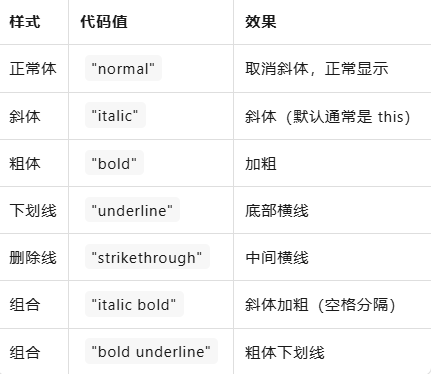
            "fontStyle": "normal"  // 取消斜体,变正常
        }
    }

可选字体样式如下
相关推荐
一次旅行1 天前
IDEA安装CC GUI新手指南
java·ide·intellij-idea
程序设计实验室1 天前
Zed AI 白嫖免费模型,搭配 DeepSeek v4,玩转 Agent 编程技巧
ide
-星空下无敌1 天前
IDEA 2025.3.1最新最全下载、安装、配置及使用教程(保姆级教程)
java·ide·intellij-idea
Gene_20221 天前
ubuntu22.04安装Claude Code及其在vscode跑通
ide·vscode·arcgis
isaac.easy1 天前
实战指南:CodeBuddy IDE × GLM-4.7 × Spec-Kit 构建智能化开发工作流
ide
shuangrenlong1 天前
android studio突然一直importing卡住
android·ide·android studio
想躺平的小羊1 天前
IDEA 如何显示或关闭项目类的结构(类的方法)
java·ide·intellij-idea
计算机安禾1 天前
【Linux从入门到精通】第28篇:文本处理三剑客(中)——sed 流编辑器
linux·服务器·编辑器
西门吹牛1 天前
Pycharm编译器中部署了pyqt5,Qtdesigner无法打开了,解决方案
ide·qt·pycharm