一、vue2主应用
1、安装qiankun包
javascript
$ yarn add qiankun # 或者 npm i qiankun -S2、mainjs中注册子应用
javascript
import { registerMicroApps, start ,setDefaultMountApp} from 'qiankun'


// 注册微应用
registerMicroApps([
  {
    name: 'opex-fe', // 微应用名称
    entry: 'http://localhost:8080/', // 微应用入口
    container: '#opex-fe-container', // 微应用挂载节点
    activeRule: (location) => location.pathname.startsWith('/opex-fe'),
    props: {
      // 传递给微应用的数据
      routerBase: '/opex-fe',
      getGlobalState: () => store.state, // 共享状态
    }
  }
])


// 判断opex-fe-container是否已加载,如果未加载就延迟
function ensureContainerAndStartMicroApps() {
  if (document.getElementById('opex-fe-container')) {
    // 容器存在,可以注册微应用并启动
    // registerMicroApps([...]); // 注册微应用的代码
    setDefaultMountApp('/'); // 默认打开的子应用
    // 启动 qiankun
start({
  prefetch: true, // 预加载
  sandbox: {
    strictStyleIsolation: true // 样式隔离
  }
})
  } else {
    // 容器尚不存在,稍后重试
    setTimeout(ensureContainerAndStartMicroApps, 100); // 100毫秒后再次尝试
  }
}

// 确保 DOMContentLoaded 事件触发后再执行
document.addEventListener('DOMContentLoaded', ensureContainerAndStartMicroApps);
完整代码:
javascript
import Vue from 'vue'

import Cookies from 'js-cookie'

import Element from 'element-ui'
import './assets/styles/element-variables.scss'

import '@/assets/styles/index.scss' // global css
import '@/assets/styles/ruoyi.scss' // ruoyi css
import '@/assets/styles/scrollbar-hide.scss' // hide sidebar scrollbar
import '@/assets/styles/sidebar-icons.scss' // sidebar icons gradient
import App from './App'
import store from './store'
import router from './router'
import directive from './directive' // directive
import plugins from './plugins' // plugins
import { download } from '@/utils/request'

import './assets/icons' // icon
import './permission' // permission control
import { getDicts } from "@/api/system/dict/data"
import { getConfigKey } from "@/api/system/config"
import { parseTime, resetForm, addDateRange, selectDictLabel, selectDictLabels, handleTree } from "@/utils/ruoyi"
// 分页组件
import Pagination from "@/components/Pagination"
// 自定义表格工具组件
import RightToolbar from "@/components/RightToolbar"
// 富文本组件
import Editor from "@/components/Editor"
// 文件上传组件
import FileUpload from "@/components/FileUpload"
// 图片上传组件
import ImageUpload from "@/components/ImageUpload"
// 图片预览组件
import ImagePreview from "@/components/ImagePreview"
// 字典标签组件
import DictTag from '@/components/DictTag'
// 字典数据组件
import DictData from '@/components/DictData'

import { registerMicroApps, start ,setDefaultMountApp} from 'qiankun'


// 全局方法挂载
Vue.prototype.getDicts = getDicts
Vue.prototype.getConfigKey = getConfigKey
Vue.prototype.parseTime = parseTime
Vue.prototype.resetForm = resetForm
Vue.prototype.addDateRange = addDateRange
Vue.prototype.selectDictLabel = selectDictLabel
Vue.prototype.selectDictLabels = selectDictLabels
Vue.prototype.download = download
Vue.prototype.handleTree = handleTree

// 全局组件挂载
Vue.component('DictTag', DictTag)
Vue.component('Pagination', Pagination)
Vue.component('RightToolbar', RightToolbar)
Vue.component('Editor', Editor)
Vue.component('FileUpload', FileUpload)
Vue.component('ImageUpload', ImageUpload)
Vue.component('ImagePreview', ImagePreview)


// 注册微应用
registerMicroApps([
  {
    name: 'opex-fe', // 微应用名称
    entry: 'http://localhost:8080/', // 微应用入口
    container: '#opex-fe-container', // 微应用挂载节点
    activeRule: (location) => location.pathname.startsWith('/opex-fe'),
    props: {
      // 传递给微应用的数据
      routerBase: '/opex-fe',
      getGlobalState: () => store.state, // 共享状态
    }
  }
])


// 判断opex-fe-container是否已加载,如果未加载就延迟
function ensureContainerAndStartMicroApps() {
  if (document.getElementById('opex-fe-container')) {
    // 容器存在,可以注册微应用并启动
    // registerMicroApps([...]); // 注册微应用的代码
    setDefaultMountApp('/'); // 默认打开的子应用
    // 启动 qiankun
start({
  prefetch: true, // 预加载
  sandbox: {
    strictStyleIsolation: true // 样式隔离
  }
})
  } else {
    // 容器尚不存在,稍后重试
    setTimeout(ensureContainerAndStartMicroApps, 100); // 100毫秒后再次尝试
  }
}
// 确保 DOMContentLoaded 事件触发后再执行
document.addEventListener('DOMContentLoaded', ensureContainerAndStartMicroApps);

Vue.use(directive)
Vue.use(plugins)
DictData.install()


Vue.use(Element, {
  size: Cookies.get('size') || 'medium' // set element-ui default size
})

Vue.config.productionTip = false

new Vue({
  el: '#app',
  router,
  store,
  render: h => h(App)
})
3、在layout=>appmain 组件中设置子应用挂载容器
javascript
<template>
  <section class="app-main">
    <!-- 微前端容器,始终存在 -->
    <div id="opex-fe-container" v-show="$route.path.startsWith('/opex-fe')"></div>

    <!-- 正常路由内容 -->
    <transition name="fade-transform" mode="out-in">
      <keep-alive :include="cachedViews">
        <router-view v-if="!$route.meta.link && !$route.path.startsWith('/opex-fe')" :key="key" />
      </keep-alive>
    </transition>
    <iframe-toggle />
    <copyright />
  </section>
</template>


#opex-fe-container {
  width: 100%;
  height: 100%;
  min-height: calc(100vh - 84px);
}
4、vue.config.js中配置header跨域
javascript
headers: {
      'Access-Control-Allow-Origin': '*',
      'Access-Control-Allow-Methods': 'GET, POST, PUT, DELETE, PATCH, OPTIONS',
      'Access-Control-Allow-Headers': 'X-Requested-With, content-type, Authorization'
    },
完整代码:
javascript
"use strict";
const path = require("path");

function resolve(dir) {
  return path.join(__dirname, dir);
}

const CompressionPlugin = require("compression-webpack-plugin");

const name = process.env.VUE_APP_TITLE || "11111"; // 网页标题

const baseUrl = "xxxxxxxxx"; // 后端接口
const port = process.env.port || process.env.npm_config_port || 80; // 端口
module.exports = {
  publicPath: process.env.NODE_ENV === "production" ? "/" : "/",
  outputDir: "dist",
  assetsDir: "static",
  productionSourceMap: false,
  transpileDependencies: ["quill"],
  devServer: {
    host: "0.0.0.0",
    port: port,
    open: true,
    headers: {
      'Access-Control-Allow-Origin': '*',
      'Access-Control-Allow-Methods': 'GET, POST, PUT, DELETE, PATCH, OPTIONS',
      'Access-Control-Allow-Headers': 'X-Requested-With, content-type, Authorization'
    },
    proxy: {
      [process.env.VUE_APP_BASE_API]: {
        target: baseUrl,
        changeOrigin: true,
        pathRewrite: {
          ["^" + process.env.VUE_APP_BASE_API]: "",
        },
      },
      // springdoc proxy
      "^/v3/api-docs/(.*)": {
        target: baseUrl,
        changeOrigin: true,
      },
    },
    disableHostCheck: true,
  },
  css: {
    loaderOptions: {
      sass: {
        sassOptions: { outputStyle: "expanded" },
      },
    },
  },
  configureWebpack: {
    name: name,
    resolve: {
      alias: {
        "@": resolve("src"),
      },
    },
    plugins: [
      // http://doc.ruoyi.vip/ruoyi-vue/other/faq.html#使用gzip解压缩静态文件
      new CompressionPlugin({
        cache: false, // 不启用文件缓存
        test: /\.(js|css|html|jpe?g|png|gif|svg)?$/i, // 压缩文件格式
        filename: "[path][base].gz[query]", // 压缩后的文件名
        algorithm: "gzip", // 使用gzip压缩
        minRatio: 0.8, // 压缩比例,小于 80% 的文件不会被压缩
        deleteOriginalAssets: false, // 压缩后删除原文件
      }),
    ],
  },
  chainWebpack(config) {
    config.plugins.delete("preload"); // TODO: need test
    config.plugins.delete("prefetch"); // TODO: need test

    // set svg-sprite-loader
    config.module.rule("svg").exclude.add(resolve("src/assets/icons")).end();
    config.module
      .rule("icons")
      .test(/\.svg$/)
      .include.add(resolve("src/assets/icons"))
      .end()
      .use("svg-sprite-loader")
      .loader("svg-sprite-loader")
      .options({
        symbolId: "icon-[name]",
      })
      .end();

    config.when(process.env.NODE_ENV !== "development", (config) => {
      config
        .plugin("ScriptExtHtmlWebpackPlugin")
        .after("html")
        .use("script-ext-html-webpack-plugin", [
          {
            // `runtime` must same as runtimeChunk name. default is `runtime`
            inline: /runtime\..*\.js$/,
          },
        ])
        .end();

      config.optimization.splitChunks({
        chunks: "all",
        cacheGroups: {
          libs: {
            name: "chunk-libs",
            test: /[\\/]node_modules[\\/]/,
            priority: 10,
            chunks: "initial", // only package third parties that are initially dependent
          },
          elementUI: {
            name: "chunk-elementUI", // split elementUI into a single package
            test: /[\\/]node_modules[\\/]_?element-ui(.*)/, // in order to adapt to cnpm
            priority: 20, // the weight needs to be larger than libs and app or it will be packaged into libs or app
          },
          commons: {
            name: "chunk-commons",
            test: resolve("src/components"), // can customize your rules
            minChunks: 3, //  minimum common number
            priority: 5,
            reuseExistingChunk: true,
          },
        },
      });
      config.optimization.runtimeChunk("single");
    });
  },
};
5、配置路由菜单:
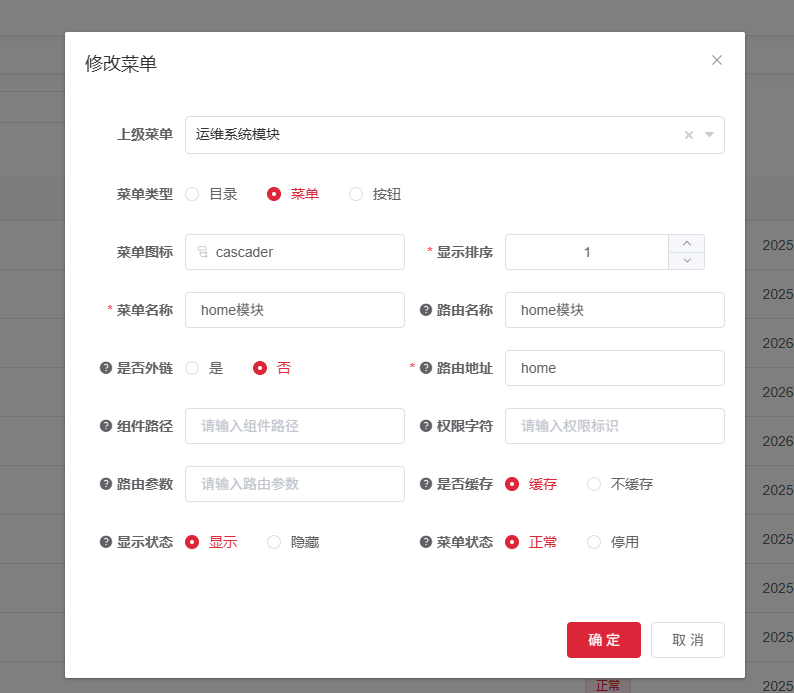
home路由地址在子组件中一定要先配置
父应用访问: http://localhost:81/opex-fe/home
子应用访问路由:http://localhost:8080/home
配置主菜单opex-fe路由:
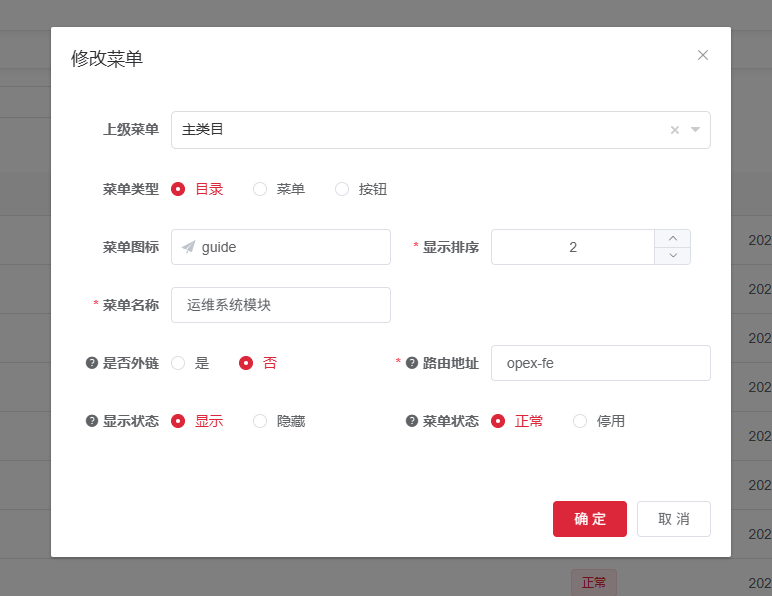
配置home菜单:
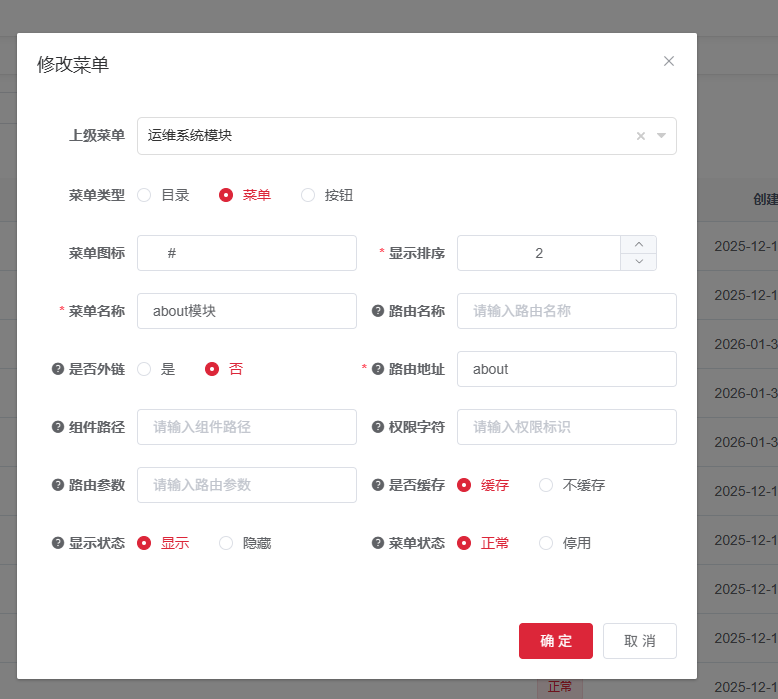
配置about菜单:
最终效果:

二、vue2子应用配置:
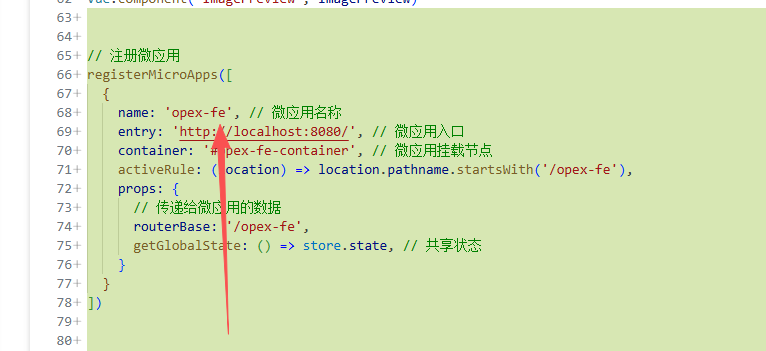
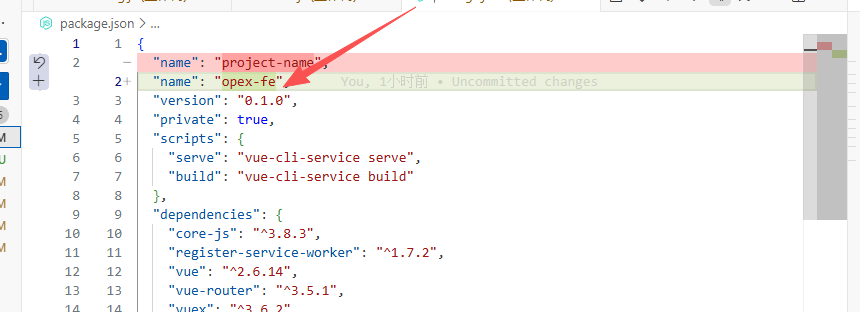
1、package.josn的name字段一定要与父应用配置的子应用name一致,opex-fe
2、mainjs配置 导出生命周期函数
javascript
import Vue from 'vue'
import VueRouter from 'vue-router'
import App from './App.vue'
import './registerServiceWorker'
import router from './router'
import store from './store'

Vue.config.productionTip = false

let instance = null

function render(props = {}) {
  const { container, routerBase } = props

  // 设置路由基础路径
  if (routerBase) {
    router.options.base = routerBase + '/'
    // 重新创建路由实例以应用新的基础路径
    router.matcher = new VueRouter({
      mode: 'history',
      base: routerBase + '/',
      routes: router.options.routes
    }).matcher
  }

  instance = new Vue({
    router,
    store,
    render: h => h(App)
  }).$mount(container ? container.querySelector('#app') : '#app')
}

// 独立运行时
if (!window.__POWERED_BY_QIANKUN__) {
  render()
}

export async function bootstrap() {
  console.log('[vue] vue app bootstraped')
}

export async function mount(props) {
  console.log('[vue] props from main framework', props)
  render(props)
}

export async function unmount() {
  instance.$destroy()
  instance.$el.innerHTML = ''
  instance = null
}
3、vue.config.js配置
javascript
const { defineConfig } = require('@vue/cli-service')
const { name } = require('./package.json')

module.exports = defineConfig({
  transpileDependencies: true,
  publicPath: process.env.NODE_ENV === 'production' ? '/' : 'http://localhost:8080/',
  devServer: {
    port: 8080,
    //允许跨域
    headers: {
      'Access-Control-Allow-Origin': '*',
      'Access-Control-Allow-Methods': 'GET, POST, PUT, DELETE, PATCH, OPTIONS',
      'Access-Control-Allow-Headers': 'X-Requested-With, content-type, Authorization'
    }
  },
//使用umd模式
  configureWebpack: {
    output: {
      library: `${name}-[name]`,
      libraryTarget: 'umd',
      chunkLoadingGlobal: `webpackJsonp_${name}`,
      globalObject: 'window'
    }
  }
})