前言
意见反馈是应用与用户沟通的重要渠道。通过收集用户的建议和问题反馈,开发者可以不断改进应用,提升用户体验。一个设计良好的反馈页面应该让用户能够方便地表达自己的想法。
本文将介绍如何在 Flutter 中实现一个功能完善的意见反馈页面。
功能设计
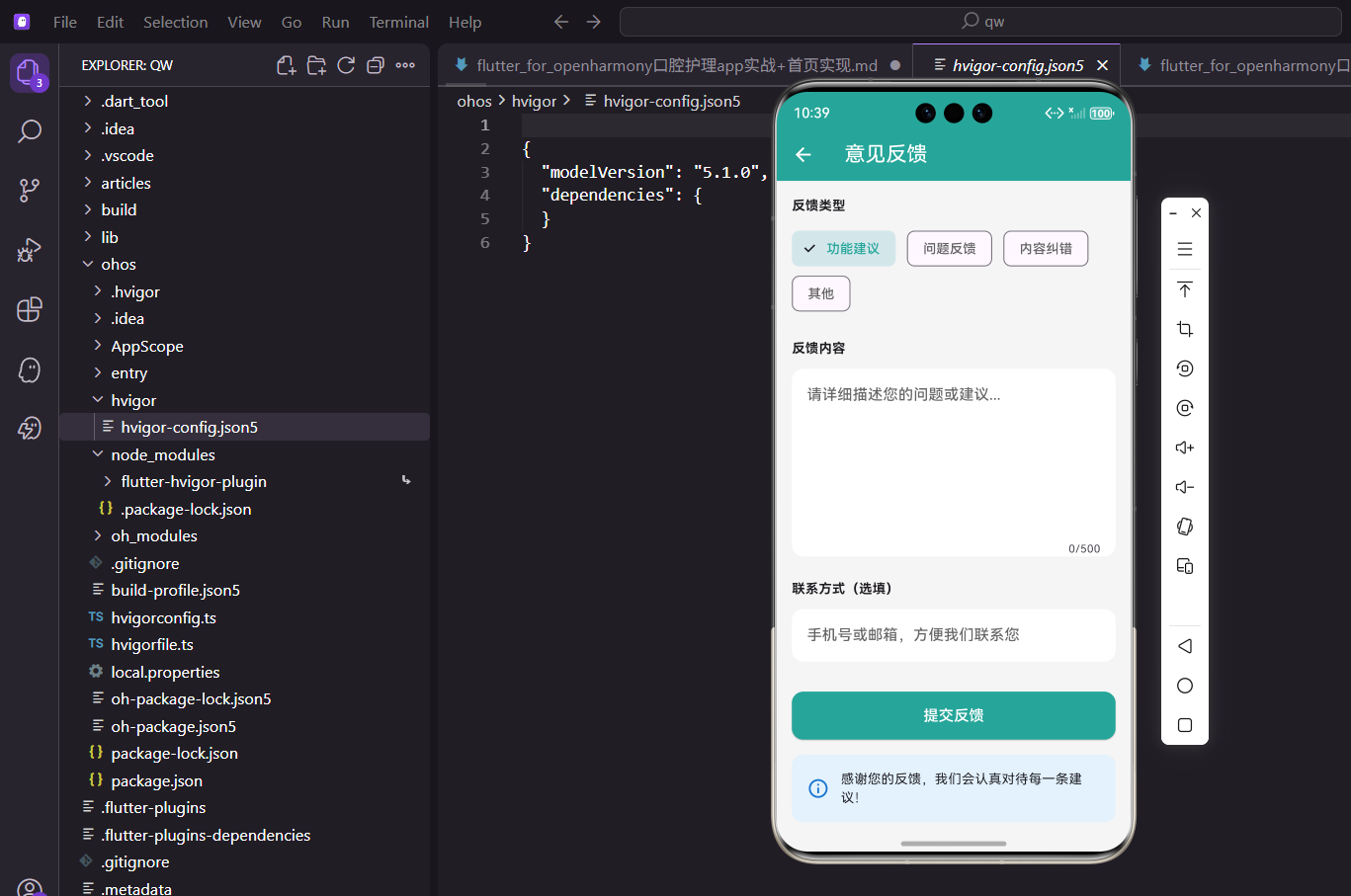
意见反馈页面需要实现以下功能:
- 反馈类型:支持选择功能建议、问题反馈、内容纠错等类型
- 反馈内容:多行文本输入,支持字数限制
- 联系方式:可选填写联系方式
- 提交反馈:验证并提交反馈内容
页面基础结构
意见反馈页面使用 StatefulWidget 实现:
dart
class FeedbackPage extends StatefulWidget {
  const FeedbackPage({super.key});

  @override
  State<FeedbackPage> createState() => _FeedbackPageState();
}

class _FeedbackPageState extends State<FeedbackPage> {
  String _selectedType = '功能建议';
  final _contentController = TextEditingController();
  final _contactController = TextEditingController();
定义反馈类型和文本控制器。
资源释放
在 dispose 中释放控制器:
dart
  @override
  void dispose() {
    _contentController.dispose();
    _contactController.dispose();
    super.dispose();
  }
避免内存泄漏。
页面布局
使用 SingleChildScrollView 包裹表单:
dart
  @override
  Widget build(BuildContext context) {
    return Scaffold(
      appBar: AppBar(title: const Text('意见反馈')),
      body: SingleChildScrollView(
        padding: const EdgeInsets.all(16),
        child: Column(
          crossAxisAlignment: CrossAxisAlignment.start,
          children: [
表单内容较多时需要支持滚动。
反馈类型选择
使用 ChoiceChip 实现类型选择:
dart
            const Text('反馈类型',
                style: TextStyle(fontWeight: FontWeight.bold)),
            const SizedBox(height: 12),
            Wrap(
              spacing: 12,
              children: ['功能建议', '问题反馈', '内容纠错', '其他'].map((type) =>
                  ChoiceChip(
                label: Text(type),
                selected: _selectedType == type,
                onSelected: (selected) {
                  if (selected) setState(() => _selectedType = type);
                },
                selectedColor: const Color(0xFF26A69A).withOpacity(0.2),
                labelStyle: TextStyle(
                  color: _selectedType == type
                      ? const Color(0xFF26A69A)
                      : Colors.grey.shade700,
                ),
              )).toList(),
            ),
ChoiceChip 提供了单选的交互效果,选中状态使用主题色。
反馈内容输入
多行文本输入框:
dart
            const SizedBox(height: 24),
            const Text('反馈内容',
                style: TextStyle(fontWeight: FontWeight.bold)),
            const SizedBox(height: 12),
            Container(
              decoration: BoxDecoration(
                color: Colors.white,
                borderRadius: BorderRadius.circular(12),
              ),
              child: TextField(
                controller: _contentController,
                maxLines: 6,
                maxLength: 500,
                decoration: const InputDecoration(
                  hintText: '请详细描述您的问题或建议...',
                  border: InputBorder.none,
                  contentPadding: EdgeInsets.all(16),
                ),
              ),
),设置最大行数和字数限制,maxLength 会自动显示字数计数器。
联系方式输入
可选的联系方式输入:
dart
            const SizedBox(height: 24),
            const Text('联系方式(选填)',
                style: TextStyle(fontWeight: FontWeight.bold)),
            const SizedBox(height: 12),
            Container(
              decoration: BoxDecoration(
                color: Colors.white,
                borderRadius: BorderRadius.circular(12),
              ),
              child: TextField(
                controller: _contactController,
                decoration: const InputDecoration(
                  hintText: '手机号或邮箱,方便我们联系您',
                  border: InputBorder.none,
                  contentPadding: EdgeInsets.all(16),
                ),
              ),
            ),
联系方式为选填项,提示用户可以填写手机号或邮箱。
提交按钮
提交反馈按钮:
dart
            const SizedBox(height: 32),
            SizedBox(
              width: double.infinity,
              child: ElevatedButton(
                onPressed: _submitFeedback,
                style: ElevatedButton.styleFrom(
                  backgroundColor: const Color(0xFF26A69A),
                  foregroundColor: Colors.white,
                  padding: const EdgeInsets.symmetric(vertical: 14),
                  shape: RoundedRectangleBorder(
                      borderRadius: BorderRadius.circular(12)),
                ),
                child: const Text('提交反馈', style: TextStyle(fontSize: 16)),
              ),
            ),
按钮占满宽度,使用主题色背景。
温馨提示
页面底部的温馨提示:
dart
            const SizedBox(height: 16),
            Container(
              padding: const EdgeInsets.all(16),
              decoration: BoxDecoration(
                color: Colors.blue.shade50,
                borderRadius: BorderRadius.circular(12),
              ),
              child: Row(
                children: [
                  Icon(Icons.info_outline, color: Colors.blue.shade700),
                  const SizedBox(width: 12),
                  const Expanded(
                    child: Text('感谢您的反馈,我们会认真对待每一条建议!'),
                  ),
                ],
              ),
            ),
          ],
        ),
      ),
    );
  }
蓝色背景的提示卡片,表达对用户反馈的重视。
提交反馈逻辑
提交反馈的处理逻辑:
dart
void _submitFeedback() {
  if (_contentController.text.isEmpty) {
    ScaffoldMessenger.of(context).showSnackBar(
      const SnackBar(content: Text('请输入反馈内容')),
    );
    return;
  }

  showDialog(
    context: context,
    builder: (ctx) => AlertDialog(
      title: const Row(
        children: [
          Icon(Icons.check_circle, color: Color(0xFF26A69A)),
          SizedBox(width: 8),
          Text('提交成功'),
        ],
      ),
      content: const Text('感谢您的反馈,我们会尽快处理!'),
      actions: [
        ElevatedButton(
          onPressed: () {
            Navigator.pop(ctx);
            Navigator.pop(context);
          },
          child: const Text('确定'),
        ),
      ],
    ),
  );
}
提交前验证内容不为空,成功后显示确认对话框并返回上一页。
数据模型定义
反馈的数据模型:
dart
class Feedback {
  final String id;
  final String type;
  final String content;
  final String? contact;
  final DateTime createTime;

  Feedback({
    String? id,
    required this.type,
    required this.content,
    this.contact,
    DateTime? createTime,
  }) : id = id ?? DateTime.now().millisecondsSinceEpoch.toString(),
       createTime = createTime ?? DateTime.now();
}
模型包含类型、内容、联系方式和创建时间。
图片上传功能
添加图片上传功能:
dart
List<String> _images = [];

Wrap(
  spacing: 8,
  runSpacing: 8,
  children: [
    ..._images.map((path) => Stack(
      children: [
        Container(
          width: 80,
          height: 80,
          decoration: BoxDecoration(
            borderRadius: BorderRadius.circular(8),
            image: DecorationImage(
              image: FileImage(File(path)),
              fit: BoxFit.cover,
            ),
          ),
        ),
        Positioned(
          right: 0,
          top: 0,
          child: GestureDetector(
            onTap: () => setState(() => _images.remove(path)),
            child: Container(
              padding: const EdgeInsets.all(2),
              decoration: const BoxDecoration(
                color: Colors.red,
                shape: BoxShape.circle,
              ),
              child: const Icon(Icons.close, size: 14, color: Colors.white),
            ),
          ),
        ),
      ],
    )),
    if (_images.length < 3)
      GestureDetector(
        onTap: _pickImage,
        child: Container(
          width: 80,
          height: 80,
          decoration: BoxDecoration(
            color: Colors.grey.shade200,
            borderRadius: BorderRadius.circular(8),
          ),
          child: const Icon(Icons.add_photo_alternate, color: Colors.grey),
        ),
      ),
  ],
)
支持上传最多3张图片,可以删除已选图片。
图片选择
使用 image_picker 选择图片:
dart
Future<void> _pickImage() async {
  final picker = ImagePicker();
  final image = await picker.pickImage(source: ImageSource.gallery);
  if (image != null) {
    setState(() => _images.add(image.path));
  }
}
从相册选择图片添加到列表。
表单验证
完善表单验证:
dart
bool _validateForm() {
  if (_contentController.text.isEmpty) {
    _showError('请输入反馈内容');
    return false;
  }
  if (_contentController.text.length < 10) {
    _showError('反馈内容至少10个字');
    return false;
  }
  if (_contactController.text.isNotEmpty) {
    if (!_isValidContact(_contactController.text)) {
      _showError('请输入正确的手机号或邮箱');
      return false;
    }
  }
  return true;
}

bool _isValidContact(String contact) {
  final phoneRegex = RegExp(r'^1[3-9]\d{9}$');
  final emailRegex = RegExp(r'^[\w-\.]+@([\w-]+\.)+[\w-]{2,4}$');
  return phoneRegex.hasMatch(contact) || emailRegex.hasMatch(contact);
}

void _showError(String message) {
  ScaffoldMessenger.of(context).showSnackBar(
    SnackBar(content: Text(message)),
  );
}
验证内容长度和联系方式格式。
提交加载状态
添加提交加载状态:
dart
bool _isSubmitting = false;

ElevatedButton(
  onPressed: _isSubmitting ? null : _submitFeedback,
  child: _isSubmitting
      ? const SizedBox(
          width: 20,
          height: 20,
          child: CircularProgressIndicator(
            strokeWidth: 2,
            valueColor: AlwaysStoppedAnimation<Color>(Colors.white),
          ),
        )
      : const Text('提交反馈', style: TextStyle(fontSize: 16)),
)
提交时显示加载指示器,禁用按钮防止重复提交。
草稿保存功能
自动保存草稿:
dart
@override
void initState() {
  super.initState();
  _loadDraft();
}

Future<void> _loadDraft() async {
  final prefs = await SharedPreferences.getInstance();
  final draft = prefs.getString('feedback_draft');
  if (draft != null) {
    _contentController.text = draft;
  }
}

Future<void> _saveDraft() async {
  final prefs = await SharedPreferences.getInstance();
  await prefs.setString('feedback_draft', _contentController.text);
}
用户输入时自动保存草稿,下次打开时恢复。
反馈历史
查看反馈历史:
dart
ListTile(
  title: const Text('我的反馈'),
  trailing: const Icon(Icons.chevron_right),
  onTap: () {
    Navigator.push(
      context,
      MaterialPageRoute(builder: (_) => const FeedbackHistoryPage()),
    );
  },
)
用户可以查看自己提交过的反馈。
总结
本文详细介绍了口腔护理 App 中意见反馈功能的实现。通过合理的表单设计和交互逻辑,我们构建了一个用户友好的反馈页面。核心技术点包括:
- 使用
ChoiceChip实现类型选择 - 通过
TextField实现多行文本输入 - 使用
maxLength限制输入字数 - 表单验证和提交状态管理
意见反馈是应用与用户沟通的重要渠道,希望本文的实现对你有所帮助。
欢迎加入开源鸿蒙跨平台社区:https://openharmonycrossplatform.csdn.net