实验目的
1、理解Trunk的运行原理
2、掌握Trunk的配置方法
实验拓扑
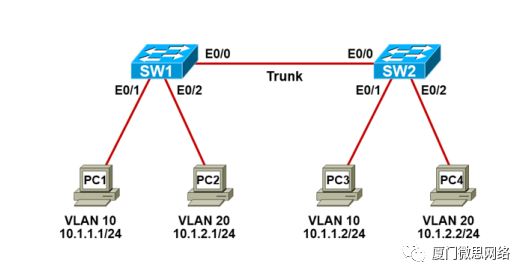
实验需求
1、根据实验拓扑图,完成设备的基本配置;
2、分别在SW1和SW2创建VLAN10和VLAN20,名字为IT和HR;
3、分别在SW1和SW2上把相应的接口划入VLAN10和VLAN20;
4、把SW1和SW2互连的链路配置成Trunk,采用Dot1q封装;
5、测试PC之间的网络连通性。
实验步骤
步骤1:设备的基本配置
配置P C1 :
VPCS> set pcname PC1 //设置主机名PC1> ip 10.1.1.1/24 //设置IP地址配置P C2 :
VPCS> set pcname PC2PC2> ip 10.1.2.1/24配置PC 3 :
VPCS> set pcname PC3PC3> ip 10.1.1.2/24配置PC 4 :
VPCS> set pcname PC4PC4> ip 10.1.2.2/24配置S W1 **:**
Switch>enableSwitch#configure terminalSwitch(config)#hostname SW1SW1(config)#no ip domain-lookupSW1(config)#line console 0SW1(config-line)#exec-timeout 0 0SW1(config-line)#logging synchronousSW1(config-line)#endSW1#配置S W2 **:**
Switch>enableSwitch#configure terminalSwitch(config)#hostname SW2SW2(config)#no ip domain-lookupSW2(config)#line console 0SW2(config-line)#exec-timeout 0 0SW2(config-line)#logging synchronousSW2(config-line)#endSW2#步骤2:V LAN 的配置
配置S W1 **:**
SW1(config)#vlan 10SW1(config-vlan)#name ITSW1(config-vlan)#exitSW1(config)#vlan 20SW1(config-vlan)#name HRSW1(config-vlan)#exitSW1(config)#interface Eth0/1SW1(config-if)#switchport mode accessSW1(config-if)#switchport access vlan 10SW1(config-if)#exitSW1(config)#interface Eth0/2SW1(config-if)#switchport mode access SW1(config-if)#switchport access vlan 20SW1(config-if)#endSW1#配置SW 2 **:**
SW2(config)#vlan 10SW2(config-vlan)#name ITSW2(config-vlan)#exitSW2(config)#vlan 20SW2(config-vlan)#name HRSW2(config-vlan)#exitSW2(config)#interface Eth0/1SW2(config-if)#switchport mode accessSW2(config-if)#switchport access vlan 10SW2(config-if)#exitSW2(config)#interface Eth0/2SW2(config-if)#switchport mode access SW2(config-if)#switchport access vlan 20SW2(config-if)#endSW2#步骤3:Trunk的配置
配置S W1 :
SW1(config)#interface Eth0/0SW1(config-if)#switchport trunk encapsulation dot1qSW1(config-if)#switchport mode trunkSW1(config-if)#endSW1#配置S W2 **:**
SW2(config)#interface Eth0/0SW2(config-if)#switchport trunk encapsulation dot1qSW2(config-if)#switchport mode trunkSW2(config-if)#endSW2#实验检查
步骤1:检查V LAN
检查S W1 **:**
SW1#show vlan brief

VLAN Name                             Status    Ports---- -------------------------------- --------- -------------------------------1    default                             active     Et0/310   IT                                 active     Et0/120   HR                                active     Et0/21002 fddi-default                     act/unsup1003 token-ring-default               act/unsup1004 fddinet-default                  act/unsup1005 trnet-default                    act/unsupSW1已经创建好VLAN10和VLAN20,并已将对应接口划入。
检查SW 2 **:**
SW2#show vlan brief

VLAN Name                             Status    Ports---- -------------------------------- --------- -------------------------------1    default                             active    Et0/310   IT                                 active    Et0/120   HR                                active    Et0/21002 fddi-default                     act/unsup1003 token-ring-default               act/unsup1004 fddinet-default                  act/unsup1005 trnet-default                    act/unsupSW2已经创建好VLAN10和VLAN20,并已将对应接口划入。
步骤2:检查Trunk
检查SW 1 **:**
SW1#show interfaces Eth0/0 switchportName: Et0/0Switchport: EnabledAdministrative Mode: trunkOperational Mode: trunkAdministrative Trunking Encapsulation: dot1qOperational Trunking Encapsulation: dot1qNegotiation of Trunking: OnAccess Mode VLAN: 1 (default)Trunking Native Mode VLAN: 1 (default)Administrative Native VLAN tagging: enabledVoice VLAN: noneAdministrative private-vlan host-association: noneAdministrative private-vlan mapping: noneAdministrative private-vlan trunk native VLAN: noneAdministrative private-vlan trunk Native VLAN tagging: enabledAdministrative private-vlan trunk encapsulation: dot1qAdministrative private-vlan trunk normal VLANs: noneAdministrative private-vlan trunk associations: noneAdministrative private-vlan trunk mappings: noneOperational private-vlan: noneTrunking VLANs Enabled: ALLPruning VLANs Enabled: 2-1001Capture Mode DisabledCapture VLANs Allowed: ALLProtected: falseAppliance trust: noneE0/0接口当前是Trunk,封装的协议是dot1q。SW1#show interfaces trunkPort        Mode            Encapsulation   Status        Native vlanEt0/0       on               802.1q         trunking      1

Port        Vlans allowed on trunkEt0/0       1-4094Port        Vlans allowed and active in management domainEt0/0       1,10,20Port        Vlans in spanning tree forwarding state and not prunedEt0/0       1,10,20E0/0封装的Trunk协议是dot1q,当前的状态是trunking。SW1#sh run int Eth0/0Building configuration...Current configuration : 90 bytes!interface Ethernet0/0 switchport trunk encapsulation dot1q switchport mode trunkendE0/0接口的Trunk封装协议是dot1q,模式是trunk。
检查SW 2 **:**
SW2#show interfaces trunkPort        Mode             Encapsulation  Status        Native vlanEt0/0       on                802.1q        trunking      1

Port        Vlans allowed on trunkEt0/0       1-4094Port        Vlans allowed and active in management domainEt0/0       1,10,20Port        Vlans in spanning tree forwarding state and not prunedEt0/0       1,10,20E0/0封装的Trunk协议是dot1q,当前的状态是trunking。
步骤4:网络连通性测试
测试P C1 和P C3 **的连通性:**
PC1> ping 10.1.1.284 bytes from 10.1.1.2 icmp_seq=1 ttl=64 time=1.603 ms84 bytes from 10.1.1.2 icmp_seq=2 ttl=64 time=1.234 ms84 bytes from 10.1.1.2 icmp_seq=3 ttl=64 time=1.027 ms84 bytes from 10.1.1.2 icmp_seq=4 ttl=64 time=2.372 ms84 bytes from 10.1.1.2 icmp_seq=5 ttl=64 time=1.200 msPC1和PC3的网络连通性正常。测试P C2 和P C4 **的连通性:**
PC2> ping 10.1.2.284 bytes from 10.1.2.2 icmp_seq=1 ttl=64 time=0.887 ms84 bytes from 10.1.2.2 icmp_seq=2 ttl=64 time=0.932 ms84 bytes from 10.1.2.2 icmp_seq=3 ttl=64 time=1.295 ms84 bytes from 10.1.2.2 icmp_seq=4 ttl=64 time=0.926 ms84 bytes from 10.1.2.2 icmp_seq=5 ttl=64 time=1.011 msPC2和PC4的网络连通性正常。01 华为认证
华为认证是面向数字化时代构建的ICT人才培养与认证体系,致力于人才培养,助力产业繁荣。当前超过68万来自全球180多个国家和地区的各行业精英已经取得华为认证。经过十年发展,随着行业的认可度不断提高,如今全球每年超过10万名新学员通过考试获得华为认证,华为认证已是ICT行业含金量较高的认证之一。
| 【华为课程】视频合集 https://mp.weixin.qq.com/s?__biz=MjM5MTA0NzUwMA==&mid=2650661584&idx=1&sn=b4db7c3c493df6f2718eb6c3c9dfbb15&scene=21#wechat_redirect
学习资料
思科认证
思科认证是由全球网络领域的巨头 ------ 思科公司推出的一系列专业认证。它是对网络技术人员专业技能和知识水平的权威认可,在全球范围内都极具含金量 。从基础到高阶,思科认证构建了一个全面且系统的体系,涵盖多个不同方向和等级,就像游戏里从新手村一路升级打 BOSS,每个阶段都对应着不同的技能要求和职业发展方向。考取思科认证,不仅能够让我们系统地学习网络技术知识,提升自己的技术实力,还能为我们的职业发展开辟出更多的可能性。
学习资料