前言:
在2021年的时候,有个拖拽的项目用到了标尺的控件,我写了一篇大概实现代码的博客:仿Word的支持横轴竖轴的WPF 标尺 - wuty007 - 博客园。在里边的实例代码里边,鼠标横纵坐标移动显示的代码没有完善。直到上个月有个水友发信息找我要源码。趁着这段时间正在使用AI编程,于是让AI帮我补充一下代码了

代码完善:
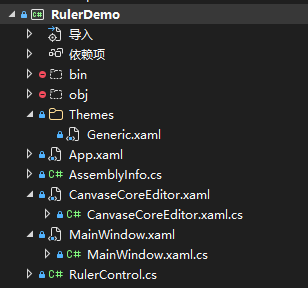
1、本次使用的是腾讯Codebuddy的AI编程插件,文件结构如下:
2、2021年开发的标尺核心的代码:
using System;
using System.Collections.Generic;
using System.Diagnostics;
using System.Globalization;
using System.Linq;
using System.Text;
using System.Threading.Tasks;
using System.Windows.Controls;
using System.Windows.Input;
using System.Windows.Media.Media3D;
using System.Windows.Media;
using System.Windows.Shapes;
using System.Windows;
namespace RulerDemo
{
[TemplatePart(Name = "verticalTrackLine", Type = typeof(Line))]
[TemplatePart(Name = "horizontalTrackLine", Type = typeof(Line))]
internal class RulerControl : Control
{
public static readonly DependencyProperty DpiProperty = DependencyProperty.Register(nameof(Dpi), typeof(Dpi), typeof(RulerControl));
public static readonly DependencyProperty DisplayPercentProperty = DependencyProperty.Register("DisplayPercent", typeof(double), typeof(RulerControl));
public static readonly DependencyProperty DisplayTypeProperty = DependencyProperty.Register("DisplayType", typeof(RulerDisplayType), typeof(RulerControl));
public static readonly DependencyProperty DisplayUnitProperty = DependencyProperty.Register("DisplayUnit", typeof(RulerDisplayUnit), typeof(RulerControl));
public static readonly DependencyProperty ZeroPointProperty = DependencyProperty.Register("ZeroPoint", typeof(double), typeof(RulerControl));
/// <summary>
/// 定义静态构造函数
/// </summary>
static RulerControl()
{
DefaultStyleKeyProperty.OverrideMetadata(typeof(RulerControl), new FrameworkPropertyMetadata(typeof(RulerControl)));
}
#region 属性
/// <summary>
/// 屏幕分辨率
/// </summary>
public Dpi Dpi
{
get => ((Dpi)GetValue(DpiProperty));
set => SetValue(DpiProperty, value);
}
/// <summary>
/// 设置0点从哪里开始
/// </summary>
public double ZeroPoint
{
get => ((double)GetValue(ZeroPointProperty));
set
{
SetValue(ZeroPointProperty, value);
InvalidateVisual();
}
}
/// <summary>
/// 显示的比率(目前支持0-1的选项)
/// </summary>
public double DisplayPercent
{
get => ((double)GetValue(DisplayPercentProperty));
set
{
if (value > 1)
{
value = 1;
}
SetValue(DisplayPercentProperty, value);
InvalidateVisual();
}
}
/// <summary>
/// 显示的类型:枚举类(支持横向或者竖向)
/// </summary>
public RulerDisplayType DisplayType
{
get => ((RulerDisplayType)GetValue(DisplayTypeProperty));
set => SetValue(DisplayTypeProperty, value);
}
/// <summary>
/// 显示的单位:cm和pixel
/// </summary>
public RulerDisplayUnit DisplayUnit
{
get => ((RulerDisplayUnit)GetValue(DisplayUnitProperty));
set => SetValue(DisplayUnitProperty, value);
}
#endregion
#region 常量
public const double InchCm = 2.54; //一英寸为2.54cm
private const int P100StepSpanPixel = 100;
private const int P100StepSpanCm = 2;
private const int P100StepCountPixel = 20;
private const int P100StepCountCm = 20;
#endregion
#region 变量
private double _minStepLengthCm;
private double _maxStepLengthCm;
private double _actualLength;
private int _stepSpan;
private int _stepCount;
private double _stepLength;
private Line _mouseVerticalTrackLine;
private Line _mouseHorizontalTrackLine;
#endregion
#region 标尺边框加指针显示
public void RaiseHorizontalRulerMoveEvent(MouseEventArgs e)
{
var mousePoint = e.GetPosition(this);
Debug.WriteLine($"水平标尺 - 鼠标位置: X={mousePoint.X}, Y={mousePoint.Y}");
if (_mouseHorizontalTrackLine != null)
{
// 水平标尺:移动垂直跟踪线,X跟随鼠标
_mouseHorizontalTrackLine.X1 = _mouseHorizontalTrackLine.X2 = mousePoint.X;
// Y坐标从0开始,延伸足够长
_mouseHorizontalTrackLine.Y1 = 0;
_mouseHorizontalTrackLine.Y2 = 5000;
_mouseHorizontalTrackLine.Visibility = Visibility.Visible;
Debug.WriteLine($"水平标尺 - 垂直线更新: X1={_mouseHorizontalTrackLine.X1}, Y1={_mouseHorizontalTrackLine.Y1}, X2={_mouseHorizontalTrackLine.X2}, Y2={_mouseHorizontalTrackLine.Y2}, Visibility={_mouseHorizontalTrackLine.Visibility}");
}
}
public void RaiseVerticalRulerMoveEvent(MouseEventArgs e)
{
var mousePoint = e.GetPosition(this);
Debug.WriteLine($"垂直标尺 - 鼠标位置: X={mousePoint.X}, Y={mousePoint.Y}");
if (_mouseVerticalTrackLine != null)
{
// 垂直标尺:移动水平跟踪线,Y跟随鼠标
_mouseVerticalTrackLine.Y1 = _mouseVerticalTrackLine.Y2 = mousePoint.Y;
// X坐标从0开始,延伸足够长
_mouseVerticalTrackLine.X1 = 0;
_mouseVerticalTrackLine.X2 = 5000;
_mouseVerticalTrackLine.Visibility = Visibility.Visible;
Debug.WriteLine($"垂直标尺 - 水平线更新: X1={_mouseVerticalTrackLine.X1}, Y1={_mouseVerticalTrackLine.Y1}, X2={_mouseVerticalTrackLine.X2}, Y2={_mouseVerticalTrackLine.Y2}, Visibility={_mouseVerticalTrackLine.Visibility}");
}
}
public override void OnApplyTemplate()
{
base.OnApplyTemplate();
_mouseVerticalTrackLine = GetTemplateChild("verticalTrackLine") as Line;
_mouseHorizontalTrackLine = GetTemplateChild("horizontalTrackLine") as Line;
Debug.WriteLine($"OnApplyTemplate调用: _mouseVerticalTrackLine={_mouseVerticalTrackLine != null}, _mouseHorizontalTrackLine={_mouseHorizontalTrackLine != null}");
}
#endregion
/// <summary>
/// 重画标尺数据
/// </summary>
/// <param name="drawingContext"></param>
protected override void OnRender(DrawingContext drawingContext)
{
try
{
var pen = new Pen(new SolidColorBrush(Colors.Black), 0.8d);
pen.Freeze();
Initialize();
GetActualLength();
GetStep();
base.OnRender(drawingContext);
this.BorderBrush = new SolidColorBrush(Colors.Black);
this.BorderThickness = new Thickness(0.1);
this.Background = new SolidColorBrush(Colors.White);
#region try
// double actualPx = this._actualLength / DisplayPercent;
var currentPosition = new Position
{
CurrentStepIndex = 0,
Value = 0
};
switch (DisplayType)
{
case RulerDisplayType.Horizontal:
{
/* 绘制前半段 */
DrawLine(drawingContext, ZeroPoint, currentPosition, pen, 0);
/* 绘制后半段 */
DrawLine(drawingContext, ZeroPoint, currentPosition, pen, 1);
break;
}
case RulerDisplayType.Vertical:
{
/* 绘制前半段 */
DrawLine(drawingContext, ZeroPoint, currentPosition, pen, 0);
/* 绘制后半段 */
DrawLine(drawingContext, ZeroPoint, currentPosition, pen, 1);
break;
}
}
#endregion
}
catch (Exception ex)
{
Console.WriteLine(ex.Message);
}
}
private void DrawLine(DrawingContext drawingContext, double currentPoint, Position currentPosition, Pen pen, int type)
{
while (true)
{
var linePercent = 0d;
if (currentPosition.CurrentStepIndex == 0)
{
var formattedText = GetFormattedText((currentPosition.Value / 10).ToString());
switch (DisplayType)
{
case RulerDisplayType.Horizontal:
{
var point = new Point(currentPoint + formattedText.Width / 2, formattedText.Height / 3);
if (point.X < 0)
{
break;
}
drawingContext.DrawText(formattedText, point);
break;
}
case RulerDisplayType.Vertical:
{
var point = new Point(this.ActualWidth, currentPoint + formattedText.Height / 2);
var rotateTransform = new RotateTransform(90, point.X, point.Y);
if (point.Y < 0)
{
break;
}
drawingContext.PushTransform(rotateTransform);
drawingContext.DrawText(formattedText, point);
drawingContext.Pop();
break;
}
}
linePercent = (int)LinePercent.P100;
}
else if (IsFinalNum(currentPosition.CurrentStepIndex, 3))
{
linePercent = (int)LinePercent.P30;
}
else if (IsFinalNum(currentPosition.CurrentStepIndex, 5))
{
linePercent = (int)LinePercent.P50;
}
else if (IsFinalNum(currentPosition.CurrentStepIndex, 7))
{
linePercent = (int)LinePercent.P30;
}
else if (IsFinalNum(currentPosition.CurrentStepIndex, 0))
{
linePercent = (int)LinePercent.P70;
}
else
{
linePercent = (int)LinePercent.P20;
}
linePercent = linePercent * 0.01;
switch (DisplayType)
{
case RulerDisplayType.Horizontal:
{
if (currentPoint > 0)
{
drawingContext.DrawLine(pen, new Point(currentPoint, 0), new Point(currentPoint, this.ActualHeight * linePercent));
}
if (type == 0)
{
currentPoint = currentPoint - _stepLength;
currentPosition.CurrentStepIndex--;
if (currentPosition.CurrentStepIndex < 0)
{
currentPosition.CurrentStepIndex = _stepCount - 1;
currentPosition.Value = GetNextStepValue(currentPosition.Value, _stepSpan, 0);
}
else if (currentPosition.CurrentStepIndex == 0)
{
if (currentPosition.Value % _stepSpan != 0)
{
currentPosition.Value = GetNextStepValue(currentPosition.Value, _stepSpan, 0);
}
}
if (currentPoint <= 0)
{
return;
}
}
else
{
currentPoint = currentPoint + _stepLength;
currentPosition.CurrentStepIndex++;
if (currentPosition.CurrentStepIndex >= _stepCount)
{
currentPosition.CurrentStepIndex = 0;
currentPosition.Value = GetNextStepValue(currentPosition.Value, _stepSpan, 1);
}
if (currentPoint >= _actualLength)
{
return;
}
}
break;
}
case RulerDisplayType.Vertical:
{
if (currentPoint > 0)
{
drawingContext.DrawLine(pen, new Point(0, currentPoint), new Point(this.ActualWidth * linePercent, currentPoint));
}
if (type == 0)
{
currentPoint = currentPoint - _stepLength;
currentPosition.CurrentStepIndex--;
if (currentPosition.CurrentStepIndex < 0)
{
currentPosition.CurrentStepIndex = _stepCount - 1;
currentPosition.Value = GetNextStepValue(currentPosition.Value, _stepSpan, 0);
}
else if (currentPosition.CurrentStepIndex == 0)
{
if (currentPosition.Value % _stepSpan != 0)
{
currentPosition.Value = GetNextStepValue(currentPosition.Value, _stepSpan, 0);
}
}
if (currentPoint <= 0)
{
return;
}
}
else
{
currentPoint = currentPoint + _stepLength;
currentPosition.CurrentStepIndex++;
if (currentPosition.CurrentStepIndex >= _stepCount)
{
currentPosition.CurrentStepIndex = 0;
currentPosition.Value = GetNextStepValue(currentPosition.Value, _stepSpan, 1);
}
if (currentPoint >= _actualLength)
{
return;
}
}
break;
}
}
}
}
/// <summary>
/// 获取下一个步长值
/// </summary>
/// <param name="value">起始值</param>
/// <param name="times">跨度</param>
/// <param name="type">半段类型,分为前半段、后半段</param>
/// <returns></returns>
private int GetNextStepValue(int value, int times, int type)
{
if (type == 0)
{
do
{
value--;
}
while (value % times != 0);
}
else
{
do
{
value++;
}
while (value % times != 0);
}
return (value);
}
[Obsolete]
private FormattedText GetFormattedText(string text)
{
return (new FormattedText(text,
//CultureInfo.GetCultureInfo("zh-cn"),
CultureInfo.GetCultureInfo("en-us"),
FlowDirection.LeftToRight,
new Typeface("宋体"),
12,
Brushes.Black));
}
private bool IsFinalNum(int value, int finalNum)
{
var valueStr = value.ToString();
if (valueStr.Substring(valueStr.Length - 1, 1) == finalNum.ToString())
{
return (true);
}
return (false);
}
/// <summary>
/// 初始化获取屏幕的DPI
/// </summary>
private void Initialize()
{
var dpi = new Dpi();
dpi.DpiX = Dpi.DpiX;
dpi.DpiY = Dpi.DpiY;
if (Dpi.DpiX == 0)
{
dpi.DpiX = 96;
}
if (Dpi.DpiY == 0)
{
dpi.DpiY = 96;
}
Dpi = dpi;
_minStepLengthCm = 0.1;
_maxStepLengthCm = 0.3;
if (DisplayPercent == 0)
DisplayPercent = 1;
switch (DisplayUnit)
{
case RulerDisplayUnit.Pixel:
{
_stepSpan = P100StepSpanPixel;
_stepCount = P100StepCountPixel;
break;
}
case RulerDisplayUnit.Cm:
{
_stepSpan = P100StepSpanCm;
_stepCount = P100StepCountCm;
break;
}
}
var width = 15;
switch (DisplayType)
{
case RulerDisplayType.Horizontal:
{
if (this.ActualHeight == 0)
{
Height = width;
}
break;
}
case RulerDisplayType.Vertical:
{
if (this.ActualWidth == 0)
{
Width = width;
}
break;
}
}
}
/// <summary>
/// 获取每一个数字间隔的跨度
/// </summary>
private void GetStep()
{
switch (DisplayUnit)
{
case RulerDisplayUnit.Pixel:
{
while (true)
{
var stepSpanCm = _stepSpan / Convert.ToDouble(GetDpi()) * InchCm * DisplayPercent;
var stepLengthCm = stepSpanCm / _stepCount;
var type = 0;
var isOut = false;
if (stepLengthCm > _maxStepLengthCm)
{
type = 1;
_stepCount = GetNextStepCount(_stepCount, type, ref isOut);
}
if (stepLengthCm < _minStepLengthCm)
{
type = 0;
_stepCount = GetNextStepCount(_stepCount, type, ref isOut);
}
if (stepLengthCm <= _maxStepLengthCm && stepLengthCm >= _minStepLengthCm)
{
_stepLength = stepSpanCm / InchCm * Convert.ToDouble(GetDpi()) / _stepCount;
break;
}
/* 已超出或小于最大步进长度 */
if (!isOut) continue;
_stepSpan = GetNextStepSpan(_stepSpan, type);
}
break;
}
}
}
private int GetNextStepCount(int stepCount, int type, ref bool isOut)
{
var result = stepCount;
isOut = false;
switch (type)
{
case 0:
{
if (stepCount == 20)
{
result = 10;
}
else
{
isOut = true;
}
break;
}
case 1:
{
if (stepCount == 10)
{
result = 20;
}
else
{
isOut = true;
}
break;
}
}
return result;
}
private int GetNextStepSpan(int stepSpan, int type)
{
var stepCountStr = stepSpan.ToString();
var resultStr = string.Empty;
switch (DisplayUnit)
{
case RulerDisplayUnit.Pixel:
{
switch (type)
{
case 0:
{
if (stepCountStr.IndexOf('5') > -1)
{
resultStr = GetNumberAndZeroNum(1, stepCountStr.Length);
}
else if (stepCountStr.IndexOf('2') > -1)
{
resultStr = GetNumberAndZeroNum(5, stepCountStr.Length - 1);
}
else if (stepCountStr.IndexOf('1') > -1)
{
resultStr = GetNumberAndZeroNum(2, stepCountStr.Length - 1);
}
break;
}
case 1:
{
if (stepCountStr.IndexOf('5') > -1)
{
resultStr = GetNumberAndZeroNum(2, stepCountStr.Length - 1);
}
else if (stepCountStr.IndexOf('2') > -1)
{
resultStr = GetNumberAndZeroNum(1, stepCountStr.Length - 1);
}
else if (stepCountStr.IndexOf('1') > -1)
{
resultStr = GetNumberAndZeroNum(5, stepCountStr.Length - 2);
}
break;
}
}
break;
}
}
if (string.IsNullOrWhiteSpace(resultStr))
{
return 0;
}
if (int.TryParse(resultStr, out var result))
{
return result;
}
return result;
}
private string GetNumberAndZeroNum(int num, int zeroNum)
{
var result = string.Empty;
result += num;
for (var i = 0; i < zeroNum; i++)
{
result += "0";
}
return (result);
}
private int GetDpi()
{
switch (DisplayType)
{
case RulerDisplayType.Horizontal:
{
return (Dpi.DpiX);
}
case RulerDisplayType.Vertical:
{
return (Dpi.DpiY);
}
default:
{
return (Dpi.DpiX);
}
}
}
private void GetActualLength()
{
switch (DisplayType)
{
case RulerDisplayType.Horizontal:
{
_actualLength = this.ActualWidth;
break;
}
case RulerDisplayType.Vertical:
{
_actualLength = this.ActualHeight;
break;
}
}
}
}
public enum RulerDisplayType
{
Horizontal, Vertical
}
public enum RulerDisplayUnit
{
Pixel,
Cm
}
public enum LinePercent
{
P20 = 20,
P30 = 30,
P50 = 50,
P70 = 70,
P100 = 100
}
public struct Dpi
{
public int DpiX
{
get; set;
}
public int DpiY
{
get; set;
}
}
public struct Position
{
public int Value
{
get; set;
}
public int CurrentStepIndex
{
get; set;
}
}
}3、在原来的代码中,增加对横纵坐标的定义和补充
 [TemplatePart(Name = "verticalTrackLine", Type = typeof(Line))]
 [TemplatePart(Name = "horizontalTrackLine", Type = typeof(Line))]
4、增加对标尺控件的样式实现
<ResourceDictionary xmlns="http://schemas.microsoft.com/winfx/2006/xaml/presentation"
                    xmlns:x="http://schemas.microsoft.com/winfx/2006/xaml"
                    xmlns:local="clr-namespace:RulerDemo">

    <Style TargetType="{x:Type local:RulerControl}">
        <Setter Property="Template">
            <Setter.Value>
                <ControlTemplate TargetType="{x:Type local:RulerControl}">
                    <Grid>
                        <ContentPresenter/>
                        <!-- 垂直跟踪线(垂直线,X坐标固定,Y跨越整个高度) -->
                        <Line x:Name="verticalTrackLine"
                              Stroke="Red"
                              StrokeThickness="1"
                              StrokeDashArray="2,2"
                              X1="0" Y1="0" X2="0" Y2="2000"
                              Visibility="Collapsed"/>
                        <!-- 水平跟踪线(水平线,Y坐标固定,X跨越整个宽度) -->
                        <Line x:Name="horizontalTrackLine"
                              Stroke="Blue"
                              StrokeThickness="1"
                              StrokeDashArray="2,2"
                              X1="0" Y1="0" X2="2000" Y2="0"
                              Visibility="Collapsed"/>
                    </Grid>
                </ControlTemplate>
            </Setter.Value>
        </Setter>
    </Style>
</ResourceDictionary>
5、CanvaseCoreEditor控件的包装
<UserControl x:Class="RulerDemo.CanvaseCoreEditor"
             xmlns="http://schemas.microsoft.com/winfx/2006/xaml/presentation"
             xmlns:x="http://schemas.microsoft.com/winfx/2006/xaml"
             xmlns:mc="http://schemas.openxmlformats.org/markup-compatibility/2006"
             xmlns:d="http://schemas.microsoft.com/expression/blend/2008"
             xmlns:local="clr-namespace:RulerDemo"
             mc:Ignorable="d"   x:Name="CanvaseEditor"
             d:DesignHeight="450" d:DesignWidth="800">

    <!-- 主网格,使用 ClipToBounds 确保内容不溢出 -->
    <Grid x:Name="MainGrid" ClipToBounds="True">
        <Grid.ColumnDefinitions>
            <ColumnDefinition Width="20"/>
            <ColumnDefinition/>
        </Grid.ColumnDefinitions>
        <Grid.RowDefinitions>
            <RowDefinition Height="20"/>
            <RowDefinition/>
        </Grid.RowDefinitions>

        <!-- 横向标尺 -->
        <local:RulerControl DisplayUnit="pixel"  DisplayType="Horizontal" Grid.Row="0" Grid.Column="1" x:Name="ucPanleHor"/>

        <!-- 纵向标尺 -->
        <local:RulerControl DisplayUnit="pixel"  DisplayType="Vertical" Grid.Row="1" Grid.Column="0" x:Name="ucPanleVer"/>
    </Grid>
</UserControl>using System;
using System.Collections.Generic;
using System.Linq;
using System.Text;
using System.Threading.Tasks;
using System.Windows;
using System.Windows.Controls;
using System.Windows.Data;
using System.Windows.Documents;
using System.Windows.Input;
using System.Windows.Media;
using System.Windows.Media.Imaging;
using System.Windows.Navigation;
using System.Windows.Shapes;
namespace RulerDemo
{
/// <summary>
/// CanvaseCoreEditor.xaml 的交互逻辑
/// </summary>
public partial class CanvaseCoreEditor : UserControl
{
public CanvaseCoreEditor()
{
InitializeComponent();
}
public void MainWindowMouseMove(MouseEventArgs e)
{
ucPanleHor.RaiseHorizontalRulerMoveEvent(e);
ucPanleVer.RaiseVerticalRulerMoveEvent(e);
}
}
}6、主窗口显示调用
<Window x:Class="RulerDemo.MainWindow"
        xmlns="http://schemas.microsoft.com/winfx/2006/xaml/presentation"
        xmlns:x="http://schemas.microsoft.com/winfx/2006/xaml"
        xmlns:d="http://schemas.microsoft.com/expression/blend/2008"
        xmlns:mc="http://schemas.openxmlformats.org/markup-compatibility/2006"
        xmlns:local="clr-namespace:RulerDemo"
        mc:Ignorable="d"
        Title="MainWindow" Height="450" Width="800">
    <Grid>


        <local:CanvaseCoreEditor x:Name="CanvaseCoreEditor"></local:CanvaseCoreEditor>


    </Grid>
</Window>using System.Diagnostics;
using System.Text;
using System.Windows;
using System.Windows.Controls;
using System.Windows.Data;
using System.Windows.Documents;
using System.Windows.Input;
using System.Windows.Media;
using System.Windows.Media.Imaging;
using System.Windows.Navigation;
using System.Windows.Shapes;
namespace RulerDemo
{
/// <summary>
/// Interaction logic for MainWindow.xaml
/// </summary>
public partial class MainWindow : Window
{
public MainWindow()
{
InitializeComponent();
MouseMove += MainWindow_MouseMove;
}
private void MainWindow_MouseMove(object sender, MouseEventArgs e)
{
Debug.WriteLine("MainWindow_MouseMove");
CanvaseCoreEditor.MainWindowMouseMove(e);
}
}
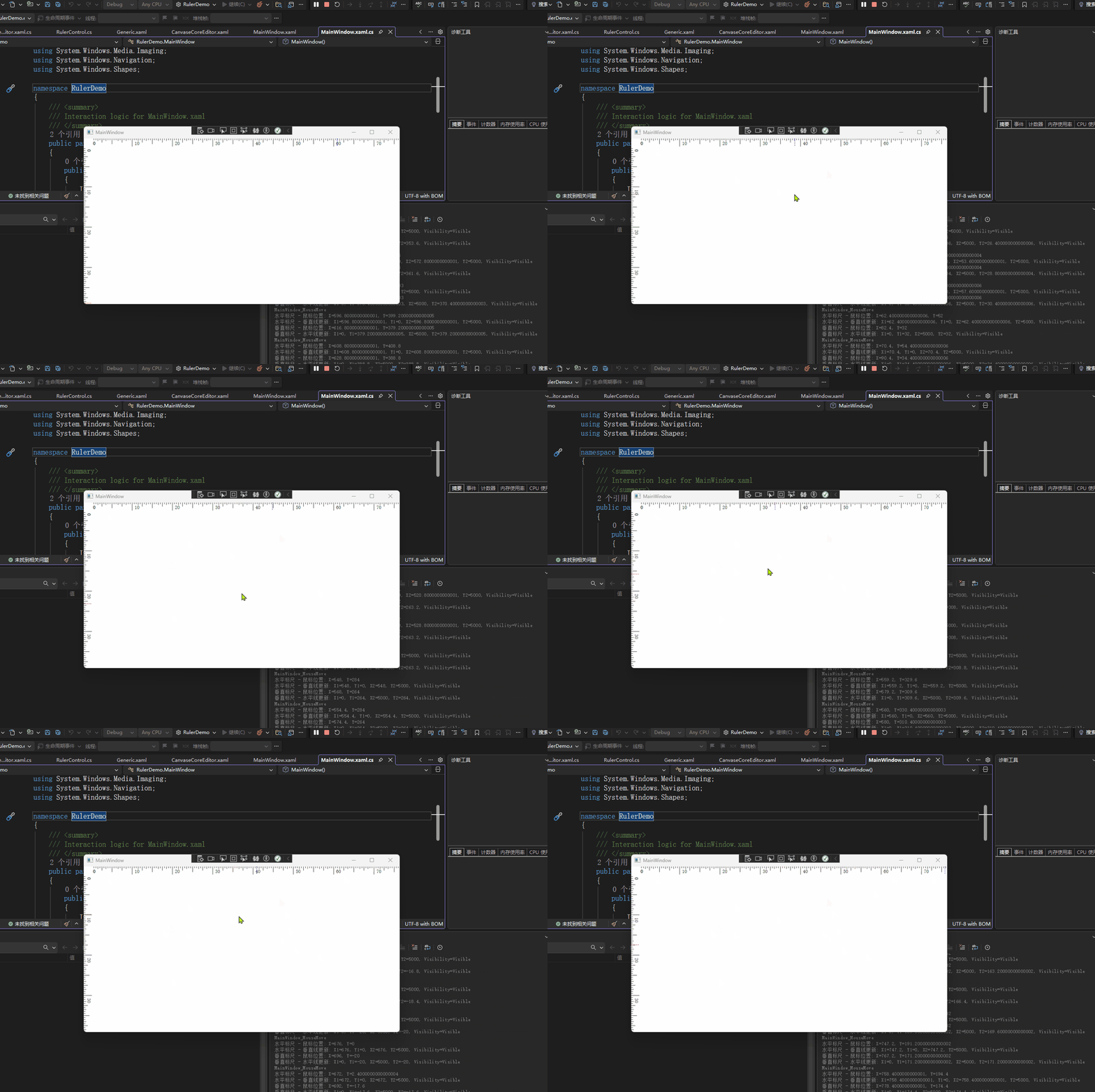
}7、显示效果如下图
总结:
1、本次完善都是通过腾讯Codebuddy的AI编程插件 帮忙完善,加上一小部分的人为的代码微调
2、标尺的代码已经上传至Github:wutyDemo/RulerDemo at main · wutangyuan/wutyDemo