【开源鸿蒙跨平台开发先锋训练营】DAY8~DAY13 底部选项卡&推荐功能实现
📚 目录
[【开源鸿蒙跨平台开发先锋训练营】DAY8~DAY13 底部选项卡&推荐功能实现](#【开源鸿蒙跨平台开发先锋训练营】DAY8~DAY13 底部选项卡&推荐功能实现)
[📝 摘 要](#📝 摘 要)
[🔍 1 概述](#🔍 1 概述)
[1.1 开发背景](#1.1 开发背景)
[1.2 开发目标](#1.2 开发目标)
[1.3 核心技术栈](#1.3 核心技术栈)
[🛠️ 2 开发环境准备](#🛠️ 2 开发环境准备)
[2.1 环境配置](#2.1 环境配置)
[2.2 本地资源配置](#2.2 本地资源配置)
[2.3 推荐页面目录结构](#2.3 推荐页面目录结构)
[🧩 3 推荐页面功能实现](#🧩 3 推荐页面功能实现)
[3.1 主页面入口实现](#3.1 主页面入口实现)
[3.2 核心组件实现](#3.2 核心组件实现)
[3.2.1 慢性病卡片组件](#3.2.1 慢性病卡片组件)
[3.2.2 母婴卡片组件](#3.2.2 母婴卡片组件)
[3.2.3 搜索框组件](#3.2.3 搜索框组件)
[3.3 子页面实现](#3.3 子页面实现)
[3.4 数据模型](#3.4 数据模型)
[📱 4 运行验证与效果展示](#📱 4 运行验证与效果展示)
[4.1 推荐页面主界面](#4.1 推荐页面主界面)
[4.2 子页面效果](#4.2 子页面效果)
[🎯 5 总结与拓展](#🎯 5 总结与拓展)
[5.1 总结](#5.1 总结)
[5.2 拓展方向](#5.2 拓展方向)
[📚 6 参考资料](#📚 6 参考资料)
📝 摘 要
本文基于开源鸿蒙跨平台开发项目,将详细记录本地美食清单 APP中推荐页面的功能实现流程。从项目目录结构设计、本地资源配置,到核心组件实现与页面跳转逻辑,均进行了模块化工程化开发,最终完成了推荐页中 "慢性病研究院" 与 "母婴研究院" 两大模块的功能落地,实现了卡片式布局与子页面跳转的核心交互。
🔍 1 概述
1.1 开发背景
本项目为开源鸿蒙跨平台开发先锋训练营实战项目,目标是打造一款集美食推荐、动态分享、饮食指南于一体的本地美食清单 APP。推荐页面作为核心功能模块,旨在提供慢性病与母婴等众多场景下的专业饮食指导。
1.2 开发目标
📌 实现推荐页面主界面,包含搜索栏、红色标题区、慢性病与母婴两大研究院模块;
📌 完成横向滚动卡片布局,支持点击卡片跳转到对应子页面;
📌 统一目录结构与代码规范,保证项目可维护性。
1.3 核心技术栈
⚡ 跨平台框架:Flutter(兼容OpenHarmony)
💻 开发工具:VS Code(代码编写)、DevEco Studio 6.0.0 Release(鸿蒙设备调试)
📊 资源管理:pubspec.yaml 本地资源配置
🛠️ 2 开发环境准备
2.1 环境配置
🚀 1. Flutter环境:安装 Flutter 3.27.5版本,配置flutter-OHOS-1.0.1(鸿蒙适配分支)分支(兼容 OpenHarmony);
📱 2. 鸿蒙环境:安装DevEco Studio 6.0.0 Release,配置 OpenHarmony SDK(API Version 20(6.0.0.47)),创建鸿蒙模拟器;
📂 3. 项目初始化:基于现有flutter_harmonyos工程,调整目录结构,安装依赖。
2.2 本地资源配置
在 pubspec.yaml 中声明推荐页面图片资源路径,确保图片正常加载:
flutter:
  uses-material-design: true
  assets:
    - assets/images/
    - assets/images/foods/               # 美食卡片图片
    - assets/images/food_show/           # 美食页相关图片
    - assets/images/food_show/dynamic/   # 清单页动态图
    - assets/images/food_show/star/      # 排行页达人头像
    - assets/images/food_show/task/      # 任务中心图标
    - assets/images/food_note/           # 动态模块根资源
    - assets/images/food_note/avatar/    # 用户头像资源
    - assets/images/food_note/dynamic/   # 动态图片资源
    - assets/images/eat_what/            # 推荐页面资源
2.3 推荐页面目录结构
遵循模块化设计思想,参考已有 food_note/ 模块规范,设计推荐页面目录:
lib/pages/eat_what/
├── components/          # 页面专属组件
│   ├── chronic_disease_card.dart  # 慢性病卡片
│   ├── maternal_baby_card.dart    # 母婴卡片
│   └── search_bar.dart            # 搜索栏
├── models/              # 数据模型
│   └── eat_what_model.dart
├── tab/                 # 子页面
│   ├── chronic_disease_page.dart
│   └── maternal_baby_page.dart
└── eat_what_page.dart   # 推荐主页面入口
🧩 3 推荐页面功能实现
3.1 主页面入口实现
主页面入口实现(eat_what_page.dart)
主页面负责整合所有组件,构建整体布局:
// eat_what/            # 推荐页面主页
// lib/pages/eat_what/eat_what_page.dart(推荐)
import 'package:flutter/material.dart';
import 'components/chronic_disease_card.dart';
import 'components/maternal_baby_card.dart';

// 推荐页面主入口
class EatWhatPage extends StatelessWidget {
  const EatWhatPage({super.key});

  // 推荐页面(EatWhatPage)的build方法中,替换搜索框部分
  @override
  Widget build(BuildContext context) {
    return Scaffold(
      appBar: AppBar(
        // AppBar配置(返回按钮、标题等)
        elevation: 0,
        backgroundColor: Colors.white,
        leading: IconButton(
          icon: const Icon(Icons.arrow_back_ios, color: Colors.black),
          onPressed: () => Navigator.pop(context),
        ),
        title: const Text(
          '推荐',
          style: TextStyle(color: Colors.black, fontSize: 18),
        ),
        centerTitle: true,
      ),
      backgroundColor: Colors.white,
      body: SingleChildScrollView(
        physics: const BouncingScrollPhysics(),
        child: Column(
          crossAxisAlignment: CrossAxisAlignment.start,
          children: [
            _buildHomeStyleSearchBar(),            // 搜索框
            _buildTitleSection(),                  // 红色标题栏
            _buildChronicDiseaseSection(context),  // 慢性病模块
            _buildMaternalBabySection(context),    //母婴研究
            const SizedBox(height: 20),
          ],
        ),
      ),
    );
  }
  // 把首页搜索框的实现方法加到EatWhatPage类中
  Widget _buildHomeStyleSearchBar() {
    return Container(
      margin: const EdgeInsets.symmetric(horizontal: 16, vertical: 10),
      decoration: BoxDecoration(
        color: Colors.grey[200],
        borderRadius: BorderRadius.circular(20),
      ),
      child: const TextField(
        decoration: InputDecoration(
          prefixIcon: Icon(Icons.search, color: Colors.grey),
          hintText: '准备吃什么,在这里搜索',
          border: InputBorder.none,
          contentPadding: EdgeInsets.symmetric(vertical: 12),
        ),
      ),
    );
  }

  // 构建红色标题栏
  Widget _buildTitleSection() {
    return Container(
      width: double.infinity,
      padding: const EdgeInsets.symmetric(horizontal: 16, vertical: 20),
      color: const Color(0xFFD32F2F),
      child: const Column(
        crossAxisAlignment: CrossAxisAlignment.start,
        children: [
          Text(
            '适合吃什么',
            style: TextStyle(
              color: Colors.white,
              fontSize: 22,
              fontWeight: FontWeight.bold,
            ),
          ),
          SizedBox(height: 4),
          Text(
            '综合1000万用户数据研究得出',
            style: TextStyle(
              color: Colors.white70,
              fontSize: 12,
            ),
          ),
        ],
      ),
    );
  }

  // 构建慢性病研究院模块
  Widget _buildChronicDiseaseSection(BuildContext context) {
    return Column(
      crossAxisAlignment: CrossAxisAlignment.start,
      children: [
        const Padding(
          padding: EdgeInsets.only(left: 16, top: 20, bottom: 10),
          child: Text(
            '慢性病研究院',
            style: TextStyle(
              fontSize: 18,
              fontWeight: FontWeight.bold,
              color: Colors.black87,
            ),
          ),
        ),
        ChronicDiseaseCard(),
      ],
    );
  }

  // 构建母婴研究院模块
  Widget _buildMaternalBabySection(BuildContext context) {
    return Column(
      crossAxisAlignment: CrossAxisAlignment.start,
      children: [
        const Padding(
          padding: EdgeInsets.only(left: 16, top: 20, bottom: 10),
          child: Text(
            '母婴研究院',
            style: TextStyle(
              fontSize: 18,
              fontWeight: FontWeight.bold,
              color: Colors.black87,
            ),
          ),
        ),
        MaternalBabyCard(),
      ],
    );
  }
}
3.2 核心组件实现
3.2.1 慢性病卡片组件
慢性病卡片组件(chronic_disease_card.dart),实现横向滚动卡片,点击跳转子页面:
// components/                 # 页面组件
// chronic_disease_card.dart  # 慢性病研究院卡片组件
import 'package:flutter/material.dart';
import '../models/eat_what_model.dart';
import '../tab/chronic_disease_page.dart';

// 慢性病研究院卡片组件
class ChronicDiseaseCard extends StatelessWidget {
  ChronicDiseaseCard({super.key});

  // 模拟慢性病数据
  final List<ChronicDiseaseModel> diseaseList = [
    ChronicDiseaseModel(
      title: '痛风',
      image: 'assets/images/eat_what/gout.png',
      descList: [
        '必知痛风小常识',
        '食材嘌呤一目了然',
        '得了痛风吃什么',
      ],
      route: '/chronic_disease/gout',
    ),
    ChronicDiseaseModel(
      title: '糖尿病',
      image: 'assets/images/eat_what/diabetes.png',
      descList: [
        '基础知识早知道',
        '什么食材不能吃',
        '这样吃控制血糖',
      ],
      route: '/chronic_disease/diabetes',
    ),
    ChronicDiseaseModel(
      title: '心脏病',
      image: 'assets/images/eat_what/heart.png',
      descList: [
        '心脏健康小知识',
        '护心食材推荐',
        '饮食注意事项',
      ],
      route: '/chronic_disease/heart',
    ),
  ];

  @override
  Widget build(BuildContext context) {
    return Padding(
      padding: const EdgeInsets.symmetric(horizontal: 16),
      child: SizedBox(
        height: 220,
        child: ListView.separated(
          scrollDirection: Axis.horizontal,
          itemCount: diseaseList.length,
          separatorBuilder: (context, index) => const SizedBox(width: 12),
          itemBuilder: (context, index) {
            final disease = diseaseList[index];
            return _buildDiseaseCard(context, disease);
          },
        ),
      ),
    );
  }

  // 构建单个慢性病卡片
  Widget _buildDiseaseCard(BuildContext context, ChronicDiseaseModel model) {
    return GestureDetector(
      onTap: () {
        // 跳转到对应慢性病子页面
        Navigator.push(
          context,
          MaterialPageRoute(
            builder: (context) => ChronicDiseasePage(diseaseType: model.title),
          ),
        );
      },
      child: Container(
        width: 160,
        padding: const EdgeInsets.all(12),
        decoration: BoxDecoration(
          borderRadius: BorderRadius.circular(12),
          color: Colors.grey[50],
          boxShadow: [
            BoxShadow(
              color: Colors.grey[200]!,
              blurRadius: 4,
              offset: const Offset(0, 2),
            ),
          ],
        ),
        child: Column(
          children: [
            // 图片
            Image.asset(
              model.image,
              height: 80,
              width: 80,
              fit: BoxFit.contain,
              // 图片加载失败时显示占位图
              errorBuilder: (context, error, stackTrace) =>
                  const Icon(Icons.image_not_supported, size: 80),
            ),
            const SizedBox(height: 10),
            // 标题
            Text(
              model.title,
              style: const TextStyle(
                fontSize: 16,
                fontWeight: FontWeight.bold,
                color: Colors.black87,
              ),
            ),
            const SizedBox(height: 8),
            // 描述
            Expanded(
              child: Column(
                mainAxisAlignment: MainAxisAlignment.center,// 补充枚举前缀 MainAxisAlignment.
                children: model.descList
                    .map((desc) => Text(
                          desc,
                          style: TextStyle(
                            fontSize: 12,
                            color: Colors.grey[600],
                          ),
                          textAlign: TextAlign.center,
                        ))
                    .toList(),
              ),
            ),
          ],
        ),
      ),
    );
  }
}
3.2.2 母婴卡片组件
母婴卡片组件(maternal_baby_card.dart),采用粉色主题,与慢性病卡片结构统一,保证视觉一致性。
// maternal_baby_card.dart    # 母婴研究院卡片组件
import 'package:flutter/material.dart';
import '../models/eat_what_model.dart';
import '../tab/maternal_baby_page.dart';

// 母婴研究院卡片组件
class MaternalBabyCard extends StatelessWidget {
  MaternalBabyCard({super.key});

  // 模拟母婴数据
  final List<MaternalBabyModel> babyList = [
    MaternalBabyModel(
      title: '宝宝辅食',
      image: 'assets/images/eat_what/baby_food.png',
      desc: '6-36个月宝宝辅食添加指南,科学喂养更健康',
      route: '/maternal_baby/baby_food',
    ),
    MaternalBabyModel(
      title: '孕期饮食',
      image: 'assets/images/eat_what/pregnancy.png',
      desc: '孕期营养搭配,适合孕妇吃的食材推荐',
      route: '/maternal_baby/pregnancy',
    ),
    MaternalBabyModel(
      title: '哺乳期',
      image: 'assets/images/eat_what/lactation.png',
      desc: '哺乳期饮食禁忌,催奶食材推荐',
      route: '/maternal_baby/lactation',
    ),
  ];

  @override
  Widget build(BuildContext context) {
    return Padding(
      padding: const EdgeInsets.symmetric(horizontal: 16),
      child: SizedBox(
        height: 220,
        child: ListView.separated(
          scrollDirection: Axis.horizontal,
          itemCount: babyList.length,
          separatorBuilder: (context, index) => const SizedBox(width: 12),
          itemBuilder: (context, index) {
            final baby = babyList[index];
            return _buildBabyCard(context, baby);
          },
        ),
      ),
    );
  }

  // 构建单个母婴卡片
  Widget _buildBabyCard(BuildContext context, MaternalBabyModel model) {
    return GestureDetector(
      onTap: () {
        // 跳转到对应母婴子页面
        Navigator.push(
          context,
          MaterialPageRoute(
            builder: (context) => MaternalBabyPage(babyType: model.title),
          ),
        );
      },
      child: Container(
        width: 160,
        padding: const EdgeInsets.all(12),
        decoration: BoxDecoration(
          borderRadius: BorderRadius.circular(12),
          color: Colors.pink[50],
          boxShadow: [
            BoxShadow(
              color: Colors.grey[200]!,
              blurRadius: 4,
              offset: const Offset(0, 2),
            ),
          ],
        ),
        child: Column(
          children: [
            // 图片
            Image.asset(
              model.image,
              height: 80,
              width: 80,
              fit: BoxFit.contain,
              errorBuilder: (context, error, stackTrace) =>
                  const Icon(Icons.image_not_supported, size: 80),
            ),
            const SizedBox(height: 10),
            // 标题
            Text(
              model.title,
              style: const TextStyle(
                fontSize: 16,
                fontWeight: FontWeight.bold,
                color: Colors.black87,
              ),
            ),
            const SizedBox(height: 8),
            // 描述
            Text(
              model.desc,
              style: TextStyle(
                fontSize: 12,
                color: Colors.grey[600],
              ),
              textAlign: TextAlign.center,
              maxLines: 3,
              overflow: TextOverflow.ellipsis,
            ),
          ],
        ),
      ),
    );
  }
}
3.2.3 搜索框组件
搜索栏组件(search_bar.dart):
// search_bar.dart            # 搜索栏组件
import 'package:flutter/material.dart';
// 推荐页面顶部搜索栏组件
class SearchBar extends StatelessWidget {
  const SearchBar({super.key});

  @override
  Widget build(BuildContext context) {
    return Padding(
      padding: const EdgeInsets.all(16),
      child: Container(
        height: 44,
        decoration: BoxDecoration(
          color: Colors.grey[100],
          borderRadius: BorderRadius.circular(22),
        ),
        child: Row(
          children: [
            const SizedBox(width: 16),
            const Icon(Icons.search, color: Colors.grey, size: 20),
            const SizedBox(width: 8),
            Expanded(
              child: TextField(
                decoration: InputDecoration(
                  hintText: '搜索想吃的食材、菜品...',
                  hintStyle: TextStyle(color: Colors.grey[500], fontSize: 14),
                  border: InputBorder.none,
                  contentPadding: const EdgeInsets.symmetric(vertical: 12),
                ),
                style: const TextStyle(fontSize: 14),
                onSubmitted: (value) {
                  // 搜索提交逻辑
                  if (value.isNotEmpty) {
                    // 可跳转搜索结果页
                    ScaffoldMessenger.of(context).showSnackBar(
                      SnackBar(content: Text('搜索:$value')),
                    );
                  }
                },
              ),
            ),
          ],
        ),
      ),
    );
  }
}
3.3 子页面实现
子页面实现(chronic_disease_page.dart),本文中推荐模块子页面为后续填充具体饮食指南内容预留结构:
// tab/                        # Tab 子页面(如果需要多 Tab 切换)
// chronic_disease_page.dart  # 慢性病研究院子页面
import 'package:flutter/material.dart';

/// 慢性病子页面(如痛风、糖尿病)
class ChronicDiseasePage extends StatelessWidget {
  final String diseaseType; // 疾病类型(痛风/糖尿病/心脏病)

  const ChronicDiseasePage({super.key, required this.diseaseType});

  @override
  Widget build(BuildContext context) {
    return Scaffold(
      appBar: AppBar(
        title: Text('$diseaseType 饮食指南'),
        backgroundColor: const Color(0xFFD32F2F),
        foregroundColor: Colors.white,
      ),
      body: const Center(
        child: Text(
          '疾病的详细饮食指南内容',
          style: TextStyle(fontSize: 16),
        ),
      ),
    );
  }
}
子页面实现(maternal_baby_page.dart):
// maternal_baby_page.dart    # 母婴研究院子页面

import 'package:flutter/material.dart';

// 母婴子页面(如宝宝辅食、孕期饮食)
class MaternalBabyPage extends StatelessWidget {
  final String babyType; // 母婴分类(宝宝辅食/孕期饮食/哺乳期)

  const MaternalBabyPage({super.key, required this.babyType});

  @override
  Widget build(BuildContext context) {
    return Scaffold(
      appBar: AppBar(
        title: Text('$babyType 饮食指南'),
        backgroundColor: Colors.pink,
        foregroundColor: Colors.white,
      ),
      body: const Center(
        child: Text(
          '母婴分类的详细饮食指南内容',
          style: TextStyle(fontSize: 16),
        ),
      ),
    );
  }
}
3.4 数据模型
数据模型(eat_what_model.dart):
// models/                     # 数据模型
// eat_what_model.dart      # 推荐页面数据模型(如分类、卡片数据)

/// 慢性病数据模型
class ChronicDiseaseModel {
  final String title; // 疾病名称
  final String image; // 图片路径
  final List<String> descList; // 描述列表
  final String route; // 跳转路由

  ChronicDiseaseModel({
    required this.title,
    required this.image,
    required this.descList,
    required this.route,
  });
}

/// 母婴数据模型
class MaternalBabyModel {
  final String title; // 分类名称
  final String image; // 图片路径
  final String desc; // 描述
  final String route; // 跳转路由

  MaternalBabyModel({
    required this.title,
    required this.image,
    required this.desc,
    required this.route,
  });
}
📱 4 运行验证与效果展示
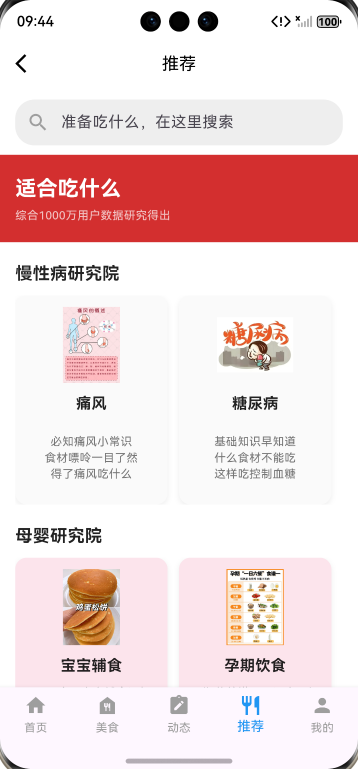
4.1 推荐页面主界面
✅ 搜索栏、红色标题区、慢性病 / 母婴模块布局完整;
✅ 横向卡片滚动流畅,点击交互正常。
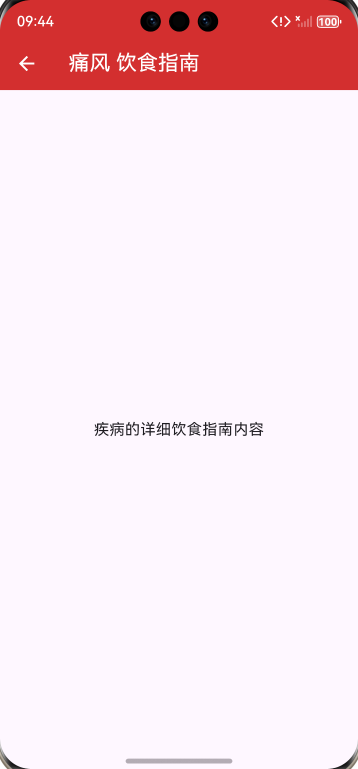
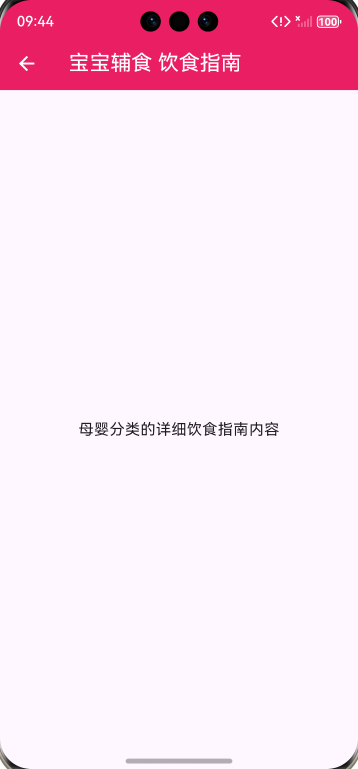
4.2 子页面效果
✅ 子页面标题与主题色匹配,内容区域预留完整。
🎯 5 总结与拓展
5.1 总结
✅ 完成了推荐页面的模块化开发,目录结构清晰,代码可维护性高;
✅ 实现了卡片式布局与页面跳转核心功能,验证了 Flutter 跨平台开发的高效性;
✅ 统一了组件规范,为后续功能迭代奠定了基础。
5.2 拓展方向
📌 填充子页面饮食指南内容;
📌 优化 UI 细节,增加加载动画与错误处理;
📌 完善后续页面。
📚 6 参考资料
🔗 参考前文:
https://blog.csdn.net/m0_74451345/article/details/156915775?spm=1001.2014.3001.5502
https://blog.csdn.net/m0_74451345/article/details/157024056?spm=1001.2014.3001.5502
https://blog.csdn.net/m0_74451345/article/details/157032531?spm=1001.2014.3001.5502
https://blog.csdn.net/m0_74451345/article/details/157094159?spm=1001.2014.3001.5502
https://blog.csdn.net/m0_74451345/article/details/157464927?spm=1001.2014.3001.5502
https://blog.csdn.net/m0_74451345/article/details/157505773?spm=1001.2014.3001.5502
https://blog.csdn.net/m0_74451345/article/details/157542849?spm=1001.2014.3001.5502
🔗 参考三方库:
OpenHarmony兼容的三方库:https://gitcode.com/openharmony-tpc/flutter_packages
ℹ️ 博客说明:本文为训练营实战记录,代码可在我的AtomGit个人公开仓库克隆到本地配置后直接运行(部分资源需要本地配置,比如需替换本地图片资源),后续将持续更新任务中心交互、其他底部选项卡模块等功能,文中也有许多待优化点,欢迎大家关注交流~
最后,
欢迎加入开源鸿蒙跨平台社区: