一、Nginx的源码编译
1.下载软件
[root@Nginx ~]# wget https://nginx.org/download/nginx-1.28.1.tar.gz2.解压
[root@Nginx ~]# tar zxf nginx-1.28.1.tar.gz
[root@Nginx ~]# cd nginx-1.28.1/
[root@Nginx nginx-1.28.1]# ls
auto     CHANGES.ru          conf       contrib          html     man        SECURITY.md
CHANGES  CODE_OF_CONDUCT.md  configure  CONTRIBUTING.md  LICENSE  README.md  src
3.检测环境
#安装依赖性
[root@Nginx ~]# dnf install gcc openssl-devel.x86_64 pcre2-devel.x86_64 zlib-devel -y

[root@Nginx nginx-1.28.1]# ./configure --prefix=/usr/local/nginx \
--user=nginx \
--group=nginx \
--with-http_ssl_module \
--with-http_v2_module \
--with-http_realip_module \
--with-http_stub_status_module \
--with-http_gzip_static_module \
--with-pcre \
--with-stream \
--with-stream_ssl_module \
--with-stream_realip_module \
4.编译
[root@Nginx nginx-1.28.1]# make
[root@Nginx nginx-1.28.1]# make install
5.nginx启动
#设定环境变量
[root@Nginx nginx-1.28.1]# cd /usr/local/nginx/sbin
[root@Nginx sbin]# vim  ~/.bash_profile
export PATH=$PATH:/usr/local/nginx/sbin

[root@Nginx sbin]# source   ~/.bash_profile

[root@Nginx sbin]# cd /usr/local/nginx/logs
[root@Nginx logs]# useradd  -s /sbin/nologin -M nginx
[root@Nginx logs]# nginx
[root@Nginx logs]# ps aux | grep nginx
root       44012  0.0  0.1  14688  2356 ?        Ss   17:01   0:00 nginx: master process nginx
nginx      44013  0.0  0.2  14888  3892 ?        S    17:01   0:00 nginx: worker process
root       44015  0.0  0.1   6636  2176 pts/0    S+   17:01   0:00 grep --color=auto nginx


#测试
[root@Nginx logs]# echo timinglee > /usr/local/nginx/html/index.html

[root@Nginx logs]# curl  172.25.254.100
timinglee
6.编写启动文件
[root@Nginx ~]# vim /lib/systemd/system/nginx.service
[Unit]
Description=The NGINX HTTP and reverse proxy server
After=syslog.target network-online.target remote-fs.target nss-lookup.target
Wants=network-online.target

[Service]
Type=forking
ExecStartPre=/usr/local/nginx/sbin/nginx -t
ExecStart=/usr/local/nginx/sbin/nginx
ExecReload=/usr/local/nginx/sbin/nginx -s reload
ExecStop=/bin/kill -s QUIT $MAINPID
PrivateTmp=true

[Install]
WantedBy=multi-user.target

[root@Nginx ~]# systemctl daemon-reload

#验证
[root@Nginx ~]# systemctl status nginx.service
○ nginx.service - The NGINX HTTP and reverse proxy server
     Loaded: loaded (/usr/lib/systemd/system/nginx.service; disabled; preset: disabled)
     Active: inactive (dead)

[root@Nginx ~]# systemctl enable --now nginx
[root@Nginx ~]# ps aux | grep nginx
root        1839  0.0  0.1  14688  2356 ?        Ss   09:53   0:00 nginx: master process /usr/local/nginx/sbin/nginx
nginx       1840  0.0  0.2  14888  3828 ?        S    09:53   0:00 nginx: worker process

[root@Nginx ~]# reboot
[root@Nginx ~]# systemctl status nginx.service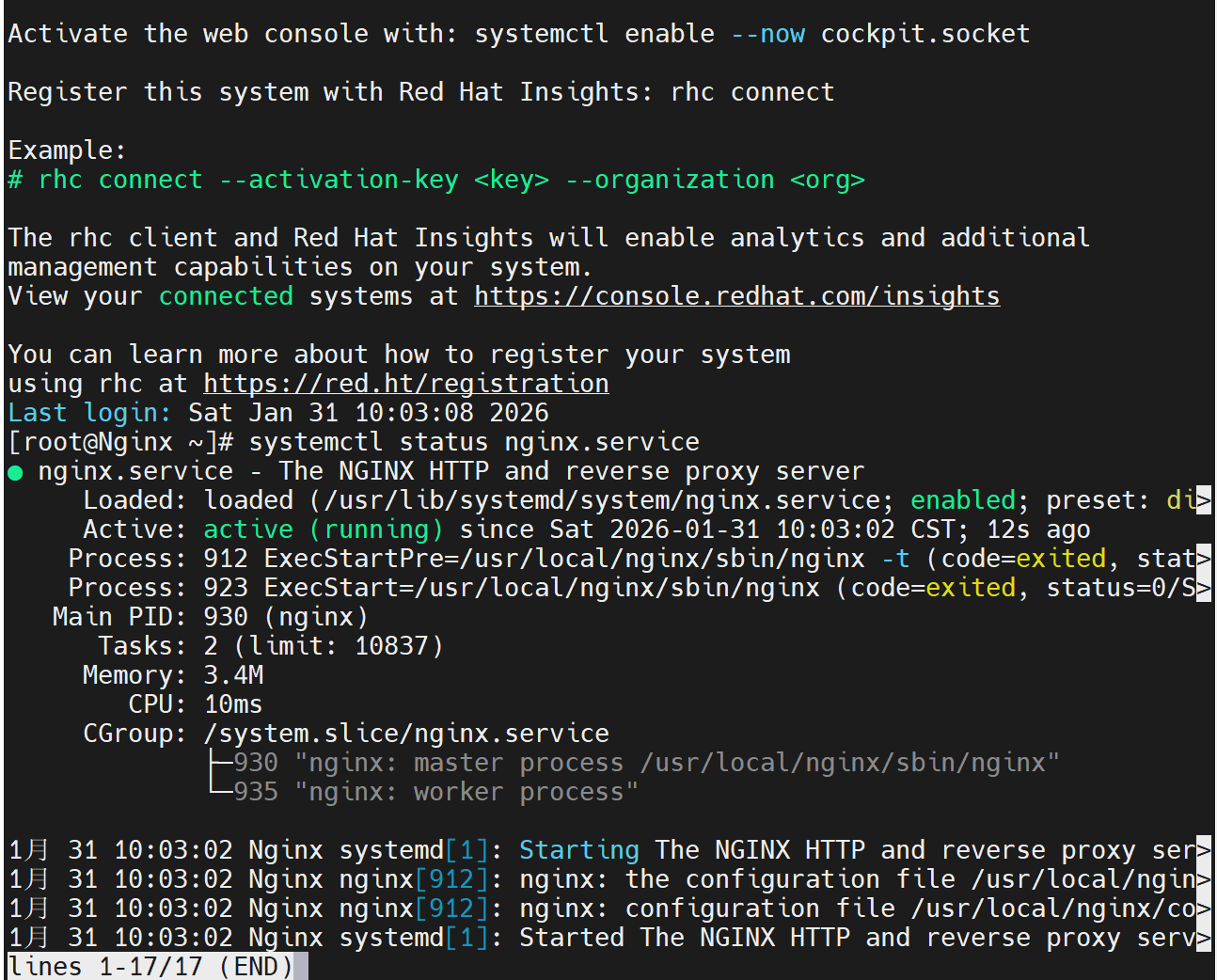
二、Nginx的平滑升级及回滚
1.下载高版本的软件
root@Nginx \~# wget https://nginx.org/download/nginx-1.29.4.tar.gz
2.对于新版本的软件进行源码编译并进行平滑升级
#编译nginx隐藏版本
root@Nginx \~# tar zxf nginx-1.29.4.tar.gz
root@Nginx \~# cd nginx-1.29.4/src/core/
root@Nginx core# vim nginx.h
#define nginx_version 1029004
#define NGINX_VERSION ""
#define NGINX_VER "TIMINGLEE/" NGINX_VERSION
#文件编辑完成后进行源码编译即可
root@Nginx core# cd ../../
root@Nginx nginx-1.29.4# ./configure --prefix=/usr/local/nginx --user=nginx --group=nginx --with-http_ssl_module --with-http_v2_module --with-http_realip_module --with-http_stub_status_module --with-http_gzip_static_module --with-pcre --with-stream --with-stream_ssl_module --with-stream_realip_module
root@Nginx nginx-1.29.4# make
root@Nginx nginx-1.29.4# cd objs/
root@Nginx objs# ls
autoconf.err nginx ngx_auto_config.h ngx_modules.c src
Makefile nginx.8 ngx_auto_headers.h ngx_modules.o
root@Nginx objs# cd /usr/local/nginx/sbin/
root@Nginx sbin# ls
nginx
root@Nginx sbin# cp -p nginx nginx.old
root@Nginx sbin# \cp -f /root/nginx-1.29.4/objs/nginx /usr/local/nginx/sbin/nginx
root@Nginx sbin# ls /usr/local/nginx/logs/
access.log error.log nginx.pid
root@Nginx sbin# ps aux | grep nginx
root 1643 0.0 0.1 14688 2360 ? Ss 09:55 0:00 nginx: master process /usr/local/nginx/sbin/nginx
nginx 1644 0.0 0.2 14888 3896 ? S 09:55 0:00 nginx: worker process
root@Nginx sbin# kill -USR2 1643 #nginx master进程id
root@Nginx sbin# ps aux | grep nginx
root 1643 0.0 0.1 14688 2744 ? Ss 09:55 0:00 nginx: master process /usr/local/nginx/sbin/nginx
nginx 1644 0.0 0.2 14888 3896 ? S 09:55 0:00 nginx: worker process
root 4919 0.0 0.4 14716 7936 ? S 10:24 0:00 nginx: master process /usr/local/nginx/sbin/nginx
nginx 4921 0.0 0.2 14916 4156 ? S 10:24 0:00 nginx: worker process
root 4923 0.0 0.1 6636 2176 pts/0 S+ 10:25 0:00 grep --color=auto nginx
root@Nginx sbin# ls /usr/local/nginx/logs/
access.log error.log nginx.pid nginx.pid.oldbin
#测试效果
root@Nginx sbin# nginx -V
nginx version: TIMINGLEE/
built by gcc 11.5.0 20240719 (Red Hat 11.5.0-5) (GCC)
built with OpenSSL 3.2.2 4 Jun 2024
TLS SNI support enabled
configure arguments: --prefix=/usr/local/nginx --user=nginx --group=nginx --with-http_ssl_module --with-http_v2_module --with-http_realip_module --with-http_stub_status_module --with-http_gzip_static_module --with-pcre --with-stream --with-stream_ssl_module --with-stream_realip_module
#回收旧版本子进程
root@Nginx sbin# ps aux | grep nginx
root 1643 0.0 0.1 14688 2744 ? Ss 09:55 0:00 nginx: master process /usr/local/nginx/sbin/nginx
nginx 1644 0.0 0.2 14888 3896 ? S 09:55 0:00 nginx: worker process
root 4919 0.0 0.4 14716 7936 ? S 10:24 0:00 nginx: master process /usr/local/nginx/sbin/nginx
nginx 4921 0.0 0.2 14916 4156 ? S 10:24 0:00 nginx: worker process
root 4929 0.0 0.1 6636 2176 pts/0 S+ 10:27 0:00 grep --color=auto nginx
root@Nginx sbin# kill -WINCH 1643
root@Nginx sbin# ps aux | grep nginx
root 1643 0.0 0.1 14688 2744 ? Ss 09:55 0:00 nginx: master process /usr/local/nginx/sbin/nginx
root 4919 0.0 0.4 14716 7936 ? S 10:24 0:00 nginx: master process /usr/local/nginx/sbin/nginx
nginx 4921 0.0 0.2 14916 4156 ? S 10:24 0:00 nginx: worker process
root 4932 0.0 0.1 6636 2176 pts/0 S+ 10:28 0:00 grep --color=auto nginx
3.版本回退|版本回滚
root@Nginx sbin# cd /usr/local/nginx/sbin/
root@Nginx sbin# cp nginx nginx.new -p
root@Nginx sbin# \cp nginx.old nginx -pf
root@Nginx sbin# ps aux | grep nginx
root 1643 0.0 0.1 14688 2744 ? Ss 09:55 0:00 nginx: master process /usr/local/nginx/sbin/nginx
root 4919 0.0 0.4 14716 7936 ? S 10:24 0:00 nginx: master process /usr/local/nginx/sbin/nginx
nginx 4921 0.0 0.2 14916 4156 ? S 10:24 0:00 nginx: worker process
root@Nginx sbin# kill -HUP 1643
root@Nginx sbin# ps aux | grep nginx
root 1643 0.0 0.1 14688 2744 ? Ss 09:55 0:00 nginx: master process /usr/local/nginx/sbin/nginx
root 4919 0.0 0.4 14716 7936 ? S 10:24 0:00 nginx: master process /usr/local/nginx/sbin/nginx
nginx 4921 0.0 0.2 14916 4156 ? S 10:24 0:00 nginx: worker process
nginx 4963 0.0 0.2 14888 3896 ? S 10:32 0:00 nginx: worker process
root 4965 0.0 0.1 6636 2176 pts/0 S+ 10:32 0:00 grep --color=auto nginx
root@Nginx sbin# nginx -V
nginx version: nginx/1.28.1
built by gcc 11.5.0 20240719 (Red Hat 11.5.0-5) (GCC)
built with OpenSSL 3.2.2 4 Jun 2024
TLS SNI support enabled
configure arguments: --prefix=/usr/local/nginx --user=nginx --group=nginx --with-http_ssl_module --with-http_v2_module --with-http_realip_module --with-http_stub_status_module --with-http_gzip_static_module --with-pcre --with-stream --with-stream_ssl_module --with-stream_realip_module
#回收新版本进程
root@Nginx sbin# kill -WINCH 4919
root@Nginx sbin# ps aux | grep nginx
root 1643 0.0 0.1 14688 2744 ? Ss 09:55 0:00 nginx: master process /usr/local/nginx/sbin/nginx
root 4919 0.0 0.4 14716 7936 ? S 10:24 0:00 nginx: master process /usr/local/nginx/sbin/nginx
nginx 4963 0.0 0.2 14888 3896 ? S 10:32 0:00 nginx: worker process
root 4969 0.0 0.1 6636 2176 pts/0 S+ 10:34 0:00 grep --color=auto nginx
三、Nginx配置文件的管理及优化参数
root@Nginx ~]# vim /usr/local/nginx/conf/nginx.conf
user nginx;
root@Nginx \~# nginx -t
nginx: the configuration file /usr/local/nginx/conf/nginx.conf syntax is ok
nginx: configuration file /usr/local/nginx/conf/nginx.conf test is successful
root@Nginx \~# nginx -s reload
root@Nginx \~# ps aux | grep nginx
root 5506 0.0 0.2 14564 3912 ? Ss 14:40 0:00 nginx: master process /usr/local/nginx/sbin/nginx
nginx 5511 0.0 0.2 14996 4032 ? S 14:41 0:00 nginx: worker process
root@Nginx \~# vim /usr/local/nginx/conf/nginx.conf
worker_processes 2;
root@Nginx \~# nginx -s reload
root@Nginx \~# ps aux | grep nginx
root 5506 0.0 0.2 14796 4040 ? Ss 14:40 0:00 nginx: master process /usr/local/nginx/sbin/nginx
nginx 5516 0.0 0.2 15012 4048 ? S 14:42 0:00 nginx: worker process
nginx 5517 0.0 0.2 15012 4048 ? S 14:42 0:00 nginx: worker process
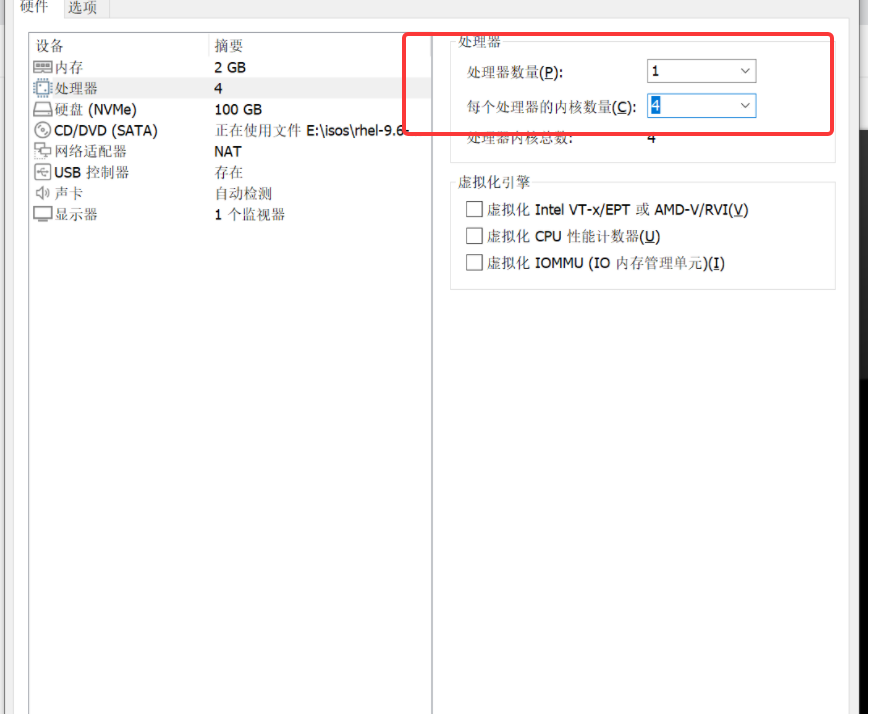
#在vmware中更改硬件cpu核心个数,然后重启
root@Nginx \~# vim /usr/local/nginx/conf/nginx.conf
worker_processes auto;
worker_cpu_affinity 0001 0010 0100 1000;
root@Nginx \~# ps aux | grep nginx
root 887 0.0 0.1 14564 2212 ? Ss 14:51 0:00 nginx: master process /usr/local/nginx/sbin/nginx
nginx 889 0.0 0.2 14964 3748 ? S 14:51 0:00 nginx: worker process
nginx 890 0.0 0.2 14964 3748 ? S 14:51 0:00 nginx: worker process
nginx 891 0.0 0.2 14964 3748 ? S 14:51 0:00 nginx: worker process
nginx 892 0.0 0.2 14964 3748 ? S 14:51 0:00 nginx: worker process
root@Nginx \~# ps axo pid,cmd,psr | grep nginx
887 nginx: master process /usr/ 3
1635 nginx: worker process 0
1636 nginx: worker process 1
1637 nginx: worker process 2
1638 nginx: worker process 3
root@Nginx \~# vim /usr/local/nginx/conf/nginx.confevents {
worker_connections 10000;
use epoll;
accept_mutex on;
multi_accept on;
}
root@Nginx \~# nginx -s reload
#测试并发
root@Nginx \~# dnf install httpd-tools -y
root@Nginx \~# ab -n 100000 -c5000 http://172.25.254.100/index.html
This is ApacheBench, Version 2.3 <Revision: 1913912 >
Copyright 1996 Adam Twiss, Zeus Technology Ltd, http://www.zeustech.net/
Licensed to The Apache Software Foundation, http://www.apache.org/
Benchmarking 172.25.254.100 (be patient)
socket: Too many open files (24) #并发数量过多导致访问失败
#处理本地文件系统的并发文件数量
root@Nginx \~# vim /etc/security/limits.conf
* - nofile 100000
* - noproc 100000
root - nofile 100000
root@Nginx \~# sudo -u nginx ulimit -n
100000
root@Nginx \~# ulimit -n 10000
100000
#测试
root@Nginx \~# ab -n 100000 -c10000 http://172.25.254.100/index.html
This is ApacheBench, Version 2.3 <Revision: 1913912 >
Copyright 1996 Adam Twiss, Zeus Technology Ltd, http://www.zeustech.net/
Licensed to The Apache Software Foundation, http://www.apache.org/
Benchmarking 172.25.254.100 (be patient)
Completed 10000 requests
Completed 20000 requests
Completed 30000 requests
Completed 40000 requests
Completed 50000 requests
四、Nginx下构建PC站点
1.location中的root
[root@Nginx conf]# cd /usr/local/nginx/conf/
[root@Nginx conf]# mkdir  conf.d
[root@Nginx conf]# vim nginx.conf
82     include "/usr/local/nginx/conf/conf.d/*.conf";

[root@Nginx conf]# nginx -s reload
[root@Nginx conf]# cd conf.d/

[root@Nginx ~]# mkdir  -p /webdata/nginx/timinglee.org/lee/html
[root@Nginx ~]# echo lee.timinglee.org > /webdata/nginx/timinglee.org/lee/html/index.html

[root@Nginx conf.d]# vim vhosts.conf
server {
    listen 80;
    server_name lee.timinglee.org;
    location / {
        root /webdata/nginx/timinglee.org/lee/html;
    }
}

root@Nginx conf.d]# systemctl restart nginx.service

#测试
[root@Nginx conf.d]# vim /etc/hosts
172.25.254.100     Nginx www.timinglee.org lee.timinglee.org

[root@Nginx conf.d]# curl  www.timinglee.org
timinglee
[root@Nginx conf.d]# curl  lee.timinglee.org
lee.timinglee.org

#local示例需要访问lee.timinglee.org/lee/目录
[root@Nginx conf.d]# vim vhosts.conf
server {
    listen 80;
    server_name lee.timinglee.org;
    location / {
        root /webdata/nginx/timinglee.org/lee/html;
    }
    location /lee {            #lee标识location中的root值+location 后面指定的值代表目录的路径
        root /webdata/nginx/timinglee.org/lee/html;
    }

}

[root@Nginx conf.d]# systemctl restart nginx.service
[root@Nginx conf.d]# mkdir  -p /webdata/nginx/timinglee.org/lee/html/lee
[root@Nginx conf.d]# echo lee > /webdata/nginx/timinglee.org/lee/html/lee/index.html
[root@Nginx conf.d]# curl  lee.timinglee.org/lee/
lee
2.location中的alias
root@Nginx conf.d# vim vhosts.conf
server {
listen 80;
server_name lee.timinglee.org;
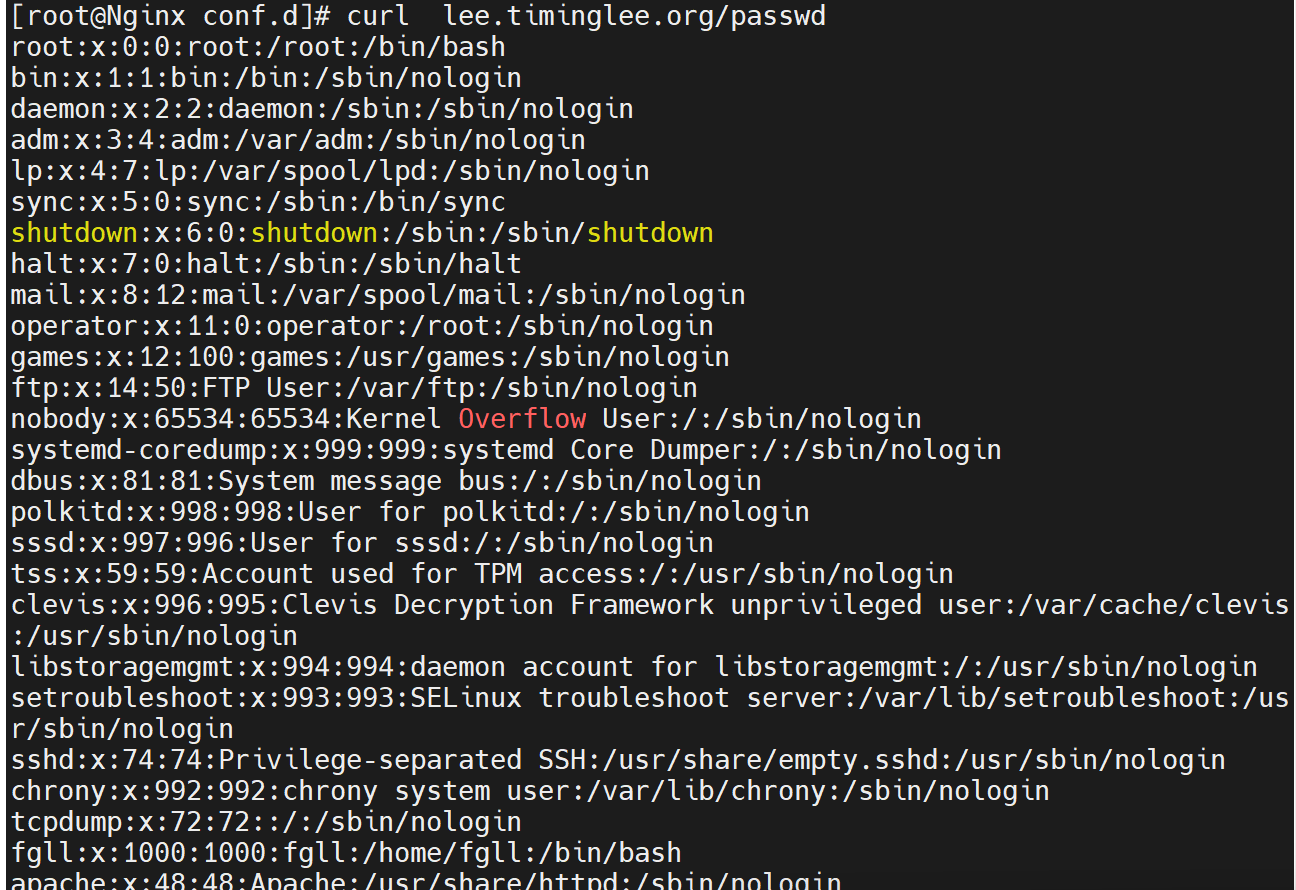
location /passwd { #标识文件
alias /etc/passwd;
}
location /passwd/ { #表示目录
alias /mnt/;
}
}
root@Nginx conf.d# nginx -s reload
root@Nginx conf.d# echo passwd > /mnt/index.html
#测试
root@Nginx conf.d# curl lee.timinglee.org/passwd/
passwd
root@Nginx conf.d# curl lee.timinglee.org/passwd
root:x:0:0:root:/root:/bin/bash
bin:x:1:1:bin:/bin:/sbin/nologin
daemon:x:2:2:daemon:/sbin:/sbin/nologin

五、KeepAlived长链接优化
1.设定长链接时间
[root@Nginx ~]# vim /usr/local/nginx/conf/nginx.conf
keepalive_timeout   5;
[root@Nginx ~]# nginx -s reload

#测试
[root@Nginx ~]# dnf install telnet -y
[root@Nginx ~]# telnet www.timinglee.org 80
Trying 172.25.254.100...
Connected to www.timinglee.org.
Escape character is '^]'.
GET / HTTP/1.1     <<<<
Host: www.timinglee.org    <<<<
							<<<
HTTP/1.1 200 OK
Server: nginx/1.28.1
Date: Sat, 31 Jan 2026 08:27:02 GMT
Content-Type: text/html
Content-Length: 10
Last-Modified: Thu, 29 Jan 2026 09:02:15 GMT
Connection: keep-alive
ETag: "697b2217-a"
Accept-Ranges: bytes

timinglee    显示的页面出现后根据设定的长链接时间会等待,超过时间后会自动退出
Connection closed by foreign host.
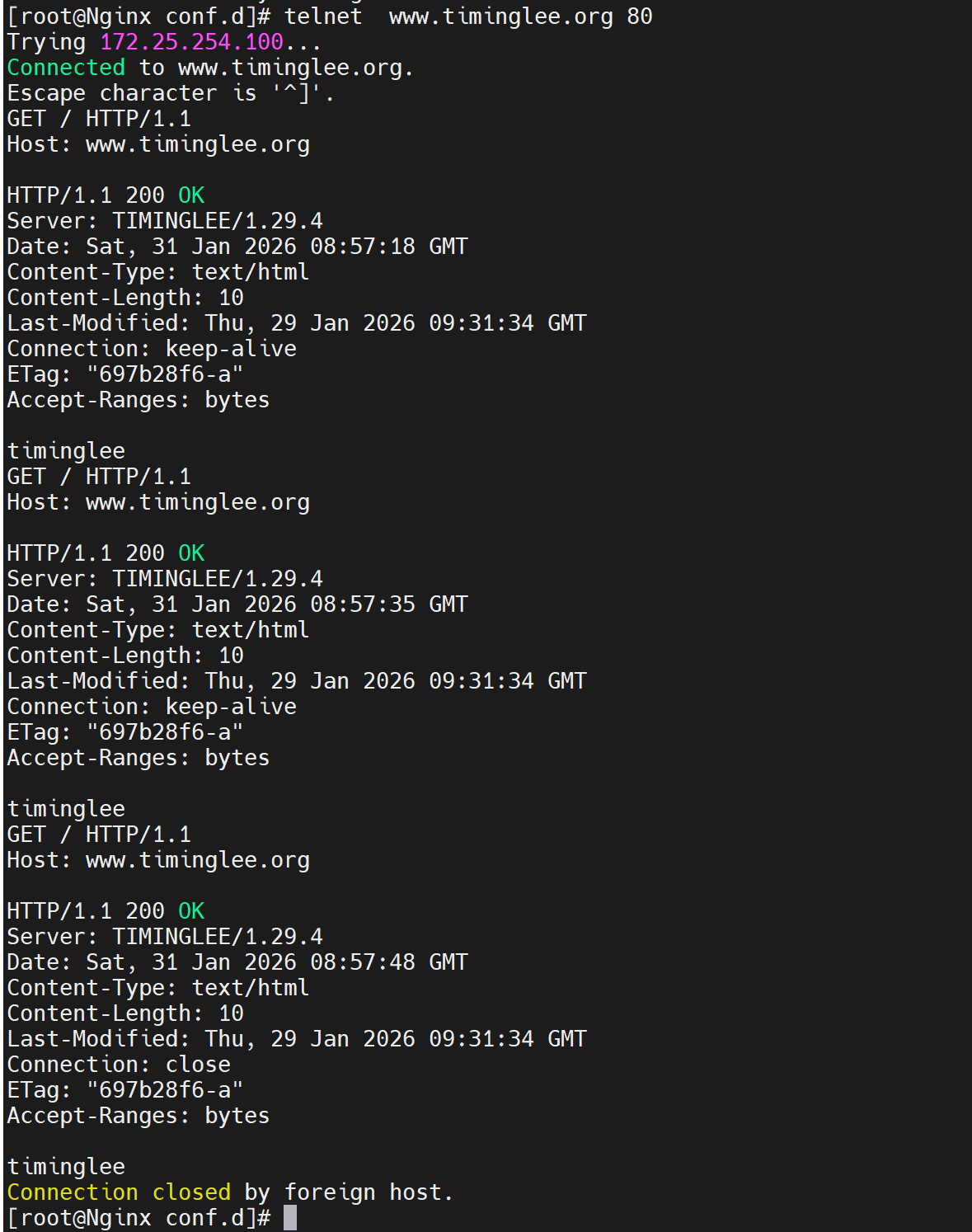
2.设定长链接次数
root@Nginx \~# vim /usr/local/nginx/conf/nginx.conf
keepalive_requests 3;root@Nginx \~# nginx -s reload
#测试
root@Nginx \~# telnet www.timinglee.org 80
Trying 172.25.254.100...
Connected to www.timinglee.org.
Escape character is '^]'.
GET / HTTP/1.1 #需要自己输入然后回车
Host: www.timinglee.orgHTTP/1.1 200 OK #第一次
Server: nginx/1.28.1
Date: Sat, 31 Jan 2026 08:32:14 GMT
Content-Type: text/html
Content-Length: 10
Last-Modified: Thu, 29 Jan 2026 09:02:15 GMT
Connection: keep-alive
Keep-Alive: timeout=100
ETag: "697b2217-a"
Accept-Ranges: bytes
timinglee
GET / HTTP/1.1
Host: www.timinglee.orgHTTP/1.1 200 OK #第二次
Server: nginx/1.28.1
Date: Sat, 31 Jan 2026 08:32:24 GMT
Content-Type: text/html
Content-Length: 10
Last-Modified: Thu, 29 Jan 2026 09:02:15 GMT
Connection: keep-alive
Keep-Alive: timeout=100
ETag: "697b2217-a"
Accept-Ranges: bytes
timinglee
GET / HTTP/1.1
Host: www.timinglee.orgHTTP/1.1 200 OK #第三次
Server: nginx/1.28.1
Date: Sat, 31 Jan 2026 08:32:35 GMT
Content-Type: text/html
Content-Length: 10
Last-Modified: Thu, 29 Jan 2026 09:02:15 GMT
Connection: close
ETag: "697b2217-a"
Accept-Ranges: bytes
timinglee
Connection closed by foreign host.