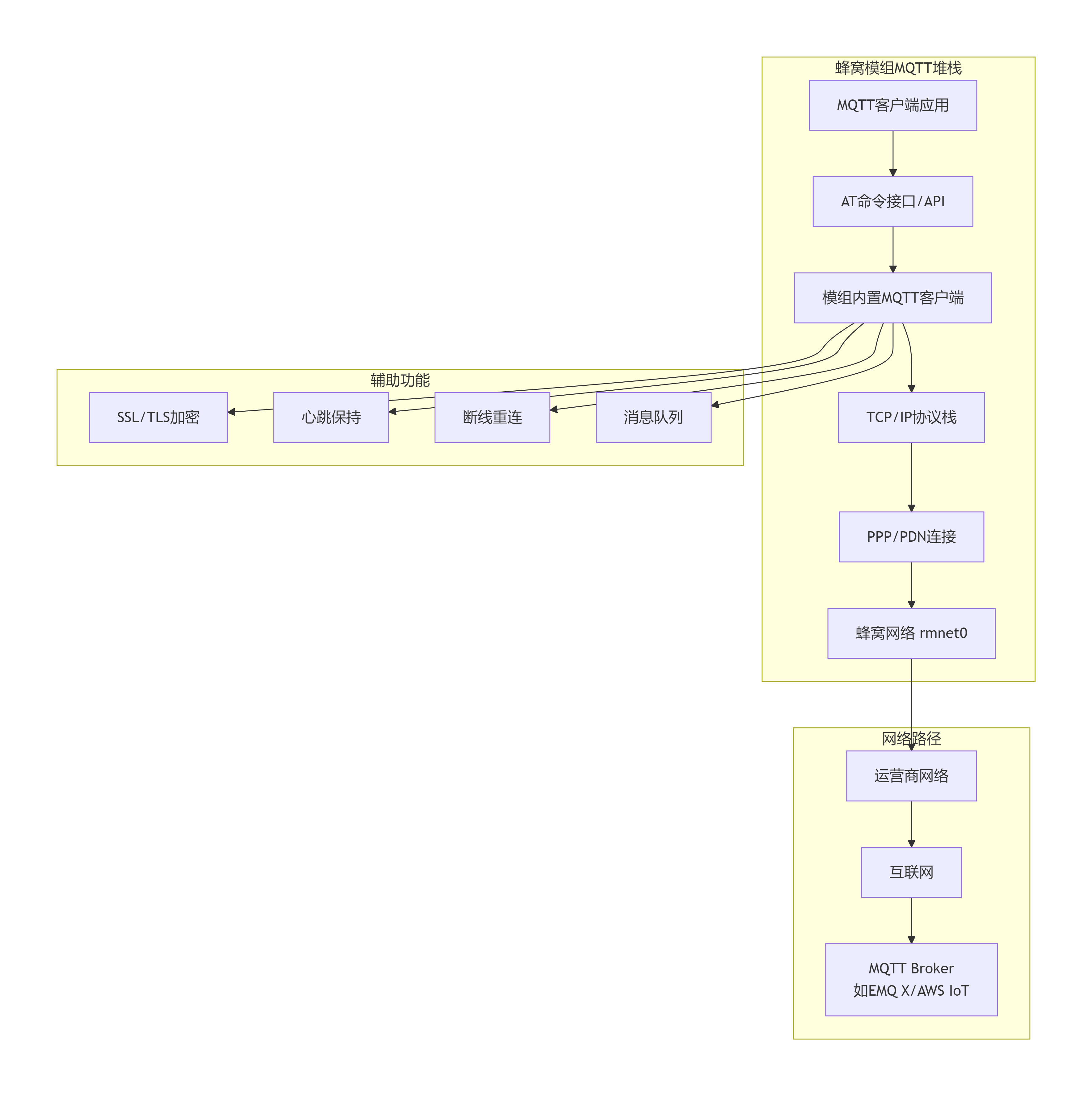
# MQTT AT命令集
AT+QMTCFG="version",3,4        # 设置MQTT版本(3:3.1.1, 4:5.0)
AT+QMTCFG="aliauth",1,"client1","username","password"
AT+QMTCFG="ssl",1,1            # 启用SSL
AT+QMTOPEN=0,"broker.example.com",1883  # 打开连接
AT+QMTCONN=0,"client123"       # 连接Broker
AT+QMTSUB=0,1,"sensor/temp",1  # 订阅主题
AT+QMTPUBEX=0,1,1,0,"control/light","{"state":"on"}"  # 发布消息
# Python控制蜂窝模组MQTT的示例
import serial
import time
import json

class CellularMQTTClient:
    def __init__(self, port="/dev/ttyUSB2", baudrate=115200):
        self.ser = serial.Serial(port, baudrate, timeout=1)
        self.client_id = f"device_{int(time.time())}"

    def send_at(self, command, expected="OK", timeout=2):
        """发送AT命令并等待响应"""
        self.ser.write(f"{command}\r\n".encode())
        time.sleep(0.1)

        start_time = time.time()
        response = ""

        while time.time() - start_time < timeout:
            if self.ser.in_waiting:
                line = self.ser.readline().decode().strip()
                response += line + "\n"
                if expected in line:
                    return True, response
                if "ERROR" in line:
                    return False, response

        return False, response

    def setup_mqtt(self, broker, port=1883):
        """配置MQTT连接"""
        steps = [
            # 1. 检查模组就绪
            ("AT", "OK"),
            # 2. 设置MQTT版本
            ('AT+QMTCFG="version",3,4', "OK"),
            # 3. 配置SSL/TLS(可选)
            ('AT+QMTCFG="ssl",1,1', "OK"),
            # 4. 打开连接
            (f'AT+QMTOPEN=0,"{broker}",{port}', "+QMTOPEN: 0,0"),
            # 5. 等待连接建立
            ("", "+QMTOPEN: 0,0"),
        ]

        for cmd, expected in steps:
            if cmd:
                success, resp = self.send_at(cmd, expected)
                if not success:
                    print(f"步骤失败: {cmd}")
                    return False
            time.sleep(1)

        return True

    def connect_broker(self, username=None, password=None):
        """连接MQTT Broker"""
        # 准备连接参数
        client_id = self.client_id
        keepalive = 60
        cleansession = 1

        cmd = f'AT+QMTCONN=0,"{client_id}",{keepalive},{cleansession}'

        if username and password:
            cmd = f'AT+QMTCONN=0,"{client_id}",{keepalive},{cleansession},"{username}","{password}"'

        success, resp = self.send_at(cmd, "+QMTCONN: 0,0,0")

        if success:
            print(f"MQTT连接成功,ClientID: {client_id}")
            return True
        else:
            print("MQTT连接失败")
            return False

    def subscribe(self, topic, qos=1):
        """订阅主题"""
        cmd = f'AT+QMTSUB=0,1,"{topic}",{qos}'
        success, resp = self.send_at(cmd, "+QMTSUB: 0,1,0")
        return success

    def publish(self, topic, payload, qos=1, retain=0):
        """发布消息"""
        # 如果是字典,转换为JSON
        if isinstance(payload, dict):
            payload = json.dumps(payload)

        # 注意:payload需要正确处理特殊字符
        encoded_payload = payload.replace('"', '\\"')

        cmd = f'AT+QMTPUBEX=0,{qos},{retain},0,"{topic}","{encoded_payload}"'
        success, resp = self.send_at(cmd, "+QMTPUBEX: 0,0")
        return success

    def listen_for_messages(self, callback, timeout=30):
        """监听接收到的消息"""
        start_time = time.time()

        while time.time() - start_time < timeout:
            if self.ser.in_waiting:
                line = self.ser.readline().decode().strip()

                # 解析MQTT消息
                if "+QMTRECV: 0," in line:
                    # 格式: +QMTRECV: 0,<msgid>,<topic>,<payload>
                    parts = line.split(",")
                    if len(parts) >= 4:
                        msgid = parts[1]
                        topic = parts[2].strip('"')
                        payload = parts[3].strip('"')

                        # 调用回调函数处理消息
                        callback(topic, payload)

            time.sleep(0.1)

    def disconnect(self):
        """断开连接"""
        self.send_at("AT+QMTDISC=0", "+QMTDISC: 0,0")
        self.send_at("AT+QMTCLOSE=0", "+QMTCLOSE: 0,0")
        self.ser.close()

# 使用示例
def on_message_received(topic, payload):
    print(f"收到消息 - 主题: {topic}, 内容: {payload}")

    # 解析JSON数据
    try:
        data = json.loads(payload)
        print(f"温度: {data.get('temperature')}°C")
    except:
        print(f"原始数据: {payload}")

# 主程序
if __name__ == "__main__":
    mqtt_client = CellularMQTTClient("/dev/ttyUSB2", 115200)

    # 1. 配置MQTT
    if mqtt_client.setup_mqtt("broker.hivemq.com", 1883):
        # 2. 连接Broker
        if mqtt_client.connect_broker():
            # 3. 订阅主题
            mqtt_client.subscribe("sensor/#")
            mqtt_client.subscribe("control/#")

            # 4. 发布设备信息
            device_info = {
                "device_id": "sensor_001",
                "firmware": "1.0.0",
                "status": "online",
                "timestamp": time.time()
            }
            mqtt_client.publish("device/info", device_info)

            # 5. 模拟传感器数据上报
            for i in range(10):
                sensor_data = {
                    "temperature": 25 + i * 0.5,
                    "humidity": 60 - i,
                    "battery": 85 - i,
                    "timestamp": time.time()
                }
                mqtt_client.publish("sensor/data", sensor_data, qos=1)
                time.sleep(10)

            # 6. 监听消息(非阻塞方式)
            import threading
            listen_thread = threading.Thread(
                target=mqtt_client.listen_for_messages,
                args=(on_message_received, 300)  # 监听5分钟
            )
            listen_thread.start()

            # 等待线程结束
            listen_thread.join()

            # 7. 断开连接
            mqtt_client.disconnect()