文章目录
-
windows主机
-
VirtualBox-7.2.4-170995
-
ubuntu24.04.2
1.virtualbox如何实现unbuntu与windows主机共享粘贴板和拖拽文件
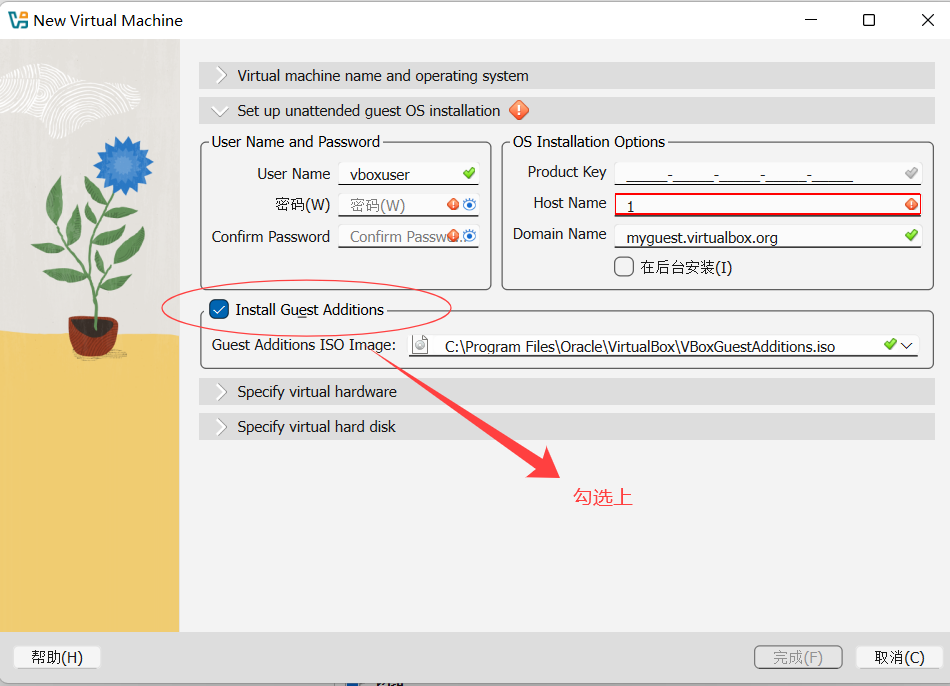
1.安装unbuntu时安装guest addtion
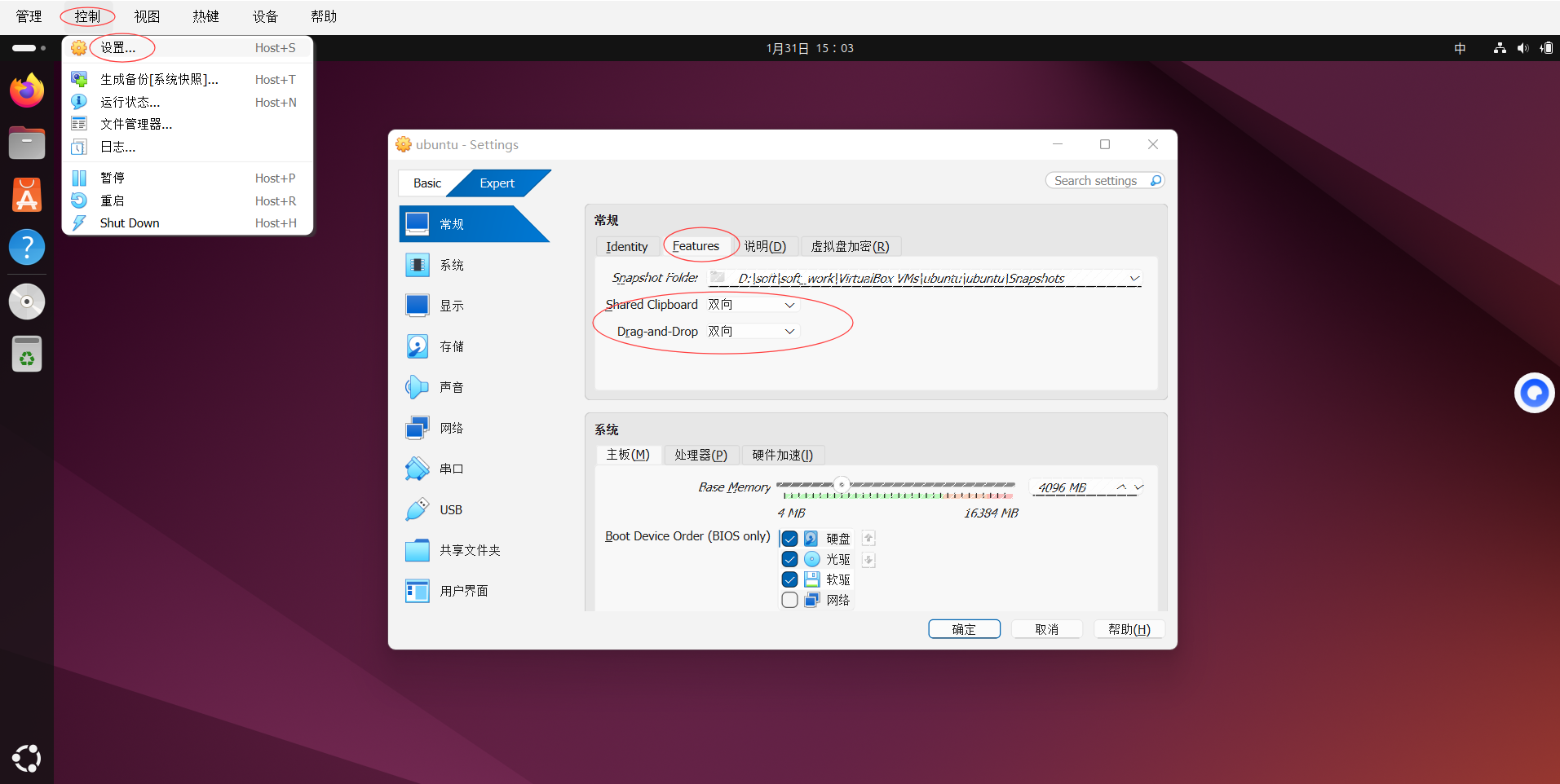
2.打开配置
2.设置语言
shell
#安装vim
sudo apt install vim
#把所有zh开头的注释都放开
sudo vim /etc/locale.gen
# 添加如下内容
sudo vim /etc/default/locale


#内容
LANG="zh_CN.UTF-8"
LANGUAGE="zh_CN:zh"
LC_ALL="zh_CN.UTF-8"
LC_NUMERIC="zh_CN.UTF-8"
LC_TIME="zh_CN.UTF-8"
LC_MONETARY="zh_CN.UTF-8"
LC_PAPER="zh_CN.UTF-8"
LC_IDENTIFICATION="zh_CN.UTF-8"
LC_NAME="zh_CN.UTF-8"
LC_ADDRESS="zh_CN.UTF-8"
LC_TELEPHONE="zh_CN.UTF-8"
LC_MEASUREMENT="zh_CN.UTF-8"

#重启
reboot
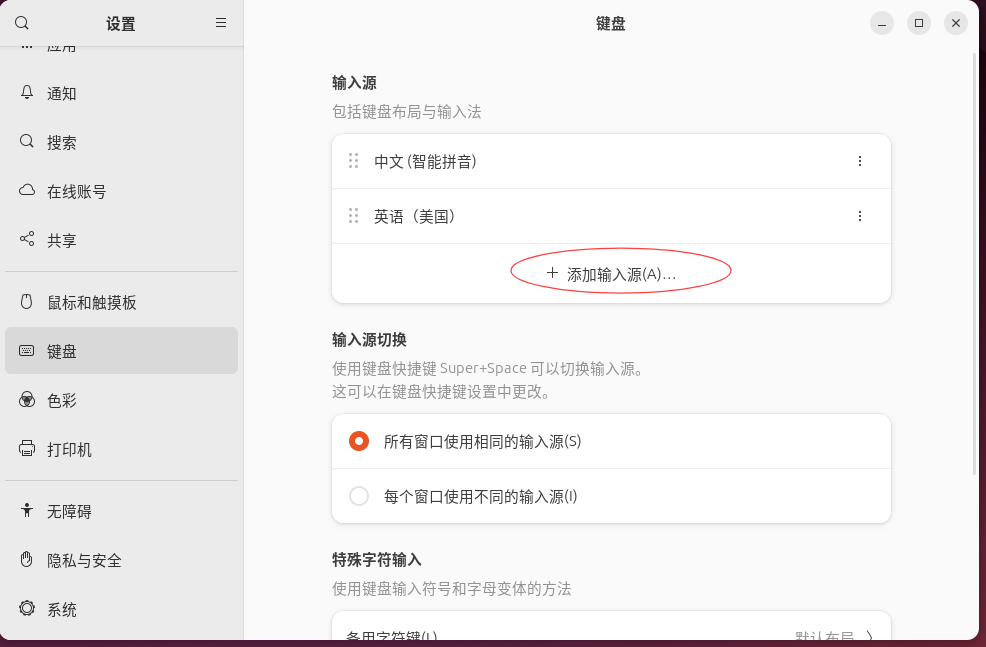
3.设置键盘选择中文拼音
4.设置unbuntu国内镜像源
bash
# 备份原始配置
sudo cp /etc/apt/sources.list.d/ubuntu.sources /etc/apt/sources.list.d/ubuntu.sources.bak

# 编辑配置文件

sudo vim /etc/apt/sources.list.d/ubuntu.sources

#添加如下内容
Types: deb
URIs: https://mirrors.aliyun.com/ubuntu/
Suites: noble noble-updates noble-backports noble-security
Components: main restricted universe multiverse
Signed-By: /usr/share/keyrings/ubuntu-archive-keyring.gpg


#更新软件包列表
sudo apt update
参考
- 下载VirtualBox:https://www.virtualbox.org/wiki/Downloads
- 从清华大学开源软件镜像站下载:ubuntu-22.04.2-desktop-amd64.iso 地址:https://mirrors.tuna.tsinghua.edu.cn/ubuntu-releases/22.04/
- 安装系统,过程与参考可能不一致,配置用户和域名信息后会自动安装 参考:https://blog.csdn.net/weixin_44071580/article/details/126815582
- 设置语言(https://blog.csdn.net/weixin_43959807/article/details/128872860),否则桌面上Terminal无法打开 参考:https://blog.csdn.net/qq_37778018/article/details/120612732 https://blog.csdn.net/weixin_43959807/article/details/128872860
- 自动安装默认NAT转换网络,需要添加一个Host-only网络(左侧选中虚拟机,单击右侧网络,添加即可) 参考:https://blog.csdn.net/jiangbinben/article/details/122942669