前言
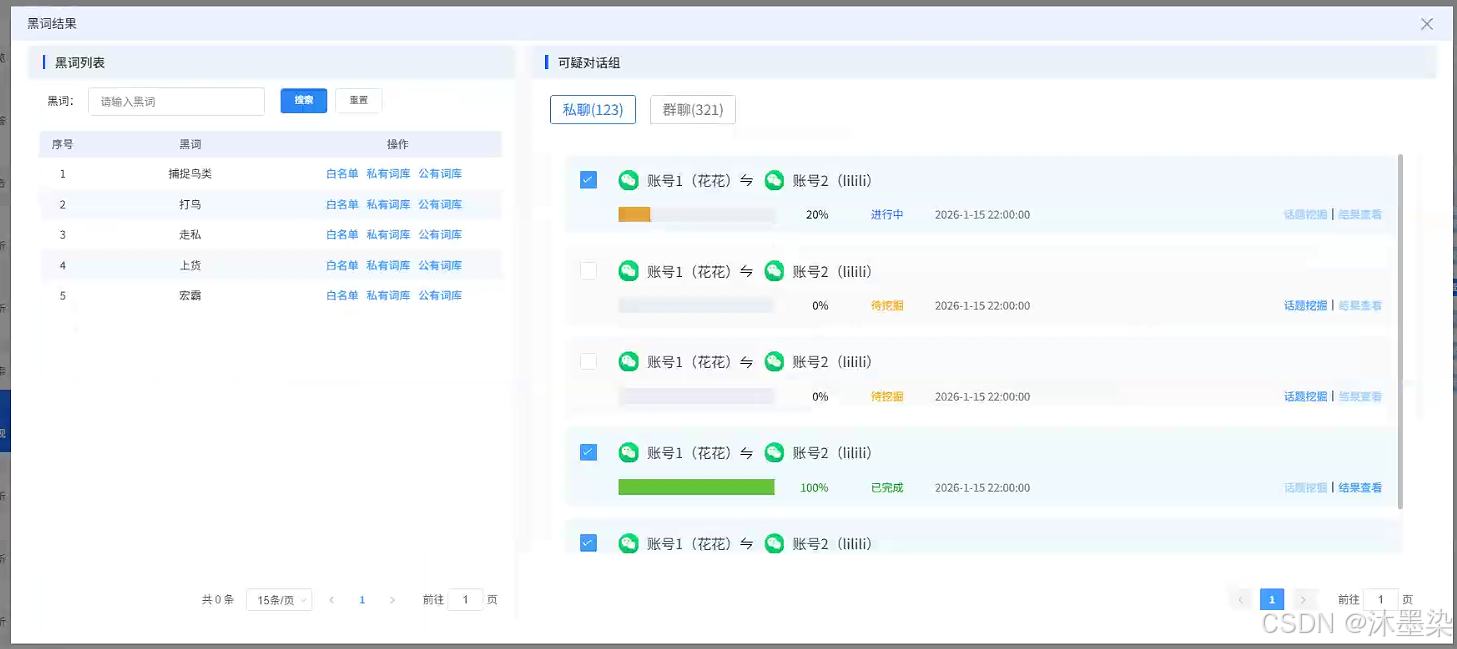
在内容安全、情报分析等领域,黑词(敏感词汇)分析是核心工作之一。本文深入解析一个企业级的黑词分析组件前端实现,该系统采用双面板交互设计 、黑词进度监控 和多维度分析,为安全分析人员提供高效、直观的操作界面。
一、组件概览
1.1 设计理念
并行分析:同时展示黑词列表与可疑对话组
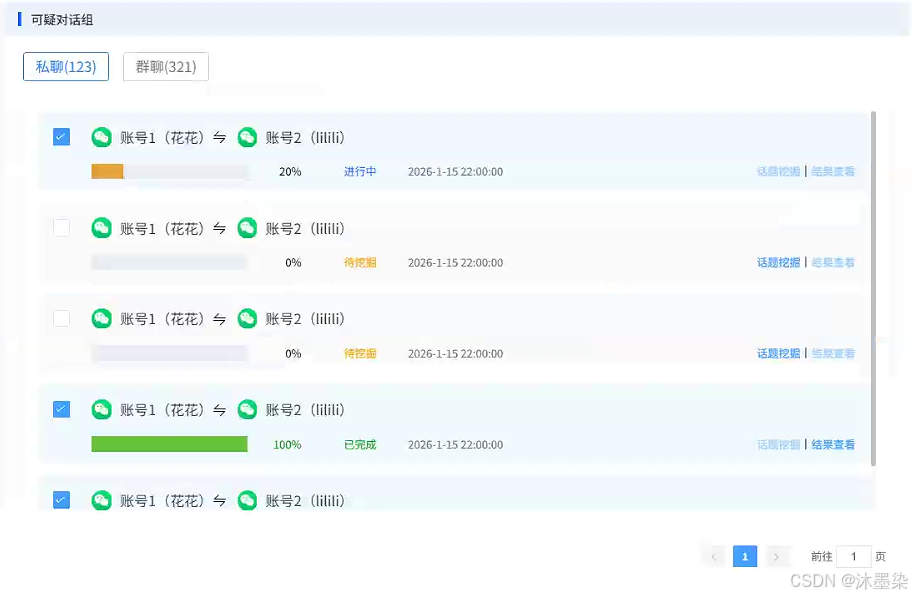
进度反馈:进度条直观展示分析状态
智能筛选:支持关键词搜索与分页展示
任务管理:统一的任务操作与状态管理
1.2 技术栈
html
Vue2 + Element UI + Axios
┌────────────────────────────────────────────┐
│         黑词分析结果对话框组件                │
├────────────────────────────────────────────┤
│  左侧:黑词管理面板 │ 右侧:对话分析面板      │
├────────────────────────────────────────────┤
│    搜索筛选组件   │  进度监控组件        │
├────────────────────────────────────────────┤
│    分页管理组件  │  批量操作控制组件        │
└────────────────────────────────────────────┘
二、组件核心结构
2.1 模态对话框设计
html
<template>
  <aby-dialog v-if="dialogVisible" @closed="dialogClose" :dialogData="dialogData">
    <div slot="content" class="black-word-analysis">
      <!-- 左侧:黑词列表 -->
      <div class="left-panel">
        <!-- 黑词管理界面 -->
      </div>

      <!-- 右侧:可疑对话组 -->
      <div class="right-panel">
        <!-- 对话分析界面 -->
      </div>
    </div>
  </aby-dialog>
</template>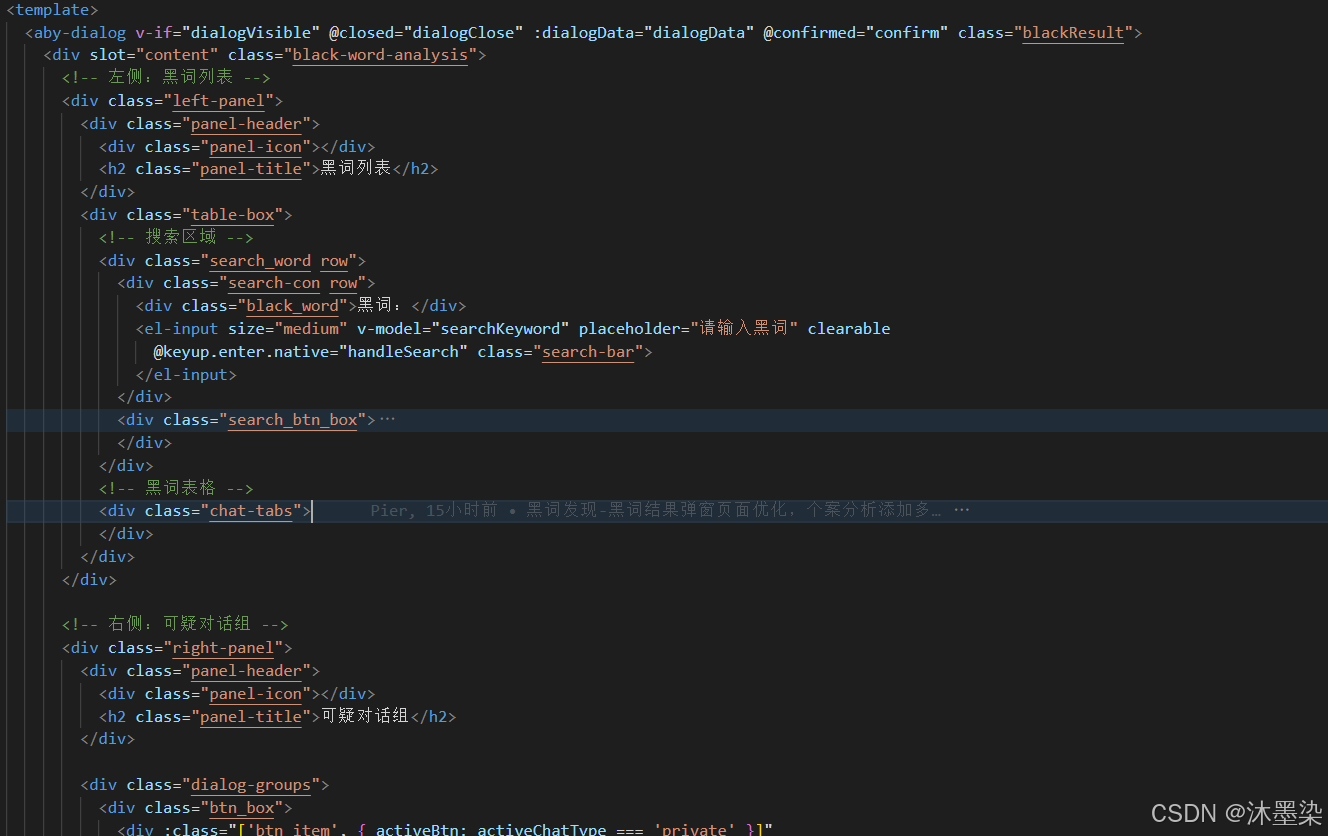
对话框配置
javascript
dialogData: {
  type: "confirm_book",        // 弹框类型
  title: "黑词结果",           // 弹框标题
  width: '90%',                // 宽度占屏幕90%
  top: '5vh',                  // 距离顶部5%
  closeOnPressEscape: false    // 禁用ESC关闭
}
三、左侧面板:黑词列表
3.1 搜索组件
html
<div class="search_word row">
  <!-- 搜索输入框 -->
  <div class="search-con row">
    <div class="black_word">黑词:</div>
    <el-input
      v-model="searchKeyword"
      placeholder="请输入黑词"
      clearable
      @keyup.enter.native="handleSearch"
      class="search-bar"
    >
    </el-input>
  </div>

  <!-- 操作按钮 -->
  <div class="search_btn_box">
    <el-button type="primary" size="small" @click="handleSearch">搜索</el-button>
    <el-button size="small" @click="handleReset">重置</el-button>
  </div>
</div>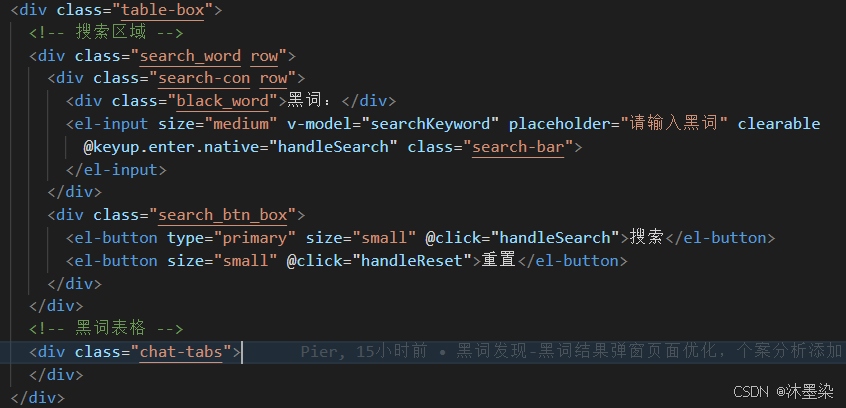
3.2 黑词表格设计
html
<el-table class="list_table" :data="privateWords" stripe v-loading="tableLoading">
  <!-- 序号列 -->
  <el-table-column prop="index" label="序号" width="60" align="center"></el-table-column>

  <!-- 黑词列 -->
  <el-table-column prop="word" label="黑词"></el-table-column>

  <!-- 操作列 -->
  <el-table-column label="操作" align="center">
    <template #default="scope">
      <div class="action-buttons">
        <!-- 白名单操作 -->
        <el-link type="primary" size="small" @click="handleTopicMining(scope.row)">
          白名单
        </el-link>

        <!-- 私有词库操作 -->
        <el-link type="primary" size="small" @click="handleResultView(scope.row)">
          私有词库
        </el-link>

        <!-- 公有词库操作 -->
        <el-link type="primary" size="small" @click="handleResultView(scope.row)">
          公有词库
        </el-link>
      </div>
    </template>
  </el-table-column>
</el-table>
3.3 分页管理
html
<div class="table_pagination">
  <el-pagination
    @size-change="handleSizeChange"
    @current-change="handleCurrentChange"
    :current-page="currentPage"
    :page-sizes="[15, 20, 30, 50]"
    :page-size="15"
    layout="total, sizes, prev, pager, next, jumper"
    :total="tableTotal">
  </el-pagination>
</div>
四、右侧面板:可疑对话组分析
4.1 聊天类型切换
html
<div class="btn_box">
  <!-- 私聊选项卡 -->
  <div :class="['btn_item', { activeBtn: activeChatType === 'private' }]"
       @click="selectBtn('private')">
    私聊(123)
  </div>

  <!-- 群聊选项卡 -->
  <div :class="['btn_item', 'btn_right', { activeBtn: activeChatType === 'group' }]"
       @click="selectBtn('group')">
    群聊(321)
  </div>
</div>
4.2 可疑对话组卡片设计
html
<div :class="['table_item', item.checked ? 'table_item_active' : '']"
     v-for="(item, index) in privateWords" :key="index">

  <!-- 顶部:账号信息 -->
  <div class="table_item_top">
    <!-- 复选框 -->
    <el-checkbox v-model="item.checked" class="table_checkbox"></el-checkbox>

    <!-- 账号信息展示 -->
    <div class="table_item_title">
      <img src="../../../assets/black/微信图片.png" class="wechat_icon">
      <div class="accout_name">账号1(花花)</div>
      <div class="accout_icon"><i class="el-icon-sort"></i></div>
      <img src="../../../assets/black/微信图片.png" class="wechat_icon">
      <div class="accout_name">账号2(lilili)</div>
    </div>
  </div>

  <!-- 底部:进度与操作 -->
  <div class="table_item_bottom row">
    <!-- 左侧:进度信息 -->
    <div class="left-content row">
      <!-- 进度条 -->
      <div class="progress-bar">
        <el-progress :percentage="item.progress"
                     :status="getProgressStatus(item.status)"
                     :show-text="false"
                     class="progress" />
        <span :class="['progress-text', getProgressTextClass(item.status)]">
          {{ item.progress }}%
        </span>
      </div>

      <!-- 状态标签 -->
      <div :class="['table_item_status', getStatusClass(item.status)]">
        {{ item.status }}
      </div>

      <!-- 时间显示 -->
      <div class="table_item_time">{{ item.time }}</div>
    </div>

    <!-- 右侧:操作按钮 -->
    <div class="dialog-actions row">
      <el-link type="primary" size="small"
               :disabled="item.status !== '待挖掘'"
               @click="handleTopicMiningForDialog(group)">
        话题挖掘
      </el-link>
      <div class="line"></div>
      <el-link type="primary" size="small"
               :disabled="item.status !== '已完成'"
               @click="handleResultViewForDialog(group)">
        结果查看
      </el-link>
    </div>
  </div>
</div>
4.3 进度状态管理组件
javascript
// 进度条状态映射
getProgressStatus(status) {
  const statusMap = {
    '已完成': 'success',
    '进行中': 'warning',
    '待挖掘': 'info'
  };
  return statusMap[status] || 'info';
},

// 状态文本样式类
getStatusClass(status) {
  const classMap = {
    '已完成': 'status-success',
    '进行中': 'status-warning',
    '待挖掘': 'status-info'
  };
  return classMap[status] || '';
},

// 进度文本样式类
getProgressTextClass(status) {
  const classMap = {
    '已完成': 'progress-text-success',
    '进行中': 'progress-text-warning',
    '待挖掘': 'progress-text-info'
  };
  return classMap[status] || '';
}
五、数据模拟设计(后期根据后端返回接口数据调整)
javascript
data() {
  return {
    // 私聊黑词列表
    privateWords: [
      {
        index: 1,
        word: '捕捉鸟类',
        type: 'private',
        checked: true,
        progress: 20,
        status: '进行中',
        time: '2026-1-15 22:00:00'
      },
      // ... 更多数据
    ],

    // 群聊黑词列表
    groupWords: [
      { index: 1, word: '捕捉鸟类', type: 'group' },
      // ... 更多数据
    ],

    // 对话组数据
    dialogGroups: [
      {
        account1: { id: 1, name: '花花' },
        account2: { id: 2, name: 'lilii' },
        progress: 0,
        status: '待挖掘',
        time: '2026-1-15 22:00:00'
      },
      // ... 更多数据
    ]
  }
}
5.2 分页与搜索逻辑
javascript
// 搜索处理
handleSearch() {
  console.log('搜索关键词:', this.searchKeyword);
  // 实际开发中可以调用API获取数据

  // 前端过滤示例
  if (this.searchKeyword) {
    this.filteredData = this.privateWords.filter(item =>
      item.word.toLowerCase().includes(this.searchKeyword.toLowerCase())
    );
  } else {
    this.filteredData = [...this.privateWords];
  }
},

// 重置搜索
handleReset() {
  this.searchKeyword = '';
  this.filteredData = [...this.privateWords];
},

// 分页处理
handleSizeChange(val) {
  console.log('每页显示条数:', val);
  this.pageSize = val;
  this.loadTableData();
},

handleCurrentChange(val) {
  console.log('当前页码:', val);
  this.currentPage = val;
  this.loadTableData();
}
六、交互功能实现
6.1 对话框管理
javascript
// 打开对话框
openDialog() {
  this.dialogVisible = true;
  // 可以在这里初始化数据
  this.initDialogData();
},

// 关闭对话框
dialogClose() {
  this.dialogVisible = false;
  this.resetDialogState();
},

// 确认操作
confirm() {
  // 获取选中的黑词
  const selectedWords = this.privateWords.filter(item => item.checked);
  console.log('选中的黑词:', selectedWords);

  // 执行确认逻辑
  this.performConfirmAction(selectedWords);

  // 关闭对话框
  this.dialogClose();
}
6.2 操作功能
javascript
// 话题挖掘
handleTopicMining(row) {
  console.log('进行话题挖掘:', row);
  // 实际开发中可以跳转到话题挖掘页面或打开模态框
  this.$message.info(`对黑词"${row.word}"进行话题挖掘`);
},

// 结果查看
handleResultView(row) {
  console.log('查看结果:', row);
  // 实际开发中可以跳转到结果页面
  this.$message.info(`查看黑词"${row.word}"的分析结果`);
},

// 对话组话题挖掘
handleTopicMiningForDialog(group) {
  console.log('对话组话题挖掘:', group);
  // 根据状态判断是否可操作
  if (group.status !== '待挖掘') {
    this.$message.warning('当前状态无法进行话题挖掘');
    return;
  }

  // 执行话题挖掘
  this.startTopicMining(group);
},

// 对话组结果查看
handleResultViewForDialog(group) {
  console.log('对话组结果查看:', group);
  // 根据状态判断是否可操作
  if (group.status !== '已完成') {
    this.$message.warning('分析未完成,无法查看结果');
    return;
  }

  // 打开结果查看页面
  this.openResultView(group);
}
七、样式设计
7.1 布局
html
.black-word-analysis {
  display: flex;
  gap: 20px;  /* 左右面板间距 */
  height: 100%;
  overflow: hidden;

  /* 左侧面板 */
  .left-panel {
    width: 630px;  /* 固定宽度 */
    background: #ffffff;
    box-shadow: 0px 0px 22px 0px rgba(159, 159, 159, 0.16);
    border-radius: 8px;
  }

  /* 右侧面板 */
  .right-panel {
    width: calc(100% - 630px);  /* 自适应剩余宽度 */
    background: #ffffff;
    box-shadow: 0px 0px 22px 0px rgba(159, 159, 159, 0.16);
    border-radius: 8px;
  }
}
7.2 面板头部设计
html
.panel-header {
  display: flex;
  align-items: center;
  height: 44px;
  background: #edf1f9;
  border-radius: 8px;
  padding: 14px 20px;
  border-bottom-left-radius: 0;
  border-bottom-right-radius: 0;

  .panel-title {
    font-family: Adobe Heiti Std;
    font-weight: 500;
    font-size: 16px;
    color: #333333;
  }

  .panel-icon {
    width: 4px;
    height: 18px;
    background: linear-gradient(-90deg, #387bfc 0%, #0155ff 100%);
    margin-right: 12px;
  }
}
7.3 进度条样式
html
.progress-bar {
  width: 268px;
  height: 100%;
  display: flex;
  align-items: center;

  .el-progress {
    width: calc(100% - 82px);
  }

  .progress {
    width: 100%;
    height: 100%;

    /deep/ .el-progress-bar__outer {
      width: 100%;
      height: 20px !important;  /* 调整进度条高度 */
      border-radius: 0px !important;  /* 直角样式 */
    }

    /deep/ .el-progress-bar__inner {
      border-radius: 0px !important;  /* 直角样式 */
    }
  }

  .progress-text {
    width: 52px;
    font-family: Adobe Heiti Std;
    font-weight: normal;
    font-size: 14px;
    color: #333333;
    margin-left: 30px;
    text-align: end;

    &.progress-text-success {
      color: #00a510;  /* 成功状态颜色 */
    }

    &.progress-text-warning {
      color: #1c68fe;  /* 进行中状态颜色 */
    }

    &.progress-text-info {
      color: #f6a200;  /* 待挖掘状态颜色 */
    }
  }
}
7.4 状态标签样式
html
.table_item_status {
  font-family: Adobe Heiti Std;
  font-weight: normal;
  font-size: 14px;
  margin-left: 54px;

  &.status-success {
    color: #00a510;  /* 成功 */
  }

  &.status-warning {
    color: #1c68fe;  /* 进行中 */
  }

  &.status-info {
    color: #f6a200;  /* 待挖掘 */
  }
}
7.5 选中状态高亮
html
.table_item {
  display: flex;
  flex-direction: column;
  justify-content: space-between;
  width: 100%;
  border-radius: 10px;
  background: #fafafa;
  margin-bottom: 14px;
  padding: 20px 20px 15px;
  transition: background-color 0.3s ease;

  /* 选中状态 */
  &.table_item_active {
    background: rgba(41, 133, 247, 0.06);  /* 浅蓝色背景 */
    border: 1px solid rgba(41, 133, 247, 0.2);  /* 蓝色边框 */
  }
}
最后
这个黑词分析系统前端实现展示了如何设计一个高效、直观的数据分析界面。关键设计亮点包括:
双面板并行设计:同时管理黑词和对话组,提高分析效率
进度监控:直观展示分析状态,便于任务管理
智能交互:根据状态动态控制操作权限
高度可配置:支持多维度筛选和分页管理
优秀用户体验:清晰的视觉层次和即时反馈