Flutter for OpenHarmony 实战:文件加密解密器完整开发指南
文章目录
- [Flutter for OpenHarmony 实战:文件加密解密器完整开发指南](#Flutter for OpenHarmony 实战:文件加密解密器完整开发指南)
-
- 摘要
- 一、项目背景与功能概述
-
- [1.1 文件加密的重要性](#1.1 文件加密的重要性)
- [1.2 应用功能规划](#1.2 应用功能规划)
- [1.3 XOR加密算法](#1.3 XOR加密算法)
- 二、技术选型与架构设计
-
- [2.1 核心技术栈](#2.1 核心技术栈)
- [2.2 应用架构](#2.2 应用架构)
- [2.3 数据流设计](#2.3 数据流设计)
- 三、XOR加密算法实现
-
- [3.1 XOR算法原理](#3.1 XOR算法原理)
- [3.2 算法实现](#3.2 算法实现)
- [3.3 加密示例](#3.3 加密示例)
- 四、文件操作实现
-
- [4.1 选择文件](#4.1 选择文件)
- [4.2 读取文件](#4.2 读取文件)
- [4.3 写入文件](#4.3 写入文件)
- 五、加密功能实现
-
- [5.1 加密流程](#5.1 加密流程)
- [5.2 加密文件命名](#5.2 加密文件命名)
- 六、解密功能实现
-
- [6.1 解密流程](#6.1 解密流程)
- [6.2 解密文件命名](#6.2 解密文件命名)
- 七、UI界面实现
-
- [7.1 文件选择区域](#7.1 文件选择区域)
- [7.2 密码输入区域](#7.2 密码输入区域)
- [7.3 操作按钮区域](#7.3 操作按钮区域)
- [7.4 结果显示区域](#7.4 结果显示区域)
- 八、运行效果与测试
-
- [8.1 项目运行命令](#8.1 项目运行命令)
- [8.2 功能测试清单](#8.2 功能测试清单)
- 九、总结
摘要
欢迎加入开源鸿蒙跨平台社区:开源鸿蒙跨平台开发者社区
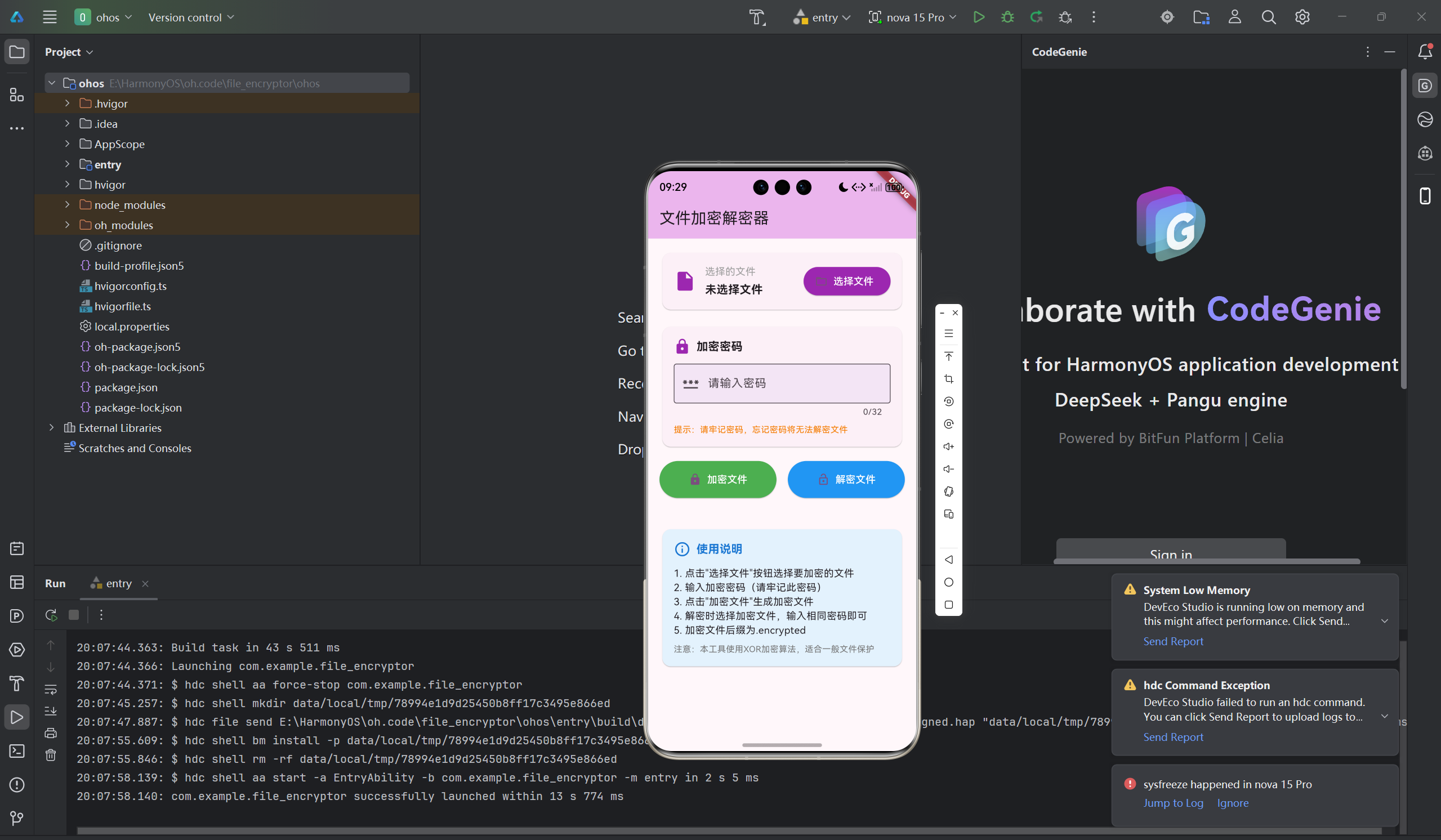
文件加密是保护数据安全的重要手段。本文将详细介绍如何使用Flutter for OpenHarmony框架开发一款功能完整的文件加密解密器应用。文章涵盖了XOR加密算法原理、文件读写操作、密码验证、加密解密流程等核心技术点。通过本文学习,读者将掌握Flutter在鸿蒙平台上开发安全类应用的完整流程,了解对称加密算法的实现方法。
一、项目背景与功能概述
1.1 文件加密的重要性
文件加密是保护敏感数据的重要手段:
- 防止未授权访问
- 保护个人隐私
- 保护商业机密
- 防止数据泄露
1.2 应用功能规划
| 功能模块 | 具体功能 |
|---|---|
| 文件选择 | 选择要加密/解密的文件 |
| 密码设置 | 设置加密密码 |
| 文件加密 | 使用XOR算法加密文件 |
| 文件解密 | 使用相同密码解密文件 |
| 结果显示 | 显示操作结果和输出文件路径 |
1.3 XOR加密算法
XOR(异或)加密是一种对称加密算法:
- 加密和解密使用相同算法
- 简单高效,适合一般文件保护
- 密钥循环使用于整个文件
二、技术选型与架构设计
2.1 核心技术栈
文件操作
- dart:io:File类读写文件
- readAsBytes:读取文件字节
- writeAsBytes:写入文件字节
加密算法
- XOR异或运算
- 密钥循环使用
- 字节级别加密
UI组件
- TextField:密码输入
- ElevatedButton:操作按钮
- Card:信息展示
2.2 应用架构
FileEncryptorApp (应用根组件)
    └── FileEncryptorPage (加密解密页面)
        ├── 文件选择区域
        │   ├── 文件信息显示
        │   └── 选择文件按钮
        ├── 密码输入区域
        │   ├── 密码输入框
        │   └── 密码提示
        ├── 操作按钮区域
        │   ├── 加密按钮
        │   └── 解密按钮
        ├── 结果显示区域
        └── 使用说明
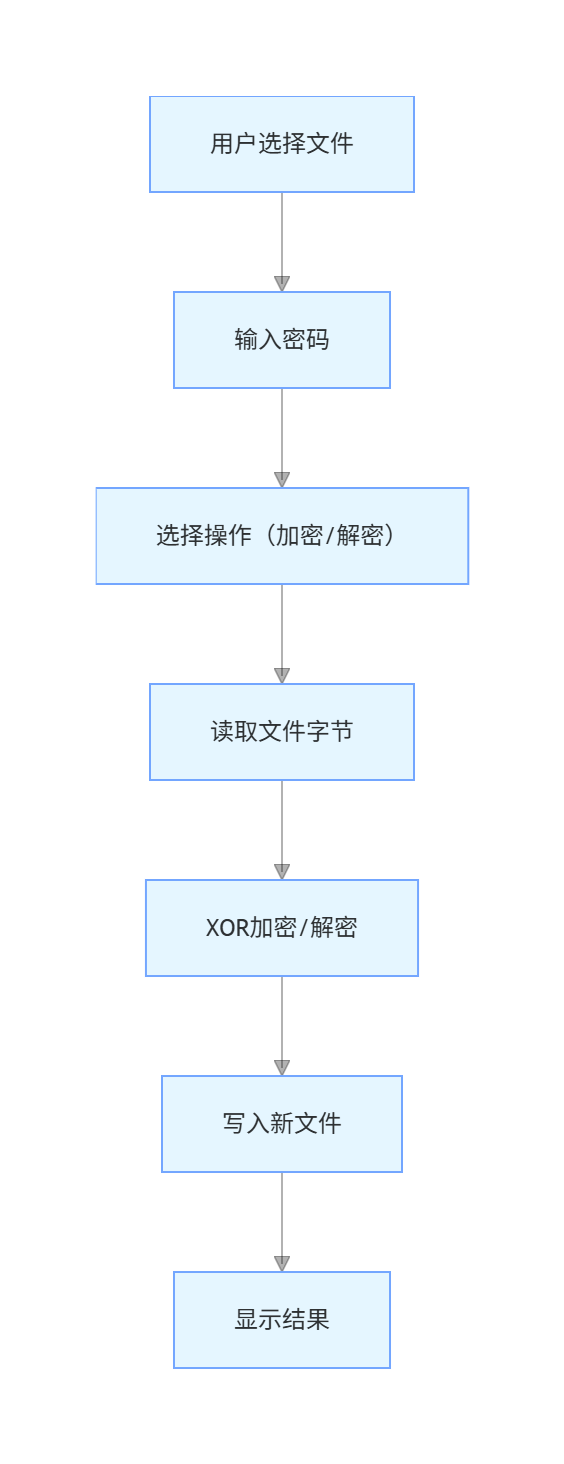
2.3 数据流设计
三、XOR加密算法实现
3.1 XOR算法原理
异或运算规则:
- 0 XOR 0 = 0
- 0 XOR 1 = 1
- 1 XOR 0 = 1
- 1 XOR 1 = 0
特性:
- A XOR B = C,则 C XOR B = A(可逆性)
- 加密和解密使用相同算法
3.2 算法实现
dart
// XOR加密算法
List<int> _xorEncrypt(List<int> data, String password) {
  // 将密码转换为字节数组
  final passwordBytes = utf8.encode(password);
  final result = <int>[];

  // 对每个字节进行XOR运算
  for (int i = 0; i < data.length; i++) {
    result.add(data[i] ^ passwordBytes[i % passwordBytes.length]);
  }

  return result;
}
算法说明
- 密码转换为UTF-8字节数组
- 密钥循环使用(取模运算)
- 每个数据字节与对应密钥字节XOR
3.3 加密示例
原始数据: [0x48, 0x65, 0x6C, 0x6C]  // "Hell"
密码: "abc"
密码字节: [0x61, 0x62, 0x63]

加密过程:
0x48 XOR 0x61 = 0x29  // 'H' XOR 'a'
0x65 XOR 0x62 = 0x07  // 'e' XOR 'b'
0x6C XOR 0x63 = 0x0F  // 'l' XOR 'c'
0x6C XOR 0x61 = 0x0D  // 'l' XOR 'a'

加密结果: [0x29, 0x07, 0x0F, 0x0D]
四、文件操作实现
4.1 选择文件
dart
Future<void> _selectFile() async {
  final controller = TextEditingController();

  if (!mounted) return;

  showDialog(
    context: context,
    builder: (context) => AlertDialog(
      title: const Text('选择文件'),
      content: TextField(
        controller: controller,
        decoration: const InputDecoration(
          labelText: '文件路径',
          hintText: '输入文件的完整路径',
          border: OutlineInputBorder(),
        ),
      ),
      actions: [
        TextButton(
          onPressed: () => Navigator.pop(context),
          child: const Text('取消'),
        ),
        TextButton(
          onPressed: () {
            if (controller.text.isNotEmpty) {
              final file = File(controller.text);
              if (file.existsSync()) {
                setState(() {
                  _selectedFilePath = controller.text;
                  _selectedFileName = controller.text.split(Platform.pathSeparator).last;
                });
                Navigator.pop(context);
              } else {
                ScaffoldMessenger.of(context).showSnackBar(
                  const SnackBar(content: Text('文件不存在')),
                );
              }
            }
          },
          child: const Text('确定'),
        ),
      ],
    ),
  );
}
4.2 读取文件
dart
final inputFile = File(_selectedFilePath);
final bytes = await inputFile.readAsBytes();
4.3 写入文件
dart
final outputFile = File(outputPath);
await outputFile.writeAsBytes(encryptedBytes);
五、加密功能实现
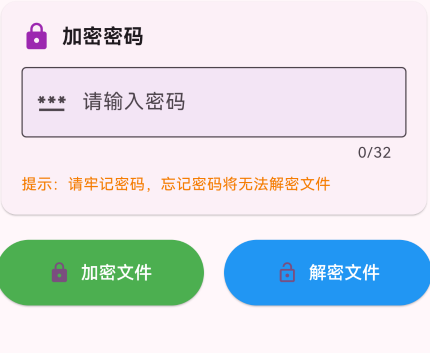
5.1 加密流程
dart
Future<void> _encryptFile() async {
  // 验证输入
  if (_selectedFilePath.isEmpty) {
    _showMessage('请先选择文件', Colors.orange);
    return;
  }

  if (_passwordController.text.isEmpty) {
    _showMessage('请输入密码', Colors.orange);
    return;
  }

  setState(() {
    _isProcessing = true;
    _resultMessage = '正在加密...';
  });

  try {
    // 1. 读取文件
    final inputFile = File(_selectedFilePath);
    final bytes = await inputFile.readAsBytes();

    // 2. XOR加密
    final encryptedBytes = _xorEncrypt(bytes, _passwordController.text);

    // 3. 生成加密文件路径
    final outputPath = '$_selectedFilePath.encrypted';
    final outputFile = File(outputPath);
    await outputFile.writeAsBytes(encryptedBytes);

    // 4. 显示结果
    setState(() {
      _resultMessage = '加密成功!\n加密文件: ${outputPath.split(Platform.pathSeparator).last}';
    });
    _showMessage('加密成功!', Colors.green);
  } catch (e) {
    setState(() {
      _resultMessage = '加密失败: $e';
    });
    _showMessage('加密失败', Colors.red);
  } finally {
    setState(() {
      _isProcessing = false;
    });
  }
}
5.2 加密文件命名
原文件: test.txt
加密后: test.txt.encrypted

原文件: document.pdf
加密后: document.pdf.encrypted
六、解密功能实现
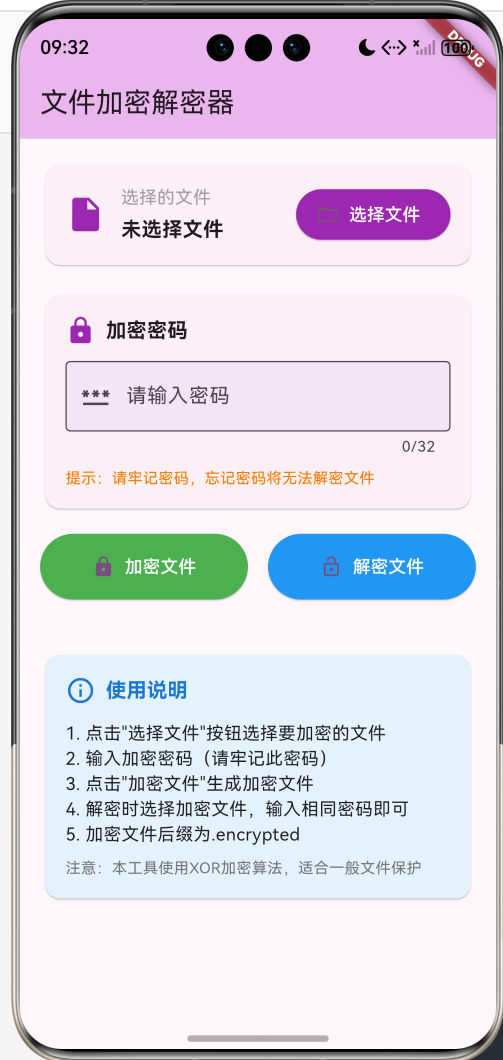
6.1 解密流程
dart
Future<void> _decryptFile() async {
  // 验证输入
  if (_selectedFilePath.isEmpty) {
    _showMessage('请先选择文件', Colors.orange);
    return;
  }

  if (_passwordController.text.isEmpty) {
    _showMessage('请输入密码', Colors.orange);
    return;
  }

  setState(() {
    _isProcessing = true;
    _resultMessage = '正在解密...';
  });

  try {
    // 1. 读取加密文件
    final inputFile = File(_selectedFilePath);
    final bytes = await inputFile.readAsBytes();

    // 2. XOR解密(XOR是对称的)
    final decryptedBytes = _xorEncrypt(bytes, _passwordController.text);

    // 3. 生成解密文件路径
    String outputPath;
    if (_selectedFilePath.endsWith('.encrypted')) {
      outputPath = _selectedFilePath.substring(0, _selectedFilePath.length - '.encrypted'.length);
      outputPath += '.decrypted';
    } else {
      outputPath = '$_selectedFilePath.decrypted';
    }

    // 4. 写入解密文件
    final outputFile = File(outputPath);
    await outputFile.writeAsBytes(decryptedBytes);

    // 5. 显示结果
    setState(() {
      _resultMessage = '解密成功!\n解密文件: ${outputPath.split(Platform.pathSeparator).last}';
    });
    _showMessage('解密成功!', Colors.green);
  } catch (e) {
    setState(() {
      _resultMessage = '解密失败: $e';
    });
    _showMessage('解密失败,密码可能错误', Colors.red);
  } finally {
    setState(() {
      _isProcessing = false;
    });
  }
}
6.2 解密文件命名
加密文件: test.txt.encrypted
解密后: test.txt.decrypted

加密文件: data.encrypted
解密后: data.decrypted
七、UI界面实现
7.1 文件选择区域
dart
Card(
  child: Padding(
    padding: const EdgeInsets.all(16),
    child: Column(
      crossAxisAlignment: CrossAxisAlignment.start,
      children: [
        Row(
          children: [
            const Icon(Icons.insert_drive_file, size: 32, color: Colors.purple),
            const SizedBox(width: 12),
            Expanded(
              child: Column(
                crossAxisAlignment: CrossAxisAlignment.start,
                children: [
                  const Text('选择的文件'),
                  const SizedBox(height: 4),
                  Text(
                    _selectedFileName,
                    style: const TextStyle(
                      fontSize: 16,
                      fontWeight: FontWeight.bold,
                    ),
                  ),
                  if (_selectedFilePath.isNotEmpty)
                    Text(
                      _selectedFilePath,
                      style: TextStyle(
                        fontSize: 12,
                        color: Colors.grey.shade600,
                      ),
                      maxLines: 2,
                      overflow: TextOverflow.ellipsis,
                    ),
                ],
              ),
            ),
            const SizedBox(width: 12),
            ElevatedButton.icon(
              onPressed: _isProcessing ? null : _selectFile,
              icon: const Icon(Icons.folder_open),
              label: const Text('选择文件'),
              style: ElevatedButton.styleFrom(
                backgroundColor: Colors.purple,
                foregroundColor: Colors.white,
              ),
            ),
          ],
        ),
      ],
    ),
  ),
)
7.2 密码输入区域
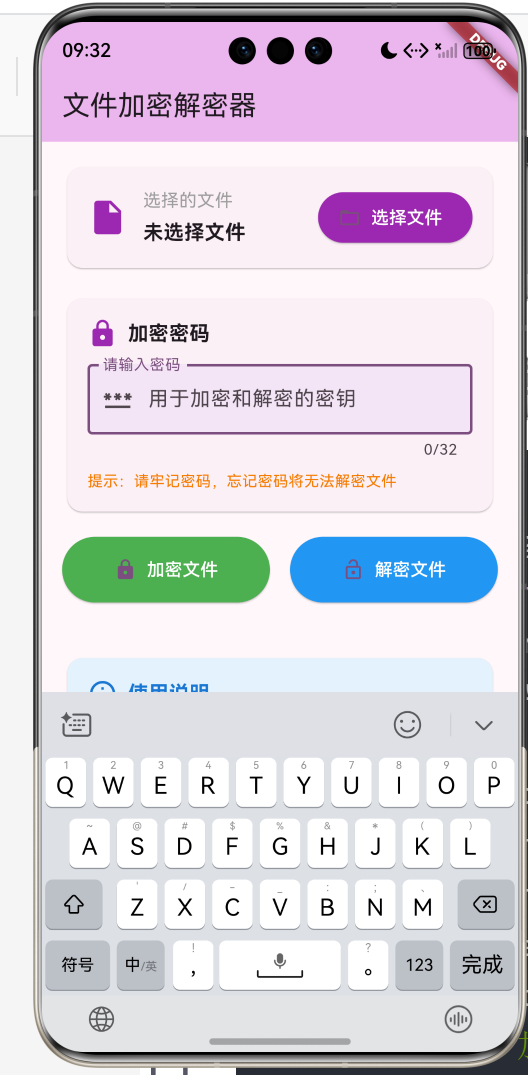
dart
Card(
  child: Padding(
    padding: const EdgeInsets.all(16),
    child: Column(
      crossAxisAlignment: CrossAxisAlignment.start,
      children: [
        const Row(
          children: [
            Icon(Icons.lock, size: 24, color: Colors.purple),
            SizedBox(width: 8),
            Text(
              '加密密码',
              style: TextStyle(
                fontSize: 16,
                fontWeight: FontWeight.bold,
              ),
            ),
          ],
        ),
        const SizedBox(height: 12),
        TextField(
          controller: _passwordController,
          obscureText: true,
          decoration: InputDecoration(
            labelText: '请输入密码',
            hintText: '用于加密和解密的密钥',
            prefixIcon: const Icon(Icons.password),
            border: const OutlineInputBorder(),
            filled: true,
            fillColor: Colors.purple.shade50,
          ),
          maxLength: 32,
        ),
        const SizedBox(height: 8),
        Text(
          '提示:请牢记密码,忘记密码将无法解密文件',
          style: TextStyle(
            fontSize: 12,
            color: Colors.orange.shade700,
          ),
        ),
      ],
    ),
  ),
)
7.3 操作按钮区域
dart
Row(
  children: [
    Expanded(
      child: ElevatedButton.icon(
        onPressed: _isProcessing ? null : _encryptFile,
        icon: const Icon(Icons.lock),
        label: const Text('加密文件'),
        style: ElevatedButton.styleFrom(
          backgroundColor: Colors.green,
          foregroundColor: Colors.white,
          padding: const EdgeInsets.symmetric(vertical: 16),
        ),
      ),
    ),
    const SizedBox(width: 16),
    Expanded(
      child: ElevatedButton.icon(
        onPressed: _isProcessing ? null : _decryptFile,
        icon: const Icon(Icons.lock_open),
        label: const Text('解密文件'),
        style: ElevatedButton.styleFrom(
          backgroundColor: Colors.blue,
          foregroundColor: Colors.white,
          padding: const EdgeInsets.symmetric(vertical: 16),
        ),
      ),
    ),
  ],
)
7.4 结果显示区域
dart
if (_resultMessage.isNotEmpty)
  Card(
    color: _resultMessage.contains('成功')
        ? Colors.green.shade50
        : Colors.red.shade50,
    child: Padding(
      padding: const EdgeInsets.all(16),
      child: Column(
        crossAxisAlignment: CrossAxisAlignment.start,
        children: [
          Row(
            children: [
              Icon(
                _resultMessage.contains('成功')
                    ? Icons.check_circle
                    : Icons.error,
                color: _resultMessage.contains('成功')
                    ? Colors.green
                    : Colors.red,
              ),
              const SizedBox(width: 8),
              const Text(
                '处理结果',
                style: TextStyle(
                  fontSize: 16,
                  fontWeight: FontWeight.bold,
                ),
              ),
            ],
          ),
          const SizedBox(height: 12),
          Text(_resultMessage),
        ],
      ),
    ),
  )
八、运行效果与测试
8.1 项目运行命令
bash
cd E:\HarmonyOS\oh.code\file_encryptor
flutter run -d ohos
8.2 功能测试清单
文件选择测试
- 点击选择文件按钮弹出对话框
- 输入正确路径显示文件名
- 输入不存在路径提示错误
密码输入测试
- 密码框隐藏输入内容
- 密码长度限制32位
- 密码提示显示正常
加密功能测试
- 选择文件后可加密
- 无密码时提示错误
- 加密生成.encrypted文件
- 加密成功显示绿色提示
解密功能测试
- 选择加密文件可解密
- 正确密码解密成功
- 错误密码解密失败
- 解密生成.decrypted文件
处理状态测试
- 处理中显示进度提示
- 处理中按钮禁用
- 处理完成显示结果
九、总结
本文详细介绍了使用Flutter for OpenHarmony开发文件加密解密器的完整过程,涵盖了以下核心技术点:
- XOR加密算法:对称加密、密钥循环使用
- 文件操作:读写文件字节流
- 密码验证:输入验证、安全提示
- 加密流程:读取、加密、写入
- 解密流程:读取、解密、写入
- UI交互:文件选择、密码输入、结果显示
这个项目展示了Flutter在安全类应用开发中的完整流程,代码结构清晰,功能实用。读者可以基于此项目添加更多功能,如:
- AES等更强加密算法
- 文件拖放选择
- 批量加密解密
- 加密进度显示
- 密码强度检测
- 加密文件预览
通过本文的学习,读者应该能够独立开发类似的安全应用,掌握Flutter在鸿蒙平台上的加密算法实现技巧。
欢迎加入开源鸿蒙跨平台社区 : 开源鸿蒙跨平台开发者社区