文章目录
-
- 资源创建
- 资源加载
-
-
- [Drawable 资源加载流程](#Drawable 资源加载流程)
- [Color 资源加载流程](#Color 资源加载流程)
- 应用图标资源加载流程
-
- AssetManager
基于 Android U
在使用一般资源时,我们通过 Context 上下文类获取 Resources 类,然后通过资源管理类(Resources)加载资源文件,在 Resources 类内部的 impl(ResourcesImpl) 进行加载资源,而 ResourcesImpl 内部则通过 AssetManager 进行资源真正的加载操作;AssetManager 内部主要是 native 方法,所以资源的加载操作主要在 native 层进行的。
而与 style 相关的资源则是通过 Theme 进行加载,Theme 同样由 Context 上下文类获取,Theme 同时也是 Resources 的内部类,Theme 内部通过 ThemeImpl 进行 style 资源的操作,而 ThemeImpl 是 ResourcesImpl 的内部类,在 ThemeImpl 内引用着 ResourcesImpl 的 mAssets(AssetManager)对象,所以通过 Theme 加载 style 资源时,同样是通过 AssetManager 进行加载,并将加载的数据通过 TypedArray 数组进行返回;
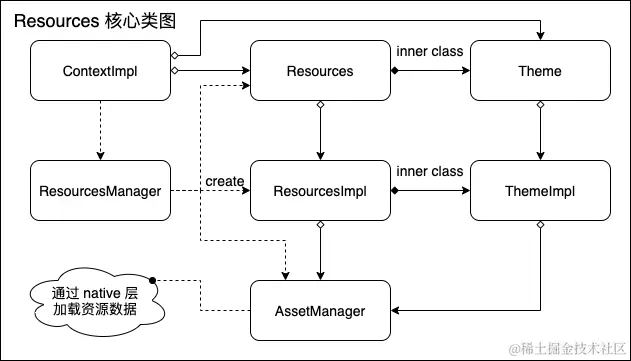
资源创建
创建 System 的 Resources
Zygote 初始化时会对资源进行预加载。
java
frameworks/base/core/java/com/android/internal/os/ZygoteInit.java

private static void preloadResources() {
    try {
        mResources = Resources.getSystem();
        mResources.startPreloading();

        ... // 系统资源加载,代码省略

        mResources.finishPreloading();
    } catch (RuntimeException e) {
        Log.w(TAG, "Failure preloading resources", e);
    }
}
在 Zygote 初始化时 mSystem 就被赋值了。所有的应用程序都是从 Zygote 进程 fork 而来的,这意味着所有进程中的 mSystem 引用的 Resources 实例在整个 Android 系统中是共享的,这部分其实也就是 framework 的资源。
通过 Resources.getSystem().getX() 调用资源时,就是在调用 framework 的资源。
java
frameworks/base/core/java/android/content/res/Resources.java

public static Resources getSystem() {
    synchronized (sSync) {
        Resources ret = mSystem;
        if (ret == null) {
            ret = new Resources();
            mSystem = ret;
        }
        return ret;
    }
}

private Resources() {
    this(null);

    final DisplayMetrics metrics = new DisplayMetrics();
    metrics.setToDefaults();

    final Configuration config = new Configuration();
    config.setToDefaults();

    mResourcesImpl = new ResourcesImpl(AssetManager.getSystem(), metrics, config,
                                       new DisplayAdjustments());
}
Resources.getSystem() 方法会对 mSystem 初始化,创建 ResourcesImpl 实例时传入的 AssetManager 是通过 AssetManager.getSystem() 获取的,会加载 framework-res.apk。
创建 Application Context 的 Resources
java
frameworks/base/core/java/android/app/ContextImpl.java

static ContextImpl createAppContext(ActivityThread mainThread, LoadedApk packageInfo,
                                    String opPackageName) {
    if (packageInfo == null) throw new IllegalArgumentException("packageInfo");
    ContextImpl context = new ContextImpl(null, mainThread, packageInfo,
                                          ContextParams.EMPTY, null, null, null, null, null, 0, null, opPackageName);
    context.setResources(packageInfo.getResources());  // 1
    context.mContextType = isSystemOrSystemUI(context) ? CONTEXT_TYPE_SYSTEM_OR_SYSTEM_UI
        : CONTEXT_TYPE_NON_UI;
    return context;
}
注释1处创建 Resources 对象,并赋值给 ContextImpl。
- 创建 Resources 对象
java
frameworks/base/core/java/android/app/LoadedApk.java

public Resources getResources() {
    if (mResources == null) {
        ...
        mResources = ResourcesManager.getInstance().getResources(...);  // 1
    }
    return mResources;
}
注释1处调用 ResourcesManager#getResources。
java
frameworks/base/core/java/android/app/ResourcesManager.java

public Resources getResources(
    @Nullable IBinder activityToken,
    @Nullable String resDir,
    @Nullable String[] splitResDirs,
    @Nullable String[] legacyOverlayDirs,
    @Nullable String[] overlayPaths,
    @Nullable String[] libDirs,
    @Nullable Integer overrideDisplayId,
    @Nullable Configuration overrideConfig,
    @NonNull CompatibilityInfo compatInfo,
    @Nullable ClassLoader classLoader,
    @Nullable List<ResourcesLoader> loaders) {
    try {
        ...
        final ResourcesKey key = new ResourcesKey(
            resDir,
            splitResDirs,
            combinedOverlayPaths(legacyOverlayDirs, overlayPaths),
            libDirs,
            overrideDisplayId != null ? overrideDisplayId : INVALID_DISPLAY,
            overrideConfig,
            compatInfo,
            loaders == null ? null : loaders.toArray(new ResourcesLoader[0]));  // 1
        classLoader = classLoader != null ? classLoader : ClassLoader.getSystemClassLoader();

        // Preload the ApkAssets required by the key to prevent performing heavy I/O while the
        // ResourcesManager lock is held.
        final ApkAssetsSupplier assetsSupplier = createApkAssetsSupplierNotLocked(key);  // 2

        ...

        Resources resources;
        if (activityToken != null) {
            Configuration initialOverrideConfig = new Configuration(key.mOverrideConfiguration);
            rebaseKeyForActivity(activityToken, key, overrideDisplayId != null);
            resources = createResourcesForActivity(activityToken, key, initialOverrideConfig,
                                                   overrideDisplayId, classLoader, assetsSupplier);
        } else {
            resources = createResources(key, classLoader, assetsSupplier);  // 3
        }
        return resources;
    } finally {
        Trace.traceEnd(Trace.TRACE_TAG_RESOURCES);
    }
}
注释1处创建 key,用于缓存 resources 对象。
注释2处创建 APK 加载资源的内存表示,同时防止 GC 回收,用于 C++ 交互。
注释3处创建 Resources。
java
frameworks/base/core/java/android/app/ResourcesManager.java

private Resources createResources(@NonNull ResourcesKey key, @NonNull ClassLoader classLoader,
                                  @Nullable ApkAssetsSupplier apkSupplier) {
    synchronized (mLock) {
        ...

        ResourcesImpl resourcesImpl = findOrCreateResourcesImplForKeyLocked(key, apkSupplier);  // 1
        if (resourcesImpl == null) {
            return null;
        }

        return createResourcesLocked(classLoader, resourcesImpl, key.mCompatInfo);  // 2
    }
}
注释1处创建 / 获取 ResourcesImpl 对象。
注释2处创建 Resources 对象。
java
frameworks/base/core/java/android/app/ResourcesManager.java

// 第一部分,创建ResourcesImpl
private @Nullable ResourcesImpl findOrCreateResourcesImplForKeyLocked(
        @NonNull ResourcesKey key, @Nullable ApkAssetsSupplier apkSupplier) {
    // 1.1 从缓存加载ResourcesImpl
    ResourcesImpl impl = findResourcesImplForKeyLocked(key);
    if (impl == null) {
        // 1.2 创建ResourcesImpl
        impl = createResourcesImpl(key, apkSupplier);
        if (impl != null) {
            // 1.3 将创建的ResourcesImpl对象放入缓存
            mResourceImpls.put(key, new WeakReference<>(impl));
        }
    }
    return impl;
}

private @Nullable ResourcesImpl createResourcesImpl(@NonNull ResourcesKey key,
        @Nullable ApkAssetsSupplier apkSupplier) {
    // 1.2.1 创建AssetManager
    final AssetManager assets = createAssetManager(key, apkSupplier);
    if (assets == null) {
        return null;
    }

    final DisplayAdjustments daj = new DisplayAdjustments(key.mOverrideConfiguration);
    daj.setCompatibilityInfo(key.mCompatInfo);

    final Configuration config = generateConfig(key);
    final DisplayMetrics displayMetrics = getDisplayMetrics(generateDisplayId(key), daj);
    // 1.2.2 创建ResourcesImpl
    final ResourcesImpl impl = new ResourcesImpl(assets, displayMetrics, config, daj);

    if (DEBUG) {
        Slog.d(TAG, "- creating impl=" + impl + " with key: " + key);
    }
    return impl;
}

// 第二部分,创建Resources
private @NonNull Resources createResourcesLocked(@NonNull ClassLoader classLoader,
        @NonNull ResourcesImpl impl, @NonNull CompatibilityInfo compatInfo) {
    cleanupReferences(mResourceReferences, mResourcesReferencesQueue);

    // 2.1 创建Resources对象
    Resources resources = compatInfo.needsCompatResources() ? new CompatResources(classLoader)
        : new Resources(classLoader);
    // 2.2 将impl设置到Resources内
    resources.setImpl(impl);
    resources.setCallbacks(mUpdateCallbacks);
    // 2.3 将resources放入缓存内
    mResourceReferences.add(new WeakReference<>(resources, mResourcesReferencesQueue));
    ...
    return resources;
}- 将 Resources 赋值给 ContextImpl 的 mResources 对象
java
frameworks/base/core/java/android/app/ContextImpl.java

void setResources(Resources r) {
    if (r instanceof CompatResources) {
        ((CompatResources) r).setContext(this);
    }
    mResources = r;  // 1
}
注释1处将 resources 赋值给 ContextImpl 的 mResources 对象。
-
总结
Resources 资源管理对象的创建,主要分为7个步骤:
-
创建 ContextImpl 时,同步会创建相关的 Resources 对象,并将 Resources 赋值给 mResources 对象;
-
通过 ResourcesManager 的 getResources 方法创建 Resources 对象;
-
创建 ResourcesKey 对象,作为缓存 key 和记录 Resource 相关的信息;
-
创建 ApkAssetsSupplier 对象,内部维护了一个 Map 集合,用于缓存不同目录下的资源数据,Key 为 Appkey(目录path生成),Value 为 ApkAssets 的 Map;
-
创建 AssetManager,用于和 native 层进行交互;
-
创建 ResourceImpl,作为 Resources 的实现类;
-
创建 Resources,并将 resources 设置到 ContextImpl;
非 Activity 类型的 Resources 最终会通过 ResourcesManager#createResourcesLocked 创建。
-
创建 Activity Context 的 Resources
前置信息
-
ActivityResources
javaprivate static class ActivityResources { public final Configuration overrideConfig = new Configuration(); public final ArrayList<ActivityResource> activityResources = new ArrayList<>(); ... }包含了与一个 Activity 或者 WindowContext 相关联的基础 Configuration 和 Resources 集合。
这也就是说,每一个 Activity 或者 WindowContext,都可能对应多个 Resources。在创建一个 Activity 或者 WindowContext 的时候,系统都会为其创建一个 ActivityResources 对象,这个 ActivityResources 的作用之一就是通过 activityResources 变量为 Activity 或者 WindowContext 保存与之联系的所有 Resources 对象。overrideConfig 成员变量会被应用到 ActivityResources.activityResources 队列中的所有 Resources 的 Configuration。
-
ActivityResource
javaprivate static class ActivityResource { public final Configuration overrideConfig = new Configuration(); @Nullable public WeakReference<Resources> resources; ... }ActivityResource 就是对 Resources 的一层封装。resources,即当前 ActivityResource 对象保存的那个 Resources 对象的弱引用。overrideConfig 保存了一个 Activity 或者 WindowContext 对象创建的时候的初始 Configuration,这个变量在 Configuration 更新的时候不会被新传入的 Configuration 覆盖掉。
-
ResourceManager
用于管理 App 所有的 resources,内部有一个
mActivityResourceReferencesmap 保存着所有 Activity或者 WindowToken 对应的 Resources 对象。javaprivate final WeakHashMap<IBinder, ActivityResources> mActivityResourceReferences = new WeakHashMap<>();
创建流程
java
frameworks/base/core/java/android/app/ContextImpl.java

static ContextImpl createActivityContext(ActivityThread mainThread,
                                         LoadedApk packageInfo, ActivityInfo activityInfo, IBinder activityToken, int displayId,
                                         Configuration overrideConfiguration) {
    ...
    String[] splitDirs = packageInfo.getSplitResDirs();  // 1
    ClassLoader classLoader = packageInfo.getClassLoader();  // 2
    ...
    ContextImpl context = new ContextImpl(null, mainThread, packageInfo, ContextParams.EMPTY,
                                          attributionTag, null, activityInfo.splitName, activityToken, null, 0, classLoader,
                                          null);  // 3
    ...
    final ResourcesManager resourcesManager = ResourcesManager.getInstance();  // 4

    // Create the base resources for which all configuration contexts for this Activity
    // will be rebased upon.
    context.setResources(resourcesManager.createBaseTokenResources(activityToken,
                                                                   packageInfo.getResDir(),
                                                                   splitDirs,
                                                                   packageInfo.getOverlayDirs(),
                                                                   packageInfo.getOverlayPaths(),
                                                                   packageInfo.getApplicationInfo().sharedLibraryFiles,
                                                                   displayId,
                                                                   overrideConfiguration,
                                                                   compatInfo,
                                                                   classLoader,
                                                                   packageInfo.getApplication() == null ? null
                                                                   : packageInfo.getApplication().getResources().getLoaders()));  // 5
    context.setDisplay(resourcesManager.getAdjustedDisplay(
        displayId, context.getResources()));
    return context;
}
注释1、2处获取当前的分辨率文件、ClassLoader。
注释3处初始化 ContextImpl。
注释4、5处获取 ResourcesManager 单例对象,然后使用其 createBaseTokenResources() 去创建最终的 Resources。接着将 Resources 对象保存到 Context 中,即赋值给 ContextImpl.mResources。
java
frameworks/base/core/java/android/app/ResourcesManager.java

public @Nullable Resources createBaseTokenResources(@NonNull IBinder token,
                                                        @Nullable String resDir,
                                                        @Nullable String[] splitResDirs,
                                                        @Nullable String[] legacyOverlayDirs,
                                                        @Nullable String[] overlayPaths,
                                                        @Nullable String[] libDirs,
                                                        int displayId,
                                                        @Nullable Configuration overrideConfig,
                                                        @NonNull CompatibilityInfo compatInfo,
                                                        @Nullable ClassLoader classLoader,
                                                        @Nullable List<ResourcesLoader> loaders) {
    try {
        Trace.traceBegin(Trace.TRACE_TAG_RESOURCES,
                         "ResourcesManager#createBaseActivityResources");
        final ResourcesKey key = new ResourcesKey(
            resDir,
            splitResDirs,
            combinedOverlayPaths(legacyOverlayDirs, overlayPaths),
            libDirs,
            displayId,
            overrideConfig,
            compatInfo,
            loaders == null ? null : loaders.toArray(new ResourcesLoader[0]));
        classLoader = classLoader != null ? classLoader : ClassLoader.getSystemClassLoader();
        ...
        synchronized (mLock) {
            // Force the creation of an ActivityResourcesStruct.
            getOrCreateActivityResourcesStructLocked(token);  // 1
        }

        // Update any existing Activity Resources references.
        updateResourcesForActivity(token, overrideConfig, displayId);  // 2

        synchronized (mLock) {
            Resources resources = findResourcesForActivityLocked(token, key,
                                                                 classLoader);  // 3
            if (resources != null) {
                return resources;
            }
        }

        // Now request an actual Resources object.
        return createResourcesForActivity(token, key,
                                          /* initialOverrideConfig */ Configuration.EMPTY, /* overrideDisplayId */ null,
                                          classLoader, /* apkSupplier */ null);  // 4
    } finally {
        Trace.traceEnd(Trace.TRACE_TAG_RESOURCES);
    }
}
注释1处创建对应的 ActivityResources 对象。
注释2处更新该 token 对应的 resources。
注释3处查找当前 Activity 对应的 resources 对象,存在则复用。如果不存在,注释4处创建。
该方法内部会经历如下步骤:
-
先查找或创建当前 token(activity) 对应的 resources。
找到了,什么都不做;
没找到,创建一个 ActivityResources 对象,并将其添加到
mActivityResourceReferencesmap 中。 -
更新该 activity 对应的 resources(内部会再执行第一步)。
-
再次查找当前 activity 对应的 resources,如果找到,则直接返回。
-
如果没找到,则重新创建一个 resources(内部会再执行第一步)。
-
getOrCreateActivityResourcesStructLocked
javaframeworks/base/core/java/android/app/ResourcesManager.java private ActivityResources getOrCreateActivityResourcesStructLocked( @NonNull IBinder activityToken) { ActivityResources activityResources = mActivityResourceReferences.get(activityToken); if (activityResources == null) { activityResources = new ActivityResources(); mActivityResourceReferences.put(activityToken, activityResources); } return activityResources; } -
updateResourcesForActivity
javaframeworks/base/core/java/android/app/ResourcesManager.java public void updateResourcesForActivity(@NonNull IBinder activityToken, @Nullable Configuration overrideConfig, int displayId) { try { ... synchronized (mLock) { final ActivityResources activityResources = getOrCreateActivityResourcesStructLocked(activityToken); boolean movedToDifferentDisplay = activityResources.overrideDisplayId != displayId; if (Objects.equals(activityResources.overrideConfig, overrideConfig) && !movedToDifferentDisplay) { // 1 // They are the same and no change of display id, no work to do. return; } // Grab a copy of the old configuration so we can create the delta's of each // Resources object associated with this Activity. final Configuration oldConfig = new Configuration(activityResources.overrideConfig); // 2 // Update the Activity's base override. if (overrideConfig != null) { activityResources.overrideConfig.setTo(overrideConfig); } else { activityResources.overrideConfig.unset(); } // Update the Activity's override display id. activityResources.overrideDisplayId = displayId; // If a application info update was scheduled to occur in this process but has not // occurred yet, apply it now so the resources objects will have updated paths if // the assets sequence changed. applyAllPendingAppInfoUpdates(); ... // Rebase each Resources associated with this Activity. // 3 final int refCount = activityResources.activityResources.size(); for (int i = 0; i < refCount; i++) { final ActivityResource activityResource = activityResources.activityResources.get(i); final Resources resources = activityResource.resources.get(); if (resources == null) { continue; } final ResourcesKey newKey = rebaseActivityOverrideConfig(activityResource, overrideConfig, displayId); // 4 if (newKey == null) { continue; } // TODO(b/173090263): Improve the performance of AssetManager & ResourcesImpl // constructions. final ResourcesImpl resourcesImpl = findOrCreateResourcesImplForKeyLocked(newKey); // 5 if (resourcesImpl != null && resourcesImpl != resources.getImpl()) { // Set the ResourcesImpl, updating it for all users of this Resources // object. resources.setImpl(resourcesImpl); // 6 } } } } finally { Trace.traceEnd(Trace.TRACE_TAG_RESOURCES); } }内部会先获取当前 activity 对应的 resources(如果不存在,则创建),如果当前传入的配置与之前一致,则直接返回(注释1);否则先使用当前 activity 对应的配置创建一个旧的 Configuration 对象(注释2),接着去更新该 activity 所有的 resourcesImpl(注释3)。每次更新时会先与当前的配置进行差异更新并返回并返回新的 ResourcesKey(注释4),并使用这个 key 获取其对应的 impl,如果没有则创建(注释5)。获取到的 impl 如果与当前的不一致,则更新当前 resources 的 impl。
-
findResourcesForActivityLocked
javaframeworks/base/core/java/android/app/ResourcesManager.java private Resources findResourcesForActivityLocked(@NonNull IBinder targetActivityToken, @NonNull ResourcesKey targetKey, @NonNull ClassLoader targetClassLoader) { ActivityResources activityResources = getOrCreateActivityResourcesStructLocked( targetActivityToken); // 1 final int size = activityResources.activityResources.size(); for (int index = 0; index < size; index++) { ActivityResource activityResource = activityResources.activityResources.get(index); Resources resources = activityResource.resources.get(); ResourcesKey key = resources == null ? null : findKeyForResourceImplLocked( resources.getImpl()); if (key != null && Objects.equals(resources.getClassLoader(), targetClassLoader) && Objects.equals(key, targetKey)) { // 2 return resources; } } return null; // 3 }通过 findResourcesForActivityLocked 获取指定的 resources 时,内部会先获取当前 token 对应的 activityResources(注释1),从而拿到其所有的 resources;然后遍历所有 resources,如果某个 resources 对应的 key(ResourcesKey)与当前查找的一致并且符合其他规则(注释2),则直接返回;否则返回 null(注释3)。
-
createResourcesForActivity
javaframeworks/base/core/java/android/app/ResourcesManager.java private Resources createResourcesForActivity(@NonNull IBinder activityToken, @NonNull ResourcesKey key, @NonNull Configuration initialOverrideConfig, @Nullable Integer overrideDisplayId, @NonNull ClassLoader classLoader, @Nullable ApkAssetsSupplier apkSupplier) { synchronized (mLock) { ... ResourcesImpl resourcesImpl = findOrCreateResourcesImplForKeyLocked(key, apkSupplier); // 1 if (resourcesImpl == null) { return null; } return createResourcesForActivityLocked(activityToken, initialOverrideConfig, overrideDisplayId, classLoader, resourcesImpl, key.mCompatInfo); // 2 } } private Resources createResourcesForActivityLocked(@NonNull IBinder activityToken, @NonNull Configuration initialOverrideConfig, @Nullable Integer overrideDisplayId, @NonNull ClassLoader classLoader, @NonNull ResourcesImpl impl, @NonNull CompatibilityInfo compatInfo) { final ActivityResources activityResources = getOrCreateActivityResourcesStructLocked( activityToken); cleanupReferences(activityResources.activityResources, activityResources.activityResourcesQueue, (r) -> r.resources); Resources resources = compatInfo.needsCompatResources() ? new CompatResources(classLoader) : new Resources(classLoader); resources.setImpl(impl); resources.setCallbacks(mUpdateCallbacks); ActivityResource activityResource = new ActivityResource(); activityResource.resources = new WeakReference<>(resources, activityResources.activityResourcesQueue); activityResource.overrideConfig.setTo(initialOverrideConfig); activityResource.overrideDisplayId = overrideDisplayId; activityResources.activityResources.add(activityResource); ... return resources; }创建 Resources 时,内部会先使用 key 查找或创建相应的 ResourcesImpl(注释1),然后创建新的 Resources。
-
总结
Activity 类型的 Resources 最终会通过 ResourcesManager#createResourcesForActivityLocked 创建。
资源加载
Drawable 资源加载流程
Context#getDrawable -> Resources#getDrawable -> Resources#getDrawableForDensity -> Resources#loadDrawable -> ResourcesImpl#loadDrawable
java
frameworks/base/core/java/android/content/res/ResourcesImpl.java

Drawable loadDrawable(@NonNull Resources wrapper, @NonNull TypedValue value, int id,
                      int density, @Nullable Resources.Theme theme)
    throws NotFoundException {
    ...
    try {
        ...
        final boolean isColorDrawable;
        final DrawableCache caches;
        final long key;
        if (value.type >= TypedValue.TYPE_FIRST_COLOR_INT
            && value.type <= TypedValue.TYPE_LAST_COLOR_INT) {
            isColorDrawable = true;
            caches = mColorDrawableCache;
            key = value.data;
        } else {
            isColorDrawable = false;
            caches = mDrawableCache;
            key = (((long) value.assetCookie) << 32) | value.data;
        }

        int cacheGeneration = caches.getGeneration();
        // First, check whether we have a cached version of this drawable
        // that was inflated against the specified theme. Skip the cache if
        // we're currently preloading or we're not using the cache.
        if (!mPreloading && useCache) {
            Drawable cachedDrawable = caches.getInstance(key, wrapper, theme);  // 1
            if (cachedDrawable != null) {
                cachedDrawable.setChangingConfigurations(value.changingConfigurations);
                return cachedDrawable;
            }
        }

        // Next, check preloaded drawables. Preloaded drawables may contain
        // unresolved theme attributes.
        final Drawable.ConstantState cs;  // 2
        if (isColorDrawable) {
            cs = sPreloadedColorDrawables.get(key);
        } else {
            cs = sPreloadedDrawables[mConfiguration.getLayoutDirection()].get(key);
        }

        Drawable dr;
        boolean needsNewDrawableAfterCache = false;
        if (cs != null) {
            dr = cs.newDrawable(wrapper);
        } else if (isColorDrawable) {
            dr = new ColorDrawable(value.data);  // 3.1
        } else {
            dr = loadDrawableForCookie(wrapper, value, id, density);  // 3.2
        }
        ...
        if (dr != null) {
            dr.setChangingConfigurations(value.changingConfigurations);
            if (useCache) {
                cacheDrawable(value, isColorDrawable, caches, theme, canApplyTheme, key, dr,
                              cacheGeneration);  // 4
                if (needsNewDrawableAfterCache) {
                    Drawable.ConstantState state = dr.getConstantState();
                    if (state != null) {
                        dr = state.newDrawable(wrapper);
                    }
                }
            }
        }

        return dr;
    } catch (Exception e) {
        ...
    }
}
注释1处尝试从缓存中获取资源。
注释2处检查预加载资源中是否存在当前需要的 drawable,并将其状态与参数保存。
注释3.1处,如果是颜色 drawable,直接创建;注释3.2处,如果不是颜色 drawable,调用 loadDrawableForCookie() 创建。
注释4处,将资源写入缓存中。
java
frameworks/base/core/java/android/content/res/ResourcesImpl.java

private Drawable loadDrawableForCookie(@NonNull Resources wrapper, @NonNull TypedValue value,
                                       int id, int density) {
    ...
    final Drawable dr;
    ...
    try {
        ...
        try {
            if (file.endsWith(".xml")) {
                final String typeName = getResourceTypeName(id);
                if (typeName != null && typeName.equals("color")) {
                    dr = loadColorOrXmlDrawable(wrapper, value, id, density, file);  // 1
                } else {
                    dr = loadXmlDrawable(wrapper, value, id, density, file);  // 2
                }
            } else if (file.startsWith("frro://")) {
                ...
                dr = decodeImageDrawable(is, wrapper);
            } else {
                final InputStream is = mAssets.openNonAsset(
                    value.assetCookie, file, AssetManager.ACCESS_STREAMING);  // 3
                final AssetInputStream ais = (AssetInputStream) is;
                dr = decodeImageDrawable(ais, wrapper, value);
            }

        } finally {
            stack.pop();
        }
    } catch (Exception | StackOverflowError e) {
        ...
    }
    Trace.traceEnd(Trace.TRACE_TAG_RESOURCES);

    return dr;
}
根据资源文件类型分别处理。
如果是 xml 类型,颜色资源解析为 ColorStateListDrawable,其他资源调用 loadXmlDrawable 解析为 Drawable。
如果不是xml类型,调用 AssetManager.openNonAsset() 打开文件。调用 decodeImageDrawable(),这里一般对应 png 等二进制图片资源,一般解析成 BitmapDrawable、NinePatchDrawable 或 AnimatedImageDrawable。
-
是 color 类型的 xml 文件
javaframeworks/base/core/java/android/content/res/ResourcesImpl.java private Drawable loadColorOrXmlDrawable(@NonNull Resources wrapper, @NonNull TypedValue value, int id, int density, String file) { try { ColorStateList csl = loadColorStateList(wrapper, value, id, null); return new ColorStateListDrawable(csl); } catch (NotFoundException originalException) { // If we fail to load as color, try as normal XML drawable try { return loadXmlDrawable(wrapper, value, id, density, file); } catch (Exception ignored) { // If fallback also fails, throw the original exception throw originalException; } } } ColorStateList loadColorStateList(Resources wrapper, TypedValue value, int id, Resources.Theme theme) throws NotFoundException { if (TRACE_FOR_PRELOAD) { // Log only framework resources if ((id >>> 24) == 0x1) { final String name = getResourceName(id); if (name != null) android.util.Log.d("PreloadColorStateList", name); } } final long key = (((long) value.assetCookie) << 32) | value.data; // Handle inline color definitions. if (value.type >= TypedValue.TYPE_FIRST_COLOR_INT && value.type <= TypedValue.TYPE_LAST_COLOR_INT) { return getColorStateListFromInt(value, key); // 1 } ComplexColor complexColor = loadComplexColorFromName(wrapper, theme, value, id); if (complexColor != null && complexColor instanceof ColorStateList) { return (ColorStateList) complexColor; } throw new NotFoundException( "Can't find ColorStateList from drawable resource ID #0x" + Integer.toHexString(id)); } -
不是 color 类型的 xml 文件
javaframeworks/base/core/java/android/content/res/ResourcesImpl.java private Drawable loadXmlDrawable(@NonNull Resources wrapper, @NonNull TypedValue value, int id, int density, String file) throws IOException, XmlPullParserException { try ( XmlResourceParser rp = loadXmlResourceParser(file, id, value.assetCookie, "drawable") ) { return Drawable.createFromXmlForDensity(wrapper, rp, density, null); } } XmlResourceParser loadXmlResourceParser(@NonNull String file, @AnyRes int id, int assetCookie, @NonNull String type) throws NotFoundException { if (id != 0) { try { synchronized (mCachedXmlBlocks) { ... final XmlBlock block = mAssets.openXmlBlockAsset(assetCookie, file); ... return block.newParser(id); } } catch (Exception e) { ... } } throw new NotFoundException("File " + file + " from xml type " + type + " resource ID #0x" + Integer.toHexString(id)); }最终调用了 AssetManager.openXmlBlockAsset()。
-
不是 xml 文件
调用 Assets.openNonAsset()。
Color 资源加载流程
ContextCompat#getColor -> ContextCompatApi23#getColor -> Context#getColor -> Resources#getColor
java
ContextCompat.java
public static final int getColor(Context context, int id) {
    final int version = Build.VERSION.SDK_INT;
    if (version >= 23) {
        return ContextCompatApi23.getColor(context, id);
    } else {
        return context.getResources().getColor(id);
    }
}

ContextCompatApi23.java
public static int getColor(Context context, int id) {
    return context.getColor(id);
}

frameworks/base/core/java/android/content/Context.java
public final int getColor(@ColorRes int id) {
    return getResources().getColor(id, getTheme());
}
调用到了 Resources#getColor
java
frameworks/base/core/java/android/content/res/Resources.java

    public int getColor(@ColorRes int id, @Nullable Theme theme) throws NotFoundException {
    final TypedValue value = obtainTempTypedValue();
    try {
        final ResourcesImpl impl = mResourcesImpl;
        impl.getValue(id, value, true);  // 1
        if (value.type >= TypedValue.TYPE_FIRST_INT
            && value.type <= TypedValue.TYPE_LAST_INT) {
            return value.data;
        } else if (value.type != TypedValue.TYPE_STRING) {
            throw new NotFoundException("Resource ID #0x" + Integer.toHexString(id)
                                        + " type #0x" + Integer.toHexString(value.type) + " is not valid");
        }

        final ColorStateList csl = impl.loadColorStateList(this, value, id, theme);  // 2
        return csl.getDefaultColor();
    } finally {
        releaseTempTypedValue(value);
    }
}
通过 getValue() 获取相应的 color 资源,并将其保存到 TypedValue 中(注释1)。然后通过 ResourcesImpl.loadColorStateList() 加载,返回颜色状态列表的默认显示颜色(注释2)。
java
frameworks/base/core/java/android/content/res/ResourcesImpl.java

ColorStateList loadColorStateList(Resources wrapper, TypedValue value, int id,
                                      Resources.Theme theme)
    throws NotFoundException {
    ...
    final long key = (((long) value.assetCookie) << 32) | value.data;
    // Handle inline color definitions.
    if (value.type >= TypedValue.TYPE_FIRST_COLOR_INT
        && value.type <= TypedValue.TYPE_LAST_COLOR_INT) {
        return getColorStateListFromInt(value, key);  // 1
    }

    ComplexColor complexColor = loadComplexColorFromName(wrapper, theme, value, id);  // 2
    if (complexColor != null && complexColor instanceof ColorStateList) {
        return (ColorStateList) complexColor;
    }
    ...
}

private ColorStateList getColorStateListFromInt(@NonNull TypedValue value, long key) {
    ColorStateList csl;
    final android.content.res.ConstantState<ComplexColor> factory =
        sPreloadedComplexColors.get(key);
    if (factory != null) {
        return (ColorStateList) factory.newInstance();  // 1.1
    }

    csl = ColorStateList.valueOf(value.data);  // 1.2

    if (mPreloading) {
        if (verifyPreloadConfig(value.changingConfigurations, 0, value.resourceId,
                                "color")) {
            sPreloadedComplexColors.put(key, csl.getConstantState());  // 1.3
        }
    }
    return csl;
}

private ComplexColor loadComplexColorFromName(Resources wrapper, Resources.Theme theme,
                                              TypedValue value, int id) {
    final long key = (((long) value.assetCookie) << 32) | value.data;
    final ConfigurationBoundResourceCache<ComplexColor> cache = mComplexColorCache;
    ComplexColor complexColor = cache.getInstance(key, wrapper, theme);  // 2.1
    if (complexColor != null) {
        return complexColor;
    }
    int cacheGeneration = cache.getGeneration();

    final android.content.res.ConstantState<ComplexColor> factory =
        sPreloadedComplexColors.get(key);

    if (factory != null) {
        complexColor = factory.newInstance(wrapper, theme);  // 2.2
    }
    if (complexColor == null) {
        complexColor = loadComplexColorForCookie(wrapper, value, id, theme);  // 2.3
    }

    if (complexColor != null) {
        complexColor.setBaseChangingConfigurations(value.changingConfigurations);

        if (mPreloading) {
            if (verifyPreloadConfig(complexColor.getChangingConfigurations(),
                                    0, value.resourceId, "color")) {
                sPreloadedComplexColors.put(key, complexColor.getConstantState());  // 2.4
            }
        } else {
            cache.put(key, theme, complexColor.getConstantState(), cacheGeneration);  // 2.5
        }
    }
    return complexColor;
}
如果当前要获取的颜色类型是 RGB 颜色值(#XXX),则先从预加载数组中取(注释1);如果此时没有加载,则创建新的 ColorStateList(注释1.1),并将其存到预加载数组中(注释1.3)。
如果当前要获取的颜色类型是引用类型,则要从 xml 中取。内部先从缓存数组中取(注释2.1)。如果不存在,从预加载数组中取(注释2.2)。如果仍不存在,则调用 loadComplexColorForCookie() 重新初始化(注释2.3)。加载完成后,如果此时正在预加载(注释2.4),将其添加到预加载数组中,否则添加到缓存中(注释2.5)。
java
frameworks/base/core/java/android/content/res/ResourcesImpl.java

private ComplexColor loadComplexColorForCookie(Resources wrapper, TypedValue value, int id,
                                                   Resources.Theme theme) {
    ...
    ComplexColor complexColor = null;
    ...
    if (file.endsWith(".xml")) {
        try {
            final XmlResourceParser parser = loadXmlResourceParser(
                file, id, value.assetCookie, "ComplexColor");  // 1

            final AttributeSet attrs = Xml.asAttributeSet(parser);
            int type;
            while ((type = parser.next()) != XmlPullParser.START_TAG
                   && type != XmlPullParser.END_DOCUMENT) {
                // Seek parser to start tag.
            }
            if (type != XmlPullParser.START_TAG) {
                throw new XmlPullParserException("No start tag found");
            }

            final String name = parser.getName();  // 2
            if (name.equals("gradient")) {
                complexColor = GradientColor.createFromXmlInner(wrapper, parser, attrs, theme);  // 渐变颜色
            } else if (name.equals("selector")) {
                complexColor = ColorStateList.createFromXmlInner(wrapper, parser, attrs, theme);  // 带状态颜色
            }
            parser.close();
        } catch (Exception e) {
            ...
        }
    } else {
        ...
    }
    ...
    return complexColor;
}
如果资源文件不是 xml 类型,抛出异常;否则调用 loadXmlResourceParser() 拿到该资源文件的 xml 解析器(注释1)。再由解析器的 name 判断具体的资源类型,从而初始化具体的颜色类(注释2)。
-
总结
当我们调用 getColor() 获取某个颜色资源时,内部会先通过 AssetManager 加载该资源,并将其保存到 TypedValue 中,如果没有读到,则抛出异常;否则调用 ResoucesImpl.loadColorStateList() 获取颜色资源。如果该资源在缓存中存在,则直接取出并返回新的实例,否则根据当前要加载的类型,如果是 "#xxx" ,则直接初始化并添加到缓存,否则判断 TypedValue 中保存的资源信息后缀是否为 xml ,如果不是则直接抛出异常,证明此时非 .xml 文件,文件无法读取,否则通过 AssetManager 获取该资源对应的xml解析器 ,并判断解析器的名字,从而决定创建 GradientColor 还是 ColorStateList,然后将结果缓存到 ResourcesImpl 中并返回。
应用图标资源加载流程
应用图标加载方式:
- 方式1
java
PackageManager pm = getPackageManager();
PackageInfo packageInfo = pm.getPackageInfo(packageName, 0);
ApplicationInfo appInfo = packageInfo.applicationInfo;
Drawable icon = pm.getDrawable(appInfo.packageName, appInfo.icon, null);- 方式2
java
PackageManager pm = getPackageManager();
ApplicationInfo appInfo = pm.getApplicationInfo(packageName, PackageManager.GET_META_DATA);
Drawable icon = pm.getApplicationIcon(appInfo);
PackageManager#getApplicationIcon(实现在 ApplicationPackageManager#getApplicationIcon)
-> ApplicationInfo#loadIcon (实现在 PackageItemInfo.loadIcon)
-> PackageManager#loadItemIcon(实现在 ApplicationPackageManager#loadItemIcon)
-> ApplicationPackageManager#loadUnbadgedItemIcon(先获取图标)
-> ApplicationPackageManager#getDrawable
-> ApplicationPackageManager#getUserBadgedIcon(再根据 UserHandle 设置分身图标)
- 方式3
Android13 + 时:
java
PackageManager pm = getPackageManager();
Drawable icon = pm.getApplicationIcon(packageName);
和方式2类似:
java
@Override public Drawable getApplicationIcon(ApplicationInfo info) {
    return info.loadIcon(this);
}

@Override public Drawable getApplicationIcon(String packageName)
    throws NameNotFoundException {
    return getApplicationIcon(getApplicationInfo(packageName, sDefaultFlags));
}- 方式4
获取 Activity 图标:
java
ComponentName component = new ComponentName(packageName, className);
ActivityInfo activityInfo = context.getPackageManager()
    .getActivityInfo(component, PackageManager.GET_META_DATA);
Drawable icon = activityInfo.loadIcon(context.getPackageManager());
ActivityInfo#loadIcon (实现在 ComponentInfo.loadIcon)
-> ApplicationInfo#loadIcon (实现在 PackageItemInfo.loadIcon)
-> PackageManager#loadItemIcon(实现在 ApplicationPackageManager#loadItemIcon)
-> ApplicationPackageManager#loadUnbadgedItemIcon(先获取图标)
-> ApplicationPackageManager#getDrawable
-> ApplicationPackageManager#getUserBadgedIcon(再根据 UserHandle 设置分身图标)
- 共同逻辑
四种方式都会调用到 ApplicationPackageManager#getDrawable。先尝试获取缓存,没有缓存再通过 Resources 加载资源。
java
public Drawable getDrawable(String packageName, @DrawableRes int resId,
            @Nullable ApplicationInfo appInfo) {
        final ResourceName name = new ResourceName(packageName, resId);
        final Drawable cachedIcon = getCachedIcon(name);
        if (cachedIcon != null) {
            return cachedIcon;
        }
    ...

    if (resId != 0) {
        try {
            final Resources r = getResourcesForApplication(appInfo);
            final Drawable dr = r.getDrawable(resId, null);
            if (dr != null) {
                putCachedIcon(name, dr);
            }
            ...
            return dr;
        }...
    }

    return null;
}
ApplicationPackageManager#getDrawable -> Resources#getDrawable,后续流程同"Drawable 资源加载流程"。
AssetManager
AssetManager 类是 Android 中实际管理资源的模块,在 Java 层和 Native 层都有代码。
java
frameworks/base/core/java/android/content/res/AssetManager.java

public final class AssetManager implements AutoCloseable {

    @UnsupportedAppUsage
    @GuardedBy("sSync") static AssetManager sSystem = null;

    @GuardedBy("sSync") private static ApkAssets[] sSystemApkAssets = new ApkAssets[0];
    @GuardedBy("sSync") private static ArraySet<ApkAssets> sSystemApkAssetsSet;

    @UnsupportedAppUsage
    @GuardedBy("this") private long mObject;

    // The loaded asset paths.
    @GuardedBy("this") private ApkAssets[] mApkAssets;
    ...
}-
sSystem 是和 Resources 类中 mSystem 对应的 AssetManager 对象,用来管理系统 framework 的资源。
-
sSystemApkAssets、sSystemApkAssetsSet 都是和系统资源相关的 ApkAssets 的集合,在 Zygote 初始化时就已经创建完成。
javaframeworks/base/core/java/android/content/res/ApkAssets.java public final class ApkAssets { @GuardedBy("this") private long mNativePtr; @Nullable @GuardedBy("this") private final StringBlock mStringBlock; ... private ApkAssets(@FormatType int format, @NonNull String path, @PropertyFlags int flags, @Nullable AssetsProvider assets) throws IOException { Objects.requireNonNull(path, "path"); mFlags = flags; mNativePtr = nativeLoad(format, path, flags, assets); mStringBlock = new StringBlock(nativeGetStringBlock(mNativePtr), true /*useSparse*/); mAssets = assets; } }通常一个 ApkAssets 管理的是一个资源包中的资源。ApkAssets 主要是与 native 层进行联系,通过各种 native 调用加载相关资源。另一个功能是把 native 层加载字符串资源保存到 mStringBlock 中。
-
mObject 用来存储在 native 层创建的 AssetManager 对象指针。
-
mApkAssets 记录所有已经加载的 assets 资源,也包括 sSystemApkAssets。
创建 Application Context 的 Resources 部分提到:创建 ResourcesImpl 实例时传入的 AssetManager 是通过 AssetManager.getSystem() 获取的,会加载 framework-res.apk。具体逻辑如下:
java
frameworks/base/core/java/android/content/res/AssetManager.java

public static AssetManager getSystem() {
    synchronized (sSync) {
        createSystemAssetsInZygoteLocked(false, FRAMEWORK_APK_PATH);
        return sSystem;
    }
}

public static void createSystemAssetsInZygoteLocked(boolean reinitialize,
            String frameworkPath) {
    if (sSystem != null && !reinitialize) {
        return;
    }

    try {
        final ArrayList<ApkAssets> apkAssets = new ArrayList<>();
        apkAssets.add(ApkAssets.loadFromPath(frameworkPath, ApkAssets.PROPERTY_SYSTEM));  // 1

        final String[] systemIdmapPaths =
            OverlayConfig.getZygoteInstance().createImmutableFrameworkIdmapsInZygote();
        for (String idmapPath : systemIdmapPaths) {
            apkAssets.add(ApkAssets.loadOverlayFromPath(idmapPath, ApkAssets.PROPERTY_SYSTEM));
        }

        sSystemApkAssetsSet = new ArraySet<>(apkAssets);  // 2
        sSystemApkAssets = apkAssets.toArray(new ApkAssets[apkAssets.size()]);  // 3
        if (sSystem == null) {
            sSystem = new AssetManager(true /*sentinel*/);  // 4
        }
        sSystem.setApkAssets(sSystemApkAssets, false /*invalidateCaches*/);  // 5
    } catch (IOException e) {
        throw new IllegalStateException("Failed to create system AssetManager", e);
    }
}
注释1处通过 loadFromPath() 来加载 framework 资源,最终是通过 nativeLoad() native 函数来完成。
注释2、3处分别对 sSystemApkAssetsSet 和 sSystemApkAssets 赋值。
注释4处创建系统专用的 AssetManager 实例,最终调用的是 nativeCreate 函数。
注释5处设置资源到已加载集合,并赋值给 mApkAssets 变量。
-
加载 framework-res.apk 的入口是 ApkAssets.loadFromPath();
-
设置资源的是 AssetManager.setApkAssets()。
ApkAssets.loadFromPath()
ApkAssets.loadFromPath() -> new ApkAssets() -> nativeLoad()
cpp
frameworks/base/core/jni/android_content_res_ApkAssets.cpp

static jlong NativeLoad(JNIEnv* env, jclass /*clazz*/, const format_type_t format,
                        jstring java_path, const jint property_flags, jobject assets_provider) {

  ...

  auto loader_assets = LoaderAssetsProvider::Create(env, assets_provider);  // 1
  AssetManager2::ApkAssetsPtr apk_assets;  // 2
  switch (format) {
    case FORMAT_APK: {
        auto assets = MultiAssetsProvider::Create(std::move(loader_assets),
                                                  ZipAssetsProvider::Create(path.c_str(),
                                                                            property_flags));
        apk_assets = ApkAssets::Load(std::move(assets), property_flags);
        break;
    }
    case FORMAT_IDMAP:
      apk_assets = ApkAssets::LoadOverlay(path.c_str(), property_flags);
      break;
    case FORMAT_ARSC:
      apk_assets = ApkAssets::LoadTable(AssetsProvider::CreateAssetFromFile(path.c_str()),
                                        std::move(loader_assets),
                                        property_flags);
      break;
    case FORMAT_DIRECTORY: {
      auto assets = MultiAssetsProvider::Create(std::move(loader_assets),
                                                DirectoryAssetsProvider::Create(path.c_str()));
      apk_assets = ApkAssets::Load(std::move(assets), property_flags);
      break;
    }
    default:
      const std::string error_msg = base::StringPrintf("Unsupported format type %d", format);
      jniThrowException(env, "java/lang/IllegalArgumentException", error_msg.c_str());
      return 0;
  }

  ...

  return CreateGuardedApkAssets(std::move(apk_assets));  // 3
}
注释1处使用提供的 assets_provider 创建资源加载器,这个加载器处理资源的加载过程。
注释2处声明一个指针,用于存储加载的 Apk 资源。
接下来根据不同的格式来选择相应的资源加载方式的分支结构。
- FORMAT_APK:创建一个多资源提供者,它将 loader_assets 与一个 zip 提供者结合,zip 提供者负责从 apk 文件中提取资源,然后使用提供的属性标志加载 apk 资源。
- FORMAT_IDMAP:将 apk 资源作为覆盖资源加载。
- FORMAT_ARSC:将 apk 资源作为表格加载。
- FORMAT_DIRECTORY:创建一个多资源提供者,将 loader_assets 与目录资源提供者结合,然后使用提供的属性标志加载 apk 资源。
- 默认:如果传入的格式不支持,抛出一个异常,并返回错误信息。
注释3处成功加载资源,返回结果。CreateGuardedApkAssets() 将加载的 apk 资源包装成一个受保护的对象。
以 FORMAT_APK 为例:
cpp
frameworks/base/libs/androidfw/ApkAssets.cpp

ApkAssetsPtr ApkAssets::Load(std::unique_ptr<AssetsProvider> assets, package_property_t flags) {
  return LoadImpl(std::move(assets), flags, nullptr /* idmap_asset */, nullptr /* loaded_idmap */);
}
调用 LoadImpl() 进行实际的资源加载。
cpp
frameworks/base/libs/androidfw/ApkAssets.cpp

ApkAssetsPtr ApkAssets::LoadImpl(std::unique_ptr<AssetsProvider> assets,
                                 package_property_t property_flags,
                                 std::unique_ptr<Asset> idmap_asset,
                                 std::unique_ptr<LoadedIdmap> loaded_idmap) {
  ...
  auto resources_asset = assets->Open(kResourcesArsc, Asset::AccessMode::ACCESS_BUFFER,
                                      &resources_asset_exists);  // 1
  ...
  return LoadImpl(std::move(resources_asset), std::move(assets), property_flags,
                  std::move(idmap_asset), std::move(loaded_idmap));  // 2
}
注释1处尝试打开资源文件(kResourcesArsc)并读取资源,如果文件不存在,resources_asset 为 nullptr。
注释2处如果打开资源文件成功,继续调用 LoadImpl 处理后续逻辑,传递资源文件、资源提供者和其他参数。
cpp
frameworks/base/libs/androidfw/ApkAssets.cpp

ApkAssetsPtr ApkAssets::LoadImpl(std::unique_ptr<Asset> resources_asset,
                                 std::unique_ptr<AssetsProvider> assets,
                                 package_property_t property_flags,
                                 std::unique_ptr<Asset> idmap_asset,
                                 std::unique_ptr<LoadedIdmap> loaded_idmap) {
    // 如果assets为nullptr,表示资源加载失败,返回空指针
    if (assets == nullptr ) {
    return {};
  }

  std::unique_ptr<LoadedArsc> loaded_arsc;  // 用于存储加载后的ARSC资源表
  // 如果资源文件(resources_asset)不为空,表示需要加载ARSC资源表
  if (resources_asset != nullptr) {
    // 获取资源文件的数据缓冲区,并确保数据对齐
    const auto data = resources_asset->getIncFsBuffer(true /* aligned */);
    const size_t length = resources_asset->getLength();
    // 如果资源文件读取失败或者数据长度为零,输出错误日志并返回空指针
    if (!data || length == 0) {
      LOG(ERROR) << "Failed to read resources table in APK '" << assets->GetDebugName() << "'.";
      return {};
    }
    // 调用LoadedArsc::Load()加载资源表
    loaded_arsc = LoadedArsc::Load(data, length, loaded_idmap.get(), property_flags);
  } else if (loaded_idmap != nullptr &&
      IsFabricatedOverlay(std::string(loaded_idmap->OverlayApkPath()))) {
    // 如果没有资源文件但有已加载的IDMAP,并且该IDMAP是一个FabricatedOverlay(即时生成的运行时资源覆盖),则加载ARSC数据
    loaded_arsc = LoadedArsc::Load(loaded_idmap.get());
  } else {
    // 如果没有资源文件且没有有效的IDMAP,创建一个空的ARSC数据
    loaded_arsc = LoadedArsc::CreateEmpty();
  }

  // 如果加载ARSC资源表失败,输出错误日志并返回空指针
  if (loaded_arsc == nullptr) {
    LOG(ERROR) << "Failed to load resources table in APK '" << assets->GetDebugName() << "'.";
    return {};
  }

  // 最终构造并返回一个ApkAssets对象
  return ApkAssetsPtr::make(PrivateConstructorUtil{}, std::move(resources_asset),
                            std::move(loaded_arsc), std::move(assets), property_flags,
                            std::move(idmap_asset), std::move(loaded_idmap));
}-
总结
ApkAssets 类是 Android 系统中用于表示 Apk 文件资源的底层实现类。它提供了 Apk 文件的不可变内存表示,并与 AssetManager 配合使用,允许高效地访问和共享 Apk 内的资源。其实现主要是本地 C++ 代码,目的是为了提高性能和减少资源消耗。
AssetManager.setApkAssets()
java
frameworks/base/core/java/android/content/res/AssetManager.java

public void setApkAssets(@NonNull ApkAssets[] apkAssets, boolean invalidateCaches) {
    Objects.requireNonNull(apkAssets, "apkAssets");

    ApkAssets[] newApkAssets = new ApkAssets[sSystemApkAssets.length + apkAssets.length];

    // Copy the system assets first.
    System.arraycopy(sSystemApkAssets, 0, newApkAssets, 0, sSystemApkAssets.length);  // 1

    // Copy the given ApkAssets if they are not already in the system list.
    int newLength = sSystemApkAssets.length;
    for (ApkAssets apkAsset : apkAssets) {  // 2
        if (!sSystemApkAssetsSet.contains(apkAsset)) {
            newApkAssets[newLength++] = apkAsset;
        }
    }

    // Truncate if necessary.
    if (newLength != newApkAssets.length) {
        newApkAssets = Arrays.copyOf(newApkAssets, newLength);
    }

    synchronized (this) {
        ensureOpenLocked();
        mApkAssets = newApkAssets;  // 3
        nativeSetApkAssets(mObject, mApkAssets, invalidateCaches);  // 4
        if (invalidateCaches) {
            // Invalidate all caches.
            invalidateCachesLocked(-1);
        }
    }
}
注释1处把 sSystemApkAssets 中的资源拷贝到一个全新数组 newApkAssets 中。
注释2处检查 sSystemApkAssetsSet 没有的资源,并添加到数组 newApkAssets。
注释3处更新已加载资源集合 mApkAssets。
注释4处调用 nativeSetApkAssets() 处理 native 层的资源。
cpp
frameworks/base/core/jni/android_util_AssetManager.cpp

static void NativeSetApkAssets(JNIEnv* env, jclass /*clazz*/, jlong ptr,
                               jobjectArray apk_assets_array, jboolean invalidate_caches) {
  ...
  auto assetmanager = LockAndStartAssetManager(ptr);
  assetmanager->SetApkAssets(apk_assets, invalidate_caches);
}
NativeSetApkAssets() 函数对 Java 层的数据进行简单处理后,调用了 AssetManager2 的 SetApkAssets() 函数。
cpp
frameworks/base/libs/androidfw/AssetManager2.cpp

bool AssetManager2::SetApkAssets(ApkAssetsList apk_assets, bool invalidate_caches) {
  BuildDynamicRefTable(apk_assets);  // 1
  RebuildFilterList();  // 2
  if (invalidate_caches) {
    InvalidateCaches(static_cast<uint32_t>(-1));
  }
  return true;
}
注释1处构建动态资源引用表。这个函数会把 LoadedArsc 中的 package 提取出来,填充到 package_group 中。
注释2处重新构建符合当前设备的资源,即 filtered_configs_。