我的摄像机不支持人形检查和车辆检测,所以我就在后台设置了一个简单的区域入侵检测,如下图所示,我施划了这个区域的多边形。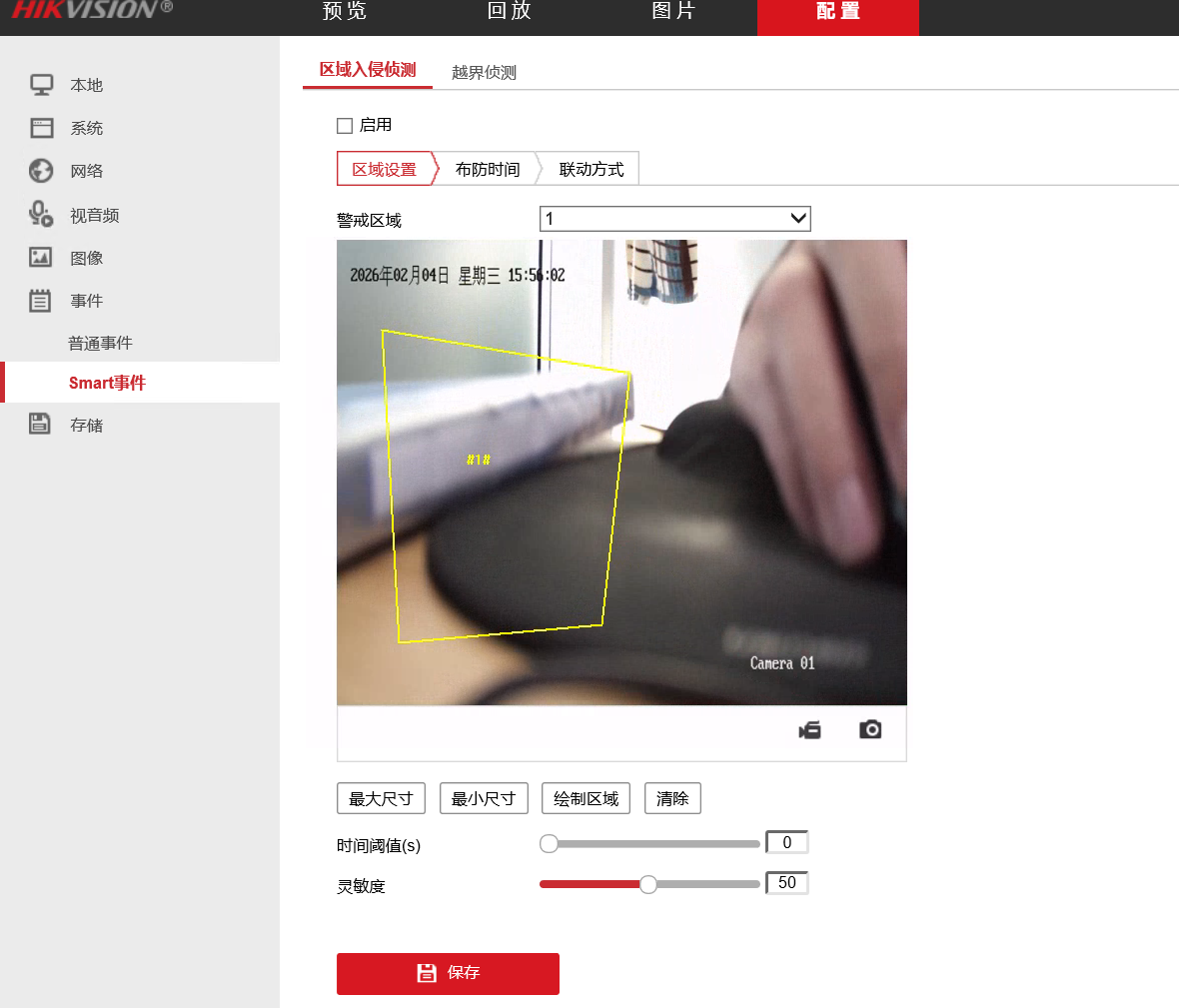
然后我编写如下代码:
python
import requests
import time
import threading
import cv2
import xml.etree.ElementTree as ET
from requests.auth import HTTPDigestAuth

# 摄像机配置
CAMERA_IP = "192.168.1.64"
USERNAME = "admin"
PASSWORD = "123456qwer"

# RTSP 主码流
RTSP_URL = f"rtsp://{USERNAME}:{PASSWORD}@{CAMERA_IP}:554/Streaming/Channels/101"

# 事件流地址
EVENT_STREAM_URL = f"http://{CAMERA_IP}/ISAPI/Event/notification/alertStream"

# 抓拍接口
SNAPSHOT_URL = f"http://{CAMERA_IP}/ISAPI/Streaming/channels/1/picture"

# 序号计数器
event_counter = 0


# ============================
#   抓拍函数
# ============================
def capture_snapshot(event_type):
    global event_counter
    event_counter += 1

    timestamp = time.strftime("%Y%m%d_%H%M%S", time.localtime())
    filename = f"{event_type}_{event_counter:04d}_{timestamp}.jpg"

    try:
        r = requests.get(SNAPSHOT_URL, auth=HTTPDigestAuth(USERNAME, PASSWORD), timeout=5)
        if r.status_code == 200:
            with open(filename, "wb") as f:
                f.write(r.content)
            print(f"📸 已保存抓拍:{filename}")
        else:
            print(f"❌ 抓拍失败,状态码:{r.status_code}")
    except Exception as e:
        print("❌ 抓拍异常:", e)


# ============================
#   事件监听线程
# ============================
def listen_event_stream():
    print("开始监听事件流...")

    with requests.get(EVENT_STREAM_URL, auth=HTTPDigestAuth(USERNAME, PASSWORD), stream=True) as r:
        if r.status_code != 200:
            print("无法连接事件流,状态码:", r.status_code)
            return

        buffer = ""

        for chunk in r.iter_content(chunk_size=1024):
            if not chunk:
                continue

            text = chunk.decode(errors="ignore")
            buffer += text

            # 每个事件以 </EventNotificationAlert> 结尾
            while "</EventNotificationAlert>" in buffer:
                # 截取完整 XML
                xml_block, buffer = buffer.split("</EventNotificationAlert>", 1)
                xml_block = xml_block + "</EventNotificationAlert>"

                # print(xml_block)

                # 去掉 boundary 和 HTTP 头,只保留 XML
                # 找到第一个 "<EventNotificationAlert"
                start_index = xml_block.find("<EventNotificationAlert")
                if start_index == -1:
                    # 不是 XML,跳过
                    continue

                xml_str = xml_block[start_index:]

                try:
                    root = ET.fromstring(xml_str)
                    ns = {"ns": "http://www.hikvision.com/ver20/XMLSchema"}

                    event_type = root.find("ns:eventType", ns).text
                    event_state = root.find("ns:eventState", ns).text

                    print(f"收到事件:{event_type}, 状态:{event_state}")

                    # 区域入侵事件
                    if event_type == "Intrusion" and event_state == "active":
                        capture_snapshot(event_type)

                except Exception as e:
                    print("❌ XML 解析失败:", e)
                    print("❌ 原始 XML:")
                    print(xml_str)
                    print("--------------------------------------------------")


# ============================
#   视频显示线程(缩放 30%)
# ============================
def show_video():
    print("打开视频流...")
    cap = cv2.VideoCapture(RTSP_URL)

    if not cap.isOpened():
        print("❌ 无法打开 RTSP 视频流")
        return

    while True:
        ret, frame = cap.read()
        if not ret:
            print("⚠️ 视频帧读取失败,重试中...")
            time.sleep(1)
            continue

        # 缩放到 30%
        frame_small = cv2.resize(frame, None, fx=0.3, fy=0.3)

        cv2.imshow("Camera Preview (30%)", frame_small)

        # 按 q 退出
        if cv2.waitKey(1) & 0xFF == ord('q'):
            break

    cap.release()
    cv2.destroyAllWindows()


# ============================
#   主程序入口
# ============================
if __name__ == "__main__":
    # 启动事件监听线程
    t1 = threading.Thread(target=listen_event_stream, daemon=True)
    t1.start()

    # 主线程显示视频
    show_video()
就可以实现了。
但有个问题,我们可能会在测试的时候收到:
python
收到事件:videoloss, 状态:inactive具体的事件信息为:
python
--boundary
Content-Type: application/xml; charset="UTF-8"
Content-Length: 518

<EventNotificationAlert version="2.0" xmlns="http://www.hikvision.com/ver20/XMLSchema">
<ipAddress>192.168.1.64</ipAddress>
<portNo>80</portNo>
<protocol>HTTP</protocol>
<macAddress>44:a6:42:46:a2:73</macAddress>
<channelID>1</channelID>
<dateTime>2026-02-04T16:14:17+08:00</dateTime>
<activePostCount>0</activePostCount>
<eventType>videoloss</eventType>
<eventState>inactive</eventState>
<eventDescription>videoloss alarm</eventDescription>
<channelName>Camera 01</channelName>
</EventNotificationAlert>
这个就是我们收到的事件,只不过事件类型是videoloss,代表这重新连接了一次rtsp。这可能是因为视频拥塞导致的,我也没找到原因。