我的项目结构如下:
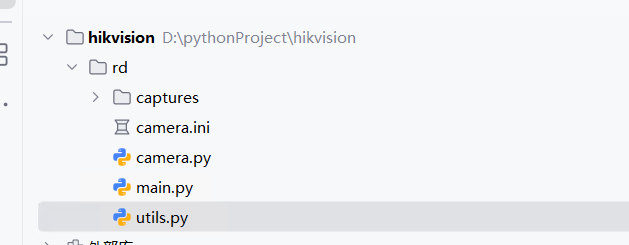
我构造了多个文件,分别列出来。
1、ini文件
bash
[camera]
ip = 192.168.1.64
username = admin
password = 123456qwer

# 主码流(高清)
rtsp_main = rtsp://admin:123456qwer@192.168.1.64:554/Streaming/Channels/101

# 子码流(流畅)
rtsp_sub = rtsp://admin:123456qwer@192.168.1.64:554/Streaming/Channels/102

# 抓拍接口(最高画质)
snapshot_url = http://192.168.1.64/ISAPI/Streaming/channels/1/picture

# 智能事件流(移动侦测、越界、入侵等)
event_stream = http://192.168.1.64/ISAPI/Event/notification/alertStream
2、utils文件
bash
import datetime
import os

def timestamp():
    """返回当前时间戳字符串,用于文件命名"""
    return datetime.datetime.now().strftime("%Y%m%d_%H%M%S")

def ensure_dir(path):
    """确保目录存在"""
    if not os.path.exists(path):
        os.makedirs(path)
3、camera文件
python
import cv2
import requests
import configparser
from requests.auth import HTTPDigestAuth
from utils import timestamp, ensure_dir


class Camera:
    """海康摄像头控制类:RTSP、抓拍、事件流"""

    def __init__(self, ini_path="camera.ini"):
        # 读取配置文件
        config = configparser.ConfigParser()
        config.read(ini_path, encoding="utf-8")

        cam = config["camera"]
        self.ip = cam["ip"]
        self.username = cam["username"]
        self.password = cam["password"]
        self.rtsp_main = cam["rtsp_main"]
        self.rtsp_sub = cam["rtsp_sub"]
        self.snapshot_url = cam["snapshot_url"]
        self.event_stream = cam["event_stream"]

    # ---------------------------------------------------------
    # 1. RTSP 视频流
    # ---------------------------------------------------------
    def get_rtsp_stream(self, use_main=True):
        """生成器:持续返回视频帧"""
        url = self.rtsp_main if use_main else self.rtsp_sub
        cap = cv2.VideoCapture(url)

        if not cap.isOpened():
            raise RuntimeError("RTSP 打不开,请检查网络或账号密码")

        while True:
            ret, frame = cap.read()
            if not ret:
                print("RTSP 断流,尝试重连...")
                cap.release()
                cap = cv2.VideoCapture(url)
                continue

            yield frame

    # ---------------------------------------------------------
    # 2. 抓拍高清图片
    # ---------------------------------------------------------
    def snapshot(self, save_dir="captures"):
        """抓拍一张高清图并保存"""
        ensure_dir(save_dir)
        filename = f"{save_dir}/capture_{timestamp()}.jpg"

        resp = requests.get(
            self.snapshot_url,
            auth=HTTPDigestAuth(self.username, self.password),
            timeout=5
        )

        if resp.status_code == 200:
            with open(filename, "wb") as f:
                f.write(resp.content)
            return filename
        else:
            raise RuntimeError(f"抓拍失败:{resp.status_code}")

    # ---------------------------------------------------------
    # 3. 监听智能事件(移动侦测、越界、入侵等)
    # ---------------------------------------------------------
    def listen_events(self):
        """监听事件流,实时返回 XML 字符串"""
        resp = requests.get(
            self.event_stream,
            auth=HTTPDigestAuth(self.username, self.password),
            stream=True,
            timeout=60
        )

        if resp.status_code != 200:
            raise RuntimeError("事件流订阅失败")

        boundary = resp.headers.get("Content-Type").split("boundary=")[-1]
        buffer = b""

        for chunk in resp.iter_content(chunk_size=4096):
            if not chunk:
                continue

            buffer += chunk

            # 判断是否包含完整事件
            if boundary.encode() in buffer:
                parts = buffer.split(boundary.encode())
                for part in parts[:-1]:
                    if b"<EventNotificationAlert" in part:
                        xml_start = part.find(b"<EventNotificationAlert")
                        xml_end = part.find(b"</EventNotificationAlert>") + len("</EventNotificationAlert>")
                        xml_data = part[xml_start:xml_end].decode()

                        yield xml_data

                buffer = parts[-1]
4、main文件(主文件)
python
from camera import Camera
import cv2

cam = Camera()

# ---------------------------------------------------------
# 1. 显示 RTSP 视频流
# ---------------------------------------------------------
def demo_rtsp():
    for frame in cam.get_rtsp_stream(use_main=True):
        cv2.imshow("RTSP Main Stream", frame)
        if cv2.waitKey(1) == ord('q'):
            break

# ---------------------------------------------------------
# 2. 抓拍一张高清图
# ---------------------------------------------------------
def demo_snapshot():
    path = cam.snapshot()
    print("抓拍成功:", path)

# ---------------------------------------------------------
# 3. 监听智能事件(移动侦测、越界、入侵等)
# ---------------------------------------------------------
def demo_events():
    print("开始监听事件流...")
    for xml in cam.listen_events():
        print("收到事件:")
        print(xml)
        print("-" * 50)


# ---------------------------------------------------------
# 主入口
# ---------------------------------------------------------
if __name__ == "__main__":
    # demo_rtsp()
    demo_snapshot()
    # demo_events()
当我们运行主文件的时候,选择具体的函数,就可以运行了。