欢迎加入开源鸿蒙跨平台社区:开源鸿蒙跨平台开发者社区
Flutter for OpenHarmony 实战:排球计分系统完整开发指南
文章目录
- [Flutter for OpenHarmony 实战:排球计分系统完整开发指南](#Flutter for OpenHarmony 实战:排球计分系统完整开发指南)
-
- 摘要
- 一、项目背景与功能概述
-
- [1.1 排球计分规则](#1.1 排球计分规则)
- [1.2 应用功能规划](#1.2 应用功能规划)
- [1.3 界面设计要求](#1.3 界面设计要求)
- 二、数据模型设计
-
- [2.1 球队类](#2.1 球队类)
- [2.2 比赛状态](#2.2 比赛状态)
- [2.3 计算属性](#2.3 计算属性)
- 三、技术选型与架构设计
-
- [3.1 核心技术栈](#3.1 核心技术栈)
- [3.2 应用架构](#3.2 应用架构)
- [3.3 数据流设计](#3.3 数据流设计)
- 四、计分逻辑实现
-
- [4.1 加分操作](#4.1 加分操作)
- [4.2 减分操作](#4.2 减分操作)
- [4.3 撤销操作](#4.3 撤销操作)
- 五、局数管理
-
- [5.1 检查本局结束](#5.1 检查本局结束)
- [5.2 手动结束本局](#5.2 手动结束本局)
- [5.3 结束本局](#5.3 结束本局)
- 六、UI界面实现
-
- [6.1 局数信息](#6.1 局数信息)
- [6.2 球队面板](#6.2 球队面板)
- [6.3 控制面板](#6.3 控制面板)
- 七、比赛记录
-
- [7.1 记录格式](#7.1 记录格式)
- [7.2 显示记录](#7.2 显示记录)
- 八、比赛结束处理
-
- [8.1 结束对话框](#8.1 结束对话框)
- [8.2 重置比赛](#8.2 重置比赛)
- 九、排球规则详解
-
- [9.1 标准比赛规则](#9.1 标准比赛规则)
- [9.2 特殊情况](#9.2 特殊情况)
- [9.3 代码实现](#9.3 代码实现)
- 十、扩展功能
-
- [10.1 球队名称编辑](#10.1 球队名称编辑)
- [10.2 保存比赛记录](#10.2 保存比赛记录)
- [10.3 定时器功能](#10.3 定时器功能)
- 十一、运行效果与测试
-
- [11.1 项目运行命令](#11.1 项目运行命令)
- [11.2 功能测试清单](#11.2 功能测试清单)
- 十二、总结
摘要
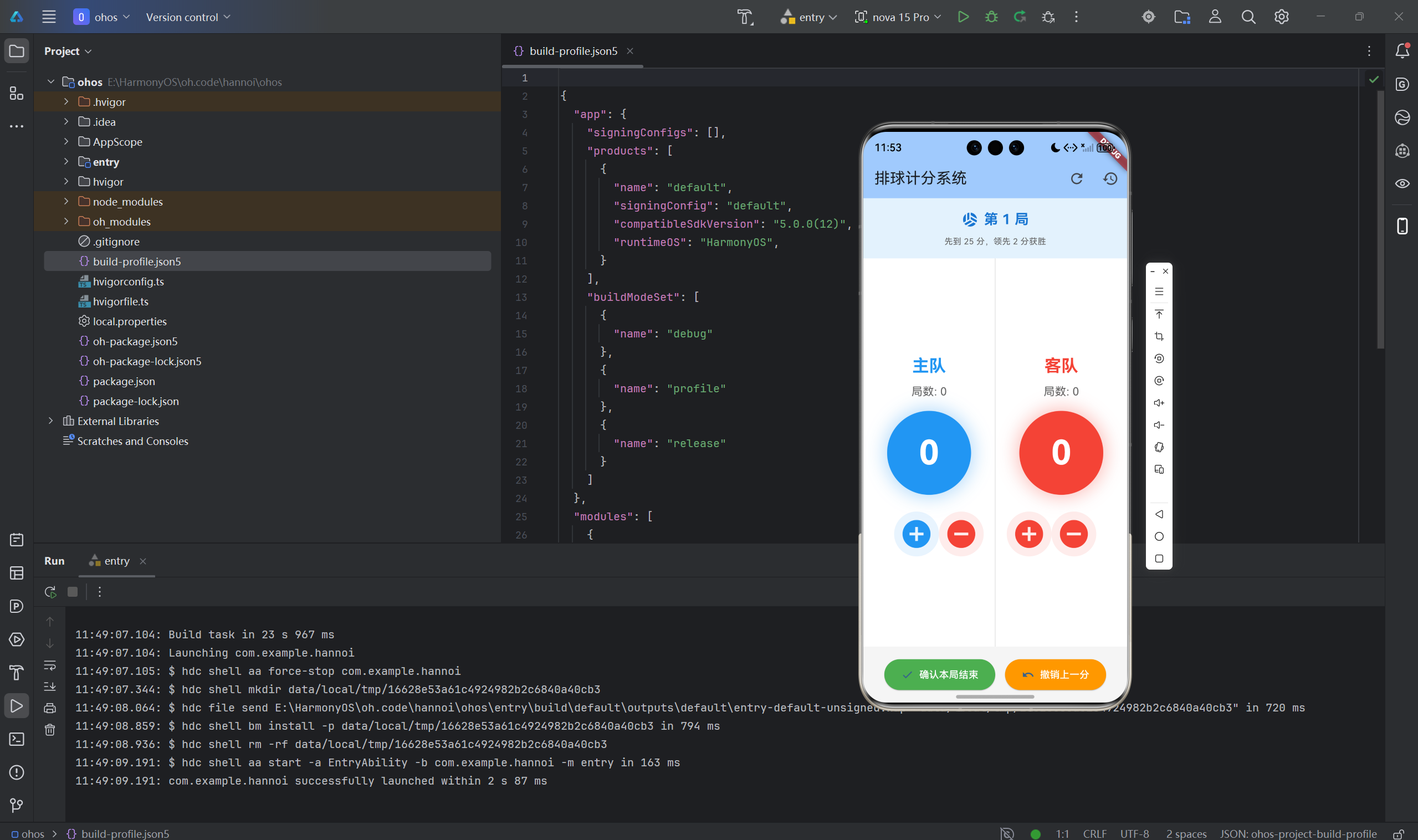
排球计分系统是体育比赛中重要的辅助工具,可以准确记录比赛比分和局数。本文将详细介绍如何使用Flutter for OpenHarmony框架开发一款功能完整的排球计分应用。文章涵盖了计分规则实现、局数管理、胜负判断、比赛记录等核心技术点。通过本文学习,读者将掌握Flutter在鸿蒙平台上开发体育类应用的完整流程,了解状态管理和数据持久化的实现方法。
一、项目背景与功能概述
1.1 排球计分规则
排球比赛采用五局三胜制:
- 前四局:先到25分,领先2分获胜
- 第五局(决胜局):先到15分,领先2分获胜
- 比赛结束:一方先赢得3局
1.2 应用功能规划
| 功能模块 | 具体功能 |
|---|---|
| 比分记录 | 主队/客队加分、减分 |
| 局数管理 | 自动切换局数、记录总局数 |
| 胜负判断 | 自动检测本局/比赛结束 |
| 比赛记录 | 记录每次得分操作 |
| 重置功能 | 重置当前比赛 |
| 决胜局 | 第五局特殊规则 |
1.3 界面设计要求
- 左右分屏显示两队比分
- 大号圆形计分板
- 局数清晰显示
- 决胜局特殊标识
- 胜利方高亮显示
二、数据模型设计
2.1 球队类
dart
class Team {
  final String name;      // 球队名称
  int score;              // 当前局得分
  int sets;               // 获胜局数
  Color color;            // 球队颜色

  Team({
    required this.name,
    this.score = 0,
    this.sets = 0,
    required this.color,
  });
}
2.2 比赛状态
dart
class _ScoreboardPageState extends State<ScoreboardPage> {
  final Team _teamA = Team(name: '主队', color: Colors.blue);
  final Team _teamB = Team(name: '客队', color: Colors.red);

  int _currentSet = 1;        // 当前局数
  bool _matchEnded = false;   // 比赛是否结束
  final List<String> _matchLog = [];  // 比赛记录
}
2.3 计算属性
dart
// 是否决胜局(第5局)
bool get _isTieBreak => _currentSet >= 5;

// 获胜分数
int get _winningScore => _isTieBreak ? 15 : 25;

// 最小领先分差
int get _minLead => 2;
三、技术选型与架构设计
3.1 核心技术栈
状态管理
- StatefulWidget管理比赛状态
- setState更新UI
UI组件
- Container:比分圆形显示
- IconButton:加减分按钮
- Card:球队面板
- AlertDialog:确认对话框
数据存储
- 内存存储比赛记录
- 可扩展为本地持久化
3.2 应用架构
ScoreboardPage (计分页面)
    ├── AppBar
    │   ├── 重置按钮
    │   └── 记录按钮
    ├── 局数信息区域
    │   ├── 当前局数
    │   ├── 决胜局标识
    │   └── 规则说明
    ├── 比分板区域
    │   ├── 主队面板
    │   │   ├── 球队名称
    │   │   ├── 局数
    │   │   ├── 当前得分
    │   │   └── 加减分按钮
    │   └── 客队面板
    │       ├── 球队名称
    │       ├── 局数
    │       ├── 当前得分
    │       └── 加减分按钮
    └── 控制区域
        ├── 确认本局结束
        └── 撤销上一分
3.3 数据流设计
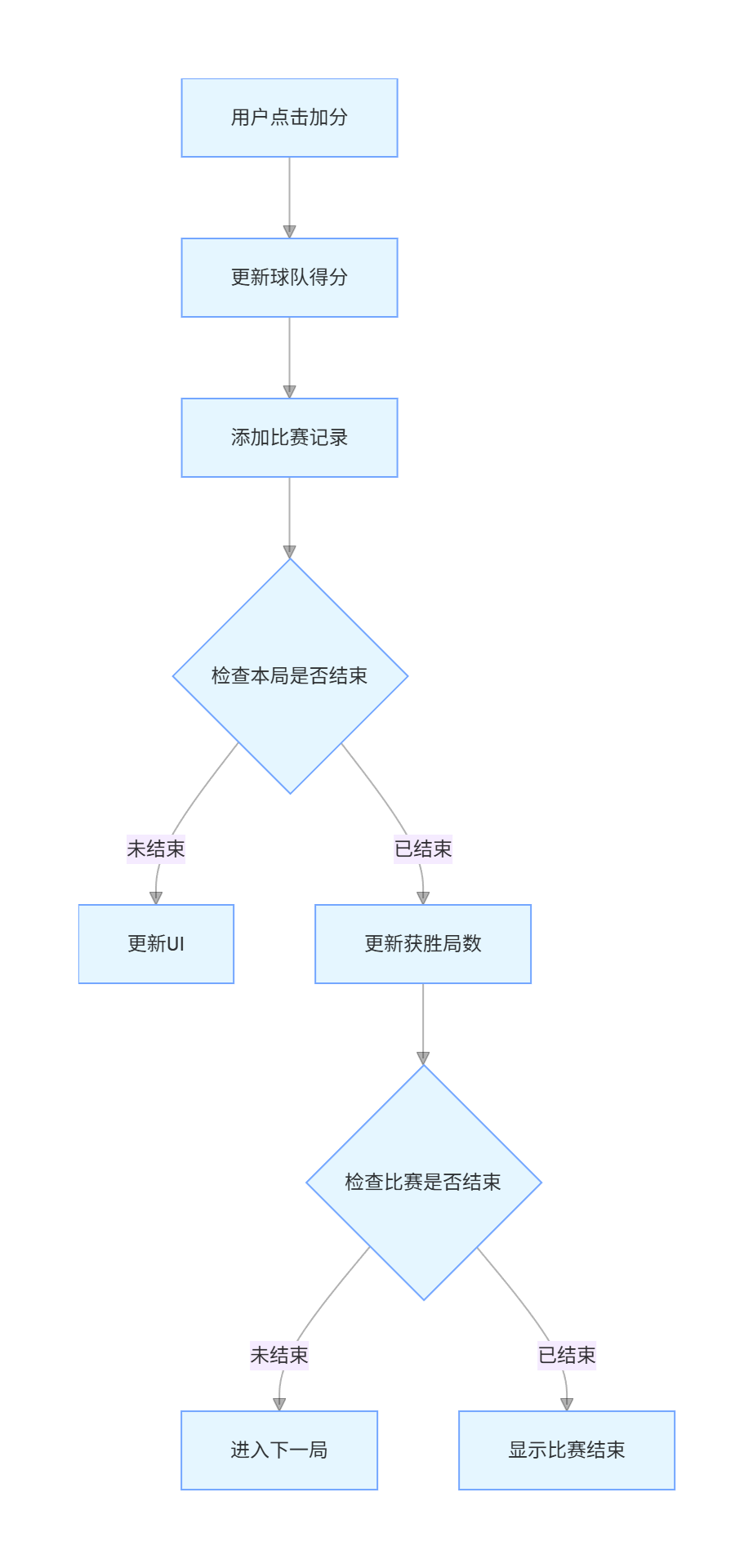
四、计分逻辑实现
4.1 加分操作
dart
void _addScore(Team team, Team opponent) {
  if (_matchEnded) return;

  setState(() {
    team.score++;
    _matchLog.add('${team.name} +1 分 (${_teamA.score}:${_teamB.score})');
    _checkSetEnd();
  });
}
4.2 减分操作
dart
void _subtractScore(Team team) {
  if (_matchEnded) return;
  if (team.score <= 0) return;  // 不能为负分

  setState(() {
    team.score--;
    _matchLog.add('${team.name} -1 分 (${_teamA.score}:${_teamB.score})');
  });
}
4.3 撤销操作
dart
void _undoLastPoint() {
  if (_matchLog.isEmpty) return;

  // 简单实现:从当前领先方减一分
  if (_teamA.score > 0) {
    setState(() {
      _teamA.score--;
      _matchLog.add('撤销: ${_teamA.name} -1 分');
    });
  } else if (_teamB.score > 0) {
    setState(() {
      _teamB.score--;
      _matchLog.add('撤销: ${_teamB.name} -1 分');
    });
  }
}
五、局数管理
5.1 检查本局结束
dart
void _checkSetEnd() {
  // 检查主队是否获胜
  bool teamAWins = _teamA.score >= _winningScore &&
                   _teamA.score - _teamB.score >= _minLead;

  // 检查客队是否获胜
  bool teamBWins = _teamB.score >= _winningScore &&
                   _teamB.score - _teamA.score >= _minLead;

  if (teamAWins || teamBWins) {
    // 自动结束本局
    _endSet(teamAWins ? _teamA : _teamB);
  }
}
5.2 手动结束本局
dart
void _confirmSetEnd() {
  if (_teamA.score == _teamB.score) {
    ScaffoldMessenger.of(context).showSnackBar(
      const SnackBar(content: Text('比分相同,不能结束本局')),
    );
    return;
  }

  final winner = _teamA.score > _teamB.score ? _teamA : _teamB;
  _endSet(winner);
}
5.3 结束本局
dart
void _endSet(Team winner) {
  setState(() {
    winner.sets++;
    _matchLog.add('第 $_currentSet 局结束,${winner.name} 获胜');

    // 检查比赛是否结束
    if (winner.sets >= 3) {
      _matchEnded = true;
      _matchLog.add('比赛结束!${winner.name} 获胜');
      _showMatchEndDialog(winner);
    } else {
      // 进入下一局
      _currentSet++;
      _teamA.score = 0;
      _teamB.score = 0;
    }
  });
}
六、UI界面实现
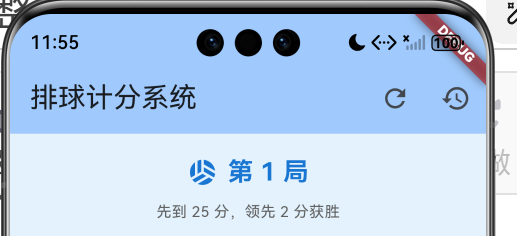
6.1 局数信息
dart
Widget _buildSetInfo() {
  return Container(
    padding: const EdgeInsets.all(16),
    color: Colors.blue.shade50,
    child: Column(
      children: [
        Row(
          mainAxisAlignment: MainAxisAlignment.center,
          children: [
            Icon(Icons.sports_volleyball, color: Colors.blue.shade700),
            const SizedBox(width: 8),
            Text(
              '第 $_currentSet 局',
              style: TextStyle(
                fontSize: 20,
                fontWeight: FontWeight.bold,
                color: Colors.blue.shade700,
              ),
            ),
            if (_isTieBreak) ...[
              const SizedBox(width: 8),
              Container(
                padding: const EdgeInsets.symmetric(horizontal: 8, vertical: 4),
                decoration: BoxDecoration(
                  color: Colors.orange,
                  borderRadius: BorderRadius.circular(12),
                ),
                child: const Text('决胜局'),
              ),
            ],
          ],
        ),
        const SizedBox(height: 8),
        Text('先到 $_winningScore 分,领先 $_minLead 分获胜'),
      ],
    ),
  );
}
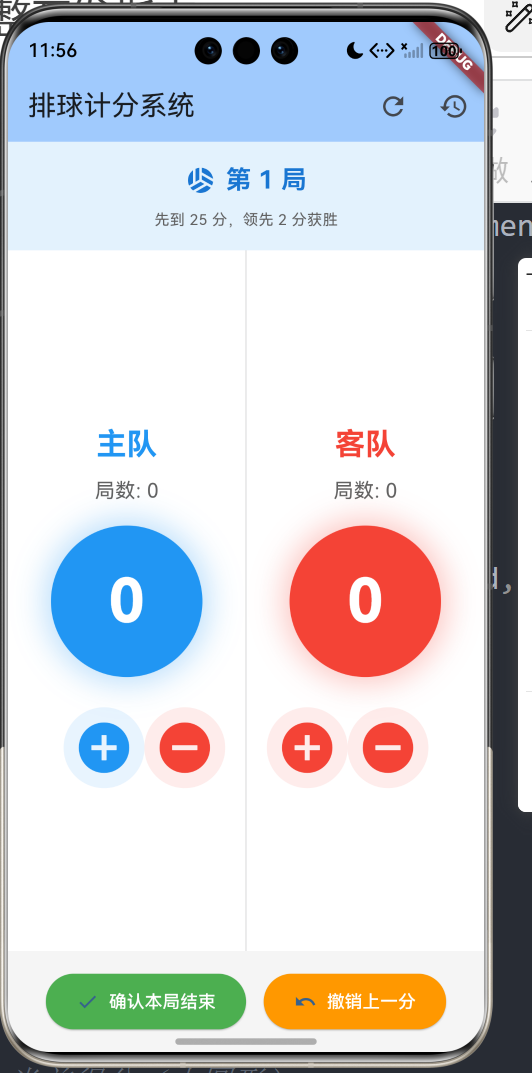
6.2 球队面板
dart
Widget _buildTeamPanel(Team team, Team opponent, bool isLeft) {
  final isWinner = _matchEnded && team.sets > opponent.sets;

  return Container(
    color: isWinner ? team.color.withValues(alpha: 0.1) : Colors.white,
    child: Column(
      mainAxisAlignment: MainAxisAlignment.center,
      children: [
        // 球队名称
        Text(
          team.name,
          style: TextStyle(
            fontSize: 24,
            fontWeight: FontWeight.bold,
            color: team.color,
          ),
        ),

        // 局数
        Text('局数: ${team.sets}'),

        const SizedBox(height: 16),

        // 当前得分(大圆形)
        Container(
          width: 120,
          height: 120,
          decoration: BoxDecoration(
            color: team.color,
            shape: BoxShape.circle,
            boxShadow: [
              BoxShadow(
                color: team.color.withValues(alpha: 0.3),
                blurRadius: 20,
                spreadRadius: 5,
              ),
            ],
          ),
          child: Center(
            child: Text(
              '${team.score}',
              style: const TextStyle(
                fontSize: 48,
                fontWeight: FontWeight.bold,
                color: Colors.white,
              ),
            ),
          ),
        ),

        // 加减分按钮
        if (!_matchEnded)
          Row(
            children: [
              IconButton(
                onPressed: () => _addScore(team, opponent),
                icon: const Icon(Icons.add_circle),
                iconSize: 48,
                color: team.color,
              ),
              IconButton(
                onPressed: () => _subtractScore(team),
                icon: const Icon(Icons.remove_circle),
                iconSize: 48,
                color: Colors.red,
              ),
            ],
          ),
      ],
    ),
  );
}
6.3 控制面板

dart
Widget _buildControlPanel() {
  return Container(
    padding: const EdgeInsets.all(16),
    color: Colors.grey.shade100,
    child: Row(
      mainAxisAlignment: MainAxisAlignment.spaceEvenly,
      children: [
        ElevatedButton.icon(
          onPressed: _confirmSetEnd,
          icon: const Icon(Icons.check),
          label: const Text('确认本局结束'),
          style: ElevatedButton.styleFrom(
            backgroundColor: Colors.green,
            foregroundColor: Colors.white,
          ),
        ),
        ElevatedButton.icon(
          onPressed: _undoLastPoint,
          icon: const Icon(Icons.undo),
          label: const Text('撤销上一分'),
          style: ElevatedButton.styleFrom(
            backgroundColor: Colors.orange,
            foregroundColor: Colors.white,
          ),
        ),
      ],
    ),
  );
}
七、比赛记录
7.1 记录格式
dart
// 加分记录
'主队 +1 分 (15:12)'

// 减分记录
'客队 -1 分 (12:12)'

// 本局结束
'第 2 局结束,主队 获胜'

// 比赛结束
'比赛结束!主队 获胜'
7.2 显示记录
dart
void _showLog() {
  showDialog(
    context: context,
    builder: (context) => AlertDialog(
      title: const Text('比赛记录'),
      content: SizedBox(
        width: double.maxFinite,
        height: 300,
        child: _matchLog.isEmpty
            ? const Center(child: Text('暂无记录'))
            : ListView.builder(
                itemCount: _matchLog.length,
                itemBuilder: (context, index) {
                  // 倒序显示,最新记录在最上面
                  return Text(
                    _matchLog[_matchLog.length - 1 - index],
                    style: const TextStyle(fontSize: 12),
                  );
                },
              ),
      ),
      actions: [
        TextButton(
          onPressed: () => Navigator.pop(context),
          child: const Text('关闭'),
        ),
      ],
    ),
  );
}
八、比赛结束处理
8.1 结束对话框
dart
void _showMatchEndDialog(Team winner) {
  showDialog(
    context: context,
    barrierDismissible: false,
    builder: (context) => AlertDialog(
      title: const Text('比赛结束'),
      content: Column(
        mainAxisSize: MainAxisSize.min,
        children: [
          Icon(Icons.emoji_events, size: 64, color: winner.color),
          const SizedBox(height: 16),
          Text(
            '${winner.name} 获胜!',
            style: TextStyle(
              fontSize: 24,
              fontWeight: FontWeight.bold,
              color: winner.color,
            ),
          ),
          const SizedBox(height: 8),
          Text('总局数: ${winner.sets} - ${winner == _teamA ? _teamB.sets : _teamA.sets}'),
        ],
      ),
      actions: [
        TextButton(
          onPressed: () {
            Navigator.pop(context);
            _resetMatch();
          },
          child: const Text('开始新比赛'),
        ),
      ],
    ),
  );
}
8.2 重置比赛
dart
void _resetMatch() {
  showDialog(
    context: context,
    builder: (context) => AlertDialog(
      title: const Text('重置比赛'),
      content: const Text('确定要重置当前比赛吗?'),
      actions: [
        TextButton(
          onPressed: () => Navigator.pop(context),
          child: const Text('取消'),
        ),
        TextButton(
          onPressed: () {
            Navigator.pop(context);
            setState(() {
              _teamA.score = 0;
              _teamA.sets = 0;
              _teamB.score = 0;
              _teamB.sets = 0;
              _currentSet = 1;
              _matchEnded = false;
              _matchLog.clear();
            });
          },
          child: const Text('确定'),
        ),
      ],
    ),
  );
}
九、排球规则详解
9.1 标准比赛规则
| 局数 | 获胜分数 | 领先分差 | 说明 |
|---|---|---|---|
| 1-4局 | 25分 | 2分 | 常规局 |
| 第5局 | 15分 | 2分 | 决胜局 |
9.2 特殊情况
无上限延长
- 如果24:24,继续比赛直到一方领先2分
- 可能出现26:24、27:25等高分
决胜局交换场地
- 第5局通常需要交换场地
- 可以添加交换场地提醒功能
9.3 代码实现
dart
// 获胜条件判断
bool _checkWinCondition(int scoreA, int scoreB) {
  int winningScore = _isTieBreak ? 15 : 25;

  // 达到获胜分数且领先2分
  if (scoreA >= winningScore && scoreA - scoreB >= 2) {
    return true;
  }
  if (scoreB >= winningScore && scoreB - scoreA >= 2) {
    return true;
  }

  return false;
}
十、扩展功能
10.1 球队名称编辑
dart
void _editTeamName(Team team) {
  final controller = TextEditingController(text: team.name);

  showDialog(
    context: context,
    builder: (context) => AlertDialog(
      title: const Text('修改球队名称'),
      content: TextField(
        controller: controller,
        decoration: const InputDecoration(
          labelText: '球队名称',
          border: OutlineInputBorder(),
        ),
      ),
      actions: [
        TextButton(
          onPressed: () => Navigator.pop(context),
          child: const Text('取消'),
        ),
        TextButton(
          onPressed: () {
            if (controller.text.trim().isNotEmpty) {
              setState(() {
                team.name = controller.text.trim();
              });
              Navigator.pop(context);
            }
          },
          child: const Text('确定'),
        ),
      ],
    ),
  );
}
10.2 保存比赛记录
dart
import 'dart:io';

Future<void> _saveMatchLog() async {
  final file = File('match_log_${DateTime.now().millisecondsSinceEpoch}.txt');
  final logContent = _matchLog.join('\n');
  await file.writeAsString(logContent);
}

Future<void> _loadMatchLog() async {
  // 从文件加载历史记录
}
10.3 定时器功能
dart
Timer? _timer;
int _elapsedSeconds = 0;

void _startTimer() {
  _timer = Timer.periodic(const Duration(seconds: 1), (timer) {
    setState(() {
      _elapsedSeconds++;
    });
  });
}

String _formatTime(int seconds) {
  final minutes = seconds ~/ 60;
  final secs = seconds % 60;
  return '${minutes.toString().padLeft(2, '0')}:${secs.toString().padLeft(2, '0')}';
}
十一、运行效果与测试
11.1 项目运行命令
bash
cd E:\HarmonyOS\oh.code\volleyball_score
flutter run -d ohos
11.2 功能测试清单
基本计分测试
- 主队加分正确
- 客队加分正确
- 不能减到负分
局数管理测试
- 达到25分且领先2分自动结束本局
- 手动结束本局功能正常
- 层数正确增加
决胜局测试
- 第5局显示决胜局标识
- 获胜分数变为15分
- 规则说明正确更新
比赛结束测试
- 3局获胜显示比赛结束
- 胜利方高亮显示
- 重置功能正常
记录功能测试
- 每次操作都记录
- 记录倒序显示
- 清空功能正常
十二、总结
本文详细介绍了使用Flutter for OpenHarmony开发排球计分系统的完整过程,涵盖了以下核心技术点:
- 数据模型:球队类、比赛状态
- 计分逻辑:加分、减分、撤销
- 局数管理:自动检测、手动确认
- 胜负判断:本局结束、比赛结束
- UI实现:比分板、控制面板
- 记录功能:操作记录、历史查询
- 规则实现:标准规则、决胜局
这个项目展示了Flutter在体育类应用开发中的完整流程。读者可以基于此项目添加更多功能:
- 球队名称编辑
- 比赛定时器
- 换人记录
- 数据统计
- 历史比赛保存
- 多场比赛管理
- 数据导出功能
通过本文的学习,读者应该能够独立开发类似的计分类应用,掌握Flutter在鸿蒙平台上的状态管理技巧。
欢迎加入开源鸿蒙跨平台社区 : 开源鸿蒙跨平台开发者社区