1、创建配置文件 src/main/resources/generatorConfig.xml
xml
<?xml version="1.0" encoding="UTF-8" ?>
<!DOCTYPE generatorConfiguration PUBLIC "-//mybatis.org//DTD MyBatis Generator Configuration 1.0//EN"
"http://mybatis.org/dtd/mybatis-generator-config_1_0.dtd" >
<generatorConfiguration>
<context id="sss" targetRuntime="MyBatis3" defaultModelType="flat">
<!-- 自动识别数据库关键字,默认false,如果设置为true,根据SqlReservedWords中定义的关键字列表;
一般保留默认值,遇到数据库关键字(Java关键字),使用columnOverride覆盖
-->
<!--<property name="autoDelimitKeywords" value="true"/>-->
<!-- beginningDelimiter和endingDelimiter:指明数据库的用于标记数据库对象名的符号,比如ORACLE就是双引号,MYSQL默认是`反引号; -->
<!--<property name="beginningDelimiter" value="'"/>
<property name="endingDelimiter" value="'"/>-->
<!-- 生成的Java文件的编码 -->
<!--<property name="javaFileEncoding" value="UTF-8"/>-->
<!-- 格式化java代码 -->
<!--<property name="javaFormatter" value="org.mybatis.generator.api.dom.DefaultJavaFormatter"/>-->
<!-- 格式化XML代码 -->
<!--<property name="xmlFormatter" value="org.mybatis.generator.api.dom.DefaultXmlFormatter"/>-->
<!--数据库连接信息-->
<jdbcConnection driverClass="org.postgresql.Driver"
connectionURL="jdbc:postgresql://172.*.*.*:18921/数据库?stringtype=unspecified&currentSchema=模式"
userId="postgres"
password="******">
</jdbcConnection>
<!--生成实体类的位置,targetPackage是包名,targetProject是生成的包在工程中的哪个文件夹下-->
<javaModelGenerator targetPackage="com.nms.service.entity" targetProject="src/main/java">
<property name="enableSubPackages" value="false"/>
<property name="trimStrings" value="true"/>
</javaModelGenerator>
<!--生成.xml文件的位置-->
<sqlMapGenerator targetPackage="mapper" targetProject="src/main/resources">
</sqlMapGenerator>
<!--生成dao层接口的位置-->
<javaClientGenerator type="XMLMAPPER" targetPackage="com.nms.service.mapper" targetProject="src/main/java/">
<property name="enableSubPackages" value="false"/>
</javaClientGenerator>
<!--数据库表名配置, schema是模式, tablename是数据库的表名,domainObjectName是生成实体类的类名-->
<table schema="模式" tableName="表名" domainObjectName="SaCheckOrder" delimitIdentifiers="true" delimitAllColumns="true"
enableCountByExample="false" enableUpdateByExample="false" enableDeleteByExample="false" enableSelectByExample="false" selectByExampleQueryId="false">
<!-- <property name="useActualColumnNames" value="true"/>-->
<!-- 使用 columnRenamingRule 去除字段前缀 -->
<columnRenamingRule searchString="^f_" replaceString="" />
<!-- <!– 排除字段 –>-->
<!-- <ignoreColumn column="is_deleted"/>-->
<!-- <ignoreColumn column="version"/>-->
</table>
<table ...>
...
</table>
</context>
</generatorConfiguration>2、在 pom.xml 文件中添加插件
xml
    <build>
        <plugins>
            <plugin>
                <groupId>org.springframework.boot</groupId>
                <artifactId>spring-boot-maven-plugin</artifactId>
                <version>4.1.0-M1</version>
            </plugin>

            <!--mybatis generator-->
            <plugin>
                <groupId>org.apache.maven.plugins</groupId>
                <artifactId>maven-compiler-plugin</artifactId>
                <configuration>
                    <source>1.8</source>
                    <target>1.8</target>
                </configuration>
                <version>3.3</version>
            </plugin>
            <plugin>
                <groupId>org.mybatis.generator</groupId>
                <artifactId>mybatis-generator-maven-plugin</artifactId>
                <version>1.3.5</version>
                <executions>
                    <execution>
                        <id>Generate MyBatis Artifacts</id>
                        <goals>
                            <goal>generate</goal>
                        </goals>
                    </execution>
                </executions>
                <dependencies>
                    <dependency>
                        <groupId>org.postgresql</groupId>
                        <artifactId>postgresql</artifactId>
                        <version>42.7.0</version>
                    </dependency>
                </dependencies>
            </plugin>
        </plugins>
    </build>
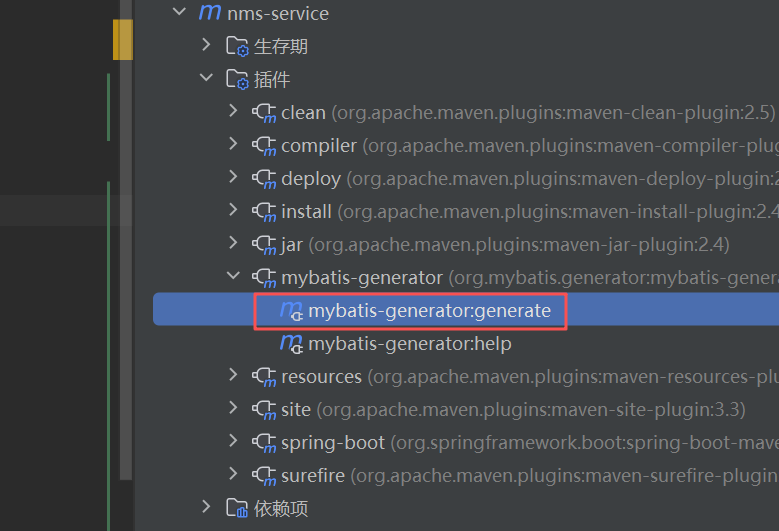
3、双击插件生成代码