数据库启动报ORA-600 kcratr_nab_less_than_odr
|-----------------------------------------------------------------------------------------------------------------------------------------------------------------------------------------------------------------------------------------------------------------------------------------------------------------------------------------------------------------------------------------------------------------------------------------------------------------------------------------------------------------------------------------------------------------------------------------------------------------------------------------------------------------------------------------------------------------------------------------------------------------------------------------------------------------------------------------------------------------------------------------------------------------------------------------------------------------------------------------------------------------------------------------------------------------------------------------------------------------------------------------------------------------------------------------------------------------------------------|
| alter database ``open Beginning crash recovery of 1 threads ``parallel recovery started with 15 processes Started redo scan Completed redo scan ``read 2930 KB redo, 1357 data blocks need recovery Errors ``in file D:\APP\ADMINISTRATOR\diag\rdbms\orcl\orcl\trace\orcl_ora_19096.trc (incident=576634): ORA-00600: ??????, ??: [kcratr_nab_less_than_odr], [1], [7859], [62180], [63172], [], [], [], [], [], [], [] Incident details ``in``: D:\APP\ADMINISTRATOR\diag\rdbms\orcl\orcl\incident\incdir_576634\orcl_ora_19096_i576634.trc Use ADRCI or Support Workbench to package the incident. See Note 411.1 at My Oracle Support ``for error and packaging details. Aborting crash recovery due to error 600 Errors ``in file D:\APP\ADMINISTRATOR\diag\rdbms\orcl\orcl\trace\orcl_ora_19096.trc: ORA-00600: ??????, ??: [kcratr_nab_less_than_odr], [1], [7859], [62180], [63172], [], [], [], [], [], [], [] Errors ``in file D:\APP\ADMINISTRATOR\diag\rdbms\orcl\orcl\trace\orcl_ora_19096.trc: ORA-00600: ??????, ??: [kcratr_nab_less_than_odr], [1], [7859], [62180], [63172], [], [], [], [], [], [], [] ORA-600 signalled during: alter database ``open``... |
这个错误一般常见的是11.2.0.1的数据库异常关机了容易遇到
又一例ORA-600 kcratr_nab_less_than_odr
ORA-600 kcratr_nab_less_than_odr故障解决
这个客户是11.2.0.4的库(在这个版本中该错误相对较少,虽然也遇到过几次)
11.2.0.4库中遇到ORA-600 kcratr_nab_less_than_odr报错
分析日志发现是由于之前io比较慢导致写入异常导致
|---------------------------------------------------------------------------------------------------------------------------------------------------------------------------------------------------------------------------------------------------------------------------------------------------------------------------------------------------------------------------------------------------------------------------------------------------------------------------------------------------------------------------------------------------------------------------------------------------------------------------------------------------------------------------------------------------------------------------------------------------------------------------------------------------------------------------------------------------------------------------------------------------------------------------------------------------------------------------------------------------------------------------------------------------------------------------------------------------------------------------------------------------------------------------------------------------------------------------------------------------------------------------------------------------------------------------------------------------------------------------------|
| Fri Feb 06 00:32:59 2026 ********************* ATTENTION: ******************** ``The controlfile header block returned by the OS ``has a sequence number that is too old. ``The controlfile might be corrupted. ``PLEASE DO NOT ATTEMPT TO START UP THE INSTANCE ``without following the steps below. ``RE-STARTING THE INSTANCE CAN CAUSE SERIOUS DAMAGE ``TO THE DATABASE, ``if the controlfile is truly corrupted. ``In order to re-start the instance safely, ``please ``do the following: ``(1) Save all copies of the controlfile ``for later ``analysis and contact your OS vendor and Oracle support. ``(2) Mount the instance and issue: ``ALTER DATABASE BACKUP CONTROLFILE TO TRACE; ``(3) Unmount the instance. ``(4) Use the script ``in the trace ``file to ``RE-CREATE THE CONTROLFILE and ``open the database. ***************************************************** CKPT (ospid: 2600): terminating the instance Fri Feb 06 00:33:00 2026 System state dump requested by (instance=1, osid=2600 (CKPT)), summary=[abnormal instance termination]. System State dumped to trace ``file D:\APP\ADMINISTRATOR\diag\rdbms\orcl\orcl\trace\orcl_diag_2488_20260206003300.trc Fri Feb 06 00:33:01 2026 opiodr aborting process unknown ospid (3420) as a result of ORA-1092 |
处理这个错误相对比较简单,重建控制文件即可
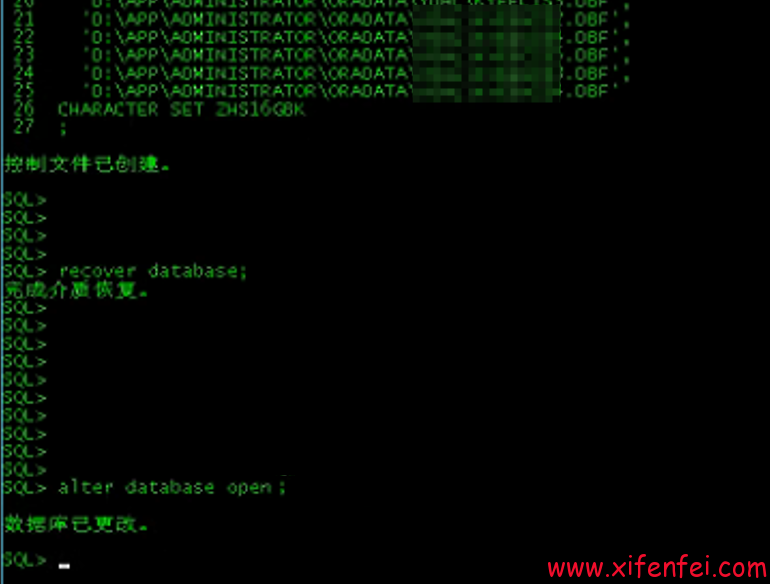
但是后续数据库出现ORA-600 4193错误
|---------------------------------------------------------------------------------------------------------------------------------------------------------------------------------------------------------------------------------------------------------------------------------------------------------------------------------------------------------------------------------------------------------------------------------------------------------------------------------------------------------------------------------------------------------------------------------------------------------------------------------------------------------------------------------------------------------------------------------------------------------------------------------------------------------------------------------------------------------------------------------------------------------------------------------------------------------------------------------------------------------------------------------------------------------------------------------------------------------------------------------------------------------------------------------------------------------------------------------------------------------------------------------------------------------------------------------------------------------------------------------------------------------------------------------------------------------------------------------------------------------------------------------------------------------------------------------------------------------------------------------------------------------------------------------------------------------------------------------------------------------------------------------------------------------------------------------------------------------------------------------------------------------------------------------------------------------------------------------------------------------------------------------------------------------------------------------------------------------------------------------------------------------------------------------------------------------------------------------------------------------------------------------------------------------------------------------------------------------------------------------------------------------------------------------------------------------------------------------------------------------------------------------------------------------------------------------------------------------------------------------------------------------------------------------------------------------------------------------------------------------------------------------------------------------------------------------------------------------------------------------------------------------------------------------------------------------------------------------------------------------------------------------------------------------------------------------------------------------------------------------------------------------------------------------------------------------------------------------------------------------------------------------|
| Fri Feb 06 02:57:34 2026 ALTER DATABASE OPEN Thread 1 opened at log sequence 7860 ``Current log``# 1 seq# 7860 mem# 0: D:\APP\ADMINISTRATOR\ORADATA\orcl\REDO01.LOG Successful ``open of redo thread 1 MTTR advisory is disabled because FAST_START_MTTR_TARGET is not ``set SMON: enabling cache recovery [4044] Successfully onlined Undo Tablespace 2. Undo initialization finished serial:0 start:5166812 end:5167140 ``diff``:328 (3 seconds) Verifying ``file header compatibility ``for 11g tablespace encryption.. Verifying 11g ``file header compatibility ``for tablespace encryption completed SMON: enabling tx recovery Database Characterset is ZHS16GBK No Resource Manager plan active replication_dependency_tracking turned off (no async multimaster replication found) Errors ``in file D:\APP\ADMINISTRATOR\diag\rdbms\orcl\orcl\trace\orcl_smon_3868.trc (incident=640589): ORA-00600: 内部错误代码, 参数: [4193], [], [], [], [], [], [], [], [], [], [], [] Incident details ``in``: D:\APP\ADMINISTRATOR\diag\rdbms\orcl\orcl\incident\incdir_640589\orcl_smon_3868_i640589.trc Use ADRCI or Support Workbench to package the incident. See Note 411.1 at My Oracle Support ``for error and packaging details. Starting background process QMNC Fri Feb 06 02:57:36 2026 QMNC started with pid=21, OS ``id``=5008 Completed: ALTER DATABASE OPEN Fri Feb 06 02:57:37 2026 db_recovery_file_dest_size of 4182 MB is 0.00% used. This is a user-specified limit on the amount of space that will be used by this database ``for recovery-related files, and does not reflect the amount of space available ``in the underlying filesystem or ASM diskgroup. Block recovery from logseq 7860, block 132954 to scn 55142160294 Recovery of Online Redo Log: Thread 1 Group 1 Seq 7860 Reading mem 0 ``Mem``# 0: D:\APP\ADMINISTRATOR\ORADATA\orcl\REDO01.LOG Block recovery completed at rba 7860.132998.16, scn 12.3602552743 Block recovery from logseq 7860, block 132954 to scn 55142160257 Recovery of Online Redo Log: Thread 1 Group 1 Seq 7860 Reading mem 0 ``Mem``# 0: D:\APP\ADMINISTRATOR\ORADATA\orcl\REDO01.LOG Block recovery completed at rba 7860.132954.16, scn 12.3602552707 Errors ``in file D:\APP\ADMINISTRATOR\diag\rdbms\orcl\orcl\trace\orcl_smon_3868.trc: ORA-01595: 释放区 (5) 回退段 (21) 时出错 ORA-00600: 内部错误代码, 参数: [4193], [], [], [], [], [], [], [], [], [], [], [] Flush retried ``for xcb 0x96c82600, pmd 0x8c6a70b8 Block recovery from logseq 7860, block 132954 to scn 55142160294 Recovery of Online Redo Log: Thread 1 Group 1 Seq 7860 Reading mem 0 ``Mem``# 0: D:\APP\ADMINISTRATOR\ORADATA\orcl\REDO01.LOG Block recovery completed at rba 7860.132998.16, scn 12.3602552743 Errors ``in file D:\APP\ADMINISTRATOR\diag\rdbms\orcl\orcl\trace\orcl_pmon_2728.trc: ORA-00600: 内部错误代码, 参数: [4193], [], [], [], [], [], [], [], [], [], [], [] PMON (ospid: 2728): terminating the instance due to error 472 System state dump requested by (instance=1, osid=2728 (PMON)), summary=[abnormal instance termination]. Fri Feb 06 02:58:17 2026 Instance terminated by PMON, pid = 2728 |
这个错误相对比较简单,由于undo回滚段异常,处理掉异常undo之后,数据库正常,完成本次恢复任务