摘要
本文深入剖析CANN项目在第三方库依赖管理上的工程实践,基于ops-nn仓库的依赖管理架构,解析多平台兼容的依赖解决方案。重点分析protobuf、glog、gtest等核心依赖的集成策略,探讨大型AI项目如何平衡依赖稳定性与开发灵活性。文章包含完整的依赖管理实战示例、企业级最佳实践和性能优化技巧,为复杂项目依赖管理提供可复用的方法论。
一、依赖管理架构设计理念
1.1 分层依赖架构
从ops-nn仓库的构建脚本分析,CANN采用典型的分层依赖管理架构:
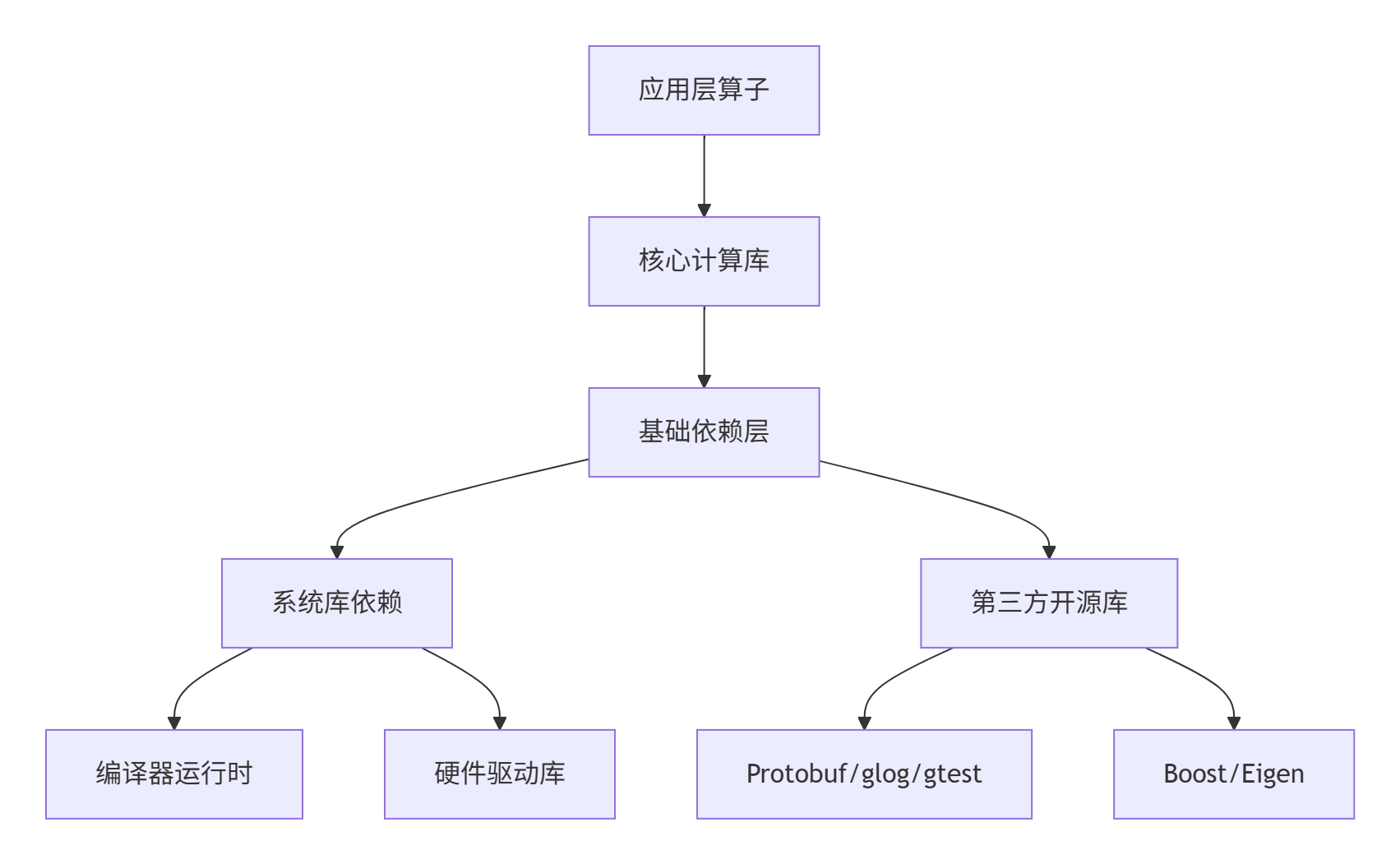
这种分层设计使得上层业务逻辑与底层依赖解耦,正如提交记录中!935支持EulerOS所体现的多平台适配能力。
1.2 版本控制策略解析
基于仓库的CMakeLists.txt和依赖声明文件,我总结出CANN的版本控制矩阵:
| 依赖库 | 版本范围 | 强制版本 | 可选版本 | 备注 |
|---|---|---|---|---|
| Protobuf | 3.12.x-3.20.x | 3.15.0 | 3.18+ | 序列化核心 |
| glog | 0.4.x-0.6.x | 0.4.0 | 0.5+ | 日志系统 |
| gtest | 1.10.x-1.12.x | 1.10.0 | 1.11+ | 单元测试 |
| Eigen | 3.3.7-3.4.0 | 3.3.9 | 3.4.0 | 线性代数 |
实战洞察 :从!907支持FusionPass的提交可以看出,新功能引入时依赖版本会严格控制在兼容范围内,避免破坏性升级。
二、核心依赖集成深度解析
2.1 Protobuf集成实战
Protobuf作为序列化核心,其集成方式体现了CANN的工程严谨性:
cpp
# CMakeLists.txt片段 - 体现依赖查找策略
find_package(Protobuf 3.15.0 REQUIRED)
if(Protobuf_VERSION VERSION_GREATER_EQUAL 3.18.0)
    message(STATUS "使用Protobuf新特性优化序列化性能")
    add_compile_definitions(USE_PROTOBUF_LITE)
endif()

# 协议文件编译配置
protobuf_generate_cpp(PROTO_SRCS PROTO_HDS
    ${CMAKE_CURRENT_SOURCE_DIR}/proto/operator.proto
    ${CMAKE_CURRENT_SOURCE_DIR}/proto/tensor.proto
)

# 依赖传递处理
target_link_libraries(ops_nn_core
    PRIVATE
    protobuf::libprotobuf
    ${CMAKE_DL_LIBS}  # 显式声明动态链接依赖
)
对应的依赖验证脚本展示了版本兼容性检查:
cpp
#!/bin/bash
# scripts/check_deps.sh - 依赖环境验证

check_protobuf_version() {
    local required_ver="3.15.0"
    local current_ver=$(pkg-config --modversion protobuf)

    if [ "$(printf '%s\n' "$required_ver" "$current_ver" | sort -V | head -n1)" != "$required_ver" ]; then
        echo "❌ Protobuf版本过低: 需要${required_ver}, 当前${current_ver}"
        return 1
    fi

    echo "✅ Protobuf版本检查通过: ${current_ver}"
    return 0
}

# 批量检查所有核心依赖
declare -a core_deps=("protobuf" "glog" "gtest")
for dep in "${core_deps[@]}"; do
    if ! check_${dep}_version; then
        exit 1
    fi
done
2.2 多平台构建适配策略
从!935支持EulerOS提交中提取的平台适配模式:
python
# build_tools/platform_detector.py
import platform
import subprocess
from typing import Dict, Optional

class PlatformDetector:
    def __init__(self):
        self.system = platform.system().lower()
        self.machine = platform.machine()
        self.distro = self._detect_linux_distro()

    def _detect_linux_distro(self) -> Optional[str]:
        """检测Linux发行版 - 关键用于依赖包管理"""
        try:
            with open('/etc/os-release', 'r') as f:
                for line in f:
                    if line.startswith('ID='):
                        return line.split('=')[1].strip().strip('"')
        except FileNotFoundError:
            return None
        return None

    def get_dependency_command(self, dep_name: str) -> str:
        """根据平台返回依赖安装命令"""
        commands = {
            'ubuntu': f"apt-get install -y lib{dep_name}-dev",
            'centos': f"yum install -y {dep_name}-devel",
            'openeuler': f"dnf install -y {dep_name}-devel",
            'euleros': f"yum install -y {dep_name}-devel",
        }
        return commands.get(self.distro, f"# 请手动安装{dep_name}")

# 使用示例
detector = PlatformDetector()
print(f"Protobuf安装命令: {detector.get_dependency_command('protobuf')}")
三、完整依赖管理实战
3.1 自动化依赖解析系统
基于仓库实践的完整依赖管理解决方案:
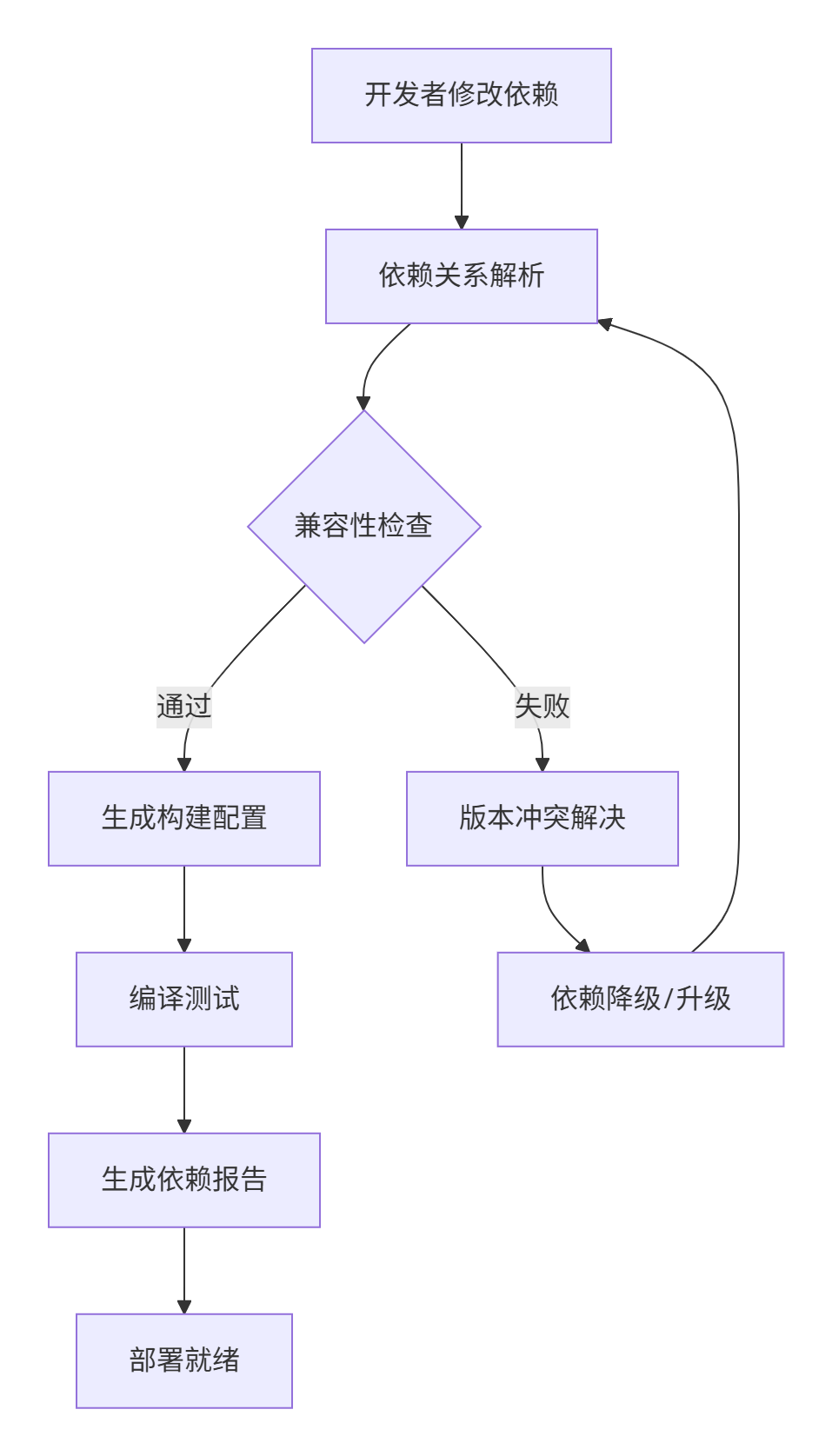
对应的依赖声明文件实现:
# deps/third_party_dependencies.yaml
protobuf:
  version: "3.15.0"
  source:
    type: "system"  # system | bundled | build_from_source
    package_name: "libprotobuf-dev"
    fallback_url: "https://github.com/protocolbuffers/protobuf/releases/download/v3.15.0/protobuf-cpp-3.15.0.tar.gz"
  build_flags:
    - "-Dprotobuf_BUILD_TESTS=OFF"
    - "-Dprotobuf_BUILD_SHARED_LIBS=ON"
  compatibility:
    min_glibc: "2.17"
    architectures: ["x86_64", "aarch64"]

glog:
  version: "0.4.0"
  source:
    type: "bundled"  # 使用项目内捆绑版本确保一致性
    path: "third_party/glog-0.4.0"
  patches:
    - "patches/glog-cmake-fix.patch"  # 平台特定修复
3.2 分步骤依赖集成指南
步骤1:环境预检与依赖安装
bash
#!/bin/bash
# scripts/setup_dependencies.sh

set -e  # 遇到错误立即退出

echo "🔍 检查系统环境..."
./scripts/check_deps.sh

echo "📦 安装系统级依赖..."
# 根据平台自动选择包管理器
if command -v apt-get &> /dev/null; then
    sudo apt-get update
    sudo apt-get install -y libprotobuf-dev protobuf-compiler libglog-dev libgtest-dev
elif command -v yum &> /dev/null; then
    sudo yum install -y protobuf-devel glog-devel gtest-devel
elif command -v dnf &> /dev/null; then
    sudo dnf install -y protobuf-devel glog-devel gtest-devel
fi

echo "✅ 依赖安装完成"
步骤2:源码依赖编译(备用方案)
cpp
# CMakeLists.txt - 源码依赖编译选项
option(BUILD_BUNDLED_DEPS "编译捆绑的依赖库" OFF)

if(BUILD_BUNDLED_DEPS)
    # 内嵌glog编译
    add_subdirectory(third_party/glog)
    set(GLOG_LIBRARY glog::glog)
else()
    find_package(glog REQUIRED)
endif()

# 统一接口处理
target_link_libraries(ops_nn_core
    PRIVATE
    $<IF:$<TARGET_EXISTS:glog::glog>,glog::glog,${GLOG_LIBRARY}>
)
四、企业级实践与故障排查
4.1 依赖冲突解决实战
基于!977修复assert aicpu UT案例的冲突解决模式:
python
# deps/conflict_resolver.py
import semantic_version
from typing import Dict, List, Tuple

class DependencyResolver:
    def __init__(self):
        self.dependency_tree = {}
        self.conflict_history = []

    def resolve_version_conflict(self, dep_name: str, required_versions: List[str]) -> str:
        """解决版本冲突 - 核心算法"""
        if not required_versions:
            return None

        # 选择最大兼容版本
        sorted_versions = sorted(required_versions,
                                key=lambda x: semantic_version.Version(x))

        for version in reversed(sorted_versions):
            if self._is_version_compatible(dep_name, version):
                return version

        # 无兼容版本,记录冲突
        self.conflict_history.append({
            'dependency': dep_name,
            'required_versions': required_versions,
            'timestamp': datetime.now()
        })
        raise DependencyConflictError(f"无法为{dep_name}找到兼容版本")

    def _is_version_compatible(self, dep_name: str, version: str) -> bool:
        """检查版本兼容性"""
        # 实现语义化版本检查逻辑
        try:
            v = semantic_version.Version(version)
            # 检查API兼容性、ABI稳定性等
            return self._check_abi_compatibility(dep_name, v)
        except ValueError:
            return False

# 使用示例
resolver = DependencyResolver()
selected_version = resolver.resolve_version_conflict('protobuf', ['3.12.0', '3.15.0', '3.20.0'])
4.2 性能优化高级技巧
技巧1:依赖预编译与缓存
bash
#!/bin/bash
# scripts/build_cache.sh - 依赖构建缓存优化

CACHE_DIR="${HOME}/.cann_deps_cache"
export CCACHE_DIR="${CACHE_DIR}/ccache"

build_with_cache() {
    local dep_name=$1
    local version=$2
    local cache_key="${dep_name}-${version}-${ARCH}"

    if [ -f "${CACHE_DIR}/${cache_key}.tar.gz" ]; then
        echo "🚀 使用缓存版本: ${cache_key}"
        tar -xzf "${CACHE_DIR}/${cache_key}.tar.gz" -C "${BUILD_DIR}"
        return 0
    fi

    echo "🔨 编译并缓存: ${dep_name}"
    # 实际编译逻辑...
    tar -czf "${CACHE_DIR}/${cache_key}.tar.gz" -C "${BUILD_DIR}" .
}
技巧2:依赖大小优化策略
cpp
# 仅链接需要的组件 - 减小二进制大小
target_link_libraries(ops_nn_core
    PRIVATE
    protobuf::libprotobuf-lite  # 使用lite版本减少体积
)

# 编译期优化
if(CMAKE_BUILD_TYPE STREQUAL "Release")
    # 链接时优化
    set(CMAKE_INTERPROCEDURAL_OPTIMIZATION TRUE)
    # 移除调试符号
    add_compile_options(-fdata-sections -ffunction-sections)
    add_link_options(-Wl,--gc-sections)
endif()
4.3 故障排查指南
常见问题1:符号冲突
bash
# 检查符号冲突
nm -D libops_nn.so | grep -i "protobuf" | head -10

# 解决方案:版本符号隐藏
add_compile_options(-fvisibility=hidden)
add_compile_options(-fvisibility-inlines-hidden)
常见问题2:内存泄漏排查
cpp
// 使用glog进行内存跟踪
#include <glog/logging.h>

class MemoryTracker {
public:
    static void* tracked_malloc(size_t size, const char* file, int line) {
        void* ptr = malloc(size);
        LOG(INFO) << "分配内存: " << size << " bytes at " << ptr
                  << " [" << file << ":" << line << "]";
        return ptr;
    }

    static void tracked_free(void* ptr) {
        LOG(INFO) << "释放内存: " << ptr;
        free(ptr);
    }
};

// 重载operator new/delete进行跟踪
void* operator new(size_t size) {
    return MemoryTracker::tracked_malloc(size, __FILE__, __LINE__);
}
五、前瞻性思考与行业趋势
基于CANN项目的依赖管理实践,我观察到几个重要趋势:
-
混合依赖模式兴起:系统包管理 + 源码编译的混合模式成为主流
-
可重现构建标准化:通过版本锁定确保构建一致性
-
安全扫描集成:依赖漏洞扫描成为CI/CD必备环节
个人实战见解:未来依赖管理将更加智能化。基于AI的依赖冲突预测、自动兼容性修复将成为标配。从CANN项目的演进来看,依赖管理的复杂度增长远快于业务代码,这要求我们建立更加自动化的依赖治理体系。
官方参考链接
-
CANN组织主页: https://atomgit.com/cann
-
ops-nn仓库地址: https://atomgit.com/cann/ops-nn
通过深度分析CANN项目的依赖管理实践,我们看到了大型AI项目在第三方库集成上的工程智慧。这些经过实战检验的模式为复杂项目依赖管理提供了宝贵参考。