目录
- 什么是流式响应
- [StreamingChatResponseHandler 详解](#StreamingChatResponseHandler 详解)
- [LambdaStreamingResponseHandler 简化用法](#LambdaStreamingResponseHandler 简化用法)
- 流式取消
- 实际代码实现
- [API 接口说明](#API 接口说明)
1. 什么是流式响应
LLMs 一次生成一个文本,因此许多 LLM 提供商提供了一种方法,可以逐个响应生成文本,而不是等待整个文本生成。
流式响应的优势:
- 大大改善用户体验
- 用户不需要等待未知时间
- 可以立即开始阅读响应
对于 ChatModel 和 LanguageModel 接口,有相应的 StreamingChatModel 和 StreamingLanguageModel 接口。
它们的 API 相似,但可以流式传输响应。它们接受一个实现 StreamingChatResponseHandler 接口的参数。
2. StreamingChatResponseHandler 详解
通过实现 StreamingChatResponseHandler,您可以定义以下事件的处理程序:
2.1 部分文本响应
当下一个部分文本响应生成时:
onPartialResponse(String)被调用- 或
onPartialResponse(PartialResponse, PartialResponseContext)被调用
根据 LLM 提供商的不同,部分响应文本可以由单个或多个令牌组成。
例如,当令牌可用时,您可以将其直接发送到 UI。
2.2 部分思维/推理文本
当下一个部分思维/推理文本生成时:
onPartialThinking(PartialThinking)被调用- 或
onPartialThinking(PartialThinking, PartialThinkingContext)被调用
2.3 部分工具调用
当下一个部分工具调用生成时:
onPartialToolCall(PartialToolCall)被调用- 或
onPartialToolCall(PartialToolCall, PartialToolCallContext)被调用
2.4 工具调用完成
当 LLM 完成单个工具调用的流式传输时:
onCompleteToolCall(CompleteToolCall)被调用
2.5 生成完成
当 LLM 完成生成时:
onCompleteResponse(ChatResponse)被调用ChatResponse对象包含完整的响应(AiMessage)以及ChatResponseMetadata
2.6 错误处理
当发生错误时:
onError(Throwable error)被调用
3. LambdaStreamingResponseHandler 简化用法
使用 LambdaStreamingResponseHandler 类可以更紧凑地发送响应。
这个实用类提供静态方法,用于使用 lambda 表达式创建一个 StreamingChatResponseHandler。
3.1 基础用法
java
import static dev.langchain4j.model.LambdaStreamingResponseHandler.onPartialResponse;

model.chat("Tell me a joke", onPartialResponse(System.out::print));
3.2 带错误处理
onPartialResponseAndError() 方法允许您定义 onPartialResponse() 和 onError() 事件的处理程序:
java
import static dev.langchain4j.model.LambdaStreamingResponseHandler.onPartialResponseAndError;

model.chat("Tell me a joke", onPartialResponseAndError(System.out::print, Throwable::printStackTrace));
3.3 阻塞式调用
LangChain4j 还提供了阻塞式调用的方法:
java
import static dev.langchain4j.model.LambdaStreamingResponseHandler.onPartialResponseBlocking;

onPartialResponseBlocking(model, "Why is the sky blue?", System.out::print);
java
import static dev.langchain4j.model.LambdaStreamingResponseHandler.onPartialResponseAndErrorBlocking;

onPartialResponseAndErrorBlocking(model, "Why is the sky blue?",
    System.out::print, Throwable::printStackTrace);
4. 流式取消
如果您想取消流式传输,您可以通过以下方法之一来取消:
onPartialResponse(PartialResponse, PartialResponseContext)onPartialThinking(PartialThinking, PartialThinkingContext)onPartialToolCall(PartialToolCall, PartialToolCallContext)
上下文对象包含 StreamingHandle,可以用来取消流:
java
model.chat(userMessage, new StreamingChatResponseHandler() {

    @Override
    public void onPartialResponse(PartialResponse partialResponse, PartialResponseContext context) {
        process(partialResponse);
        if (shouldCancel()) {
            context.streamingHandle().cancel();
        }
    }

    @Override
    public void onCompleteResponse(ChatResponse completeResponse) {
        System.out.println("onCompleteResponse: " + completeResponse);
    }

    @Override
    public void onError(Throwable error) {
        error.printStackTrace();
    }
});
当调用 StreamingHandle.cancel() 时,LangChain4j 将关闭连接并停止流式传输。调用 StreamingHandle.cancel() 之后,StreamingChatResponseHandler 将不会再收到任何后续回调。
5. 实际代码实现
5.1 StreamingChatService(服务层)
StreamingChatService.java 实现了完整的流式响应功能:
java
@Service
public class StreamingChatService {

    @Resource
    private ChatModel chatModel;

    @Resource
    private StreamingChatModel streamingChatModel;

    private final Map<String, MessageWindowChatMemory> memories = new ConcurrentHashMap<>();

    private static final int DEFAULT_MAX_MESSAGES = 10;

    public String chat(String memoryId, String userMessage) {
        MessageWindowChatMemory memory = getOrCreateMemory(memoryId);
        memory.add(UserMessage.from(userMessage));

        List<ChatMessage> messages = new ArrayList<>(memory.messages());

        ChatResponse response = chatModel.chat(messages);
        String aiResponse = response.aiMessage().text();

        memory.add(AiMessage.from(aiResponse));

        return aiResponse;
    }

    public SseEmitter chatStream(String memoryId, String userMessage) {
        SseEmitter emitter = new SseEmitter(60000L);

        emitter.onTimeout(() -> {
            emitter.complete();
        });

        emitter.onError((e) -> {
            // 错误处理
        });

        MessageWindowChatMemory memory = getOrCreateMemory(memoryId);
        memory.add(UserMessage.from(userMessage));

        List<ChatMessage> messages = new ArrayList<>(memory.messages());
        StringBuilder fullResponse = new StringBuilder();

        try {
            streamingChatModel.chat(messages, new StreamingChatResponseHandler() {
                @Override
                public void onPartialResponse(String partialResponse) {
                    try {
                        if (partialResponse != null && !partialResponse.isEmpty()) {
                            emitter.send(SseEmitter.event()
                                    .id(String.valueOf(System.currentTimeMillis()))
                                    .name("message")
                                    .data(partialResponse)
                                    .build());
                            fullResponse.append(partialResponse);
                        }
                    } catch (IOException e) {
                        emitter.completeWithError(e);
                    }
                }

                @Override
                public void onCompleteResponse(ChatResponse completeResponse) {
                    try {
                        memory.add(AiMessage.from(fullResponse.toString()));
                        emitter.send(SseEmitter.event()
                                .name("done")
                                .data("[DONE]")
                                .build());
                        emitter.complete();
                    } catch (IOException e) {
                        emitter.completeWithError(e);
                    }
                }

                @Override
                public void onError(Throwable error) {
                    try {
                        emitter.send(SseEmitter.event()
                                .name("error")
                                .data("[ERROR]: " + error.getMessage())
                                .build());
                    } catch (IOException e) {
                        // ignore
                    }
                    emitter.completeWithError(error);
                }
            });
        } catch (Exception e) {
            emitter.completeWithError(e);
        }

        return emitter;
    }

    public SseEmitter chatStreamWithSystem(String memoryId, String systemPrompt, String userMessage) {
        MessageWindowChatMemory memory = getOrCreateMemory(memoryId);

        if (!hasSystemMessage(memory)) {
            memory.add(SystemMessage.from(systemPrompt));
        }

        return chatStream(memoryId, userMessage);
    }

    private boolean hasSystemMessage(MessageWindowChatMemory memory) {
        return memory.messages().stream()
            .anyMatch(msg -> msg instanceof SystemMessage);
    }

    private MessageWindowChatMemory getOrCreateMemory(String memoryId) {
        return memories.computeIfAbsent(memoryId, id ->
            MessageWindowChatMemory.builder()
                .id(id)
                .maxMessages(DEFAULT_MAX_MESSAGES)
                .build()
        );
    }
}
5.2 核心功能说明
1. 双模型支持
使用这个模型呢、要先配置对应的配置文件
java
@Configuration
public class LangChain4jConfig {

    @Value("${langchain4j.community.dashscope.chat-model.api-key}")
    private String apiKey;

    @Value("${langchain4j.community.dashscope.chat-model.model-name}")
    private String modelName;

    @Bean
    @Primary
    public ChatModel chatModel() {
        return QwenChatModel.builder()
                .apiKey(apiKey)
                .modelName(modelName)
                .enableSearch(true)
                .temperature(0.3F)
                .build();
    }

    @Bean
    public StreamingChatModel streamingChatModel() {
        return QwenStreamingChatModel.builder()
                .apiKey(apiKey)
                .modelName(modelName)
                .enableSearch(true)
                .temperature(0.3F)
                .build();
    }
}
java
@Resource
private ChatModel chatModel;  // 普通对话

@Resource
private StreamingChatModel streamingChatModel;  // 流式对话
2. SSE 发射器配置
java
SseEmitter emitter = new SseEmitter(60000L);  // 60秒超时

emitter.onTimeout(() -> {
    emitter.complete();
});

emitter.onError((e) -> {
    // 错误处理
});
3. StreamingChatResponseHandler 实现
java
streamingChatModel.chat(messages, new StreamingChatResponseHandler() {
    @Override
    public void onPartialResponse(String partialResponse) {
        // 发送部分响应到客户端
        emitter.send(SseEmitter.event()
            .name("message")
            .data(partialResponse)
            .build());
    }

    @Override
    public void onCompleteResponse(ChatResponse completeResponse) {
        // 发送完成事件
        emitter.send(SseEmitter.event()
            .name("done")
            .data("[DONE]")
            .build());
        emitter.complete();
    }

    @Override
    public void onError(Throwable error) {
        // 发送错误事件
        emitter.send(SseEmitter.event()
            .name("error")
            .data("[ERROR]: " + error.getMessage())
            .build());
        emitter.completeWithError(error);
    }
});
4. 会话管理
- 使用
MessageWindowChatMemory管理对话历史 - 自动保留最近 10 条消息
- 支持系统提示词设置
- 多用户/多会话隔离
6. API 接口说明
6.1 StreamingChatController(控制器层)
StreamingChatController.java 提供了 SSE 流式接口:
java
@RestController
@RequestMapping("/streaming-chat")
@Tag(name = "流式对话", description = "基于 StreamingChatModel 的流式响应功能")
public class StreamingChatController {

    @Resource
    private StreamingChatService streamingChatService;

    @PostMapping(value = "/chat", produces = "text/event-stream")
    @Operation(summary = "流式发送消息", description = "使用 StreamingChatModel 进行流式对话,返回 SSE 流")
    public SseEmitter chatStream(
        @RequestParam String memoryId,
        @RequestParam String message
    ) {
        return streamingChatService.chatStream(memoryId, message);
    }

    @PostMapping(value = "/chat-with-system", produces = "text/event-stream")
    @Operation(summary = "流式对话(带系统提示)", description = "使用系统提示词进行流式对话,返回 SSE 流")
    public SseEmitter chatStreamWithSystem(
        @RequestParam String memoryId,
        @RequestParam String systemPrompt,
        @RequestParam String message
    ) {
        return streamingChatService.chatStreamWithSystem(memoryId, systemPrompt, message);
    }
}
6.2 接口使用示例
1. 基础流式对话
bash
curl -X POST http://localhost:8080/streaming-chat/chat \
  -H "Accept: text/event-stream" \
  -H "Content-Type: application/x-www-form-urlencoded" \
-d "memoryId=user123&message=请写一首关于春天的诗"响应格式(SSE):
text
id: 1706789000000
name: message
data: 春

id: 1706789000001
name: message
data: 天

id: 1706789000002
name: message
data: 来

id: 1706789000003
name: done
data: [DONE]
2. 带系统提示的流式对话
bash
curl -X POST http://localhost:8080/streaming-chat/chat-with-system \
  -H "Accept: text/event-stream" \
  -H "Content-Type: application/x-www-form-urlencoded" \
  -d "memoryId=user123&systemPrompt=你是一个诗人&message=请写一首关于春天的诗"
6.3 前端 JavaScript 示例
javascript
const eventSource = new EventSource(
  '/streaming-chat/chat?memoryId=user123&message=' +
  encodeURIComponent('请写一首关于春天的诗')
);

eventSource.addEventListener('message', (event) => {
  console.log('收到数据:', event.data);
  // 逐字显示到页面
  updateResponse(event.data);
});

eventSource.addEventListener('done', (event) => {
  console.log('响应完成');
  eventSource.close();
});

eventSource.addEventListener('error', (event) => {
  console.error('发生错误:', event.data);
  eventSource.close();
});
完整事例
html
<!DOCTYPE html>
<html lang="zh-CN">
<head>
    <meta charset="UTF-8">
    <meta name="viewport" content="width=device-width, initial-scale=1.0">
    <title>流式对话测试</title>
    <style>
        * {
            margin: 0;
            padding: 0;
            box-sizing: border-box;
        }

        body {
            font-family: -apple-system, BlinkMacSystemFont, 'Segoe UI', Roboto, 'Helvetica Neue', Arial, sans-serif;
            background: linear-gradient(135deg, #667eea 0%, #764ba2 100%);
            min-height: 100vh;
            padding: 20px;
        }

        .container {
            max-width: 800px;
            margin: 0 auto;
            background: white;
            border-radius: 12px;
            box-shadow: 0 10px 40px rgba(0, 0, 0, 0.1);
            overflow: hidden;
        }

        .header {
            background: linear-gradient(135deg, #667eea 0%, #764ba2 100%);
            color: white;
            padding: 30px;
            text-align: center;
        }

        .header h1 {
            font-size: 28px;
            margin-bottom: 10px;
        }

        .header p {
            opacity: 0.9;
            font-size: 14px;
        }

        .chat-container {
            padding: 20px;
            min-height: 400px;
            max-height: 500px;
            overflow-y: auto;
            background: #f8f9fa;
        }

        .message {
            margin-bottom: 20px;
            padding: 15px;
            border-radius: 8px;
            animation: slideIn 0.3s ease-out;
        }

        @keyframes slideIn {
            from {
                opacity: 0;
                transform: translateY(10px);
            }
            to {
                opacity: 1;
                transform: translateY(0);
            }
        }

        .message.user {
            background: #e3f2fd;
            border-left: 4px solid #2196f3;
        }

        .message.assistant {
            background: #f3e5f5;
            border-left: 4px solid #9c27b0;
        }

        .message .label {
            font-weight: bold;
            margin-bottom: 8px;
            font-size: 12px;
            color: #666;
            text-transform: uppercase;
        }

        .message .content {
            line-height: 1.6;
            color: #333;
        }

        .input-container {
            padding: 20px;
            background: white;
            border-top: 1px solid #e0e0e0;
        }

        .input-group {
            display: flex;
            gap: 10px;
            margin-bottom: 10px;
        }

        input[type="text"] {
            flex: 1;
            padding: 12px 15px;
            border: 2px solid #e0e0e0;
            border-radius: 8px;
            font-size: 14px;
            transition: border-color 0.3s;
        }

        input[type="text"]:focus {
            outline: none;
            border-color: #667eea;
        }

        button {
            padding: 12px 30px;
            background: linear-gradient(135deg, #667eea 0%, #764ba2 100%);
            color: white;
            border: none;
            border-radius: 8px;
            font-size: 14px;
            font-weight: bold;
            cursor: pointer;
            transition: transform 0.2s, box-shadow 0.2s;
        }

        button:hover {
            transform: translateY(-2px);
            box-shadow: 0 5px 15px rgba(102, 126, 234, 0.4);
        }

        button:active {
            transform: translateY(0);
        }

        button:disabled {
            opacity: 0.6;
            cursor: not-allowed;
        }

        .system-prompt {
            margin-bottom: 10px;
        }

        .status {
            padding: 10px;
            margin-bottom: 10px;
            border-radius: 6px;
            font-size: 13px;
            display: none;
        }

        .status.streaming {
            background: #fff3cd;
            color: #856404;
            border: 1px solid #ffeaa7;
            display: block;
        }

        .status.error {
            background: #f8d7da;
            color: #721c24;
            border: 1px solid #f5c6cb;
            display: block;
        }

        .typing-indicator {
            display: inline-block;
            animation: blink 1s infinite;
        }

        @keyframes blink {
            0%, 50% { opacity: 1; }
            51%, 100% { opacity: 0; }
        }
    </style>
</head>
<body>
    <div class="container">
        <div class="header">
            <h1>🚀 LangChain4j 流式对话测试</h1>
            <p>实时流式响应体验 - 支持多轮对话</p>
        </div>

        <div class="chat-container" id="chatContainer">
            <div class="message assistant">
                <div class="label">助手</div>
                <div class="content">你好!我是 AI 助手,有什么可以帮助你的吗?</div>
            </div>
        </div>

        <div class="status" id="status"></div>

        <div class="input-container">
            <div class="system-prompt">
                <input type="text" id="systemPrompt" placeholder="系统提示词(可选)例如:你是一个诗人" />
            </div>
            <div class="input-group">
                <input type="text" id="userMessage" placeholder="输入你的消息..." autofocus />
                <button id="sendButton" onclick="sendMessage()">发送</button>
            </div>
        </div>
    </div>

    <script>
        const chatContainer = document.getElementById('chatContainer');
        const userMessageInput = document.getElementById('userMessage');
        const systemPromptInput = document.getElementById('systemPrompt');
        const sendButton = document.getElementById('sendButton');
        const statusDiv = document.getElementById('status');

        let memoryId = 'user_' + Date.now();
        let currentAssistantMessage = null;

        function showStatus(message, type = 'streaming') {
            statusDiv.textContent = message;
            statusDiv.className = 'status ' + type;
        }

        function hideStatus() {
            statusDiv.className = 'status';
            statusDiv.textContent = '';
        }

        function addMessage(role, content) {
            const messageDiv = document.createElement('div');
            messageDiv.className = 'message ' + role;
            messageDiv.innerHTML = `
                <div class="label">${role === 'user' ? '用户' : '助手'}</div>
                <div class="content">${content}</div>
            `;
            chatContainer.appendChild(messageDiv);
            chatContainer.scrollTop = chatContainer.scrollHeight;
        }

        async function sendMessage() {
            const message = userMessageInput.value.trim();
            if (!message) return;

            const systemPrompt = systemPromptInput.value.trim();

            addMessage('user', message);
            userMessageInput.value = '';
            sendButton.disabled = true;

            currentAssistantMessage = document.createElement('div');
            currentAssistantMessage.className = 'message assistant';
            currentAssistantMessage.innerHTML = `
                <div class="label">助手 <span class="typing-indicator">●</span></div>
                <div class="content"></div>
            `;
            chatContainer.appendChild(currentAssistantMessage);

            const contentDiv = currentAssistantMessage.querySelector('.content');
            showStatus('🔄 正在接收流式响应...');

            try {
                const url = systemPrompt
                    ? `streaming-chat/chat-with-system?memoryId=${memoryId}&systemPrompt=${encodeURIComponent(systemPrompt)}&message=${encodeURIComponent(message)}`
                    : `streaming-chat/chat?memoryId=${memoryId}&message=${encodeURIComponent(message)}`;

                const response = await fetch(url, {
                    method: 'POST'
                });

                if (!response.ok) {
                    throw new Error(`HTTP error! status: ${response.status}`);
                }

                const reader = response.body.getReader();
                const decoder = new TextDecoder();
                let buffer = '';

                while (true) {
                    const { done, value } = await reader.read();
                    if (done) break;

                    buffer += decoder.decode(value, { stream: true });

                    const lines = buffer.split('\n');
                    buffer = lines.pop() || '';

                    for (const line of lines) {
                        if (line.startsWith('data:')) {
                            const data = line.substring(5).trim();
                            if (data === '[DONE]') {
                                hideStatus();
                                continue;
                            }
                            if (data.startsWith('[ERROR]')) {
                                showStatus('❌ ' + data, 'error');
                                continue;
                            }
                            contentDiv.textContent += data;
                            chatContainer.scrollTop = chatContainer.scrollHeight;
                        }
                    }
                }

                currentAssistantMessage.querySelector('.label').innerHTML = '助手';
                hideStatus();

            } catch (error) {
                console.error('Error:', error);
                showStatus('❌ 发生错误: ' + error.message, 'error');
                contentDiv.textContent = '抱歉,发生了错误:' + error.message;
            } finally {
                sendButton.disabled = false;
                userMessageInput.focus();
            }
        }

        userMessageInput.addEventListener('keypress', (e) => {
            if (e.key === 'Enter' && !sendButton.disabled) {
                sendMessage();
            }
        });
    </script>
</body>
</html>
6.4 样例展示
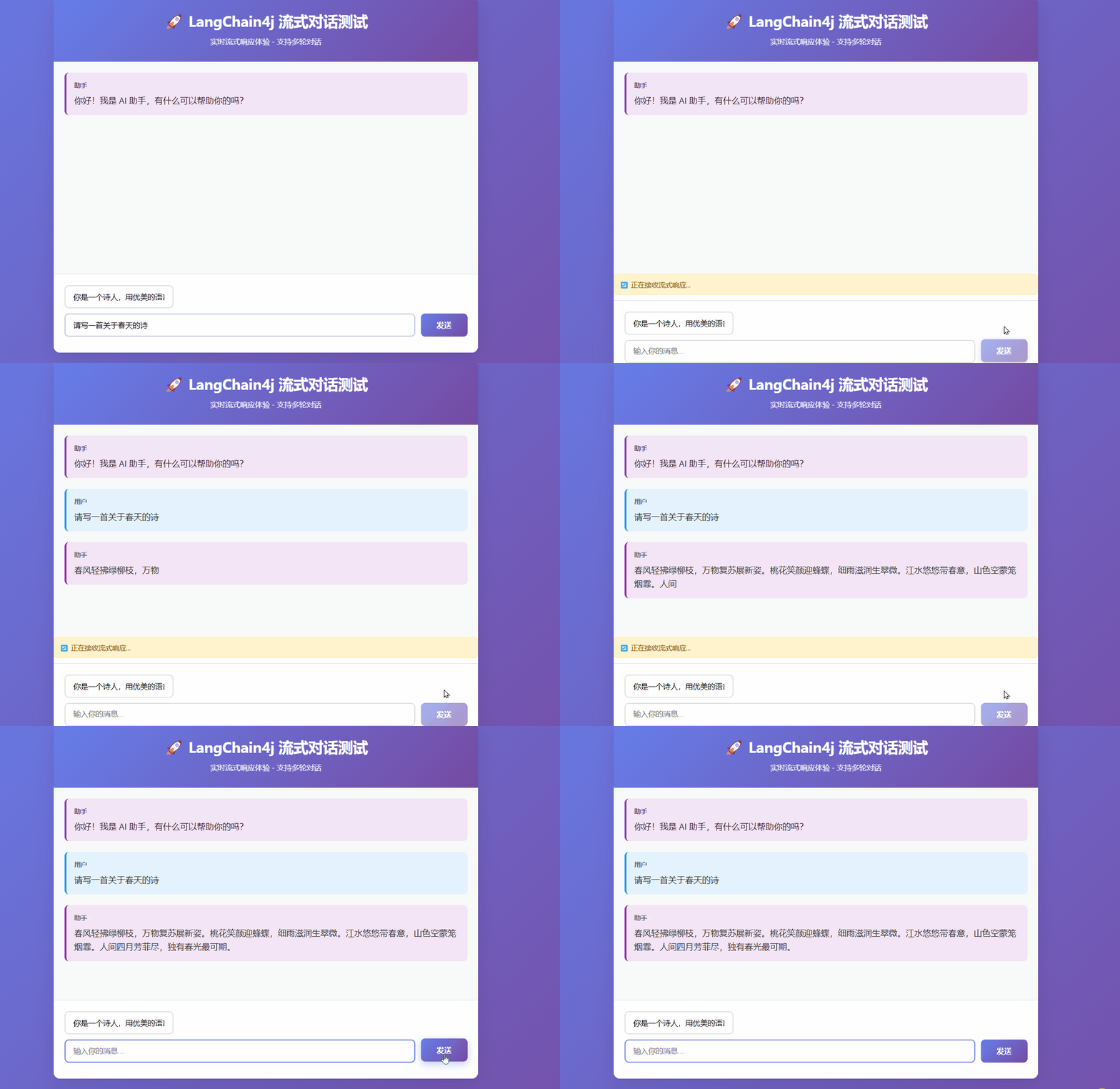
总结
本教程涵盖了 LangChain4j 流式响应的核心概念:
- 流式响应原理:LLM逐个生成令牌,无需等待完整响应
- StreamingChatResponseHandler:处理部分响应、完成事件和错误
- LambdaStreamingResponseHandler:简化流式响应处理
- SSE 集成:Spring 的 Server Sent Events 推送
- 会话管理:MessageWindowChatMemory 自动管理对话历史
关键优势
- ✅ 实时响应:用户立即看到生成的文本
- ✅ 节省时间:无需等待完整响应
- ✅ 良好体验:类似打字机的效果
- ✅ 状态管理:自动维护对话上下文
使用场景
- 聊天机器人
- 内容生成器
- 代码助手
- 文档撰写工具
通过这个实现,您可以构建具有实时流式响应能力的 AI 应用!