引言
在上一篇文章中,我们深入分析了Binder驱动的内核机制。但是有一个核心问题还没有回答:Client如何知道Server的Binder句柄?
想象一下,你想打电话给朋友,但你不知道他的电话号码。这时你需要查电话簿(Yellow Pages)。在Android系统中,ServiceManager就是这本"电话簿"------它维护了系统中所有服务的注册表,提供服务的注册和查询功能。
没有ServiceManager,Binder IPC就无法工作。所有的系统服务(如ActivityManagerService、WindowManagerService)都需要先向ServiceManager注册,客户端才能通过ServiceManager查询到它们的Binder句柄,进而进行跨进程调用。
本文将深入Android 15源码,剖析ServiceManager的工作机制:
你将学到:
- ServiceManager的启动流程与特殊性
- 服务注册(addService)的完整实现
- 服务查询(getService)的查找机制
- 死亡通知(DeathRecipient)的工作原理
- VINTF声明验证与安全机制
- Android 15的新特性与优化
ServiceManager的特殊性
在深入代码前,我们先理解ServiceManager的几个特殊之处。
1. Handle 0:ServiceManager的唯一标识
在Binder系统中,ServiceManager有一个硬编码的句柄值:0。
cpp
// ProcessState.cpp
enum {
    CONTEXT_MGR_HANDLE = 0  // ServiceManager的句柄固定为0
};
这是一个"先有鸡还是先有蛋"的问题:
- 所有服务都需要向ServiceManager注册
- 但客户端如何获取ServiceManager的句柄?
解决方案 :将ServiceManager的句柄硬编码为0。这样,所有进程都知道,要与ServiceManager通信,只需要使用handle=0。
💡 设计巧思: Handle 0是Binder协议的特殊约定,在Binder驱动初始化时就预留了这个位置给ServiceManager。这是一个优雅的引导机制(Bootstrap)。
2. Context Manager:成为Binder上下文管理者
ServiceManager不仅仅是一个普通服务,它还是Binder上下文管理者(Context Manager)。
cpp
// main.cpp (Android 15)
int main(int argc, char** argv) {
    const char* driver = argc == 2 ? argv[1] : "/dev/binder";

    sp<ProcessState> ps = ProcessState::initWithDriver(driver);

    sp<ServiceManager> manager = sp<ServiceManager>::make(std::make_unique<Access>());

    // 关键步骤1:将自己设置为Context Object
    IPCThreadState::self()->setTheContextObject(manager);

    // 关键步骤2:向驱动注册为Context Manager
    if (!ps->becomeContextManager()) {
        LOG(FATAL) << "Could not become context manager";
    }

    // 进入消息循环
    sp<Looper> looper = Looper::prepare(false);
    while(true) {
        looper->pollAll(-1);
    }
}becomeContextManager做了什么?
cpp
// ProcessState.cpp
bool ProcessState::becomeContextManager() {
    // 通过ioctl告诉驱动:"我是ServiceManager"
    flat_binder_object obj{
        .flags = FLAT_BINDER_FLAG_ACCEPTS_FDS,
    };

    binder_write_read bwr{};
    binder_transaction_data tr{};
    tr.target.handle = 0;
    tr.code = BINDER_SET_CONTEXT_MGR;

    // 驱动会将handle 0绑定到当前进程
    int result = ioctl(mDriverFD, BINDER_WRITE_READ, &bwr);
    return result == 0;
}驱动收到BINDER_SET_CONTEXT_MGR命令后,会:
- 检查调用进程是否有权限(需要root或system权限)
- 将handle 0永久绑定到ServiceManager进程
- 确保只有一个进程能成为Context Manager
3. 单例且唯一
整个Android系统中,只能有一个ServiceManager实例。它由init进程在系统启动早期启动,并一直运行直到系统关闭。
bash
# init.rc中的ServiceManager启动配置
service servicemanager /system/bin/servicemanager
    class core animation
    user system
    group system readproc
    critical
    onrestart restart apexd
    onrestart restart audioserver
# ...重启时需要重启依赖的服务critical标志:ServiceManager被标记为关键服务,如果它崩溃,系统会自动重启进入恢复模式。
ServiceManager架构概览
在深入启动流程前,先看看ServiceManager的整体架构:
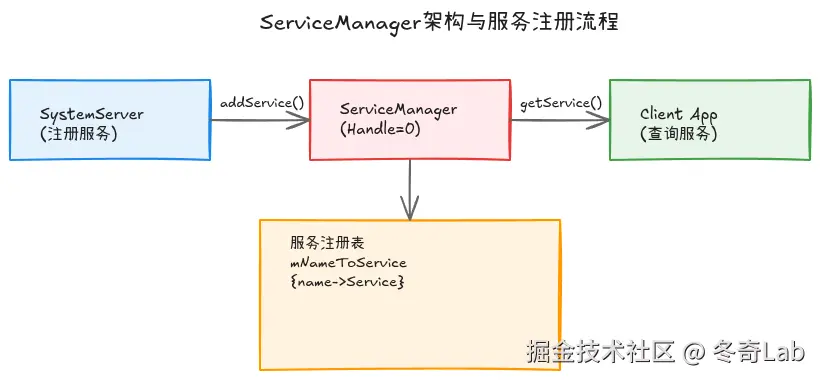
图1: ServiceManager架构 - SystemServer注册服务,Client查询服务,ServiceManager维护服务注册表
ServiceManager启动流程
让我们跟踪ServiceManager从启动到就绪的完整流程。
1. main函数:初始化与准备
cpp
// main.cpp (Android 15)
int main(int argc, char** argv) {
    // 1. 初始化日志
    android::base::InitLogging(argv, android::base::KernelLogger);

    const char* driver = argc == 2 ? argv[1] : "/dev/binder";

    #if !defined(VENDORSERVICEMANAGER)
    android::register_perfetto_te_categories();  // Perfetto追踪
    #endif

    LOG(INFO) << "Starting sm instance on " << driver;

    // 2. 初始化ProcessState
    sp<ProcessState> ps = ProcessState::initWithDriver(driver);
    ps->setThreadPoolMaxThreadCount(0);  // 不使用线程池,单线程处理
    ps->setCallRestriction(ProcessState::CallRestriction::FATAL_IF_NOT_ONEWAY);

    // 3. 禁用后台调度,确保高优先级
    IPCThreadState::self()->disableBackgroundScheduling(true);

    // 4. 创建ServiceManager实例
    sp<ServiceManager> manager = sp<ServiceManager>::make(std::make_unique<Access>());

    // 5. 自己也要注册为服务(服务的服务)
    if (!manager->addService("manager", manager,
                            false /*allowIsolated*/,
                            IServiceManager::DUMP_FLAG_PRIORITY_DEFAULT).isOk()) {
        LOG(ERROR) << "Could not self register servicemanager";
    }

    // 6. 成为Context Manager
    IPCThreadState::self()->setTheContextObject(manager);
    if (!ps->becomeContextManager()) {
        LOG(FATAL) << "Could not become context manager";
    }

    // 7. 设置事件循环
    sp<Looper> looper = Looper::prepare(false);

    sp<BinderCallback> binderCallback = BinderCallback::setupTo(looper);
    ClientCallbackCallback::setupTo(looper, manager, binderCallback);

    // 8. 设置ready属性,通知其他进程可以使用了
    #ifndef VENDORSERVICEMANAGER
    if (!SetProperty("servicemanager.ready", "true")) {
        LOG(ERROR) << "Failed to set servicemanager ready property";
    }
    #endif

    // 9. 进入消息循环,永不退出
    while(true) {
        looper->pollAll(-1);  // 阻塞等待Binder事务
    }

    return EXIT_FAILURE;  // 不应该到达这里
}关键点解析:
- 单线程模式 :
setThreadPoolMaxThreadCount(0)表示不使用Binder线程池,只用主线程处理,简化并发控制 - 只接受单向调用 :
FATAL_IF_NOT_ONEWAY确保所有对ServiceManager的调用都是异步的,防止死锁 - 高优先级 :
disableBackgroundScheduling(true)确保ServiceManager不会被降优先级 - 自我注册:ServiceManager也将自己注册为名为"manager"的服务,供特殊情况使用
- Ready属性:通过系统属性通知其他等待的进程
2. Looper事件循环
ServiceManager使用Looper而不是传统的Binder线程池:
cpp
// BinderCallback:处理Binder事件
class BinderCallback : public LooperCallback {
public:
    static sp<BinderCallback> setupTo(const sp<Looper>& looper) {
        sp<BinderCallback> cb = sp<BinderCallback>::make();
        cb->mLooper = looper;

        // 将Binder驱动的文件描述符加入Looper监听
        IPCThreadState::self()->setupPolling(&cb->mBinderFd);

        int ret = looper->addFd(cb->mBinderFd,
                               Looper::POLL_CALLBACK,
                               Looper::EVENT_INPUT,
                               cb, nullptr);
        LOG_ALWAYS_FATAL_IF(ret != 1, "Failed to add binder FD to Looper");

        return cb;
    }

    // 当Binder驱动有数据时,此函数被调用
    int handleEvent(int fd, int events, void* data) override {
        IPCThreadState::self()->handlePolledCommands();
        return 1;  // 继续接收回调
    }

private:
    sp<Looper> mLooper;
    int mBinderFd = -1;
};
为什么用Looper而不是线程池?
- 简单:单线程模型,无需考虑并发同步
- 可控:ServiceManager需要精确控制事务处理顺序
- 高效:避免线程切换开销
- 可扩展:可以同时监听其他事件(如定时器)
服务注册:addService详解
当系统服务(如AMS)想要注册时,会调用addService。让我们看完整流程。
1. 客户端调用
cpp
// SystemServer.java (Java层)
ServiceManager.addService(Context.ACTIVITY_SERVICE, activityManager);

// 最终调用到Native层
// IServiceManager.aidl
interface IServiceManager {
    void addService(String name, IBinder service,
                   boolean allowIsolated, int dumpPriority);
}
2. ServiceManager实现
cpp
// ServiceManager.cpp (Android 15)
Status ServiceManager::addService(const std::string& name,
                                  const sp<IBinder>& binder,
                                  bool allowIsolated,
                                  int32_t dumpPriority) {
    SM_PERFETTO_TRACE_FUNC(PERFETTO_TE_PROTO_FIELDS(
            PERFETTO_TE_PROTO_FIELD_CSTR(kProtoServiceName, name.c_str())));

    // 1. 获取调用者上下文(UID/PID/SID)
    auto ctx = mAccess->getCallingContext();

    // 2. 权限检查:App UID不能注册服务
    if (multiuser_get_app_id(ctx.uid) >= AID_APP) {
        return Status::fromExceptionCode(Status::EX_SECURITY,
                                        "App UIDs cannot add services.");
    }

    // 3. 检查是否有权限注册此服务
    std::optional<std::string> accessorName;
    if (auto status = canAddService(ctx, name, &accessorName); !status.isOk()) {
        return status;
    }

    // 4. 基本参数检查
    if (binder == nullptr) {
        return Status::fromExceptionCode(Status::EX_ILLEGAL_ARGUMENT, "Null binder.");
    }

    if (!isValidServiceName(name)) {
        ALOGE("%s Invalid service name: %s", ctx.toDebugString().c_str(), name.c_str());
        return Status::fromExceptionCode(Status::EX_ILLEGAL_ARGUMENT,
                                        "Invalid service name.");
    }

    // 5. VINTF声明检查(Android 15重要机制)
    #ifndef VENDORSERVICEMANAGER
    if (!meetsDeclarationRequirements(ctx, binder, name)) {
        return Status::fromExceptionCode(Status::EX_ILLEGAL_ARGUMENT,
                                        "VINTF declaration error.");
    }
    #endif

    // 6. 检查dump优先级标志
    if ((dumpPriority & DUMP_FLAG_PRIORITY_ALL) == 0) {
        ALOGW("%s Dump flag priority is not set when adding %s",
              ctx.toDebugString().c_str(), name.c_str());
    }

    // 7. 注册死亡通知(关键机制!)
    if (binder->remoteBinder() != nullptr &&
        binder->linkToDeath(sp<ServiceManager>::fromExisting(this)) != OK) {
        ALOGE("%s Could not linkToDeath when adding %s",
              ctx.toDebugString().c_str(), name.c_str());
        return Status::fromExceptionCode(Status::EX_ILLEGAL_STATE,
                                        "Couldn't linkToDeath.");
    }

    // 8. 检查是否已存在同名服务
    auto it = mNameToService.find(name);
    bool prevClients = false;
    if (it != mNameToService.end()) {
        const Service& existing = it->second;
        prevClients = existing.hasClients;

        // 警告:不同UID/SID注册相同服务名
        if (existing.ctx.uid != ctx.uid) {
            ALOGW("Service '%s' originally registered from UID %u "
                  "but now from UID %u. Multiple instances?",
                  name.c_str(), existing.ctx.uid, ctx.uid);
        }

        if (existing.ctx.sid != ctx.sid) {
            ALOGW("Service '%s' originally registered from SID %s "
                  "but now from SID %s. Multiple instances?",
                  name.c_str(), existing.ctx.sid.c_str(), ctx.sid.c_str());
        }
    }

    // 9. 添加/更新服务到注册表
    mNameToService[name] = Service{
        .binder = binder,
        .allowIsolated = allowIsolated,
        .dumpPriority = dumpPriority,
        .hasClients = prevClients,
        .guaranteeClient = false,
        .ctx = ctx,
    };

    // 10. 通知等待此服务的客户端
    if (auto it = mNameToRegistrationCallback.find(name);
        it != mNameToRegistrationCallback.end()) {

        mNameToService[name].guaranteeClient = true;
        CHECK(handleServiceClientCallback(2, name, false));

        for (const sp<IServiceCallback>& cb : it->second) {
            cb->onRegistration(name, binder);  // 回调通知
        }
    }

    return Status::ok();
}核心数据结构:
cpp
// ServiceManager.h
struct Service {
    sp<IBinder> binder;           // 服务的Binder对象
    bool allowIsolated;           // 是否允许隔离进程访问
    int32_t dumpPriority;         // dump优先级
    bool hasClients;              // 是否有客户端
    bool guaranteeClient;         // 保证有客户端
    Access::CallingContext ctx;   // 注册者的上下文信息
};

// 服务注册表:服务名 -> Service
std::map<std::string, Service> mNameToService;

// 注册回调表:服务名 -> 回调列表
std::map<std::string, std::vector<sp<IServiceCallback>>> mNameToRegistrationCallback;
3. VINTF声明验证(Android 15安全机制)
Android 15强化了VINTF(Vendor Interface)声明验证:
cpp
static bool meetsDeclarationRequirements(const Access::CallingContext& ctx,
                                        const sp<IBinder>& binder,
                                        const std::string& name) {
    // 检查Binder是否要求VINTF声明
    if (!Stability::requiresVintfDeclaration(binder)) {
        return true;  // 不需要声明,通过
    }

    // 检查是否在VINTF manifest中声明
    return isVintfDeclared(ctx, name);
}

static bool isVintfDeclared(const Access::CallingContext& ctx,
                           const std::string& name) {
    // 解析服务名(如 android.hardware.foo.IFoo/default)
    AidlName aname;
    if (!AidlName::fill(name, &aname, true)) return false;

    // 遍历所有manifest(device/framework)
    bool found = forEachManifest([&](const ManifestWithDescription& mwd) {
        if (mwd.manifest->hasAidlInstance(aname.package,
                                         aname.iface,
                                         aname.instance)) {
            ALOGI("%s Found %s in %s VINTF manifest.",
                  ctx.toDebugString().c_str(),
                  name.c_str(),
                  mwd.description);
            return true;
        }
        return false;
    });

    if (!found) {
        ALOGI("%s Could not find %s in the VINTF manifest.",
              ctx.toDebugString().c_str(), name.c_str());
    }

    return found;
}VINTF的作用:
- 明确声明HAL服务的接口版本
- 防止未声明的服务注册(提高安全性)
- 支持跨版本兼容性检查
- 便于系统升级时的兼容性管理
服务查询:getService详解
客户端如何查询已注册的服务?
1. 客户端调用
cpp
// Java层
IBinder binder = ServiceManager.getService(Context.ACTIVITY_SERVICE);

// Native层
sp<IBinder> binder = defaultServiceManager()->getService(String16("activity"));
2. ServiceManager实现
cpp
// ServiceManager.cpp (Android 15)
Status ServiceManager::getService(const std::string& name, sp<IBinder>* outBinder) {
    SM_PERFETTO_TRACE_FUNC(PERFETTO_TE_PROTO_FIELDS(
            PERFETTO_TE_PROTO_FIELD_CSTR(kProtoServiceName, name.c_str())));

    *outBinder = tryGetBinder(name, true);
    // 为了向后兼容,总是返回OK(即使服务不存在)
    return Status::ok();
}

sp<IBinder> ServiceManager::tryGetBinder(const std::string& name,
                                         bool startIfNotFound) {
    auto ctx = mAccess->getCallingContext();

    // 1. 权限检查:调用者是否有权限访问此服务
    if (!mAccess->canFind(ctx, name)) {
        ALOGE("%s Cannot find %s", ctx.toDebugString().c_str(), name.c_str());
        return nullptr;
    }

    // 2. 查询服务注册表
    auto it = mNameToService.find(name);
    if (it == mNameToService.end()) {
        ALOGI("%s Service %s not found", ctx.toDebugString().c_str(), name.c_str());
        return nullptr;
    }

    const Service& service = it->second;

    // 3. 检查隔离进程访问权限
    if (!service.allowIsolated && is_multiuser_uid_isolated(ctx.uid)) {
        ALOGW("%s Isolated process cannot access %s",
              ctx.toDebugString().c_str(), name.c_str());
        return nullptr;
    }

    // 4. 记录客户端信息
    if (!service.guaranteeClient) {
        mNameToService[name].guaranteeClient = true;
        mNameToService[name].hasClients = true;
    }

    // 5. 返回服务的Binder对象
    return service.binder;
}
checkService vs getService:
cpp
// checkService:仅检查服务是否存在,不启动
Status ServiceManager::checkService(const std::string& name,
                                   os::Service* outService) {
    *outService = tryGetService(name, false);  // startIfNotFound = false
    return Status::ok();
}

// getService:如果服务支持懒启动,会尝试启动它
Status ServiceManager::getService(const std::string& name,
                                 sp<IBinder>* outBinder) {
    *outBinder = tryGetBinder(name, true);  // startIfNotFound = true
    return Status::ok();
}
3. 权限控制:Access类
cpp
// Access.cpp
bool Access::canFind(const CallingContext& ctx, const std::string& name) {
    // 1. 检查SELinux上下文
    if (!checkSelinuxAccess(ctx, name, "find")) {
        return false;
    }

    // 2. 检查特殊服务的访问控制列表
    if (isRestrictedService(name)) {
        return isAllowedUser(ctx.uid, name);
    }

    return true;
}

bool Access::canAdd(const CallingContext& ctx, const std::string& name) {
    // 只有system/root用户可以注册服务
    if (ctx.uid != AID_SYSTEM && ctx.uid != AID_ROOT) {
        return false;
    }

    // 检查SELinux
    return checkSelinuxAccess(ctx, name, "add");
}CallingContext结构:
cpp
struct CallingContext {
    pid_t pid;          // 进程ID
    uid_t uid;          // 用户ID
    std::string sid;    // SELinux SID
    int debugPid;       // 调试用PID

    // 从IPCThreadState获取
    static CallingContext fromBinder() {
        IPCThreadState* ipc = IPCThreadState::self();
        return CallingContext{
            .pid = ipc->getCallingPid(),
            .uid = ipc->getCallingUid(),
            .sid = getSeContext(ipc->getCallingPid()),
            .debugPid = ipc->getCallingPid(),
        };
    }
};
死亡通知:DeathRecipient机制
当服务进程异常退出时,ServiceManager如何感知并清理?
1. linkToDeath:注册死亡监听
在addService时,ServiceManager会注册死亡通知:
cpp
// addService中
if (binder->linkToDeath(sp<ServiceManager>::fromExisting(this)) != OK) {
    ALOGE("Could not linkToDeath when adding %s", name.c_str());
    return Status::fromExceptionCode(Status::EX_ILLEGAL_STATE,
                                    "Couldn't linkToDeath.");
}
2. binderDied:处理死亡通知
cpp
// ServiceManager.cpp
void ServiceManager::binderDied(const wp<IBinder>& who) {
    // 遍历所有服务,找到死亡的那个
    for (auto it = mNameToService.begin(); it != mNameToService.end(); ) {
        if (it->second.binder == who.promote()) {
            ALOGI("Service '%s' died (binder %p)",
                  it->first.c_str(), who.unsafe_get());

            // 通知等待的客户端
            if (auto cbIt = mNameToRegistrationCallback.find(it->first);
                cbIt != mNameToRegistrationCallback.end()) {
                for (const sp<IServiceCallback>& cb : cbIt->second) {
                    // 通知服务已死亡
                    cb->onRegistration(it->first, nullptr);
                }
            }

            // 从注册表移除
            it = mNameToService.erase(it);
        } else {
            ++it;
        }
    }
}Binder驱动的死亡通知机制:
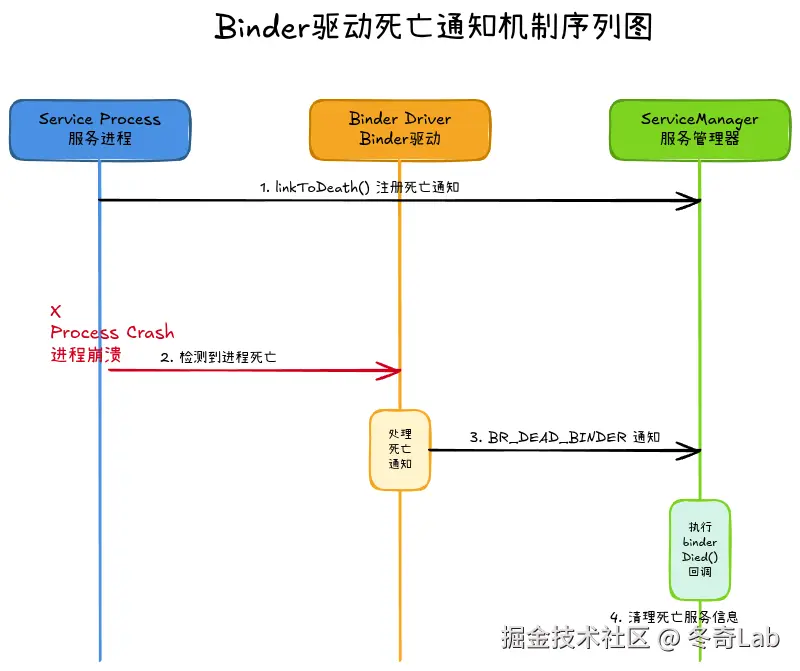
3. 客户端注册回调
客户端也可以监听服务的注册/死亡:
cpp
// IServiceManager.aidl
interface IServiceManager {
    void registerForNotifications(String name, IServiceCallback callback);
}

// 客户端使用
serviceManager->registerForNotifications("activity", new ServiceCallback() {
    @Override
    public void onRegistration(String name, IBinder service) {
        if (service == null) {
            // 服务死亡
            Log.w(TAG, "Service " + name + " died!");
        } else {
            // 服务注册/重启
            Log.i(TAG, "Service " + name + " registered!");
        }
    }
});
服务列表与dump
ServiceManager还提供了服务列表和dump功能。
1. listServices:列出所有服务
cpp
Status ServiceManager::listServices(int32_t dumpPriority,
                                   std::vector<std::string>* outList) {
    // 权限检查
    if (!mAccess->canList(mAccess->getCallingContext())) {
        return Status::fromExceptionCode(Status::EX_SECURITY,
                                        "Cannot list services.");
    }

    // 按dump优先级过滤
    for (const auto& [name, service] : mNameToService) {
        if (dumpPriority == IServiceManager::DUMP_FLAG_PRIORITY_ALL ||
            (service.dumpPriority & dumpPriority) != 0) {
            outList->push_back(name);
        }
    }

    return Status::ok();
}
2. dump:导出服务信息
bash
# 通过dumpsys查看ServiceManager状态
adb shell dumpsys servicemanager

# 输出示例
Registered services:
  activity: [android.app.IActivityManager]
    UID: 1000 (system)
    PID: 1234
    Clients: 15
    DumpPriority: CRITICAL|HIGH|NORMAL

  window: [android.view.IWindowManager]
    UID: 1000 (system)
    PID: 1234
    Clients: 8
    DumpPriority: CRITICAL|HIGH

Total services: 87
Active clients: 156
Android 15的新特性
1. Perfetto追踪集成
Android 15深度集成了Perfetto追踪:
cpp
// 每个关键函数都有追踪宏
Status ServiceManager::addService(const std::string& name, ...) {
    SM_PERFETTO_TRACE_FUNC(PERFETTO_TE_PROTO_FIELDS(
            PERFETTO_TE_PROTO_FIELD_CSTR(kProtoServiceName, name.c_str())));

    // ... 函数实现
}
使用Perfetto可以精确追踪ServiceManager的性能:
bash
# 抓取ServiceManager的trace
perfetto -c trace_config.pb -o trace.pb

# 在UI中查看service注册/查询的耗时
2. VINTF强制验证
Android 15强制HAL服务必须在VINTF manifest中声明:
xml
<!-- device/vendor/manifest.xml -->
<hal format="aidl">
    <name>android.hardware.power</name>
    <interface>
        <name>IPower</name>
        <instance>default</instance>
    </interface>
    <fqname>@1.0::IPower/default</fqname>
</hal>
未声明的服务将无法注册:
cpp
if (!meetsDeclarationRequirements(ctx, binder, name)) {
    return Status::fromExceptionCode(Status::EX_ILLEGAL_ARGUMENT,
                                    "VINTF declaration error.");
}
3. Updatable APEX支持
支持通过APEX更新HAL服务:
cpp
static std::optional<std::string> getVintfUpdatableApex(const std::string& name) {
    // 查询服务是否可以通过APEX更新
    forEachManifest([&](const ManifestWithDescription& mwd) {
        // 检查manifest中的updatableViaApex字段
        if (manifestInstance.updatableViaApex().has_value()) {
            return manifestInstance.updatableViaApex().value();
        }
    });
}
4. 客户端回调优化
Android 15优化了客户端回调机制,使用定时器定期检查:
cpp
class ClientCallbackCallback : public LooperCallback {
public:
static sp<ClientCallbackCallback> setupTo(...) {
// 创建定时器,每5秒触发一次
int fdTimer = timerfd_create(CLOCK_MONOTONIC, 0);
itimerspec timespec {
.it_interval = { .tv_sec = 5, .tv_nsec = 0 },
.it_value = { .tv_sec = 5, .tv_nsec = 0 },
};
timerfd_settime(fdTimer, 0, ×pec, nullptr);
looper->addFd(fdTimer, Looper::POLL_CALLBACK, Looper::EVENT_INPUT, cb, nullptr);
return cb;
}
int handleEvent(int fd, int events, void* data) override {
// 定期处理客户端回调
mManager->handleClientCallbacks();
mBinderCallback->repoll(); // b/316829336修复
return 1;
}
};常见问题
Q1: 为什么ServiceManager的handle必须是0?
A: 这是一个引导问题(Bootstrap Problem)。要获取任何服务,都需要先查询ServiceManager,但要查询ServiceManager,又需要知道它的handle。通过硬编码handle=0,所有进程都知道如何找到ServiceManager,从而启动整个服务发现链条。
Q2: 如果ServiceManager崩溃会怎样?
A : ServiceManager被标记为critical服务:
- init会立即重启ServiceManager
- 所有依赖的服务(如audioserver、mediaserver)也会重启
- 如果重启失败,系统进入恢复模式
bash
# init.rc
service servicemanager /system/bin/servicemanager
    critical  # 崩溃导致系统重启
    onrestart restart audioserver
    onrestart restart mediaserver
    # ...
Q3: App为什么不能注册系统服务?
A: 安全考虑:
cpp
// App UID检查
if (multiuser_get_app_id(ctx.uid) >= AID_APP) {
    return Status::fromExceptionCode(Status::EX_SECURITY,
                                    "App UIDs cannot add services.");
}
只有system UID(1000)或root UID(0)才能注册服务,防止App伪造系统服务。
Q4: getService和checkService有什么区别?
A:
- getService: 如果服务不存在但支持懒启动,会尝试启动服务,可能阻塞
- checkService: 仅检查服务是否已注册,不会启动服务,不阻塞
cpp
// 需要确保服务存在时使用getService
sp<IBinder> binder = sm->getService(String16("activity"));

// 仅检查状态时使用checkService(例如做UI展示)
sp<IBinder> binder = sm->checkService(String16("activity"));
if (binder == nullptr) {
    showServiceUnavailable();
}
Q5: 死亡通知是同步还是异步的?
A : 异步。当服务进程死亡时:
- Binder驱动检测到进程退出
- 驱动向ServiceManager发送
BR_DEAD_BINDER命令 - ServiceManager在下次处理Binder命令时调用
binderDied() - 清理是异步的,有一定延迟
实战:追踪服务注册
1. 查看已注册的服务
bash
# 列出所有服务
adb shell service list

# 输出示例
Found 87 services:
0    phone: [com.android.internal.telephony.ITelephony]
1    isms: [com.android.internal.telephony.ISms]
2    activity: [android.app.IActivityManager]
3    package: [android.content.pm.IPackageManager]
...
2. dumpsys查看服务详情
bash
# 查看ServiceManager状态
adb shell dumpsys servicemanager

# 查看特定服务
adb shell dumpsys activity

# 查看服务的客户端连接
adb shell lsof | grep binder
3. 使用Systrace追踪
bash
# 抓取包含ServiceManager的trace
systrace.py -t 10 binder sm -o trace.html

# 在Chrome中打开trace.html,搜索:
# - "ServiceManager::addService"
# - "ServiceManager::getService"
4. 监控服务注册
bash
# 实时监控服务注册
adb logcat | grep "ServiceManager"

# 过滤特定服务
adb logcat | grep "addService.*activity"
总结
ServiceManager是Android Binder IPC的核心枢纽,承担着服务注册表的角色。
核心机制:
- ✅ Handle 0:硬编码的唯一标识,解决引导问题
- ✅ Context Manager:向驱动注册为Binder上下文管理者
- ✅ 单例模式:全系统唯一实例,由init启动并标记为critical
- ✅ 服务注册表:维护name→Service的映射
- ✅ 权限控制:UID/SELinux多重检查
- ✅ 死亡通知:自动清理已死亡的服务
工作流程:
- 启动: init→main→becomeContextManager→Looper
- 注册: addService→权限检查→VINTF验证→linkToDeath→添加到map
- 查询: getService→权限检查→查map→返回Binder
- 清理: binderDied→移除服务→通知客户端
Android 15增强:
- Perfetto深度集成,性能追踪更精确
- VINTF强制验证,安全性提升
- APEX updatable支持,HAL可独立更新
- 客户端回调优化,减少资源占用
理解ServiceManager,你就理解了Android服务架构的基石。在下一篇文章中,我们将深入AIDL和HIDL,看看如何定义和使用Binder服务接口。
系列文章
欢迎来我中的个人主页找到更多有用的知识和有趣的产品