
个人主页:ujainu
欢迎加入开源鸿蒙跨平台社区:https://openharmonycrossplatform.csdn.net
文章目录
-
- 一、鸿蒙设计语言下的搜索交互规范
- [二、核心架构调整:分离 allNotes 与 filteredNotes](#二、核心架构调整:分离 allNotes 与 filteredNotes)
- [三、搜索栏实现:AppBar 内嵌 TextField](#三、搜索栏实现:AppBar 内嵌 TextField)
- 四、实时搜索与防抖(Debounce)优化
- [五、搜索栏 UI 构建](#五、搜索栏 UI 构建)
- 六、列表展示与空状态处理
- [七、完整可运行代码(Flutter + OpenHarmony)](#七、完整可运行代码(Flutter + OpenHarmony))
- 结语
在上一篇《零依赖!用 Flutter + OpenHarmony 构建鸿蒙风格临时记事本(一):内存 CRUD》中,我们成功搭建了一个功能完整的 内存版记事本 ,实现了增、删、改、查四大基础操作。然而,当笔记数量逐渐增多------从几条到几十条甚至上百条时,用户将面临一个现实问题:如何快速找到某条特定笔记?
此时,全局搜索功能 便成为提升用户体验的关键一环。本文将在此基础上,为记事本主界面集成 实时模糊搜索能力 ,支持对笔记的 标题与内容 进行关键词匹配,并通过 防抖(debounce)优化性能 、动态隐藏 FAB 聚焦搜索体验,全面贴合 OpenHarmony 所倡导的"高效、自然"交互原则。
✅ 为什么搜索如此重要?
- 用户平均只记得笔记的"片段信息"(如"会议纪要"、"购物清单")
- 线性滚动查找效率极低(O(n) 时间复杂度)
- 实时反馈能显著降低认知负荷,提升操作流畅度
一、鸿蒙设计语言下的搜索交互规范
OpenHarmony 的设计哲学强调 "以用户为中心",其对搜索功能有明确指引:
- 入口显性但不突兀:搜索栏置于 AppBar 内,保持界面整洁
- 即时反馈:输入即搜,无需点击"搜索"按钮
- 聚焦优先级:搜索激活时,弱化其他操作(如隐藏 FAB)
- 结果清晰:高亮匹配项(本文暂不实现高亮,后续可扩展)
在 Flutter 中,我们有两种主流方案:
- Material 3 的
SearchBar/SearchAnchor(推荐,符合鸿蒙现代感) - 自定义
TextField+AppBar.actions
考虑到兼容性与控制力,本文采用 自定义 TextField 方案,既保留 Material 3 视觉风格,又便于实现防抖与状态管理。
二、核心架构调整:分离 allNotes 与 filteredNotes
为了支持搜索,我们必须将 原始数据源 与 展示数据 分离:
dart
List<Note> _allNotes = [];        // 原始完整列表(来自内存 CRUD)
List<Note> _filteredNotes = [];   // 当前展示列表(根据关键词过滤)
String _searchQuery = '';         // 当前搜索关键词
🔍 关键逻辑:
_allNotes由 CRUD 操作维护(新增、编辑、删除)_filteredNotes仅用于 UI 展示,随_searchQuery动态变化- 初始状态下
_filteredNotes = _allNotes(无搜索)
三、搜索栏实现:AppBar 内嵌 TextField
我们将搜索框集成到 AppBar 的 title 区域,并支持 聚焦展开 与 失焦收起:
dart
class _HomePageState extends State<HomePage> {
  final List<Note> _allNotes = [];
  List<Note> _filteredNotes = [];
  String _searchQuery = '';
  late FocusNode _searchFocusNode;
  bool _isSearching = false;

  @override
  void initState() {
    super.initState();
    _searchFocusNode = FocusNode();
    _filteredNotes = _allNotes; // 初始显示全部
  }

  @override
  void dispose() {
    _searchFocusNode.dispose();
    super.dispose();
  }

  @override
  Widget build(BuildContext context) {
    return Scaffold(
      appBar: AppBar(
        backgroundColor: Colors.white,
        foregroundColor: Colors.black,
        elevation: 0,
        title: _buildSearchField(),
        leading: _isSearching
            ? IconButton(
                icon: const Icon(Icons.arrow_back),
                onPressed: _exitSearch,
              )
            : null,
        actions: !_isSearching
            ? [
                IconButton(
                  icon: const Icon(Icons.search),
                  onPressed: _enterSearchMode,
                ),
              ]
            : null,
      ),
      body: _buildNoteList(),
      floatingActionButton: !_isSearching
          ? FloatingActionButton(
              onPressed: _onAddNote,
              child: const Icon(Icons.add),
            )
          : null, // 搜索时隐藏 FAB
    );
  }
}
搜索模式切换逻辑
dart
void _enterSearchMode() {
  setState(() {
    _isSearching = true;
    _searchQuery = ''; // 清空上次搜索
    _filteredNotes = _allNotes; // 先显示全部
  });
  _searchFocusNode.requestFocus(); // 自动聚焦
}

void _exitSearchMode() {
  setState(() {
    _isSearching = false;
    _searchQuery = '';
    _filteredNotes = _allNotes;
  });
  _searchFocusNode.unfocus();
}
✅ 优化点:
- 搜索激活时,左侧显示返回箭头(替代默认汉堡菜单)
- 右侧搜索图标仅在非搜索状态显示
- FAB 在搜索时自动隐藏,避免干扰
四、实时搜索与防抖(Debounce)优化
直接监听 TextField 的 onChanged 会导致 每次按键都触发过滤 ,在大量数据下可能造成卡顿。因此,我们引入 防抖机制:
dart
import 'dart:async';

class _HomePageState extends State<HomePage> {
  // ... 其他字段
  Timer? _debounceTimer;

  void _onSearchQueryChanged(String query) {
    // 取消之前的定时器
    _debounceTimer?.cancel();

    // 设置新的延迟任务(300ms)
    _debounceTimer = Timer(const Duration(milliseconds: 300), () {
      _performSearch(query);
    });
  }

  void _performSearch(String query) {
    setState(() {
      _searchQuery = query.trim();
      if (query.isEmpty) {
        _filteredNotes = _allNotes;
      } else {
        _filteredNotes = _allNotes.where((note) {
          final titleMatch = note.title.toLowerCase().contains(query.toLowerCase());
          final contentMatch = note.content.toLowerCase().contains(query.toLowerCase());
          return titleMatch || contentMatch;
        }).toList();
      }
    });
  }

  @override
  void dispose() {
    _debounceTimer?.cancel();
    _searchFocusNode.dispose();
    super.dispose();
  }
}
⚠️ 为什么需要防抖?
- 用户输入"Flutter"需按 7 次键,若每次都过滤,会执行 7 次 O(n) 操作
- 防抖后,仅在用户停顿 300ms 后执行一次,大幅降低 CPU 负载
- 300ms 是经验值,平衡响应速度与性能
五、搜索栏 UI 构建
使用 TextField 模拟 Material 3 搜索样式:
dart
Widget _buildSearchField() {
  if (!_isSearching) {
    return const Text('我的笔记', style: TextStyle(fontWeight: FontWeight.w500));
  }

  return TextField(
    focusNode: _searchFocusNode,
    onChanged: _onSearchQueryChanged,
    decoration: InputDecoration(
      hintText: '搜索标题或内容...',
      hintStyle: const TextStyle(color: Colors.grey),
      border: InputBorder.none,
      focusedBorder: InputBorder.none,
      prefixIcon: const Icon(Icons.search, color: Colors.grey),
      suffixIcon: _searchQuery.isNotEmpty
          ? IconButton(
              icon: const Icon(Icons.clear, size: 18),
              onPressed: () {
                _onSearchQueryChanged('');
                // 清空输入框
                WidgetsBinding.instance.addPostFrameCallback((_) {
                  if (_searchFocusNode.hasFocus) {
                    _searchFocusNode.requestFocus();
                  }
                });
              },
            )
          : null,
    ),
    style: const TextStyle(fontSize: 16),
  );
}
✅ 细节打磨:
- 使用
prefixIcon显示搜索图标- 有输入时显示清除按钮(
suffixIcon)- 清除后自动重新聚焦,保持搜索状态
- 无边框设计,符合鸿蒙"去装饰化"理念
六、列表展示与空状态处理
搜索结果可能为空,需友好提示:
dart
Widget _buildNoteList() {
  if (_filteredNotes.isEmpty) {
    if (_searchQuery.isNotEmpty) {
      return Center(
        child: Column(
          mainAxisAlignment: MainAxisAlignment.center,
          children: [
            const Icon(Icons.search_off, size: 64, color: Colors.grey),
            const SizedBox(height: 16),
            Text('未找到包含"$_searchQuery"的笔记', style: const TextStyle(color: Colors.grey)),
          ],
        ),
      );
    } else {
      return const Center(child: Text('暂无笔记', style: TextStyle(color: Colors.grey)));
    }
  }

  return ListView.builder(
    padding: const EdgeInsets.all(16),
    itemCount: _filteredNotes.length,
    itemBuilder: (context, index) {
      final note = _filteredNotes[index];
      return _buildNoteItem(note, index);
    },
  );
}
📌 用户体验增强:
- 区分"无笔记"与"无搜索结果"两种空状态
- 使用
Icons.search_off图标强化语义
七、完整可运行代码(Flutter + OpenHarmony)
以下代码整合了 内存 CRUD + 实时搜索 ,可直接复制到 main.dart 中运行:
dart
// main.dart - 支持实时搜索的鸿蒙记事本
import 'package:flutter/material.dart';
import 'dart:async';

// ==================== 数据模型 ====================
class Note {
  final String id;
  String title;
  String content;
  final DateTime createdAt;

  Note({required this.title, this.content = ''})
      : id = DateTime.now().microsecondsSinceEpoch.toString(),
        createdAt = DateTime.now();

  Note.withId({
    required this.id,
    required this.title,
    required this.content,
    required this.createdAt,
  });
}

// ==================== 编辑页面 ====================
class NoteEditorPage extends StatefulWidget {
  final Note? existingNote;
  const NoteEditorPage({this.existingNote, super.key});

  @override
  State<NoteEditorPage> createState() => _NoteEditorPageState();
}

class _NoteEditorPageState extends State<NoteEditorPage> {
  late final TextEditingController _titleController;
  late final TextEditingController _contentController;

  @override
  void initState() {
    super.initState();
    if (widget.existingNote != null) {
      _titleController = TextEditingController(text: widget.existingNote!.title);
      _contentController = TextEditingController(text: widget.existingNote!.content);
    } else {
      _titleController = TextEditingController();
      _contentController = TextEditingController();
    }
  }

  @override
  void dispose() {
    _titleController.dispose();
    _contentController.dispose();
    super.dispose();
  }

  void _saveNote() {
    final title = _titleController.text.trim();
    if (title.isEmpty) return;
    final note = widget.existingNote != null
        ? Note.withId(
            id: widget.existingNote!.id,
            title: title,
            content: _contentController.text.trim(),
            createdAt: widget.existingNote!.createdAt,
          )
        : Note(title: title, content: _contentController.text.trim());
    Navigator.pop(context, note);
  }

  @override
  Widget build(BuildContext context) {
    return Scaffold(
      appBar: AppBar(
        title: Text(widget.existingNote == null ? '新建笔记' : '编辑笔记'),
        backgroundColor: Colors.white,
        foregroundColor: Colors.black,
        elevation: 0,
        actions: [IconButton(icon: const Icon(Icons.save), onPressed: _saveNote)],
      ),
      body: Padding(
        padding: const EdgeInsets.all(16),
        child: Column(
          children: [
            TextField(
              controller: _titleController,
              decoration: const InputDecoration(
                hintText: '标题',
                border: InputBorder.none,
                focusedBorder: InputBorder.none,
              ),
              style: const TextStyle(fontSize: 20, fontWeight: FontWeight.bold),
              maxLines: 1,
            ),
            const Divider(height: 24),
            Expanded(
              child: TextField(
                controller: _contentController,
                decoration: const InputDecoration(
                  hintText: '写下你的想法...',
                  border: InputBorder.none,
                  focusedBorder: InputBorder.none,
                ),
                maxLines: null,
                keyboardType: TextInputType.multiline,
              ),
            ),
          ],
        ),
      ),
    );
  }
}

// ==================== 主界面(含搜索)====================
class HomePage extends StatefulWidget {
  const HomePage({super.key});

  @override
  State<HomePage> createState() => _HomePageState();
}

class _HomePageState extends State<HomePage> {
  final List<Note> _allNotes = [];
  List<Note> _filteredNotes = [];
  String _searchQuery = '';
  late FocusNode _searchFocusNode;
  bool _isSearching = false;
  Timer? _debounceTimer;

  @override
  void initState() {
    super.initState();
    _searchFocusNode = FocusNode();
    _filteredNotes = _allNotes;
  }

  @override
  void dispose() {
    _debounceTimer?.cancel();
    _searchFocusNode.dispose();
    super.dispose();
  }

  void _enterSearchMode() {
    setState(() {
      _isSearching = true;
      _searchQuery = '';
      _filteredNotes = _allNotes;
    });
    _searchFocusNode.requestFocus();
  }

  void _exitSearchMode() {
    setState(() {
      _isSearching = false;
      _searchQuery = '';
      _filteredNotes = _allNotes;
    });
    _searchFocusNode.unfocus();
  }

  void _onSearchQueryChanged(String query) {
    _debounceTimer?.cancel();
    _debounceTimer = Timer(const Duration(milliseconds: 300), () {
      _performSearch(query);
    });
  }

  void _performSearch(String query) {
    setState(() {
      _searchQuery = query.trim();
      if (query.isEmpty) {
        _filteredNotes = _allNotes;
      } else {
        final lowerQuery = query.toLowerCase();
        _filteredNotes = _allNotes.where((note) {
          return note.title.toLowerCase().contains(lowerQuery) ||
                 note.content.toLowerCase().contains(lowerQuery);
        }).toList();
      }
    });
  }

  void _onAddNote() {
    Navigator.push(context, MaterialPageRoute(builder: (_) => const NoteEditorPage()))
        .then((result) {
      if (result != null && result is Note) {
        setState(() {
          _allNotes.insert(0, result);
          if (!_isSearching) _filteredNotes = _allNotes;
        });
      }
    });
  }

  void _onEditNote(Note note) {
    Navigator.push(
      context,
      MaterialPageRoute(builder: (_) => NoteEditorPage(existingNote: note)),
    ).then((result) {
      if (result != null && result is Note) {
        setState(() {
          final index = _allNotes.indexWhere((n) => n.id == result.id);
          if (index != -1) {
            _allNotes[index] = result;
            if (!_isSearching) {
              _filteredNotes = _allNotes;
            } else {
              _performSearch(_searchQuery); // 重新搜索
            }
          }
        });
      }
    });
  }

  String _formatTime(DateTime time) {
    return '${time.year}-${time.month.toString().padLeft(2, '0')}-${time.day.toString().padLeft(2, '0')} '
        '${time.hour.toString().padLeft(2, '0')}:${time.minute.toString().padLeft(2, '0')}';
  }

  Widget _buildNoteCard(Note note) {
    return Card(
      margin: const EdgeInsets.only(bottom: 12),
      shape: RoundedRectangleBorder(borderRadius: BorderRadius.circular(12)),
      child: Padding(
        padding: const EdgeInsets.all(16),
        child: Column(
          crossAxisAlignment: CrossAxisAlignment.start,
          children: [
            Text(note.title, style: const TextStyle(fontSize: 18, fontWeight: FontWeight.bold, color: Colors.grey),
                maxLines: 1, overflow: TextOverflow.ellipsis),
            const SizedBox(height: 8),
            if (note.content.isNotEmpty)
              Text(note.content, maxLines: 2, overflow: TextOverflow.ellipsis, style: const TextStyle(color: Colors.grey)),
            const SizedBox(height: 12),
            Text(_formatTime(note.createdAt), style: const TextStyle(color: Colors.grey, fontSize: 12)),
          ],
        ),
      ),
    );
  }

  Widget _buildNoteItem(Note note, int index) {
    return Dismissible(
      key: Key(note.id),
      direction: DismissDirection.endToStart,
      background: Container(
        color: Colors.red,
        alignment: Alignment.centerRight,
        padding: const EdgeInsets.only(right: 20),
        child: const Icon(Icons.delete, color: Colors.white),
      ),
      onDismissed: (direction) {
        setState(() {
          _allNotes.removeWhere((n) => n.id == note.id);
          if (!_isSearching) {
            _filteredNotes = _allNotes;
          } else {
            _performSearch(_searchQuery);
          }
        });
        ScaffoldMessenger.of(context).showSnackBar(SnackBar(content: Text('已删除 "${note.title}"')));
      },
      child: GestureDetector(
        onTap: () => _onEditNote(note),
        child: _buildNoteCard(note),
      ),
    );
  }

  Widget _buildSearchField() {
    if (!_isSearching) {
      return const Text('我的笔记', style: TextStyle(fontWeight: FontWeight.w500));
    }

    return TextField(
      focusNode: _searchFocusNode,
      onChanged: _onSearchQueryChanged,
      decoration: InputDecoration(
        hintText: '搜索标题或内容...',
        hintStyle: const TextStyle(color: Colors.grey),
        border: InputBorder.none,
        focusedBorder: InputBorder.none,
        prefixIcon: const Icon(Icons.search, color: Colors.grey),
        suffixIcon: _searchQuery.isNotEmpty
            ? IconButton(
                icon: const Icon(Icons.clear, size: 18),
                onPressed: () {
                  _onSearchQueryChanged('');
                  WidgetsBinding.instance.addPostFrameCallback((_) {
                    if (_searchFocusNode.hasFocus) {
                      _searchFocusNode.requestFocus();
                    }
                  });
                },
              )
            : null,
      ),
      style: const TextStyle(fontSize: 16),
    );
  }

  Widget _buildNoteList() {
    if (_filteredNotes.isEmpty) {
      if (_searchQuery.isNotEmpty) {
        return Center(
          child: Column(
            mainAxisAlignment: MainAxisAlignment.center,
            children: [
              const Icon(Icons.search_off, size: 64, color: Colors.grey),
              const SizedBox(height: 16),
              Text('未找到包含"$_searchQuery"的笔记', style: const TextStyle(color: Colors.grey)),
            ],
          ),
        );
      } else {
        return const Center(child: Text('暂无笔记', style: TextStyle(color: Colors.grey)));
      }
    }

    return ListView.builder(
      padding: const EdgeInsets.all(16),
      itemCount: _filteredNotes.length,
      itemBuilder: (context, index) => _buildNoteItem(_filteredNotes[index], index),
    );
  }

  @override
  Widget build(BuildContext context) {
    return Scaffold(
      appBar: AppBar(
        backgroundColor: Colors.white,
        foregroundColor: Colors.black,
        elevation: 0,
        title: _buildSearchField(),
        leading: _isSearching
            ? IconButton(icon: const Icon(Icons.arrow_back), onPressed: _exitSearchMode)
            : null,
        actions: !_isSearching
            ? [IconButton(icon: const Icon(Icons.search), onPressed: _enterSearchMode)]
            : null,
      ),
      body: _buildNoteList(),
      floatingActionButton: !_isSearching
          ? FloatingActionButton(onPressed: _onAddNote, child: const Icon(Icons.add))
          : null,
    );
  }
}

// ==================== 主程序入口 ====================
void main() {
  runApp(MaterialApp(
    debugShowCheckedModeBanner: false,
    theme: ThemeData(useMaterial3: true),
    home: HomePage(),
  ));
}
运行界面
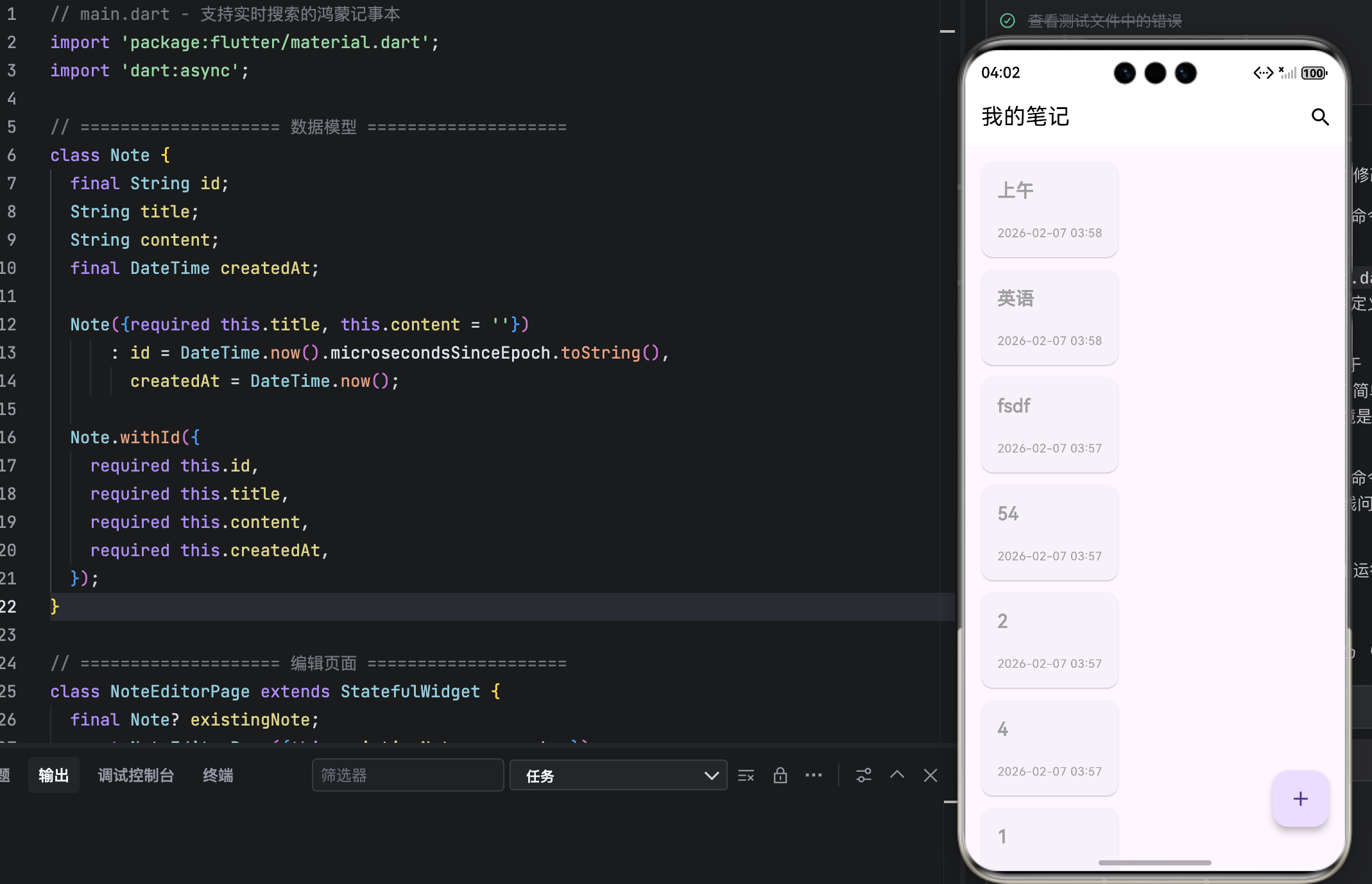
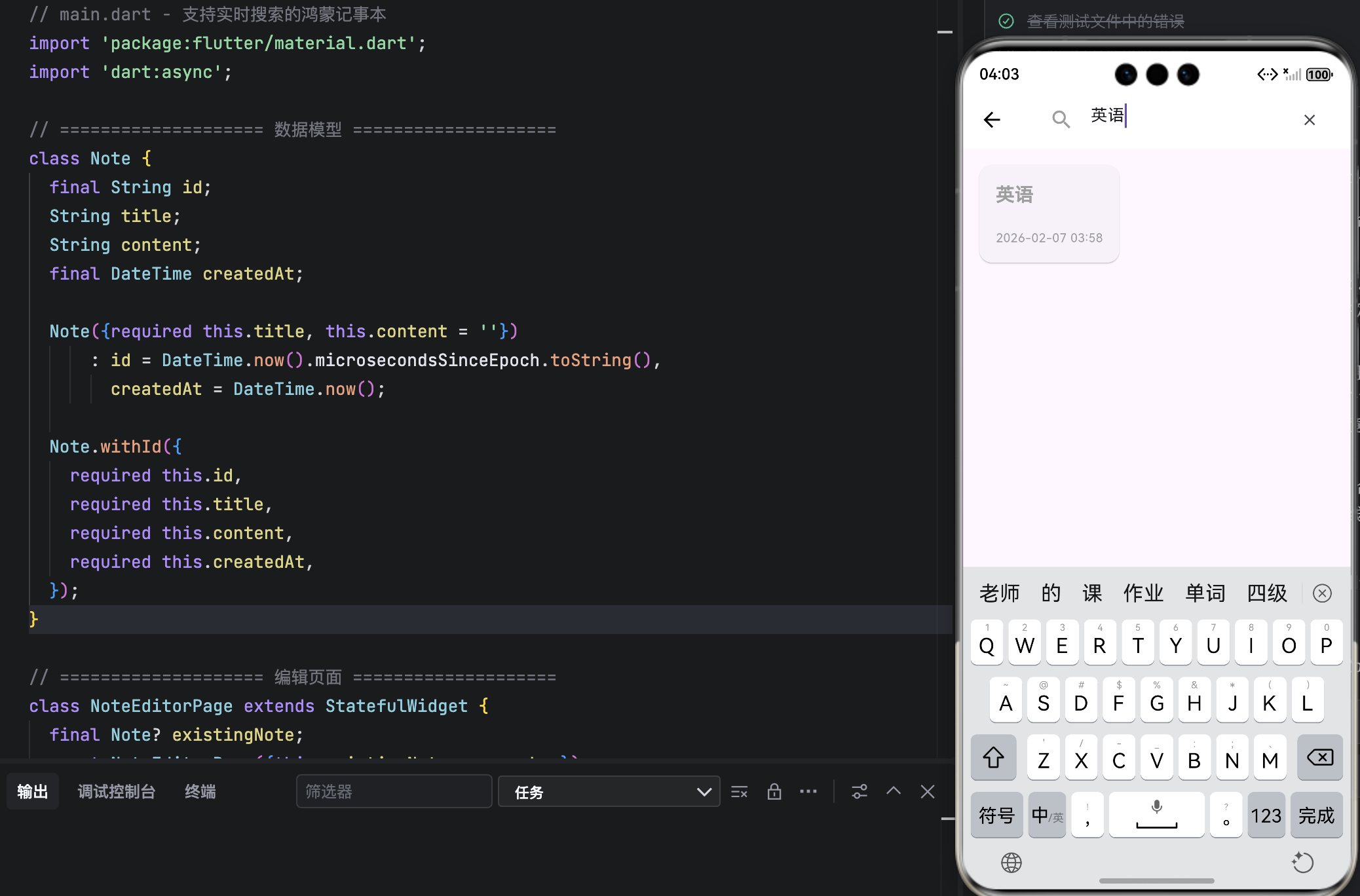
结语
本文成功为鸿蒙记事本注入了 实时搜索能力 ,通过 防抖优化、状态分离、UI 聚焦 等手段,在保证性能的同时极大提升了海量笔记下的查找效率。所有改动均严格遵循 OpenHarmony 的简洁、高效设计原则。
此功能虽小,却是专业应用的标配。下一步,我们将把内存数据迁移到 本地数据库(Drift),实现真正的持久化存储,让笔记"永不丢失"。