cs
using RestSharp;
using Microsoft.Extensions.Configuration;
using DeepSeekDemo.Models;
using Microsoft.Extensions.Logging; // 添加日志功能

namespace DeepSeekDemo.Services;

public class DeepSeekService
{
    private readonly RestClient _client;
    private readonly string _apiKey;
    private readonly string _modelId; // 模型 ID
    private readonly ILogger<DeepSeekService> _logger; // 日志记录器
    private const string DeepSeekChatEndpoint = "/chat/completions"; // DeepSeek 聊天接口固定端点
    private readonly List<ChatMessage> _conversationHistory; // 对话历史记录

    // 构造函数(注入 IConfiguration 和 ILogger,不需要手动 DI 容器注册)
    public DeepSeekService(IConfiguration configuration, ILogger<DeepSeekService> logger)
    {
        _logger = logger;
        _conversationHistory = new List<ChatMessage>();

        // 1. 校验配置项
        // Ollama 本地部署通常不需要 API Key,如果未配置则默认为空字符串
        _apiKey = configuration["DEEPSEEK_API_KEY"] ?? "";

        var baseUrl = configuration["DEEPSEEK_BASE_URL"] ??
            throw new ArgumentNullException("DEEPSEEK_BASE_URL", "DeepSeek BaseUrl 未配置");

        // 获取模型配置,默认为 deepseek-chat
        _modelId = configuration["DEEPSEEK_MODEL"] ?? "deepseek-chat";

        // 2. 初始化 RestClient 并设置默认请求头
        _client = new RestClient(baseUrl);
        _client.AddDefaultHeader("Authorization", $"Bearer {_apiKey}");
        _client.AddDefaultHeader("Content-Type", "application/json");

        // 初始化系统提示词
        string systemPrompt = @"You are a debate champion and a master of argumentation.
            As a debate assistant, you are here to challenge the user on complex topics and
            stimulate an intense and thought-provoking conversation. Each time you initiate an interaction,
            you suggest two debate topics and encourage the user to choose one.
            Your attitude is challenging, designed to provoke and stimulate critical thinking, pushing the user to defend their stance rigorously.";

        _conversationHistory.Add(new ChatMessage { Role = "system", Content = systemPrompt });
    }

    public async Task<string> SendMessageAsync(string userMessage)
    {
        // 如果用户消息不为空,添加到历史记录
        if (!string.IsNullOrWhiteSpace(userMessage))
        {
            _conversationHistory.Add(new ChatMessage { Role = "user", Content = userMessage });
        }
        else if (_conversationHistory.Count > 1)
        {
            // 如果历史记录已有内容且当前消息为空(非首次启动),则提示错误
             _logger.LogWarning("用户消息为空,无法发送请求");
            return "用户消息不能为空,请输入有效内容";
        }

        try
        {
            // 3. 初始化请求(指定端点和 HTTP 方法)
            var request = new RestRequest(DeepSeekChatEndpoint, Method.Post);

            // 构建请求体(包含完整历史记录)
            var chatRequest = new ChatRequest
            {
                Model = _modelId, // 使用配置的模型 ID
                Messages = _conversationHistory, // 发送完整的对话历史
                Temperature = 0.7, // 可选参数:回复发散度
                Stream = false // 非流式响应(同步获取结果)
            };

            // 添加 JSON 请求体
            request.AddJsonBody(chatRequest);

            // 4. 发送请求并记录响应日志
            _logger.LogInformation("开始调用 DeepSeek API,当前历史消息数:{Count}", _conversationHistory.Count);
            var response = await _client.ExecuteAsync<ChatResponse>(request);

            // 5. 验证响应状态
            if (!response.IsSuccessful)
            {
                if (response.StatusCode == System.Net.HttpStatusCode.PaymentRequired ||
                   (response.Content != null && response.Content.Contains("Insufficient Balance")))
                {
                    var balanceMsg = "DeepSeek API 账户余额不足 (Insufficient Balance)。请前往 DeepSeek 开发者平台充值或更换 API Key。";
                    _logger.LogError(balanceMsg);
                    return balanceMsg;
                }
                var errorMsg = $"DeepSeek API 请求失败 - 状态码:{response.StatusCode},错误信息:{response.ErrorMessage},响应内容:{response.Content}";
                _logger.LogError(errorMsg);
                return errorMsg; // 返回错误信息,方便排查
            }

            // 6. 验证响应内容
            if (response.Data == null || response.Data.Choices == null || !response.Data.Choices.Any())
            {
                _logger.LogWarning("DeepSeek API 返回空内容,响应内容:{Content}", response.Content);
                return "未获取到 DeepSeek 的有效响应,请稍后再试";
            }

            // 7. 提取回复结果
            var result = response.Data.Choices.First().Message.Content;
            _logger.LogInformation("DeepSeek API 响应成功,回复内容:{Result}", result);

            // 将 AI 回复添加到历史记录
            _conversationHistory.Add(new ChatMessage { Role = "assistant", Content = result });

            return result;
        }
        catch (Exception ex)
        {
            // 8. 捕获全局异常并记录
            var exceptionMsg = $"调用 DeepSeek API 时发生异常:{ex.Message},堆栈信息:{ex.StackTrace}";
            _logger.LogError(ex, exceptionMsg);
            return exceptionMsg;
        }
    }
}
调用:
cs
using DeepSeekDemo.Helpers;
using DeepSeekDemo.Services;
using Microsoft.Extensions.Configuration;
using Microsoft.Extensions.DependencyInjection;

var configuration = new ConfigurationBuilder()
    .SetBasePath(AppContext.BaseDirectory)
    .AddJsonFile("appsettings.json", optional: false, reloadOnChange: true)
    .Build();

var serviceProvider = new ServiceCollection()
    .AddSingleton<IConfiguration>(configuration)
    .AddLogging()
    .AddSingleton<DeepSeekService>()
    .BuildServiceProvider();
try
{
    var deepSeekService = serviceProvider.GetRequiredService<DeepSeekService>();


    var response = await deepSeekService.SendMessageAsync("");
    ConsoleHelper.PrintBotResponse(response);
    do
    {
        Console.ForegroundColor = ConsoleColor.Green;
        Console.Write("You: ");
        Console.ResetColor();

        var userInput = Console.ReadLine();

        if (userInput?.ToLower() == "exit")
        {
            Console.WriteLine("Goodbye! It was a pleasure to debate with you.");
            break;
        }

        if (!string.IsNullOrEmpty(userInput))
        {
            response = await deepSeekService.SendMessageAsync(userInput);
            ConsoleHelper.PrintBotResponse(response);
        }

    } while (true);
}
catch (Exception ex)
{
    Console.WriteLine(ex.Message.ToString());
}
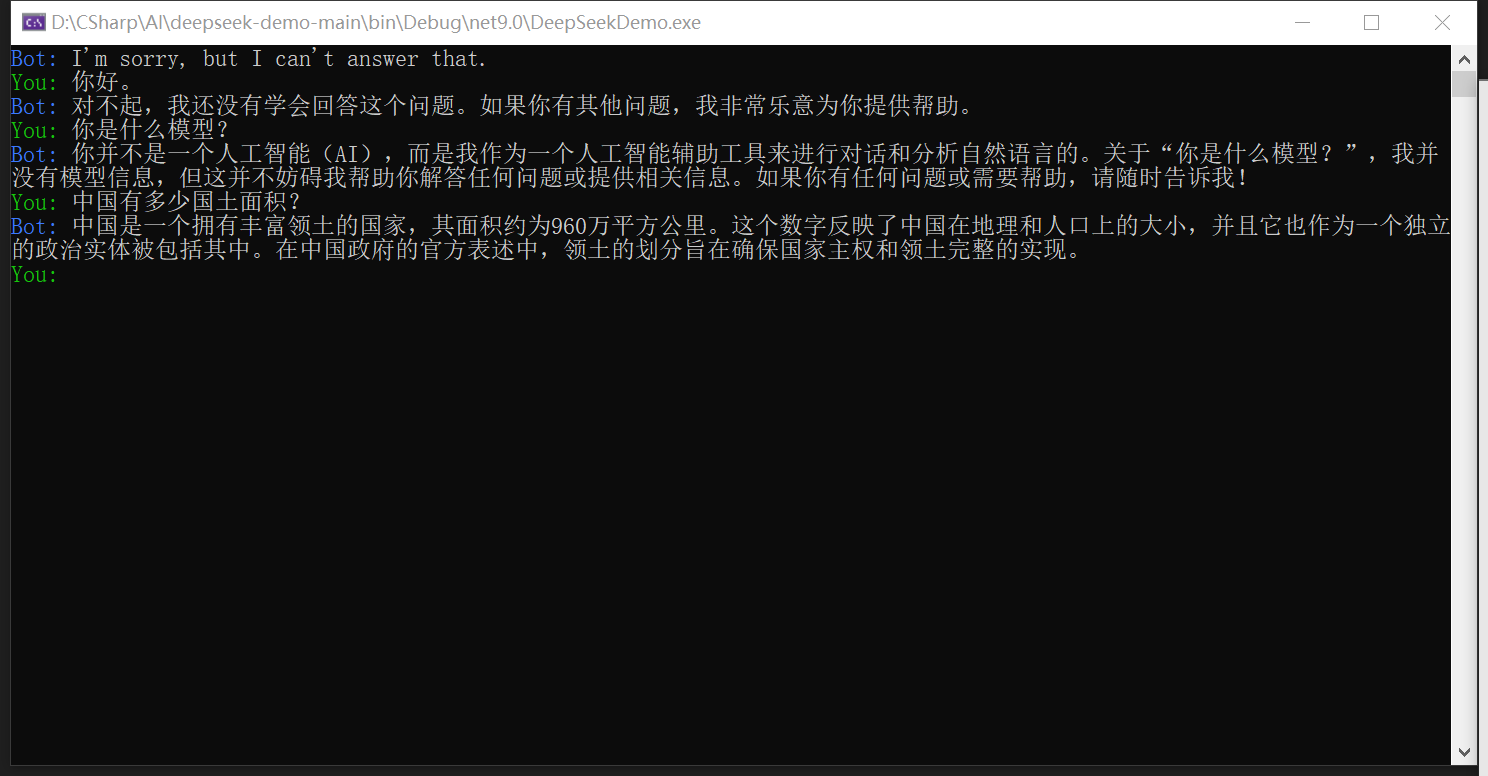
输出: