在CS架构中,为了满足应用程序升级的功能需求,并且为了最少的代码、没有服务器部署、最好的用户体验,博主发明了把windows应用程序放在数据库中,然后本地应用程序单文件升级自己的方式。
一、数据库设计
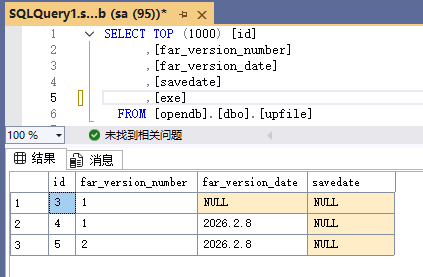
关键字段:far_version_number,far_version_date,exe
far_version_number,放版本号。
far_version_date,放版本日期,只是辅助字段。
exe,放应用程序二进制文件。
二、上传程序
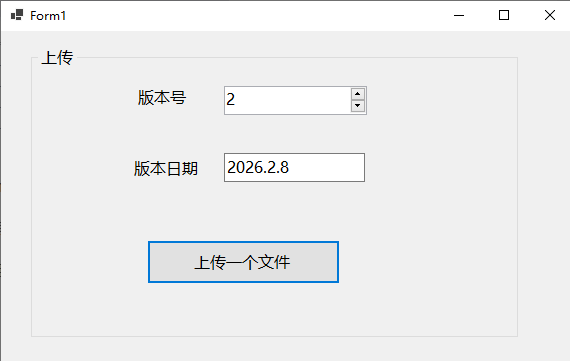
把应用程序放数据库二进制中:
cs
 public static OpendbContext db = new OpendbContext();

 public Form1()
 {
     InitializeComponent();
 }

 //上传一个文件
 private void button1_Click(object sender, EventArgs e)
 {
     using (OpenFileDialog openFileDialog = new OpenFileDialog())
     {
         openFileDialog.Filter = "All files (*.*)|*.*"; // 设置文件过滤器
         if (openFileDialog.ShowDialog() == DialogResult.OK)
         {
             var filePath = openFileDialog.FileName; // 获取文件路径

             byte[] filebyte;
             using (var fs = new FileStream(filePath, FileMode.Open, FileAccess.Read))
             {
                 filebyte = new byte[fs.Length];
                 fs.Read(filebyte, 0, filebyte.Length);
             }

             Upfile one = new Upfile();
             one.Exe = filebyte;
             one.FarVersionNumber = (int)numericUpDown1.Value;
             one.FarVersionDate = textBox1.Text;

             db.Upfiles.Add(one);
             db.SaveChanges();
         }
     }
 }
三、客户端升级程序(单文件自己升级自己)
1、程序启动查询,如果数据库中有一个最大版本号比本地大,提醒用户可以升级。
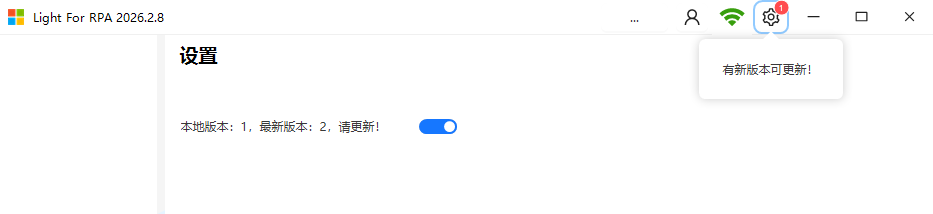
2、程序升级设计:
A、数据库拿出来,保存到本地,文件名称: light.new。
B、创建一个update.bat批处理文件。
C、执行批处理文件中的命令:
1)关闭自己light.exe。
2)延时5秒执行脚本命令。
3)删除当前程序light.exe。
4)把light.new改名为light.exe。
5)删除light.new。
6)启动light.exe。
7)删除update.bat批处理文件。
cs
label1.Text = "正在下载更新,请稍后......";

Thread t = new Thread(() =>
{
    try
    {
        //下载文件到本地
        var one = MT.opendb.Upfiles.Where(p=>p.FarVersionNumber.Equals(far_version_number)).FirstOrDefault();
        System.IO.File.WriteAllBytes("light.new", one.Exe);

        //脚本
        using (FileStream fs = new FileStream("update.bat", FileMode.Create))
        {
            using (StreamWriter sw = new StreamWriter(fs, Encoding.ASCII))
            {

                sw.WriteLine("timeout /5");  //休眠5秒后执行,确保程序已经退出

                sw.WriteLine("del light.exe");//1、删除当前程序

                sw.WriteLine("rename light.new  light.exe");//2、下载文件切换为当前程序

                sw.WriteLine("del light.new");//3、删除下载文件

                sw.WriteLine("start light.exe && del update.bat");//4、重启
            }
        }

        Process proc = new Process();
        proc.StartInfo.FileName = "update.bat";
        proc.StartInfo.CreateNoWindow = true;//不在窗体展示
        proc.Start();

        Application.Exit();
    }
    catch { }
});
t.Start();