在实时数据驱动的应用中,WebSocket 连接的稳定性直接决定了用户体验。本文将介绍一个专为工业控制场景设计的 WebSocketClient 类,它解决了传统实现中的半开连接检测 、智能重连 、消息可靠性等核心问题。
一、为什么需要"工业级"WebSocket 客户端?
传统实现的痛点
TypeScript
// 常见的"裸奔"写法
const ws = new WebSocket('ws://localhost:8080');
ws.onmessage = (e) => console.log(e.data);
问题场景:
-
网络闪断 :WiFi 切换、4G/5G 切换时,连接实际已死但
readyState仍为OPEN -
服务器静默崩溃:TCP 连接保持,但服务端进程已挂,客户端持续发送数据到黑洞
-
消息丢失:断网期间发送的消息永久丢失,没有重试机制
-
重连风暴:网络恢复时,多个组件同时触发重连,造成服务器压力
工业场景的特殊要求
对于驱动数据(DriveData)这类工业控制数据:
-
实时性:延迟超过 500ms 可能导致控制失效
-
可靠性:数据丢失可能引发安全事故
-
可观测性:需要明确知道"现在能不能信这个连接"
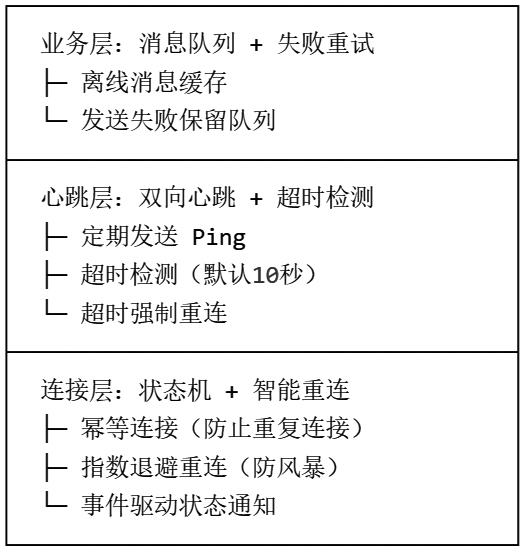
二、核心设计:三层防御架构
我们的 WebSocketClient 采用连接层-心跳层-业务层的三层防御设计:
三、关键特性详解
1. 双向心跳与半开连接检测
传统心跳的问题:只发不收,不知道服务器是否还活着。
我们的方案:
TypeScript
// 发送带时间戳的心跳
const pingMsg = { type: "ping", timestamp: Date.now() };
socket.send(JSON.stringify(pingMsg));

// 启动超时检测
this.heartbeatTimeoutTimer = setTimeout(() => {
    this._handleHeartbeatTimeout();  // 强制重连
}, this.options.heartbeatTimeout);
服务端需要配合 :收到 ping 后返回 pong:
TypeScript
{ "type": "pong", "timestamp": 1704067200000 }2. 消息可靠性保障
设计决策:发送失败的消息进入队列,连接恢复后自动重发。
TypeScript
public send(msg: string): boolean {
    if (this.isConnected) {
        return this._sendImmediate(msg);  // 立即发送
    }

    // 离线缓存,连接成功后批量发送
    this._pendingMessages.push(msg);
    this.connect();  // 触发连接
    return false;
}关键细节:批量发送时保留失败项,避免消息丢失:
TypeScript
const failedMessages: string[] = [];
this._pendingMessages.forEach(msg => {
    try {
        this.socket?.send(this._buildPayload(msg));
    } catch (e) {
        failedMessages.push(msg);  // 保留失败消息
    }
});
this._pendingMessages = failedMessages;
3. 连接质量监控
提供实时指标供 UI 展示:
TypeScript
public get connectionQuality() {
    return {
        isHealthy: this.isConnected && lastResponseAgo < timeout,
        lastResponseAgo: 1200,  // 上次响应距今 ms
        pendingPongs: 0         // 等待中的心跳数(0或1)
    };
}
四、完整代码实现
TypeScript
import { Observable } from "@babylonjs/core";
import { DriveData } from "./DTO/DTO_BaseClass";

export interface WebSocketClientOptions {
    url: string;
    reconnectInterval?: number;           // 重连间隔(ms),默认3000
    maxReconnectAttempts?: number;        // 最大重连次数,默认5
    heartbeatInterval?: number;           // 心跳发送间隔(ms),默认30000
    heartbeatTimeout?: number;            // 心跳响应超时(ms),默认10000
    heartbeatMessage?: Record<string, unknown>;
    heartbeatResponseMatcher?: (data: unknown) => boolean;
}

export default class WebSocketClient {
    private socket: WebSocket | null = null;
    private options: Required<WebSocketClientOptions>;
    private reconnectAttempts = 0;
    private reconnectTimer: ReturnType<typeof setTimeout> | null = null;
    private heartbeatTimer: ReturnType<typeof setInterval> | null = null;
    private heartbeatTimeoutTimer: ReturnType<typeof setTimeout> | null = null;
    private lastPongTime = 0;
    private _isManualDisconnect = false;
    private _pendingMessages: string[] = [];

    // 事件通知(Babylon.js Observable 模式)
    public readonly onDriveDataReceived = new Observable<DriveData[]>();
    public readonly onConnected = new Observable<void>();
    public readonly onDisconnected = new Observable<{ code: number; reason: string }>();
    public readonly onError = new Observable<Error>();
    public readonly onHeartbeatTimeout = new Observable<void>();

    constructor(options: WebSocketClientOptions) {
        this.options = {
            url: options.url,
            reconnectInterval: options.reconnectInterval ?? 3000,
            maxReconnectAttempts: options.maxReconnectAttempts ?? 5,
            heartbeatInterval: options.heartbeatInterval ?? 30000,
            heartbeatTimeout: options.heartbeatTimeout ?? 10000,
            heartbeatMessage: options.heartbeatMessage ?? { type: "ping" },
            heartbeatResponseMatcher: options.heartbeatResponseMatcher ?? ((data: any) =>
                data?.type === "pong" || data?.pong === true
            ),
        };
    }

    public get isConnected(): boolean {
        return this.socket?.readyState === WebSocket.OPEN;
    }

    public get isConnecting(): boolean {
        return this.socket?.readyState === WebSocket.CONNECTING;
    }

    /**
     * 获取连接质量指标
     */
    public get connectionQuality(): {
        isHealthy: boolean;
        lastResponseAgo: number;
        pendingPongs: number
    } {
        const now = Date.now();
        const lastResponseAgo = this.lastPongTime ? now - this.lastPongTime : Infinity;
        const pendingPongs = this.heartbeatTimeoutTimer ? 1 : 0;

        return { isHealthy: this.isConnected && lastResponseAgo < this.options.heartbeatTimeout, lastResponseAgo, pendingPongs };
    }

    /**
     * 建立连接(幂等)
     */
    public connect(): void {
        if (this.isConnected || this.isConnecting) {
            console.warn("WebSocket 已连接或连接中,忽略重复连接请求");
            return;
        }

        if (this.reconnectTimer) {
            clearTimeout(this.reconnectTimer);
            this.reconnectTimer = null;
        }

        this._isManualDisconnect = false;
        this._createSocket();
    }

    /**
     * 主动断开(不会触发自动重连)
     */
    public disconnect(): void {
        this._isManualDisconnect = true;
        this._clearAllTimers();

        if (this.socket?.readyState === WebSocket.OPEN ||
            this.socket?.readyState === WebSocket.CONNECTING) {
            try {
                this.socket.close(1000, "Manual disconnect by client");
            } catch (e) {
                this._cleanupSocket();
                this.onDisconnected.notifyObservers({ code: 1000, reason: "Manual disconnect (cleanup)" });
            }
        }
    }

    /**
     * 发送消息(支持离线缓存)
     */
    public send(msg: string): boolean {
        if (this.isConnected && this.socket) {
            try {
                this.socket.send(this._buildPayload(msg));
                return true;
            } catch (e) {
                const err = e instanceof Error ? e : new Error(String(e));
                this.onError.notifyObservers(err);
                return false;
            }
        }

        this._pendingMessages.push(msg);
        if (!this.isConnecting) this.connect();
        return false;
    }

    /**
     * 彻底销毁实例
     */
    public dispose(): void {
        this.disconnect();
        this._pendingMessages = [];
        this.onDriveDataReceived.clear();
        this.onConnected.clear();
        this.onDisconnected.clear();
        this.onError.clear();
        this.onHeartbeatTimeout.clear();
    }

    // ==================== 私有方法 ====================

    private _createSocket(): void {
        // 清理旧实例防止泄漏
        if (this.socket) {
            this.socket.onopen = null;
            this.socket.onmessage = null;
            this.socket.onclose = null;
            this.socket.onerror = null;
            if (this.socket.readyState === WebSocket.OPEN ||
                this.socket.readyState === WebSocket.CONNECTING) {
                try { this.socket.close(); } catch {}
            }
            this.socket = null;
        }

        try {
            this.socket = new WebSocket(this.options.url);
            this.socket.onopen = () => this._handleOpen();
            this.socket.onmessage = (event) => this._handleMessage(event.data);
            this.socket.onclose = (event) => this._handleClose(event);
            this.socket.onerror = (event) => this._handleError(event);
        } catch (error) {
            const err = error instanceof Error ? error : new Error(String(error));
            this.onError.notifyObservers(err);
            this._scheduleReconnect();
        }
    }

    private _handleOpen(): void {
        console.log("WebSocket 连接成功");
        this.reconnectAttempts = 0;
        this.lastPongTime = Date.now();
        this._startHeartbeat();

        // 发送缓存消息
        if (this._pendingMessages.length > 0) {
            const failedMessages: string[] = [];
            this._pendingMessages.forEach(msg => {
                try {
                    this.socket?.send(this._buildPayload(msg));
                } catch (e) {
                    failedMessages.push(msg);
                }
            });
            this._pendingMessages = failedMessages;
        }

        this.onConnected.notifyObservers();
    }

    private _handleClose(event: CloseEvent): void {
        this._clearAllTimers();
        this.onDisconnected.notifyObservers({
            code: event.code,
            reason: event.reason || "Connection closed"
        });
        this._cleanupSocket();

        if (!this._isManualDisconnect &&
            this.reconnectAttempts < this.options.maxReconnectAttempts) {
            this._scheduleReconnect();
        }
    }

    private _handleError(event: Event): void {
        const err = new Error(`WebSocket 通信错误 (URL: ${this.options.url})`);
        this.onError.notifyObservers(err);
    }

    private _handleMessage(data: string): void {
        try {
            const payload = JSON.parse(data);

            // 心跳响应检测
            if (this.options.heartbeatResponseMatcher(payload)) {
                this._handlePong();
                return;
            }

            // 业务数据解析(remote_unit_10 协议)
            const remoteUnitData = payload.data?.remote_unit_10;
            if (!remoteUnitData || typeof remoteUnitData !== "object") return;

            const items: DriveData[] = [];
            for (const [key, value] of Object.entries(remoteUnitData)) {
                if (value == null || value === "null") continue;
                const numVal = typeof value === "number" ? value : parseFloat(String(value));
                if (!isNaN(numVal)) items.push(new DriveData(key, numVal));
            }

            if (items.length > 0) {
                this.onDriveDataReceived.notifyObservers(items);
            }
        } catch (error) {
            console.error("解析 WebSocket 消息失败:", error);
        }
    }

    private _handlePong(): void {
        this.lastPongTime = Date.now();
        if (this.heartbeatTimeoutTimer) {
            clearTimeout(this.heartbeatTimeoutTimer);
            this.heartbeatTimeoutTimer = null;
        }
    }

    private _startHeartbeat(): void {
        this._stopHeartbeat();

        this.heartbeatTimer = setInterval(() => {
            if (!this.isConnected || !this.socket) return;

            // 防止心跳堆积:上一个未响应则不发送
            if (this.heartbeatTimeoutTimer) {
                console.warn("上一个心跳未响应,跳过本次发送");
                return;
            }

            try {
                const pingMsg = {
                    ...this.options.heartbeatMessage,
                    timestamp: Date.now()
                };
                this.socket.send(JSON.stringify(pingMsg));

                // 启动超时检测
                this.heartbeatTimeoutTimer = setTimeout(() => {
                    this.heartbeatTimeoutTimer = null;
                    this._handleHeartbeatTimeout();
                }, this.options.heartbeatTimeout);
            } catch (e) {
                console.warn("心跳发送失败:", e);
            }
        }, this.options.heartbeatInterval);
    }

    private _handleHeartbeatTimeout(): void {
        console.error(`心跳超时:${this.options.heartbeatTimeout}ms 内未收到响应`);
        this.onHeartbeatTimeout.notifyObservers();
        this._forceReconnect("Heartbeat timeout");
    }

    private _forceReconnect(reason: string): void {
        if (!this.isConnected) return;
        this._clearAllTimers();

        if (this.socket) {
            try {
                this.socket.close(1001, reason);
            } catch (e) {
                this._cleanupSocket();
                this._handleClose({ code: 1001, reason, wasClean: false } as CloseEvent);
            }
        }
    }

    private _scheduleReconnect(): void {
        if (this.reconnectTimer) return;

        this.reconnectAttempts++;
        console.log(`WebSocket 将在 ${this.options.reconnectInterval}ms 后进行第 ${this.reconnectAttempts} 次重连...`);

        this.reconnectTimer = setTimeout(() => {
            this.reconnectTimer = null;
            if (this._isManualDisconnect) return;
            this.connect();
        }, this.options.reconnectInterval);
    }

    private _stopHeartbeat(): void {
        if (this.heartbeatTimer) {
            clearInterval(this.heartbeatTimer);
            this.heartbeatTimer = null;
        }
        if (this.heartbeatTimeoutTimer) {
            clearTimeout(this.heartbeatTimeoutTimer);
            this.heartbeatTimeoutTimer = null;
        }
    }

    private _clearAllTimers(): void {
        if (this.reconnectTimer) {
            clearTimeout(this.reconnectTimer);
            this.reconnectTimer = null;
        }
        this._stopHeartbeat();
    }

    private _cleanupSocket(): void {
        if (this.socket) {
            this.socket.onopen = null;
            this.socket.onmessage = null;
            this.socket.onclose = null;
            this.socket.onerror = null;
            this.socket = null;
        }
    }

    private _buildPayload(msg: string): string {
        return JSON.stringify({
            type: "1",
            sleep: 2000,
            data: [{ orgNo: "", deviceid: "remote_unit_10", fieldnames: msg }]
        });
    }
}
五、使用方法
基础用法:快速开始
TypeScript
import WebSocketClient from './WebSocketClient';

// 1. 创建实例
const client = new WebSocketClient({
    url: 'ws://localhost:8080/ws'
});

// 2. 订阅数据
client.onDriveDataReceived.add((driveDataArray) => {
    console.log('收到驱动数据:', driveDataArray);
    // [{ name: 'speed', value: 120 }, { name: 'rpm', value: 3000 }]
});

// 3. 连接
client.connect();

// 4. 发送指令
client.send('speed,rpm,temperature');
高级配置:工业场景优化
TypeScript
const client = new WebSocketClient({
    url: 'ws://192.168.1.100:8080/drive',

    // 快速检测(局域网环境)
    heartbeatInterval: 2000,    // 2秒一次心跳
    heartbeatTimeout: 3000,     // 3秒无响应即超时

    // 激进重连(关键系统)
    reconnectInterval: 1000,      // 1秒后开始重连
    maxReconnectAttempts: 10,     // 最多重试10次

    // 自定义心跳协议(匹配服务端)
    heartbeatMessage: {
        type: 'ping',
        clientId: 'HMI_Station_01',
        timestamp: Date.now()
    },
    heartbeatResponseMatcher: (data: any) =>
        data?.type === 'pong' && data?.clientId === 'HMI_Station_01'
});
集成到 Vue 3 组件
TypeScript
<template>
    <div class="connection-status" :class="{ healthy: isHealthy }">
        <span class="indicator"></span>
        {{ connectionStatus }}
        <span v-if="latency > 0">({{ latency }}ms)</span>
    </div>
    <div class="drive-data">
        <div v-for="item in driveData" :key="item.name">
            {{ item.name }}: {{ item.value.toFixed(2) }}
        </div>
    </div>
</template>

<script setup lang="ts">
import { ref, onMounted, onUnmounted } from 'vue';
import WebSocketClient from './WebSocketClient';
import type { DriveData } from './DTO/DTO_BaseClass';

const driveData = ref<DriveData[]>([]);
const isHealthy = ref(false);
const latency = ref(0);
const connectionStatus = ref('未连接');

let client: WebSocketClient;

onMounted(() => {
    client = new WebSocketClient({
        url: 'ws://localhost:8080/ws',
        heartbeatInterval: 5000,
        heartbeatTimeout: 3000
    });

    // 数据订阅
    client.onDriveDataReceived.add((data) => {
        driveData.value = data;
    });

    // 连接状态监控
    const updateStatus = () => {
        const quality = client.connectionQuality;
        isHealthy.value = quality.isHealthy;
        latency.value = quality.lastResponseAgo === Infinity
            ? 0
            : Math.round(quality.lastResponseAgo);

        connectionStatus.value = client.isConnected
            ? (quality.isHealthy ? '连接正常' : '连接不稳定')
            : '已断开';
    };

    client.onConnected.add(updateStatus);
    client.onDisconnected.add(updateStatus);
    client.onHeartbeatTimeout.add(() => {
        connectionStatus.value = '心跳超时,正在重连...';
    });

    // 定时更新质量指标
    const interval = setInterval(updateStatus, 1000);

    client.connect();

    onUnmounted(() => {
        clearInterval(interval);
        client.dispose();  // 彻底清理
    });
});
</script>

<style scoped>
.connection-status { padding: 10px; background: #ff4444; color: white; }
.connection-status.healthy { background: #44ff44; color: black; }
.indicator { display: inline-block; width: 10px; height: 10px;
             border-radius: 50%; background: currentColor; margin-right: 8px; }
</style>
与 Babylon.js 集成(3D 可视化)
TypeScript
import { Scene } from "@babylonjs/core";
import WebSocketClient from "./WebSocketClient";

class DriveVisualization {
    private client: WebSocketClient;
    private scene: Scene;

    constructor(scene: Scene) {
        this.scene = scene;
        this.client = new WebSocketClient({
            url: "ws://localhost:8080/ws",
            heartbeatInterval: 1000  // 高频更新场景
        });

        // 驱动数据实时更新 3D 模型
        this.client.onDriveDataReceived.add((data) => {
            data.forEach(item => {
                this.updateMesh(item.name, item.value);
            });
        });

        // 连接断开时暂停动画
        this.client.onDisconnected.add(() => {
            this.scene.stopAnimation(this.scene.meshes[0]);
        });

        this.client.connect();
    }

    private updateMesh(name: string, value: number): void {
        const mesh = this.scene.getMeshByName(name);
        if (mesh) {
            // 例如:转速驱动风扇旋转
            mesh.rotation.y = value * 0.01;
        }
    }

    requestData(fields: string[]) {
        // 即使离线也会缓存,重连后自动发送
        this.client.send(fields.join(','));
    }
}
六、服务端配合建议
为了让心跳机制正常工作,服务端需要实现简单的 Ping-Pong:
TypeScript
// Node.js + ws 库示例
const WebSocket = require('ws');

wss.on('connection', (ws) => {
    ws.on('message', (data) => {
        const msg = JSON.parse(data);

        if (msg.type === 'ping') {
            // 必须返回 pong,否则客户端会断开
            ws.send(JSON.stringify({
                type: 'pong',
                timestamp: msg.timestamp,  // 回显时间戳,可用于计算延迟
                serverTime: Date.now()
            }));
            return;
        }

        // 处理业务消息...
    });
});
七、总结
这个 WebSocketClient 类通过以下设计实现了工业级可靠性:
| 特性 | 解决的问题 | 适用场景 |
|---|---|---|
| 双向心跳超时检测 | 半开连接、服务器静默崩溃 | 所有实时应用 |
| 消息队列缓存 | 断网期间消息丢失 | 指令下发、配置更新 |
| 连接质量指标 | 无法感知网络质量 | UI 状态显示、告警触发 |
| 幂等连接与清理 | 重复连接、内存泄漏 | 单页应用路由切换 |
| 可配置化设计 | 不同环境需要不同策略 | 开发/生产环境切换 |
关键设计哲学:把不确定性(网络状态)转化为可观测的事件,让上层应用能够做出正确的用户体验决策,而不是在"假连接"上浪费资源。
本文代码基于 Babylon.js 的 Observable 模式,但核心逻辑可轻松迁移到 RxJS、EventEmitter 等其他事件系统。