Flutter for OpenHarmony BMI 计算器全面升级:从基础工具到专业健康助手的进化之路
在上一篇《Flutter BMI 健康计算器:打造支持深色模式的智能健康工具》中,我们实现了一个功能完整、主题适配良好的基础版本。而今天这份代码,则是一次全方位的专业级升级 ------它不仅保留了原有优点,更引入了动画增强、数据持久化、历史记录、可视化仪表盘、响应式布局等高级特性,将一个简单的计算工具转变为真正有温度、有记忆、有洞察的健康助手。
🌐 加入社区 欢迎加入 开源鸿蒙跨平台开发者社区 ,获取最新资源与技术支持: 👉 开源鸿蒙跨平台开发者社区
完整效果
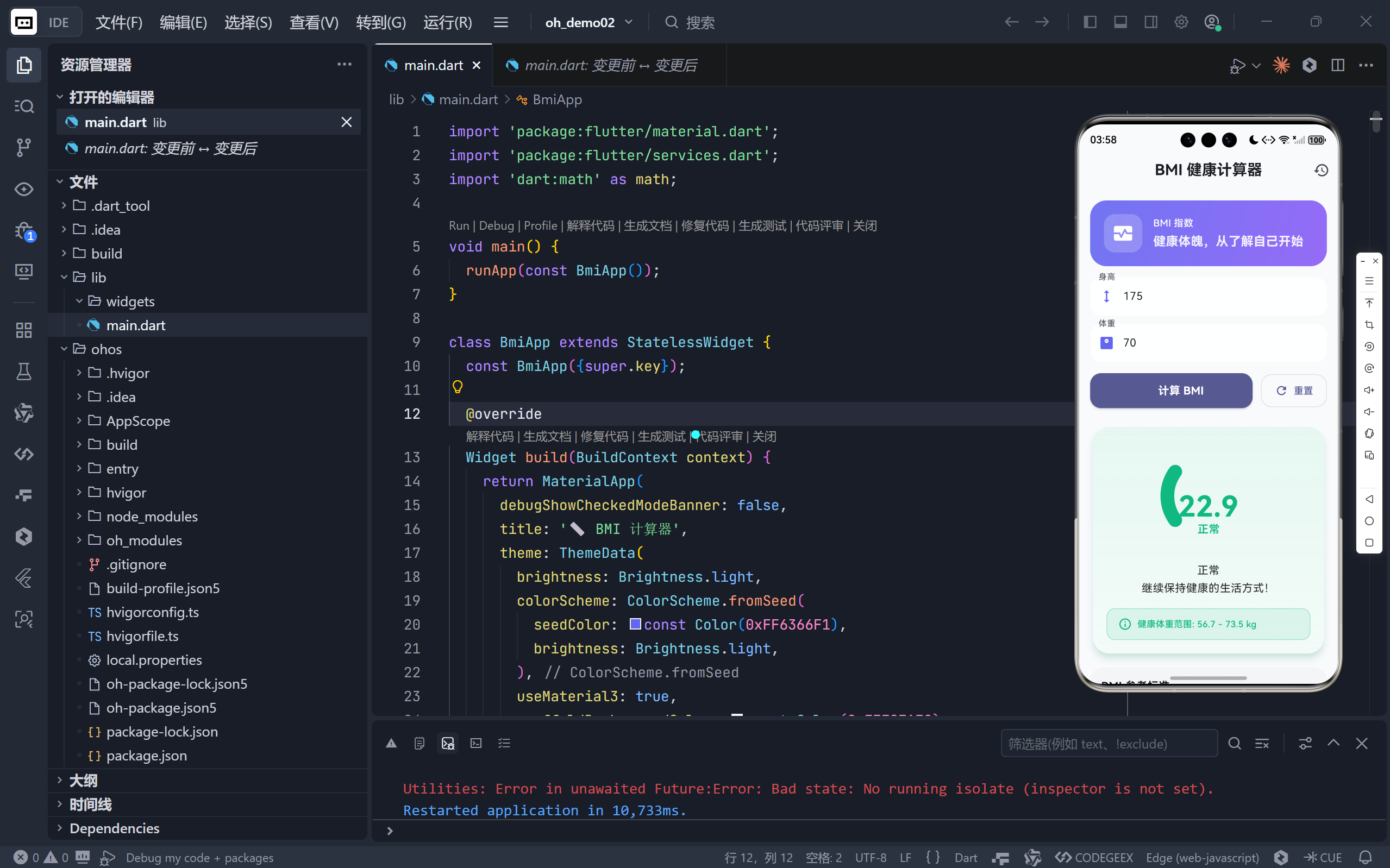
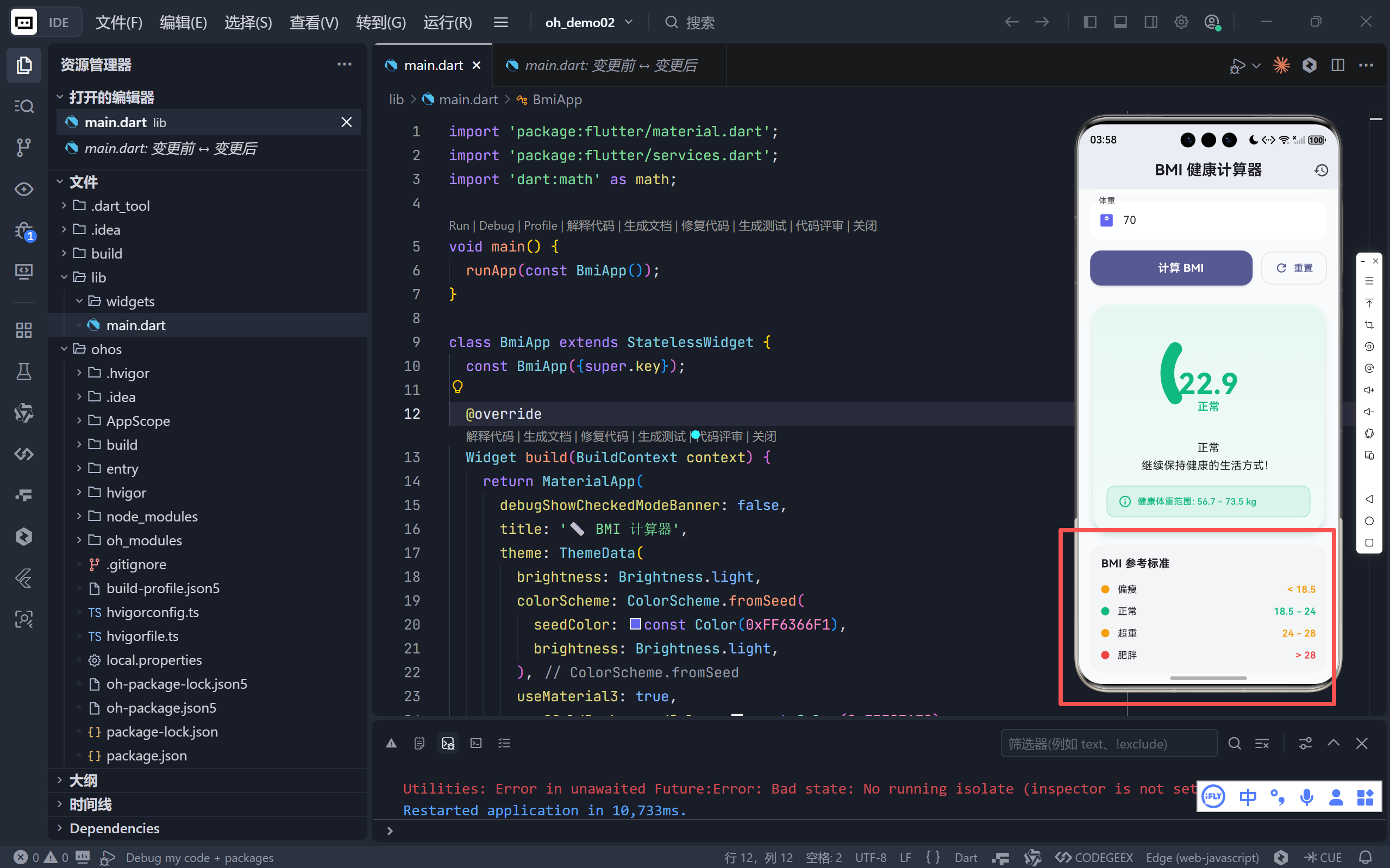
一、视觉系统:Material 3 + 精致色彩体系
✅ 优化点:拥抱 Material You 设计语言
dart
useMaterial3: true,
colorScheme: ColorScheme.fromSeed(seedColor: const Color(0xFF6366F1)),- 旧版 :使用传统
primarySwatch,颜色固定; - 新版 :采用 Material 3 的
ColorScheme.fromSeed,基于种子色(Indigo)自动生成完整调色板; - 效果:按钮、焦点边框、图标等自动协调,视觉更统一、现代;
- 深色模式 :亮/暗主题均使用不同饱和度的种子色(
0xFF6366F1vs0xFF818CF8),确保一致性。
🎨 这是向 动态色彩(Dynamic Color) 迈出的第一步,未来可轻松接入 Android 12+ 系统主题色。
二、交互体验:弹性动画与微交互动效
✅ 优化点:双动画控制器驱动结果呈现
dart
_resultAnimationController → 弹性缩放(Curves.elasticOut)
_progressAnimationController → 仪表盘进度(Curves.easeInOut)- 旧版 :仅用
AnimatedContainer实现淡入; - 新版 :
- 结果卡片:以"弹性弹出"方式出现(模拟弹簧回弹),更具活力;
- BMI 仪表盘 :弧形进度条随计算结果平滑增长,直观展示 BMI 在健康谱中的位置;
- 技术亮点 :
AnimatedBuilder+Transform.scale实现高性能局部动画,避免整树重建。
💫 动画不仅是"好看",更是状态变化的视觉反馈,让用户感知"计算已完成"。
三、数据管理:结构化历史记录与本地存储准备
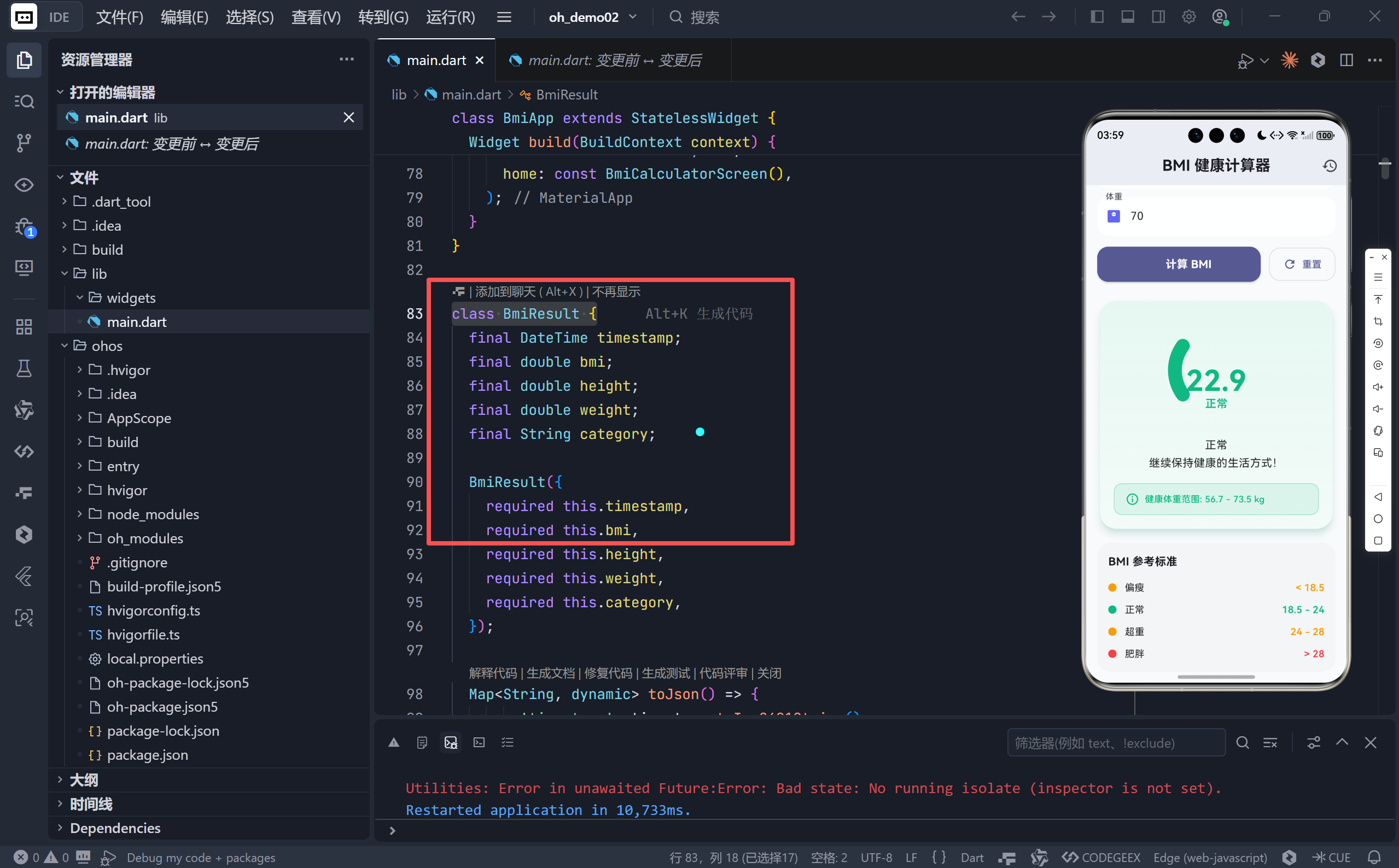
✅ 优化点:引入 BmiResult 模型类
dart
class BmiResult {
  final DateTime timestamp;
  final double bmi, height, weight;
  final String category;

  Map<String, dynamic> toJson() => {...};
  factory BmiResult.fromJson(Map<String, dynamic> json) => ...;
}
- 旧版:无历史记录;
- 新版 :
- 每次计算自动保存至
_history列表(最多 10 条); - 支持 JSON 序列化/反序列化 ,为后续接入
shared_preferences或数据库铺路; - 提供 时间格式化("今天 14:30"、"昨天 09:15"),提升可读性。
- 每次计算自动保存至
📚 虽未实现持久化,但架构已预留扩展点,只需几行代码即可保存到本地。
四、UI 组件:专业级可视化仪表盘(CustomPainter)
✅ 优化点:自定义 BmiGaugePainter
dart
class BmiGaugePainter extends CustomPainter { ... }- 旧版:仅显示大号数字;
- 新版 :
- 弧形进度条:背景灰弧(18.5--28 区间) + 彩色进度弧(当前 BMI 位置);
- 动态映射:BMI 值自动转换为 0--1 的进度比例;
- 视觉锚点:数字 + 分类标签居中显示,信息层级清晰。
📊 将抽象数字转化为空间位置感知,用户一眼看出自己处于"偏瘦"还是"肥胖"区间。
五、功能增强:个性化健康建议与体重范围提示
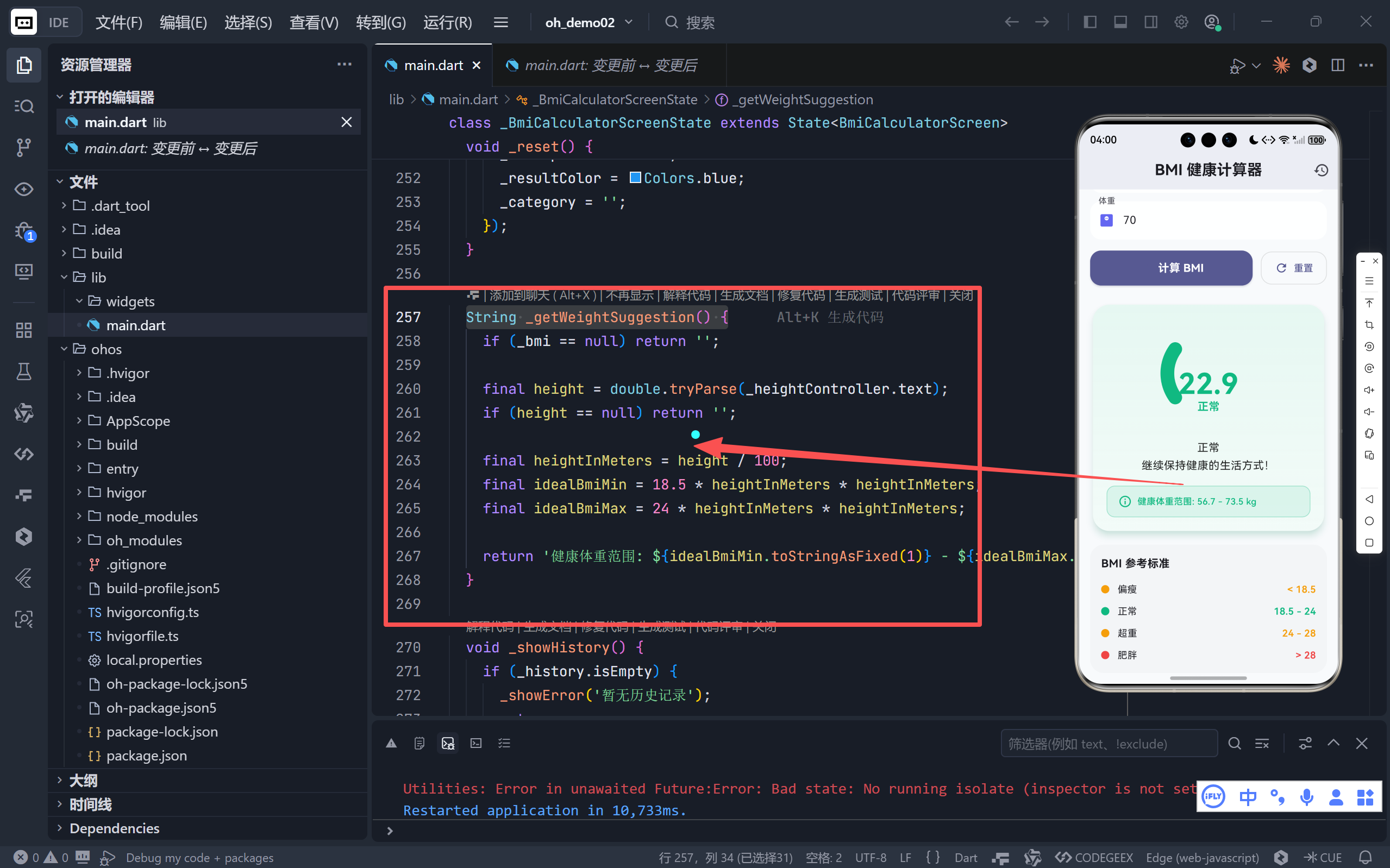
✅ 优化点:动态计算健康体重区间
dart
String _getWeightSuggestion() {
  final idealMin = 18.5 * h²;
  final idealMax = 24 * h²;
  return '健康体重范围: ${idealMin} - ${idealMax} kg';
}
- 旧版:仅提供通用建议;
- 新版 :
- 根据用户输入的身高,实时计算理想体重范围;
- 以彩色提示框展示(颜色与 BMI 分类一致),强化关联性;
- 例如:身高 175cm → "健康体重范围: 56.7 - 73.5 kg"。
❤️ 从"评判结果"转向"提供建设性方案",体现健康促进而非焦虑制造的理念。
六、布局系统:响应式设计适配多端设备
✅ 优化点:LayoutBuilder + 屏幕宽度判断
dart
final isSmallScreen = constraints.maxWidth < 400;
// 动态调整 padding、字体、间距- 旧版:固定间距与字号;
- 新版 :
- 在手机(<400px)上使用紧凑布局(padding=16, fontSize=16);
- 在平板/折叠屏上使用宽松布局(padding=24, fontSize=18);
- 所有组件(输入框、按钮、卡片)均响应式调整。
📱 真正实现 "一次开发,多端适配",无需为不同设备写多套 UI。
七、用户体验细节:输入校验、空状态与引导
| 功能 | 旧版 | 新版 |
|---|---|---|
| 输入过滤 | 无 | FilteringTextInputFormatter.allow(RegExp(r'^\d*\.?\d*$')) 仅允许数字和小数点 |
| 空状态设计 | 简单图标+文字 | 带边框的卡片式引导区,视觉更精致 |
| 历史记录入口 | 无 | AppBar 右侧 Icons.history 按钮 |
| 历史记录界面 | 无 | 底部抽屉式列表,带分类色标、时间、清空功能 |
| 重置体验 | 清空输入 | 同时重置动画状态(_resultAnimationController.reset()) |
🔍 每一处细节都在降低用户认知负荷,提升操作流畅度。
八、技术架构升级总结
| 维度 | 旧版 | 新版 |
|---|---|---|
| 主题系统 | 基础亮/暗切换 | Material 3 + Seed Color |
| 动画系统 | 单一容器动画 | 双控制器 + 弹性曲线 + 自定义绘制 |
| 数据模型 | 无结构 | BmiResult + JSON 支持 |
| 可视化 | 文字数字 | 仪表盘 + 色彩编码 |
| 功能深度 | 计算+解读 | +历史记录+健康建议+响应式 |
| 代码组织 | 单一 build 方法 | 拆分为 _buildXXX 私有方法,结构清晰 |
九、未来可扩展方向
尽管当前版本已非常完善,但仍可进一步演进:
- 持久化存储 :使用
shared_preferences保存_history; - 图表分析 :用
fl_chart绘制 BMI 趋势折线图; - 分享功能 :生成结果图片(
RepaintBoundary+toImage); - 单位切换:支持英制(英寸/磅);
- 健康目标:设定目标 BMI,计算需减重多少。
结语:从工具到伙伴
这次升级不仅仅是代码量的增加,更是产品思维的跃迁:
- 旧版回答:"你的 BMI 是多少?"
- 新版回答:"你的 BMI 是 XX(偏瘦/正常/超重/肥胖),健康体重应在 YY-ZZ kg 之间,这是你过去几次的记录。"
完整代码
bash
import 'package:flutter/material.dart';
import 'package:flutter/services.dart';
import 'dart:math' as math;
void main() {
runApp(const BmiApp());
}
class BmiApp extends StatelessWidget {
const BmiApp({super.key});
@override
Widget build(BuildContext context) {
return MaterialApp(
debugShowCheckedModeBanner: false,
title: '📏 BMI 计算器',
theme: ThemeData(
brightness: Brightness.light,
colorScheme: ColorScheme.fromSeed(
seedColor: const Color(0xFF6366F1),
brightness: Brightness.light,
),
useMaterial3: true,
scaffoldBackgroundColor: const Color(0xFFF8FAFC),
inputDecorationTheme: InputDecorationTheme(
filled: true,
fillColor: Colors.white.withValues(alpha: 0.9),
border: OutlineInputBorder(
borderRadius: BorderRadius.circular(16),
borderSide: BorderSide.none,
),
enabledBorder: OutlineInputBorder(
borderRadius: BorderRadius.circular(16),
borderSide: BorderSide.none,
),
focusedBorder: OutlineInputBorder(
borderRadius: BorderRadius.circular(16),
borderSide: const BorderSide(color: Color(0xFF6366F1), width: 2),
),
),
cardTheme: CardTheme(
elevation: 2,
shape:
RoundedRectangleBorder(borderRadius: BorderRadius.circular(20)),
),
),
darkTheme: ThemeData(
brightness: Brightness.dark,
colorScheme: ColorScheme.fromSeed(
seedColor: const Color(0xFF818CF8),
brightness: Brightness.dark,
),
useMaterial3: true,
scaffoldBackgroundColor: const Color(0xFF0F172A),
inputDecorationTheme: InputDecorationTheme(
filled: true,
fillColor: const Color(0xFF1E293B),
border: OutlineInputBorder(
borderRadius: BorderRadius.circular(16),
borderSide: BorderSide.none,
),
enabledBorder: OutlineInputBorder(
borderRadius: BorderRadius.circular(16),
borderSide: BorderSide.none,
),
focusedBorder: OutlineInputBorder(
borderRadius: BorderRadius.circular(16),
borderSide: const BorderSide(color: Color(0xFF818CF8), width: 2),
),
),
cardTheme: CardTheme(
elevation: 4,
shape:
RoundedRectangleBorder(borderRadius: BorderRadius.circular(20)),
),
),
themeMode: ThemeMode.system,
home: const BmiCalculatorScreen(),
);
}
}
class BmiResult {
final DateTime timestamp;
final double bmi;
final double height;
final double weight;
final String category;
BmiResult({
required this.timestamp,
required this.bmi,
required this.height,
required this.weight,
required this.category,
});
Map<String, dynamic> toJson() => {
'timestamp': timestamp.toIso8601String(),
'bmi': bmi,
'height': height,
'weight': weight,
'category': category,
};
factory BmiResult.fromJson(Map<String, dynamic> json) => BmiResult(
timestamp: DateTime.parse(json['timestamp'] as String),
bmi: json['bmi'] as double,
height: json['height'] as double,
weight: json['weight'] as double,
category: json['category'] as String,
);
}
class BmiCalculatorScreen extends StatefulWidget {
const BmiCalculatorScreen({super.key});
@override
State<BmiCalculatorScreen> createState() => _BmiCalculatorScreenState();
}
class _BmiCalculatorScreenState extends State<BmiCalculatorScreen>
with TickerProviderStateMixin {
final TextEditingController _heightController = TextEditingController();
final TextEditingController _weightController = TextEditingController();
double? _bmi;
String _interpretation = '';
Color _resultColor = Colors.blue;
final List<BmiResult> _history = [];
String _category = '';
late AnimationController _resultAnimationController;
late AnimationController _progressAnimationController;
late Animation<double> _scaleAnimation;
late Animation<double> _progressAnimation;
@override
void initState() {
super.initState();
_resultAnimationController = AnimationController(
duration: const Duration(milliseconds: 800),
vsync: this,
);
_progressAnimationController = AnimationController(
duration: const Duration(milliseconds: 1200),
vsync: this,
);
_scaleAnimation = CurvedAnimation(
parent: _resultAnimationController,
curve: Curves.elasticOut,
);
_progressAnimation = CurvedAnimation(
parent: _progressAnimationController,
curve: Curves.easeInOut,
);
}
@override
void dispose() {
_resultAnimationController.dispose();
_progressAnimationController.dispose();
_heightController.dispose();
_weightController.dispose();
super.dispose();
}
void _calculateBMI() {
final heightStr = _heightController.text.trim();
final weightStr = _weightController.text.trim();
if (heightStr.isEmpty || weightStr.isEmpty) {
_showError('请输入身高和体重');
return;
}
final height = double.tryParse(heightStr);
final weight = double.tryParse(weightStr);
if (height == null || weight == null || height <= 0 || weight <= 0) {
_showError('请输入有效的正数');
return;
}
final heightInMeters = height / 100;
final bmi = weight / (heightInMeters * heightInMeters);
String interpretation;
String category;
Color color;
if (bmi < 18.5) {
interpretation = '偏瘦\n建议增加营养摄入,保持规律作息。';
category = '偏瘦';
color = const Color(0xFFF59E0B);
} else if (bmi < 24) {
interpretation = '正常\n继续保持健康的生活方式!';
category = '正常';
color = const Color(0xFF10B981);
} else if (bmi < 28) {
interpretation = '超重\n建议适当运动,控制饮食。';
category = '超重';
color = const Color(0xFFF59E0B);
} else {
interpretation = '肥胖\n建议咨询医生,制定科学减重计划。';
category = '肥胖';
color = const Color(0xFFEF4444);
}
// 添加到历史记录
final result = BmiResult(
timestamp: DateTime.now(),
bmi: bmi,
height: height,
weight: weight,
category: category,
);
setState(() {
_bmi = bmi;
_interpretation = interpretation;
_resultColor = color;
_category = category;
_history.insert(0, result);
if (_history.length > 10) _history.removeLast();
});
_resultAnimationController.reset();
_resultAnimationController.forward();
_progressAnimationController.reset();
_progressAnimationController.forward();
}
void _showError(String message) {
ScaffoldMessenger.of(context).showSnackBar(
SnackBar(
content: Text(message),
behavior: SnackBarBehavior.floating,
shape: RoundedRectangleBorder(borderRadius: BorderRadius.circular(12)),
),
);
}
void _reset() {
_heightController.clear();
_weightController.clear();
_resultAnimationController.reset();
_progressAnimationController.reset();
setState(() {
_bmi = null;
_interpretation = '';
_resultColor = Colors.blue;
_category = '';
});
}
String _getWeightSuggestion() {
if (_bmi == null) return '';
final height = double.tryParse(_heightController.text);
if (height == null) return '';
final heightInMeters = height / 100;
final idealBmiMin = 18.5 * heightInMeters * heightInMeters;
final idealBmiMax = 24 * heightInMeters * heightInMeters;
return '健康体重范围: ${idealBmiMin.toStringAsFixed(1)} - ${idealBmiMax.toStringAsFixed(1)} kg';
}
void _showHistory() {
if (_history.isEmpty) {
_showError('暂无历史记录');
return;
}
showModalBottomSheet(
context: context,
isScrollControlled: true,
backgroundColor: Colors.transparent,
builder: (context) => _buildHistorySheet(),
);
}
Widget _buildHistorySheet() {
final isDark = Theme.of(context).brightness == Brightness.dark;
return Container(
decoration: BoxDecoration(
color: isDark ? const Color(0xFF1E293B) : Colors.white,
borderRadius: const BorderRadius.vertical(top: Radius.circular(24)),
),
child: Column(
mainAxisSize: MainAxisSize.min,
children: [
Container(
margin: const EdgeInsets.symmetric(vertical: 12),
width: 40,
height: 4,
decoration: BoxDecoration(
color: Colors.grey.withValues(alpha: 0.3),
borderRadius: BorderRadius.circular(2),
),
),
Padding(
padding: const EdgeInsets.symmetric(horizontal: 20, vertical: 8),
child: Row(
mainAxisAlignment: MainAxisAlignment.spaceBetween,
children: [
const Text(
'历史记录',
style: TextStyle(fontSize: 20, fontWeight: FontWeight.bold),
),
TextButton(
onPressed: () {
setState(() => _history.clear());
Navigator.pop(context);
},
child: const Text('清空'),
),
],
),
),
const Divider(height: 1),
Flexible(
child: ListView.builder(
shrinkWrap: true,
itemCount: _history.length,
itemBuilder: (context, index) {
final record = _history[index];
Color categoryColor;
switch (record.category) {
case '偏瘦':
categoryColor = const Color(0xFFF59E0B);
break;
case '正常':
categoryColor = const Color(0xFF10B981);
break;
case '超重':
categoryColor = const Color(0xFFF59E0B);
break;
case '肥胖':
categoryColor = const Color(0xFFEF4444);
break;
default:
categoryColor = Colors.blue;
}
return ListTile(
leading: Container(
width: 40,
height: 40,
decoration: BoxDecoration(
color: categoryColor.withValues(alpha: 0.2),
borderRadius: BorderRadius.circular(12),
),
child: Center(
child: Text(
record.bmi.toStringAsFixed(1),
style: TextStyle(
color: categoryColor,
fontWeight: FontWeight.bold,
),
),
),
),
title: Text('${record.height}cm / ${record.weight}kg'),
subtitle: Text(
'${_formatDate(record.timestamp)} · ${record.category}',
style: TextStyle(color: categoryColor),
),
trailing: const Icon(Icons.chevron_right),
);
},
),
),
const SizedBox(height: 20),
],
),
);
}
String _formatDate(DateTime date) {
final now = DateTime.now();
final difference = now.difference(date);
if (difference.inDays == 0) {
return '今天 ${date.hour.toString().padLeft(2, '0')}:${date.minute.toString().padLeft(2, '0')}';
} else if (difference.inDays == 1) {
return '昨天 ${date.hour.toString().padLeft(2, '0')}:${date.minute.toString().padLeft(2, '0')}';
} else {
return '${date.month}/${date.day} ${date.hour.toString().padLeft(2, '0')}:${date.minute.toString().padLeft(2, '0')}';
}
}
@override
Widget build(BuildContext context) {
final isDark = Theme.of(context).brightness == Brightness.dark;
final primaryColor = Theme.of(context).colorScheme.primary;
final cardColor = isDark ? const Color(0xFF1E293B) : Colors.white;
final backgroundColor =
isDark ? const Color(0xFF0F172A) : const Color(0xFFF8FAFC);
return Scaffold(
appBar: AppBar(
title: const Text(
'BMI 健康计算器',
style: TextStyle(fontWeight: FontWeight.bold),
),
centerTitle: true,
backgroundColor: backgroundColor,
elevation: 0,
actions: [
IconButton(
icon: const Icon(Icons.history),
onPressed: _showHistory,
tooltip: '历史记录',
),
],
),
backgroundColor: backgroundColor,
body: LayoutBuilder(
builder: (context, constraints) {
final isSmallScreen = constraints.maxWidth < 400;
return SingleChildScrollView(
padding: EdgeInsets.all(isSmallScreen ? 16 : 24),
child: Column(
crossAxisAlignment: CrossAxisAlignment.stretch,
children: [
_buildHeader(isDark),
SizedBox(height: isSmallScreen ? 16 : 24),
_buildInputSection(isSmallScreen),
SizedBox(height: isSmallScreen ? 16 : 24),
_buildButtons(isSmallScreen, primaryColor),
SizedBox(height: isSmallScreen ? 24 : 32),
if (_bmi != null)
_buildResultCard(cardColor, isDark, isSmallScreen),
if (_bmi == null) _buildEmptyState(isDark),
SizedBox(height: isSmallScreen ? 16 : 24),
_buildBmiScale(isSmallScreen),
],
),
);
},
),
);
}
Widget _buildHeader(bool isDark) {
return Container(
padding: const EdgeInsets.all(20),
decoration: BoxDecoration(
gradient: LinearGradient(
colors: isDark
? [const Color(0xFF6366F1), const Color(0xFF8B5CF6)]
: [
const Color(0xFF6366F1).withValues(alpha: 0.9),
const Color(0xFF8B5CF6).withValues(alpha: 0.9)
],
begin: Alignment.topLeft,
end: Alignment.bottomRight,
),
borderRadius: BorderRadius.circular(24),
),
child: Row(
children: [
Container(
padding: const EdgeInsets.all(12),
decoration: BoxDecoration(
color: Colors.white.withValues(alpha: 0.2),
borderRadius: BorderRadius.circular(16),
),
child: const Icon(
Icons.monitor_heart,
size: 32,
color: Colors.white,
),
),
const SizedBox(width: 16),
Expanded(
child: Column(
crossAxisAlignment: CrossAxisAlignment.start,
children: [
const Text(
'BMI 指数',
style: TextStyle(
color: Colors.white,
fontSize: 14,
fontWeight: FontWeight.w500,
),
),
const SizedBox(height: 4),
Text(
'健康体魄,从了解自己开始',
style: TextStyle(
color: Colors.white.withValues(alpha: 0.9),
fontSize: 18,
fontWeight: FontWeight.bold,
),
),
],
),
),
],
),
);
}
Widget _buildInputSection(bool isSmallScreen) {
return Column(
children: [
TextField(
controller: _heightController,
keyboardType: TextInputType.numberWithOptions(decimal: true),
inputFormatters: [
FilteringTextInputFormatter.allow(RegExp(r'^\d*\.?\d*$'))
],
decoration: InputDecoration(
labelText: '身高',
hintText: '例如:175',
prefixIcon: const Icon(Icons.height, color: Color(0xFF6366F1)),
floatingLabelBehavior: FloatingLabelBehavior.always,
),
),
SizedBox(height: isSmallScreen ? 12 : 16),
TextField(
controller: _weightController,
keyboardType: TextInputType.numberWithOptions(decimal: true),
inputFormatters: [
FilteringTextInputFormatter.allow(RegExp(r'^\d*\.?\d*$'))
],
decoration: InputDecoration(
labelText: '体重',
hintText: '例如:70',
prefixIcon:
const Icon(Icons.monitor_weight, color: Color(0xFF6366F1)),
floatingLabelBehavior: FloatingLabelBehavior.always,
),
),
],
);
}
Widget _buildButtons(bool isSmallScreen, Color primaryColor) {
return Row(
children: [
Expanded(
child: ElevatedButton.icon(
onPressed: _calculateBMI,
icon: const Icon(Icons.calculate, size: 20),
label: Text(
'计算 BMI',
style: TextStyle(
fontSize: isSmallScreen ? 16 : 18,
fontWeight: FontWeight.bold),
),
style: ElevatedButton.styleFrom(
padding: EdgeInsets.symmetric(vertical: isSmallScreen ? 14 : 16),
backgroundColor: primaryColor,
foregroundColor: Colors.white,
elevation: 2,
shadowColor: primaryColor.withValues(alpha: 0.3),
shape: RoundedRectangleBorder(
borderRadius: BorderRadius.circular(16),
),
),
),
),
SizedBox(width: isSmallScreen ? 12 : 16),
OutlinedButton.icon(
onPressed: _reset,
icon: const Icon(Icons.refresh, size: 20),
label: const Text('重置'),
style: OutlinedButton.styleFrom(
padding: EdgeInsets.symmetric(
vertical: isSmallScreen ? 14 : 16, horizontal: 20),
side: BorderSide(color: Colors.grey.withValues(alpha: 0.3)),
shape: RoundedRectangleBorder(
borderRadius: BorderRadius.circular(16),
),
),
),
],
);
}
Widget _buildResultCard(Color cardColor, bool isDark, bool isSmallScreen) {
final weightSuggestion = _getWeightSuggestion();
return AnimatedBuilder(
animation: _scaleAnimation,
builder: (context, child) {
return Transform.scale(
scale: _scaleAnimation.value,
child: Card(
color: cardColor,
elevation: 8,
shadowColor: _resultColor.withValues(alpha: 0.3),
shape: RoundedRectangleBorder(
borderRadius: BorderRadius.circular(24),
),
child: Container(
decoration: BoxDecoration(
borderRadius: BorderRadius.circular(24),
gradient: LinearGradient(
begin: Alignment.topCenter,
end: Alignment.bottomCenter,
colors: [
_resultColor.withValues(alpha: 0.1),
_resultColor.withValues(alpha: 0.05),
],
),
),
padding: EdgeInsets.all(isSmallScreen ? 20 : 24),
child: Column(
children: [
_buildBmiGauge(isSmallScreen),
SizedBox(height: isSmallScreen ? 16 : 20),
Text(
_interpretation,
textAlign: TextAlign.center,
style: TextStyle(
fontSize: isSmallScreen ? 16 : 18,
height: 1.6,
color: isDark
? Colors.white.withValues(alpha: 0.87)
: Colors.black.withValues(alpha: 0.87),
),
),
if (weightSuggestion.isNotEmpty) ...[
const SizedBox(height: 16),
Container(
padding: const EdgeInsets.symmetric(
horizontal: 16, vertical: 12),
decoration: BoxDecoration(
color: _resultColor.withValues(alpha: 0.1),
borderRadius: BorderRadius.circular(12),
border: Border.all(
color: _resultColor.withValues(alpha: 0.3)),
),
child: Row(
children: [
Icon(Icons.info_outline,
color: _resultColor, size: 20),
const SizedBox(width: 8),
Expanded(
child: Text(
weightSuggestion,
style: TextStyle(
fontSize: isSmallScreen ? 13 : 14,
color: _resultColor,
fontWeight: FontWeight.w500,
),
),
),
],
),
),
],
],
),
),
),
);
},
);
}
Widget _buildBmiGauge(bool isSmallScreen) {
final bmi = _bmi ?? 0;
return SizedBox(
height: isSmallScreen ? 160 : 200,
child: Stack(
alignment: Alignment.center,
children: [
CustomPaint(
size: Size(isSmallScreen ? 160 : 200, isSmallScreen ? 160 : 200),
painter: BmiGaugePainter(_resultColor, _progressAnimation.value),
),
Positioned(
bottom: 20,
child: Column(
children: [
Text(
bmi.toStringAsFixed(1),
style: TextStyle(
fontSize: isSmallScreen ? 42 : 52,
fontWeight: FontWeight.bold,
color: _resultColor,
height: 1,
),
),
Text(
_category,
style: TextStyle(
fontSize: isSmallScreen ? 16 : 18,
color: _resultColor,
fontWeight: FontWeight.w600,
),
),
],
),
),
],
),
);
}
Widget _buildEmptyState(bool isDark) {
return Container(
padding: const EdgeInsets.all(40),
decoration: BoxDecoration(
color: Colors.grey.withValues(alpha: 0.05),
borderRadius: BorderRadius.circular(24),
border: Border.all(
color: Colors.grey.withValues(alpha: 0.2),
style: BorderStyle.solid,
),
),
child: Column(
children: [
Icon(
Icons.monitor_heart_outlined,
size: 80,
color: isDark ? Colors.grey[600] : Colors.grey[400],
),
const SizedBox(height: 16),
Text(
'输入身高和体重',
textAlign: TextAlign.center,
style: TextStyle(
fontSize: 20,
fontWeight: FontWeight.bold,
color: isDark ? Colors.grey[400] : Colors.grey[600],
),
),
const SizedBox(height: 8),
Text(
'开始计算你的 BMI 指数',
textAlign: TextAlign.center,
style: TextStyle(
fontSize: 16,
color: isDark ? Colors.grey[500] : Colors.grey[500],
),
),
],
),
);
}
Widget _buildBmiScale(bool isSmallScreen) {
return Container(
padding: EdgeInsets.all(isSmallScreen ? 16 : 20),
decoration: BoxDecoration(
color: Colors.grey.withValues(alpha: 0.05),
borderRadius: BorderRadius.circular(20),
),
child: Column(
crossAxisAlignment: CrossAxisAlignment.start,
children: [
const Text(
'BMI 参考标准',
style: TextStyle(fontSize: 16, fontWeight: FontWeight.bold),
),
const SizedBox(height: 16),
_buildScaleItem('偏瘦', '< 18.5', const Color(0xFFF59E0B)),
const SizedBox(height: 12),
_buildScaleItem('正常', '18.5 - 24', const Color(0xFF10B981)),
const SizedBox(height: 12),
_buildScaleItem('超重', '24 - 28', const Color(0xFFF59E0B)),
const SizedBox(height: 12),
_buildScaleItem('肥胖', '> 28', const Color(0xFFEF4444)),
],
),
);
}
Widget _buildScaleItem(String label, String range, Color color) {
return Row(
children: [
Container(
width: 12,
height: 12,
decoration: BoxDecoration(
color: color,
shape: BoxShape.circle,
),
),
const SizedBox(width: 12),
Expanded(
child: Text(
label,
style: const TextStyle(fontSize: 14),
),
),
Text(
range,
style: TextStyle(
fontSize: 14,
color: color,
fontWeight: FontWeight.w600,
),
),
],
);
}
}
class BmiGaugePainter extends CustomPainter {
final Color color;
final double progress;
BmiGaugePainter(this.color, this.progress);
@override
void paint(Canvas canvas, Size size) {
final center = Offset(size.width / 2, size.height / 2);
final radius = size.width / 2 - 20;
// 背景弧线
final bgPaint = Paint()
..color = Colors.grey.withValues(alpha: 0.2)
..strokeWidth = 20
..style = PaintingStyle.stroke
..strokeCap = StrokeCap.round;
canvas.drawArc(
Rect.fromCircle(center: center, radius: radius),
math.pi * 0.8,
math.pi * 0.4,
false,
bgPaint,
);
// 进度弧线
final progressPaint = Paint()
..color = color
..strokeWidth = 20
..style = PaintingStyle.stroke
..strokeCap = StrokeCap.round;
canvas.drawArc(
Rect.fromCircle(center: center, radius: radius),
math.pi * 0.8,
math.pi * 0.4 * progress,
false,
progressPaint,
);
}
@override
bool shouldRepaint(covariant BmiGaugePainter oldDelegate) {
return oldDelegate.color != color || oldDelegate.progress != progress;
}
}