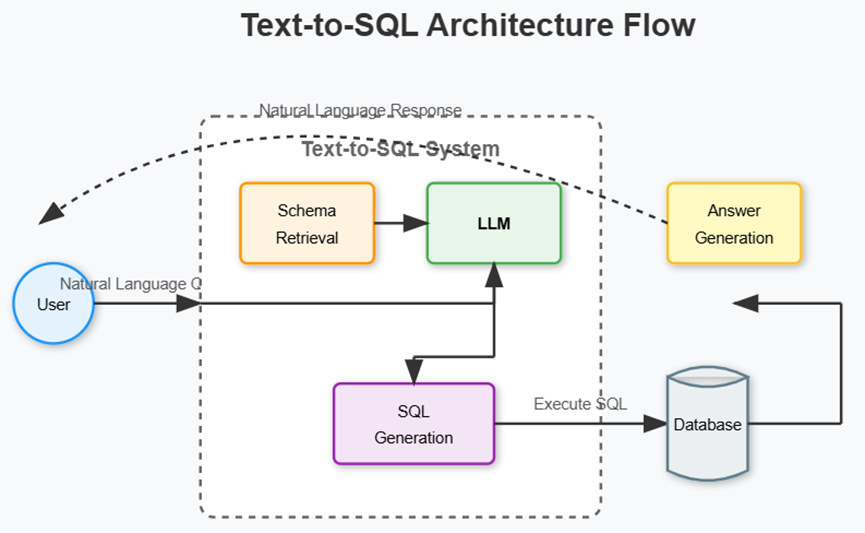
基本思想:
-
User : 发起自然语言查询。
-
Text-to-SQL System : 包含 Schema Retrieval(模式检索)和 LLM(大模型处理)。
-
SQL Generation : 生成可执行的 SQL 语句。
-
Database : 执行 SQL 查询。
-
Answer Generation : 将查询结果转化为自然语言反馈给用户。
dify基于Database插件搭建sql-to-txt流程:
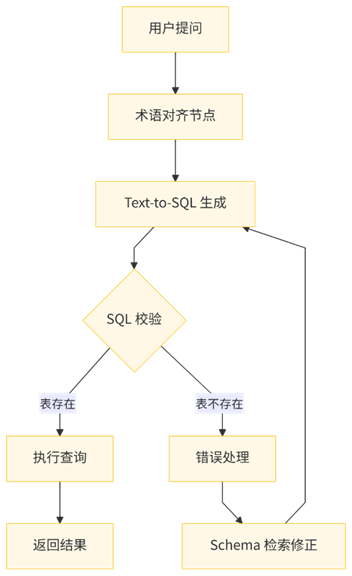
基本流程:
Dify流程:
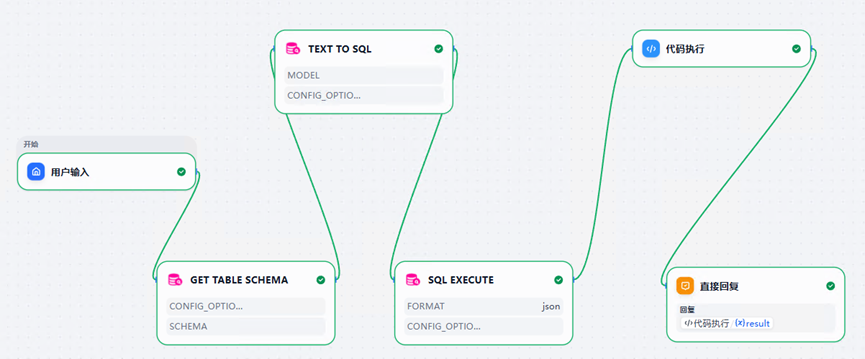
DSL配置,
app:
description: ''
icon: 🤖
icon_background: '#FFEAD5'
mode: advanced-chat
name: sql
use_icon_as_answer_icon: false
dependencies:
- current_identifier: null
type: marketplace
value:
marketplace_plugin_unique_identifier: hjlarry/database:0.0.6@534bc26cf5bc4ff6b5557457452287ccc71f00eef9378784c4f43ca49954ca2f
version: null
kind: app
version: 0.5.0
workflow:
conversation_variables: []
environment_variables: []
features:
file_upload:
allowed_file_extensions:
- .JPG
- .JPEG
- .PNG
- .GIF
- .WEBP
- .SVG
allowed_file_types:
- image
allowed_file_upload_methods:
- local_file
- remote_url
enabled: false
fileUploadConfig:
attachment_image_file_size_limit: 2
audio_file_size_limit: 50
batch_count_limit: 5
file_size_limit: 15
file_upload_limit: 20
image_file_batch_limit: 10
image_file_size_limit: 10
single_chunk_attachment_limit: 10
video_file_size_limit: 100
workflow_file_upload_limit: 10
image:
enabled: false
number_limits: 3
transfer_methods:
- local_file
- remote_url
number_limits: 3
opening_statement: ''
retriever_resource:
enabled: true
sensitive_word_avoidance:
enabled: false
speech_to_text:
enabled: false
suggested_questions: []
suggested_questions_after_answer:
enabled: false
text_to_speech:
enabled: false
language: ''
voice: ''
graph:
edges:
- data:
isInIteration: false
isInLoop: false
sourceType: tool
targetType: tool
id: 1770610191150-source-1770610228064-target
selected: false
source: '1770610191150'
sourceHandle: source
target: '1770610228064'
targetHandle: target
type: custom
zIndex: 0
- data:
isInIteration: false
isInLoop: false
sourceType: tool
targetType: code
id: 1770610228064-source-1770686701313-target
source: '1770610228064'
sourceHandle: source
target: '1770686701313'
targetHandle: target
type: custom
zIndex: 0
- data:
isInLoop: false
sourceType: code
targetType: answer
id: 1770686701313-source-1770622509100-target
source: '1770686701313'
sourceHandle: source
target: '1770622509100'
targetHandle: target
type: custom
zIndex: 0
- data:
isInIteration: false
isInLoop: false
sourceType: start
targetType: tool
id: 1770608495338-source-1770705839396-target
source: '1770608495338'
sourceHandle: source
target: '1770705839396'
targetHandle: target
type: custom
zIndex: 0
- data:
isInLoop: false
sourceType: tool
targetType: tool
id: 1770705839396-source-1770610191150-target
source: '1770705839396'
sourceHandle: source
target: '1770610191150'
targetHandle: target
type: custom
zIndex: 0
nodes:
- data:
selected: false
title: 用户输入
type: start
variables: []
height: 74
id: '1770608495338'
position:
x: 711.3884927714366
y: 9.595486515898628
positionAbsolute:
x: 711.3884927714366
y: 9.595486515898628
selected: false
sourcePosition: right
targetPosition: left
type: custom
width: 243
- data:
is_team_authorization: false
paramSchemas:
- auto_generate: null
default: null
form: llm
human_description:
en_US: The user query.
ja_JP: The user query.
pt_BR: The user query.
zh_Hans: 用户的问题。
label:
en_US: Query string
ja_JP: Query string
pt_BR: Query string
zh_Hans: 查询语句
llm_description: The user query.
max: null
min: null
name: query
options: []
placeholder: null
precision: null
required: true
scope: null
template: null
type: string
- auto_generate: null
default: null
form: llm
human_description:
en_US: Specify which tables to provide to LLM as context. If not specified,
all tables will be used. Multi tables use comma to separate.
ja_JP: Specify which tables to provide to LLM as context. If not specified,
all tables will be used. Multi tables use comma to separate.
pt_BR: Specify which tables to provide to LLM as context. If not specified,
all tables will be used. Multi tables use comma to separate.
zh_Hans: 指定哪些表用于提供给LLM作为上下文,如不指定,则使用所有表。多张表用半角逗号隔开。
label:
en_US: Tables
ja_JP: Tables
pt_BR: Tables
zh_Hans: 表
llm_description: Specify which tables schema do you want to get as model
context. Multi tables use comma to separate. Leave it blank if you want
to get all tables schema.
max: null
min: null
name: tables
options: []
placeholder: null
precision: null
required: false
scope: null
template: null
type: string
- auto_generate: null
default: null
form: form
human_description:
en_US: Choose the model.
ja_JP: Choose the model.
pt_BR: Choose the model.
zh_Hans: 选择模型。
label:
en_US: Model
ja_JP: Model
pt_BR: Model
zh_Hans: 模型
llm_description: ''
max: null
min: null
name: model
options: []
placeholder: null
precision: null
required: true
scope: llm
template: null
type: model-selector
- auto_generate: null
default: null
form: llm
human_description:
en_US: Optional, Filling in this field will overwrite the database connection
entered during authorization.
ja_JP: Optional, Filling in this field will overwrite the database connection
entered during authorization.
pt_BR: Optional, Filling in this field will overwrite the database connection
entered during authorization.
zh_Hans: 选填,填写后将覆盖授权时填写的数据库连接。
label:
en_US: DB URI
ja_JP: DB URI
pt_BR: DB URI
zh_Hans: DB URI
llm_description: ''
max: null
min: null
name: db_uri
options: []
placeholder: null
precision: null
required: false
scope: null
template: null
type: secret-input
- auto_generate: null
default: null
form: form
human_description:
en_US: 'Optional. For example {"connect_args": {"ssl": {"ca": "/path/to/ca.pem"}}}
More connection options can be found at https://docs.sqlalchemy.org/en/20/core/engines.html#sqlalchemy.create_engine
'
ja_JP: 'Optional. For example {"connect_args": {"ssl": {"ca": "/path/to/ca.pem"}}}
More connection options can be found at https://docs.sqlalchemy.org/en/20/core/engines.html#sqlalchemy.create_engine
'
pt_BR: 'Optional. For example {"connect_args": {"ssl": {"ca": "/path/to/ca.pem"}}}
More connection options can be found at https://docs.sqlalchemy.org/en/20/core/engines.html#sqlalchemy.create_engine
'
zh_Hans: '选填项。例如 {"connect_args": {"ssl": {"ca": "/path/to/ca.pem"}}}
更多连接选项可参考 https://docs.sqlalchemy.org/en/20/core/engines.html#sqlalchemy.create_engine
'
label:
en_US: DB Config Options
ja_JP: DB Config Options
pt_BR: DB Config Options
zh_Hans: 数据库连接配置选项
llm_description: ''
max: null
min: null
name: config_options
options: []
placeholder: null
precision: null
required: false
scope: null
template: null
type: string
params:
config_options: ''
db_uri: ''
model: ''
query: ''
tables: ''
plugin_id: hjlarry/database
plugin_unique_identifier: hjlarry/database:0.0.6@534bc26cf5bc4ff6b5557457452287ccc71f00eef9378784c4f43ca49954ca2f
provider_icon: /console/api/workspaces/current/plugin/icon?tenant_id=5b1fd494-34c5-4639-81f0-f61c85c31793&filename=65d2d7404efb4952bb715a35ae79ccce92e70b820fd6cdb74e9acc58a505f7cf.svg
provider_id: hjlarry/database/database
provider_name: hjlarry/database/database
provider_type: builtin
selected: false
title: Text to SQL
tool_configurations:
config_options:
type: mixed
value: null
model:
type: constant
value:
completion_params: {}
mode: chat
model: qwen3:14b
model_type: llm
provider: langgenius/ollama/ollama
tool_description: 提供数据库上下文和用户的问题,来得到一个 SQL 语句。
tool_label: Text to SQL
tool_name: text2sql
tool_node_version: '2'
tool_parameters:
db_uri:
type: mixed
value: mysql+pymysql://root:root@192.168.27.161:3306/smart_vision
query:
type: mixed
value: '{{#sys.query#}}'
tables:
type: mixed
value: '{{#1770705839396.text#}}'
type: tool
height: 115
id: '1770610191150'
position:
x: 1056.3564190517127
y: -134.01758076999633
positionAbsolute:
x: 1056.3564190517127
y: -134.01758076999633
selected: false
sourcePosition: right
targetPosition: left
type: custom
width: 243
- data:
is_team_authorization: false
paramSchemas:
- auto_generate: null
default: null
form: llm
human_description:
en_US: The SQL query string.
ja_JP: The SQL query string.
pt_BR: The SQL query string.
zh_Hans: SQL 查询语句。
label:
en_US: SQL Query
ja_JP: SQL Query
pt_BR: SQL Query
zh_Hans: SQL 查询语句
llm_description: The SQL query string.
max: null
min: null
name: query
options: []
placeholder: null
precision: null
required: true
scope: null
template: null
type: string
- auto_generate: null
default: null
form: llm
human_description:
en_US: Optional, Filling in this field will overwrite the database connection
entered during authorization.
ja_JP: Optional, Filling in this field will overwrite the database connection
entered during authorization.
pt_BR: Optional, Filling in this field will overwrite the database connection
entered during authorization.
zh_Hans: 选填,填写后将覆盖授权时填写的数据库连接。
label:
en_US: DB URI
ja_JP: DB URI
pt_BR: DB URI
zh_Hans: DB URI
llm_description: ''
max: null
min: null
name: db_uri
options: []
placeholder: null
precision: null
required: false
scope: null
template: null
type: string
- auto_generate: null
default: json
form: form
human_description:
en_US: Choose the output format.
ja_JP: Choose the output format.
pt_BR: Choose the output format.
zh_Hans: 选择输出格式。
label:
en_US: Output format
ja_JP: Output format
pt_BR: Output format
zh_Hans: 输出格式
llm_description: ''
max: null
min: null
name: format
options:
- icon: ''
label:
en_US: JSON
ja_JP: JSON
pt_BR: JSON
zh_Hans: JSON
value: json
- icon: ''
label:
en_US: CSV
ja_JP: CSV
pt_BR: CSV
zh_Hans: CSV
value: csv
- icon: ''
label:
en_US: YAML
ja_JP: YAML
pt_BR: YAML
zh_Hans: YAML
value: yaml
- icon: ''
label:
en_US: Markdown
ja_JP: Markdown
pt_BR: Markdown
zh_Hans: Markdown
value: md
- icon: ''
label:
en_US: Excel
ja_JP: Excel
pt_BR: Excel
zh_Hans: Excel
value: xlsx
- icon: ''
label:
en_US: HTML
ja_JP: HTML
pt_BR: HTML
zh_Hans: HTML
value: html
placeholder: null
precision: null
required: false
scope: null
template: null
type: select
- auto_generate: null
default: null
form: form
human_description:
en_US: 'Optional. For example {"connect_args": {"ssl": {"ca": "/path/to/ca.pem"}}}
More connection options can be found at https://docs.sqlalchemy.org/en/20/core/engines.html#sqlalchemy.create_engine
'
ja_JP: 'Optional. For example {"connect_args": {"ssl": {"ca": "/path/to/ca.pem"}}}
More connection options can be found at https://docs.sqlalchemy.org/en/20/core/engines.html#sqlalchemy.create_engine
'
pt_BR: 'Optional. For example {"connect_args": {"ssl": {"ca": "/path/to/ca.pem"}}}
More connection options can be found at https://docs.sqlalchemy.org/en/20/core/engines.html#sqlalchemy.create_engine
'
zh_Hans: '选填项。例如 {"connect_args": {"ssl": {"ca": "/path/to/ca.pem"}}}
更多连接选项可参考 https://docs.sqlalchemy.org/en/20/core/engines.html#sqlalchemy.create_engine
'
label:
en_US: DB Config Options
ja_JP: DB Config Options
pt_BR: DB Config Options
zh_Hans: 数据库连接配置选项
llm_description: ''
max: null
min: null
name: config_options
options: []
placeholder: null
precision: null
required: false
scope: null
template: null
type: string
params:
config_options: ''
db_uri: ''
format: ''
query: ''
plugin_id: hjlarry/database
plugin_unique_identifier: hjlarry/database:0.0.6@534bc26cf5bc4ff6b5557457452287ccc71f00eef9378784c4f43ca49954ca2f
provider_icon: /console/api/workspaces/current/plugin/icon?tenant_id=5b1fd494-34c5-4639-81f0-f61c85c31793&filename=65d2d7404efb4952bb715a35ae79ccce92e70b820fd6cdb74e9acc58a505f7cf.svg
provider_id: hjlarry/database/database
provider_name: hjlarry/database/database
provider_type: builtin
selected: false
title: SQL Execute
tool_configurations:
config_options:
type: mixed
value: ''
format:
type: constant
value: json
tool_description: 此工具用于在已存在的数据库中执行 SQL 查询。
tool_label: SQL Execute
tool_name: sql_execute
tool_node_version: '2'
tool_parameters:
db_uri:
type: mixed
value: mysql+pymysql://root:root@192.168.27.161:3306/smart_vision
query:
type: mixed
value: '{{#1770610191150.text#}}'
type: tool
height: 115
id: '1770610228064'
position:
x: 1217.1491735587451
y: 176.05114575271068
positionAbsolute:
x: 1217.1491735587451
y: 176.05114575271068
selected: true
sourcePosition: right
targetPosition: left
type: custom
width: 243
- data:
answer: '{{#1770686701313.result#}}'
selected: false
title: 直接回复
type: answer
variables: []
height: 104
id: '1770622509100'
position:
x: 1581.8317652628396
y: 184.02500990106049
positionAbsolute:
x: 1581.8317652628396
y: 184.02500990106049
selected: false
sourcePosition: right
targetPosition: left
type: custom
width: 243
- data:
code: "import json\ndef main(arg1: str):\n return {\n \"result\"\
: json.dumps(arg1[0])\n }\n"
code_language: python3
outputs:
result:
children: null
type: string
selected: false
title: 代码执行
type: code
variables:
- value_selector:
- '1770610228064'
- json
value_type: array[object]
variable: arg1
height: 53
id: '1770686701313'
position:
x: 1536.0744059447863
y: -134.01758076999633
positionAbsolute:
x: 1536.0744059447863
y: -134.01758076999633
selected: false
sourcePosition: right
targetPosition: left
type: custom
width: 243
- data:
is_team_authorization: true
paramSchemas:
- auto_generate: null
default: null
form: llm
human_description:
en_US: Specify which tables schema you want to get. If not specified,
all tables will be used. Multi tables use comma to separate.
ja_JP: Specify which tables schema you want to get. If not specified,
all tables will be used. Multi tables use comma to separate.
pt_BR: Specify which tables schema you want to get. If not specified,
all tables will be used. Multi tables use comma to separate.
zh_Hans: 指定想要哪些表的结构,如不指定,则使用所有表。多张表用半角逗号隔开。
label:
en_US: Tables
ja_JP: Tables
pt_BR: Tables
zh_Hans: 表
llm_description: Specify which tables schema you want to get. If not specified,
all tables will be used. Multi tables use comma to separate.
max: null
min: null
name: tables
options: []
placeholder: null
precision: null
required: false
scope: null
template: null
type: string
- auto_generate: null
default: null
form: llm
human_description:
en_US: Optional, Filling in this field will overwrite the database connection
entered during authorization.
ja_JP: Optional, Filling in this field will overwrite the database connection
entered during authorization.
pt_BR: Optional, Filling in this field will overwrite the database connection
entered during authorization.
zh_Hans: 选填,填写后将覆盖授权时填写的数据库连接。
label:
en_US: DB URI
ja_JP: DB URI
pt_BR: DB URI
zh_Hans: DB URI
llm_description: ''
max: null
min: null
name: db_uri
options: []
placeholder: null
precision: null
required: false
scope: null
template: null
type: secret-input
- auto_generate: null
default: null
form: form
human_description:
en_US: 'Optional. For example {"connect_args": {"ssl": {"ca": "/path/to/ca.pem"}}}
More connection options can be found at https://docs.sqlalchemy.org/en/20/core/engines.html#sqlalchemy.create_engine
'
ja_JP: 'Optional. For example {"connect_args": {"ssl": {"ca": "/path/to/ca.pem"}}}
More connection options can be found at https://docs.sqlalchemy.org/en/20/core/engines.html#sqlalchemy.create_engine
'
pt_BR: 'Optional. For example {"connect_args": {"ssl": {"ca": "/path/to/ca.pem"}}}
More connection options can be found at https://docs.sqlalchemy.org/en/20/core/engines.html#sqlalchemy.create_engine
'
zh_Hans: '选填项。例如 {"connect_args": {"ssl": {"ca": "/path/to/ca.pem"}}}
更多连接选项可参考 https://docs.sqlalchemy.org/en/20/core/engines.html#sqlalchemy.create_engine
'
label:
en_US: DB Config Options
ja_JP: DB Config Options
pt_BR: DB Config Options
zh_Hans: 数据库连接配置选项
llm_description: ''
max: null
min: null
name: config_options
options: []
placeholder: null
precision: null
required: false
scope: null
template: null
type: string
- auto_generate: null
default: null
form: form
human_description:
en_US: Schema name. If `schema` is left empty, the database's default
schema(like the `public` of postgresql) is used, else the named schema
is searched
ja_JP: Schema name. If `schema` is left empty, the database's default
schema(like the `public` of postgresql) is used, else the named schema
is searched
pt_BR: Schema name. If `schema` is left empty, the database's default
schema(like the `public` of postgresql) is used, else the named schema
is searched
zh_Hans: 数据库schema名称。如果 `schema` 留空,则使用数据库的默认schema(例如postgresql中的public),否则使用指定的schema。
label:
en_US: Schema
ja_JP: Schema
pt_BR: Schema
zh_Hans: Schema
llm_description: ''
max: null
min: null
name: schema
options: []
placeholder: null
precision: null
required: false
scope: null
template: null
type: string
params:
config_options: ''
db_uri: ''
schema: ''
tables: ''
plugin_id: hjlarry/database
plugin_unique_identifier: hjlarry/database:0.0.6@534bc26cf5bc4ff6b5557457452287ccc71f00eef9378784c4f43ca49954ca2f
provider_icon: /console/api/workspaces/current/plugin/icon?tenant_id=5b1fd494-34c5-4639-81f0-f61c85c31793&filename=65d2d7404efb4952bb715a35ae79ccce92e70b820fd6cdb74e9acc58a505f7cf.svg
provider_id: hjlarry/database/database
provider_name: hjlarry/database/database
provider_type: builtin
selected: false
title: Get Table Schema
tool_configurations:
config_options:
type: mixed
value: ''
schema:
type: mixed
value: ''
tool_description: 从数据库中获取表结构。
tool_label: Get Table Schema
tool_name: table_schema
tool_node_version: '2'
tool_parameters:
db_uri:
type: mixed
value: mysql+pymysql://root:root@192.168.27.161:3306/smart_vision
tables:
type: mixed
value: ''
type: tool
height: 115
id: '1770705839396'
position:
x: 898.2897640587221
y: 176.05114575271068
positionAbsolute:
x: 898.2897640587221
y: 176.05114575271068
selected: false
sourcePosition: right
targetPosition: left
type: custom
width: 243
viewport:
x: -730.6384974472226
y: 338.28805802504723
zoom: 1.381912879967776
rag_pipeline_variables: []DB_URL的配置,
mysql+pymysql://root:root@192.168.27.161:3306/smart_visionGET TABLE SCHEMA、TEXT TO SQL、 SQL EXECUTE的配置如下,
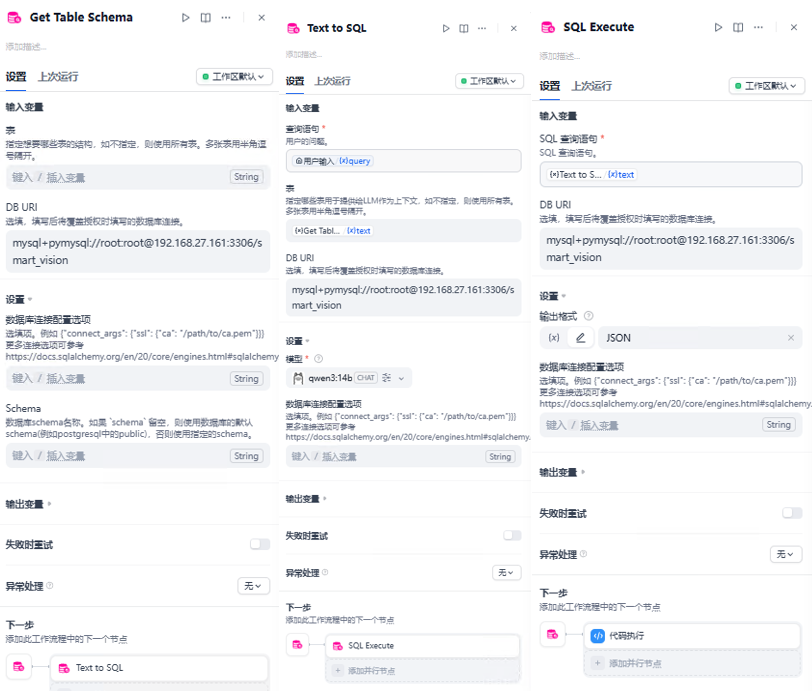
代码执行中的配置,
import json
def main(arg1: str):
    return {
        "result": json.dumps(arg1[0])
    }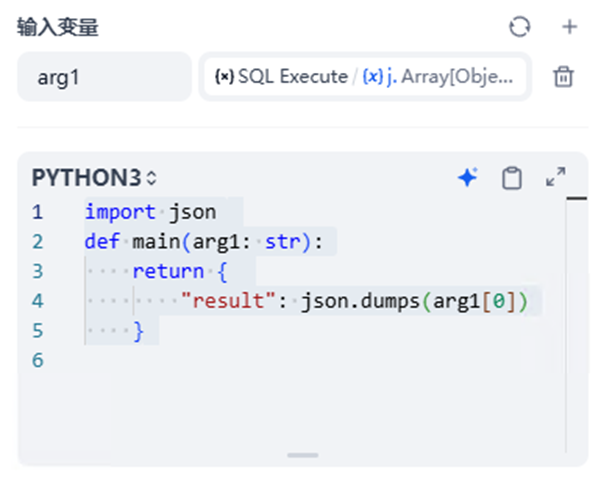
增加代码执行节点,主要是为了提取SQL EXECUTE输出的json。
运行效果,
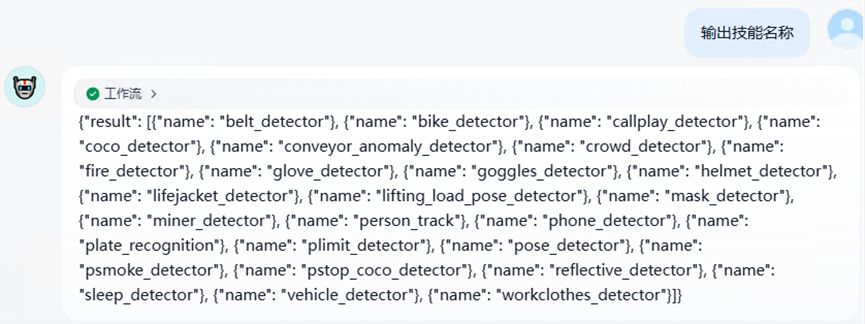
SQL Bot实现text-to-sql:
SQL Bot安装:
官方教程,https://dataease.cn/sqlbot/v1/quick_start/
我这里选择容器安装的支持MCP的版本。
docker run -d \
    --name sqlbot \
    --restart unless-stopped \
    -p 8000:8000 \
    -p 8001:8001 \
    -e SERVER_IMAGE_HOST=http://47.92.75.231:8001/images/ \
    -v data/sqlbot/excel:/opt/sqlbot/data/excel \
    -v ./data/sqlbot/file:/opt/sqlbot/data/file \
    -v data/sqlbot/images:/opt/sqlbot/images \
    -v data/sqlbot/logs:/opt/sqlbot/logs \
    -v data/postgresql:/var/lib/postgresql/data \
    --privileged=true \
    dataease/sqlbot
数据配置配置mysql数据库:
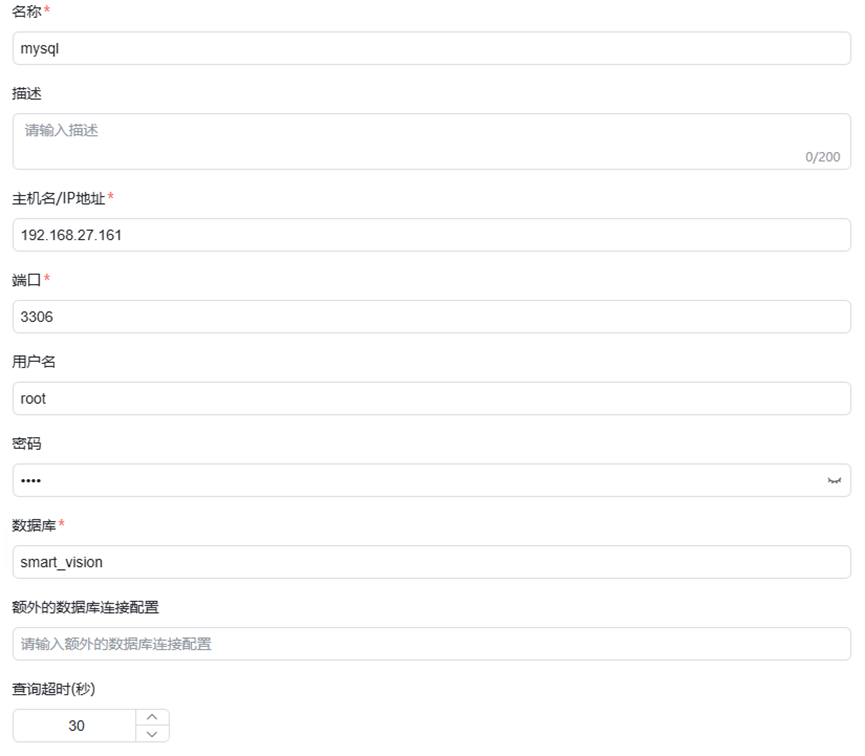
AI模型配置:
这里配置的本地基于ollama容器搭建的qwen3:14b模型。
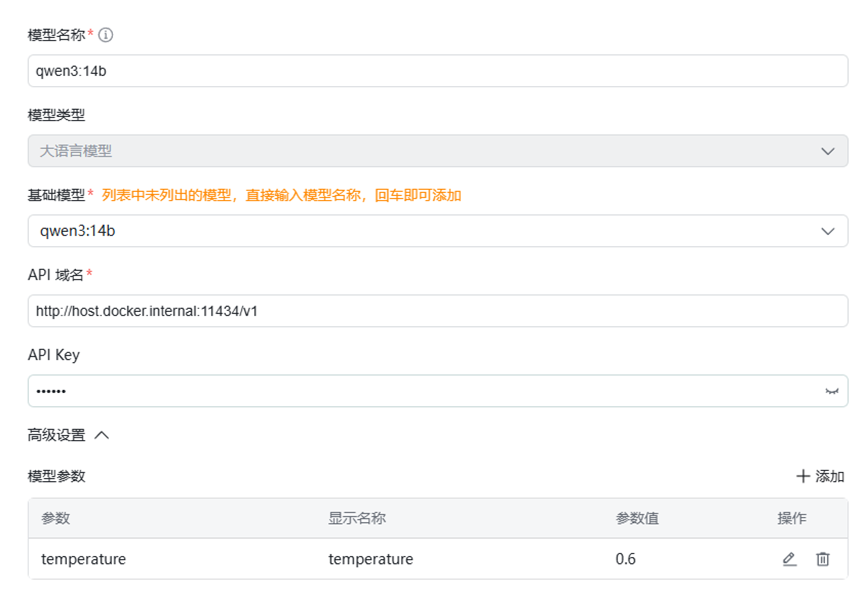
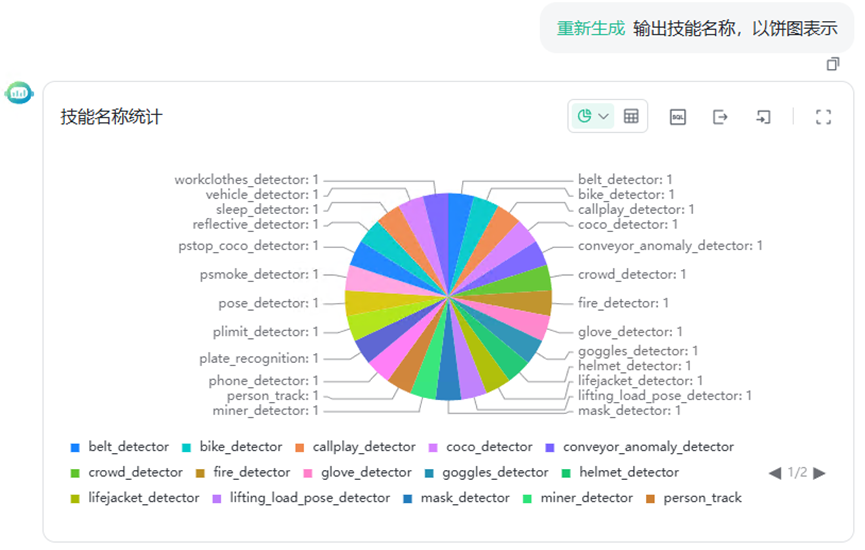
效果测试:
Dify基于MCP集成SQLbot:
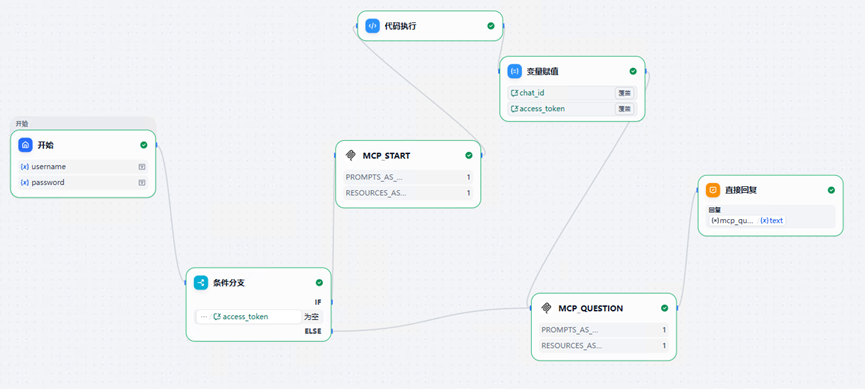
DSL配置,
app:
description: ''
icon: 🤖
icon_background: '#FFEAD5'
mode: advanced-chat
name: sqlbot-test
use_icon_as_answer_icon: false
dependencies:
- current_identifier: null
type: marketplace
value:
marketplace_plugin_unique_identifier: junjiem/mcp_sse:0.2.1@53cc613667fcf91dd7208dd5f6d2c8df3c7ff0af8b79e8f3c0a430f1b39bda4c
version: null
kind: app
version: 0.5.0
workflow:
conversation_variables:
- description: ''
id: 99c192a6-ec6c-4d5c-ae2d-14e5d1910ec8
name: access_token
selector:
- conversation
- access_token
value: ''
value_type: string
- description: ''
id: d3516b05-1faf-460d-8689-13ebbf172a2d
name: chat_id
selector:
- conversation
- chat_id
value: 0
value_type: integer
environment_variables: []
features:
file_upload:
allowed_file_extensions:
- .JPG
- .JPEG
- .PNG
- .GIF
- .WEBP
- .SVG
allowed_file_types:
- image
allowed_file_upload_methods:
- local_file
- remote_url
enabled: false
fileUploadConfig:
attachment_image_file_size_limit: 2
audio_file_size_limit: 50
batch_count_limit: 5
file_size_limit: 15
file_upload_limit: 20
image_file_batch_limit: 10
image_file_size_limit: 10
single_chunk_attachment_limit: 10
video_file_size_limit: 100
workflow_file_upload_limit: 10
image:
enabled: false
number_limits: 3
transfer_methods:
- local_file
- remote_url
number_limits: 3
opening_statement: ''
retriever_resource:
enabled: true
sensitive_word_avoidance:
enabled: false
speech_to_text:
enabled: false
suggested_questions: []
suggested_questions_after_answer:
enabled: false
text_to_speech:
enabled: false
language: ''
voice: ''
graph:
edges:
- data:
isInIteration: false
isInLoop: false
sourceType: start
targetType: if-else
id: 1758090351370-source-1758091453454-target
selected: false
source: '1758090351370'
sourceHandle: source
target: '1758091453454'
targetHandle: target
type: custom
zIndex: 0
- data:
isInIteration: false
isInLoop: false
sourceType: if-else
targetType: tool
id: 1758091453454-true-1758091588852-target
selected: false
source: '1758091453454'
sourceHandle: 'true'
target: '1758091588852'
targetHandle: target
type: custom
zIndex: 0
- data:
isInIteration: false
isInLoop: false
sourceType: tool
targetType: code
id: 1758091588852-source-1758092552178-target
selected: false
source: '1758091588852'
sourceHandle: source
target: '1758092552178'
targetHandle: target
type: custom
zIndex: 0
- data:
isInIteration: false
isInLoop: false
sourceType: code
targetType: assigner
id: 1758092552178-source-1758092556290-target
selected: false
source: '1758092552178'
sourceHandle: source
target: '1758092556290'
targetHandle: target
type: custom
zIndex: 0
- data:
isInIteration: false
isInLoop: false
sourceType: assigner
targetType: tool
id: 1758092556290-source-1758092765242-target
source: '1758092556290'
sourceHandle: source
target: '1758092765242'
targetHandle: target
type: custom
zIndex: 0
- data:
isInLoop: false
sourceType: tool
targetType: answer
id: 1758092765242-source-answer-target
source: '1758092765242'
sourceHandle: source
target: answer
targetHandle: target
type: custom
zIndex: 0
- data:
isInLoop: false
sourceType: if-else
targetType: tool
id: 1758091453454-false-1758092765242-target
source: '1758091453454'
sourceHandle: 'false'
target: '1758092765242'
targetHandle: target
type: custom
zIndex: 0
nodes:
- data:
desc: ''
selected: false
title: 开始
type: start
variables:
- default: admin
label: username
max_length: 48
options: []
required: false
type: text-input
variable: username
- default: SQLBot@123456
label: password
max_length: 48
options: []
required: false
type: text-input
variable: password
height: 136
id: '1758090351370'
position:
x: 518.7519591076812
y: 193.35595493631018
positionAbsolute:
x: 518.7519591076812
y: 193.35595493631018
selected: false
sourcePosition: right
targetPosition: left
type: custom
width: 243
- data:
answer: '{{#1758092765242.text#}}'
desc: ''
selected: false
title: 直接回复
type: answer
variables: []
height: 104
id: answer
position:
x: 1651.2352324130006
y: 288.64953441196894
positionAbsolute:
x: 1651.2352324130006
y: 288.64953441196894
selected: false
sourcePosition: right
targetPosition: left
type: custom
width: 243
- data:
cases:
- case_id: 'true'
conditions:
- comparison_operator: empty
id: 04434cde-207b-4deb-9889-5b4869f27b28
value: ''
varType: string
variable_selector:
- conversation
- access_token
id: 'true'
logical_operator: and
desc: ''
selected: false
title: 条件分支
type: if-else
height: 125
id: '1758091453454'
position:
x: 807.8282351654619
y: 440.8410436447798
positionAbsolute:
x: 807.8282351654619
y: 440.8410436447798
selected: false
sourcePosition: right
targetPosition: left
type: custom
width: 243
- data:
desc: ''
is_team_authorization: true
output_schema: null
paramSchemas:
- auto_generate: null
default: null
form: llm
human_description:
en_US: Name of the tool to execute.
ja_JP: Name of the tool to execute.
pt_BR: Name of the tool to execute.
zh_Hans: 要执行的工具的名称。
label:
en_US: Tool Name
ja_JP: Tool Name
pt_BR: Tool Name
zh_Hans: 工具名称
llm_description: Name of the MCP tool to execute.
max: null
min: null
name: tool_name
options: []
placeholder: null
precision: null
required: true
scope: null
template: null
type: string
- auto_generate: null
default: null
form: llm
human_description:
en_US: Tool arguments (JSON string in the python dict[str, Any] format).
ja_JP: Tool arguments (JSON string in the python dict[str, Any] format).
pt_BR: Tool arguments (JSON string in the python dict[str, Any] format).
zh_Hans: 工具的参数。
label:
en_US: Arguments
ja_JP: Arguments
pt_BR: Arguments
zh_Hans: 参数
llm_description: MCP Tool arguments (JSON string in the python dict[str,
Any] format).
max: null
min: null
name: arguments
options: []
placeholder: null
precision: null
required: true
scope: null
template: null
type: string
- auto_generate: null
default: 1
form: form
human_description:
en_US: Fetch and call the preset MCP Resources as Tools.
ja_JP: Fetch and call the preset MCP Resources as Tools.
pt_BR: Fetch and call the preset MCP Resources as Tools.
zh_Hans: 将预设的 MCP Resources 作为 Tools 返回和调用。
label:
en_US: MCP Resources as Tools
ja_JP: MCP Resources as Tools
pt_BR: MCP Resources as Tools
zh_Hans: MCP 资源作为工具
llm_description: ''
max: null
min: null
name: resources_as_tools
options: []
placeholder: null
precision: null
required: true
scope: null
template: null
type: boolean
- auto_generate: null
default: 1
form: form
human_description:
en_US: Fetch and call the preset MCP Prompts as Tools.
ja_JP: Fetch and call the preset MCP Prompts as Tools.
pt_BR: Fetch and call the preset MCP Prompts as Tools.
zh_Hans: 将预设的 MCP Prompts 作为 Tools 返回和调用。
label:
en_US: MCP Prompts as Tools
ja_JP: MCP Prompts as Tools
pt_BR: MCP Prompts as Tools
zh_Hans: MCP 提示词作为工具
llm_description: ''
max: null
min: null
name: prompts_as_tools
options: []
placeholder: null
precision: null
required: true
scope: null
template: null
type: boolean
- auto_generate: null
default: null
form: llm
human_description:
en_US: MCP Servers config, support multiple MCP services. (Optional, Filling
in this field will overwrite the MCP Servers config entered during authorization.)
ja_JP: MCP Servers config, support multiple MCP services. (Optional, Filling
in this field will overwrite the MCP Servers config entered during authorization.)
pt_BR: MCP Servers config, support multiple MCP services. (Optional, Filling
in this field will overwrite the MCP Servers config entered during authorization.)
zh_Hans: MCP服务配置,支持多个MCP服务。 (选填,填写后将覆盖授权时填写的MCP服务配置。)
label:
en_US: MCP Servers config
ja_JP: MCP Servers config
pt_BR: MCP Servers config
zh_Hans: MCP 服务配置
llm_description: ''
max: null
min: null
name: servers_config
options: []
placeholder: null
precision: null
required: false
scope: null
template: null
type: string
params:
arguments: ''
prompts_as_tools: ''
resources_as_tools: ''
servers_config: ''
tool_name: ''
provider_id: junjiem/mcp_sse/mcp_sse
provider_name: junjiem/mcp_sse/mcp_sse
provider_type: builtin
selected: false
title: mcp_start
tool_configurations:
prompts_as_tools:
type: constant
value: 1
resources_as_tools:
type: constant
value: 1
tool_description: 调用 MCP 服务端工具。
tool_label: 调用 MCP 工具
tool_name: mcp_sse_call_tool
tool_node_version: '2'
tool_parameters:
arguments:
type: mixed
value: '{
"username":"{{#1758090351370.username#}}",
"password":"{{#1758090351370.password#}}"
}'
servers_config:
type: mixed
value: '{
"sqlbot_mcp": {
"url": "http://host.docker.internal:8001/mcp",
"transport": "sse"
}
}'
tool_name:
type: mixed
value: mcp_start
type: tool
height: 115
id: '1758091588852'
position:
x: 1054.2507711868489
y: 231.44192596679505
positionAbsolute:
x: 1054.2507711868489
y: 231.44192596679505
selected: false
sourcePosition: right
targetPosition: left
type: custom
width: 243
- data:
code: "import json\ndef main(arg1: str) -> dict:\n json_obj = json.loads(arg1)\n\
\ return {\n \"chat_id\": json_obj[\"data\"][\"chat_id\"],\n \
\ \"access_token\": json_obj[\"data\"][\"access_token\"]\n }\n"
code_language: python3
desc: ''
outputs:
access_token:
children: null
type: string
chat_id:
children: null
type: number
selected: false
title: 代码执行
type: code
variables:
- value_selector:
- '1758091588852'
- text
variable: arg1
height: 53
id: '1758092552178'
position:
x: 1090.4975283553138
y: 18.469181102148355
positionAbsolute:
x: 1090.4975283553138
y: 18.469181102148355
selected: false
sourcePosition: right
targetPosition: left
type: custom
width: 243
- data:
desc: ''
items:
- input_type: variable
operation: over-write
value:
- '1758092552178'
- chat_id
variable_selector:
- conversation
- chat_id
write_mode: over-write
- input_type: variable
operation: over-write
value:
- '1758092552178'
- access_token
variable_selector:
- conversation
- access_token
write_mode: over-write
selected: false
title: 变量赋值
type: assigner
version: '2'
height: 111
id: '1758092556290'
position:
x: 1324.6685555249037
y: 93.08780081324474
positionAbsolute:
x: 1324.6685555249037
y: 93.08780081324474
selected: true
sourcePosition: right
targetPosition: left
type: custom
width: 243
- data:
desc: ''
is_team_authorization: true
output_schema: null
paramSchemas:
- auto_generate: null
default: null
form: llm
human_description:
en_US: Name of the tool to execute.
ja_JP: Name of the tool to execute.
pt_BR: Name of the tool to execute.
zh_Hans: 要执行的工具的名称。
label:
en_US: Tool Name
ja_JP: Tool Name
pt_BR: Tool Name
zh_Hans: 工具名称
llm_description: Name of the MCP tool to execute.
max: null
min: null
name: tool_name
options: []
placeholder: null
precision: null
required: true
scope: null
template: null
type: string
- auto_generate: null
default: null
form: llm
human_description:
en_US: Tool arguments (JSON string in the python dict[str, Any] format).
ja_JP: Tool arguments (JSON string in the python dict[str, Any] format).
pt_BR: Tool arguments (JSON string in the python dict[str, Any] format).
zh_Hans: 工具的参数。
label:
en_US: Arguments
ja_JP: Arguments
pt_BR: Arguments
zh_Hans: 参数
llm_description: MCP Tool arguments (JSON string in the python dict[str,
Any] format).
max: null
min: null
name: arguments
options: []
placeholder: null
precision: null
required: true
scope: null
template: null
type: string
- auto_generate: null
default: 1
form: form
human_description:
en_US: Fetch and call the preset MCP Resources as Tools.
ja_JP: Fetch and call the preset MCP Resources as Tools.
pt_BR: Fetch and call the preset MCP Resources as Tools.
zh_Hans: 将预设的 MCP Resources 作为 Tools 返回和调用。
label:
en_US: MCP Resources as Tools
ja_JP: MCP Resources as Tools
pt_BR: MCP Resources as Tools
zh_Hans: MCP 资源作为工具
llm_description: ''
max: null
min: null
name: resources_as_tools
options: []
placeholder: null
precision: null
required: true
scope: null
template: null
type: boolean
- auto_generate: null
default: 1
form: form
human_description:
en_US: Fetch and call the preset MCP Prompts as Tools.
ja_JP: Fetch and call the preset MCP Prompts as Tools.
pt_BR: Fetch and call the preset MCP Prompts as Tools.
zh_Hans: 将预设的 MCP Prompts 作为 Tools 返回和调用。
label:
en_US: MCP Prompts as Tools
ja_JP: MCP Prompts as Tools
pt_BR: MCP Prompts as Tools
zh_Hans: MCP 提示词作为工具
llm_description: ''
max: null
min: null
name: prompts_as_tools
options: []
placeholder: null
precision: null
required: true
scope: null
template: null
type: boolean
- auto_generate: null
default: null
form: llm
human_description:
en_US: MCP Servers config, support multiple MCP services. (Optional, Filling
in this field will overwrite the MCP Servers config entered during authorization.)
ja_JP: MCP Servers config, support multiple MCP services. (Optional, Filling
in this field will overwrite the MCP Servers config entered during authorization.)
pt_BR: MCP Servers config, support multiple MCP services. (Optional, Filling
in this field will overwrite the MCP Servers config entered during authorization.)
zh_Hans: MCP服务配置,支持多个MCP服务。 (选填,填写后将覆盖授权时填写的MCP服务配置。)
label:
en_US: MCP Servers config
ja_JP: MCP Servers config
pt_BR: MCP Servers config
zh_Hans: MCP 服务配置
llm_description: ''
max: null
min: null
name: servers_config
options: []
placeholder: null
precision: null
required: false
scope: null
template: null
type: string
params:
arguments: ''
prompts_as_tools: ''
resources_as_tools: ''
servers_config: ''
tool_name: ''
provider_id: junjiem/mcp_sse/mcp_sse
provider_name: junjiem/mcp_sse/mcp_sse
provider_type: builtin
selected: false
title: mcp_question
tool_configurations:
prompts_as_tools:
type: constant
value: 1
resources_as_tools:
type: constant
value: 1
tool_description: 调用 MCP 服务端工具。
tool_label: 调用 MCP 工具
tool_name: mcp_sse_call_tool
tool_node_version: '2'
tool_parameters:
arguments:
type: mixed
value: "{\n\"chat_id\":{{#conversation.chat_id#}}, \n\"question\":\"{{#sys.query#}}\"\
,\n\"token\":\"{{#conversation.access_token#}}\"\n}"
servers_config:
type: mixed
value: '{
"sqlbot_mcp": {
"url": "http://host.docker.internal:8001/mcp",
"transport": "sse"
}
}'
tool_name:
type: mixed
value: mcp_question
type: tool
height: 115
id: '1758092765242'
position:
x: 1376.5787477024674
y: 482.65794566081945
positionAbsolute:
x: 1376.5787477024674
y: 482.65794566081945
selected: false
sourcePosition: right
targetPosition: left
type: custom
width: 243
viewport:
x: -70.16861083238769
y: 145.24057527644743
zoom: 0.7937005259840993
rag_pipeline_variables: []工具中对,发现和调用MCP工具,进行配置,
凭据名称:
SqlbotMCP服务配置,
{ "server_name": { "url": "http://host.docker.internal:8001/mcp", "headers": {}, "timeout": 50, "sse_read_timeout": 50 }}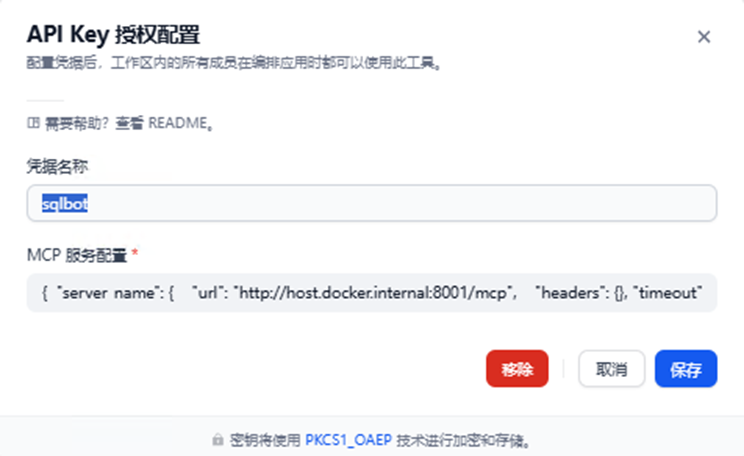
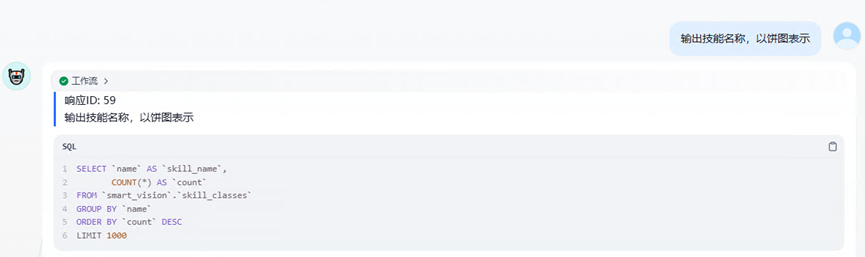
运行效果:
SQLBot 核心优势概览:
| 维度 | SQLBot | 普通 Database 工具 |
|---|---|---|
| 架构设计 | LLM + RAG 双引擎 | 纯 LLM 或规则引擎 |
| 部署方式 | 开箱即用,Docker 一键部署 | 需复杂配置或二次开发 |
| 集成能力 | 原生支持 MCP 协议,可嵌入 Dify/n8n/Coze | 需自行开发接口 |
| 数据安全 | 工作空间隔离 + 细粒度权限 | 通常缺乏企业级权限控制 |
| 准确性提升 | RAG 检索增强,越问越准 | 容易产生模型幻觉 |
| 可视化 | 内置图表生成 + 仪表板搭建 | 仅返回原始数据 |