资源开通:
ecs.gn7e-c16g1.16xlarge 4 * NVIDIA A100 80G
OS镜像选择(测试阶段免去组件预安装困扰):
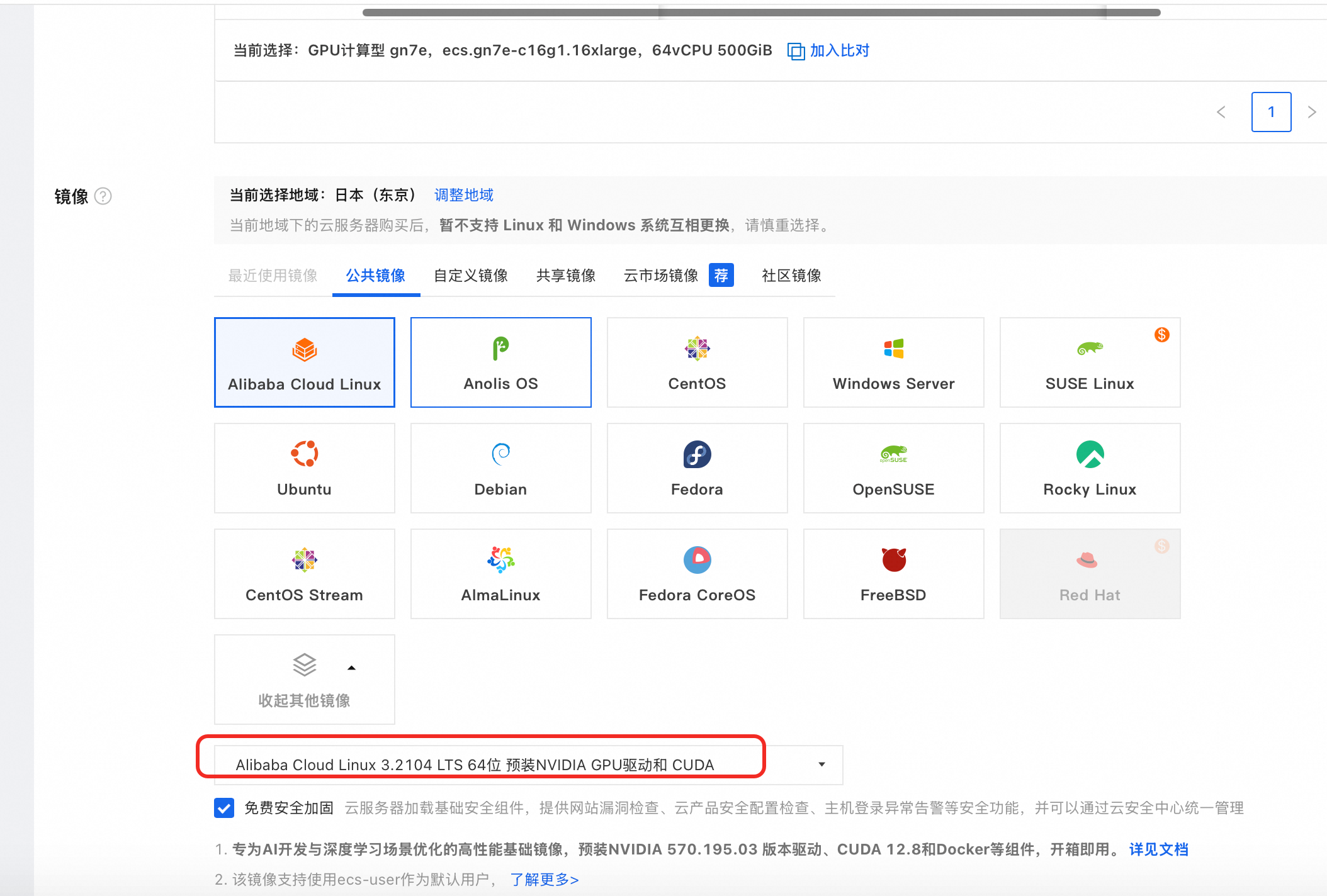
安装GPU驱动:
如果选用"安装 GPU 驱动"会基于如下脚本安装GPU驱动
"#!/bin/sh
#Please input version to install
DRIVER_VERSION="570.195.03"
CUDA_VERSION="12.8.1"
CUDNN_VERSION="9.8.0.87"
IS_INSTALL_eRDMA="FALSE"
IS_INSTALL_RDMA="FALSE"
INSTALL_DIR="/root/auto_install"
#using .run to install driver and cuda
auto_install_script="auto_install_v4.0.sh"
script_download_url=(curlhttp://100.100.100.200/latest/meta−data/source−address∣head−1)"/opsx/ecs/linux/binary/script/(curl http://100.100.100.200/latest/meta-data/source-address | head -1)"/opsx/ecs/linux/binary/script/(curlhttp://100.100.100.200/latest/meta−data/source−address∣head−1)"/opsx/ecs/linux/binary/script/{auto_install_script}"
echo $script_download_url
rm -rf $INSTALL_DIR
mkdir -p $INSTALL_DIR
cd INSTALL_DIR \&\& wget -t 10 --timeout=10 script_download_url && bash INSTALLDIR/{INSTALL_DIR}/INSTALLDIR/{auto_install_script} DRIVER_VERSION CUDA_VERSION CUDNN_VERSION IS_INSTALL_RDMA $IS_INSTALL_eRDMA "
分配公网以及200M 带宽,加速镜像拉取。
检查安装情况
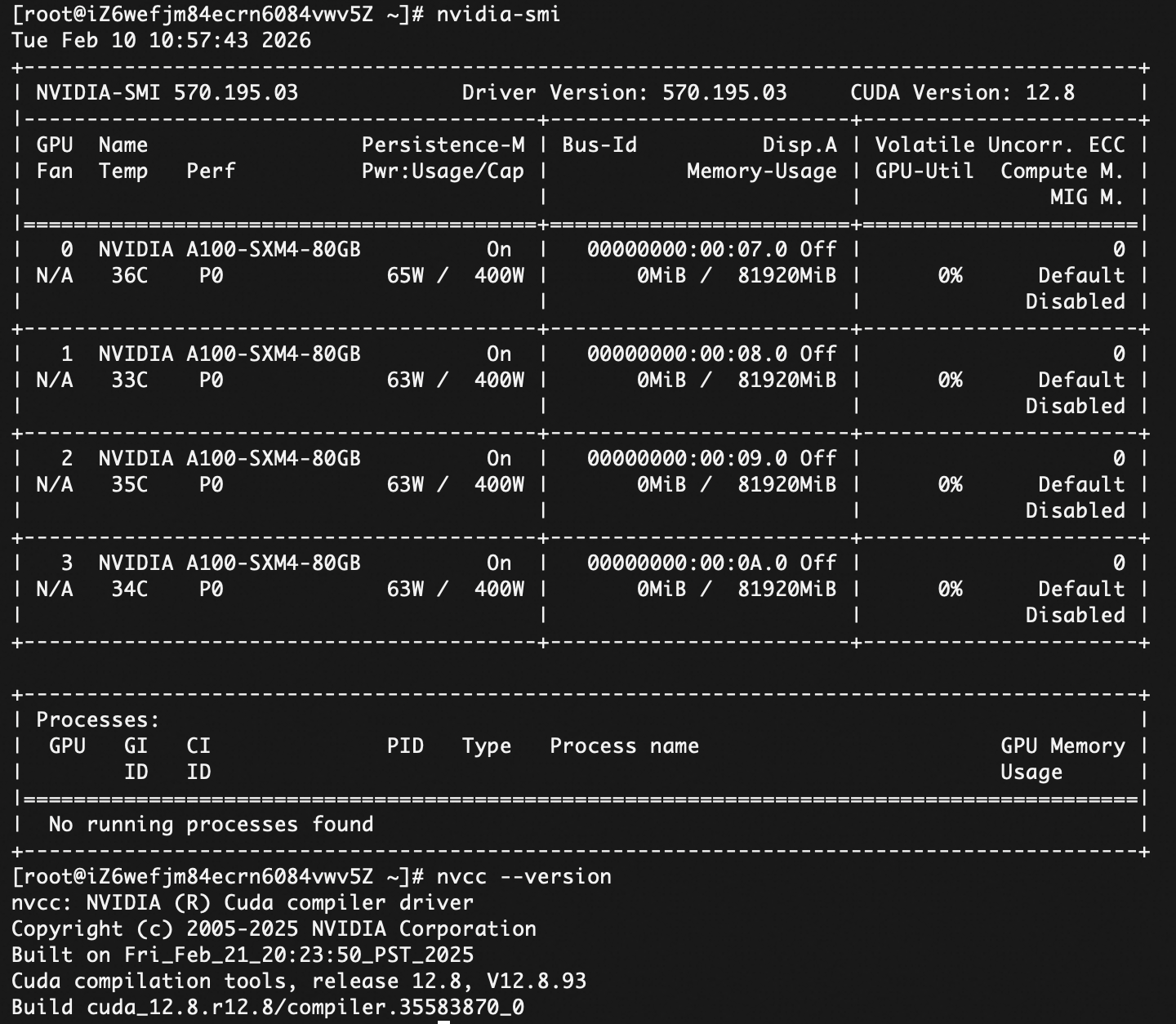
模型下载:
最快、最推荐的方法是使用 hf download (Hugging Face CLI)。
以下是详细的原因和操作建议:
- 为什么选 hf download 或 huggingface-cli?
多线程下载: 传统的 git clone(即使带了 LFS)通常是单线程或并发受限的。Hugging Face 官方的 CLI 工具支持多线程并行下载,能跑满你的带宽。
断点续传: 像 Qwen3-80B 这种模型文件非常大(可能超过 100GB),一旦网络波动,git clone 很容易中断且难以恢复,而 CLI 工具支持稳健的断点续传。
更智能的缓存: 它会自动管理缓存软链接,方便你在多个项目间复用模型。
Miniconda安装
用miniconda做环境隔离,OS自带的python版本可能低一些,随意改动版本可能影响其他项目。
wget https://repo.anaconda.com/miniconda/Miniconda3-latest-Linux-x86_64.sh
bash Miniconda3-latest-Linux-x86_64.sh
// 一路输入 yes 或按回车,安装完后重启终端//
conda tos accept --override-channels --channel https://repo.anaconda.com/pkgs/main
conda tos accept --override-channels --channel https://repo.anaconda.com/pkgs/r
conda tos accept --override-channels --channel https://repo.anaconda.com/pkgs/r
~/miniconda3/bin/conda init bas
source ~/.bashrc
nohup hf download Qwen/Qwen3-Next-80B-A3B-Instruct --local-dir Qwen3-80B > download.log 2>&1 &
挂在后台,防止网络断了影响下载。
pip install vllm
//pip install 'vllm>=0.10.2'
1. 创建环境
conda create -n hf_download python=3.10 -y
2. 激活环境
conda activate hf_download
3. 安装工具
pip install -U "huggingface_hubcli"
4. 开始高速下载模型
huggingface-cli download Qwen/Qwen3-Next-80B-A3B-Instruct --local-dir Qwen3-80B
升级python版本到3.9+
wget https://www.python.org/ftp/python/3.9.0/Python-3.9.0.tgz && tar -xzf Python-3.9.0.tgz
cd Python-3.9.0 && ./configure --enable-optimizations
下载hf
curl -LsSf https://hf.co/cli/install.sh | bash
root@iZ6wefjm84ecrn6084vwv5Z \~# curl -LsSf https://hf.co/cli/install.sh | bash
INFO Installing Hugging Face CLI...
INFO OS: linux
INFO Force reinstall: false
INFO Install dir: /root/.hf-cli
INFO Bin dir: /root/.local/bin
INFO Skip PATH update: false
WARNING python3 detected (Python 3.6.8) but Python 3.9+ is required.
WARNING python detected (Python 3.6.8) but Python 3.9+ is required.
ERROR Python 3.9+ is required but was not found.
INFO On Fedora/RHEL: sudo dnf install python3 python3-pip
1. 安装
pip install -U "huggingface_hubcli"
2. 下载 (使用 --parallel 选项加快速度)
huggingface-cli download Qwen/Qwen3-Next-80B-A3B-Instruct --local-dir Qwen3-80B
在日本的机器上:
首选: hf download (截图最下方的 cURL 方式)。
备选: huggingface-cli download。
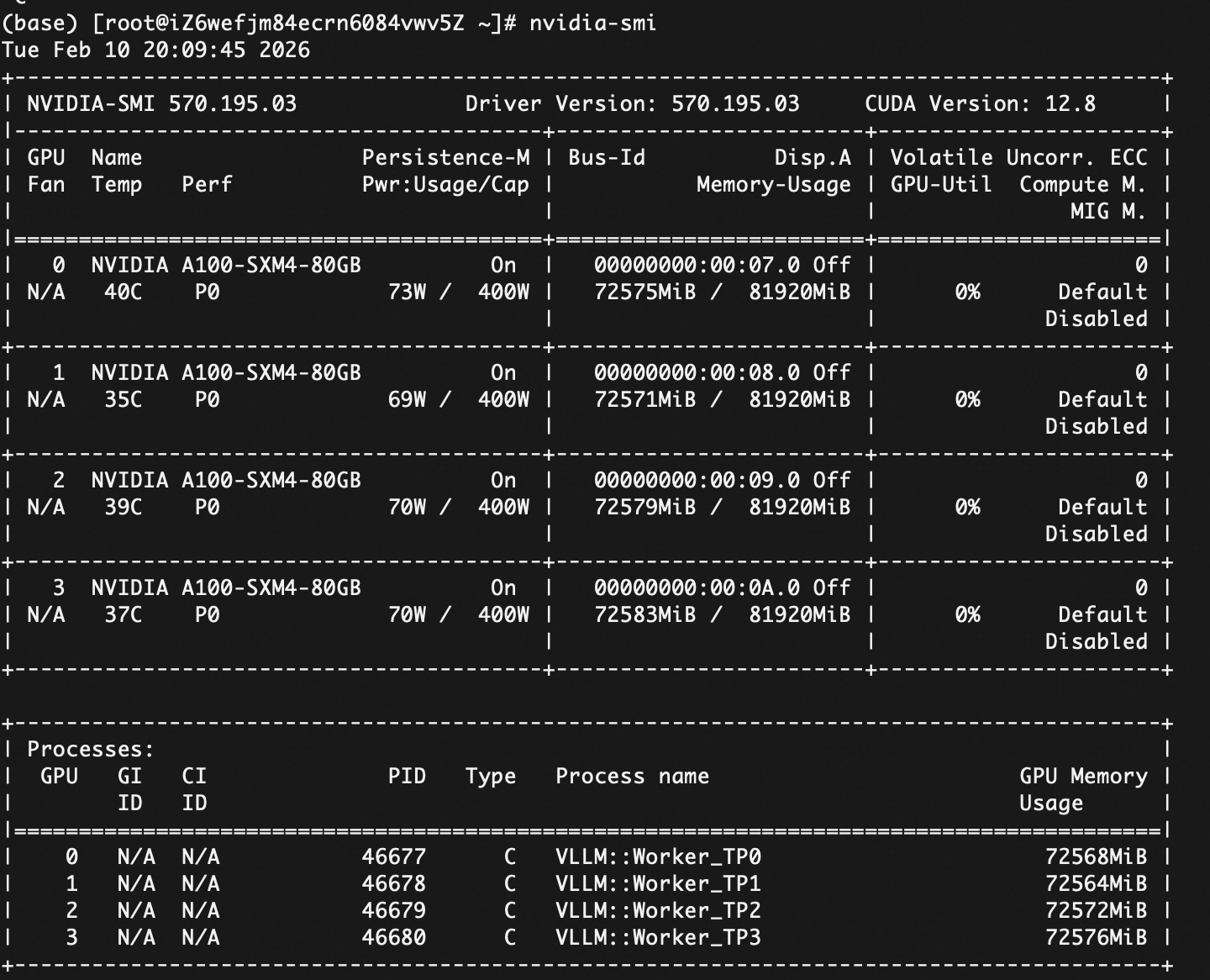
vllm 加载模型:
(base) root@iZ6wefjm84ecrn6084vwv5Z 9c7f2fbe84465e40164a94cc16cd30b6999b0cc7# vllm serve . \
--tensor-parallel-size 4
--served-model-name qwen3-next
--gpu-memory-utilization 0.85
--trust-remote-code
(APIServer pid=46226) INFO 02-10 19:54:24 utils.py:325
(APIServer pid=46226) INFO 02-10 19:54:24 utils.py:325 █ █ █▄ ▄█
(APIServer pid=46226) INFO 02-10 19:54:24 utils.py:325 ▄▄ ▄█ █ █ █ ▀▄▀ █ version 0.15.1
(APIServer pid=46226) INFO 02-10 19:54:24 utils.py:325 █▄█▀ █ █ █ █ model .
(APIServer pid=46226) INFO 02-10 19:54:24 utils.py:325 ▀▀ ▀▀▀▀▀ ▀▀▀▀▀ ▀ ▀
(APIServer pid=46226) INFO 02-10 19:54:24 utils.py:325
(APIServer pid=46226) INFO 02-10 19:54:24 utils.py:261 non-default args: {'model_tag': '.', 'api_server_count': 1, 'model': '.', 'trust_remote_code': True, 'served_model_name': 'qwen3-next', 'tensor_parallel_size': 4, 'gpu_memory_utilization': 0.85}
(APIServer pid=46226) The argument
trust_remote_codeis to be used with Auto classes. It has no effect here and is ignored.(APIServer pid=46226) The argument
trust_remote_codeis to be used with Auto classes. It has no effect here and is ignored.(APIServer pid=46226) The argument
trust_remote_codeis to be used with Auto classes. It has no effect here and is ignored.(APIServer pid=46226) INFO 02-10 19:54:30 model.py:541 Resolved architecture: Qwen3NextForCausalLM
(APIServer pid=46226) INFO 02-10 19:54:30 model.py:1561 Using max model len 262144
(APIServer pid=46226) INFO 02-10 19:54:30 scheduler.py:226 Chunked prefill is enabled with max_num_batched_tokens=2048.
(APIServer pid=46226) INFO 02-10 19:54:31 config.py:504 Setting attention block size to 272 tokens to ensure that attention page size is >= mamba page size.
(APIServer pid=46226) INFO 02-10 19:54:31 config.py:535 Padding mamba page size by 1.49% to ensure that mamba page size and attention page size are exactly equal.
(APIServer pid=46226) INFO 02-10 19:54:31 vllm.py:624 Asynchronous scheduling is enabled.
(EngineCore_DP0 pid=46543) INFO 02-10 19:54:35 core.py:96 Initializing a V1 LLM engine (v0.15.1) with config: model='.', speculative_config=None, tokenizer='.', skip_tokenizer_init=False, tokenizer_mode=auto, revision=None, tokenizer_revision=None, trust_remote_code=True, dtype=torch.bfloat16, max_seq_len=262144, download_dir=None, load_format=auto, tensor_parallel_size=4, pipeline_parallel_size=1, data_parallel_size=1, disable_custom_all_reduce=False, quantization=None, enforce_eager=False, enable_return_routed_experts=False, kv_cache_dtype=auto, device_config=cuda, structured_outputs_config=StructuredOutputsConfig(backend='auto', disable_fallback=False, disable_any_whitespace=False, disable_additional_properties=False, reasoning_parser='', reasoning_parser_plugin='', enable_in_reasoning=False), observability_config=ObservabilityConfig(show_hidden_metrics_for_version=None, otlp_traces_endpoint=None, collect_detailed_traces=None, kv_cache_metrics=False, kv_cache_metrics_sample=0.01, cudagraph_metrics=False, enable_layerwise_nvtx_tracing=False, enable_mfu_metrics=False, enable_mm_processor_stats=False, enable_logging_iteration_details=False), seed=0, served_model_name=qwen3-next, enable_prefix_caching=False, enable_chunked_prefill=True, pooler_config=None, compilation_config={'level': None, 'mode': <CompilationMode.VLLM_COMPILE: 3>, 'debug_dump_path': None, 'cache_dir': '', 'compile_cache_save_format': 'binary', 'backend': 'inductor', 'custom_ops': 'none', 'splitting_ops': 'vllm::unified_attention', 'vllm::unified_attention_with_output', 'vllm::unified_mla_attention', 'vllm::unified_mla_attention_with_output', 'vllm::mamba_mixer2', 'vllm::mamba_mixer', 'vllm::short_conv', 'vllm::linear_attention', 'vllm::plamo2_mamba_mixer', 'vllm::gdn_attention_core', 'vllm::kda_attention', 'vllm::sparse_attn_indexer', 'vllm::rocm_aiter_sparse_attn_indexer', 'vllm::unified_kv_cache_update', 'compile_mm_encoder': False, 'compile_sizes': \[\], 'compile_ranges_split_points': 2048, 'inductor_compile_config': {'enable_auto_functionalized_v2': False, 'combo_kernels': True, 'benchmark_combo_kernel': True}, 'inductor_passes': {}, 'cudagraph_mode': <CUDAGraphMode.FULL_AND_PIECEWISE: (2, 1)>, 'cudagraph_num_of_warmups': 1, 'cudagraph_capture_sizes': 1, 2, 4, 8, 16, 24, 32, 40, 48, 56, 64, 72, 80, 88, 96, 104, 112, 120, 128, 136, 144, 152, 160, 168, 176, 184, 192, 200, 208, 216, 224, 232, 240, 248, 256, 272, 288, 304, 320, 336, 352, 368, 384, 400, 416, 432, 448, 464, 480, 496, 512, 'cudagraph_copy_inputs': False, 'cudagraph_specialize_lora': True, 'use_inductor_graph_partition': False, 'pass_config': {'fuse_norm_quant': False, 'fuse_act_quant': False, 'fuse_attn_quant': False, 'eliminate_noops': True, 'enable_sp': False, 'fuse_gemm_comms': False, 'fuse_allreduce_rms': False}, 'max_cudagraph_capture_size': 512, 'dynamic_shapes_config': {'type': <DynamicShapesType.BACKED: 'backed'>, 'evaluate_guards': False, 'assume_32_bit_indexing': True}, 'local_cache_dir': None, 'static_all_moe_layers': \[\]}
(EngineCore_DP0 pid=46543) WARNING 02-10 19:54:35 multiproc_executor.py:910 Reducing Torch parallelism from 32 threads to 1 to avoid unnecessary CPU contention. Set OMP_NUM_THREADS in the external environment to tune this value as needed.
INFO 02-10 19:54:41 parallel_state.py:1212 world_size=4 rank=3 local_rank=3 distributed_init_method=tcp://127.0.0.1:49101 backend=nccl
INFO 02-10 19:54:41 parallel_state.py:1212 world_size=4 rank=2 local_rank=2 distributed_init_method=tcp://127.0.0.1:49101 backend=nccl
INFO 02-10 19:54:41 parallel_state.py:1212 world_size=4 rank=0 local_rank=0 distributed_init_method=tcp://127.0.0.1:49101 backend=nccl
INFO 02-10 19:54:41 parallel_state.py:1212 world_size=4 rank=1 local_rank=1 distributed_init_method=tcp://127.0.0.1:49101 backend=nccl
INFO 02-10 19:54:42 pynccl.py:111 vLLM is using nccl==2.27.5
WARNING 02-10 19:54:42 symm_mem.py:67 SymmMemCommunicator: Device capability 8.0 not supported, communicator is not available.
WARNING 02-10 19:54:42 symm_mem.py:67 SymmMemCommunicator: Device capability 8.0 not supported, communicator is not available.
WARNING 02-10 19:54:42 symm_mem.py:67 SymmMemCommunicator: Device capability 8.0 not supported, communicator is not available.
WARNING 02-10 19:54:42 symm_mem.py:67 SymmMemCommunicator: Device capability 8.0 not supported, communicator is not available.
INFO 02-10 19:54:42 parallel_state.py:1423 rank 1 in world size 4 is assigned as DP rank 0, PP rank 0, PCP rank 0, TP rank 1, EP rank 1
INFO 02-10 19:54:42 parallel_state.py:1423 rank 2 in world size 4 is assigned as DP rank 0, PP rank 0, PCP rank 0, TP rank 2, EP rank 2
INFO 02-10 19:54:42 parallel_state.py:1423 rank 3 in world size 4 is assigned as DP rank 0, PP rank 0, PCP rank 0, TP rank 3, EP rank 3
INFO 02-10 19:54:42 parallel_state.py:1423 rank 0 in world size 4 is assigned as DP rank 0, PP rank 0, PCP rank 0, TP rank 0, EP rank 0
(Worker_TP0 pid=46677) INFO 02-10 19:54:43 gpu_model_runner.py:4033 Starting to load model ...
(Worker_TP0 pid=46677) INFO 02-10 19:55:00 unquantized.py:103 Using TRITON backend for Unquantized MoE
(Worker_TP0 pid=46677) INFO 02-10 19:55:00 cuda.py:364 Using FLASH_ATTN attention backend out of potential backends: ('FLASH_ATTN', 'FLASHINFER', 'TRITON_ATTN', 'FLEX_ATTENTION')
Loading safetensors checkpoint shards: 0% Completed | 0/41 00:00\
Loading safetensors checkpoint shards: 2% Completed | 1/41 00:00\<00:20, 1.98it/s
Loading safetensors checkpoint shards: 5% Completed | 2/41 00:01\<00:21, 1.79it/s
Loading safetensors checkpoint shards: 7% Completed | 3/41 00:01\<00:22, 1.73it/s
Loading safetensors checkpoint shards: 10% Completed | 4/41 00:02\<00:22, 1.66it/s
Loading safetensors checkpoint shards: 12% Completed | 5/41 00:03\<00:22, 1.60it/s
Loading safetensors checkpoint shards: 15% Completed | 6/41 00:03\<00:20, 1.73it/s
Loading safetensors checkpoint shards: 17% Completed | 7/41 00:04\<00:19, 1.77it/s
Loading safetensors checkpoint shards: 20% Completed | 8/41 00:04\<00:18, 1.74it/s
Loading safetensors checkpoint shards: 22% Completed | 9/41 00:05\<00:18, 1.74it/s
Loading safetensors checkpoint shards: 24% Completed | 10/41 00:05\<00:17, 1.76it/s
Loading safetensors checkpoint shards: 27% Completed | 11/41 00:06\<00:16, 1.81it/s
Loading safetensors checkpoint shards: 29% Completed | 12/41 00:06\<00:16, 1.74it/s
Loading safetensors checkpoint shards: 32% Completed | 13/41 00:07\<00:16, 1.73it/s
Loading safetensors checkpoint shards: 34% Completed | 14/41 00:08\<00:15, 1.74it/s
Loading safetensors checkpoint shards: 37% Completed | 15/41 00:08\<00:15, 1.70it/s
Loading safetensors checkpoint shards: 39% Completed | 16/41 00:09\<00:14, 1.70it/s
Loading safetensors checkpoint shards: 41% Completed | 17/41 00:09\<00:13, 1.73it/s
Loading safetensors checkpoint shards: 46% Completed | 19/41 00:10\<00:09, 2.22it/s
Loading safetensors checkpoint shards: 49% Completed | 20/41 00:11\<00:10, 2.00it/s
Loading safetensors checkpoint shards: 51% Completed | 21/41 00:11\<00:10, 1.88it/s
Loading safetensors checkpoint shards: 54% Completed | 22/41 00:12\<00:10, 1.83it/s
Loading safetensors checkpoint shards: 56% Completed | 23/41 00:12\<00:09, 1.82it/s
Loading safetensors checkpoint shards: 59% Completed | 24/41 00:13\<00:09, 1.81it/s
Loading safetensors checkpoint shards: 61% Completed | 25/41 00:13\<00:09, 1.76it/s
Loading safetensors checkpoint shards: 63% Completed | 26/41 00:14\<00:08, 1.72it/s
Loading safetensors checkpoint shards: 66% Completed | 27/41 00:15\<00:08, 1.71it/s
Loading safetensors checkpoint shards: 68% Completed | 28/41 00:15\<00:07, 1.70it/s
Loading safetensors checkpoint shards: 71% Completed | 29/41 00:16\<00:07, 1.67it/s
Loading safetensors checkpoint shards: 73% Completed | 30/41 00:17\<00:06, 1.65it/s
Loading safetensors checkpoint shards: 76% Completed | 31/41 00:17\<00:06, 1.63it/s
Loading safetensors checkpoint shards: 78% Completed | 32/41 00:18\<00:05, 1.67it/s
Loading safetensors checkpoint shards: 80% Completed | 33/41 00:18\<00:04, 1.66it/s
Loading safetensors checkpoint shards: 83% Completed | 34/41 00:19\<00:04, 1.71it/s
Loading safetensors checkpoint shards: 85% Completed | 35/41 00:19\<00:03, 1.70it/s
Loading safetensors checkpoint shards: 88% Completed | 36/41 00:20\<00:03, 1.66it/s
Loading safetensors checkpoint shards: 90% Completed | 37/41 00:21\<00:02, 1.65it/s
Loading safetensors checkpoint shards: 93% Completed | 38/41 00:21\<00:01, 1.68it/s
Loading safetensors checkpoint shards: 95% Completed | 39/41 00:22\<00:01, 1.71it/s
Loading safetensors checkpoint shards: 98% Completed | 40/41 00:22\<00:00, 1.74it/s
Loading safetensors checkpoint shards: 100% Completed | 41/41 00:23\<00:00, 1.76it/s
Loading safetensors checkpoint shards: 100% Completed | 41/41 00:23\<00:00, 1.75it/s
(Worker_TP0 pid=46677)
(Worker_TP0 pid=46677) INFO 02-10 19:55:24 default_loader.py:291 Loading weights took 23.52 seconds
(Worker_TP0 pid=46677) INFO 02-10 19:55:24 gpu_model_runner.py:4130 Model loading took 37.22 GiB memory and 40.701756 seconds
(Worker_TP0 pid=46677) INFO 02-10 19:55:33 backends.py:812 Using cache directory: /root/.cache/vllm/torch_compile_cache/3bbbe12d51/rank_0_0/backbone for vLLM's torch.compile
(Worker_TP0 pid=46677) INFO 02-10 19:55:33 backends.py:872 Dynamo bytecode transform time: 8.17 s
(Worker_TP0 pid=46677) INFO 02-10 19:55:41 backends.py:302 Cache the graph of compile range (1, 2048) for later use
(Worker_TP2 pid=46679) INFO 02-10 19:55:41 backends.py:302 Cache the graph of compile range (1, 2048) for later use
(Worker_TP3 pid=46680) INFO 02-10 19:55:41 backends.py:302 Cache the graph of compile range (1, 2048) for later use
(Worker_TP1 pid=46678) INFO 02-10 19:55:41 backends.py:302 Cache the graph of compile range (1, 2048) for later use
(Worker_TP0 pid=46677) INFO 02-10 19:55:45 fused_moe.py:1077 Using configuration from /root/miniconda3/lib/python3.13/site-packages/vllm/model_executor/layers/fused_moe/configs/E=512,N=128,device_name=NVIDIA_A100-SXM4-80GB.json for MoE layer.
(Worker_TP0 pid=46677) INFO 02-10 19:55:58 backends.py:319 Compiling a graph for compile range (1, 2048) takes 20.67 s
(Worker_TP0 pid=46677) INFO 02-10 19:55:58 monitor.py:34 torch.compile takes 28.84 s in total
(Worker_TP0 pid=46677) INFO 02-10 19:56:00 gpu_worker.py:356 Available KV cache memory: 28.1 GiB
(EngineCore_DP0 pid=46543) INFO 02-10 19:56:00 kv_cache_utils.py:1307 GPU KV cache size: 613,632 tokens
(EngineCore_DP0 pid=46543) INFO 02-10 19:56:00 kv_cache_utils.py:1312 Maximum concurrency for 262,144 tokens per request: 9.34x
Capturing CUDA graphs (mixed prefill-decode, PIECEWISE): 100%|████████████████████████████████████████| 51/51 00:10\<00:00, 4.72it/s
Capturing CUDA graphs (decode, FULL): 94%|███████████████████████████████████████████████████████▋ | 33/35 00:07\<00:00, 5.68it/s(Worker_TP3 pid=46680) INFO 02-10 19:56:19 custom_all_reduce.py:216 Registering 8342 cuda graph addresses
(Worker_TP2 pid=46679) INFO 02-10 19:56:19 custom_all_reduce.py:216 Registering 8342 cuda graph addresses
Capturing CUDA graphs (decode, FULL): 97%|█████████████████████████████████████████████████████████▎ | 34/35 00:07\<00:00, 5.67it/s(Worker_TP1 pid=46678) INFO 02-10 19:56:19 custom_all_reduce.py:216 Registering 8342 cuda graph addresses
Capturing CUDA graphs (decode, FULL): 100%|███████████████████████████████████████████████████████████| 35/35 00:07\<00:00, 4.46it/s
(Worker_TP0 pid=46677) INFO 02-10 19:56:19 custom_all_reduce.py:216 Registering 8342 cuda graph addresses
(Worker_TP0 pid=46677) INFO 02-10 19:56:19 gpu_model_runner.py:5063 Graph capturing finished in 20 secs, took 1.79 GiB
(EngineCore_DP0 pid=46543) INFO 02-10 19:56:20 core.py:272 init engine (profile, create kv cache, warmup model) took 55.31 seconds
(EngineCore_DP0 pid=46543) INFO 02-10 19:56:20 vllm.py:624 Asynchronous scheduling is enabled.
(APIServer pid=46226) INFO 02-10 19:56:20 api_server.py:665 Supported tasks: 'generate'
(APIServer pid=46226) WARNING 02-10 19:56:20 model.py:1371 Default vLLM sampling parameters have been overridden by the model's
generation_config.json:{'temperature': 0.7, 'top_k': 20, 'top_p': 0.8}. If this is not intended, please relaunch vLLM instance with--generation-config vllm.(APIServer pid=46226) INFO 02-10 19:56:20 serving.py:177 Warming up chat template processing...
(APIServer pid=46226) INFO 02-10 19:56:21 hf.py:310 Detected the chat template content format to be 'string'. You can set
--chat-template-content-formatto override this.(APIServer pid=46226) INFO 02-10 19:56:21 serving.py:212 Chat template warmup completed in 320.9ms
(APIServer pid=46226) INFO 02-10 19:56:21 api_server.py:946 Starting vLLM API server 0 on http://0.0.0.0:8000
(APIServer pid=46226) INFO 02-10 19:56:21 launcher.py:38 Available routes are:
(APIServer pid=46226) INFO 02-10 19:56:21 launcher.py:46 Route: /openapi.json, Methods: HEAD, GET
(APIServer pid=46226) INFO 02-10 19:56:21 launcher.py:46 Route: /docs, Methods: HEAD, GET
(APIServer pid=46226) INFO 02-10 19:56:21 launcher.py:46 Route: /docs/oauth2-redirect, Methods: HEAD, GET
(APIServer pid=46226) INFO 02-10 19:56:21 launcher.py:46 Route: /redoc, Methods: HEAD, GET
(APIServer pid=46226) INFO 02-10 19:56:21 launcher.py:46 Route: /scale_elastic_ep, Methods: POST
(APIServer pid=46226) INFO 02-10 19:56:21 launcher.py:46 Route: /is_scaling_elastic_ep, Methods: POST
(APIServer pid=46226) INFO 02-10 19:56:21 launcher.py:46 Route: /tokenize, Methods: POST
(APIServer pid=46226) INFO 02-10 19:56:21 launcher.py:46 Route: /detokenize, Methods: POST
(APIServer pid=46226) INFO 02-10 19:56:21 launcher.py:46 Route: /inference/v1/generate, Methods: POST
(APIServer pid=46226) INFO 02-10 19:56:21 launcher.py:46 Route: /pause, Methods: POST
(APIServer pid=46226) INFO 02-10 19:56:21 launcher.py:46 Route: /resume, Methods: POST
(APIServer pid=46226) INFO 02-10 19:56:21 launcher.py:46 Route: /is_paused, Methods: GET
(APIServer pid=46226) INFO 02-10 19:56:21 launcher.py:46 Route: /metrics, Methods: GET
(APIServer pid=46226) INFO 02-10 19:56:21 launcher.py:46 Route: /health, Methods: GET
(APIServer pid=46226) INFO 02-10 19:56:21 launcher.py:46 Route: /v1/chat/completions, Methods: POST
(APIServer pid=46226) INFO 02-10 19:56:21 launcher.py:46 Route: /v1/chat/completions/render, Methods: POST
(APIServer pid=46226) INFO 02-10 19:56:21 launcher.py:46 Route: /v1/responses, Methods: POST
(APIServer pid=46226) INFO 02-10 19:56:21 launcher.py:46 Route: /v1/responses/{response_id}, Methods: GET
(APIServer pid=46226) INFO 02-10 19:56:21 launcher.py:46 Route: /v1/responses/{response_id}/cancel, Methods: POST
(APIServer pid=46226) INFO 02-10 19:56:21 launcher.py:46 Route: /v1/audio/transcriptions, Methods: POST
(APIServer pid=46226) INFO 02-10 19:56:21 launcher.py:46 Route: /v1/audio/translations, Methods: POST
(APIServer pid=46226) INFO 02-10 19:56:21 launcher.py:46 Route: /v1/completions, Methods: POST
(APIServer pid=46226) INFO 02-10 19:56:21 launcher.py:46 Route: /v1/completions/render, Methods: POST
(APIServer pid=46226) INFO 02-10 19:56:21 launcher.py:46 Route: /v1/messages, Methods: POST
(APIServer pid=46226) INFO 02-10 19:56:21 launcher.py:46 Route: /v1/models, Methods: GET
(APIServer pid=46226) INFO 02-10 19:56:21 launcher.py:46 Route: /load, Methods: GET
(APIServer pid=46226) INFO 02-10 19:56:21 launcher.py:46 Route: /version, Methods: GET
(APIServer pid=46226) INFO 02-10 19:56:21 launcher.py:46 Route: /ping, Methods: GET
(APIServer pid=46226) INFO 02-10 19:56:21 launcher.py:46 Route: /ping, Methods: POST
(APIServer pid=46226) INFO 02-10 19:56:21 launcher.py:46 Route: /invocations, Methods: POST
(APIServer pid=46226) INFO 02-10 19:56:21 launcher.py:46 Route: /classify, Methods: POST
(APIServer pid=46226) INFO 02-10 19:56:21 launcher.py:46 Route: /v1/embeddings, Methods: POST
(APIServer pid=46226) INFO 02-10 19:56:21 launcher.py:46 Route: /score, Methods: POST
(APIServer pid=46226) INFO 02-10 19:56:21 launcher.py:46 Route: /v1/score, Methods: POST
(APIServer pid=46226) INFO 02-10 19:56:21 launcher.py:46 Route: /rerank, Methods: POST
(APIServer pid=46226) INFO 02-10 19:56:21 launcher.py:46 Route: /v1/rerank, Methods: POST
(APIServer pid=46226) INFO 02-10 19:56:21 launcher.py:46 Route: /v2/rerank, Methods: POST
(APIServer pid=46226) INFO 02-10 19:56:21 launcher.py:46 Route: /pooling, Methods: POST
(APIServer pid=46226) INFO: Started server process 46226
(APIServer pid=46226) INFO: Waiting for application startup.
(APIServer pid=46226) INFO: Application startup complete.
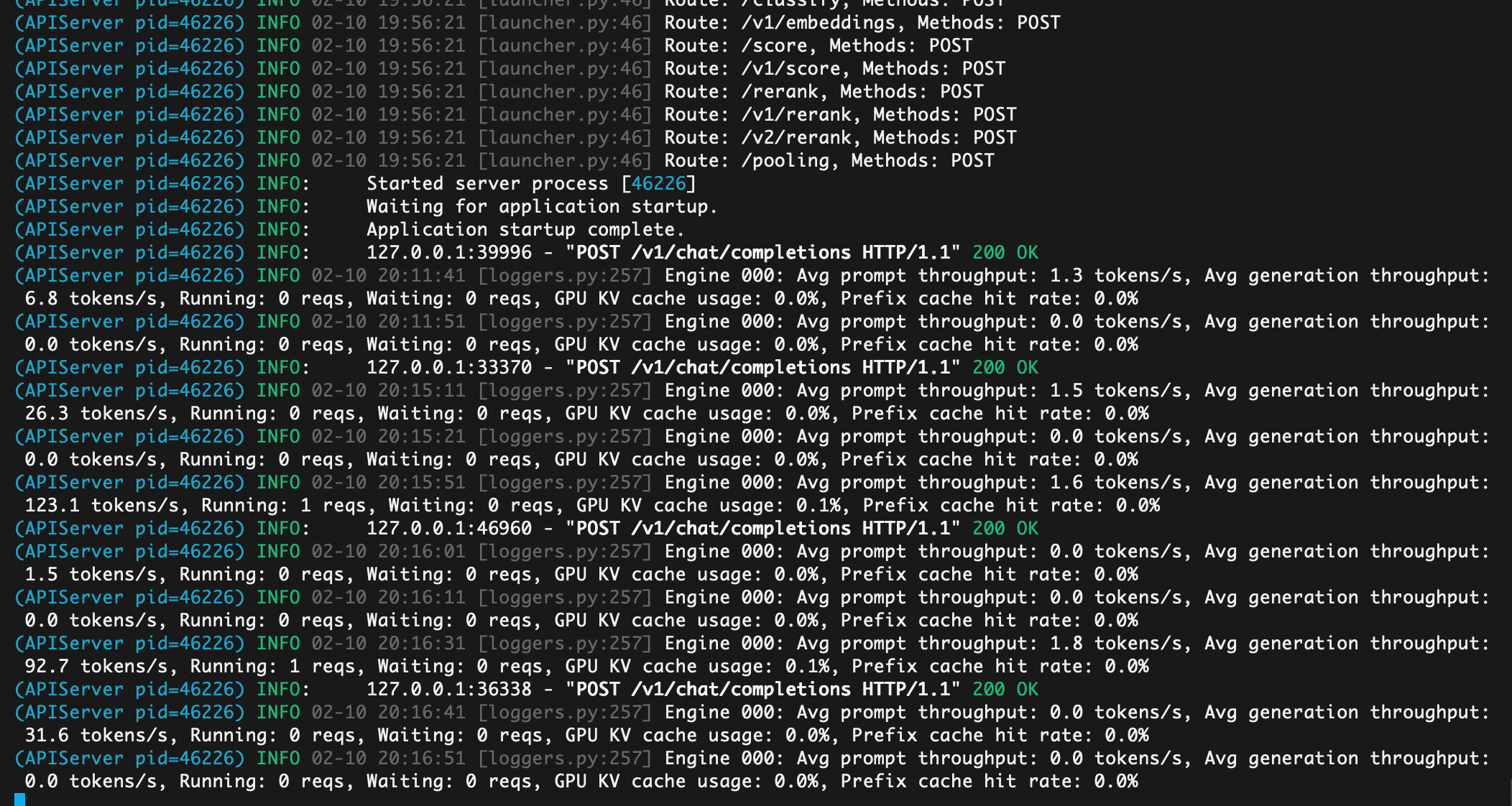
root@iZ6wefjm84ecrn6084vwv5Z \~# curl -X POST http://localhost:8000/v1/chat/completions '{"model": "qwen3-next","messages": {"role": "user","content": "为什么大模型TOKEN对于云计算企业这样重要。"}}'
{"id":"chatcmpl-ae023d3165ec42f5","object":"chat.completion","created":1770725767,"model":"qwen3-next","choices":{"index":0,"message":{"role":"assistant","content":"这是一个非常关键且前沿的问题。在大模型(Large Language Models, LLMs)时代,"Token"虽然只是一个技术术语(指文本被分词后的最小单位),但它对云计算企业的重要性远超其字面含义------它已成为**算力经济、商业模式、竞争壁垒和收入引擎** 的核心计量单位。以下是详细解析:\\n\\n---\\n\\n### 一、Token 是大模型使用量的"基本计量单位"\\n\\n大模型的运行依赖于"输入 + 输出"的文本处理。无论是用户提问、生成文章、写代码,还是企业API调用,系统都必须将文本切分为Token进行处理。\\n\\n- 1个Token ≈ 0.75个英文单词 或 1\~2个中文字符\\n- 一次对话可能消耗几百到上万个Token\\n- 一次API调用的计费 = 输入Token数 + 输出Token数\\n\\n👉 **因此,Token = 用户使用量 = 云计算资源消耗量 = 企业收入来源** \\n\\n---\\n\\n### 二、Token驱动云计算企业的商业模式变革\\n\\n#### 1. **从"卖服务器"到"卖Token"** \\n过去:AWS、阿里云卖的是EC2实例、存储、带宽。\\n现在:OpenAI、Anthropic、百度文心、通义千问等通过API提供大模型服务,**按Token收费** 。\\n\\n- OpenAI:$0.50 / 1M 输入Token,$1.50 / 1M 输出Token(GPT-4-turbo)\\n- 阿里云通义千问:按Token计费,价格远低于OpenAI\\n- 腾讯混元:按调用次数或Token阶梯计价\\n\\n**云计算企业不再卖硬件,而是卖"智能计算服务"------而Token就是这个服务的"货币"。** \\n\\n#### 2. **Token成为定价与利润的核心** \\n- 模型推理成本 = Token数 × 每Token的算力开销(GPU时间、显存、能耗)\\n- 云计算企业通过优化模型压缩、推理加速、批处理等技术,**降低每Token成本** ,从而提升利润率\\n- 高并发、高效率的云平台,能以更低的每Token成本提供服务,形成价格优势\\n\\n\> 💡 举例:如果A公司每Token成本是$0.0000002,B公司是$0.0000005,那么A在同样收入下利润高出150%!\\n\\n---\\n\\n### 三、Token是云计算企业竞争的"新战场"\\n\\n\| 竞争维度 \| 传统云服务 \| 大模型时代 \|\\n\|----------\|-------------\|--------------\|\\n\| 核心指标 \| CPU利用率、网络延迟 \| 每秒处理Token数(TPS)、每Token成本 \|\\n\| 竞争焦点 \| 价格、稳定性、地域覆盖 \| 推理速度、Token性价比、长上下文支持 \|\\n\| 技术壁垒 \| 虚拟化、网络优化 \| 模型并行、KV缓存优化、FlashAttention、量化压缩 \|\\n\\n👉 谁能用更少的算力处理更多Token,谁就能赢得客户、抢占市场。\\n\\n---\\n\\n### 四、Token数据是云计算企业的"黄金资产"\\n\\n- **用户行为数据** :通过Token分析,企业知道用户在问什么、用在什么场景(客服、写作、编程、医疗)\\n- **模型迭代依据** :高频Token组合 → 指导模型微调、数据增强、领域优化\\n- **商业化拓展** :识别高价值行业(如法律、金融)→ 推出垂直行业模型 + 高价套餐\\n\\n\> 比如:阿里云发现"合同生成"类Token激增 → 推出"法务通义"专属模型 → 收费翻倍\\n\\n---\\n\\n### 五、Token推动云计算架构重构\\n\\n为了高效处理Token,云厂商必须:\\n\\n1. **部署专用AI芯片** :如阿里含光800、华为昇腾、AWS Trainium/Inferentia\\n2. **构建推理集群** :优化KV Cache、PagedAttention、连续批处理(Continuous Batching)\\n3. **边缘+云端协同** :轻量模型在边缘处理短Token,重模型在云端处理长上下文\\n4. **动态扩缩容** :根据Token请求峰值自动调度GPU资源\\n\\n👉 这些技术投入,都是围绕"高效处理Token"展开的。\\n\\n---\\n\\n### 六、未来趋势:Token将成为"数字世界的石油"\\n\\n- **Token经济** :未来可能出现Token交易市场、Token期货、Token质押\\n- **企业成本结构** :SaaS公司成本中"LLM Token支出"将超过服务器、人力\\n- **监管焦点** :各国可能对Token能耗、碳足迹进行统计与征税\\n\\n---\\n\\n### ✅ 总结:为什么Token对云计算企业如此重要?\\n\\n\| 维度 \| 重要性 \|\\n\|------\|--------\|\\n\| **收入来源** \| Token是计费单位,直接决定营收 \|\\n\| **成本控制** \| 每Token成本决定利润率 \|\\n\| **技术竞争** \| 处理Token的效率 = 核心竞争力 \|\\n\| **商业洞察** \| Token数据 = 用户需求地图 \|\\n\| **战略转型** \| 从IaaS/PaaS向AI服务转型的核心载体 \|\\n\| **生态构建** \| 基于Token的API经济催生开发者生态 \|\\n\\n\> 🌟 **一句话总结** : \\n\> **在大模型时代,云计算企业不再卖"算力",而是卖"智能文本处理能力"------而Token,就是这种能力的唯一通用货币。** \\n\\n---\\n\\n如果你是云计算企业的决策者,**你必须把"Token"当作核心KPI来管理**------就像当年管理CPU利用率一样。谁掌握了Token的效率与规模,谁就掌握了AI时代的云市场。","refusal":null,"annotations":null,"audio":null,"function_call":null,"tool_calls":\[,"reasoning":null,"reasoning_content":null},"logprobs":null,"finish_reason":"stop","stop_reason":null,"token_ids":null}],"service_tier":null,"system_fingerprint":null,"usage":{"prompt_tokens":18,"total_tokens":1261,"completion_tokens":1243,"prompt_tokens_details":null},"prompt_logprobs":null,"prompt_token_ids":null,"kv_transfer_params":null}
参考:
https://huggingface.co/Qwen/Qwen3-Next-80B-A3B-Instruct
https://modelscope.cn/models/Qwen/Qwen3-Next-80B-A3B-Instruct