OCR 测试脚本说明文档
脚本简介
test_simple.py 是一个简化的 OCR 识别测试脚本,用于测试 GLM-OCR 模型对图片的识别性能。
功能特点
- ✅ 强制使用 CPU 模式(避免 GPU 兼容性问题)
- ✅ 分别测试 3 张图片(a.png, b.png, c.png)
- ✅ 记录每张图片的识别用时
- ✅ 将测试结果保存到
test1.txt文件
环境要求
Python 版本
- Python 3.13.2
- 使用虚拟环境:
venv_ocr
操作系统
- Windows 10/11
- 其他支持 Python 的操作系统(Linux, macOS)
需要安装的包
核心依赖包
bash
# 激活虚拟环境
venv_ocr\Scripts\activate

# 安装 PyTorch (CPU 版本)
pip install torch torchvision torchaudio

# 安装 Transformers (需要最新版本以支持 GLM-OCR)
pip install git+https://github.com/huggingface/transformers.git

# 安装 Pillow (图像处理)
pip install Pillow
完整安装命令(推荐)
bash
# 激活虚拟环境
venv_ocr\Scripts\activate

# 一次性安装所有依赖
pip install torch torchvision torchaudio Pillow
pip install git+https://github.com/huggingface/transformers.git
可选依赖
如果需要使用 GPU(当前脚本已禁用 GPU,但未来可能需要):
bash
# CUDA 版本的 PyTorch(需要根据 CUDA 版本选择)
# 例如 CUDA 11.8:
pip install torch torchvision torchaudio --index-url https://download.pytorch.org/whl/cu118

# 或 CUDA 12.1:
pip install torch torchvision torchaudio --index-url https://download.pytorch.org/whl/cu121
⚠️ 注意:当前脚本强制使用 CPU 模式,因为 GPU 存在兼容性问题(kernel 版本不匹配)。
项目结构
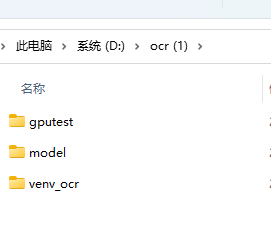
ocr (1)/
├── venv_ocr/              # Python 3.13.2 虚拟环境
├── model/                 # GLM-OCR 模型文件
│   ├── config.json
│   ├── model.safetensors
│   ├── tokenizer.json
│   └── ...
└── gputest/               # 测试目录
    ├── a.png             # 测试图片 1
    ├── b.png             # 测试图片 2
    ├── c.png             # 测试图片 3
    ├── test_simple.py    # 测试脚本
    ├── test1.txt         # 测试结果输出文件(运行后生成)
    └── 运行简单测试.bat   # Windows 批处理文件
使用方法
方法 1:使用批处理文件(推荐)
- 双击运行
运行简单测试.bat - 等待测试完成
- 查看
test1.txt文件获取结果
方法 2:命令行运行
bash
# 进入项目目录
cd "D:\ocr (1)"

# 激活虚拟环境
venv_ocr\Scripts\activate

# 进入测试目录
cd gputest

# 运行测试脚本
python test_simple.py
输出结果
测试完成后,会在 gputest/test1.txt 文件中生成测试报告,包含:
- 测试时间
- 使用的设备(CPU)
- 每张图片的识别用时
- 识别结果长度
- 总计和平均用时
输出示例
OCR 识别测试结果
============================================================
测试时间: 2026-02-12 10:30:45
使用设备: CPU
============================================================

图片             用时(秒)         结果长度
------------------------------------------------------------
a.png            12.34            1234
b.png            15.67            2345
c.png            18.90            3456
------------------------------------------------------------
总计             46.91
平均             15.64
注意事项
-
GPU 兼容性问题:当前脚本强制使用 CPU 模式,因为 GPU 存在 kernel 版本不匹配问题:
FATAL: kernel `fmha_cutlassF_f16_aligned_64x64_rf_sm80` is for sm80-sm100, but was built for sm37 -
模型路径 :脚本会自动检测模型路径,优先使用
model/目录,如果不存在则使用项目根目录。 -
首次运行:首次运行时会加载模型,可能需要较长时间(几分钟),请耐心等待。
-
内存要求:CPU 模式需要较大的内存(建议至少 8GB RAM),模型加载后占用约 2-4GB 内存。
-
测试图片 :确保
gputest/目录中存在a.png,b.png,c.png三张测试图片。
故障排查
问题 1:找不到模型文件
- 检查
model/目录是否存在 - 确认
model/config.json文件存在
问题 2:导入错误
- 确认已安装所有依赖包
- 检查虚拟环境是否已激活
- 尝试重新安装 transformers:
pip install --upgrade git+https://github.com/huggingface/transformers.git
问题 3:内存不足
- 关闭其他占用内存的程序
- 考虑使用更小的模型或减少并发测试
问题 4:图片不存在
- 确认测试图片文件存在于
gputest/目录 - 检查文件名是否正确(a.png, b.png, c.png)
更新日志
- v1.0 (2026-02-12)
- 初始版本
- 支持 CPU 模式测试
- 输出测试结果到文件
相关资源
python
"""
OCR识别测试脚本 - 简化版
分别测试3张图片,记录用时到 test1.txt

环境要求:
- Python 3.13.2
- 虚拟环境: venv_ocr

需要安装的包:
- torch (PyTorch CPU版本)
- transformers (最新版本,支持GLM-OCR)
- Pillow (图像处理)

安装命令:
    venv_ocr\Scripts\activate
    pip install torch torchvision torchaudio Pillow
    pip install git+https://github.com/huggingface/transformers.git

使用方法:
    方法1: 双击运行 运行简单测试.bat
    方法2: python test_simple.py

输出:
    测试结果保存在 test1.txt 文件中

注意:
    - 当前强制使用CPU模式(避免GPU兼容性问题)
    - 首次运行需要加载模型,可能需要几分钟
"""

import os
import sys
import time
import torch
from datetime import datetime
from transformers import AutoProcessor, AutoModelForImageTextToText
from PIL import Image

# 获取项目根目录
PROJECT_ROOT = os.path.dirname(os.path.dirname(os.path.abspath(__file__)))
# 模型路径 - 优先使用 model 目录,如果不存在则使用项目根目录
MODEL_PATH = os.path.join(PROJECT_ROOT, "model")
if not os.path.exists(os.path.join(MODEL_PATH, "config.json")):
    MODEL_PATH = PROJECT_ROOT
# 测试图片目录
TEST_IMAGES_DIR = os.path.dirname(os.path.abspath(__file__))
# 输出文件
OUTPUT_FILE = os.path.join(TEST_IMAGES_DIR, "test1.txt")

def test_image(image_path, processor, model, device):
    """测试单张图像的识别"""
    try:
        # 加载图像
        image = Image.open(image_path).convert("RGB")

        # 设置提示词
        prompt_text = "Text Recognition:"

        # 构建消息
        messages = [{
            "role": "user",
            "content": [
                {"type": "image", "image": image},
                {"type": "text", "text": prompt_text}
            ]
        }]

        # 处理输入
        inputs = processor.apply_chat_template(
            messages,
            tokenize=True,
            add_generation_prompt=True,
            return_dict=True,
            return_tensors="pt"
        )

        inputs = {k: v.to(device) if isinstance(v, torch.Tensor) else v
                 for k, v in inputs.items()}
        inputs.pop("token_type_ids", None)

        # 开始识别并计时
        start_time = time.time()

        with torch.no_grad():
            generated_ids = model.generate(
                **inputs,
                max_new_tokens=8192,
                do_sample=False,
                num_beams=1
            )

        elapsed_time = time.time() - start_time

        # 解码输出
        output_text = processor.decode(
            generated_ids[0][inputs["input_ids"].shape[1]:],
            skip_special_tokens=False
        )

        return output_text, elapsed_time

    except Exception as e:
        print(f"错误: {str(e)}")
        import traceback
        traceback.print_exc()
        return None, None


def main():
    """主测试函数"""
    print("="*60)
    print("OCR 识别测试")
    print("="*60)

    # 测试图片列表
    test_images = ["a.png", "b.png", "c.png"]

    # 强制使用CPU模式(避免GPU兼容性问题)
    use_gpu = False
    device = "cpu"
    torch_dtype = torch.float32
    print("\n强制使用CPU模式(避免GPU兼容性问题)")

    # 加载模型
    print(f"\n加载模型... (路径: {MODEL_PATH})")
    try:
        processor = AutoProcessor.from_pretrained(MODEL_PATH, trust_remote_code=True)
        model = AutoModelForImageTextToText.from_pretrained(
            MODEL_PATH,
            torch_dtype=torch_dtype,
            trust_remote_code=True
        )
        model = model.to(device)
        model.eval()
        print("模型加载完成!")
    except Exception as e:
        print(f"模型加载失败: {str(e)}")
        return

    # 测试结果
    results = []

    # 测试每张图片
    print("\n" + "="*60)
    print("开始测试图片")
    print("="*60)

    for img_name in test_images:
        img_path = os.path.join(TEST_IMAGES_DIR, img_name)

        if not os.path.exists(img_path):
            print(f"\n警告: 图片不存在: {img_path}")
            continue

        print(f"\n测试图片: {img_name}")
        result, elapsed = test_image(img_path, processor, model, device)

        if result is not None and elapsed is not None:
            results.append({
                "image": img_name,
                "time": elapsed,
                "result_length": len(result)
            })
            print(f"  用时: {elapsed:.2f} 秒")
            print(f"  结果长度: {len(result)} 字符")
        else:
            print(f"  测试失败")

    # 写入结果到文件
    print("\n" + "="*60)
    print("保存结果到 test1.txt")
    print("="*60)

    with open(OUTPUT_FILE, "w", encoding="utf-8") as f:
        f.write("OCR 识别测试结果\n")
        f.write("="*60 + "\n")
        f.write(f"测试时间: {datetime.now().strftime('%Y-%m-%d %H:%M:%S')}\n")
        f.write(f"使用设备: {'GPU' if use_gpu else 'CPU'}\n")
        if use_gpu:
            f.write(f"GPU名称: {torch.cuda.get_device_name(0)}\n")
        f.write("="*60 + "\n\n")

        f.write(f"{'图片':<15} {'用时(秒)':<15} {'结果长度':<15}\n")
        f.write("-" * 60 + "\n")

        total_time = 0
        for r in results:
            f.write(f"{r['image']:<15} {r['time']:<15.2f} {r['result_length']:<15}\n")
            total_time += r['time']

        f.write("-" * 60 + "\n")
        f.write(f"{'总计':<15} {total_time:<15.2f} {'':<15}\n")
        f.write(f"{'平均':<15} {total_time/len(results):<15.2f} {'':<15}\n")

    print(f"\n结果已保存到: {OUTPUT_FILE}")
    print("\n测试完成!")


if __name__ == "__main__":
    main()