DeepSeek-OCR 发布于25年10月,而这次DeepSeek-OCR 2发布仅隔了三个月。这会不会是DeepSeek V4发布前上的前菜呢?让我们一起尝尝鲜吧。


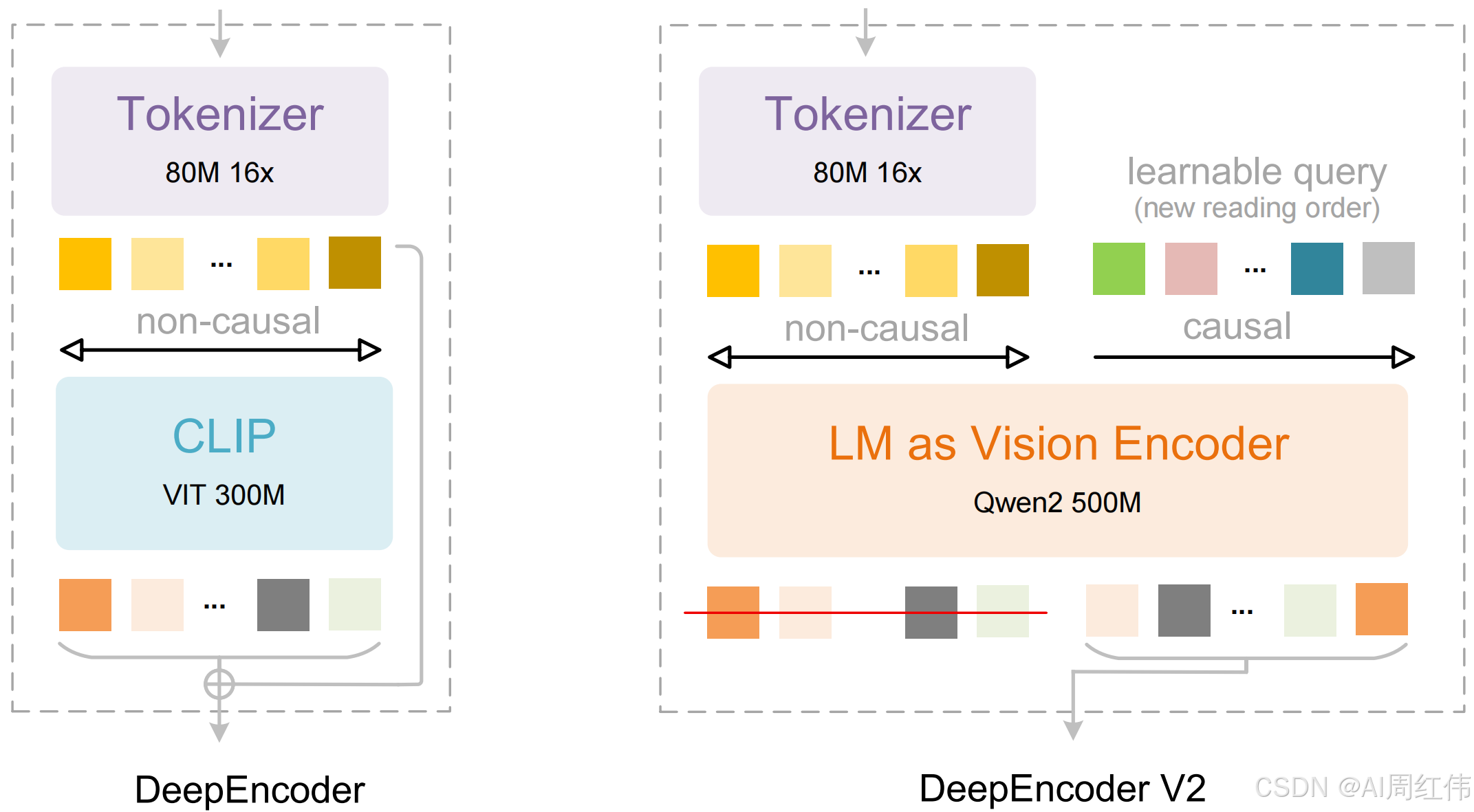
DeepSeek发布全新DeepSeek-OCR 2模型,采用创新的DeepEncoder V2方法,让AI能够根据图像的含义动态重排图像的各个部分,而不再只是机械地从左到右扫描。这种方式模拟了人类在观看场景时所遵循的逻辑流程。最终,该模型在处理布局复杂的图片时,表现优于传统的视觉-[语言模型](https://so.csdn.net/so/search?q=%E8%AF%AD%E8%A8%80%E6%A8%A1%E5%9E%8B&spm=1001.2101.3001.7020),实现了更智能、更具因果推理能力的视觉理解。github地址:https://github.com/deepseek-ai/DeepSeek-OCR-2
DeepSeek-OCR 2: Visual Causal Flow
Explore more human-like visual encoding.
<>Contents
<>Install
Our environment is cuda11.8+torch2.6.0.
-
Clone this repository and navigate to the DeepSeek-OCR-2 folder
-
Conda
conda create -n deepseek-ocr2 python=3.12.9 -y
conda activate deepseek-ocr2 -
Packages
-
download the vllm-0.8.5 whl
pip install torch==2.6.0 torchvision==0.21.0 torchaudio==2.6.0 --index-url https://download.pytorch.org/whl/cu118
pip install vllm-0.8.5+cu118-cp38-abi3-manylinux1_x86_64.whl
pip install -r requirements.txt
pip install flash-attn==2.7.3 --no-build-isolation
Note: if you want vLLM and transformers codes to run in the same environment, you don't need to worry about this installation error like: vllm 0.8.5+cu118 requires transformers>=4.51.1
<>vLLM-Inference
- VLLM:
Note: change the INPUT_PATH/OUTPUT_PATH and other settings in the DeepSeek-OCR2-master/DeepSeek-OCR2-vllm/config.py
cd DeepSeek-OCR2-master/DeepSeek-OCR2-vllm-
image: streaming output
python run_dpsk_ocr2_image.py
-
pdf: concurrency (on-par speed with DeepSeek-OCR)
python run_dpsk_ocr2_pdf.py
-
batch eval for benchmarks (i.e., OmniDocBench v1.5)
python run_dpsk_ocr2_eval_batch.py
<>Transformers-Inference
-
Transformers
from transformers import AutoModel, AutoTokenizer
import torch
import os
os.environ["CUDA_VISIBLE_DEVICES"] = '0'
model_name = 'deepseek-ai/DeepSeek-OCR-2'tokenizer = AutoTokenizer.from_pretrained(model_name, trust_remote_code=True)
model = AutoModel.from_pretrained(model_name, _attn_implementation='flash_attention_2', trust_remote_code=True, use_safetensors=True)
model = model.eval().cuda().to(torch.bfloat16)prompt = "\nFree OCR. "
prompt = "\nConvert the document to markdown. "
image_file = 'your_image.jpg'
output_path = 'your/output/dir'res = model.infer(tokenizer, prompt=prompt, image_file=image_file, output_path = output_path, base_size = 1024, image_size = 768, crop_mode=True, save_results = True)
or you can
cd DeepSeek-OCR2-master/DeepSeek-OCR2-hf
python run_dpsk_ocr2.py
<>Support-Modes
- Dynamic resolution
Default: (0-6)×768×768 + 1×1024×1024 --- (0-6)×144 + 256 visual tokens ✅