1、热点启动流程
APP调用WifiManager.java的startSoftAp的函数,用来启动热点. 在android 12之后,wifi框架相关试下被Google移动到了/packages/modules/Wifi/中.
热点相关启动流程如下:
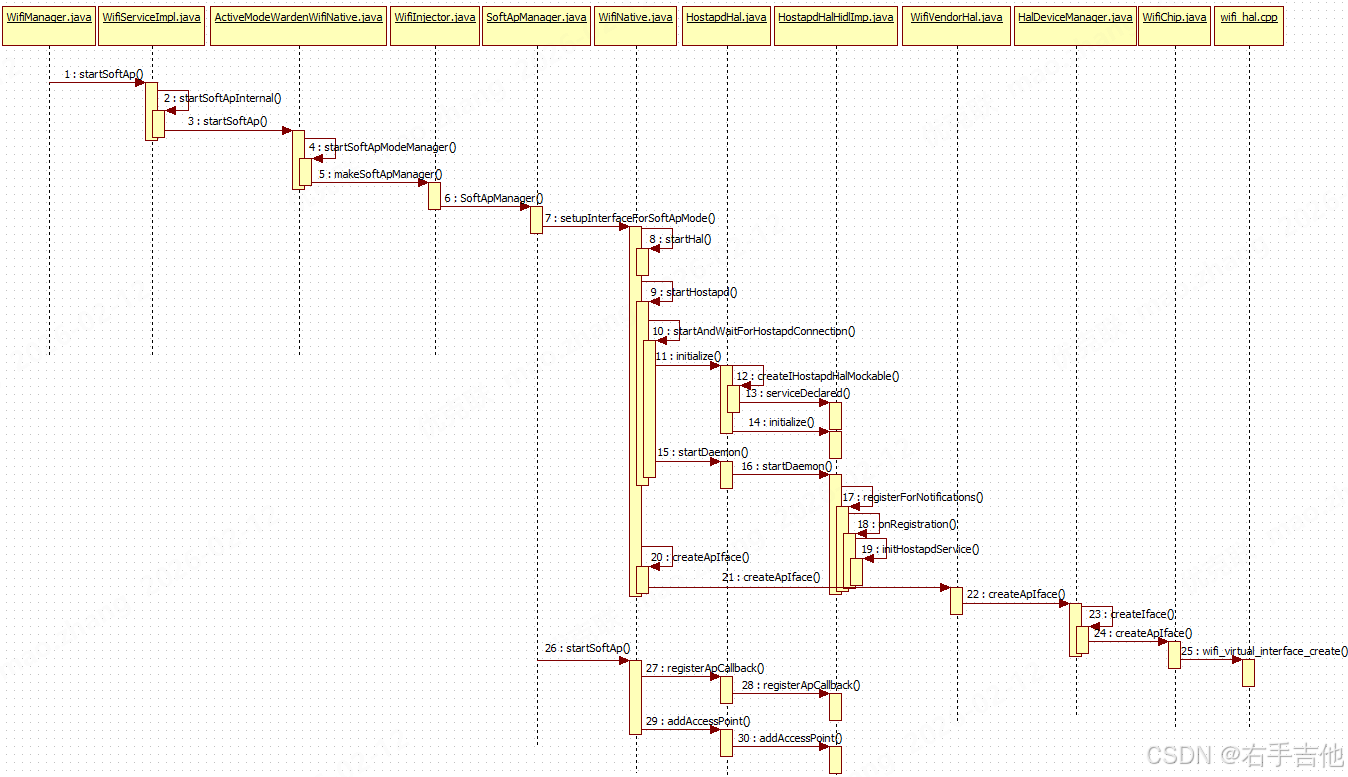
从流程图看,WifiNative.java为启动流程的关键类,主要启动过程包含如下三个步骤,启动Hal层,启动hostapd程序,创建WIFI热点网卡。
java
 public String setupInterfaceForSoftApMode(
            @NonNull InterfaceCallback interfaceCallback, @NonNull WorkSource requestorWs,
            @SoftApConfiguration.BandType int band, boolean isBridged,
            @NonNull SoftApManager softApManager, int type) {
        synchronized (mLock) {
            String bugTitle = "Wi-Fi BugReport (softAp interface failure)";
            String errorMsg = "";

            //启动HAL层程序
            if (!startHal()) {
                errorMsg = "Failed to start softAp Hal";
                Log.e(TAG, errorMsg);
                mWifiMetrics.incrementNumSetupSoftApInterfaceFailureDueToHal();
                takeBugReportInterfaceFailureIfNeeded(bugTitle, errorMsg);
                return null;
            }

            //启动hostapd程序
            if (!startHostapd()) {
                errorMsg = "Failed to start softAp hostapd";
                Log.e(TAG, errorMsg);
                mWifiMetrics.incrementNumSetupSoftApInterfaceFailureDueToHostapd();
                takeBugReportInterfaceFailureIfNeeded(bugTitle, errorMsg);
                return null;
            }

            //创建热点网卡
            Iface iface = mIfaceMgr.allocateIface(Iface.IFACE_TYPE_AP);
            if (iface == null) {
                Log.e(TAG, "Failed to allocate new AP iface");
                return null;
            }
            iface.externalListener = interfaceCallback;
            iface.name = createApIface(iface, requestorWs, band, isBridged, softApManager, type);

            .......

}
1.1、启动Hal层
拉起IWifi服务,具体实现在WifiHalHidlImpl.java中。
java
private void initServiceManagerIfNecessaryLocked() {
        if (mServiceManager != null) {
            Log.i(TAG, "mServiceManager already exists");
            return;
        }
        Log.i(TAG, "initServiceManagerIfNecessaryLocked");

        // Failures of IServiceManager are most likely system breaking.
        // Behavior here will be to WTF and continue.
        mServiceManager = getServiceManagerMockable();
        if (mServiceManager == null) {
            Log.wtf(TAG, "Failed to get IServiceManager instance");
            return;
        }

        try {
            if (!mServiceManager.linkToDeath(mServiceManagerDeathRecipient, 0)) {
                Log.wtf(TAG, "Error on linkToDeath on IServiceManager");
                mServiceManager = null;
                return;
            }

            //注册IWIFI服务状态是否ready,在mServiceNotificationCallback回调中出初始化化完成
            if (!mServiceManager.registerForNotifications(IWifi.kInterfaceName, "",
                    mServiceNotificationCallback)) {
                Log.wtf(TAG, "Failed to register a listener for IWifi service");
                mServiceManager = null;
            }
        } catch (RemoteException e) {
            Log.wtf(TAG, "Exception while operating on IServiceManager: " + e);
            mServiceManager = null;
            return;
        }
        mIsVendorHalSupported = isSupportedInternal();
    }
在WifiHalHidlImpl.java中mServiceNotificationCallback函数中保存private android.hardware.wifi.V1_0.IWifi mWifi;对象。IWifi最终实现在hardware/interfaces/wifi/1.5/default/wifi.cpp中。
1.2、启动hostapd程序
为IHostapd服务,其中HostapdHalHidlImp.java为Framework和Hal层交互的关键类,mIServiceManager.registerForNotifications监听IHostapd服务的启动,当IHostapd启动后,HostapdHalHidlImp获取到IHostapd实例。
java
    @Override
    public boolean initialize() {
        synchronized (mLock) {
            if (mVerboseLoggingEnabled) {
                Log.i(TAG, "Registering IHostapd service ready callback.");
            }
            mIHostapd = null;
            if (mIServiceManager != null) {
                // Already have an IServiceManager and serviceNotification registered, don't
                // don't register another.
                return true;
            }
            try {
                mIServiceManager = getServiceManagerMockable();
                if (mIServiceManager == null) {
                    Log.e(TAG, "Failed to get HIDL Service Manager");
                    return false;
                }
                if (!linkToServiceManagerDeath()) {
                    return false;
                }
                /* TODO(b/33639391) : Use the new IHostapd.registerForNotifications() once it
                   exists */

                // 此处Framework监听android.hardware.wifi.hostapd@1.0::IHostapd/default
                // 是否启动完成,启动完成后框架可以调用IHostapd接口
                if (!mIServiceManager.registerForNotifications(
                        IHostapd.kInterfaceName, "", mServiceNotificationCallback)) {
                    Log.e(TAG, "Failed to register for notifications to "
                            + IHostapd.kInterfaceName);
                    mIServiceManager = null; // Will need to register a new ServiceNotification
                    return false;
                }
            } catch (RemoteException e) {
                Log.e(TAG, "Exception while trying to register a listener for IHostapd service: "
                        + e);
                hostapdServiceDiedHandler(mDeathRecipientCookie);
                mIServiceManager = null; // Will need to register a new ServiceNotification
                return false;
            }
            return true;
        }
    }
IHostapd hal层服务实现在高通平台external\wpa_supplicant_8\hostapd\hidl\1.3\hidl.cpp,在初始化函数hostapd_hidl_init中调用service->registerAsService,将IHostapd服务注册到系统中。
cpp
int hostapd_hidl_init(struct hapd_interfaces *interfaces)
{
	wpa_printf(MSG_DEBUG, "Initing hidl control");
#ifdef ARCH_ARM_32
	android::hardware::ProcessState::initWithMmapSize(getHWBinderMmapSize());
#endif /* ARCH_ARM_32 */

	IPCThreadState::self()->setupPolling(&hidl_fd);
	if (hidl_fd < 0)
		goto err;

	wpa_printf(MSG_INFO, "Processing hidl events on FD %d", hidl_fd);
	// Look for read events from the hidl socket in the eloop.
	if (eloop_register_read_sock(
		hidl_fd, hostapd_hidl_sock_handler, interfaces, NULL) < 0)
		goto err;
	service = new Hostapd(interfaces);
	if (!service)
		goto err;
	if (interfaces->hidl_service_name) {
		wpa_printf(MSG_DEBUG, "Override HIDL service name: %s",
			   interfaces->hidl_service_name);

        //注册Hidl服务,保证上框架层获取到服务实例
		if (service->registerAsService(interfaces->hidl_service_name)
		    != android::NO_ERROR)
			goto err;
	} else {
		wpa_printf(MSG_DEBUG, "Using default HIDL service name");
		if (service->registerAsService() != android::NO_ERROR)
			goto err;
	}

    .......

	return 0;
err:
	hostapd_hidl_deinit(interfaces);
	return -1;
}
hostapd_hidl_init 在external\wpa_supplicant_8\hostapd\main.c的main函数中初始化。其中IHostapd为在rc中注册为service服务,框架侧涉及为lazy服务,就是需要的时候启动,不需要的的时候退出。
/vendor/etc/init $ cat hostapd.android.rc
init.rc fragment for hostapd on Android
Copyright (c) 2002-2016, Jouni Malinen <j@w1.fi>
This software may be distributed under the terms of the BSD license.
See README for more details.
on post-fs-data
mkdir /data/vendor/wifi 0770 wifi wifi
mkdir /data/vendor/wifi/hostapd 0770 wifi wifi
mkdir /data/vendor/wifi/hostapd/sockets 0770 wifi wifi
service hostapd /vendor/bin/hw/hostapd -dd -g /data/vendor/wifi/hostapd/global
interface android.hardware.wifi.hostapd@1.0::IHostapd default
interface android.hardware.wifi.hostapd@1.1::IHostapd default
interface android.hardware.wifi.hostapd@1.2::IHostapd default
interface android.hardware.wifi.hostapd@1.3::IHostapd default
interface vendor.qti.hardware.wifi.hostapd@1.0::IHostapdVendor default
interface vendor.qti.hardware.wifi.hostapd@1.1::IHostapdVendor default
interface vendor.qti.hardware.wifi.hostapd@1.2::IHostapdVendor default
1.3、创建wlan网口
启动完成上面进程后,通过WifiChip.java创建wifi虚拟网卡。高通平台创建网卡名在hardware/interfaces/wifi/1.5/default/wifi_chip.cpp中实现,具体逻辑如下
cpp
uint32_t WifiChip::startIdxOfApIface() {

    //如果wifi支持双STA,则AP使用网口为WLAN2
    if (isDualStaConcurrencyAllowedInCurrentMode()) {
        // When the HAL support dual STAs, AP should start with idx 2.
        LOG(ERROR) << "startIdxOfApIface = 2 ";
        return 2;
    } else if (isStaApConcurrencyAllowedInCurrentMode()) {
        //  When the HAL support STA + AP but it doesn't support dual STAs.
        //  AP should start with idx 1.
         LOG(ERROR) << "startIdxOfApIface = 1 ";
        return 1;
    }
    // No concurrency support.
     LOG(ERROR) << "startIdxOfApIface = 0 ";
    return 0;
}

std::string getWlanIfaceName(unsigned idx) {
    if (idx >= kMaxWlanIfaces) {
        CHECK(false) << "Requested interface beyond wlan" << kMaxWlanIfaces;
        return {};
    }

    std::array<char, PROPERTY_VALUE_MAX> buffer;
    if (idx == 0 || idx == 1) {
        const char* altPropName =
            (idx == 0) ? "wifi.interface" : "wifi.concurrent.interface";
        auto res = property_get(altPropName, buffer.data(), nullptr);
        if (res > 0) return buffer.data();
    }
    std::string propName = "wifi.interface." + std::to_string(idx);
    auto res = property_get(propName.c_str(), buffer.data(), nullptr);
    if (res > 0) {
         LOG(ERROR) << "getWlanIfaceName buffer.data() = " << buffer.data();
         return buffer.data();
    }

    //AP使用网口为"wlan2", 相关代码解析以高通6490wifi芯片进行分析
    LOG(ERROR) << "getWlanIfaceName idx = " << std::to_string(idx);
    return "wlan" + std::to_string(idx);
}
相关Log如下:
02-12 15:05:13.832 2037 2572 I WifiNative: startHal is success !!!
02-12 15:05:13.849 2037 2572 I HostapdHalHidlImp: serviceDeclared interfaceName = android.hardware.wifi.hostapd@1.0::IHostapd
02-12 15:05:13.946 5463 5463 I hostapd : main argv0 = /vendor/bin/hw/hostapd
02-12 15:05:13.946 5463 5463 I hostapd : main argv0 = /vendor/bin/hw/hostapd
02-12 15:05:13.947 5463 5463 I hostapd : main argv1 = -dd
02-12 15:05:13.947 5463 5463 I hostapd : main argv2 = -g
02-12 15:05:13.947 5463 5463 I hostapd : main argv3 = /data/vendor/wifi/hostapd/global
02-12 15:05:13.947 5463 5463 I hostapd : main argv3 = /data/vendor/wifi/hostapd/global
02-12 15:05:13.947 5463 5463 E hostapd : debug, set loglevel
02-12 15:05:13.947 5463 5463 D hostapd : Using existing control interface directory
02-12 15:05:13.950 5463 5463 I HidlServiceManagement: Registered android.hardware.wifi.hostapd@1.3::IHostapd/default
02-12 15:05:13.980 2037 2572 I WifiNative: startHostapd is success !!!
02-12 15:05:13.985 2037 2572 I WifiNative: CreateApIface - vendor bridge=false
02-12 15:05:13.995 1171 1171 E android.hardware.wifi@1.0-service: startIdxOfApIface = 2
02-12 15:05:13.995 1171 1171 E android.hardware.wifi@1.0-service: getWlanIfaceName idx = 2
02-12 15:05:13.995 1171 1171 E android.hardware.wifi@1.0-service: allocate ap ifname = wlan2
02-12 15:05:14.026 2037 2572 I WifiNative: Successfully setup Iface:{Name=wlan2,Id=1,Type=AP}
02-12 15:05:14.102 2037 2572 D WifiNative: onSetCountryCodeSucceeded: CN
02-12 15:05:14.183 2037 2572 I WifiNative: Interface state changed on Iface:{Name=wlan2,Id=1,Type=AP}, isUp=true
1.4、添加热点
在SoftApManager.java中startSoftAp来启动启热点,最后通过HAL层调用到比hostapd.cpp中的addSingleAccessPoin函数。
cpp
V1_2::HostapdStatus Hostapd::addSingleAccessPoint(
    const V1_3::IHostapd::IfaceParams& iface_params,
    const V1_3::IHostapd::ChannelParams& channelParams,
    const V1_3::IHostapd::NetworkParams& nw_params,
    const std::string br_name)
{
	if (hostapd_get_iface(interfaces_, iface_params.V1_2.V1_1.V1_0.ifaceName.c_str())) {
		wpa_printf(
		    MSG_ERROR, "Interface %s already present",
		    iface_params.V1_2.V1_1.V1_0.ifaceName.c_str());
		return {V1_2::HostapdStatusCode::FAILURE_IFACE_EXISTS, ""};
	}
	const auto conf_params = CreateHostapdConfig(iface_params, channelParams, nw_params, br_name);
	if (conf_params.empty()) {
		wpa_printf(MSG_ERROR, "Failed to create config params");
		return {V1_2::HostapdStatusCode::FAILURE_ARGS_INVALID, ""};
	}
	const auto conf_file_path =
	    WriteHostapdConfig(iface_params.V1_2.V1_1.V1_0.ifaceName, conf_params);
    if (conf_file_path.empty()) {
		wpa_printf(MSG_ERROR, "Failed to write config file");
		return {V1_2::HostapdStatusCode::FAILURE_UNKNOWN, ""};
	}
	std::string add_iface_param_str = StringPrintf(
	    "%s config=%s", iface_params.V1_2.V1_1.V1_0.ifaceName.c_str(),
	    conf_file_path.c_str());
	std::vector<char> add_iface_param_vec(
	    add_iface_param_str.begin(), add_iface_param_str.end() + 1);
	wpa_printf(MSG_INFO, "hostapd_add_iface %s success", add_iface_param_vec.data());

    //此处调用wpa_supplicant_8包中的hapd_interfaces中的结构体和函数执行相关代码

	if (hostapd_add_iface(interfaces_, add_iface_param_vec.data()) < 0) {
		wpa_printf(
		    MSG_ERROR, "Adding interface %s failed",
		    add_iface_param_str.c_str());
		return {V1_2::HostapdStatusCode::FAILURE_UNKNOWN, ""};
	} else {
		wpa_printf(
		    MSG_INFO, "hostapd_add_iface %s sucess",
		    iface_params.V1_2.V1_1.V1_0.ifaceName.c_str());
	}

    ......

}
相关调用流程如下,最终通过driver_nl80211.c调用到wifi固件中,高通平台默认在vendor/qcom/opensource/wlan中,不同WIFI平台不同
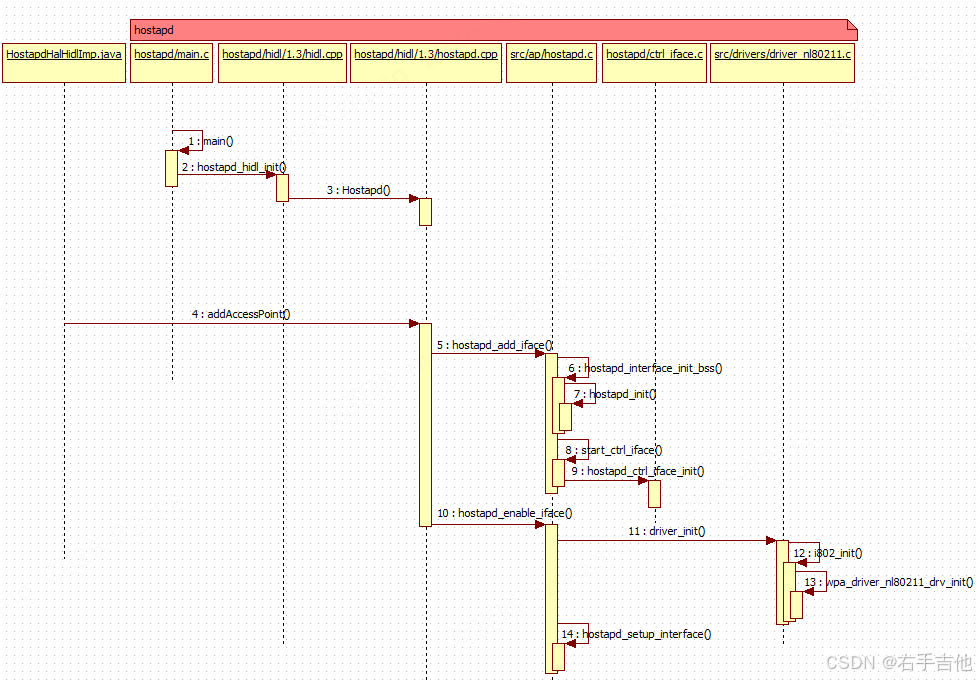
hostapd.cpp在external\wpa_supplicant_8代码仓中,其中external\wpa_supplicant_8为wifi开源代码。
参考相关网页https://w1.fi/wpa_supplicant/devel/index.html 查看hostapd相关架构图如下
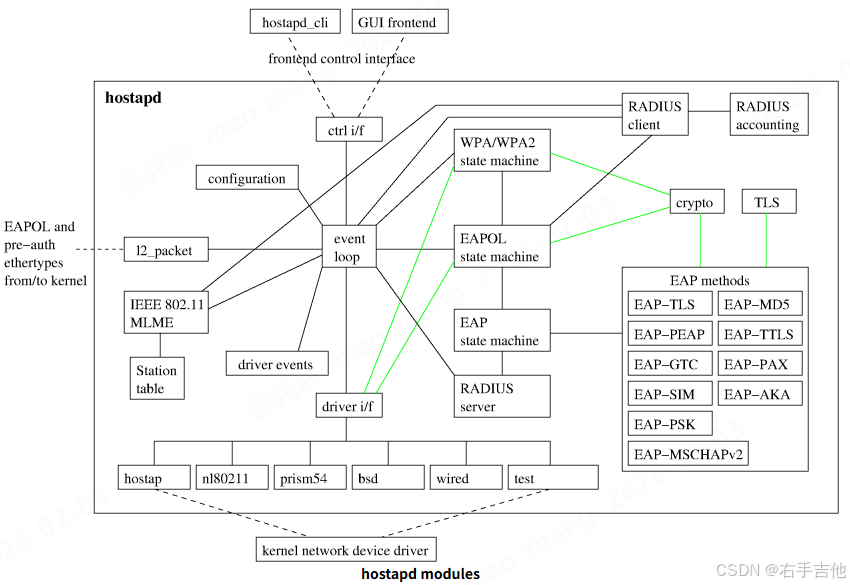
包含hostapd_cli和hostapd两个程序,hostapd_cli为控制程序,hostapd为热点实现程序。
其中hapd_interfaces为framework和Hidl交互的主要对象
cpp
struct hapd_interfaces {
	int (*reload_config)(struct hostapd_iface *iface);
	struct hostapd_config * (*config_read_cb)(const char *config_fname);

    //hostapd_cli初始化函数指针
	int (*ctrl_iface_init)(struct hostapd_data *hapd);

    //hostapd_cli去初始化函数指针
	void (*ctrl_iface_deinit)(struct hostapd_data *hapd);

	int (*for_each_interface)(struct hapd_interfaces *interfaces,
				  int (*cb)(struct hostapd_iface *iface,
					    void *ctx), void *ctx);
    //驱动交互函数指针
	int (*driver_init)(struct hostapd_iface *iface);

	size_t count;
	int global_ctrl_sock;
	struct dl_list global_ctrl_dst;
	char *global_iface_path;
	char *global_iface_name;
#ifdef CONFIG_CTRL_IFACE_HIDL
	char *hidl_service_name;
#endif
#ifndef CONFIG_NATIVE_WINDOWS
	gid_t ctrl_iface_group;
#endif /* CONFIG_NATIVE_WINDOWS */
	struct hostapd_iface **iface;

	size_t terminate_on_error;
#ifndef CONFIG_NO_VLAN
	struct dynamic_iface *vlan_priv;
#endif /* CONFIG_NO_VLAN */
#ifdef CONFIG_ETH_P_OUI
	struct dl_list eth_p_oui; /* OUI Extended EtherType handlers */
#endif /* CONFI
2、热点认证测试
--- 带宽设置测试
hostapd_cli chan_switch
usage: <cs_count> <freq> sec_channel_offset= center_freq1= center_freq2= bandwidth= blocktx ht\|vht
20MHz配置
adb shell "hostapd_cli chan_switch 30 5180 bandwidth=20 ht"
40MHz配置
adb shell "hostapd_cli chan_switch 30 2412 bandwidth=40 sec_channel_offset=1 center_freq1=2422 ht"
adb shell "hostapd_cli chan_switch 30 5180 bandwidth=40 sec_channel_offset=1 center_freq1=5190 ht"
80MHz配置
adb shell "hostapd_cli chan_switch 30 5745 bandwidth=80 sec_channel_offset=1 center_freq1=5775 vht"
160MHz配置
adb shell "hostapd_cli chan_switch 30 5180 bandwidth=160 sec_channel_offset=1 center_freq1=5250 vht"
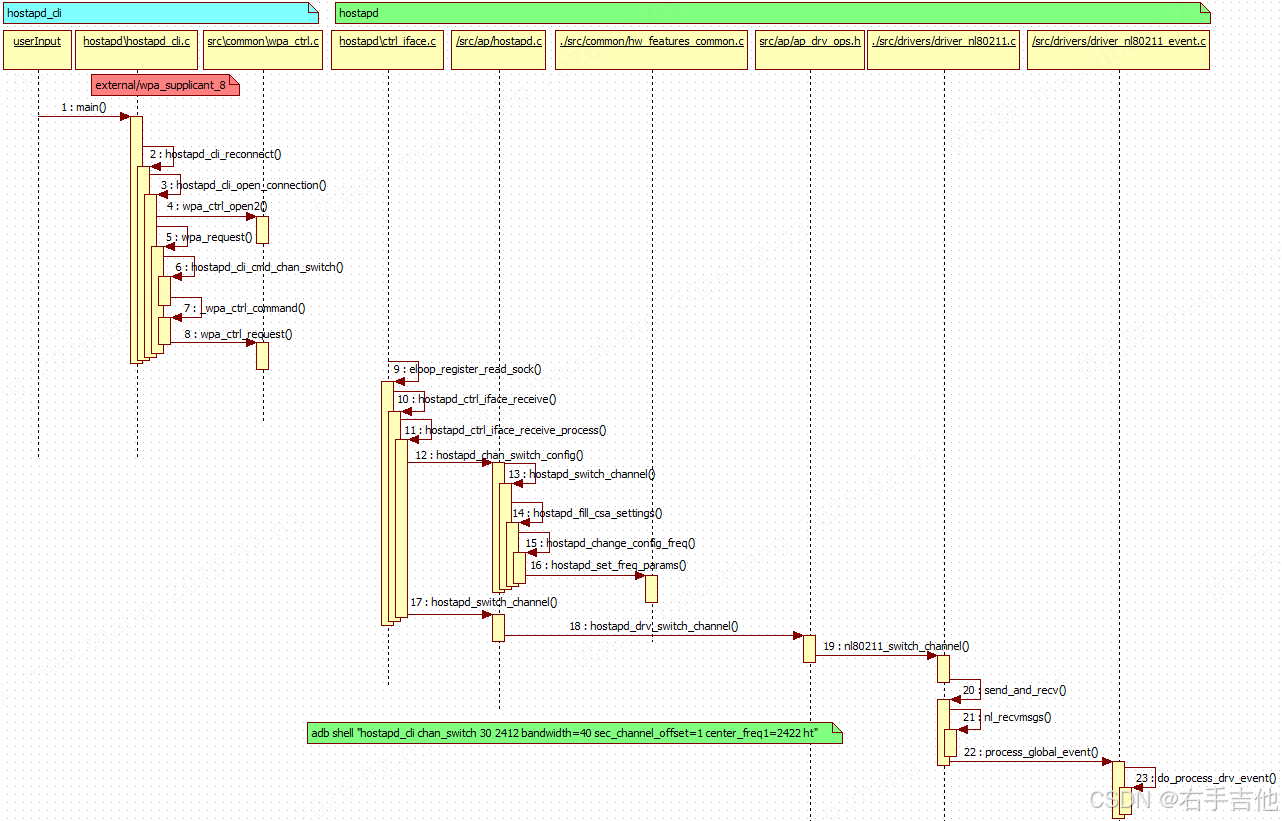
相关交互流程记录如下:
3、热点断开原因
在开发过程中经常出现热点断开的情况。可以参考如下网站