系列博客目录
文章目录
hugging face在线使用 对国内用户不友好,所以我们使用hugging face的三个核心组件(Transformers、datasets、Tokenizer)来实现本地调用。
1.使用API
python
import os
from huggingface_hub import InferenceClient

client = InferenceClient(
    provider="hf-inference",
    api_key="hf_XXX",
)

result = client.text_classification(
    "I hate you.",
    model="distilbert/distilbert-base-uncased-finetuned-sst-2-english",
)

print(result)
输出:
powershell
D:\anaconda3\envs\Hugging_Face\python.exe D:\Hugging_Face\Hugging_Face_practise\API_test\self.py
[TextClassificationOutputElement(label='NEGATIVE', score=0.9992952346801758), TextClassificationOutputElement(label='POSITIVE', score=0.0007047692197375)]

Process finished with exit code 0
2.下载模型
python
# 将模型下载到本地调用
from transformers import AutoModelForCausalLM,AutoTokenizer
# 将模型和分词工具下载到本地,并指定保存路径
model_name ="uer/gpt2-chinese-cluecorpussmall"
cache_dir ="model/uer/gpt2-chinese-cluecorpussmall"
# 下载模型
AutoModelForCausalLM.from_pretrained(model_name, cache_dir=cache_dir)

#下载分词工具
AutoTokenizer.from_pretrained(model_name, cache_dir=cache_dir)

print(f"模型分词器已下载到:{cache_dir}")
下载后效果:
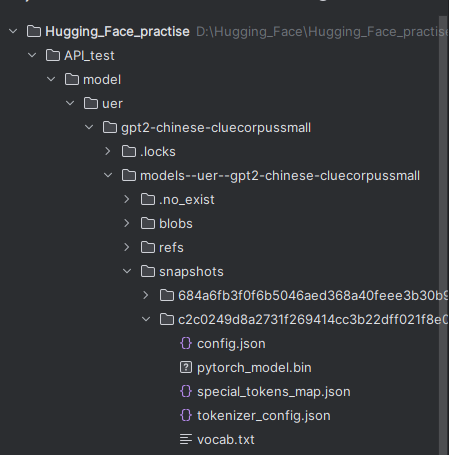
其中config.json 是配置文件,里面的"vocab_size": 21128就是最多有多少种token。
3.使用本地模型,并且使用generator中多个参数
python
from transformers import AutoModelForCausalLM, AutoTokenizer, pipeline
#设置具体包含 config.json 的目录
model_dir =r"D:\Hugging_Face\Hugging_Face_practise\API_test\model\uer\gpt2-chinese-cluecorpussmall\models--uer--gpt2-chinese-cluecorpussmall\snapshots\c2c0249d8a2731f269414cc3b22dff021f8e07a3"
# 加载模型和分词器
model = AutoModelForCausalLM.from_pretrained(model_dir)
tokenizer =AutoTokenizer.from_pretrained(model_dir)

#使用加载的模型和分词器创建生成文本的 pipeline
generator =pipeline("text-generation", model=model, device="cuda", tokenizer=tokenizer)

# 生成文本
# output = generator("你好,我是一款语言模型,", max_length = 50, num_return_sequences=1)
output = generator(
"你好,我是一款语言模型",
    max_length=50,  # 指定生成文本的最大长度。这里的50表示生成的文本最多包含50个标记(tokens)
    num_return_sequences=1,  # 参数指定返回多少个独立生成的文本序列。值为1表示只生成并返回一段文本。
    truncation=True,  # 该参数决定是否截断输入文本以适应模型的最大输入长度。如果True,超过模型最大输入长度的部分会被截断
    temperature=0.7,  # 该参数控制生成文本的随机性。值越低,生成的文本越保守((倾向于选择概率较高的词),值越高,生成的文本越多样(倾向于选择更多不同的词)
    top_k=50,  # 该参数限制模型在每一步生成时仅从概率最高的k个词中选择下一个词。这里 top_k=50 表示模型在生成每个词时只考虑概率最高的前50个候选词。如果设置为1,则模型每次产生的结果相同
    top_p=0.9,  # 该参数(又称为核采样)进一步限制模型生成时的间汇选择范围。它会选择一组累积概率达到 p 的词汇,模型只会从这个概率集合中采样。
    clean_up_tokenization_spaces=False  # 该参数控制生成的文本中是否清理分词时引入的空格
)
print(output[0])