一、前言
开发中,我们可能需要记录一些信息,用在后续的处理上。
存储有几种方式:
- 存在元素参数上。若使用项目参数,很方便,但是容易照成"污染"。若使用元素参数,则涉及到修改族,修改再载入比较慢,如果族复杂,载入覆盖的过程可能会出问题。
- 存在本地数据库中,如
SQLite。这是个好方式,适用于大多数情况,按需封装好后使用也很方便。但也有不好的情况,比如我需要自己生成的一些模型,记录一些可能的 userdata,并将其绑定到其他元素上,我希望跨机也能保持这个记录,而在线数据库又不能接受时,本地数据库就不行了。 - 存在Revit文档里,Revit提供了这个功能,可以通使用扩展存储来做到。按照 API 文档描述,存储较大的信息时,会有性能问题。
二、API
扩展存储相关的类都在Autodesk.Revit.DB.ExtensibleStorage命名空间下。
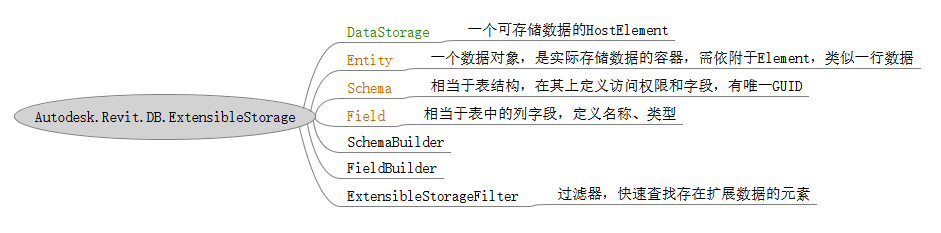
DataStorage,一个放在 Document 中的数据图元,不存在实体,有点类似于过滤器中ParameterFilterElement。
2.1. Field 的要求
概括:涉及到浮点类型的,需要指定单位;只有Entity类型,需要指定 SubSchemaGUID
浮点类型注意:① 创建时需要指定数据单位类型,②添加时需要指定显示单位类型,③读取时需要指定显示单位类型。
Ⅰ、最好让添加和读取时的显示单位类型一致,否则 Revit 会进行单位转换,导致读取的值和写入的不一致。
Ⅱ、如果想要 RevitLookup 查看的值和写入的值一样,就将写入时的显示单位设置为DisplayUnitType.DUT_DECIMAL_FEET(英尺)。
【写入的值】 -->(转为英尺)--> 存储的值 -->(转为读取时指定的单位)--> 【输出的值】
| Field 可选类型 | NeedsUnits | NeedsSubSchemaGUID |
|---|---|---|
| bool | 否 | 否 |
| byte, int | 否 | 否 |
| float, double | 是 | 否 |
| string | 否 | 否 |
| GUID | 否 | 否 |
| ElementId | 否 | 否 |
| UV, XYZ | 是 | 否 |
| Entity | 否 | 是 |
三、示例
3.1. 简单示例
由于方法比较简单,就先给一个简单的例子
csharp
public void SimpleDemo()
{
    var guid = new Guid("F2BBCD7B-9624-4356-AA92-2D87EF25C006");

    SchemaBuilder builder = new SchemaBuilder(guid);
    builder.SetReadAccessLevel(AccessLevel.Public)  // 访问级别
        .SetWriteAccessLevel(AccessLevel.Public)
        .SetVendorId("YourCompany")                 // 供应商 ID
        .SetSchemaName("SampleDemo")
        .SetDocumentation("简单的例子");

    // 添加字段
    builder.AddSimpleField("age", typeof(int))
        .SetDocumentation("年龄");

    builder.AddArrayField("hobby", typeof(string))
        .SetDocumentation("爱好");

    builder.AddMapField("score", typeof(string), typeof(double)) // 浮点类型需要设置单位
        .SetUnitType(UnitType.UT_Length)
        .SetDocumentation("成绩");

    builder.Finish();

    // 添加数据

    using Transaction transaction = new Transaction(this.Document, "Add Data to Schema");
    transaction.Start();

    DataStorage dataStorage = DataStorage.Create(this.Document);
    dataStorage.Name = "SimpleDemoDataStorage";
    Schema schema = Schema.Lookup(guid);
    Entity entity = new Entity(schema);

    entity.Set<int>("age", 25);
    entity.Set<IList<string>>("hobby", ["Reading", "Traveling", "Coding"]);
    entity.Set<IDictionary<string, double>>("score", new Dictionary<string, double>
        {
            { "Math", 95 },
            { "English", 88.5 },
            { "Science", 90.5 }
        }, DisplayUnitType.DUT_METERS);     // 浮点类型 存储时指定单位

    dataStorage.SetEntity(entity);

    transaction.Commit();

    // 读取数据

    Entity retrievedEntity = dataStorage.GetEntity(schema);
    double age = retrievedEntity.Get<int>("age");
    IList<string> hobbies = retrievedEntity.Get<IList<string>>("hobby");
    // 浮点类型读取时指定单位
    IDictionary<string, double> scores = retrievedEntity.Get<IDictionary<string, double>>("score", DisplayUnitType.DUT_METERS);

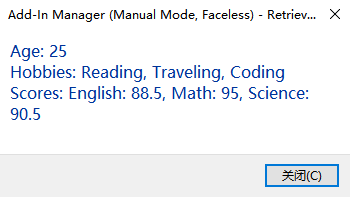
    string msg = $"Age: {age}\n" +
        $"Hobbies: {string.Join(", ", hobbies)}\n" +
        $"Scores: {string.Join(", ", scores.Select(kv => $"{kv.Key}: {kv.Value}"))}";

    TaskDialog.Show("Retrieved Data", msg);
}
3.2. 嵌套 Entity 示例
如果要和数据库表那样的,允许"多行"数据,就需要嵌套 Entity 来模仿,内部是作为行容器,外部的作为表容器。
也就是将 Filed 的类型设置为 Entity。
最简单的方式,就是存一个 Json 字符串。
注意不要在扩展存储中保存太多数据,会影响 Revit 的性能(API 文档中提示)。
csharp
[Transaction(TransactionMode.Manual)]
internal class Test_ExtensibleStorage : ExternalCommand
{
    // 数据结构定义
    public class ProjectionData
    {
        public int Number { get; set; }
        public string PlaneType { get; set; }
        public XYZ XAxis { get; set; }
    }

    // 主 Schema GUID(固定,不要改)
    private static readonly Guid MainSchemaGuid = new Guid("B804CCAC-C1E9-4A26-919B-000000000000"); // 用你自己的 GUID 替换

    // 子 Schema GUID(每个记录的结构)
    private static readonly Guid SubSchemaGuid = new Guid("B804CCAC-C1E9-4A26-919B-000000000001"); // 用你自己的 GUID 替换

    public override void Execute()
    {
        Document doc = this.Document;

        // 步骤1: 选一个 Element 作为宿主(例如一个墙)

        //var hostElement = DataStorage.Create(doc);
        var hostElementReference = this.UiDocument.Selection.PickObject(ObjectType.Element, "请选择一个元素作为数据存储宿主");
        var hostElement = doc.GetElement(hostElementReference.ElementId);

        // 步骤2: 创建或获取 Schema(只需运行一次)

        using (Transaction tx = new Transaction(doc, "Create Schemas"))
        {
            tx.Start();
            GetOrCreateMainSchema();
            GetOrCreateSubSchema();
            tx.Commit();
        }

        // 步骤3: 示例数据(多行)
        List<ProjectionData> sampleData = new List<ProjectionData>
        {
            new ProjectionData { Number = 1, PlaneType = "XY", XAxis = new XYZ(1, 0, 0) },
            new ProjectionData { Number = 2, PlaneType = "XZ", XAxis = new XYZ(0, 1, 0) },
            new ProjectionData { Number = 3, PlaneType = "Custom", XAxis = new XYZ(0.5, 0.5, 0) }
        };

        // 步骤4: 存储数据
        SaveData(hostElement, sampleData);

        // 步骤5: 读取数据并显示
        List<ProjectionData> readData = ReadData(hostElement);
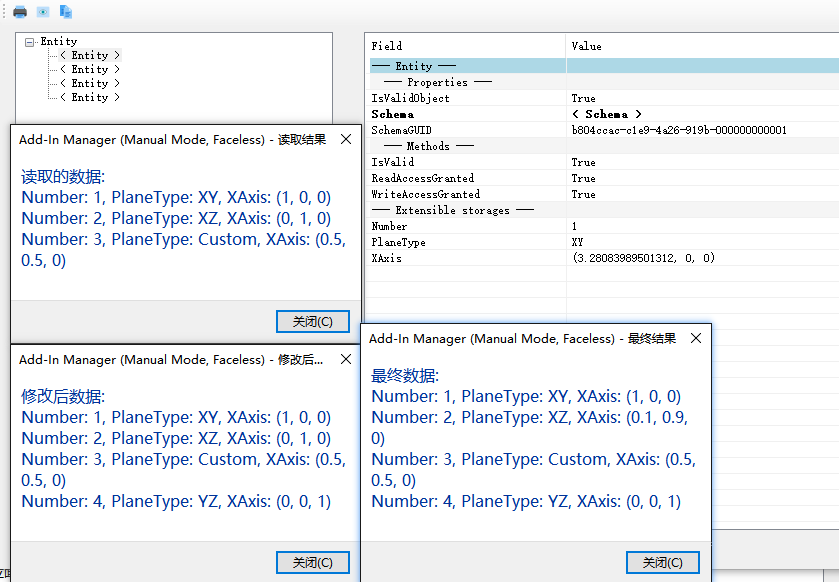
        string readResult = "读取的数据:\n" + string.Join("\n", readData.Select(d => $"Number: {d.Number}, PlaneType: {d.PlaneType}, XAxis: ({d.XAxis.X}, {d.XAxis.Y}, {d.XAxis.Z})"));
        TaskDialog.Show("读取结果", readResult);

        // 步骤6: 修改数据(例如添加一行新数据)
        ProjectionData newItem = new ProjectionData { Number = 4, PlaneType = "YZ", XAxis = new XYZ(0, 0, 1) };
        AddNewItem(hostElement, newItem);

        // 读取修改后数据
        readData = ReadData(hostElement);
        readResult = "修改后数据:\n" + string.Join("\n", readData.Select(d => $"Number: {d.Number}, PlaneType: {d.PlaneType}, XAxis: ({d.XAxis.X}, {d.XAxis.Y}, {d.XAxis.Z})"));
        TaskDialog.Show("修改后结果", readResult);

        // 步骤7: 修改现有数据(例如更新第二行的 XAxis)
        UpdateItem(hostElement, 2, new XYZ(0.1, 0.9, 0));

        //// 读取最终数据
        readData = ReadData(hostElement);
        readResult = "最终数据:\n" + string.Join("\n", readData.Select(d => $"Number: {d.Number}, PlaneType: {d.PlaneType}, XAxis: ({d.XAxis.X}, {d.XAxis.Y}, {d.XAxis.Z})"));
        TaskDialog.Show("最终结果", readResult);
    }

    public static Schema GetOrCreateMainSchema()
    {
        Schema schema = Schema.Lookup(MainSchemaGuid);
        if (schema != null) return schema;

        SchemaBuilder builder = new SchemaBuilder(MainSchemaGuid);
        builder.SetReadAccessLevel(AccessLevel.Public)
            .SetWriteAccessLevel(AccessLevel.Public)
            .SetVendorId("YourCompany")
            .SetSchemaName("ProjectionDataMain")
            .SetDocumentation("存储多行投影数据的数组");

        // 主字段:一个 Entity 数组
        builder.AddArrayField("Projections", typeof(Entity))
           .SetSubSchemaGUID(SubSchemaGuid);

        return builder.Finish();
    }

    // 创建或获取子 Schema(单行结构)
    private static Schema GetOrCreateSubSchema()
    {
        Schema schema = Schema.Lookup(SubSchemaGuid);
        if (schema != null) return schema;

        SchemaBuilder builder = new SchemaBuilder(SubSchemaGuid);
        builder.SetReadAccessLevel(AccessLevel.Public);
        builder.SetWriteAccessLevel(AccessLevel.Public);
        builder.SetVendorId("YourCompany");
        builder.SetSchemaName("ProjectionDataSub");
        builder.SetDocumentation("单行投影数据");

        // 子字段
        builder.AddSimpleField("Number", typeof(int));
        builder.AddSimpleField("PlaneType", typeof(string));
        builder.AddSimpleField("XAxis", typeof(XYZ))
            .SetUnitType(UnitType.UT_Length);

        return builder.Finish();
    }

    // 存储数据(覆盖式写入)

    private static void SaveData(Element hostElement, List<ProjectionData> dataList)
    {
        Document doc = hostElement.Document;
        using (Transaction tx = new Transaction(doc, "Save Projection Data"))
        {
            tx.Start();

            Schema mainSchema = Schema.Lookup(MainSchemaGuid);
            Schema subSchema = Schema.Lookup(SubSchemaGuid);

            Entity mainEntity = new Entity(mainSchema);
            IList<Entity> subEntities = new List<Entity>();

            foreach (var data in dataList)
            {
                Entity subEntity = new Entity(subSchema);
                subEntity.Set<int>("Number", data.Number);
                subEntity.Set<string>("PlaneType", data.PlaneType);
                subEntity.Set<XYZ>("XAxis", data.XAxis, DisplayUnitType.DUT_METERS);
                subEntities.Add(subEntity);
            }

            mainEntity.Set<IList<Entity>>("Projections", subEntities);
            hostElement.SetEntity(mainEntity);

            tx.Commit();
        }
    }

    // 读取数据
    private static List<ProjectionData> ReadData(Element hostElement)
    {
        List<ProjectionData> result = new List<ProjectionData>();

        Schema mainSchema = Schema.Lookup(MainSchemaGuid);
        if (mainSchema == null) return result;

        Entity mainEntity = hostElement.GetEntity(mainSchema);
        if (!mainEntity.IsValid()) return result;

        IList<Entity> subEntities = mainEntity.Get<IList<Entity>>("Projections");
        if (subEntities == null) return result;

        Schema subSchema = Schema.Lookup(SubSchemaGuid);

        foreach (Entity sub in subEntities)
        {
            if (sub.Schema.GUID != subSchema.GUID) continue;

            result.Add(new ProjectionData
            {
                Number = sub.Get<int>("Number"),
                PlaneType = sub.Get<string>("PlaneType"),
                XAxis = sub.Get<XYZ>("XAxis", DisplayUnitType.DUT_METERS)
            });
        }

        return result;
    }

    // 修改:添加一行新数据
    private static void AddNewItem(Element hostElement, ProjectionData newItem)
    {
        List<ProjectionData> currentData = ReadData(hostElement);
        currentData.Add(newItem);
        SaveData(hostElement, currentData); // 覆盖写入
    }

    // 修改:更新特定一行(按 Number 找,更新 XAxis 示例)
    private static void UpdateItem(Element hostElement, int targetNumber, XYZ newXAxis)
    {
        List<ProjectionData> currentData = ReadData(hostElement);
        var itemToUpdate = currentData.FirstOrDefault(d => d.Number == targetNumber);
        if (itemToUpdate != null)
        {
            itemToUpdate.XAxis = newXAxis;
        }
        SaveData(hostElement, currentData); // 覆盖写入
    }
}
四、总结
注意浮点类型的数据需要指定单位(创建、写入、读取)。
Schema GUID 不能有重复的。
其它没什么了,如果数据复杂,转为 Json 塞进去是最方便的。