spice-gtk使用GStreamer作为音频后端,实现了音频播放和录制功能。本文分析音频通道的设计与实现。
背景与目标
SPICE协议支持双向音频流:
- PlaybackChannel(播放通道):接收服务器音频数据并播放
- RecordChannel(录制通道):捕获本地音频并发送到服务器
spice-gtk通过抽象层和GStreamer实现,提供了灵活的音频处理架构。
音频架构概览
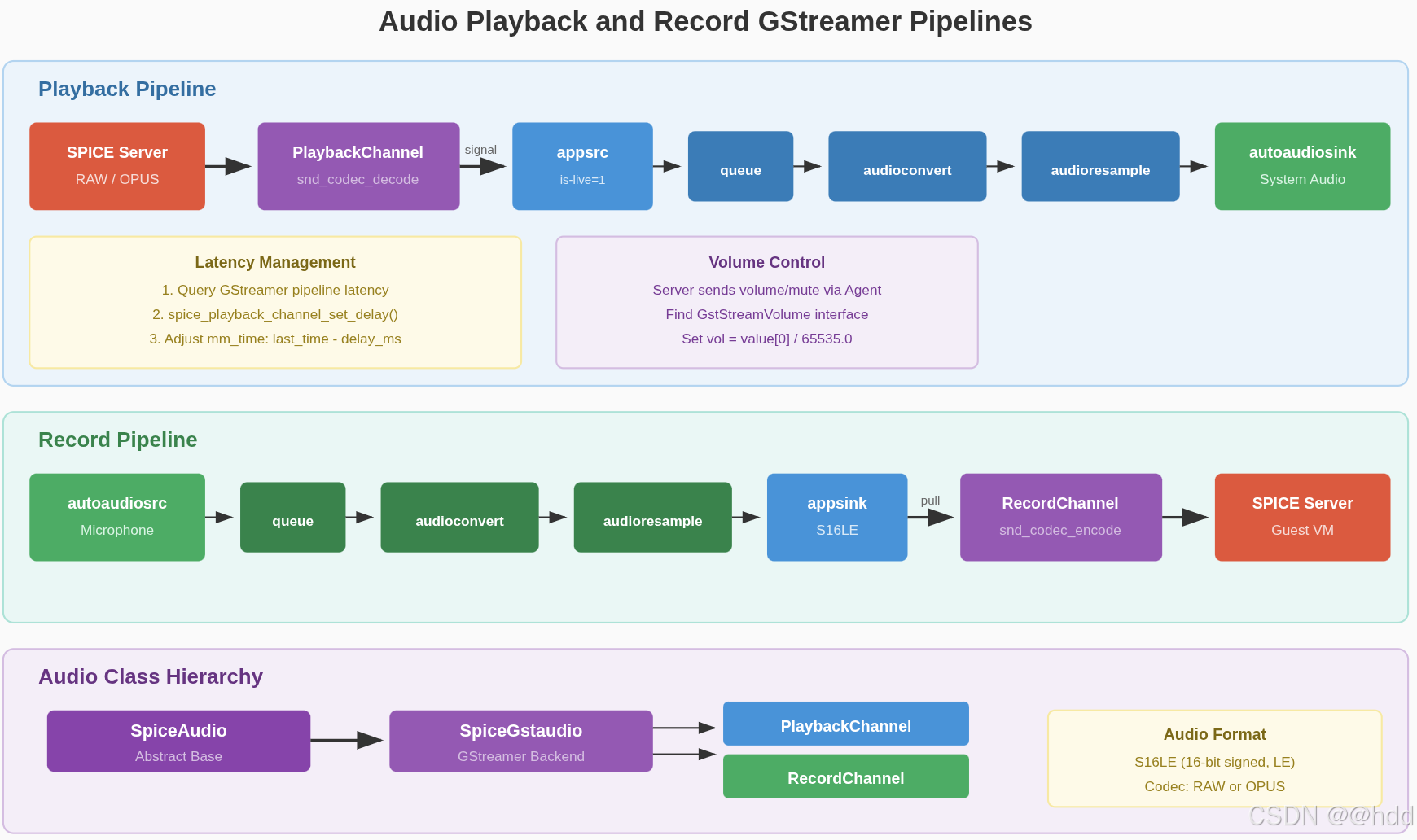
类层次结构
| 类名 | 说明 |
|---|---|
SpiceAudio |
抽象基类,定义音频处理接口 |
SpiceGstaudio |
GStreamer实现,提供具体的音频后端 |
PlaybackChannel |
播放通道,接收服务器音频数据 |
RecordChannel |
录制通道,捕获本地音频并发送到服务器 |
SpiceAudio抽象基类
SpiceAudio定义了音频处理的接口:
c
// spice-audio.c
G_DEFINE_ABSTRACT_TYPE_WITH_PRIVATE(SpiceAudio, spice_audio, G_TYPE_OBJECT)

struct _SpiceAudioPrivate {
    SpiceSession *session;        // 关联的会话
    GMainContext *main_context;   // 主事件循环上下文
};

// 抽象方法
struct _SpiceAudioClass {
    GObjectClass parent_class;

    // 连接通道到音频后端
    gboolean (*connect_channel)(SpiceAudio *audio, SpiceChannel *channel);

    // 异步获取播放音量信息
    void (*get_playback_volume_info_async)(SpiceAudio *audio, ...);
    gboolean (*get_playback_volume_info_finish)(SpiceAudio *audio, ...);

    // 异步获取录制音量信息
    void (*get_record_volume_info_async)(SpiceAudio *audio, ...);
    gboolean (*get_record_volume_info_finish)(SpiceAudio *audio, ...);
};
SpiceAudio的职责:
- 监听会话中的新通道
- 自动连接PlaybackChannel和RecordChannel
- 响应会话的音频启用/禁用状态
c
// spice-audio.c
static void channel_new(SpiceSession *session, SpiceChannel *channel, SpiceAudio *self)
{
    connect_channel(self, channel);
}

static void connect_channel(SpiceAudio *self, SpiceChannel *channel)
{
    if (channel->priv->state != SPICE_CHANNEL_STATE_UNCONNECTED)
        return;

    // 调用子类实现的connect_channel方法
    if (SPICE_AUDIO_GET_CLASS(self)->connect_channel(self, channel))
        spice_channel_connect(channel);
}
SpiceGstaudio:GStreamer实现
核心数据结构
c
// spice-gstaudio.c
struct stream {
    GstElement              *pipe;      // GStreamer管道
    GstElement              *src;       // 源元素(appsrc或autoaudiosrc)
    GstElement              *sink;      // 接收器元素(audiosink或appsink)
    guint                   rate;       // 采样率
    guint                   channels;   // 声道数
    gboolean                fake;       // 是否为假通道(仅用于获取音量信息)
};

struct _SpiceGstaudioPrivate {
    SpiceChannel            *pchannel;   // PlaybackChannel
    SpiceChannel            *rchannel;   // RecordChannel
    struct stream           playback;    // 播放流
    struct stream           record;      // 录制流
    guint                   mmtime_id;   // 多媒体时间同步定时器ID
    guint                   rbus_watch_id; // 录制流总线监视ID
};
播放通道实现
GStreamer管道构建
播放管道从appsrc接收音频数据,经过格式转换和重采样,最终输出到系统音频设备:
c
// spice-gstaudio.c
static void playback_start(SpicePlaybackChannel *channel, gint format, gint channels,
                           gint frequency, gpointer data)
{
    SpiceGstaudio *gstaudio = data;
    SpiceGstaudioPrivate *p = gstaudio->priv;

    g_return_if_fail(p != NULL);
    g_return_if_fail(format == SPICE_AUDIO_FMT_S16);

    // 如果参数变化,重建管道
    if (p->playback.pipe &&
        (p->playback.rate != frequency ||
         p->playback.channels != channels)) {
        playback_stop(gstaudio);
        g_clear_pointer(&p->playback.pipe, gst_object_unref);
    }

    if (!p->playback.pipe) {
        GError *error = NULL;
        gchar *audio_caps =
            g_strdup_printf("audio/x-raw,format=\"S16LE\",channels=%d,rate=%d,"
                            "layout=interleaved", channels, frequency);
        // 支持通过环境变量自定义sink
        gchar *pipeline = g_strdup (g_getenv("SPICE_GST_AUDIOSINK"));
        if (pipeline == NULL)
            pipeline = g_strdup_printf(
                "appsrc is-live=1 do-timestamp=0 format=time caps=\"%s\" name=\"appsrc\" ! "
                "queue ! audioconvert ! audioresample ! "
                "autoaudiosink name=\"audiosink\"", audio_caps);

        SPICE_DEBUG("audio pipeline: %s", pipeline);
        p->playback.pipe = gst_parse_launch(pipeline, &error);
        if (error != NULL) {
            g_warning("Failed to create pipeline: %s", error->message);
            goto cleanup;
        }

        // 获取管道中的元素
        p->playback.src = gst_bin_get_by_name(GST_BIN(p->playback.pipe), "appsrc");
        p->playback.sink = gst_bin_get_by_name(GST_BIN(p->playback.pipe), "audiosink");
        p->playback.rate = frequency;
        p->playback.channels = channels;

cleanup:
        if (error != NULL)
            g_clear_pointer(&p->playback.pipe, gst_object_unref);
        g_clear_error(&error);
        g_free(audio_caps);
        g_free(pipeline);
    }

    // 启动播放
    if (p->playback.pipe)
        gst_element_set_state(p->playback.pipe, GST_STATE_PLAYING);

    // 启动延迟同步定时器
    if (!p->playback.fake && p->mmtime_id == 0) {
        update_mmtime_timeout_cb(gstaudio);
        p->mmtime_id = g_timeout_add_seconds(1, update_mmtime_timeout_cb, gstaudio);
    }
}
播放管道结构:
播放管道从appsrc接收音频数据,经过queue缓冲、audioconvert格式转换和audioresample重采样,最终输出到autoaudiosink系统音频设备。详细流程见上方架构图。
音频数据接收
当PlaybackChannel收到音频数据时,通过信号通知Gstaudio,然后推送到GStreamer管道:
c
// spice-gstaudio.c
static void playback_data(SpicePlaybackChannel *channel,
                          gpointer *audio, gint size,
                          gpointer data)
{
    SpiceGstaudio *gstaudio = data;
    SpiceGstaudioPrivate *p = gstaudio->priv;
    GstBuffer *buf;

    g_return_if_fail(p != NULL);

    // 复制数据(TODO: 尝试避免内存拷贝)
    audio = g_memdup(audio, size);
    buf = gst_buffer_new_wrapped(audio, size);
    // 推送到appsrc
    gst_app_src_push_buffer(GST_APP_SRC(p->playback.src), buf);
}playback_data()函数设计分析:
- 内存拷贝的必要性 :使用
g_memdup拷贝音频数据是因为数据可能来自协程上下文,而协程可能在数据被GStreamer处理之前就返回或释放了数据。拷贝确保了数据的生命周期独立于协程。 - 零拷贝传递 :虽然需要拷贝数据,但
gst_buffer_new_wrapped创建的GstBuffer直接引用这块内存,避免了额外的拷贝。GStreamer会在使用完毕后释放这块内存,实现了高效的内存管理。
录制通道实现
录制管道构建
录制管道从系统音频设备捕获音频,经过格式转换和重采样,输出到appsink:
c
// spice-gstaudio.c
static void record_start(SpiceRecordChannel *channel, gint format, gint channels,
                         gint frequency, gpointer data)
{
    SpiceGstaudio *gstaudio = data;
    SpiceGstaudioPrivate *p = gstaudio->priv;

    g_return_if_fail(p != NULL);
    g_return_if_fail(format == SPICE_AUDIO_FMT_S16);

    // 如果参数变化,重建管道
    if (p->record.pipe &&
        (p->record.rate != frequency ||
         p->record.channels != channels)) {
        gst_element_set_state(p->record.pipe, GST_STATE_NULL);
        if (p->rbus_watch_id > 0) {
            g_source_remove(p->rbus_watch_id);
            p->rbus_watch_id = 0;
        }
        g_clear_pointer(&p->record.pipe, gst_object_unref);
    }

    if (!p->record.pipe) {
        GError *error = NULL;
        GstBus *bus;
        gchar *audio_caps =
            g_strdup_printf("audio/x-raw,format=\"S16LE\",channels=%d,rate=%d,"
                            "layout=interleaved", channels, frequency);
        gchar *pipeline =
            g_strdup_printf("autoaudiosrc name=audiosrc ! queue ! "
                            "audioconvert ! audioresample ! "
                            "appsink caps=\"%s\" name=appsink", audio_caps);

        p->record.pipe = gst_parse_launch(pipeline, &error);
        if (error != NULL) {
            g_warning("Failed to create pipeline: %s", error->message);
            goto cleanup;
        }

        // 设置总线监视器处理新样本
        bus = gst_pipeline_get_bus(GST_PIPELINE(p->record.pipe));
        p->rbus_watch_id = gst_bus_add_watch(bus, record_bus_cb, data);
        gst_object_unref(GST_OBJECT(bus));

        p->record.src = gst_bin_get_by_name(GST_BIN(p->record.pipe), "audiosrc");
        p->record.sink = gst_bin_get_by_name(GST_BIN(p->record.pipe), "appsink");
        p->record.rate = frequency;
        p->record.channels = channels;

        // 启用appsink的信号发射
        gst_app_sink_set_emit_signals(GST_APP_SINK(p->record.sink), TRUE);
        spice_g_signal_connect_object(p->record.sink, "new-sample",
                                      G_CALLBACK(record_new_buffer), gstaudio, 0);

cleanup:
        if (error != NULL)
            g_clear_pointer(&p->record.pipe, gst_object_unref);
        g_clear_error(&error);
        g_free(audio_caps);
        g_free(pipeline);
    }

    if (p->record.pipe)
        gst_element_set_state(p->record.pipe, GST_STATE_PLAYING);
}
录制管道结构:
录制管道从autoaudiosrc系统音频设备捕获音频,经过queue缓冲、audioconvert格式转换和audioresample重采样,最终输出到appsink。详细流程见上方架构图。
音频数据发送
当appsink有新样本时,通过总线消息通知,然后读取数据并发送到RecordChannel:
c
// spice-gstaudio.c
static GstFlowReturn record_new_buffer(GstAppSink *appsink, gpointer data)
{
    SpiceGstaudio *gstaudio = data;
    SpiceGstaudioPrivate *p = gstaudio->priv;
    GstMessage *msg;

    g_return_val_if_fail(p != NULL, GST_FLOW_ERROR);

    // 发送应用消息触发总线回调
    msg = gst_message_new_application(GST_OBJECT(p->record.pipe),
                                      gst_structure_new_empty ("new-sample"));
    gst_element_post_message(p->record.pipe, msg);
    return GST_FLOW_OK;
}

static gboolean record_bus_cb(GstBus *bus, GstMessage *msg, gpointer data)
{
    SpiceGstaudio *gstaudio = data;
    SpiceGstaudioPrivate *p = gstaudio->priv;

    g_return_val_if_fail(p != NULL, FALSE);

    switch (GST_MESSAGE_TYPE(msg)) {
    case GST_MESSAGE_APPLICATION: {
        GstSample *s;
        GstBuffer *buffer;
        GstMapInfo mapping;

        // 从appsink拉取样本
        s = gst_app_sink_pull_sample(GST_APP_SINK(p->record.sink));
        if (!s) {
            if (!gst_app_sink_is_eos(GST_APP_SINK(p->record.sink)))
                g_warning("eos not reached, but can't pull new sample");
            return TRUE;
        }

        buffer = gst_sample_get_buffer(s);
        if (!buffer) {
            if (!gst_app_sink_is_eos(GST_APP_SINK(p->record.sink)))
                g_warning("eos not reached, but can't pull new buffer");
            return TRUE;
        }

        // 映射缓冲区内存
        if (!gst_buffer_map(buffer, &mapping, GST_MAP_READ)) {
            return TRUE;
        }

        // 发送到RecordChannel
        spice_record_channel_send_data(SPICE_RECORD_CHANNEL(p->rchannel),
                               mapping.data, mapping.size, 0);
        gst_buffer_unmap(buffer, &mapping);
        gst_sample_unref(s);
        break;
    }
    default:
        break;
    }

    return TRUE;
}
PlaybackChannel:音频数据接收
音频解码
PlaybackChannel支持RAW和OPUS编码格式:
c
// channel-playback.c
struct _SpicePlaybackChannelPrivate {
    int                         mode;        // 音频数据模式(RAW/OPUS)
    SndCodec                    codec;       // 音频编解码器
    guint32                     frame_count; // 帧计数
    guint32                     last_time;   // 最后时间戳
    guint8                      nchannels;   // 声道数
    guint16                     *volume;     // 音量数组
    guint8                      mute;        // 静音状态
    gboolean                    is_active;   // 是否激活
    guint32                     latency;     // 延迟(毫秒)
    guint32                     min_latency; // 最小延迟(毫秒)
};

/* coroutine context */
static void playback_handle_data(SpiceChannel *channel, SpiceMsgIn *in)
{
    SpicePlaybackChannelPrivate *c = SPICE_PLAYBACK_CHANNEL(channel)->priv;
    SpiceMsgPlaybackPacket *packet = spice_msg_in_parsed(in);

    // 检查时间戳顺序
    if (spice_mmtime_diff(c->last_time, packet->time) > 0)
        g_warn_if_reached();

    c->last_time = packet->time;

    uint8_t *data = packet->data;
    int n = packet->data_size;
    uint8_t pcm[SND_CODEC_MAX_FRAME_SIZE * 2 * 2];

    // 如果不是RAW格式,需要解码
    if (c->mode != SPICE_AUDIO_DATA_MODE_RAW) {
        n = sizeof(pcm);
        data = pcm;

        if (snd_codec_decode(c->codec, packet->data, packet->data_size,
                    pcm, &n) != SND_CODEC_OK) {
            g_warning("snd_codec_decode() error");
            return;
        }
    }

    // 发出playback-data信号
    g_coroutine_signal_emit(channel, signals[SPICE_PLAYBACK_DATA], 0, data, n);

    // 每100帧请求一次延迟信息
    if ((c->frame_count++ % 100) == 0) {
        g_coroutine_signal_emit(channel, signals[SPICE_PLAYBACK_GET_DELAY], 0);
    }
}playback_handle_data()函数设计分析:
- 时间戳检查 :通过
spice_mmtime_diff检查时间戳顺序,可以检测乱序数据包。虽然SPICE协议保证顺序,但这种检查提供了额外的健壮性,有助于调试网络问题。 - 解码流程 :
snd_codec_decode函数处理OPUS等编码格式的解码。如果不是RAW格式,数据会被解码为PCM格式后再传递给GStreamer管道。这种设计支持多种音频编码格式,提高了兼容性。 - 延迟查询策略:每100帧请求一次延迟信息,这是一个平衡性能和实时性的折中方案。过于频繁的查询会增加开销,而过于稀疏的查询可能导致延迟信息不准确。100帧的采样间隔(约2-3秒)在大多数场景下都能提供足够的实时性。
延迟管理
PlaybackChannel通过mm_time同步机制管理音频延迟:
c
// channel-playback.c
void spice_playback_channel_set_delay(SpicePlaybackChannel *channel, guint32 delay_ms)
{
    SpicePlaybackChannelPrivate *c;
    SpiceSession *session;

    g_return_if_fail(SPICE_IS_PLAYBACK_CHANNEL(channel));

    CHANNEL_DEBUG(channel, "playback set_delay %u ms", delay_ms);

    c = channel->priv;
    c->latency = delay_ms;

    session = spice_channel_get_session(SPICE_CHANNEL(channel));
    if (session) {
        // 设置多媒体时间:last_time - delay_ms
        // 这确保音频同步考虑播放延迟
        spice_session_set_mm_time(session, c->last_time - delay_ms);
    } else {
        CHANNEL_DEBUG(channel, "channel detached from session, mm time skipped");
    }
}

// spice-gstaudio.c
static gboolean update_mmtime_timeout_cb(gpointer data)
{
    SpiceGstaudio *gstaudio = data;
    SpiceGstaudioPrivate *p = gstaudio->priv;
    GstQuery *q;

    g_return_val_if_fail(!p->playback.fake, TRUE);

    // 查询GStreamer管道的延迟
    q = gst_query_new_latency();
    if (gst_element_query(p->playback.pipe, q)) {
        gboolean live;
        GstClockTime minlat, maxlat;
        gst_query_parse_latency(q, &live, &minlat, &maxlat);
        SPICE_DEBUG("got min latency %" GST_TIME_FORMAT ", max latency %"
                    GST_TIME_FORMAT ", live %d", GST_TIME_ARGS (minlat),
                    GST_TIME_ARGS (maxlat), live);
        // 设置延迟到PlaybackChannel
        spice_playback_channel_set_delay(SPICE_PLAYBACK_CHANNEL(p->pchannel),
                                         GST_TIME_AS_MSECONDS(minlat));
    }
    gst_query_unref (q);

    return TRUE;
}
RecordChannel:音频编码与发送
音频编码
RecordChannel支持RAW和OPUS编码格式:
c
// channel-record.c
struct _SpiceRecordChannelPrivate {
    int                         mode;              // 音频数据模式
    gboolean                    started;           // 是否已开始
    SndCodec                    codec;             // 音频编解码器
    gsize                       frame_bytes;       // 帧字节数
    guint8                      *last_frame;       // 最后一帧(用于帧对齐)
    gsize                       last_frame_current;// 当前帧已填充字节数
    guint8                      nchannels;         // 声道数
    guint16                     *volume;           // 音量数组
    guint8                      mute;              // 静音状态
};

void spice_record_channel_send_data(SpiceRecordChannel *channel, gpointer data,
                                    gsize bytes, uint32_t time)
{
    SpiceRecordChannelPrivate *rc;
    SpiceMsgcRecordPacket p = {0, };

    g_return_if_fail(SPICE_IS_RECORD_CHANNEL(channel));
    rc = channel->priv;
    if (rc->last_frame == NULL) {
        CHANNEL_DEBUG(channel, "recording didn't start or was reset");
        return;
    }

    g_return_if_fail(spice_channel_get_read_only(SPICE_CHANNEL(channel)) == FALSE);

    uint8_t *encode_buf = NULL;

    // 如果尚未开始,发送模式和开始标记
    if (!rc->started) {
        spice_record_mode(channel, time, rc->mode, NULL, 0);
        spice_record_start_mark(channel, time);
        rc->started = TRUE;
    }

    // 分配编码缓冲区(如果不是RAW格式)
    if (rc->mode != SPICE_AUDIO_DATA_MODE_RAW)
        encode_buf = g_alloca(SND_CODEC_MAX_COMPRESSED_BYTES);

    p.time = time;

    // 处理帧对齐的数据
    while (bytes > 0) {
        gsize n;
        int frame_size;
        SpiceMsgOut *msg;
        uint8_t *frame;

        // 完成上一帧或开始新帧
        if (rc->last_frame_current > 0) {
            n = MIN(bytes, rc->frame_bytes - rc->last_frame_current);
            memcpy(rc->last_frame + rc->last_frame_current, data, n);
            rc->last_frame_current += n;
            if (rc->last_frame_current < rc->frame_bytes)
                break;
            frame = rc->last_frame;
            frame_size = rc->frame_bytes;
        } else {
            n = MIN(bytes, rc->frame_bytes);
            frame_size = n;
            frame = data;
        }

        // 如果数据不足一帧,保存到last_frame
        if (rc->last_frame_current == 0 && n < rc->frame_bytes) {
            memcpy(rc->last_frame, data, n);
            rc->last_frame_current = n;
            break;
        }

        // 编码(如果不是RAW格式)
        if (rc->mode != SPICE_AUDIO_DATA_MODE_RAW) {
            int len = SND_CODEC_MAX_COMPRESSED_BYTES;
            if (snd_codec_encode(rc->codec, frame, frame_size, encode_buf, &len) != SND_CODEC_OK) {
                g_warning("encode failed");
                return;
            }
            frame = encode_buf;
            frame_size = len;
        }

        // 发送数据包
        msg = spice_msg_out_new(SPICE_CHANNEL(channel), SPICE_MSGC_RECORD_DATA);
        msg->marshallers->msgc_record_data(msg->marshaller, &p);
        spice_marshaller_add(msg->marshaller, frame, frame_size);
        spice_msg_out_send(msg);

        if (rc->last_frame_current == rc->frame_bytes)
            rc->last_frame_current = 0;

        bytes -= n;
        data = (guint8*)data + n;
    }
}
音量控制
音量同步
spice-gtk支持从服务器同步音量设置,并应用到GStreamer管道:
c
// spice-gstaudio.c
#define VOLUME_NORMAL 65535

static void playback_volume_changed(GObject *object, GParamSpec *pspec, gpointer data)
{
    SpiceGstaudio *gstaudio = data;
    GstElement *e = NULL;
    guint16 *volume;
    guint nchannels;
    SpiceGstaudioPrivate *p = gstaudio->priv;
    gdouble vol;

    if (!p->playback.sink)
        return;

    g_object_get(object,
                 "volume", &volume,
                 "nchannels", &nchannels,
                 NULL);

    g_return_if_fail(nchannels > 0);

    // 转换为0.0-1.0范围
    vol = 1.0 * volume[0] / VOLUME_NORMAL;
    SPICE_DEBUG("playback volume changed to %u (%0.2f)", volume[0], 100*vol);

    // 查找支持GstStreamVolume接口的元素
    if (GST_IS_BIN(p->playback.sink))
        e = gst_bin_get_by_interface(GST_BIN(p->playback.sink), GST_TYPE_STREAM_VOLUME);
    if (!e)
        e = g_object_ref(p->playback.sink);

    g_return_if_fail(e != NULL);

    // 设置音量
    if (GST_IS_STREAM_VOLUME(e)) {
        gst_stream_volume_set_volume(GST_STREAM_VOLUME(e), GST_STREAM_VOLUME_FORMAT_CUBIC, vol);
    } else if (g_object_class_find_property(G_OBJECT_GET_CLASS (e), "volume") != NULL) {
        g_object_set(e, "volume", vol, NULL);
    } else {
        g_warning("playback: ignoring volume change on %s", gst_element_get_name(e));
    }

    g_object_unref(e);
}

static void playback_mute_changed(GObject *object, GParamSpec *pspec, gpointer data)
{
    SpiceGstaudio *gstaudio = data;
    SpiceGstaudioPrivate *p = gstaudio->priv;
    GstElement *e = NULL;
    gboolean mute;

    if (!p->playback.sink)
        return;

    g_object_get(object, "mute", &mute, NULL);
    SPICE_DEBUG("playback mute changed to %d", mute);

    // 查找支持GstStreamVolume接口的元素
    if (GST_IS_BIN(p->playback.sink))
        e = gst_bin_get_by_interface(GST_BIN(p->playback.sink), GST_TYPE_STREAM_VOLUME);
    if (!e)
        e = g_object_ref(p->playback.sink);

    g_return_if_fail(e != NULL);

    // 设置静音
    if (GST_IS_STREAM_VOLUME(e)) {
        gst_stream_volume_set_mute(GST_STREAM_VOLUME(e), mute);
    } else if (g_object_class_find_property(G_OBJECT_GET_CLASS (e), "mute") != NULL) {
        g_object_set(e, "mute", mute, NULL);
    } else {
        g_warning("playback: ignoring mute change on %s", gst_element_get_name(e));
    }

    g_object_unref(e);
}
信号与事件
PlaybackChannel信号
| 信号名 | 参数 | 说明 |
|---|---|---|
playback-start |
format, channels, rate | 开始播放,提供音频格式 |
playback-data |
data, data_size | 音频数据到达 |
playback-stop |
无 | 停止播放 |
playback-get-delay |
无 | 请求延迟信息 |
RecordChannel信号
| 信号名 | 参数 | 说明 |
|---|---|---|
record-start |
format, channels, rate | 开始录制,提供音频格式 |
record-stop |
无 | 停止录制 |
总结
spice-gtk的音频实现具有以下特点:
- 抽象设计 :通过
SpiceAudio基类提供可扩展的架构 - GStreamer集成:使用GStreamer处理所有音频I/O和格式转换
- 编解码支持:支持RAW和OPUS格式,自动选择最佳编码
- 延迟管理 :通过
mm_time同步机制管理播放延迟 - 音量控制:支持从服务器同步音量,并应用到系统音频设备
- 异步处理:使用协程和GStreamer的异步API实现非阻塞操作
这种设计使得spice-gtk能够提供高质量的音频体验,同时保持代码的清晰和可维护性。