Vue3核心语法回顾与Composition深入 -- pd的前端笔记
文章目录
-
- [Vue3核心语法回顾与Composition深入 -- pd的前端笔记](#Vue3核心语法回顾与Composition深入 -- pd的前端笔记)
- [第一讲:Vue 3 核心语法回顾与 Composition API 深入](#第一讲:Vue 3 核心语法回顾与 Composition API 深入)
-
- [1.1 从零创建 Vue 3 项目 + 认识 `<script setup>` ------ 你的第一个响应式计数器](#1.1 从零创建 Vue 3 项目 + 认识
<script setup>—— 你的第一个响应式计数器) - [1.2 深入 ref 与 reactive ------ 响应式数据的两种写法怎么选?](#1.2 深入 ref 与 reactive —— 响应式数据的两种写法怎么选?)
- [1.3 计算属性、监听器与生命周期 ------ 让组件"活"起来](#1.3 计算属性、监听器与生命周期 —— 让组件“活”起来)
- [1.4 自定义 Composables ------ 把逻辑变成"乐高积木"](#1.4 自定义 Composables —— 把逻辑变成“乐高积木”)
-
- [改造1.1 篇的计数器逻](#改造1.1 篇的计数器逻)
- [第二个 Composable:useLocalStorage](#第二个 Composable:useLocalStorage)
- [第三个 Composable:useFetch(引入 fetch 和 AbortController)](#第三个 Composable:useFetch(引入 fetch 和 AbortController))
- [Composable 设计最佳实践(TS + 工程化)](#Composable 设计最佳实践(TS + 工程化))
- [1.1 从零创建 Vue 3 项目 + 认识 `<script setup>` ------ 你的第一个响应式计数器](#1.1 从零创建 Vue 3 项目 + 认识
写在最前: 环境配置
shell
# 因为latest要求nodejs > 20.19, 但是我的nodejs版本是20.10
# 所以需要安装nvm 进行node版本管理
# 管理员权限
nvm install 22.12.0
nvm use 22.12.0

npm create vue@latest my-vue3-app
cd my-vue3-app
npm install
npm run dev
第一讲:Vue 3 核心语法回顾与 Composition API 深入
1.1 从零创建 Vue 3 项目 + 认识 <script setup> ------ 你的第一个响应式计数器
替换 src/App.vue 的全部内容为以下代码:
html
<!-- src/App.vue -->
<script setup lang="ts">
// 👆 注意:加上 lang="ts",告诉 Vue 这是 TypeScript 代码!

import { ref } from 'vue'

// 使用 ref 创建一个响应式变量,初始值为数字 0
// TypeScript 会自动推断 count 的类型为 Ref<number>
const count = ref(0)

// 定义 increment 函数:没有参数,没有返回值(void)
function increment(): void {
  // 在 TypeScript 中,ref 的值必须通过 .value 访问
  count.value = count.value + 1
}

// 定义 reset 函数
function reset(): void {
  count.value = 0
}
</script>

<template>
  <div style="padding: 20px; font-family: Arial, sans-serif">
    <h1>我的第一个 Vue 3 + TypeScript 计数器</h1>
    <p>当前数字是:{{ count }}</p>
    <button @click="increment">点我 +1</button>
    <button @click="reset" style="margin-left: 10px">重置</button>
  </div>
</template>
其中:
Ref<T>是 Vue 提供的泛型接口,表示一个响应式引用- T 是你传入的值的类型(这里是 number)
模板中为什么不用 .value?
- 在
<template>中,所有Ref<T>类型的变量都会自动.value解包 - 但在
<script setup>的 JS/TS 逻辑中,必须手动写.value,一旦不加.value就会从Ref<number>变成 number,失去响应性!
升级组件:让用户自定义每次点击加多少
html
<script setup lang="ts">
import { ref } from 'vue'

const count = ref(0)
// 新增:步长,默认为 1,类型是 number
const step = ref(1)

function increment(): void {
  // 使用 step.value 作为增量
  count.value += step.value
}

function reset(): void {
  count.value = 0
}

// 处理输入框变化
function handleStepChange(event: Event): void {
  const target = event.target as HTMLInputElement
  // 将字符串转为数字,NaN 时默认为 1
  const value = Number(target.value)
  step.value = isNaN(value) ? 1 : value
}
</script>

<template>
  <div style="padding: 20px; font-family: Arial, sans-serif">
    <h1>增强版计数器(带步长)</h1>
    <p>当前数字:{{ count }}</p>

    <div style="margin: 10px 0">
      <label>步长: </label>
      <!-- 输入框绑定 change 事件 -->
      <input
        type="number"
        :value="step"
        @change="handleStepChange"
        style="width: 80px; padding: 4px"
      />
    </div>

    <button @click="increment">点我 +{{ step }}</button>
    <button @click="reset" style="margin-left: 10px">重置</button>
  </div>
</template>
🔍 关键 TS 点解析:
event: Event:明确事件类型event.target as HTMLInputElement:类型断言,告诉 TS "我知道 target 是 input 元素"- Number() 转换后用 isNaN() 校验,避免 step.value = NaN
💡 如果你不写类型断言,TS 会报错:"Property 'value' does not exist on type 'EventTarget'",因为 event.target 默认是 EventTarget | null,不一定是 input。
TypeScript 如何帮助你避免常见 Bug?
假设你误写了:
js
function badIncrement() {
  count.value = count.value + "1" // 字符串拼接!
}
TS 会立刻报错:Operator '+' cannot be applied to types 'number' and 'string'.
而在纯 JS 中,这会导致 count 变成 "01", "011", ... ------ 一个隐蔽的 bug!
✅ 本篇小结(TS + Vue 3 初学者重点)
| 概念 | 说明 |
|---|---|
lang="ts" |
必须加在 <script setup> 上才能用 TS |
ref(0) |
返回 Ref<number>,JS/TS 中读写需 .value |
| 模板自动解包 | {``{ count }} 不用 .value |
| 函数类型标注 | 推荐写 : void 或 : ReturnType |
| 类型断言 | event.target as HTMLInputElement 获取具体 DOM 类型 |
| 类型安全 | 防止运行时错误,提升代码健壮性 |
1.2 深入 ref 与 reactive ------ 响应式数据的两种写法怎么选?
✅ 写法一:用 ref 包装整个对象(推荐!)
html
<!-- UserCardRef.vue -->
<script setup lang="ts">
import { ref } from 'vue'

// 定义接口,描述用户结构
interface User {
  name: string
  age: number
}

// 使用 ref 包裹整个对象
const user = ref<User>({
  name: '张三',
  age: 25
})

// 更新函数
function updateName(newName: string): void {
  user.value.name = newName // ✅ 安全!响应性保留
}

function updateAge(newAge: number): void {
  user.value.age = newAge
}
</script>

<template>
  <div style="border: 1px solid #ccc; padding: 16px; margin: 10px">
    <h3>使用 ref 的用户卡片</h3>
    <p>姓名:{{ user.name }}</p>
    <p>年龄:{{ user.age }}</p>
    <button @click="updateName('李四')">改名李四</button>
    <button @click="updateAge(30)" style="margin-left: 8px">年龄+5</button>
  </div>
</template>
❌ 写法二:用 reactive + 直接解构(危险!)
html
<!-- UserCardReactiveBad.vue -->
<script setup lang="ts">
import { reactive } from 'vue'

interface User {
  name: string
  age: number
}

// 使用 reactive 创建响应式对象
const user = reactive<User>({
  name: '张三',
  age: 25
})

// ⚠️ 危险操作:直接解构!
const { name, age } = user

function updateName(newName: string): void {
  user.name = newName // ✅ 这个还能更新
}

// 但模板里如果用 {{ name }},就永远不会变了!
</script>

<template>
  <div style="border: 1px solid #f99; padding: 16px; margin: 10px; background: #ffecec">
    <h3 style="color: red">错误示范:reactive + 直接解构</h3>
    <!-- ⚠️ 这里的 name 是解构时的快照,不是响应式的! -->
    <p>姓名:{{ name }}</p> <!-- ❌ 不会更新! -->
    <p>年龄:{{ user.age }}</p> <!-- ✅ 这个会更新 -->
    <button @click="updateName('王五')">改名王五</button>
  </div>
</template>
🔴 问题:
点击按钮后,user.name 确实变了,但模板中的 {{ name }} 不会更新!
因为 const { name } = user 只是把 user.name 的当前值赋给 name,它是个普通字符串,没有响应性。
💡 这是新手最容易踩的坑之一!
ref vs reactive:到底怎么选?(TS 最佳实践)
| 场景 | 推荐方案 | 理由 |
|---|---|---|
| 简单值(数字、字符串、布尔) | ref |
直观,无需包装对象 |
| 复杂对象(用户、表单、配置) | ref<{ ... }> |
避免 reactive 解构陷阱,类型更清晰 |
| 需要解构到模板 | ref 或 reactive + toRefs |
ref 更简单;toRefs 适合已有 reactive 代码 |
| 性能敏感场景 | 两者差异极小,优先可读性 | Vue 3 内部优化得很好 |
创建一个"表单状态管理器"
html
<!-- LoginForm.vue -->
<script setup lang="ts">
import { ref } from 'vue'

interface LoginForm {
  email: string
  password: string
  remember: boolean
}

// 初始化表单状态
const form = ref<LoginForm>({
  email: '',
  password: '',
  remember: false
})

// 更新字段的通用函数
function updateField<K extends keyof LoginForm>(
  field: K,
  value: LoginForm[K]
): void {
  form.value[field] = value
}

// 提交表单
function onSubmit(): void {
  console.log('提交表单:', form.value)
  alert('表单已提交!请打开控制台查看数据')
}
</script>

<template>
  <div style="max-width: 400px; margin: 20px auto; padding: 20px; border: 1px solid #ddd">
    <h2>登录表单(ref 管理)</h2>
    <div style="margin: 10px 0">
      <label>Email:</label>
      <input
        v-model="form.email"
        type="email"
        style="width: 100%; padding: 6px"
      />
    </div>
    <div style="margin: 10px 0">
      <label>Password:</label>
      <input
        v-model="form.password"
        type="password"
        style="width: 100%; padding: 6px"
      />
    </div>
    <div style="margin: 10px 0">
      <label>
        <input
          v-model="form.remember"
          type="checkbox"
        /> 记住我
      </label>
    </div>
    <button @click="onSubmit" style="padding: 8px 16px; background: #42b883; color: white; border: none">
      登录
    </button>

    <!-- 实时预览表单数据 -->
    <pre style="margin-top: 16px; background: #f5f5f5; padding: 10px">{{ form }}</pre>
  </div>
</template>
🔍 TS 亮点解析:
ref<LoginForm>:明确类型,编辑器自动补全 email/passwordK extends keyof LoginForm:泛型约束,确保 field 是合法 keyv-model="form.email":Vue 自动处理 .value,你不用写 form.value.email
💡 这就是现代 Vue 3 + TS 开发的典型模式:类型安全 + 响应式 + 简洁模板
| 概念 | 正确做法 | 错误做法 |
|---|---|---|
| 响应式对象 | const obj = ref({ ... }) |
const { x } = reactive({ x: 1 }) |
| 修改值 | obj.value.prop = newValue |
obj = { ... }(覆盖 ref) |
| 模板绑定 | {``{ obj.prop }} |
{``{ prop }}(未用 toRefs) |
| 类型标注 | ref<MyType>(initial) |
不写类型(失去 TS 优势) |
1.3 计算属性、监听器与生命周期 ------ 让组件"活"起来
🎯 场景:用户全名 = 名 + 姓
我们有一个用户对象,包含 firstName 和 lastName,想自动合成 fullName。
html
<!-- FullNameDemo.vue -->
<script setup lang="ts">
import { ref, computed } from 'vue'

// 原始数据
const firstName = ref('张')
const lastName = ref('三')

// ✅ 计算属性:自动派生 fullName
const fullName = computed(() => {
  return `${firstName.value} ${lastName.value}`
})

// 更新函数
function changeName(): void {
  firstName.value = '李'
  lastName.value = '四'
}
</script>

<template>
  <div style="padding: 20px; font-family: Arial">
    <h2>计算属性示例:全名合成</h2>
    <p>名:{{ firstName }}</p>
    <p>姓:{{ lastName }}</p>
    <p style="font-weight: bold; color: #42b883">全名:{{ fullName }}</p>
    <button @click="changeName">切换为 李四</button>
  </div>
</template>
🔍 关键点解析:
- computed(() => {...}) 返回一个 只读的 Ref
- 模板中直接写 {{ fullName }}(自动解包)
- 当 firstName 或 lastName 变化时,fullName 自动重新计算
- TS 自动推断 fullName 类型为 ComputedRef
⚠️ 不要手动调用 fullName() ------ 它不是函数,是响应式引用!
监听器(watch):当数据变化时,我想做点事
🎯 场景:监听搜索关键词,发起 API 请求
html
<!-- WatchDemo.vue -->
<script setup lang="ts">
import { ref, watch } from 'vue'

const keyword = ref('')
const searchResult = ref<string[]>([])

// ✅ 监听 keyword 变化
watch(
  keyword, // 要监听的源(可以是 ref、getter 函数等)
  (newVal: string, oldVal: string) => {
    console.log(`关键词从 "${oldVal}" 变为 "${newVal}"`)
    if (newVal.trim()) {
      // 模拟搜索
      searchResult.value = [`结果1 for ${newVal}`, `结果2 for ${newVal}+10086`]
    } else {
      searchResult.value = []
    }
  },
  {
    immediate: false, // 是否立即执行一次?默认 false
    deep: false       // 是否深度监听?对对象/数组才需要
  }
)

function clearSearch(): void {
  keyword.value = ''
}
</script>

<template>
  <div style="padding: 20px; max-width: 500px">
    <h2>监听器示例:搜索关键词</h2>
    <input
      v-model="keyword"
      placeholder="输入关键词..."
      style="width: 100%; padding: 8px; margin: 8px 0"
    />
    <button @click="clearSearch">清空</button>

    <ul style="margin-top: 16px">
      <li v-for="item in searchResult" :key="item">{{ item }}</li>
    </ul>
  </div>
</template>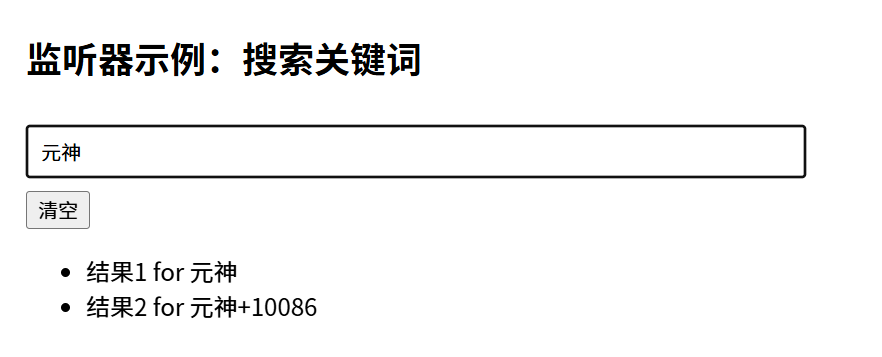
🔍 watch 参数详解(TS 类型安全):
| 参数 | 说明 |
|---|---|
| source | 要监听的数据: - ref → 直接传 keyword - 多个 → [ref1, ref2] - 表达式 → () => someRef.value.id |
| callback | (newValue, oldValue) => void TS 会自动推断 newValue 类型 |
| options | { immediate?: boolean, deep?: boolean } |
✅ 最佳实践:
- 简单值监听 → 用 ref
- 复杂表达式监听 → 用 getter 函数:watch(() => user.value?.profile?.name, ...)
🆚 watch vs watchEffect:怎么选?
| 对比项 | watch(source, callback) |
watchEffect(() => { ... }) |
|---|---|---|
| 触发时机 | 仅当 source 变化时 |
组件 setup 时立即执行 + 依赖变化时 |
| 能访问 oldValue | ✅ 是 | ❌ 否 |
| 适合场景 | 需要新旧值对比、条件执行 | 自动追踪依赖(如日志、简单副作用) |
✅ watchEffect 示例:自动打印当前计数
js
import { ref, watchEffect } from 'vue'

const count = ref(0)

watchEffect(() => {
  // 自动追踪 count.value
  console.log('当前计数:', count.value)
})

// 每次 count 变化,都会 log
// 只要watcheffect中的依赖项变化时就会执行
生命周期钩子:在正确时机执行副作用
Vue 3 将生命周期函数以 onXxx 形式导出,全部在 setup() 中调用。
🔁 完整生命周期顺序(简化版):
text
onBeforeMount → onMounted → (用户交互) → onUnmounted
html
<script setup lang="ts">
import { ref, onMounted, onUnmounted, onBeforeMount } from 'vue'

const message = ref('等待挂载...')

// 组件挂载前
onBeforeMount(() => {
  console.log('【onBeforeMount】DOM 还没生成')
})

// ✅ 组件挂载后(最常用!)
onMounted(() => {
  console.log('【onMounted】DOM 已生成,可以操作 DOM 或发起请求')
  message.value = '组件已挂载!'

  // 模拟获取数据
  setTimeout(() => {
    message.value = '数据加载完成!'
  }, 1000)
})

// 组件卸载前(清理定时器、事件监听等)
onUnmounted(() => {
  console.log('【onUnmounted】组件即将销毁,记得清理!')
})
</script>
✅ 关键规则:
- 不要在 setup 顶层直接写副作用(如 fetchData()),因为此时 DOM 未就绪
- 所有副作用(请求、订阅、DOM 操作)必须放在 onMounted 或之后
动手实验:构建一个"实时字数统计器"
结合 ref + computed + watch + onMounted:
html
<!-- WordCounter.vue -->
<script setup lang="ts">
import { ref, computed, watch, onMounted } from 'vue'

const text = ref('')
const maxLength = ref(100)

// ✅ 计算属性:当前字数 & 剩余字数
const wordCount = computed(() => text.value.length)
const remaining = computed(() => maxLength.value - wordCount.value)
const isOverLimit = computed(() => wordCount.value > maxLength.value)

// ✅ 监听 text 变化,保存到 localStorage
watch(text, (newText) => {
  localStorage.setItem('draft', newText)
})

// ✅ 挂载时恢复草稿
onMounted(() => {
  const saved = localStorage.getItem('draft')
  if (saved) {
    text.value = saved
  }
})

function clearDraft(): void {
  text.value = ''
  localStorage.removeItem('draft')
}
</script>

<template>
  <div style="max-width: 600px; margin: 20px auto; padding: 20px; font-family: Arial">
    <h2>实时字数统计器(带本地存储)</h2>

    <textarea
      v-model="text"
      placeholder="开始输入..."
      style="width: 100%; height: 120px; padding: 8px; margin: 10px 0"
    ></textarea>

    <div :style="{ color: isOverLimit ? 'red' : 'green' }">
      {{ wordCount }} / {{ maxLength }} 字
      <span v-if="isOverLimit" style="color: red; margin-left: 8px">⚠️ 超出限制!</span>
    </div>

    <button @click="clearDraft" style="margin-top: 10px">清空草稿</button>
  </div>
</template>
🔍 技术点总结:
computed:派生wordCount、remaining、isOverLimitwatch:监听text并持久化到localStorageonMounted:恢复上次编辑内容
✅ 本篇小结:何时用什么?
| 需求 | 推荐 API | 理由 |
|---|---|---|
| 派生状态(如格式化、过滤) | computed |
缓存、高效、自动依赖追踪 |
| 数据变化时执行副作用(需新旧值) | watch |
精确控制、可选 immediate/deep |
| 自动追踪依赖的简单副作用 | watchEffect |
代码更简洁 |
| 操作 DOM / 发起请求 | onMounted |
确保 DOM 已就绪 |
| 清理资源(定时器、监听) | onUnmounted |
防止内存泄漏 |
1.4 自定义 Composables ------ 把逻辑变成"乐高积木"
在 Vue 3 中,Composable(组合式函数) 是以 useXxx 命名的函数,用于封装可复用的逻辑。
💡 类比:就像乐高积木------你把"计数逻辑"、"本地存储逻辑"、"API 请求逻辑"分别做成标准积木,以后搭任何组件都能直接拼。
✅ 优势:
- 逻辑复用:不用重复写相同代码
- 关注点分离:组件只负责 UI,逻辑抽离到 useXxx
- 类型安全:配合 TS,输入输出清晰
- 易于测试:纯函数,不依赖组件上下文
改造1.1 篇的计数器逻
我们把第 1.1 篇的计数器逻辑抽出来:
ts
// composables/useCounter.ts
import { ref, computed } from 'vue'

export function useCounter(initialValue: number = 0) {
  const count = ref(initialValue)

  const isEven = computed(() => count.value % 2 === 0)

  function increment(step: number = 1) {
    count.value += step
  }

  function reset() {
    count.value = initialValue
  }

  return {
    count,
    isEven,
    increment,
    reset
  }
}
🔍 TS 说明:
- 参数 initialValue: number = 0:带默认值的数字参数
- 返回对象的类型由 TS 自动推断,无需手动标注(但你也可以用接口显式声明)
在组件中使用:
html
<script setup lang="ts">
import { useCounter } from '@/composables/useCounter'

const { count, isEven, increment, reset } = useCounter(10)
</script>

<template>
  <div style="padding: 20px">
    <p>计数:{{ count }}({{ isEven ? '偶数' : '奇数' }})</p>
    <button @click="increment(1)">+1</button>
    <button @click="increment(5)" style="margin: 0 8px">+5</button>
    <button @click="reset">重置</button>
  </div>
</template>
✅ 完美复用!而且逻辑和 UI 彻底解耦。
第二个 Composable:useLocalStorage
localStorage 是什么?
它是浏览器提供的持久化存储机制,数据以字符串形式保存在用户设备上,关闭浏览器后依然存在(除非手动清除)。
典型用途:保存用户偏好、表单草稿、主题设置等。
注意:
只能存字符串 → 存对象需 JSON.stringify,取时 JSON.parse
同源策略限制(不同域名不能共享)
容量约 5~10MB(因浏览器而异)
现在,我们封装一个能自动同步 ref 到 localStorage 的 Composable:
ts
// composables/useLocalStorage.ts
import { ref, watch } from 'vue'

/**
 * 创建一个与 localStorage 同步的响应式引用
 * @param key localStorage 的键名
 * @param defaultValue 初始值(如果 localStorage 中没有)
 */
export function useLocalStorage<T>(key: string, defaultValue: T) {
  // 尝试从 localStorage 读取
  const storedValue = localStorage.getItem(key)
  let initialValue: T

  try {
    // 如果有存储值,解析为 JSON;否则用默认值
    initialValue = storedValue ? JSON.parse(storedValue) : defaultValue
  } catch (error) {
    // 解析失败(比如格式损坏),回退到默认值
    console.warn(`Failed to parse localStorage item "${key}"`, error)
    initialValue = defaultValue
  }

  const value = ref<T>(initialValue)

  // 监听变化,自动存入 localStorage
  watch(value, (newValue) => {
    localStorage.setItem(key, JSON.stringify(newValue))
  }, { deep: true }) // deep: true 支持对象/数组

  return value
}
🔍 TS 亮点:
- 泛型
<T>:让函数适用于任意类型(string / number / object) deep: true:确保嵌套对象变化也能触发存储- 错误处理:防止 JSON.parse 崩溃
在组件中使用:
html
<!-- ThemeSwitcher.vue -->
<script setup lang="ts">
import { useLocalStorage } from '@/composables/useLocalStorage'

// 自动从 localStorage 读取 'theme',默认 'light'
const theme = useLocalStorage<'light' | 'dark'>('theme', 'light')

function toggleTheme() {
  theme.value = theme.value === 'light' ? 'dark' : 'light'
  // 自动保存到 localStorage!
}
</script>

<template>
  <div :style="{ background: theme === 'dark' ? '#333' : '#fff', color: theme === 'dark' ? '#fff' : '#000', padding: '20px' }">
    <h2>主题切换器(自动持久化)</h2>
    <p>当前主题:{{ theme }}</p>
    <button @click="toggleTheme">切换主题</button>
    <p>刷新页面试试,主题会保留!</p>
  </div>
</template>
第三个 Composable:useFetch(引入 fetch 和 AbortController)
🔎 先认识 fetch(现代 Web API)
fetch 是什么?
它是浏览器原生提供的网络请求 API,用于从服务器获取或发送数据(替代老旧的 XMLHttpRequest)。
基本用法:fetch(url).then(res => res.json())
优点:基于 Promise,支持 async/await,内置流处理
注意:
默认不带 cookie → 需加 { credentials: 'include' }
HTTP 错误(如 404)不会 reject Promise → 需手动检查 res.ok
🔎 再认识 AbortController(取消请求)
AbortController 是什么?
它是浏览器提供的请求取消机制。当你发起一个 fetch,可以传入 signal,后续调用 abort() 即可中断请求。
典型场景:组件卸载时取消未完成的请求,避免"内存泄漏"或状态更新错误。
现在,封装一个带 loading、error、自动取消的 useFetch:
ts
// composables/useFetch.ts (升级版)
import { ref, watch, onUnmounted, Ref } from 'vue'

interface UseFetchReturn<T> {
  data: Ref<T | null>
  error: Ref<Error | null>
  loading: Ref<boolean>
}

export function useFetch<T>(url: string | Ref<string>): UseFetchReturn<T> {
  const data = ref<T | null>(null)
  const error = ref<Error | null>(null)
  const loading = ref(false)

  // 创建一个可取消的请求控制器
  let controller: AbortController

  const execute = async (currentUrl: string) => {
    // 取消上一次请求(如果存在)
    if (controller) {
      controller.abort()
    }

    controller = new AbortController()
    loading.value = true
    error.value = null

    try {
      const response = await fetch(currentUrl, {
        signal: controller.signal
      })

      if (!response.ok) {
        throw new Error(`HTTP ${response.status}: ${response.statusText}`)
      }

      const result = await response.json()
      data.value = result
    } catch (err) {
      if ((err as Error).name !== 'AbortError') {
        error.value = err as Error
      }
    } finally {
      loading.value = false
    }
  }

  // 核心:监听 url 变化
  if (typeof url === 'string') {
    // 静态 URL
    execute(url)
  } else {
    // 动态 URL(ref)
    watch(url, (newUrl) => {
      if (newUrl) execute(newUrl)
    }, { immediate: true })
  }

  // 组件卸载时取消请求
  onUnmounted(() => {
    if (controller) {
      controller.abort()
    }
  })

  return { data, error, loading }
}
在组件中使用:
html
<!-- UserFetcher.vue -->
<script setup lang="ts">
import { ref, computed } from 'vue'
import { useFetch } from '@/composables/useFetch'

const id = ref<number>(1)

// 动态生成 URL
const url = computed(() => `https://jsonplaceholder.typicode.com/users/${id.value}`)

// 传入 ref<string>,useFetch 会自动监听变化
const { data, error, loading } = useFetch<{ id: number; name: string }>(url)
</script>

<template>
  <div style="padding: 20px; max-width: 500px">
    <h2>用户信息加载器(修复版)</h2>
    <input v-model.number="id" type="number" placeholder="请输入用户ID" />

    <div v-if="loading">正在加载...</div>
    <div v-else-if="error" style="color: red">加载失败:{{ error.message }}</div>
    <div v-else-if="data">
      <p>ID: {{ data.id }}</p>
      <p>姓名: {{ data.name }}</p>
    </div>
  </div>
</template>
Composable 设计最佳实践(TS + 工程化)
| 原则 | 说明 |
|---|---|
| 命名规范 | 一律 useXxx,一眼识别是 Composable |
| 单一职责 | 一个 Composable 只做一件事(如 useLocalStorage 不处理 UI) |
| 返回 refs | 返回 ref 而非普通值,确保模板能直接用 |
| 泛型支持 | 用 <T> 让函数适用于多种类型 |
| 副作用清理 | 用 onUnmounted 或返回 cleanup 函数 |
| 避免直接操作 DOM | 保持逻辑与渲染解耦 |
✅ 本篇小结
| Composable | 功能 | 关键技术 |
|---|---|---|
useCounter |
计数逻辑复用 | ref + computed |
useLocalStorage |
持久化状态 | localStorage + watch + JSON |
useFetch |
安全 API 请求 | fetch + AbortController + onUnmounted |