runtime-dom 是Vue 3 源码中一个核心的运行时包,主要作用是为Vue应用提供与浏览器DOM 相关的具体实现,包括节点元素操作,监听事件绑定,属性更新等与DOM元素相关的一系列方法。
简单来说:runtime-dom 是 Vue 的"DOM 操作适配层"
一、为什么需要 runtime-dom
Vue 是与平台无关的框架,这也意味着同一套核心逻辑,可以运行在常见的有浏览器(DOM)、Nuxt.js(SSR)、Weex(Native APP)等环境中。
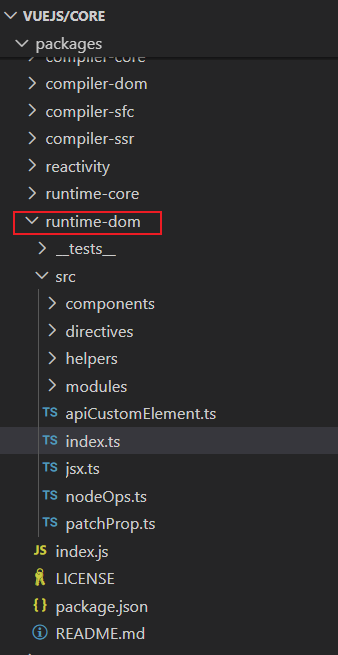
在源码中所在的位置:
二、runtime-dom的核心功能
1.DOM操作之nodeOps
javascript
// 导出 nodeOps 对象,它实现了 Renderer(渲染器)所需的平台相关 DOM 操作方法
// 使用 Omit 排除了 'patchProp' 方法(该方法由其他模块单独实现)
export const nodeOps: Omit<RendererOptions<Node, Element>, 'patchProp'> = {
  // 插入子节点到父节点中,anchor 为插入位置的参考节点(插入到 anchor 之前)
  insert: (child, parent, anchor) => {
    parent.insertBefore(child, anchor || null)
  },

  // 从 DOM 中移除指定子节点
  remove: child => {
    const parent = child.parentNode
    if (parent) {
      parent.removeChild(child)
    }
  },

  // 创建元素节点
  // 参数说明:
  // - tag: 元素标签名
  // - namespace: 命名空间(如 'svg'、'mathml' 或 undefined)
  // - is: 自定义元素的 is 属性(用于 Web Components)
  // - props: 初始化属性(目前仅用于 select 的 multiple 属性)
  createElement: (tag, namespace, is, props): Element => {
    let el: Element

    // 根据命名空间使用不同的 createElementNS 或 createElement
    if (namespace === 'svg') {
      el = doc.createElementNS(svgNS, tag) // SVG 命名空间
    } else if (namespace === 'mathml') {
      el = doc.createElementNS(mathmlNS, tag) // MathML 命名空间
    } else if (is) {
      el = doc.createElement(tag, { is }) // 自定义元素(Web Components)
    } else {
      el = doc.createElement(tag) // 普通 HTML 元素
    }

    // 特殊处理 <select multiple>:某些浏览器需要显式设置 multiple 属性
    if (tag === 'select' && props && props.multiple != null) {
      (el as HTMLSelectElement).setAttribute('multiple', props.multiple)
    }

    return el
  },

  // 创建文本节点
  createText: text => doc.createTextNode(text),

  // 创建注释节点
  createComment: text => doc.createComment(text),

  // 设置文本节点的内容(nodeValue)
  setText: (node, text) => {
    node.nodeValue = text
  },

  // 设置元素的文本内容(textContent)
  setElementText: (el, text) => {
    el.textContent = text
  },

  // 获取节点的父节点(类型断言为 Element | null)
  parentNode: node => node.parentNode as Element | null,

  // 获取节点的下一个兄弟节点
  nextSibling: node => node.nextSibling,

  // 查询选择器(document.querySelector)
  querySelector: selector => doc.querySelector(selector),

  // 设置作用域 ID(用于 scoped CSS)
  // 实际上是给元素添加一个空属性,例如 <div data-v-xxx="">
  setScopeId(el, id) {
    el.setAttribute(id, '')
  },

  // __UNSAFE__(不安全操作)
  // 原因:使用了 innerHTML。
  // 安全前提:静态内容仅来自编译后的模板(用户只使用可信模板时是安全的)
  // 功能:批量插入静态 HTML 内容(用于优化静态节点的渲染性能)
  insertStaticContent(content, parent, anchor, namespace, start, end) {
    // 记录插入前的最后一个子节点(用于后续返回插入范围)
    const before = anchor ? anchor.previousSibling : parent.lastChild

    // 如果提供了缓存的起始/结束节点(start/end),且结构有效,则复用克隆方式插入(性能优化)
    if (start && (start === end || start.nextSibling)) {
      // 缓存路径:克隆已存在的 DOM 节点
      while (true) {
        parent.insertBefore(start!.cloneNode(true), anchor)
        if (start === end || !(start = start!.nextSibling)) break
      }
    } else {
      // 非缓存路径:通过 innerHTML 解析新内容
      // 根据命名空间包裹内容(确保正确解析 SVG/MathML)
      templateContainer.innerHTML = unsafeToTrustedHTML(
        namespace === 'svg'
          ? `<svg>${content}</svg>`
          : namespace === 'mathml'
            ? `<math>${content}</math>`
            : content,
      ) as string

      const template = templateContainer.content // DocumentFragment

      // 如果是 SVG 或 MathML,移除外层包裹标签(因为 innerHTML 需要根元素)
      if (namespace === 'svg' || namespace === 'mathml') {
        const wrapper = template.firstChild!
        while (wrapper.firstChild) {
          template.appendChild(wrapper.firstChild) // 提取内部节点
        }
        template.removeChild(wrapper) // 移除 <svg> 或 <math> 包裹
      }

      // 将解析好的 DocumentFragment 插入到目标位置
      parent.insertBefore(template, anchor)
    }

    // 返回插入内容的第一个和最后一个节点,供后续引用或缓存
    return [
      // 第一个插入的节点
      before ? before.nextSibling! : parent.firstChild!,
      // 最后一个插入的节点
      anchor ? anchor.previousSibling! : parent.lastChild!,
    ]
  },
}
2.属性操作之patchProp
javascript
/**
 * 判断属性名是否为事件处理器(以 on 开头且后接大写字母)
 * @param key 要检测的属性名
 * @returns 布尔值:是否为事件属性
 */
export const isOn = (key) => {
  // 核心逻辑:
  // 1. 字符串长度至少为 3(on + 至少一个大写字母)
  // 2. 前两个字符是 'on'
  // 3. 第三个字符是大写字母(A-Z)
  return key.length > 2 && key[0] === 'o' && key[1] === 'n' && /[A-Z]/.test(key[2])
}
export const patchClass = (el,value)=>{
    if(value == null){
        value = '';
    }
    el.className = value;// 设置样式名
}
export const patchStyle = (el, prev, next) => {
    const style = el.style;
    if (!next) {
        el.removeAttribute('style');
    } else {

        for (const key in next) {
            style[key] = next[key];
        }
        if (prev) {
            for (const key in prev) {
                if (next[key] == null) {
                    style[key] = '';
                }
            }
        }
    }
}
export const patchEvent = (el, rawName, nextValue) => {
    const invokers = el._vei || (el._vei = {});
    const exisitingInvoker = invokers[rawName];
    if (nextValue && exisitingInvoker) { // 如果绑定过,则替换为新的
        exisitingInvoker.value = nextValue;
    } else {
        const name = rawName.slice(2).toLowerCase();
        if (nextValue) {  // 绑定新值
            const invoker = (invokers[rawName] = createInvoker(nextValue));
            el.addEventListener(name, invoker);
        } else if (exisitingInvoker) {
            el.removeEventListener(name, exisitingInvoker);
            invokers[rawName] = undefined;
        }
    }
}
function createInvoker(initialValue) {
    const invoker = (e) => {
        invoker.value(e);
    }
    invoker.value = initialValue;
    return invoker;
}
export const patchAttr = (el, key, value) => {
    if (value == null) {
        el.removeAttribute(key);
    } else {
        el.setAttribute(key, value);
    }
}
function patchProp(el, key, preValue, nextValue) {
    switch (key) {
        case 'class':
                patchClass(el, nextValue);
            break;
        case 'style':
            patchStyle(el, preValue, nextValue);
            break;
        default:
            if (isOn(key)) { // 事件如onClick
                patchEvent(el, key, nextValue);
            } else {
                patchAttr(el, key, nextValue);
            }
            break;
    }
}
以上方法会被传给 runtime-core,由核心模块调用,runtime-core 使用这套接口操作对应平台环境,而无需知道底层是 DOM 还是其他。对于runtime-core,后续会再单独整理成对应文章。
三、总结
runtime-dom是Vue 3 在浏览器环境中的 DOM 操作实现层,提供 createElement, patchProp, insert 等 DOM 操作。目的是解耦核心逻辑与平台细节,支持多端渲染,通过与runtime-core结合使用,把虚拟 DOM 变成真实页面,这也是 runtime-dom主要职责之一。今天简单总结了 runtime-dom的部分核心实现,如果有问题的小伙伴欢迎在评论区沟通交流!