目录
[1 静态算法](#1 静态算法)
[1.1 static-rr](#1.1 static-rr)
[1.2 first](#1.2 first)
[2 动态算法](#2 动态算法)
[2.1 roundrobin](#2.1 roundrobin)
[2.2 leastconn](#2.2 leastconn)
[3 混合算法](#3 混合算法)
[3.1 source](#3.1 source)
[3.2 uri](#3.2 uri)
[3.3 url_param](#3.3 url_param)
[3.4 hdr](#3.4 hdr)
1 静态算法
1.1 static-rr
 # 基于权重的轮询调度。不支持运行时利用socat进行权重的动态调整(只支持0和1,不支持其它值)。
 [root@VSNode ~]# vim /etc/haproxy/haproxy.cfg
  65 # 算法实现
  66 listen webcluster
  67     log         192.168.0.20 local2
  68     bind            *:80
  69     balance     static-rr
  70     server web1 192.168.0.20:80 check inter 3s fall 3 rise 5 weight 2
  71     server web2 192.168.0.30:80 check inter 3s fall 3 rise 5 weight 1
 [root@VSNode ~]# systemctl reload haproxy.service
 # 测试
 [root@Client ~]# for i in {1..6};do curl 172.25.254.100;done
 RS1 - 192.168.0.20
 RS1 - 192.168.0.20
 RS2 - 192.168.0.30
 RS1 - 192.168.0.20
 RS1 - 192.168.0.20
 RS2 - 192.168.0.30
 # 不支持socat热更新
 [root@VSNode ~]# echo "set weight webcluster/web1 1  " | socat stdio /var/lib/haproxy/stats
 Backend is using a static LB algorithm and only accepts weights '0%' and '100%'.
1.2 first
 # 其只会当第一台服务器的连接数达到上限,新请求才会分配给下一台服务。
 [root@VSNode ~]# vim /etc/haproxy/haproxy.cfg
  65 # 算法实现
  66 listen webcluster
  67     log         192.168.0.20 local2
  68     bind            *:80
  69     balance     first
  70     server web1 192.168.0.20:80 maxconn 1 check inter 3s fall 3 rise 5 weight 2
  # maxconn 1表示HAProxy只允许同时1个连接到web1
  71     server web2 192.168.0.30:80 check inter 3s fall 3 rise 5 weight 1
 [root@VSNode ~]# systemctl reload haproxy.service
 # 测试
 # 开两个shell同时测试
 [root@Client ~]# while true; do curl 172.25.254.100; done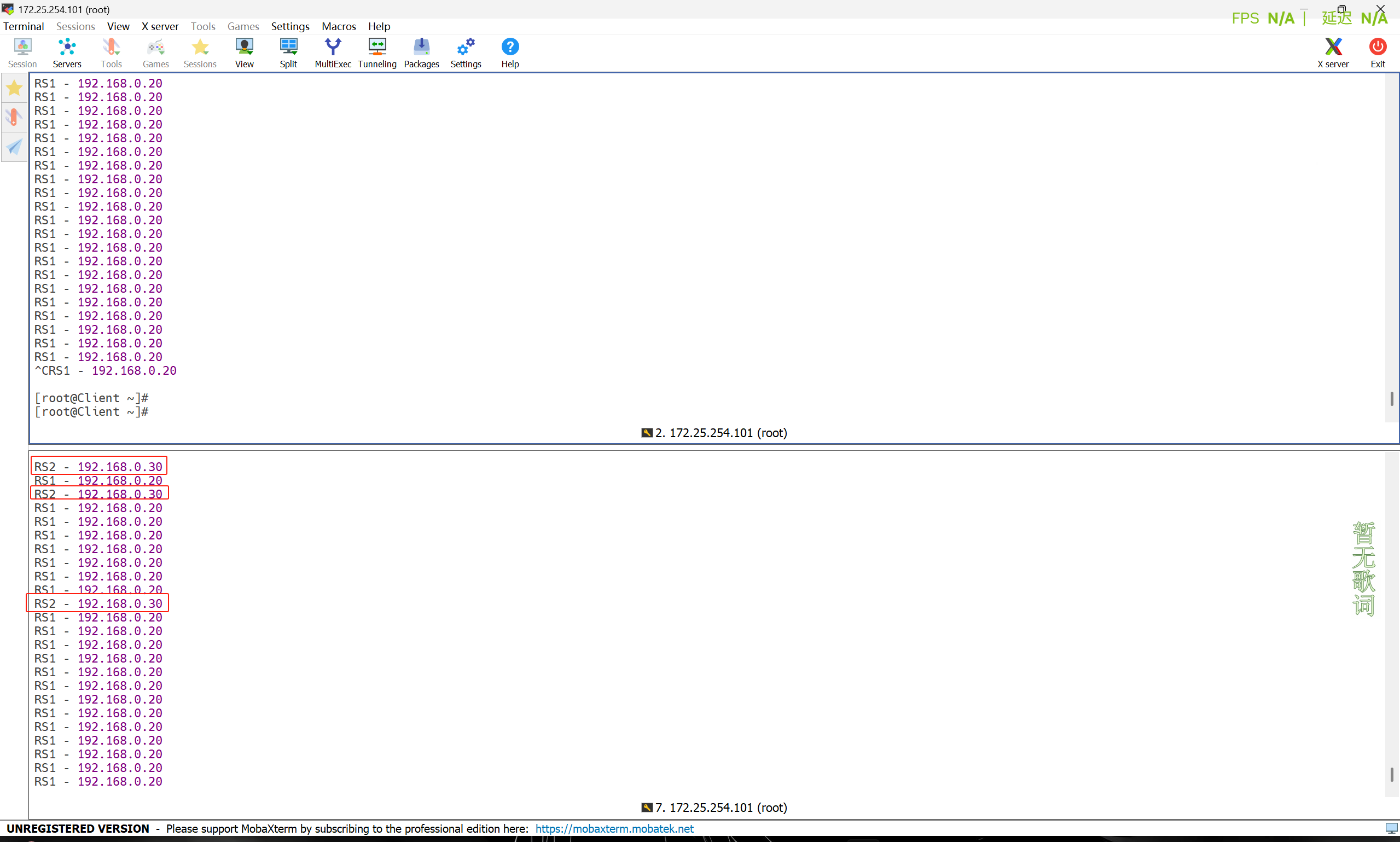
2 动态算法
2.1 roundrobin
# 基于权重的轮询动态调度算法。支持权重的运行时调整,不同于lvs中的rr轮询模式。
[root@VSNode ~]# vim /etc/haproxy/haproxy.cfg
65 # 算法实现
66 listen webcluster
67 log 192.168.0.20 local2
68 bind *:80
69 balance roundrobin
70 server web1 192.168.0.20:80 check inter 3s fall 3 rise 5 weight 2
71 server web2 192.168.0.30:80 check inter 3s fall 3 rise 5 weight 1
[root@VSNode ~]# systemctl reload haproxy.service
# 测试
[root@Client ~]# for i in {1..6};do curl 172.25.254.100;done
RS1 - 192.168.0.20
RS1 - 192.168.0.20
RS2 - 192.168.0.30
RS1 - 192.168.0.20
RS1 - 192.168.0.20
RS2 - 192.168.0.30
# 使用socat热加载
[root@VSNode ~]# echo "get weight webcluster/web1" | socat stdio /var/lib/haproxy/stats
2 (initial 2)
[root@VSNode ~]# echo "set weight webcluster/web1 1" | socat stdio /var/lib/haproxy/stats
[root@VSNode ~]# echo "get weight webcluster/web1" | socat stdio /var/lib/haproxy/stats
1 (initial 2)
# 效果
[root@Client ~]# for i in {1..6};do curl 172.25.254.100;done
RS2 - 192.168.0.30
RS1 - 192.168.0.20
RS2 - 192.168.0.30
RS1 - 192.168.0.20
RS2 - 192.168.0.30
RS1 - 192.168.0.202.2 leastconn
 # leastconn加权的最少连接的动态。根据当前连接最少的后端服务器而非权重进行优先调度。
 [root@VSNode ~]# vim /etc/haproxy/haproxy.cfg
 65 # 算法实现
  66 listen webcluster
  67     log         192.168.0.20 local2
  68     bind            *:80
  69     balance     leastconn
  70     server web1 192.168.0.20:80 check inter 3s fall 3 rise 5 weight 2
  71     server web2 192.168.0.30:80 check inter 3s fall 3 rise 5 weight 1
 [root@VSNode ~]# systemctl reload haproxy.service
 # 效果
 [root@Client ~]# for i in {1..6};do curl 172.25.254.100;done
 RS2 - 192.168.0.30
 RS1 - 192.168.0.20
 RS2 - 192.168.0.30
 RS1 - 192.168.0.20
 RS2 - 192.168.0.30
 RS1 - 192.168.0.20
3 混合算法
3.1 source
 # 此方法默认是静态的,即不支持在线调整权重,不支持慢启动,可实现对后端服务器均衡调度。基于客户端IP哈希而实现会话保持。
 [root@VSNode ~]# vim /etc/haproxy/haproxy.cfg
  65 # 算法实现
  66 listen webcluster
  67     log         192.168.0.20 local2
  68     bind            *:80
  69     balance     source
  70     server web1 192.168.0.20:80 check inter 3s fall 3 rise 5 weight 2
  71     server web2 192.168.0.30:80 check inter 3s fall 3 rise 5 weight 1
[root@VSNode ~]# systemctl reload haproxy.service 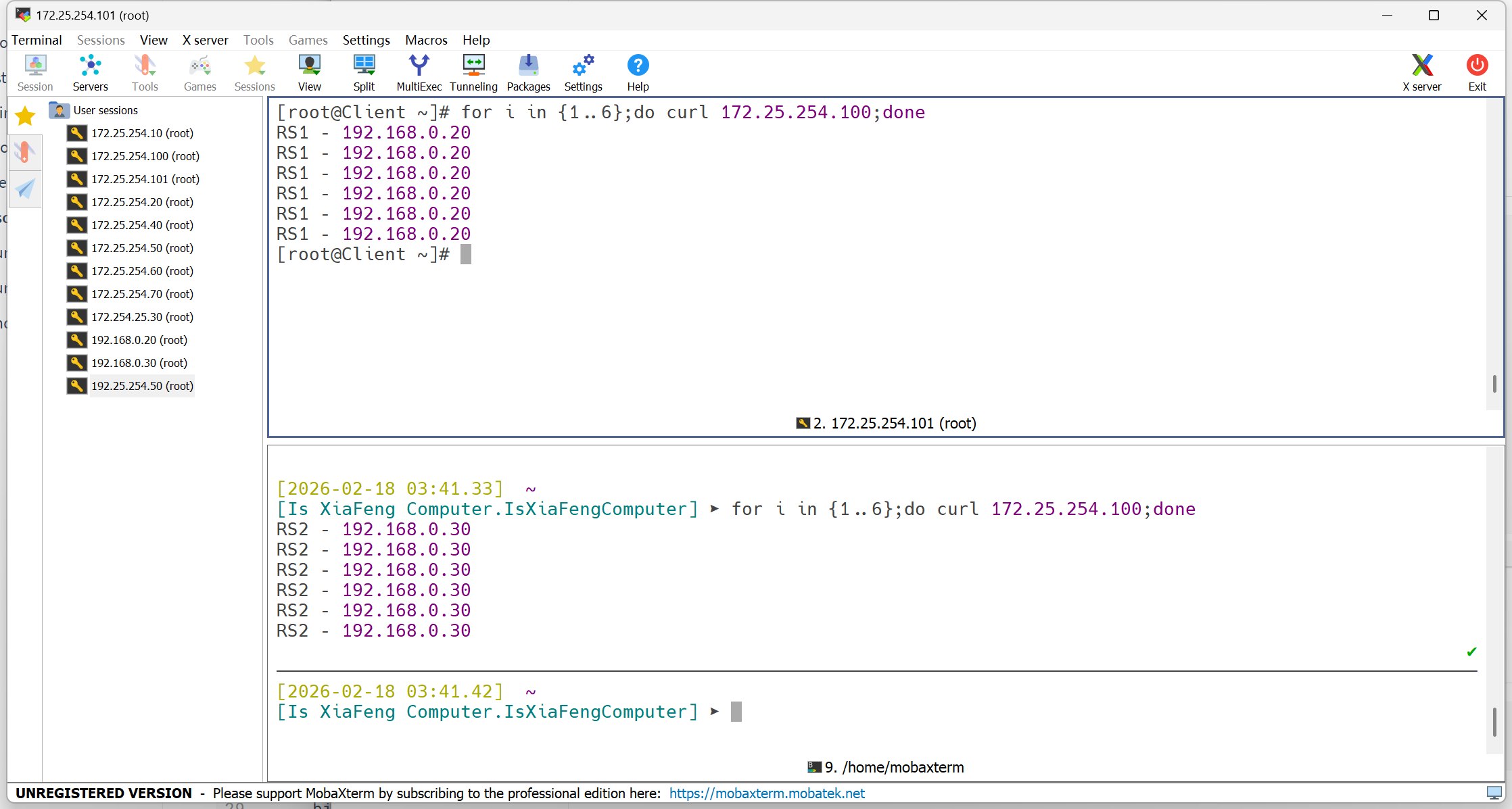
 # 动态实现
 [root@VSNode ~]# vim /etc/haproxy/haproxy.cfg
  65 # 算法实现
  66 listen webcluster
  67     log         192.168.0.20 local2
  68     bind            *:80
  69     balance     source
  70     hash-type   consistent
  71     server web1 192.168.0.20:80 check inter 3s fall 3 rise 5 weight 2
  72     server web2 192.168.0.30:80 check inter 3s fall 3 rise 5 weight 1
 [root@VSNode ~]# systemctl reload haproxy.service
3.2 uri
# 基于对用户请求的URI的左半部分或整个uri做hash,再将hash结果对总权重进行取模后根据最终结果将请求转发到后端指定服务器。
# 真实主机:
[root@RS1 ~]# echo "RS1 - 192.168.0.20 - index.html" > /var/www/html/index.html
[root@RS1 ~]# echo "RS1 - 192.168.0.20 - index1.html" > /var/www/html/index1.html
[root@RS2 ~]# echo "RS1 - 192.168.0.20 - index2.html" > /var/www/html/index2.html
[root@RS1 ~]# systemctl reload httpd
[root@RS2 ~]# echo "RS2 - 192.168.0.30 - index.html" > /var/www/html/index.html
[root@RS2 ~]# echo "RS2 - 192.168.0.30 - index1.html" > /var/www/html/index1.html
[root@RS2 ~]# echo "RS2 - 192.168.0.30 - index2.html" > /var/www/html/index2.html
[root@RS2 ~]# httpd -k graceful
AH00558: httpd: Could not reliably determine the server's fully qualified domain name, using 192.168.0.30. Set the 'ServerName' directive globally to suppress this message
# 调度器:
[root@VSNode ~]# vim /etc/haproxy/haproxy.cfg
65 # 算法实现
66 listen webcluster
67 log 192.168.0.20 local2
68 bind *:80
69 balance uri
70 hash-type consistent
71 server web1 192.168.0.20:80 check inter 3s fall 3 rise 5 weight 2
72 server web2 192.168.0.30:80 check inter 3s fall 3 rise 5 weight 1
[root@VSNode ~]# systemctl reload haproxy.service
#测试
[root@Client ~]# for i in {1..4};do curl 172.25.254.100/index.html;done
RS1 - 192.168.0.20 - index.html
RS1 - 192.168.0.20 - index.html
RS1 - 192.168.0.20 - index.html
RS1 - 192.168.0.20 - index.html
[root@Client ~]# for i in {1..4};do curl 172.25.254.100/index1.html;done
RS1 - 192.168.0.20 - index1.html
RS1 - 192.168.0.20 - index1.html
RS1 - 192.168.0.20 - index1.html
RS1 - 192.168.0.20 - index1.html
[root@Client ~]# for i in {1..4};do curl 172.25.254.100/index2.html;done
RS2 - 192.168.0.30 - index2.html
RS2 - 192.168.0.30 - index2.html
RS2 - 192.168.0.30 - index2.html
RS2 - 192.168.0.30 - index2.html3.3 url_param
# 对用户请求的url中的 params 部分中的一个参数key对应的value值作hash计算,并由服务器总权重相除,之后派发至某挑出的服务器。
[root@VSNode ~]# vim /etc/haproxy/haproxy.cfg
65 # 算法实现
66 listen webcluster
67 log 192.168.0.20 local2
68 bind *:80
69 balance url_param name
70 hash-type consistent
71 server web1 192.168.0.20:80 check inter 3s fall 3 rise 5 weight 2
72 server web2 192.168.0.30:80 check inter 3s fall 3 rise 5 weight 1
[root@VSNode ~]# systemctl reload haproxy.service
# 测试
[root@Client ~]# for i in {1..4};do curl 172.25.254.100/index1.html?name=xixi;done
RS1 - 192.168.0.20 - index1.html
RS1 - 192.168.0.20 - index1.html
RS1 - 192.168.0.20 - index1.html
RS1 - 192.168.0.20 - index1.html
[root@Client ~]# for i in {1..4};do curl 172.25.254.100/index1.html?name=buxixi;done
RS2 - 192.168.0.30 - index1.html
RS2 - 192.168.0.30 - index1.html
RS2 - 192.168.0.30 - index1.html
RS2 - 192.168.0.30 - index1.html
[root@Client ~]# for i in {1..4};do curl 172.25.254.100/index2.html?name=xixi;done
RS1 - 192.168.0.20 - index2.html
RS1 - 192.168.0.20 - index2.html
RS1 - 192.168.0.20 - index2.html
RS1 - 192.168.0.20 - index2.html
[root@Client ~]# for i in {1..4};do curl 172.25.254.100/index2.html?name=buxixi;done
RS2 - 192.168.0.30 - index2.html
RS2 - 192.168.0.30 - index2.html
RS2 - 192.168.0.30 - index2.html
RS2 - 192.168.0.30 - index2.html3.4 hdr
# 针对用户每个http头部(header)请求中的指定信息做hash(此处由 name 指定的http首部将会被取出并做hash计算)。
[root@VSNode ~]# vim /etc/haproxy/haproxy.cfg
 65 # 算法实现
 66 listen webcluster
 67     log         192.168.0.20 local2
 68     bind            *:80
 69     balance      hdr(User-Agent)
 70     hash-type   consistent
 71     server web1 192.168.0.20:80 check inter 3s fall 3 rise 5 weight 2
 72     server web2 192.168.0.30:80 check inter 3s fall 3 rise 5 weight 1
[root@VSNode ~]# systemctl reload haproxy.service
[root@Client ~]# curl -A "xixi" 172.25.254.100
RS1 - 192.168.0.20 - index.html
[root@Client ~]# curl -A "buxixi" 172.25.254.100
RS2 - 192.168.0.30 - index.html