Paging是什么?
Paging 用于加载和显示分页数据
- 分页数据的内存中缓存。该功能有助于确保您的应用在处理分页数据时高效使用系统资源。
- 内置的请求去重功能,可确保您的应用高效利用网络带宽和系统资源。
- 可配置的 RecyclerView 适配器,会在用户滚动到已加载数据的末尾时自动请求数据。
- 对 Kotlin 协程和数据流以及 LiveData 和 RxJava 的一流支持。
- 内置对错误处理功能的支持,包括刷新和重试功能。
Paging架构
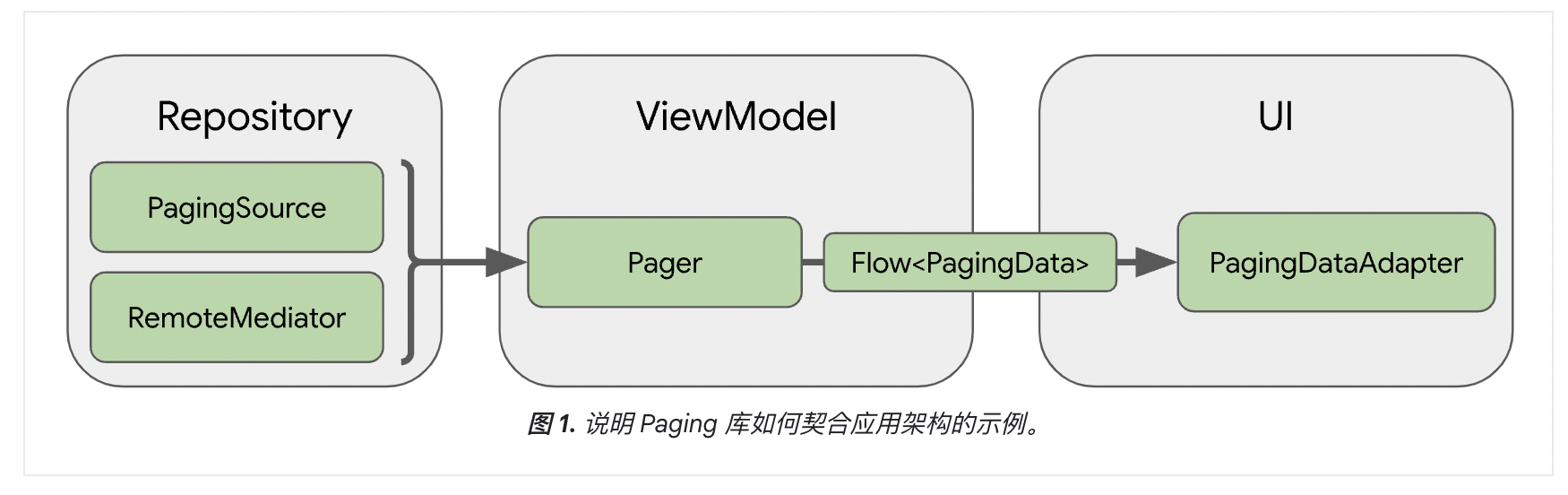
- PagingSource 对象定义了数据源,以及如何从该数据源检索数据
- RemoteMediator 对象会处理来自分层数据源(例如具有本地数据库缓存的网络数据源)的分页
- Pager基于PagingSource和PagingConfig构造Flow<PagingData>
- PagingData 是用于存放分页数据快照的容器。它会查询 PagingSource 对象并存储结果
- PagingDataAdapter,是一种处理分页数据的RecyclerView.Adapter
Paging实现
依赖
def paging_version = "3.4.1"

  implementation "androidx.paging:paging-runtime:$paging_version"

  // alternatively - without Android dependencies for tests
  testImplementation "androidx.paging:paging-common:$paging_version"

  // optional - RxJava2 support
  implementation "androidx.paging:paging-rxjava2:$paging_version"

  // optional - RxJava3 support
  implementation "androidx.paging:paging-rxjava3:$paging_version"

  // optional - Guava ListenableFuture support
  implementation "androidx.paging:paging-guava:$paging_version"

  // optional - Jetpack Compose integration
  implementation "androidx.paging:paging-compose:3.4.1"
Bean
public class User {
    public int id;
    public String name;
    public int age;

    public User(int id, String name, int age) {
        this.id = id;
        this.name = name;
        this.age = age;
    }
}
PagingSource<Key, Value>
数据源,Key定义了用于加载数据的标识符,Value是数据本身的类型
- 如需使用 RxJava,实现 RxPagingSource
- 如需使用 Guava 中的 ListenableFuture,实现 ListenableFuturePagingSource
java
public class UserPagingSource extends PagingSource<Integer, User> {
    private final static String TAG = "UserPagingSource";

    // 模拟从网络加载数据
    private List<User> loadUsersFromNetwork(int page, int pageSize) {
        List<User> users = new ArrayList<>();
        // 模拟每页返回 10 条数据
        int startIndex = (page - 1) * pageSize + 1;
        for (int i = 0; i < pageSize; i++) {
            users.add(new User(startIndex + i, "用户" + (startIndex + i), i + 1));
        }
        return users;
    }

    @Nullable
    @Override
    public Object load(@NonNull LoadParams<Integer> params,
                       @NonNull Continuation<? super LoadResult<Integer, User>> continuation) {
        try {
            // 获取页码(第一页是 null,第二页开始是具体的页码)
            int page = params.getKey() == null ? 1 : params.getKey();
            int pageSize = params.getLoadSize();
            Log.d(TAG, "正在加载第 " + page + " 页" + ", LoadSize = " + pageSize);

            // 模拟网络延迟
            Thread.sleep(2000); // 2秒延迟,模拟网络请求
            // 模拟网络请求(实际项目中这里是调用 API)
            List<User> users = loadUsersFromNetwork(page, pageSize);

            Log.d(TAG, "第 " + page + " 页加载完成,数据量: " + users.size());

            // 返回数据页
            return new LoadResult.Page<>(
                    users,                           // 数据列表
                    page > 1 ? page - 1 : null,    // 前一页(如果是第一页,传 null)
                    users.size() == pageSize ? page + 1 : null  // 后一页(还有数据就传下一页,否则传 null)
            );
        } catch (Exception e) {
            return new LoadResult.Error<>(e);
        }
    }


    // 确定刷新时从哪个位置开始加载数据,以保持用户的浏览位置
    @Nullable
    @Override
    public Integer getRefreshKey(@NonNull PagingState<Integer, User> state) {
        // 获取锚点位置(当前可见的第一个位置)
        Integer anchorPosition = state.getAnchorPosition();
        if (anchorPosition == null) {
            return null; // 没有可见位置,无法确定刷新键
        }

        // 找到距离锚点位置最近的页面
        LoadResult.Page<Integer, User> anchorPage = state.closestPageToPosition(anchorPosition);
        if (anchorPage == null) {
            return null; // 没有找到页面
        }

        // 获取前一页的键
        Integer prevKey = anchorPage.getPrevKey();
        if (prevKey != null) {
            return prevKey + 1; // 返回下一页的键
        }

        // 获取下一页的键
        Integer nextKey = anchorPage.getNextKey();
        if (nextKey != null) {
            return nextKey - 1; // 返回前一页的键
        }

        // 都没有键,返回 null(初始页)
        return null;
    }
}
load()获取分页数据
- LoadParams 为加载信息,包含键和项数等
- LoadResult 为加载结果,成功返回 LoadResult.Page,失败返回 LoadResult.Error
getRefreshKey()当数据在初始加载后刷新或失效时,返回传递给 load() 方法的键。在后续刷新数据时,会自动调用此方法
PagingData
通过Pager 获取来自 PagingSource 的 PagingData 对象的响应式流,如返回LiveData
java
public class UserRepository {

    public LiveData<PagingData<User>> getUsers() {
        // 创建分页配置
        Pager<Integer, User> pager = new Pager<>(
                new PagingConfig(
                        10,     // 每次加载的数据条数
                        5,            // 距离列表末尾还有多少条数据时开始预加载
                        true,         // 加载期间是否使用空白占位符
                        20,          // 首次加载的数据量
                        200         // 内存中最多缓存多少条数据
                ),
                () -> new UserPagingSource() // 数据源
        );
        return PagingLiveData.getLiveData(pager);
    }
}
java
public class UserViewModel extends ViewModel {
    private final UserRepository repository = new UserRepository();

    public LiveData<PagingData<User>> getUsers() {
        return repository.getUsers();
    }
}
PagingDataAdapter
RecycleView适配器继承PagingDataAdapter
java
public class UserAdapter extends PagingDataAdapter<User, UserAdapter.UserViewHolder> {

    // 比较规则(用于判断数据是否相同)
    private static final DiffUtil.ItemCallback<User> DIFF_CALLBACK = new DiffUtil.ItemCallback<User>() {
        @Override
        public boolean areItemsTheSame(User oldItem, User newItem) {
            return oldItem.id == newItem.id;
        }

        @Override
        public boolean areContentsTheSame(User oldItem, User newItem) {
            return oldItem.name.equals(newItem.name) && oldItem.age == newItem.age;
        }
    };

    public UserAdapter() {
        super(DIFF_CALLBACK);
    }

    @NonNull
    @Override
    public UserViewHolder onCreateViewHolder(@NonNull ViewGroup parent, int viewType) {
        View view = LayoutInflater.from(parent.getContext()).inflate(R.layout.item_user, parent, false);
        return new UserViewHolder(view);
    }

    @Override
    public void onBindViewHolder(UserViewHolder holder, int position) {
        User user = getItem(position);
        if (user != null) {
            holder.bind(user);
        }
    }

    public static class UserViewHolder extends RecyclerView.ViewHolder {
        TextView tvName, tvAge;

        UserViewHolder(View itemView) {
            super(itemView);
            tvName = itemView.findViewById(R.id.tv_name);
            tvAge = itemView.findViewById(R.id.tv_age);
        }

        void bind(User user) {
            tvName.setText(user.name);
            tvAge.setText(String.valueOf(user.age));
        }
    }
}
MainActivity
获取LiveData,通过submitData提交数据
java
public class MainActivity extends AppCompatActivity {
    private RecyclerView recyclerView;
    private UserAdapter adapter;
    private UserViewModel viewModel;

    @Override
    protected void onCreate(Bundle savedInstanceState) {
        super.onCreate(savedInstanceState);
        setContentView(R.layout.activity_main);
        viewModel = new ViewModelProvider(this).get(UserViewModel.class);
        initView();
        initData();
        initListener();
    }

    private void initListener() {
        viewModel.getUsers().observe(this, pagingData -> {
            adapter.submitData(getLifecycle(), pagingData);
        });
    }

    private void initData() {
        recyclerView.setLayoutManager(new LinearLayoutManager(this));
        adapter = new UserAdapter();
        recyclerView.setAdapter(adapter);
    }

    private void initView() {
        recyclerView = findViewById(R.id.recyclerView);
    }
}
activity_main.xml
xml
<?xml version="1.0" encoding="utf-8"?>
<androidx.constraintlayout.widget.ConstraintLayout xmlns:android="http://schemas.android.com/apk/res/android"
    xmlns:app="http://schemas.android.com/apk/res-auto"
    xmlns:tools="http://schemas.android.com/tools"
    android:id="@+id/main"
    android:layout_width="match_parent"
    android:layout_height="match_parent"
    tools:context=".MainActivity">

    <androidx.recyclerview.widget.RecyclerView
        android:id="@+id/recyclerView"
        android:layout_width="match_parent"
        android:layout_height="match_parent" />

</androidx.constraintlayout.widget.ConstraintLayout>
item_user.xml
xml
<LinearLayout xmlns:android="http://schemas.android.com/apk/res/android"
    android:layout_width="match_parent"
    android:layout_height="50dp"
    android:gravity="left"
    android:layout_marginTop="25dp"
    android:orientation="horizontal">

    <TextView
        android:id="@+id/tv_name"
        android:layout_width="wrap_content"
        android:layout_height="wrap_content"
        android:layout_marginLeft="10dp"
        android:layout_gravity="center"
        android:text="用户A"
        android:textSize="16sp" />

    <TextView
        android:id="@+id/tv_age"
        android:layout_width="wrap_content"
        android:layout_height="wrap_content"
        android:layout_gravity="center"
        android:layout_marginLeft="50dp"
        android:text="20"
        android:textSize="14sp" />

</LinearLayout>