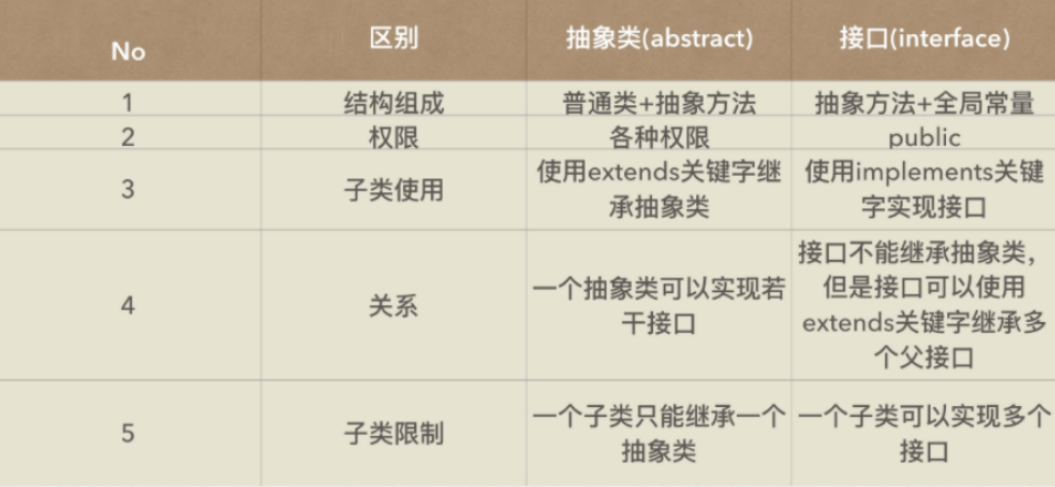
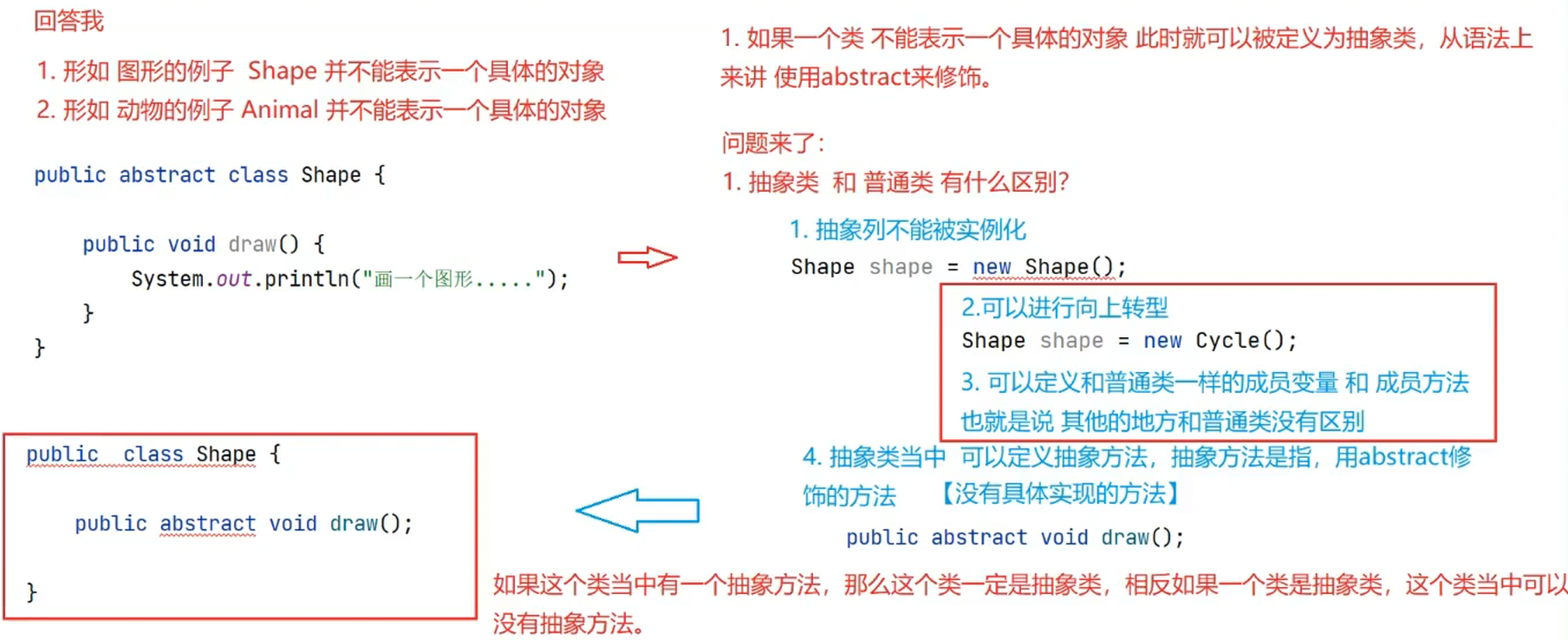
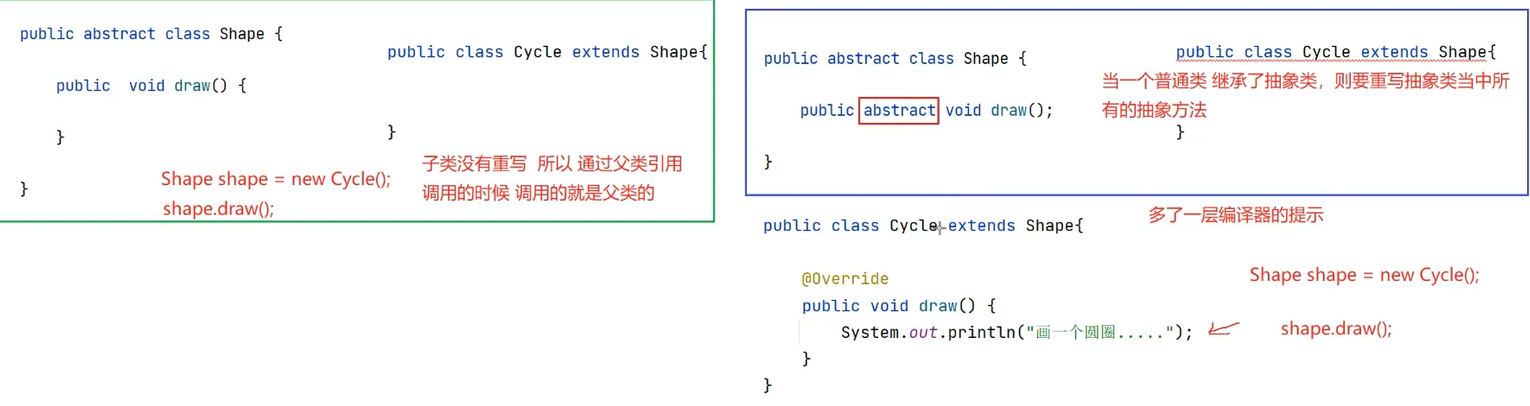
public abstract class Cycle extends Shape {

    public abstract void test();
}

class A extends Cycle {

    @Override
    public void test() {
        // 方法体(当前为空)
    }

    @Override
    public void draw() {
        // 方法体(当前为空)
    }
}
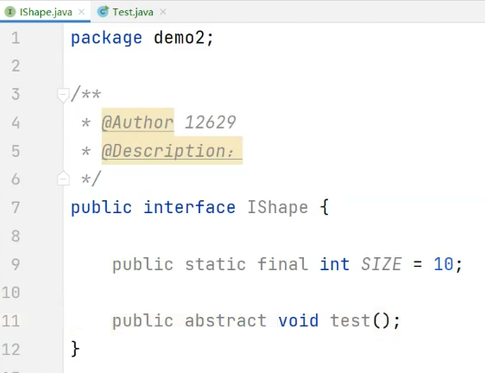
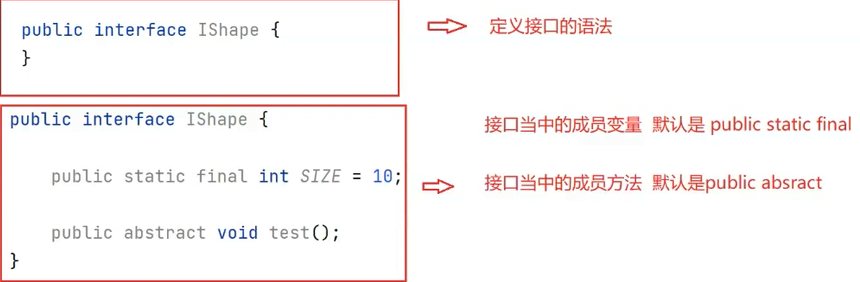
public interface 接口名称 {
    // 抽象方法

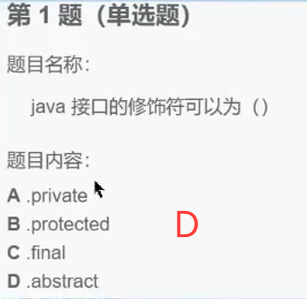
    // 方式1: public abstract是固定搭配,可以不写
    public abstract void method1();

    // 方式2
    public void method2();

    // 方式3
    abstract void method3();

    // 方式4 (推荐)
    void method4();

    // 注意:在接口中上述写法都是抽象方法,更推荐方式4,代码更简洁
}
提示:
创建接口时,接口的命名一般以大写字母 I 开头。
接口的命名一般使用"形容词"词性的单词。
阿里编码规范中约定,接口中的方法和属性不要加任何修饰符号,保持代码的简洁性。
2.3 接口使用
接口不能直接使用,必须要有一个"实现类"来"实现"该接口,实现接口中的所有抽象方法。
java复制代码
public class 类名称 implements 接口名称 {
    // ...
}
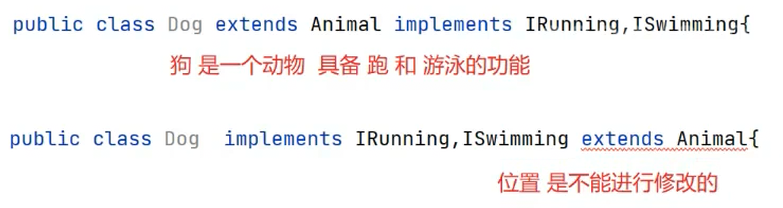
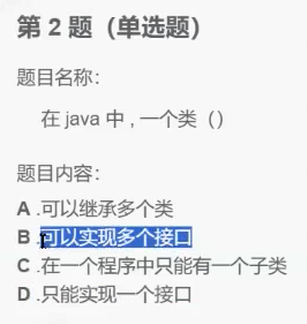
注意 :子类和父类之间是 extends继承关系,类与接口之间是 implements实现关系。
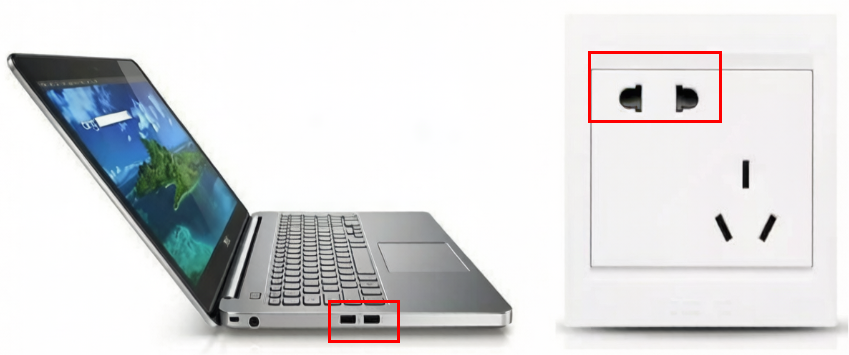
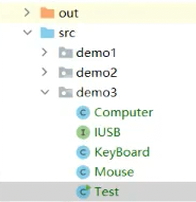
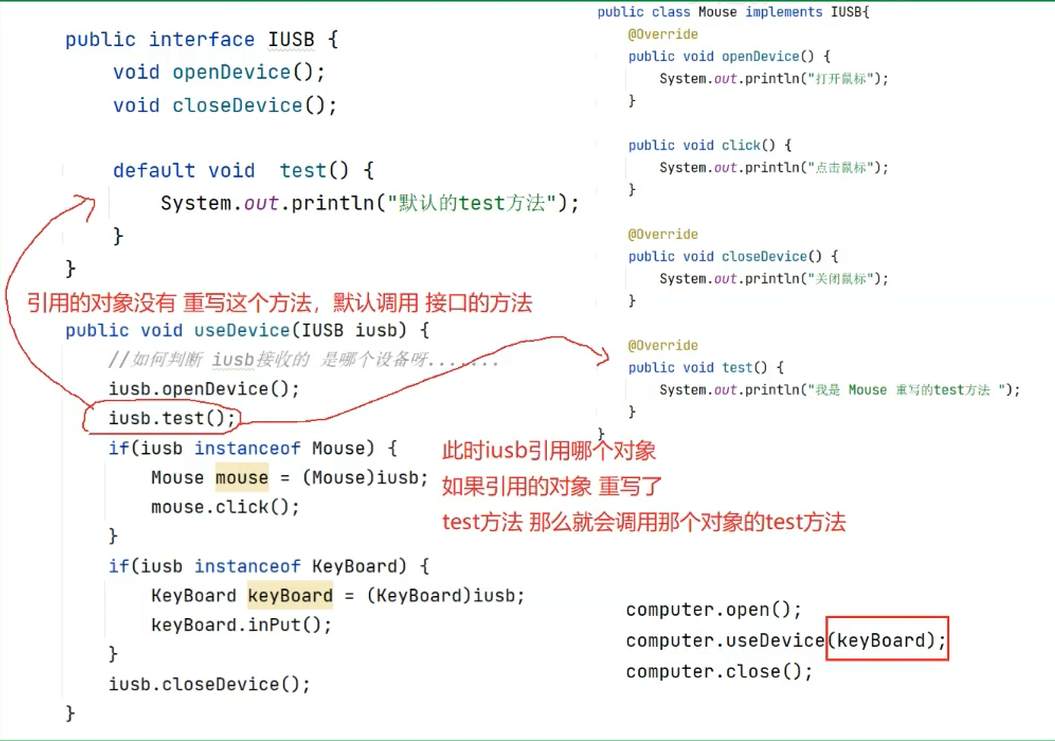
实例说明:实现笔记本电脑使用USB鼠标、USB键盘的例子
USB接口:包含打开设备、关闭设备功能
笔记本类:包含开机功能、关机功能、使用USB设备功能
鼠标类:实现USB接口,并具备点击功能
键盘类:实现USB接口,并具备输入功能
1. USB接口
java复制代码
public interface USB {
    void openDevice();
    void closeDevice();
}
2. Mouse鼠标类
java复制代码
public class Mouse implements USB {
    @Override
    public void openDevice() {
        System.out.println("打开鼠标");
    }

    @Override
    public void closeDevice() {
        System.out.println("关闭鼠标");
    }

    public void click() {
        System.out.println("鼠标点击");
    }
}
3. KeyBoard键盘类
java复制代码
public class KeyBoard implements USB {
    @Override
    public void openDevice() {
        System.out.println("打开键盘");
    }

    @Override
    public void closeDevice() {
        System.out.println("关闭键盘");
    }

    public void inPut(){
        System.out.println("键盘输入");
    }
}
4. Computer笔记本电脑类
java复制代码
public class Computer {
    public void powerOn() {
        System.out.println("打开笔记本电脑");
    }

    public void powerOff() {
        System.out.println("关闭笔记本电脑");
    }

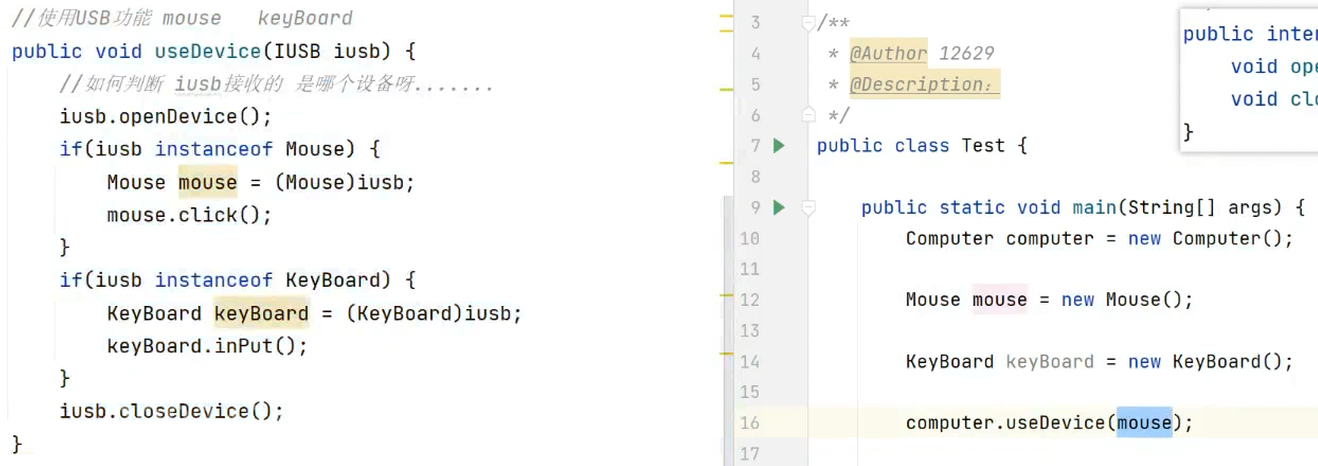
    public void useDevice(USB usb) {
        usb.openDevice();
        if(usb instanceof Mouse){
            Mouse mouse = (Mouse)usb;
//上面一行要向下转型是因为:
//函数接收参数的时候有向上转型,根据原则:
//通过父类引用(此处为接口)只能调用
//自己的方法
//和子类重写接口的方法(发生动态绑定,调取子类自己的方法)
//所以此处需要向下转型
            mouse.click();
        }else if(usb instanceof KeyBoard){
            KeyBoard keyBoard = (KeyBoard)usb;
            keyBoard.inPut();
        }
        usb.closeDevice();
    }
}
5. TestUSB测试类
java复制代码
public class TestUSB{
    public static void main(String[] args) {
        Computer computer = new Computer();
        computer.powerOn();

        //使用鼠标设备
        computer.useDevice(new Mouse());

        //使用键盘设备
        computer.useDevice(new KeyBoard());

        computer.powerOff();
    }
}
程序说明:
这是一个完整的面向对象多态编程示例:
USB接口定义了设备连接的通用协议(打开/关闭)
Mouse 和 KeyBoard 类实现了该接口,并各自有专有功能
Computer 类通过接口引用接收设备,运行时判断具体类型来调用特有方法
TestUSB 展示了接口多态的实际使用场景
执行结果会是:
打开笔记本电脑
打开鼠标
鼠标点击
关闭鼠标
打开键盘
键盘输入
关闭键盘
关闭笔记本电脑
13.250317-抽象类和接口--01:42:00->02:14:10
2.4 接口的九种特性
1. 特性一
**特性:** 接口类型是一种引用类型,但是不能直接new接口的对象
java复制代码
public class TestUSB {
    public static void main(String[] args) {
        USB usb = new USB();
    }
}
class Student {
    public String name;
    public int score;

    public Student(String name, int score) {
        this.name = name;
        this.score = score;
    }

    @Override
    public String toString() {
        return "[" + this.name + ":" + this.score + "]";
    }
}
java复制代码
class Test {
    public static void main(String[] args) {
        Student s1 = new Student("张三", 10);
        Student s2 = new Student("李四", 20);

        // 这里会编译报错
        System.out.println(s1 > s2);
    }
}
此时程序会编译报错,并没有指定根据分数还是什么进行大小比较。所以,应该指定以什么样的方式进行比较。
不太好的点是,只要按照该方式比较后,不灵活。无法按照其他方式进行比较
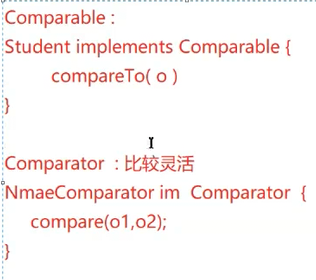
方式一:使用Comparable接口
使用Comparable接口
java复制代码
public class Student implements Comparable<Student> {
    public String name;
    public int age;
    public double score;

    public Student(String name, int age, double score) {
        this.name = name;
        this.age = age;
        this.score = score;
    }

    @Override
    public String toString() {
        return "Student{" +
            "name='" + name + '\'' +
            ", age=" + age +
            ", score=" + score +
            '}';
    }

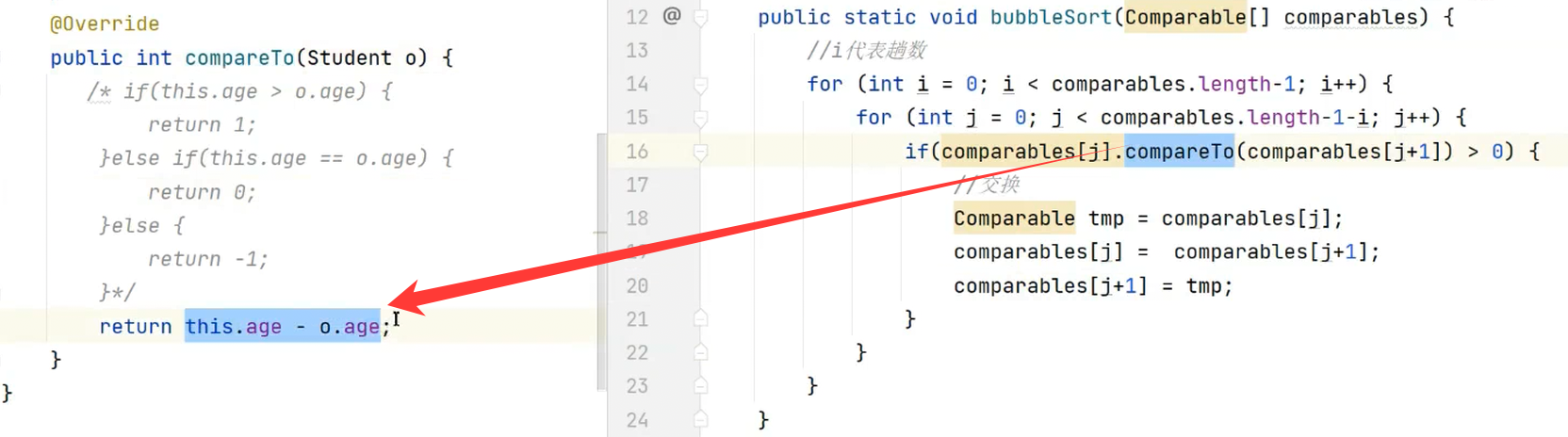
    @Override
    public int compareTo(Student o) {
        /* if(this.age > o.age) {
            return 1;
        } else if(this.age == o.age) {
            return 0;
        } else {
            return -1;
        } */
        return this.age - o.age;
    }
}
java复制代码
public class Test {
    public static void main(String[] args) {
        Student student1 = new Student("zhangsan", 10, 89.3);
        Student student2 = new Student("lisi", 5, 90.29);

        if(student1.compareTo(student2) > 0) {
            System.out.println("s1 > s2");
        }
    }
}
14.250319-接口--00:36:30->00:56:00
让我们的Student类实现Comparable接口,并实现其中的compareTo方法
java复制代码
class Student implements Comparable {
  private String name;
  private int score;

  public Student(String name, int score) {
    this.name = name;
    this.score = score;
  }

  @Override
  public String toString() {
    return "[" + this.name + ":" + this.score + "]";
  }

  @Override
  public int compareTo(Object o) { //用Object比较少,最多的还是我上方的代码截图
    Student s = (Student)o;
    if (this.score > s.score) {
      return -1;
    } else if (this.score < s.score) {
      return 1;
    } else {
      return 0;
    }
  }
}
java复制代码
public class Test {
  public static void main(String[] args) {
    Student s1 = new Student("zhangsan",10);
    Student s2 = new Student("lisi",20);
    System.out.println(s1.compareTo(s2));
  }
}
如果s1大于s2那么返回大于0的数字, 如果相同返回0, 否则返回小于0的数字。
方式二:使用Comparator接口
使用Comparator接口:
AgeComparator.java(年龄比较器)
java复制代码
public class AgeComparator implements Comparator<Student> {
    @Override
    public int compare(Student o1, Student o2) {
        return o1.age - o2.age;
    }
}
ScoreComparator.java(分数比较器)
java复制代码
public class ScoreComparator implements Comparator<Student> {
    @Override
    public int compare(Student o1, Student o2) {
        return (int)(o1.score - o2.score);
    }
}
Test.java(测试类)
java复制代码
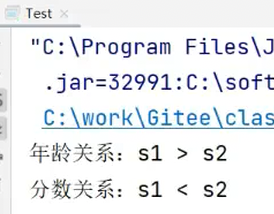
public class Test {
    public static void main(String[] args) {
        Student student1 = new Student("zhangsan", 10, 89.3);
        Student student2 = new Student("lisi", 5, 90.29);

        // 使用年龄比较器
        AgeComparator ageComparator = new AgeComparator();
        int ret = ageComparator.compare(student1, student2);
        if (ret > 0) {
            System.out.println("年龄关系:s1>s2");
        }

        // 使用分数比较器
        ScoreComparator scoreComparator = new ScoreComparator();
        int ret2 = scoreComparator.compare(student1, student2);
        if (ret2 > 0) {
            System.out.println("分数关系:s1>s2");
        } else {
            System.out.println("分数关系:s1<s2");
        }
    }
}
1. String类的接口实现
java复制代码
public final class String
    implements java.io.Serializable, Comparable<String>, CharSequence,
    Constable, ConstantDesc {
    // 类体内容...
}
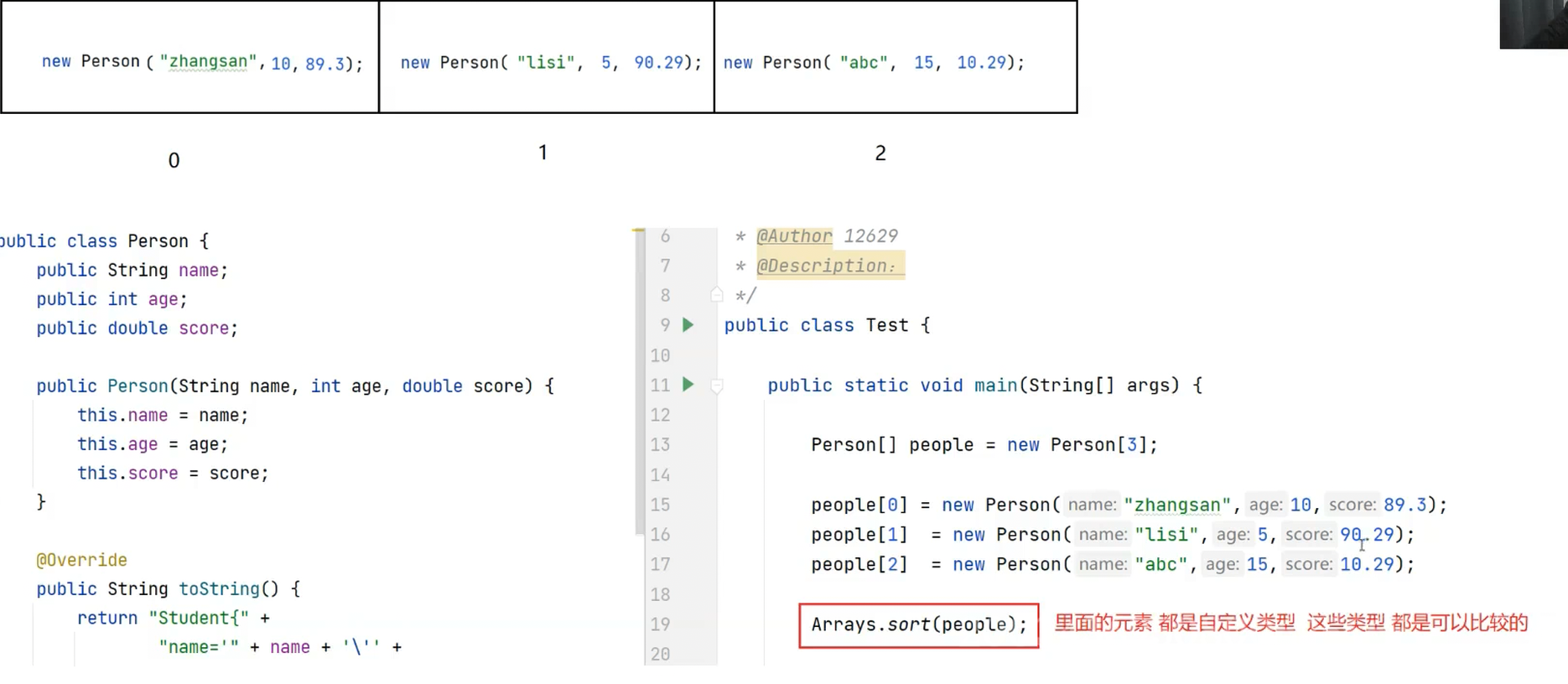
public class Person implements Comparable<Person> {
    public String name;
    public int age;
    public double score;

    public Person(String name, int age, double score) {
        this.name = name;
        this.age = age;
        this.score = score;
    }

    @Override
    public String toString() {
        return "Student{" +
                "name='" + name + '\'' +
                ", age=" + age +
                ", score=" + score +
                '}';
    }

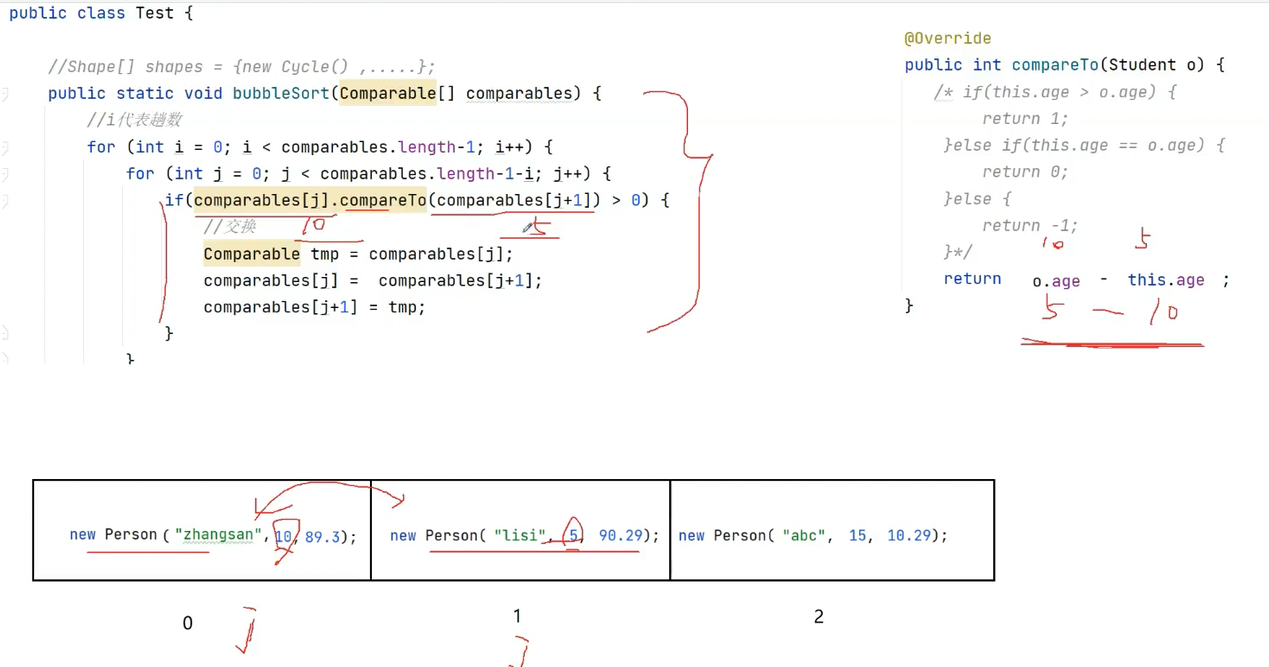
    @Override
    public int compareTo(Person o) {
        // 从小到大比较
        // return this.age - o.age;
        return o.age - this.age;
    }
}
java复制代码
import java.util.Arrays;

public class Test {
    public static void main(String[] args) {
        // 1. 创建Person数组并初始化
        Person[] people = new Person[3];
        people[0] = new Person("zhangsan", 10, 89.3);
        people[1] = new Person("lisi", 5, 90.29);
        people[2] = new Person("abc", 15, 10.29);

        // 2. 对Person数组排序
        Arrays.sort(people);
        System.out.println(Arrays.toString(people));

        System.out.println("=================");

        // 3. 创建并排序基本类型数组
        int[] array = {1, 12, 31, 14, 5};
        Arrays.sort(array);
        System.out.println(Arrays.toString(array));
    }
}
14.250319-接口--01:25:35->01:45:00
补充2:Arrays.sort方法传入一个比较器
ScoreComparator.java(分数比较器)
java复制代码
public class ScoreComparator implements Comparator<Student> {
    @Override
    public int compare(Student o1, Student o2) {
        return (int)(o1.score - o2.score);
    }
}
Test.java(测试主类)
java复制代码
import java.util.Arrays;

public class Test {
    public static void main(String[] args) {
        Student[] students = new Student[3];
        students[0] = new Student("zhangsan", 10, 89.3);
        students[1] = new Student("lisi", 5, 90.29);
        students[2] = new Student("abc", 15, 10.29);

        ScoreComparator scoreComparator = new ScoreComparator();
        Arrays.sort(students, scoreComparator);

        System.out.println(Arrays.toString(students));
    }
}
class Student {
    public String name;
    public int score;

    public Student(String name, int score) {
        this.name = name;
        this.score = score;
    }

    @Override
    public String toString() {
        return "(" + this.name + ":" + this.score + ")";
    }
}

class ScoreComparator implements Comparator<Student> {
    @Override
    public int compare(Student o1, Student o2) {
        return o1.score - o2.score;
    }
}

class NameComparator implements Comparator<Student> {
    @Override
    public int compare(Student o1, Student o2) {
        return o1.name.compareTo(o2.name);
    }
}
java复制代码
public class Test {
    public static void main(String[] args) {
        Student s1 = new Student("zhangsan", 10);
        Student s2 = new Student("lisi", 20);

        // 根据分数进行比较
        ScoreComparator scoreComparator = new ScoreComparator();
        System.out.println(scoreComparator.compare(s1, s2));

        // 根据姓名进行比较
        NameComparator nameComparator = new NameComparator();
        System.out.println(nameComparator.compare(s1, s2));
    }
}
2.8 Clonable 接口和深拷贝:
Person.java
java复制代码
package demo3;

public class Person {
    public String name;
    public int age;
    public double score;

    public Person(String name, int age, double score) {
        this.name = name;
        this.age = age;
        this.score = score;
    }

    @Override
    public String toString() {
        return "Student{" +
                "name='" + name + '\'' +
                ", age=" + age +
                ", score=" + score +
                '}';
    }

    @Override
    protected Object clone() throws CloneNotSupportedException {
        return super.clone();
    }
}
Test.java
java复制代码
package demo3;

public class Test {
    public static void main(String[] args) throws CloneNotSupportedException {
        Person person1 = new Person("zhangsan", 10, 89.3);
        Person person2 = (Person) person1.clone();
        System.out.println(person2);
    }
}
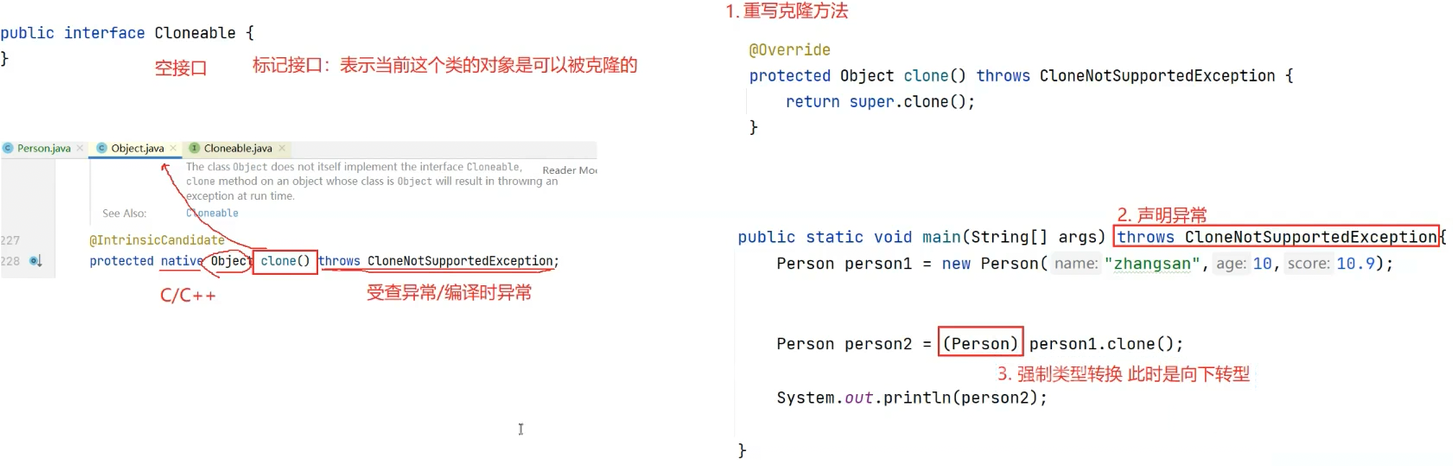
报错了!!!解决办法:
实现Cloneable接口
此时:
14.250319-接口--02:28:10->02:42:00
14.250319-接口--02:42:00->02:43:43
2.8.1 浅拷贝引入:
++Money 类和 Person 类定义++
java复制代码
package demo3;

class Money {
    public double money = 9.9;
}

public class Person implements Cloneable {
    public String name;
    public int age;
    public double score;

    public Money m = new Money();

    public Person(String name, int age, double score) {
        this.name = name;
        this.age = age;
        this.score = score;
    }

    @Override
    public String toString() {
        return "Student{" +
                "name='" + name + '\'' +
                ", age=" + age +
                ", score=" + score +
                '}';
    }
}
++Test 类基本框架++
java复制代码
package demo3;

/**
 * @Author 12629
 * @Description:
 */
public class Test {
    public static void main(String[] args) {
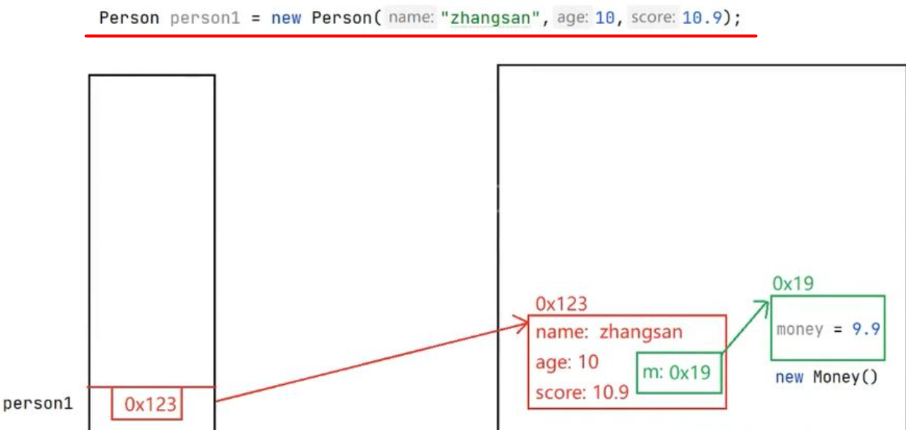
        Person person1 = new Person(name: "zhangsan", age: 10, score: 10.9);
    }
}
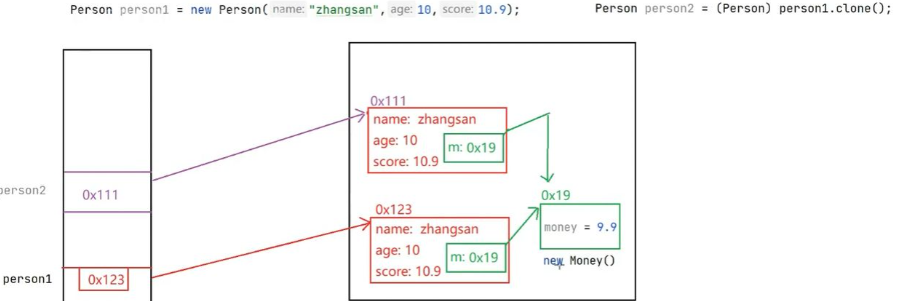
++内存示意图(无代码,是内存模型图示)++
++Test 类(添加克隆操作):++
java复制代码
public class Test {
    public static void main(String[] args) throws CloneNotSupportedException {
        Person person1 = new Person(name: "zhangsan", age: 10, score: 10.9);
        Person person2 = (Person) person1.clone();
    }
}
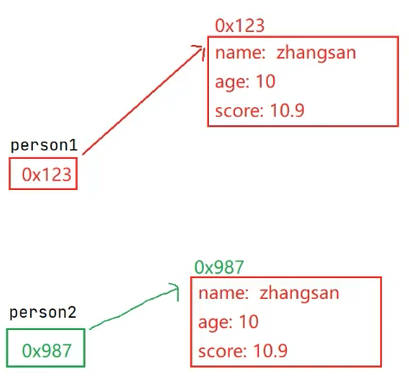
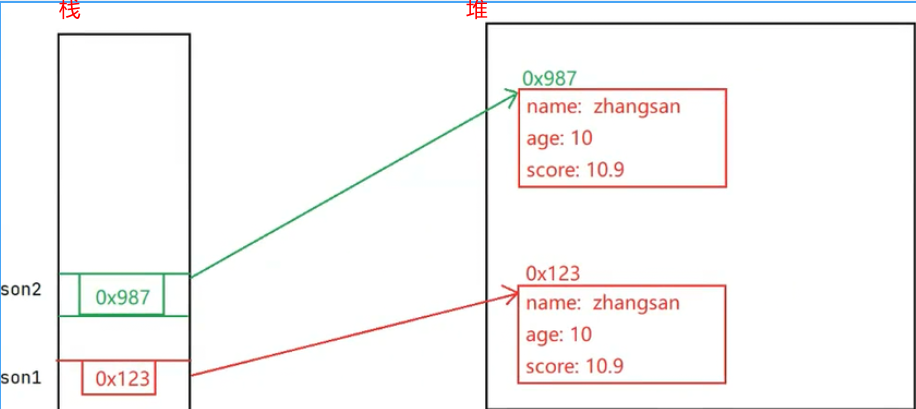
++内存示意图(克隆后)++
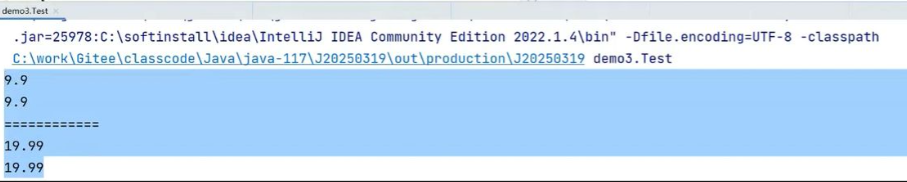
++Test 类(完整测试代码)++
java复制代码
public class Test {
    public static void main(String[] args) throws CloneNotSupportedException {
        Person person1 = new Person(name: "zhangsan", age: 10, score: 10.9);
        Person person2 = (Person) person1.clone();

        System.out.println(person1.m.money);
        System.out.println(person2.m.money);

        System.out.println("===============");

        person2.m.money = 19.99;

        System.out.println(person1.m.money);
        System.out.println(person2.m.money);
    }
}
// Test.java
package demo3;

public class Test {
    public static void main(String[] args) throws CloneNotSupportedException {
        // 标准Java语法
        Person person1 = new Person("zhangsan", 10, 10.9);
        Person person2 = (Person) person1.clone();

        // 测试代码...
    }
}
class Animal implements Cloneable {
    private String name;

    @Override
    public Animal clone() {
        Animal o = null;
        try {
            o = (Animal)super.clone();
        } catch (CloneNotSupportedException e) {
            e.printStackTrace();
        }
        return o;
    }
}

public class Test {
    public static void main(String[] args) {
        Animal animal = new Animal();
        Animal animal2 = animal.clone();
        System.out.println(animal == animal2);
    }
}

// 输出结果
// false
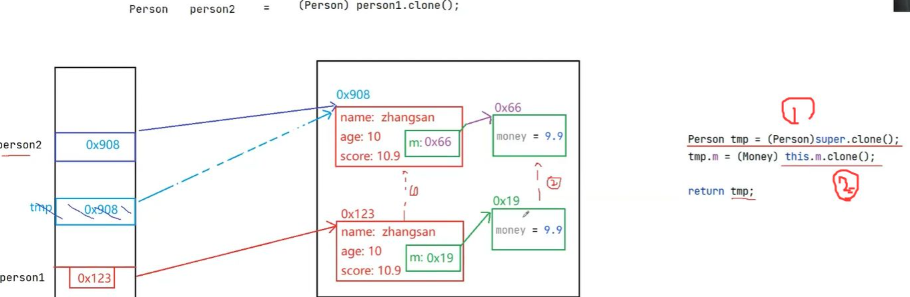
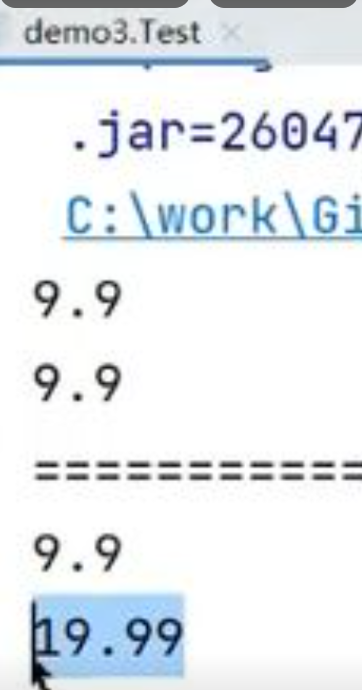
浅拷贝 VS 深拷贝
Cloneable 拷贝出的对象是一份"浅拷贝"
观察以下代码:
java复制代码
class Money {
    public double m = 99.99;
}

class Person implements Cloneable {
    public Money money = new Money();

    @Override
    public Object clone() throws CloneNotSupportedException {
        return super.clone();
    }
}

public class TestDemo3 {
    public static void main(String[] args) throws CloneNotSupportedException {
        Person person1 = new Person();
        Person person2 = (Person) person1.clone();

        System.out.println("通过person2修改前的结果");
        System.out.println(person1.money.m);
        System.out.println(person2.money.m);

        person2.money.m = 13.6;

        System.out.println("通过person2修改后的结果");
        System.out.println(person1.money.m);
        System.out.println(person2.money.m);
    }
}
public class Student implements Comparable<Student> {
    public String name;
    public int age;

    public Student(String name, int age) {
        this.name = name;
        this.age = age;
    }

    @Override
    public String toString() {
        return "Student{" +
                "name='" + name + '\'' +
                ", age=" + age +
                "}";
    }

    @Override
    public int compareTo(Student o) {
        return this.age - o.age;
    }
}
比较器类 AgeComparator
java复制代码
package demo1;

import java.util.Comparator;

public class AgeComparator implements Comparator<Student> {
    @Override
    public int compare(Student o1, Student o2) {
        return o1.age - o2.age;
    }
}
测试类 Test包含多种排序方法
java复制代码
import java.util.Arrays;
import java.util.Comparator;

public class Test {
    // 方法1: 使用Comparable的冒泡排序
    public static void bubbleSort(Comparable[] comparables) {
        for (int i = 0; i < comparables.length - 1; i++) {
            for (int j = 0; j < comparables.length - 1 - i; j++) {
                if (comparables[j].compareTo(comparables[j + 1]) > 0) {
                    Comparable tmp = comparables[j];
                    comparables[j] = comparables[j + 1];
                    comparables[j + 1] = tmp;
                }
            }
        }
    }

    // 方法2: 使用Comparator的冒泡排序
    public static void bubbleSort(Student[] students, Comparator<Student> comparator) {
        for (int i = 0; i < students.length - 1; i++) {
            for (int j = 0; j < students.length - 1 - i; j++) {
                if (comparator.compare(students[j], students[j + 1]) > 0) {
                    Student tmp = students[j];
                    students[j] = students[j + 1];
                    students[j + 1] = tmp;
                }
            }
        }
    }

    public static void main(String[] args) {
        // 创建学生数组
        Student[] students = new Student[3];
        students[0] = new Student("zhangsan", 10);
        students[1] = new Student("lisi", 5);
        students[2] = new Student("abc", 15);

        // 创建比较器
        AgeComparator ageComparator = new AgeComparator();

        // 多种排序方式示例(按需使用)
        // 1. 使用内置排序 + Comparable
        // Arrays.sort(students);

        // 2. 使用内置排序 + Comparator
        // Arrays.sort(students, ageComparator);

        // 3. 使用自定义冒泡排序 + Comparable
        bubbleSort(students);

        // 4. 使用自定义冒泡排序 + Comparator
        // bubbleSort(students, ageComparator);

        // 输出结果
        System.out.println(Arrays.toString(students));
    }
}

13.250317-抽象类和接口--01:26:43->01:29:00
13.250317-抽象类和接口--01:29:00->01:32:35
13.250317-抽象类和接口--01:32:35->01:42:00

13.250317-抽象类和接口--02:31:25->02:33:37
13.250317-抽象类和接口--02:39:22->02:49:15

1. String类的接口实现
14.250319-接口--01:45:00->01:49:45
14.250319-接口--01:49:45->01:56:15


实现Cloneable接口