JDBC-获取数据库连接
1. 方式一
这种方式在代码中指明了要获取的是Mysql数据库的驱动对象,如果后续切换其他数据库,就需要修改代码。因此在JDBC程序中,尽量不要出现第三方的API。
java
	@Test
    public void test1() throws SQLException {
        Driver driver = new com.mysql.cj.jdbc.Driver();
        Properties properties = new Properties();
        properties.setProperty("user", "root");
        properties.setProperty("password", "root");
        Connection connect = driver.connect("jdbc:mysql://localhost:3306/jdbc?serverTimezone=UTC", properties);
        System.out.println(connect);
    }
输出结果:
java
com.mysql.cj.jdbc.ConnectionImpl@7642df8f2. 方式二
使用反射的方式创建驱动对象,这里还是获取Mysql的驱动对象,将来如果要切换数据库,驱动可以做成配置项。
java
	@Test
    public void test2() throws Exception {
        Class<?> aClass = Class.forName("com.mysql.cj.jdbc.Driver");
        Driver driver = (Driver) aClass.newInstance();
        Properties properties = new Properties();
        properties.setProperty("user", "root");
        properties.setProperty("password", "root");
        Connection connect = driver.connect("jdbc:mysql://localhost:3306/jdbc?serverTimezone=UTC", properties);
        System.out.println(connect);
    }
3. 方式三
使用DriverManager获取连接,而非之前的Driver。
java
	@Test
    public void test3() throws Exception {
        Class<?> aClass = Class.forName("com.mysql.cj.jdbc.Driver");
        Driver driver = (Driver) aClass.newInstance();
        DriverManager.registerDriver(driver);
        Properties properties = new Properties();
        properties.setProperty("user", "root");
        properties.setProperty("password", "root");
        Connection connection = DriverManager.getConnection("jdbc:mysql://localhost:3306/jdbc?serverTimezone=UTC", properties);
        System.out.println(connection);
    }
4. 方式四
相较于方式三,去掉了"加载并注册驱动"的步骤。
java
	@Test
    public void test4() throws SQLException {
        Properties properties = new Properties();
        properties.setProperty("user", "root");
        properties.setProperty("password", "root");
        Connection connection = DriverManager.getConnection("jdbc:mysql://localhost:3306/jdbc?serverTimezone=UTC", properties);
        System.out.println(connection);
    }
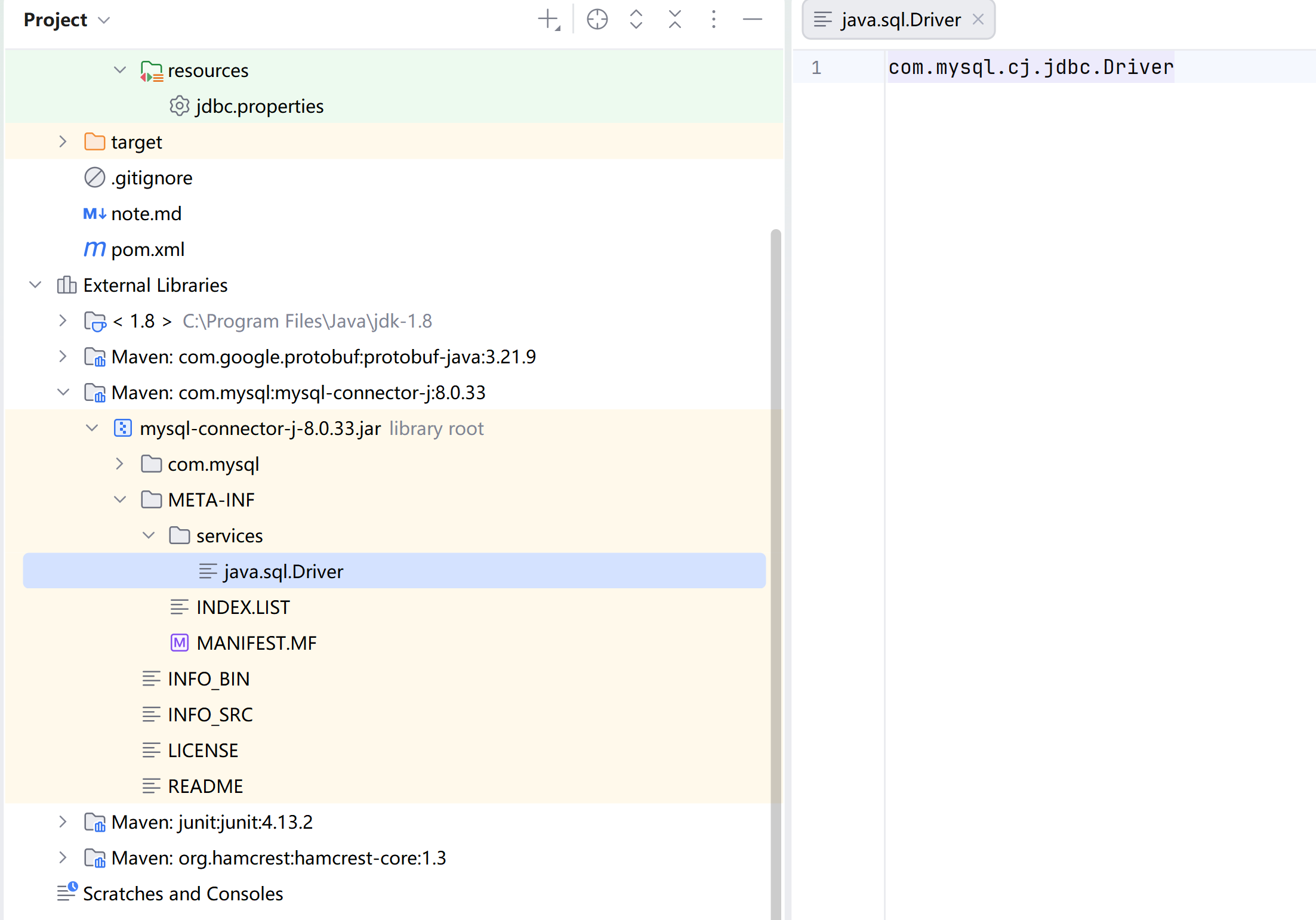
因为,mysql的驱动包,可以自动加载驱动类:
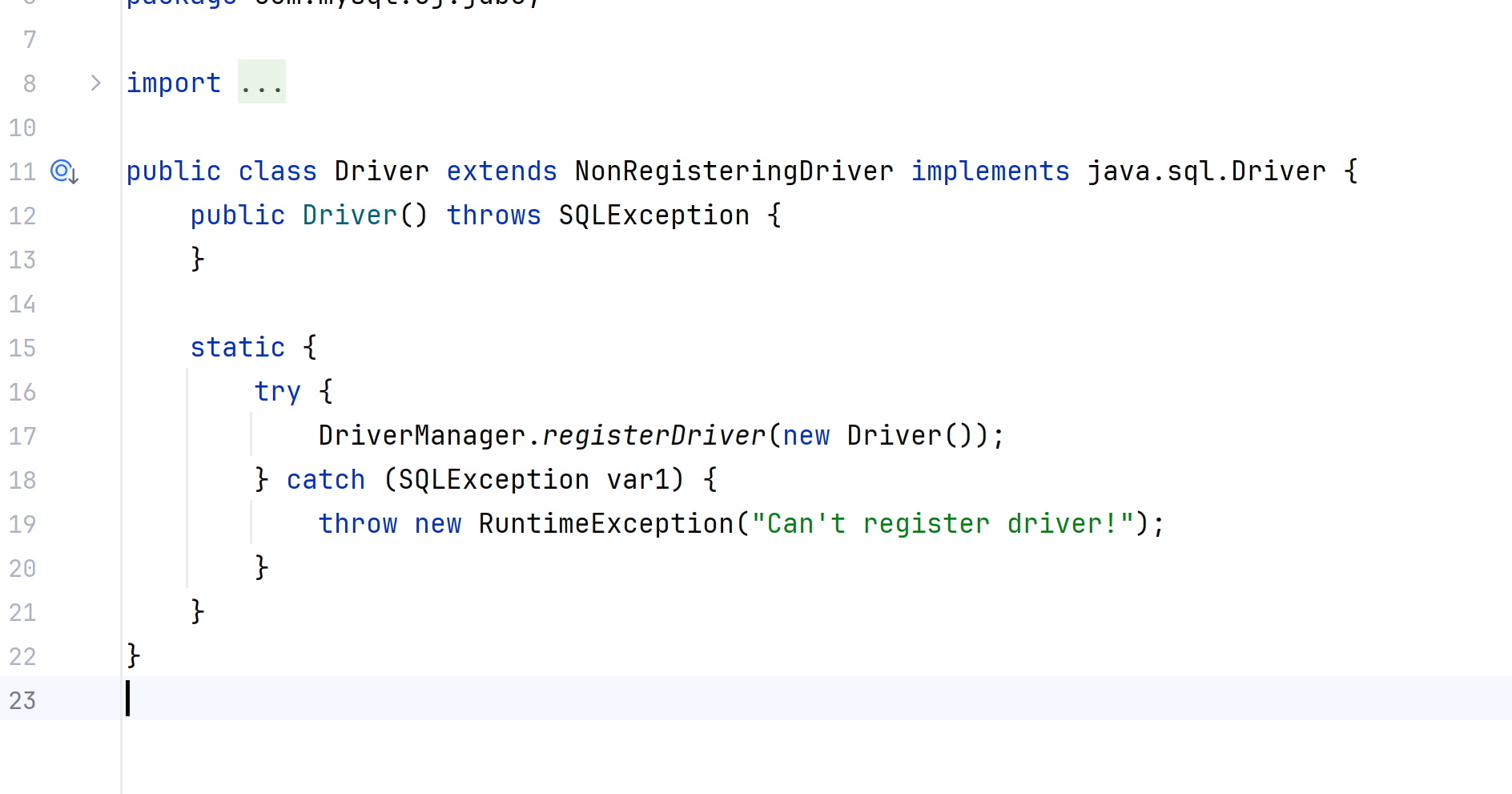
并且在驱动类中已经完成了注册:
5. 方式五(推荐)
将数据库连接信息放到配置文件中
java
@Test
    public void test5() throws IOException, ClassNotFoundException, SQLException {
        InputStream inputStream = TestGetConnection.class.getClassLoader().getResourceAsStream("jdbc.properties");
        Properties properties = new Properties();
        properties.load(inputStream);

        String user = properties.getProperty("user");
        String password = properties.getProperty("password");
        String url = properties.getProperty("url");
        String driver = properties.getProperty("driver");

        Class.forName(driver);
        Connection connection = DriverManager.getConnection(url, user, password);

        System.out.println(connection);
    }
jdbc.properties
java
user=root
password=root
driver=com.mysql.cj.jdbc.Driver
url=jdbc:mysql://localhost:3306/jdbc?serverTimezone=UTC
6. 获取连接和关闭资源的操作,写在公共的类中
java
public class JDBCUtils {
    public static Connection getConnection() throws Exception {
        InputStream inputStream = JDBCUtils.class.getClassLoader().getResourceAsStream("jdbc.properties");
        Properties properties = new Properties();
        properties.load(inputStream);

        String user = properties.getProperty("user");
        String password = properties.getProperty("password");
        String url = properties.getProperty("url");
        String driver = properties.getProperty("driver");

        Class.forName(driver);

        return DriverManager.getConnection(url, user, password);
    }
    public static void close(Connection connection, Statement statement) {
        try {
            if (statement != null) {
                statement.close();
            }
            if (connection != null) {
                connection.close();
            }
        } catch (SQLException e) {
            throw new RuntimeException(e);
        }
    }
    public static void close(Connection connection, Statement statement, ResultSet resultSet) {
        close(connection,statement);
        if(resultSet!=null){
            try {
                resultSet.close();
            } catch (SQLException e) {
                throw new RuntimeException(e);
            }
        }
    }
}