目录
前言
CSS篇
1.如何实现一个4:3的区域
有两种方法:
- 使用现代CSS属性:aspect-ratio:4 / 3;
- 使用padding-top(padding-bottom)撑开:padding-top和padding-bottom设置成百分比时基于父元素的宽度计算
html
<!DOCTYPE html>
<html lang="zh-CN">
<head>
  	<meta charset="UTF-8">
  	<meta name="viewport" content="width=device-width, initial-scale=1.0">
  	<title>测试</title>
  	<style>
		.box {
			width: 200px;
		}
		.ratio-box {
			aspect-ratio: 4 / 3;
			background-color: lightgreen;
		}
		.extend-box {
			position: relative;
			padding-top: 75%;
		}
		.inner-box {
			position: absolute;
			left: 0;
			top: 0;
			width: 100%;
			height: 100%;
			background-color: lightblue;
		}
  	</style>
</head>
<body>
	<div class="box ratio-box">占位符</div>
	<div class="box">
		<div class="extend-box">
			<div class="inner-box">
				占位符
			</div>
		</div>
	</div>
	<div class="console"></div>
	<script>
		const ratioBox = document.querySelectorAll('.box');
		const consoleElement = document.querySelector('.console');
		ratioBox.forEach(box => {
			const width = box.offsetWidth;
			const height = box.offsetHeight;
			consoleElement.innerHTML += `宽度: ${width}px, 高度: ${height}px<br>`;
		})
	</script>
</body>
</html>
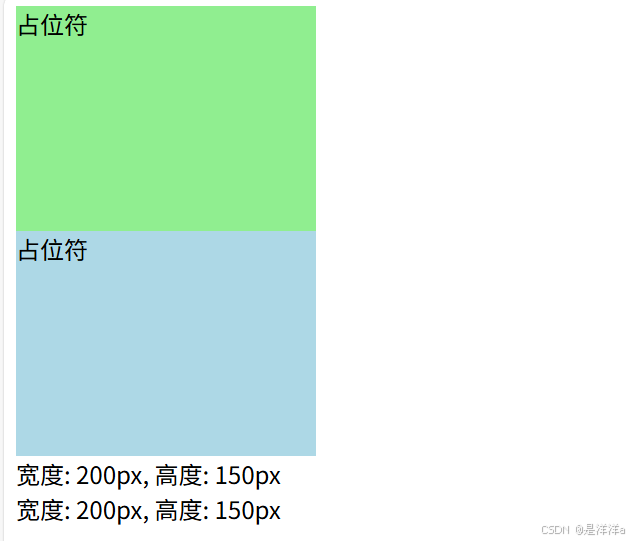
结果:
JS篇
1.splice和slice
splice可以对数组进行原地删除、添加、替换
splice语法:
javascript
array.splice(start, deleteCount, item1, item2, ...);- start:操作开始位置(包括当前位置)
- deleteCount:删除元素数量,可以为0
- item1,item2...:添加或替换的元素
下面是三个操作:
javascript
// 原数组
const arr = [1, 2];
// 添加
arr.splice(0, 0, ...[3, 4]);
arr.splice(0, 0, 5);
console.log(arr); // [ 5, 3, 4, 1, 2 ]
// 删除
arr.splice(1, 2);
console.log(arr); // [ 5, 1, 2 ]
// 替换
arr.splice(1, 1, 6);
console.log(arr); // [ 5, 6, 2 ]
slice用来切割复制原数组,但是不会改变原数组
slice语法:
javascript
array.slice(start, end);- start:开始位置
- end:结束位置
slice 切割:"包头不包尾"(从start开始切,包括start。到end终止,不包括end),切割的数组是浅拷贝
javascript
// 原数组
let cake = ['草莓', '蓝莓', '芒果', '桃子', '葡萄'];
// 切割指定位置数组
let order1 = cake.slice(1, 3);
console.log(order1); // ['蓝莓', '芒果']
// 切割到最后
let order2 = cake.slice(2);
console.log(order2); // ['芒果', '桃子', '葡萄']
// 倒着切
let order3 = cake.slice(-3, -1);
console.log(order3); // ['芒果', '桃子']
// 复制整个数组
let order4 = cake.slice();
console.log(order4); // [ '草莓', '蓝莓', '芒果', '桃子', '葡萄' ]
手写代码篇
1.手写定时器
javascript
async function run() {
	console.log("开始执行");
	await new Promise(r => {
		console.log("进入定时器");
		setTimeout(() => {
			r();
		}, 1000);
	})
	console.log("定时器结束");
}

run();
2.让两个对象共享一个祖先
- 场景:有A和B两个对象,现在让A和B都共享A的祖先
javascript
const A = {
	name: "A",
	age: 12,
}
const B = {
	name: "B",
	age: 13,
}

Object.getPrototypeOf(A).say = function() {
	console.log(`名字: ${this.name}, 年龄: ${this.age}`);
}
Object.setPrototypeOf(B, Object.getPrototypeOf(A));

A.say();
B.say();