A.确保没有空口令账号
sh
┌──(root㉿kali)-[/home/kali/桌面]
└─# # 查看 /etc/shadow 中第二字段为空(或为!!、*)但允许登录的账户
awk -F: '($2 == "" || $2 == "!!") && ($1 != "nobody") {print $1}' /etc/shadow
B.确保密码最长过期天数为 90 天,最小过期天数为 80 天,最小长度为 8,密码过期警告天数为 7 天
sh
vim /etc/login.defs
i
PASS_MAX_DAYS   90     最长过期天数为 90 天
PASS_MIN_DAYS   80      最小过期天数为 80 天
PASS_WARN_AGE   7    密码过期警告天数为 7 天
PASS_MIN_LEN    8
然后保存退出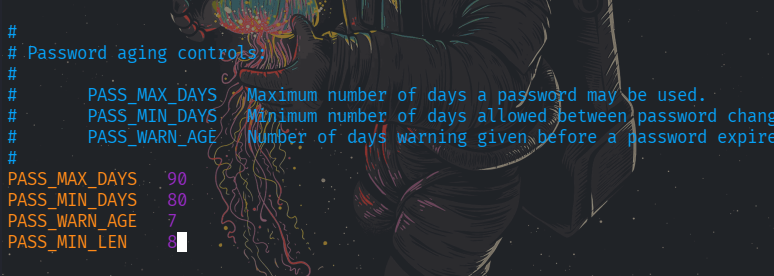
C.确保不能通过 root 进行远程 ssh 登陆
检查
sh
grep -i "PermitRootLogin" /etc/ssh/sshd_config


sh
┌──(root㉿kali)-[/home/kali/桌面]
└─# grep -i "PermitRootLogin" /etc/ssh/sshd_config
#PermitRootLogin prohibit-password
the setting of "PermitRootLogin prohibit-password"
sh
vim /etc/ssh/sshd_config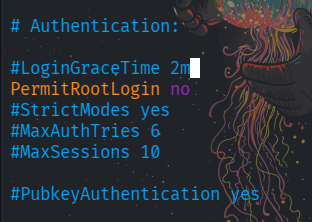
在重启
sh
systemctl restart sshd
D.确保 uid 为 0 的用户只有 root
sh
awk -F: '($3==0)' /etc/passwd


sh
┌──(root㉿kali)-[/home/kali/桌面]
└─# awk -F: '($3==0)' /etc/passwd
root:x:0:0:root:/root:/usr/bin/zsh

┌──(root㉿kali)-[/home/kali/桌面]
└─# awk -F: '$3 == 0 {print $1}' /etc/passwd
root
E.确保不存在.netrc 和.rhosts 文件
全局查找
sh
find / -name ".rhosts" -o -name ".netrc" 2>/dev/null
全局查找
有就有,没有就没有
sh
┌──(root㉿kali)-[/home/kali/桌面]
└─# find / -name ".rhosts" -o -name ".netrc" 2>/dev/null

┌──(root㉿kali)-[/home/kali/桌面]
└─#
F.确保所有与 umask 相关的配置文件中,umask 的值都是 022
sh
grep -r "umask" /etc/profile /etc/bashrc /etc/profile.d/ ~/.bashrc 2>/dev/null


sh
┌──(root㉿kali)-[/home/kali/桌面]
└─# grep -r "umask" /etc/profile /etc/bashrc /etc/profile.d/ ~/.bashrc 2>/dev/null
如果有就
-
在
/etc/profile和/etc/bashrc中添加或修改:sh
umask 022
G.配置完成后,执行程序"/root/check/linux"。如基线策略都修复完成,程序会输出一个 flag 信息,将此 flag 提交