文章目录

前言
博主介绍:✌目前全网粉丝4W+,csdn博客专家、Java领域优质创作者,博客之星、阿里云平台优质作者、专注于Java后端技术领域。
涵盖技术内容:Java后端、大数据、算法、分布式微服务、中间件、前端、运维等。
博主所有博客文件目录索引:博客目录索引(持续更新)
CSDN搜索:长路
视频平台:b站-Coder长路
原始打包
xml
<build>
  <plugins>
    <plugin>
      <groupId>org.springframework.boot</groupId>
      <artifactId>spring-boot-maven-plugin</artifactId>
      <executions>
        <execution>
          <phase>package</phase>
          <goals>
            <goal>repackage</goal>
          </goals>
        </execution>
      </executions>
      <configuration>
        <includeSystemScope>true</includeSystemScope>
        <!--   指定主类     -->
        <mainClass>com.dtstack.knowledge.ai.server.KnowLedgeServerApplication</mainClass>
      </configuration>
    </plugin>
    <plugin>
      <artifactId>maven-source-plugin</artifactId>
      <executions>
        <execution>
          <id>attach-sources</id>
          <goals>
            <goal>jar-no-fork</goal>
          </goals>
        </execution>
      </executions>
      <configuration>
        <attach>true</attach>
      </configuration>
    </plugin>
  </plugins>
</build>
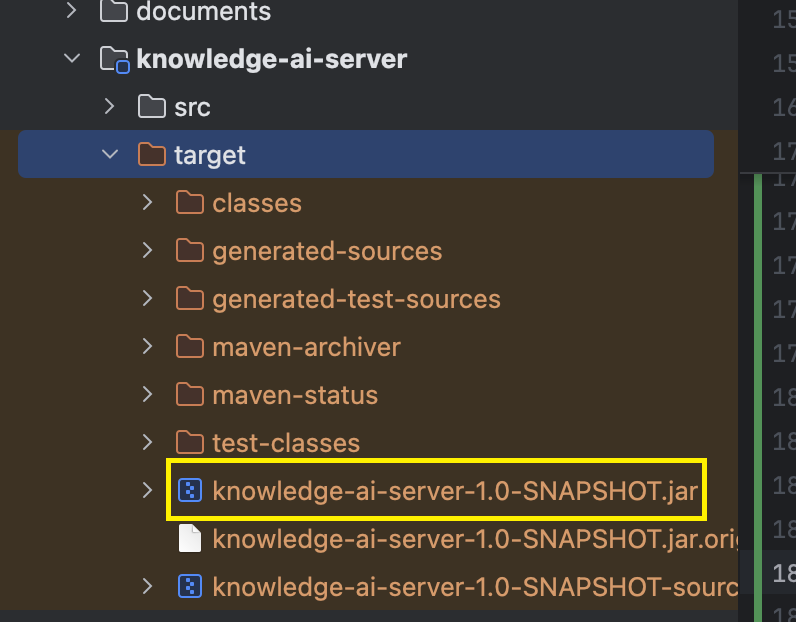
编译打包之后为:
拆包实现
引入pom.xml依赖 & 新建assembly.xml
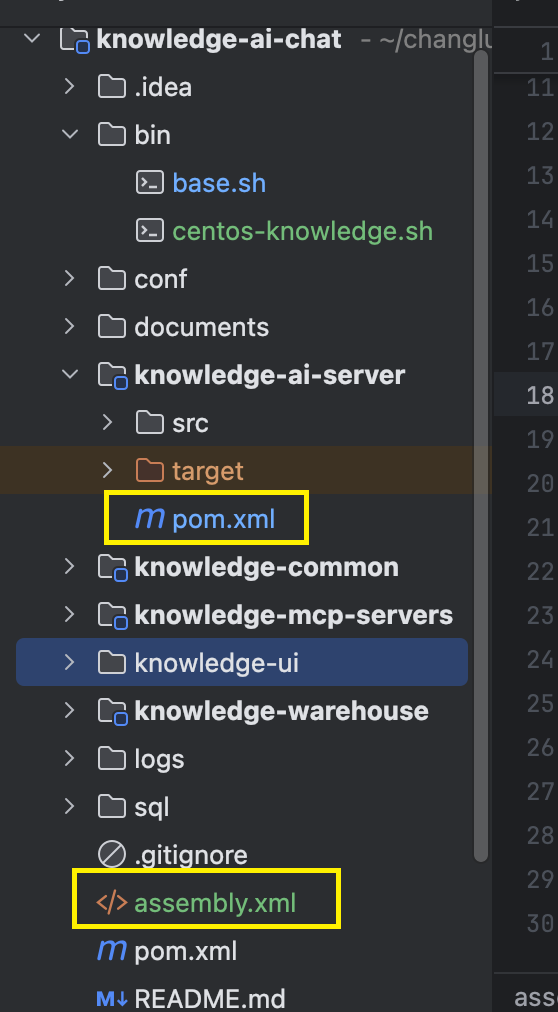
关键点为:
- maven-shade-plugin中的
<include>com.changlu:knowledge-*</include>,表示对应的com.changlu 指的是groupId,后缀knowledge-*指的是artifactId。 - maven-jar-plugin中的指定启动器类:
<mainClass>com.dtstack.knowledge.ai.server.KnowLedgeServerApplication</mainClass> - maven-antrun-plugin中指定了拷贝路径。
xml
<build>
  <plugins>
    <plugin>
      <groupId>org.apache.maven.plugins</groupId>
      <artifactId>maven-shade-plugin</artifactId>
      <version>3.0.0</version>
      <dependencies>
        <dependency>
          <groupId>org.springframework.boot</groupId>
          <artifactId>spring-boot-maven-plugin</artifactId>
          <version>${spring-boot.version}</version>
        </dependency>
      </dependencies>
      <configuration>
        <keepDependenciesWithProvidedScope>false</keepDependenciesWithProvidedScope>
        <createDependencyReducedPom>false</createDependencyReducedPom>
        <filters>
          <filter>
            <artifact>*:*</artifact>
            <excludes>
              <exclude>META-INF/*.SF</exclude>
              <exclude>META-INF/*.DSA</exclude>
              <exclude>META-INF/*.RSA</exclude>
            </excludes>
          </filter>
        </filters>
      </configuration>
      <executions>
        <execution>
          <phase>package</phase>
          <goals>
            <goal>shade</goal>
          </goals>
          <configuration>
            <artifactSet>
              <includes>
                <include>com.changlu:knowledge-*</include>
              </includes>
            </artifactSet>
          </configuration>
        </execution>
      </executions>
    </plugin>
    <plugin>
      <groupId>org.apache.maven.plugins</groupId>
      <artifactId>maven-compiler-plugin</artifactId>
      <version>2.3.2</version>
      <configuration>
        <source>17</source>
        <target>17</target>
      </configuration>
    </plugin>

    <!--      后续打包可以识别到${git.branch}      -->
    <plugin>
      <groupId>pl.project13.maven</groupId>
      <artifactId>git-commit-id-plugin</artifactId>
      <version>2.2.6</version>
      <executions>
        <execution>
          <id>get-the-git-infos</id>
          <goals>
            <goal>revision</goal>
          </goals>
        </execution>
      </executions>
      <configuration>
        <dateFormat>yyyy.MM.dd HH:mm:ss</dateFormat>
        <prefix>git</prefix>
        <verbose>true</verbose>
        <!-- 是否单独生成properties文件 -->
        <generateGitPropertiesFile>true</generateGitPropertiesFile>
        <!-- 没有 .git 目录时则构建失败,false:继续构建-->
        <failOnNoGitDirectory>false</failOnNoGitDirectory>
        <!-- 生成文件路径-->
           <generateGitPropertiesFilename>${project.basedir}/src/main/resources/git.properties</generateGitPropertiesFilename>
           <gitDescribe>
               <always>false</always>
               <dirty>-dirty</dirty>
               <forceLongFormat>false</forceLongFormat>
           </gitDescribe>
       </configuration>
     </plugin>

     <plugin>
         <groupId>org.apache.maven.plugins</groupId>
         <artifactId>maven-jar-plugin</artifactId>
         <version>3.2.0</version>
         <configuration>
             <archive>
                 <manifestEntries>
                     <Class-Path>.</Class-Path>
                 </manifestEntries>
                 <manifest>
                     <!-- 工程主入口 -->
                     <mainClass>com.dtstack.knowledge.ai.server.KnowLedgeServerApplication</mainClass>
                     <addClasspath>true</addClasspath>
                 </manifest>
             </archive>
             <excludes>
                 <exclude>application.properties</exclude>
                 <exclude>application.yaml</exclude>
                 <exclude>logback.xml</exclude>
             </excludes>
         </configuration>
     </plugin>
     <plugin>
         <artifactId>maven-antrun-plugin</artifactId>
         <version>1.8</version>
         <executions>
             <execution>
                 <id>copy-resources</id>
                 <!-- here the phase you need -->
                 <phase>package</phase>
                 <goals>
                     <goal>run</goal>
                 </goals>
                 <configuration>
                     <tasks>
                         <copy file="${basedir}/target/${project.name}-${project.version}.jar"
                               tofile="${basedir}/target/dtstack-platform/dtstack-platform/dtstack/${project.name}-${git.branch}.jar"/>
                     </tasks>
                 </configuration>
             </execution>
         </executions>
     </plugin>
     <!-- assembly 插件打包-->
     <plugin>
         <groupId>org.apache.maven.plugins</groupId>
         <artifactId>maven-assembly-plugin</artifactId>
         <version>2.6</version>
         <executions>
             <execution>
                 <id>data-module</id>
                 <phase>package</phase>
                 <goals>
                     <goal>single</goal>
                 </goals>
                 <configuration>
                     <descriptors>
                         <descriptor>assembly.xml</descriptor>
                     </descriptors>
                     <outputDirectory>target</outputDirectory>
                     <!-- 打包路径名称-->
                     <finalName>dtstack-platform</finalName>
                     <appendAssemblyId>false</appendAssemblyId>
                 </configuration>
             </execution>
         </executions>
     </plugin>
   </plugins>
</build>
assembly.xml:
xml
<assembly
  xmlns="http://maven.apache.org/plugins/maven-assembly-plugin/assembly/1.1.2"
  xmlns:xsi="http://www.w3.org/2001/XMLSchema-instance"
  xsi:schemaLocation="http://maven.apache.org/plugins/maven-assembly-plugin/assembly/1.1.2 http://maven.apache.org/xsd/assembly-1.1.2.xsd">
  <id>dt_public_service</id>
  <includeBaseDirectory>true</includeBaseDirectory>

  <!-- 输出格式为linux下的dir格式格式-->
  <formats>
    <format>dir</format>
  </formats>

  <dependencySets>
    <!-- 依赖所属jar包目录存储-->
    <dependencySet>
      <useProjectArtifact>true</useProjectArtifact>
      <!-- 改动解释:需要提出当前对应的源码包的打包,目的是将对应的依赖拆分出来
      com.changlu 指的是groupId,后缀knowledge-*指的是artifactId
      -->
      <excludes>
        <exclude>com.changlu:knowledge-*</exclude>
      </excludes>
      <outputDirectory>lib</outputDirectory>
      <outputFileNameMapping>${artifact.groupId}-${artifact.artifactId}.${artifact.extension}</outputFileNameMapping>
      <scope>runtime</scope>
    </dependencySet>

  </dependencySets>
</assembly>
执行打包命令与测试
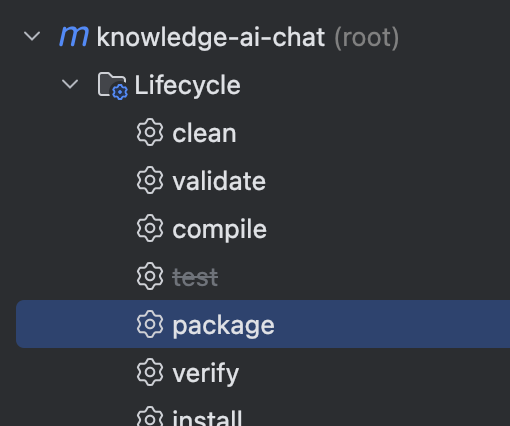
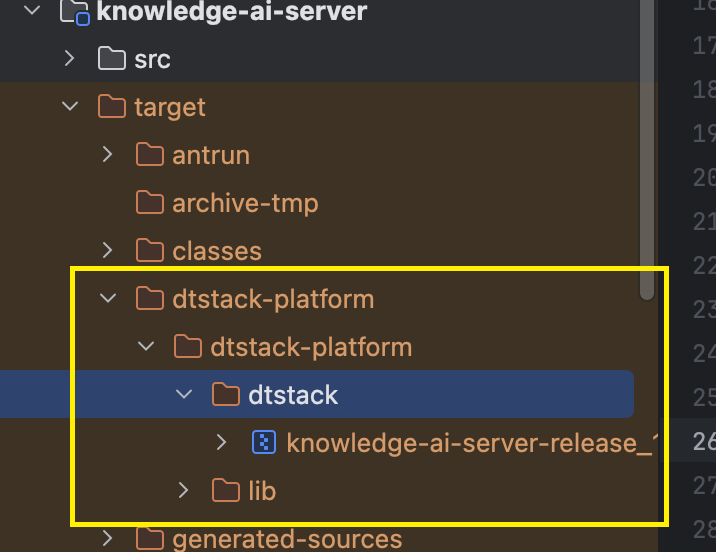
输出的打包后文件目录为,实现了拆包效果:
执行的命令为:
本机:
/Library/Java/JavaVirtualMachines/jdk-17.jdk/Contents/Home/bin/java -cp "/Users/edy/changlu_workspace/daishuyun/材料/2025/2025.6.1黑客马拉松/code/knowledge-ai-chat/knowledge-ai-server/target/dtstack-platform/dtstack-platform/dtstack/:/Users/edy/changlu_workspace/daishuyun/材料/2025/2025.6.1黑客马拉松/code/knowledge-ai-chat/knowledge-ai-server/target/dtstack-platform/dtstack-platform/lib/" com.dtstack.knowledge.ai.server.KnowLedgeServerApplication
服务器:
shell
# -cp 指定目录加载,这里指定两个位置:
#  /opt/tools/ai-chat/knowledge-server/lib/*、
/opt/tools/ai-chat/jdk/jdk-17.0.10+7/bin/java 、/opt/tools/ai-chat/knowledge-server/dtstack/*
-cp /opt/tools/ai-chat/knowledge-server/lib/*:/opt/tools/ai-chat/knowledge-server/dtstack/* com.dtstack.knowledge.ai.server.KnowLedgeServerApplication
说明:后续真实项目的执行,后使用shell脚本形式来完成启动和关闭。
资料获取
大家点赞、收藏、关注、评论啦~
精彩专栏推荐订阅:在下方专栏👇🏻
- 长路-文章目录汇总(算法、后端Java、前端、运维技术导航):博主所有博客导航索引汇总
- 开源项目Studio-Vue---校园工作室管理系统(含前后台,SpringBoot+Vue):博主个人独立项目,包含详细部署上线视频,已开源
- 学习与生活-专栏:可以了解博主的学习历程
- 算法专栏:算法收录
更多博客与资料可查看👇🏻获取联系方式👇🏻,🍅文末获取开发资源及更多资源博客获取🍅