测试下挂起函数:
Kotlin
// 1. 定义挂起函数(用suspend关键字修饰)
suspend fun suspendFunction(name: String, delayTime: Long) {
    Log.d("zxzx", "[$name] 挂起函数开始执行,当前线程:${Thread.currentThread().name}")

    // delay是Kotlin内置的挂起函数(核心:释放线程,不阻塞)
    delay(delayTime)

    Log.d("zxzx", "[$name] 挂起函数执行完毕,当前线程:${Thread.currentThread().name}")
}

// 2. 测试函数(Android环境可放在Activity/Fragment中,普通测试用main函数)
fun testSuspend() {
    Log.d("zxzx", "主线程开始,当前线程:${Thread.currentThread().name}")

    // 错误示例:普通函数中直接调用挂起函数 → 编译报错!
    // suspendFunction("错误测试", 1000L) // 编译提示:Suspend function 'suspendFunction' should be called only from a coroutine or another suspend function

    // 正确方式1:在runBlocking(协程作用域)中调用
    runBlocking {
        // 启动子协程调用挂起函数
        launch(Dispatchers.IO) {
            suspendFunction("测试1", 2000L)
        }
        launch(Dispatchers.Default) {
            suspendFunction("测试2", 1000L)
        }
    }

    // 正确方式2:Android中用lifecycleScope(推荐)
    // lifecycleScope.launch {
    //     suspendFunction("Android测试", 1500L)
    // }

    Log.d("zxzx", "主线程继续执行,当前线程:${Thread.currentThread().name}")
    Log.d("zxzx", "力拔山兮气盖世,\n时不利兮骓不逝。\n骓不逝兮可奈何,\n虞兮虞兮奈若何!")
}
在onCreate函数中调用testSuspend函数,打印:
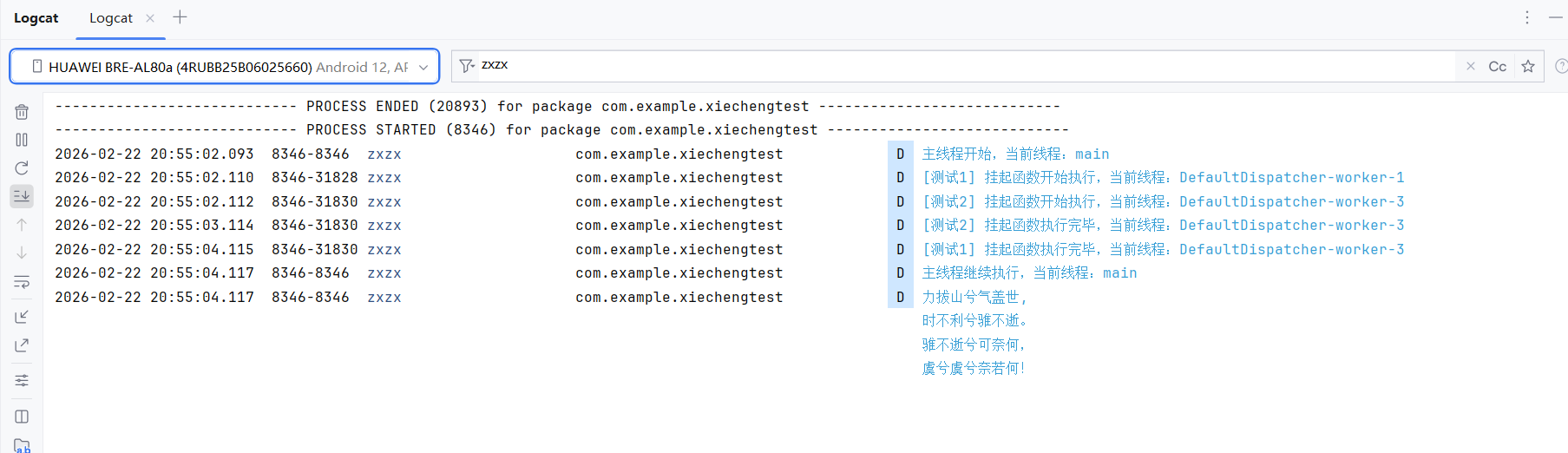
ok. 这里好像没看出挂起有什么用。后面再继续研究。