Wails 客户端
bash
{
  "$schema": "https://wails.io/schemas/config.v2.json",
  "name": "execute-sql",
  "outputfilename": "execute-sql",
  "frontend:dir": "E:/Workspace/MCP/tools/execute_sql/ui",
  "frontend:install": "npm install",
  "frontend:build": "npm run build",
  "frontend:dev:watcher": "npm run dev",
  "frontend:dev:serverUrl": "auto",
  "author": {
    "name": "jiudan",
    "email": "jiudan1021@foxmail.com"
  }
}
wails.json 配置信息
Go
import (
	"context"
	"embed"

	"github.com/wailsapp/wails/v2"
	"github.com/wailsapp/wails/v2/pkg/options"
	"github.com/wailsapp/wails/v2/pkg/options/assetserver"
	"github.com/wailsapp/wails/v2/pkg/runtime"
)

//go:embed all:dist
var assets embed.FS

type App struct {
	ctx context.Context
}

func NewApp() *App {
	return &App{}
}

func (a *App) startup(ctx context.Context) {
	a.ctx = ctx
}

func (a *App) beforeClose(ctx context.Context) (prevent bool) {
	selection, err := runtime.MessageDialog(ctx, runtime.MessageDialogOptions{
		Type:    runtime.QuestionDialog,
		Title:   "确认关闭",
		Message: "确定要退出应用吗?",
		Buttons: []string{"取消", "确定"},
	})
	if err != nil {
		return false
	}
	if selection == "取消" {
		return true
	}
	return false
}

func RunApp(title string, width, height, minWidth, minHeight int, onTop bool, disableResize bool, frameless bool, closeConfirm bool) {
	// 创建APP
	app := NewApp()
	// 配置
	option := &options.App{
		Title:         title,
		Width:         width,
		Height:        height,
		Frameless:     frameless,
		AlwaysOnTop:   onTop,
		DisableResize: disableResize,
		OnStartup:     app.startup,
		AssetServer: &assetserver.Options{
			Assets: assets,
		},
		BackgroundColour: &options.RGBA{R: 255, G: 255, B: 255, A: 1},
		Bind: []interface{}{
			app,
		},
	}
	// 配置最小宽高
	if minWidth > 0 {
		option.MinWidth = minWidth
	}
	if minHeight > 0 {
		option.MinHeight = minHeight
	}
	// 关闭确认
	if closeConfirm {
		option.OnBeforeClose = app.beforeClose
	}
	// 运行 APP
	err := wails.Run(option)
	if err != nil {
		panic(err)
	}
}
页面数据交互
Go
var Data = make(map[string]interface{})

func (a *App) GetData() map[string]any {
	return Data
}

func (a *App) SetData(data map[string]any) bool {
	Data = make(map[string]any)
	for k, v := range data {
		Data[k] = v
	}
	return true
}

func (a *App) UpdateData(key string, value any) bool {
	Data[key] = value
	return true
}
与后端交互的API,这里只需要读取和更新数据即可
参数解析
Go
package main

import (
	"encoding/json"
	"flag"
	"fmt"
	"os"
	"path/filepath"
	"strings"
)

func str2bool(s string) bool {
	return strings.ToLower(s) == "t" || strings.ToLower(s) == "true" ||
		strings.ToLower(s) == "1" || strings.ToLower(s) == "y"
}

func main() {
	title := flag.String("title", "RunSQL", "标题")
	width := flag.Int("width", 800, "页面宽度")
	height := flag.Int("height", 600, "页面高度")
	minWidth := flag.Int("min_width", 0, "页面最小宽度")
	minHeight := flag.Int("min_height", 0, "页面最小高度")
	onTop := flag.String("on_top", "false", "页面是否置顶")
	disableResize := flag.String("disable_resize", "false", "页面是否可缩放")
	frameless := flag.String("frameless", "true", "页面是否无边框")
	dataPath := flag.String("data_path", "./data.json", "数据文件路径")
	resultPath := flag.String("result_path", "./result.json", "结果文件路径")
	closeConfirm := flag.String("close_confirm", "false", "是否显示关闭确认对话框")
	flag.Parse()
	// 检查数据文件路径
	if *dataPath == "" {
		panic("数据文件路径不能为空")
	}
	if _, err := os.Stat(*dataPath); os.IsNotExist(err) {
		panic(fmt.Sprintf("数据文件不存在: %s", *dataPath))
	}
	// 处理结果文件路径
	if *resultPath == "" {
		filename := filepath.Base(*dataPath)
		*resultPath = strings.TrimSuffix(filename, filepath.Ext(filename)) + "-result.json"
	}
	// 读取并解析JSON数据
	jsonData, err := os.ReadFile(*dataPath)
	if err != nil {
		panic(err)
	}
	err = json.Unmarshal(jsonData, &Data)
	if err != nil {
		panic(err)
	}
	// 运行应用(不再传递assetsDir参数)
	RunApp(*title, *width, *height, *minWidth, *minHeight,
		str2bool(*onTop), str2bool(*disableResize), str2bool(*frameless), str2bool(*closeConfirm),
	)
	// 输出结果
	dataString, err := json.Marshal(Data)
	if err != nil {
		panic(err)
	}
	err = os.WriteFile(*resultPath, dataString, 0644)
	if err != nil {
		panic(err)
	}
}
编译运行
bash
wails build 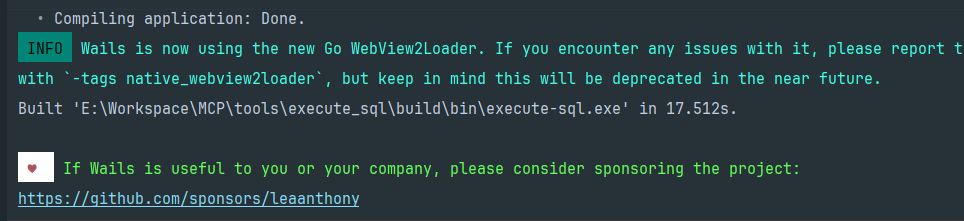
注意配置的 frontend:dir/wailsjs 会生成对应的 js 文件,前端调用 Go 的方法通过调用 Js 方法实现。