HAProxy七层负载可以解决LVS四层负载不能识别url进行主动调度的功能
一、负载均衡
1. 什么是负载均衡
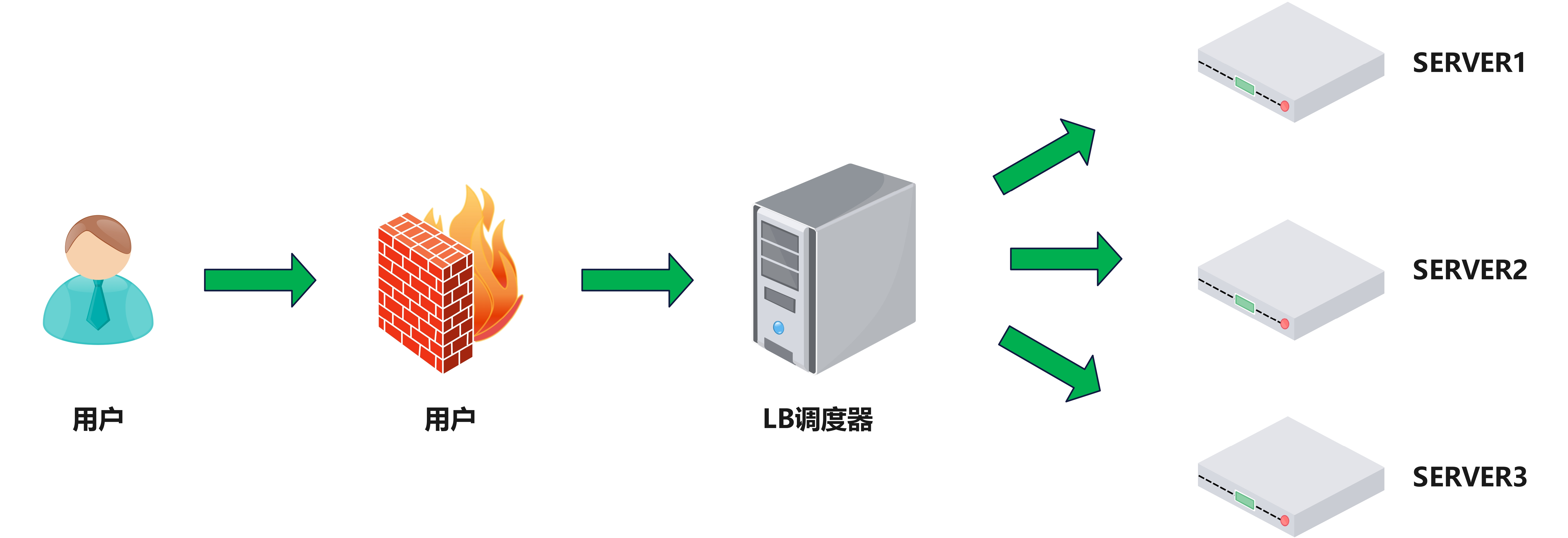
负载均衡:Load Balance,简称LB,是一种服务或基于硬件设备等实现的高可用反向代理技术,负载均 衡将特定的业务(web服务、网络流量等)分担给指定的一个或多个后端特定的服务器或设备,从而提高了 公司业务的并发处理能力、保证了业务的高可用性、方便了业务后期的水平动态扩展
阿里云SLB介绍 :https://developer.aliyun.com/article/1803
2. 为什么用负载均衡
- Web服务器的动态水平扩展-->对用户无感知
- 增加业务并发访问及处理能力-->解决单服务器瓶颈问题
- 节约公网IP地址-->降低IT支出成本
- 隐藏内部服务器IP-->提高内部服务器安全性
- 配置简单-->固定格式的配置文件
- 功能丰富-->支持四层和七层,支持动态下线主机
- 性能较强-->并发数万甚至数十万
3. 负载均衡类型
(1)硬件:
- F5 美国F5网络公司 https://www.f5.com/zh
- Netscaler 美国思杰公司 https://www.citrix.com.cn/products/citrix-adc/
- Array 华耀 https://www.arraynetworks.com.cn/
- AD-1000 深信服 https://www.sangfor.com.cn/
(2)四层负载均衡
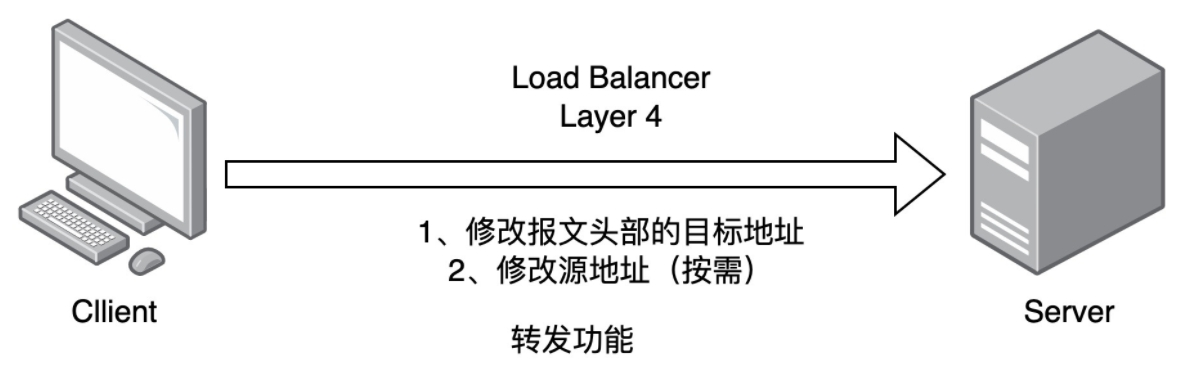
通过ip+port决定负载均衡的去向。
对流量请求进行NAT处理,转发至后台服务器。
记录tcp、udp流量分别是由哪台服务器处理,后续该请求连接的流量都通过该服务器处理。
支持四层的软件
- lvs:重量级四层负载均衡器
- Nginx:轻量级四层负载均衡器,可缓存(nginx四层是通过upstream模块)
- Haproxy:模拟四层转发
(3)七层负载均衡
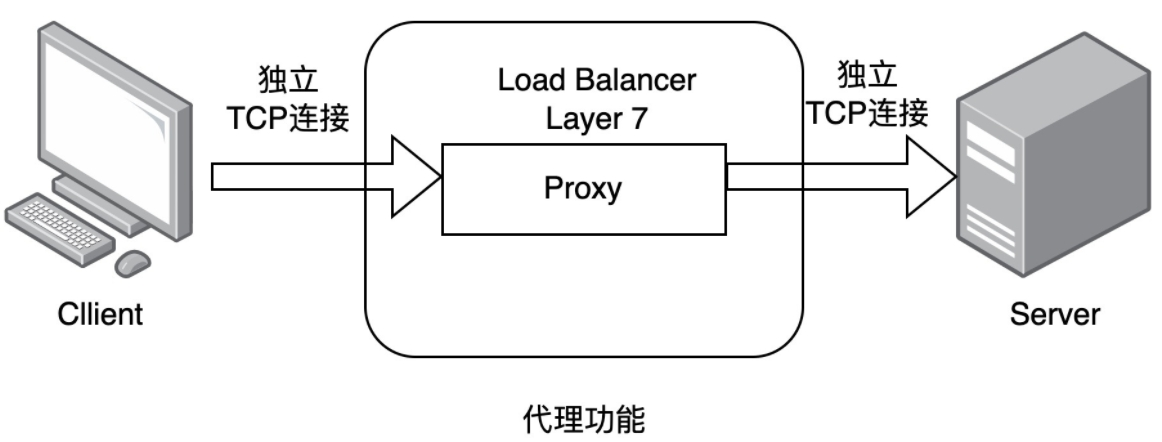
通过虚拟ur|或主机ip进行流量识别,根据应用层信息进行解析,决定是否需要进行负载均衡。
代理后台服务器与客户端建立连接,如nginx可代理前后端,与前端客户端tcp连接,与后端服务器建立 tcp连接,
支持七层代理的软件:
- Nginx:基于http协议(nginx七层是通过proxy_pass)
- Haproxy:七层代理,会话保持、标记、路径转移等
(4)四层和七层的区别
所谓的四到七层负载均衡,就是在对后台的服务器进行负载均衡时,依据四层的信息或七层的信息来决 定怎么样转发流量
四层的负载均衡,就是通过发布三层的IP地址(VIP),然后加四层的端口号,来决定哪些流量需要做负 载均衡,对需要处理的流量进行NAT处理,转发至后台服务器,并记录下这个TCP或者UDP的流量是由哪 台服务器处理的,后续这个连接的所有流量都同样转发到同一台服务器处理
七层的负载均衡,就是在四层的基础上(没有四层是绝对不可能有七层的),再考虑应用层的特征,比 如同一个Web服务器的负载均衡,除了根据VIP加80端口辨别是否需要处理的流量,还可根据七层的 URL、浏览器类别、语言来决定是否要进行负载均衡。
- 分层位置:四层负载均衡在传输层及以下,七层负载均衡在应用层及以下
- 性能 :四层负载均衡架构无需解析报文消息内容,在网络吞吐量与处理能力上较高:七层可支持解析应用 层报文消息内容,识别URL、Cookie、HTTP header等信息。、
- 原理 :四层负载均衡是基于ip+port;七层是基于虚拟的URL或主机IP等。
- 功能类比:四层负载均衡类似于路由器;七层类似于代理服务器。
- 安全性:四层负载均衡无法识别DDoS攻击;七层可防御SYN Cookie/Flood攻击
二、HAProxy基础环境
HAProxy是一款具备高并发(万级以上)、高性能的TCP和HTTP负载均衡器
- 支持基于cookie的持久性,自动故障切换,支持正则表达式及web状态统计
- 企业版网站:https://www.haproxy.com/
- 社区版网站:https://www.haproxy.org/
- github:https://www.haproxy.org/
1. HAProxy的实验环境
需要三台主机,一台调度器haproxy(NAT+仅主机),两台后台服务器rs(仅主机)
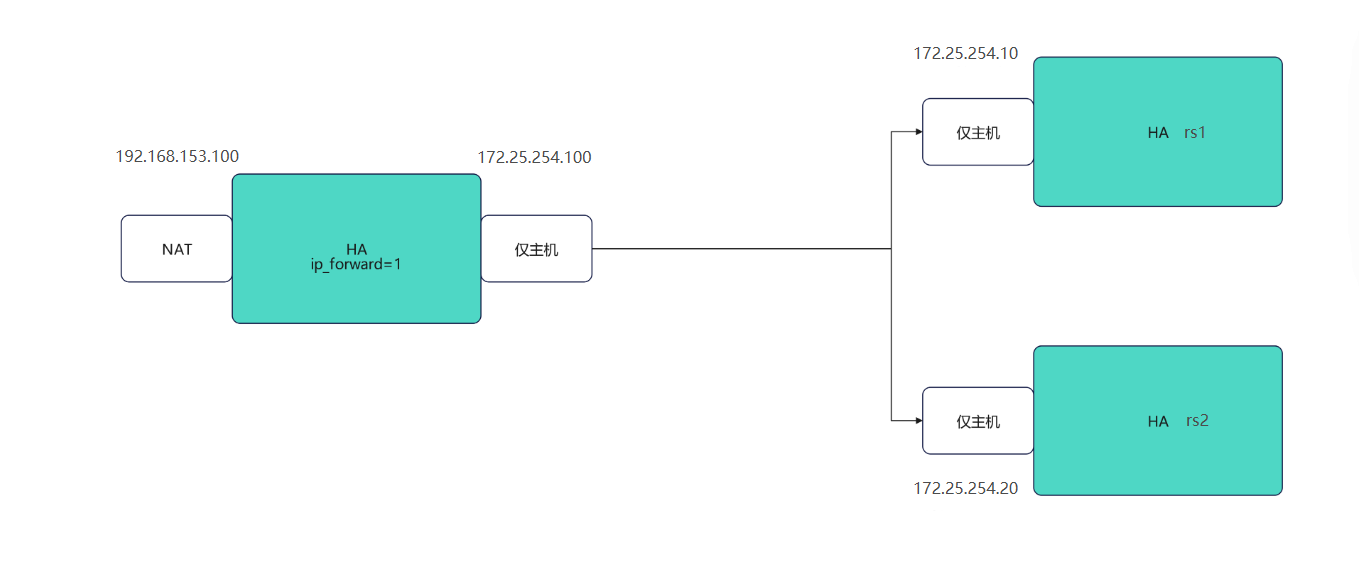
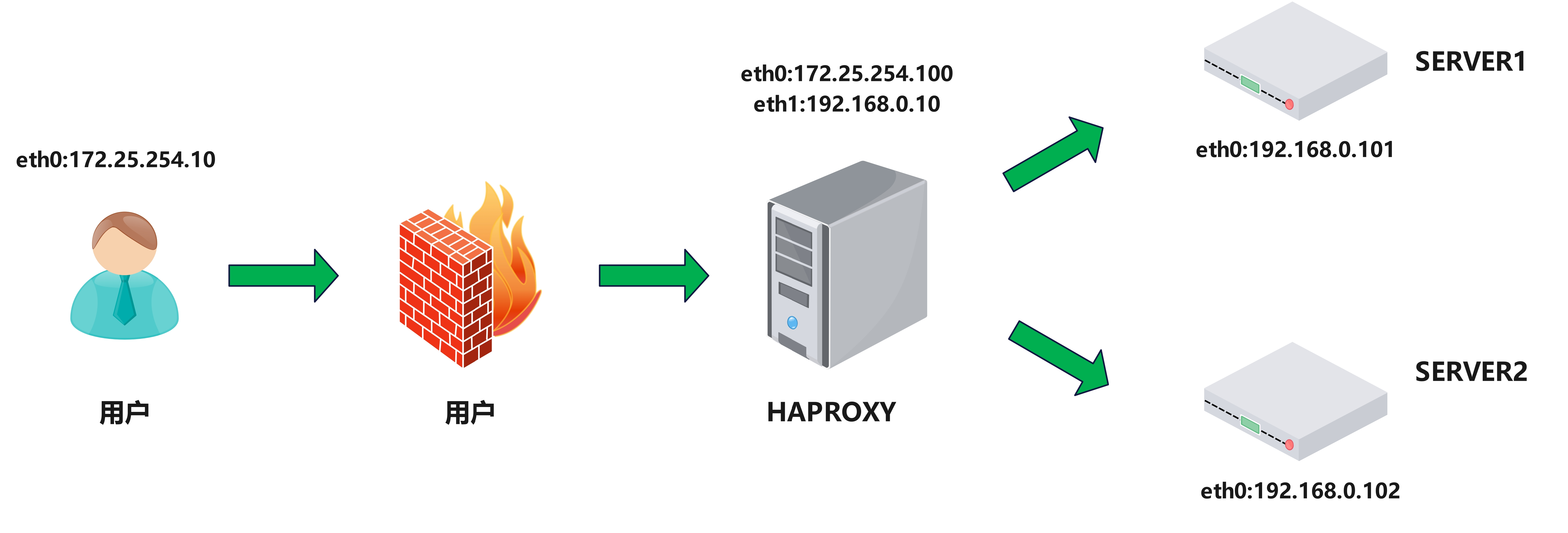
(1)配置haproxy主机环境
[root@haproxy ~]# ip.sh eth0 192.168.153.100 haproxy
[root@haproxy ~]# ip.sh eth1 172.25.254.100 haproxy noroute
[root@haproxy ~]# echo net.ipv4.ip_forward=1 > /etc/sysctl.conf
[root@haproxy ~]# sysctl -p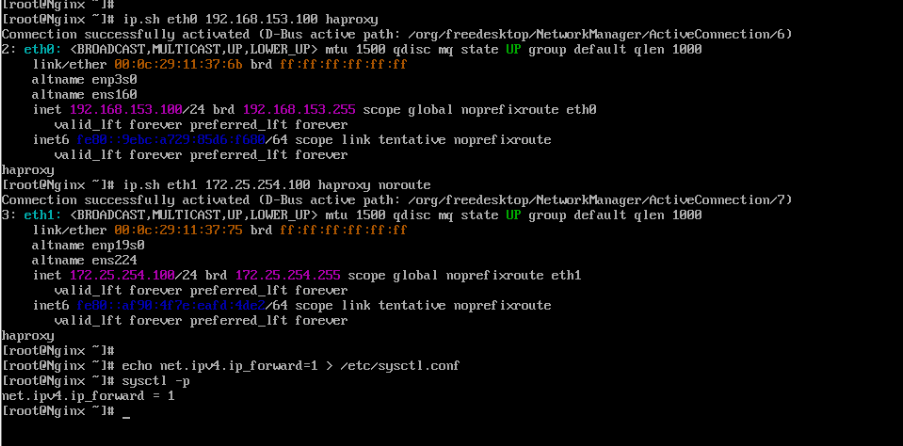
(2)配置rs主机环境
[root@rs1 ~]# ip.sh eth0 172.25.254.10 rs1 noroute
[root@rs1 ~]# dnf install httpd -y
[root@rs1 ~]# echo rs1 - 172.25.254.10 > /var/www/html/index.html
[root@rs1 ~]# systemctl enable --now httpd

[root@rs2 ~]# ip.sh eth0 172.25.254.20 rs2 noroute
[root@rs2 ~]# dnf install httpd -y
[root@rs2 ~]# echo rs2 - 172.25.254.20 > /var/www/html/index.html
[root@rs2 ~]# systemctl enable --now httpd
(3)测试环境
[root@haproxy ~]# curl 172.25.254.10
rs1 - 172.25.254.10
[root@haproxy ~]# curl 172.25.254.20
rs2 - 172.25.254.20
(4)安装haproxy
[root@haproxy ~]# dnf install haproxy-2.4.22-4.el9.x86_64 -y
[root@haproxy ~]# systemctl enable --now haproxy.service
2. haproxy的负载均衡
global:全局配置段
- 进程及安全配置相关的参数
- 性能调整相关参数
- Debug参数
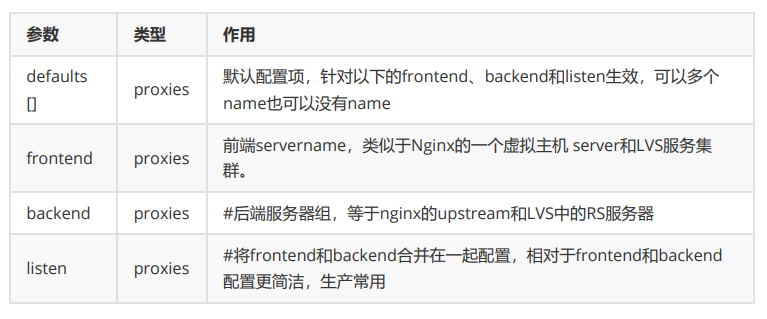
proxies:代理配置段
- defaults:为frontend, backend, listen提供默认配置
- frontend:前端,相当于nginx中的server {}
- backend:后端,相当于nginx中的upstream {}
- listen:同时拥有前端和后端配置,配置简单,生产推荐使用
(1)前后端分开设定
编辑haproxy的主配置文件/etc/haproxy/haproxy.cfg,添加frontend和backend服务
[root@haproxy ~]# vim /etc/haproxy/haproxy.cfg
 64 frontend webcluster
 65     bind            *:80
 66     mode            http
 67     use_backend     webserver-80
 68
 69 backend webserver-80
 70     server web1 172.25.254.10:80 check inter 3s fall 3 rise 5
 71     server web2 172.25.254.20:80 check inter 3s fall 3 rise 5

[root@haproxy ~]# systemctl restart haproxy.service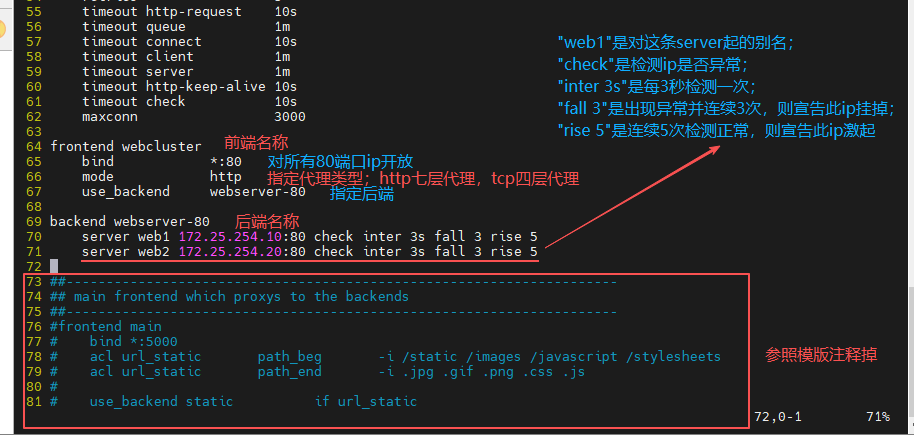
用测试机或客户端来进行测试
[root@client ~]# curl 192.168.153.100
rs1 - 172.25.254.10
[root@client ~]# curl 192.168.153.100
rs2 - 172.25.254.20
(2)用listen方式编写负载均衡
编写haproxy的主配置文件,用listen方式不需要分前端和后端
[root@haproxy ~]# vim /etc/haproxy/haproxy.cfg
 64 listen webcluster
 65     bind            *:80
 66     mode            http
 67     server rs1-haha 172.25.254.10:80 check inter 3s fall 3 rise 5
 68     server rs2-hehe 172.25.254.20:80 check inter 3s fall 3 rise 5

[root@haproxy ~]# systemctl restart haproxy.service
再次测试
[root@client ~]# curl 192.168.153.100
rs1 - 172.25.254.10
[root@client ~]# curl 192.168.153.100
rs2 - 172.25.254.20
3. global全局配置参数
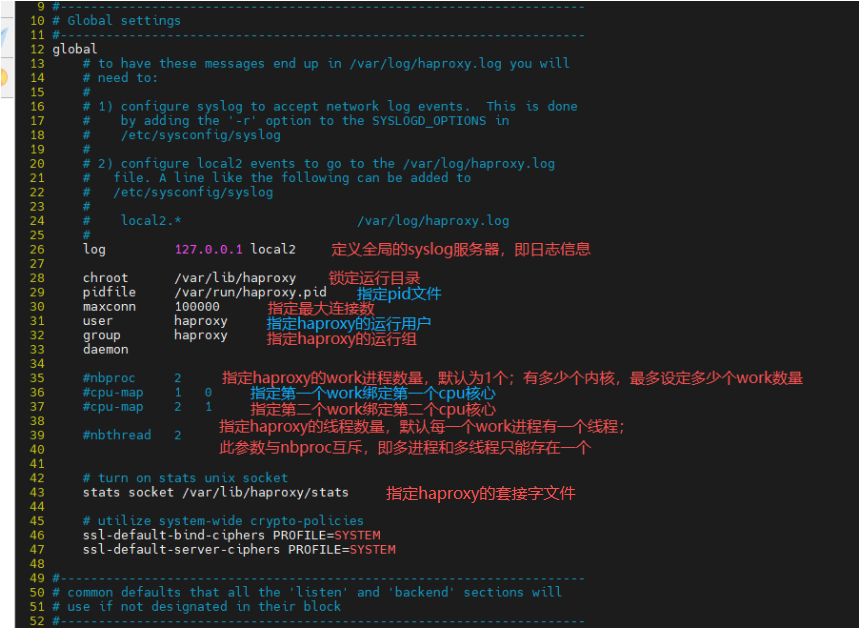
(1)log参数
指定日志到172.25.254.10(rs1主机)
在rs1主机上开启接受日志的端口
[root@rs1 ~]# vim /etc/rsyslog.conf
 32 module(load="imudp") # needs to be done just once
 33 input(type="imudp" port="514")
[root@rs1 ~]# systemctl restart rsyslog.service
[root@rs1 ~]# netstat -antlupe | grep rsyslog
在haproxy主机上指定日志发送到rs1主机上
[root@haproxy ~]# vim /etc/haproxy/haproxy.cfg
 26     log         172.25.254.10 local2
[root@haproxy ~]# systemctl restart haproxy.service
测试
[root@client ~]# for i in {1..10};do curl 192.168.153.100;done
rs1 - 172.25.254.10
rs2 - 172.25.254.20
rs1 - 172.25.254.10
rs2 - 172.25.254.20
······

[root@rs1 ~]# cat /var/log/messages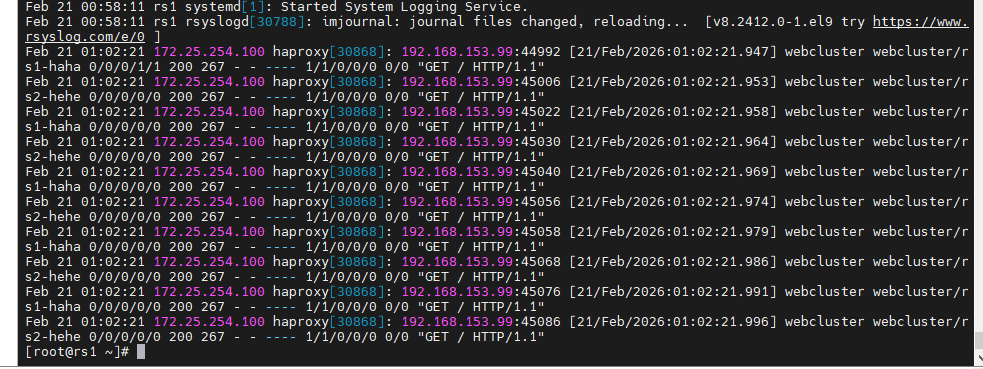
(2)haproxy多进程
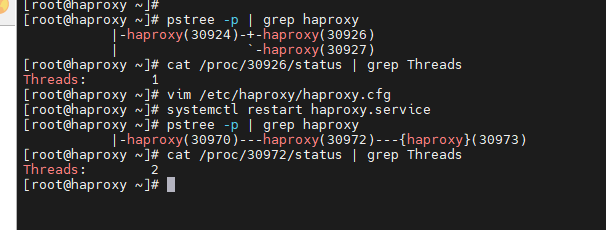
默认haproxy是单进程,改多进程需要添加nbproc参数,减少cpu损耗资源则将进程和内核进行绑定
将套接字与多个进程进行绑定,不然多进程无法全部管理
删除原先的套接字,重启后进行测试
[root@haproxy ~]# pstree -p | grep haproxy
[root@haproxy ~]# vim /etc/haproxy/haproxy.cfg
 26     log         127.0.0.1 local2
 35     nbproc      2
 36     cpu-map 1   0
 37     cpu-map 2   1
 42     #stats socket /var/lib/haproxy/stats
 43     stats socket /var/lib/haproxy/haproxy1  mode 600 level admin process 1
 44     stats socket /var/lib/haproxy/haproxy2  mode 600 level admin process 2
[root@haproxy ~]# rm -rf /var/lib/haproxy/stats
[root@haproxy ~]# systemctl restart haproxy.service

[root@haproxy ~]# pstree -p | grep haproxy
[root@haproxy ~]# ll /var/lib/haproxy/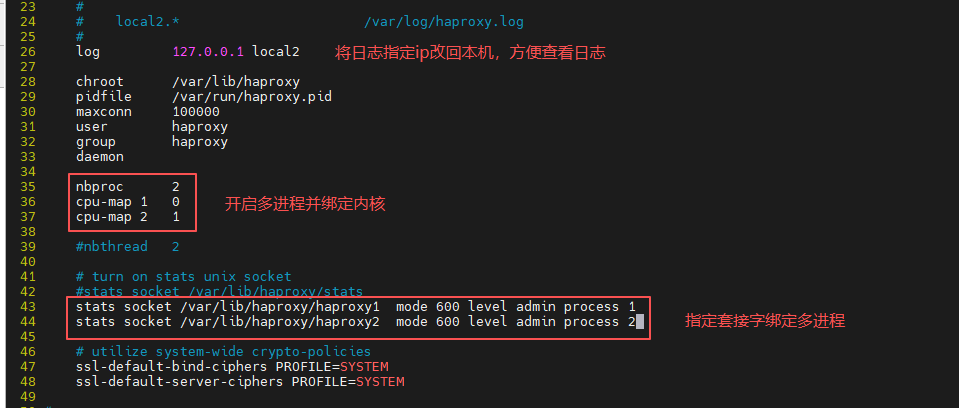

(3)haproxy多线程
多进程和多线程不能同时存在,所以需要将多进程注释掉
Threads是线程数量
[root@haproxy ~]# pstree -p | grep haproxy
[root@haproxy ~]# cat /proc/30926/status | grep Threads
[root@haproxy ~]# vim /etc/haproxy/haproxy.cfg
 35     #nbproc     2
 36     #cpu-map    1   0
 37     #cpu-map    2   1
 39     nbthread    2
 41     # turn on stats unix socket
 42     stats socket /var/lib/haproxy/stats
 43     #stats socket /var/lib/haproxy/haproxy1 mode 600 level admin process 1
 44     #stats socket /var/lib/haproxy/haproxy2 mode 600 level admin process 2
[root@haproxy ~]# systemctl restart haproxy.service

[root@haproxy ~]# pstree -p | grep haproxy
[root@haproxy ~]# cat /proc/30972/status | grep Threads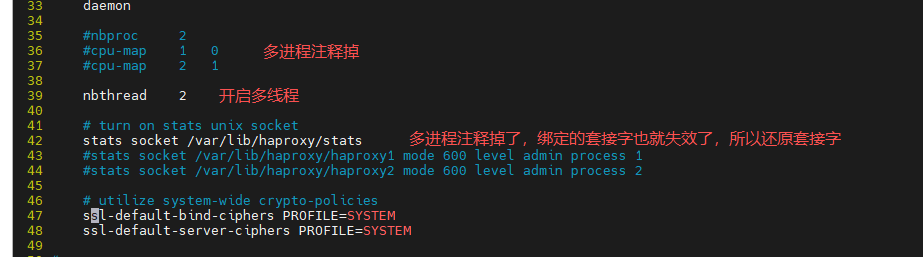
4. proxies代理配置参数
(1)defaults参数
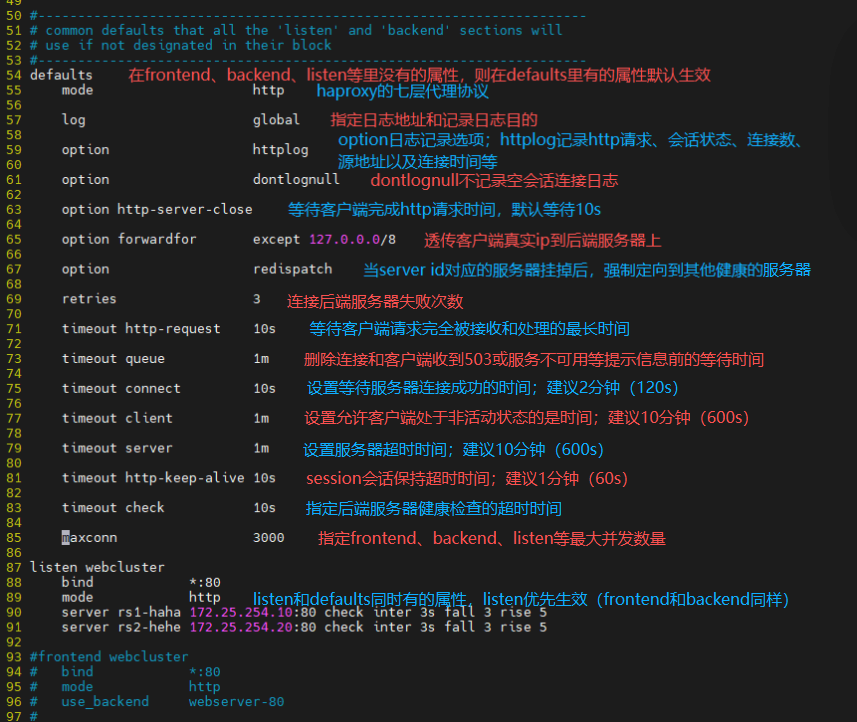
在frontend、backend和listen里没有的参数,则在defaults有的参数默认生效
在frontend、backend和listen里有的参数在defaults也有,则frontend等先生效
在defaults、frontend、backend、liste后面跟的name,name字段只能使用大小写字母,数字,'-'(dash),'_'(underscore),'.' (dot)和 ':'(colon),并且严格 区分大小写
(2)server配置

- check:对指定的real进行健康状态检查
- addr:指定健康状态监测ip
- port:指定健康状态监测端口
- inter:检查健康转台间隔时间,默认2000ms
- fall:后端服务器连接失效次数,默认为3;如果3次都失效则下线
- rise:后端服务器连接有效次数,默认为2;如果2次都有效则上线
- weight:默认为1,最大值为256,0(状态为蓝色)表示不参与负载均衡,但仍接受持久连接
- backup:将后端服务器标记为备份状态,只在所有非备份主机down机时提供服务,类似Sorry Server
- disabled:将后端服务器标记为不可用状态,即维护状态,除了持久模式
- redirect prefix http://www.baidu.com/:将请求临时(302)重定向至其它URL,只适用于http 模式
- maxconn:当前后端server的最大并发连接数
三、socat热更新工具
对服务器修改权重或其他状态时,需要重新启动在能生效,这会导致服务器(调度器)暂时下线,而在真正服务时是不能下线的,所以我们就需要热更新socat工具
热更新:在服务或软件不停止的情况下更新软件或服务的工作方式,完成对软件不停工更新,典型的热更新设备,usb,在使用usb进行插拔时,电脑系统时不需要停止工作的,这中设备叫热插拔设备
1. 安装socat并查看haproxy信息
"get weight"查看权重,"webcluster/rs1-haha"(be_name/srv_name)指定服务器
[root@haproxy ~]# dnf install socat -y
[root@haproxy ~]# socat -h
[root@haproxy ~]# echo "show server state" | socat stdio /var/lib/haproxy/stats 1
[root@haproxy ~]# echo "get weight webcluster/rs1-haha" | socat stdio /var/lib/haproxy/stats
[root@haproxy ~]# echo "get weight webcluster/rs2-hehe" | socat stdio /var/lib/haproxy/stats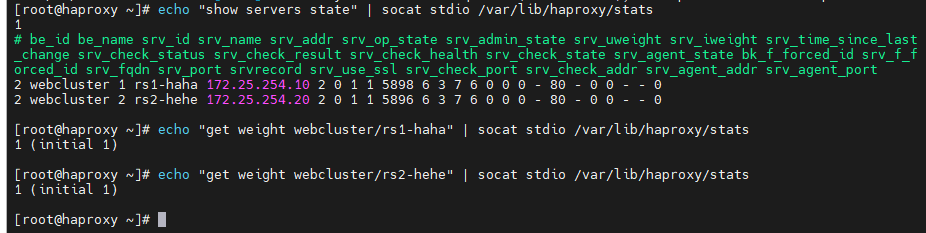
2. 利用socat修改权重
直接修改会报错,因为套接字没有权限修改
给socket授权后需要删除原来的套接字再进行重启
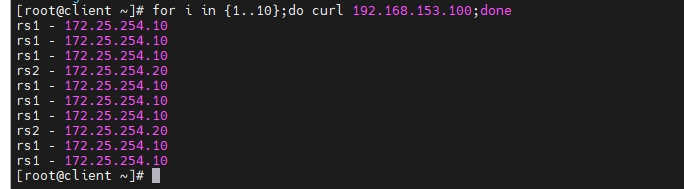
然后用再次用socat修改权重并进行测试
[root@haproxy ~]# echo "set weight webcluster/rs1-haha 2" | socat stdio /var/lib/haproxy/stats
[root@haproxy ~]# vim /etc/haproxy/haproxy.cfg
 42     stats socket /var/lib/haproxy/stats mode 600 level admin
[root@haproxy ~]# rm -rf /var/lib/haproxy/*
[root@haproxy ~]# systemctl restart haproxy.service
[root@haproxy ~]# ll /var/lib/haproxy/
[root@haproxy ~]# echo "set weight webcluster/rs1-haha 3" | socat stdio /var/lib/haproxy/stats
[root@haproxy ~]# echo "get weight webcluster/rs1-haha" | socat stdio /var/lib/haproxy/stats

[root@client ~]# for i in {1..10};do curl 192.168.153.100;done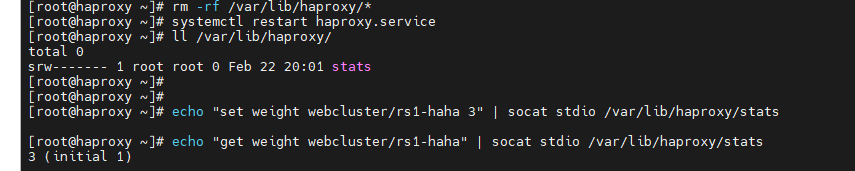
四、HAProxy算法
- HAProxy通过固定参数balance指明对后端服务器的调度算法
- balance参数可以配置在listen或backend选项中
- HAProxy的调度算法分为静态和动态调度算法
- 有些算法可以根据参数在静态和动态算法中相互转换
1.静态算法
静态算法:按照事先定义好的规则轮询公平调度,不关心后端服务器的当前负载、连接数和响应速度等,且无法实时修改权重(只能为0和1,0关闭,1开启),只能靠重启HAProxy生效。
(1)static-rr
基于权重的轮询调度
- 不支持运行时利用socat进行权重的动态调整(只支持0和1,不支持其它值)
- 不支持端服务器慢启动
- 其后端主机数量没有限制,相当于LVS中的 wrr
慢启动:指在服务器刚刚启动上不会把他所应该承担的访问压力全部给它,而是先给一部分,当没 问题后在给一部分
设置为static-rr算法,并设置rs1的权重为3,rs2权重为1
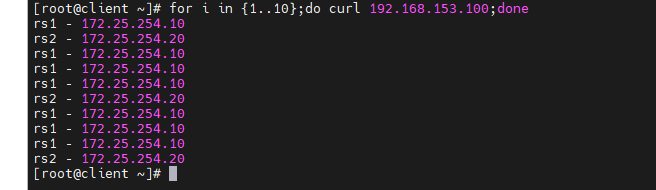
然后测试热更新能否修改权重,并进行访问
[root@haproxy ~]# vim /etc/haproxy/haproxy.cfg
 72 listen webcluster
 73     bind            *:80
 74     balance         static-rr
 75     server rs1-haha 172.25.254.10:80 check inter 3s fall 3 rise 5 weight 3
 76     server rs2-hehe 172.25.254.20:80 check inter 3s fall 3 rise 5 wetght 1
[root@haproxy ~]# systemctl restart haproxy.service
[root@haproxy ~]# echo "get weight webcluster/rs1-haha" | socat stdio /var/lib/haproxy/stats
[root@haproxy ~]# echo "get weight webcluster/rs2-hehe" | socat stdio /var/lib/haproxy/stats
[root@haproxy ~]# echo "set weight webcluster/rs1-haha 1" | socat stdio /var/lib/haproxy/stats

[root@client ~]# for i in {1..10};do curl 192.168.153.100;done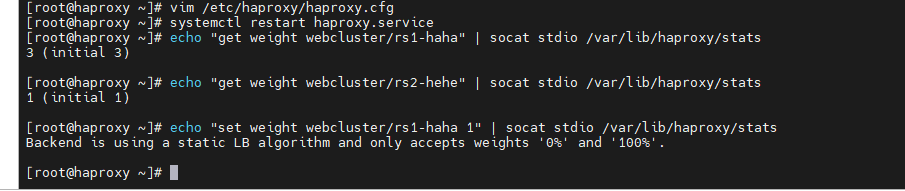
(2)first
基于"优先级"调度
- 根据服务器在列表中的位置,自上而下进行调度
- 其只会当第一台服务器的连接数达到上限,新请求才会分配给下一台服务
- 其会忽略服务器的权重设置
- 不支持用socat进行动态修改权重,可以设置0和1,可以设置其它值但无效
设置first算法,在客户端中进行持续访问进行测试
[root@haproxy ~]# vim /etc/haproxy/haproxy.cfg
 72 listen webcluster
 73     bind            *:80
 74     balance         first
 75     server rs1-haha 172.25.254.10:80 check inter 3s fall 3 rise 5 weight 3
 76     server rs2-hehe 172.25.254.20:80 check inter 3s fall 3 rise 5 weight 1
[root@haproxy ~]# systemctl restart haproxy.service

[root@client ~]# while true;do curl 192.168.153.100;done
rs1 - 172.25.254.10
rs1 - 172.25.254.10
rs1 - 172.25.254.10
rs1 - 172.25.254.10
rs1 - 172.25.254.10
rs1 - 172.25.254.10
rs1 - 172.25.254.10
······

[root@haproxy ~]# vim /etc/haproxy/haproxy.cfg
 72 listen webcluster
 73     bind            *:80
 74     balance         first
 75     server rs2-hehe 172.25.254.20:80 check inter 3s fall 3 rise 5 weight 1
 76     server rs1-haha 172.25.254.10:80 check inter 3s fall 3 rise 5 weight 3
[root@haproxy ~]# systemctl restart haproxy.service

[root@client ~]# while true;do curl 192.168.153.100;done
rs2 - 172.25.254.20
rs2 - 172.25.254.20
rs2 - 172.25.254.20
rs2 - 172.25.254.20
rs2 - 172.25.254.20
rs2 - 172.25.254.20
······
则哪个server在前面,则优先访问哪个服务器
测试当第一个server超载时,服务会不会调度到并一个server上
# 在server上配置"maxconn 1"的数值太小了,仅限测试
[root@haproxy ~]# vim /etc/haproxy/haproxy.cfg
 72 listen webcluster
 73     bind            *:80
 74     balance         first
 75     server rs2-hehe 172.25.254.20:80 maxconn 1 check inter 3s fall 3 rise 5 weight 1
 76     server rs1-haha 172.25.254.10:80 check inter 3s fall 3 rise 5 weight 3
[root@haproxy ~]# systemctl restart haproxy.service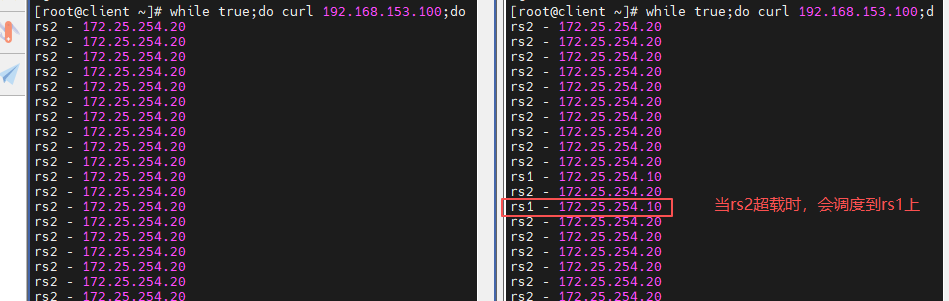
2.动态算法
- 基于后端服务器状态进行调度适当调整
- 新请求将优先调度至当前负载较低的服务器
- 权重可以在haproxy运行时动态调整无需重启
(1)roudrobin
基于权重的轮询动态调度算法
- 支持权重的运行时调整,不同于lvs中的rr轮训模式
- HAProxy中的roundrobin支持慢启动(新加的服务器会逐渐增加转发数)
- 其每个后端backend中最多支持4095个real server
- 支持对real server权重动态调整
- roundrobin为默认调度算法,此算法使用广泛
设置roundrobin算法,并进行测试
[root@haproxy ~]# vim /etc/haproxy/haproxy.cfg
 72 listen webcluster
 73     bind            *:80
 74     balance         roundrobin
 75     server rs2-hehe 172.25.254.20:80 check inter 3s fall 3 rise 5 weight 1
 76     server rs1-haha 172.25.254.10:80 check inter 3s fall 3 rise 5 weight 3
[root@haproxy ~]# systemctl restart haproxy.service

[root@client ~]# for i in {1..10};do curl 192.168.153.100;done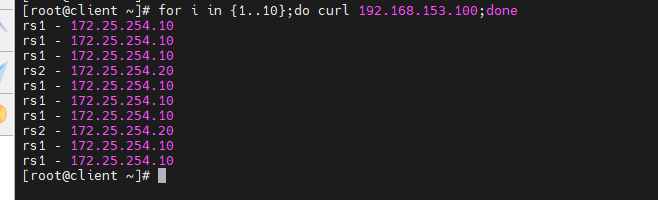
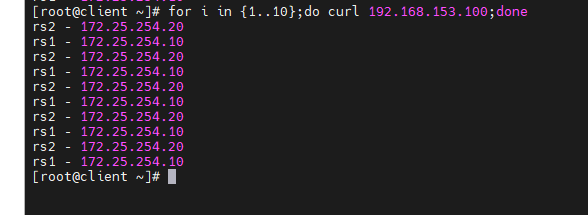
更新动态权重
[root@haproxy ~]# echo "get weight webcluster/rs1-haha" | socat stdio /var/lib/haproxy/stats
[root@haproxy ~]# echo "get weight webcluster/rs2-hehe" | socat stdio /var/lib/haproxy/stats
[root@haproxy ~]# echo "set weight webcluster/rs1-haha 1" | socat stdio /var/lib/haproxy/stats
[root@haproxy ~]# echo "get weight webcluster/rs1-haha" | socat stdio /var/lib/haproxy/stats

[root@client ~]# for i in {1..10};do curl 192.168.153.100;done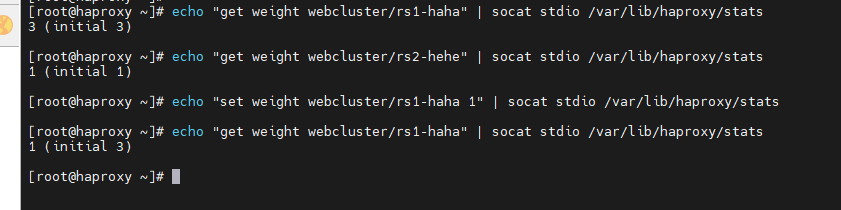
(2)leastconn
加权的最少连接的动态
-
支持权重的运行时调整和慢启动,即:根据当前连接最少的后端服务器而非权重进行优先调度(新客户 端连接)
-
比较适合长连接的场景使用,比如:MySQL等场景。
[root@haproxy ~]# vim /etc/haproxy/haproxy.cfg
72 listen webcluster
73 bind *:80
74 balance leastconn
75 server rs2-hehe 172.25.254.20:80 check inter 3s fall 3 rise 5 weight 1
76 server rs1-haha 172.25.254.10:80 check inter 3s fall 3 rise 5 weight 3
[root@haproxy ~]# systemctl restart haproxy.service[root@client ~]# for i in {1..10};do curl 192.168.153.100;done
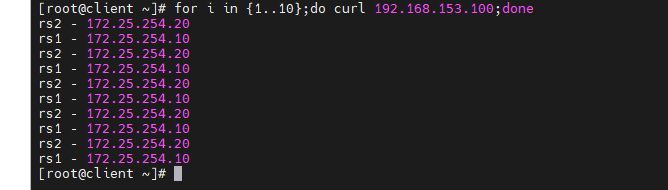
3.混合算法
混合算法即可作为静态算法,又可以通过选项成为动态算法
(1)source
源地址hash,基于用户源地址hash并将请求转发到后端服务器,后续同一个源地址请求将被转发至同一个后端web服务器
- 此方式当后端服务器数据量发生变化时,会导致很多用户的请求转发至新的后端服务器,默认为静态方式
- 但是可以通过hash-type支持的选项更改这个算法一般是在不插入Cookie的TCP模式下使用,也可给拒绝会话cookie的客户提供最好的会话粘性,适用于session会话保持但不支持 cookie和缓存的场景源地址有两种转发客户端请求到后端服务器的服务器选取计算方式
- 分别是取模法(map-base)和一致性hash(consistent)
### 取模法
map-based:取模法
- 对source地址进行hash计算,再基于服务器总权重的取模,最终结果决定将此请求转发至对应的后端服务器。
- 此方法是静态的,即不支持在线调整权重,不支持慢启动,可实现对后端服务器均衡调度
- 缺点是当服务器的总权重发生变化时,即有服务器上线或下线,都会因总权重发生变化而导致调度结果
- 整体改变 hash-type 指定的默值为此算法
设定算法为source,默认为静态即取模法
[root@haproxy ~]# vim /etc/haproxy/haproxy.cfg
 72 listen webcluster
 73     bind            *:80
 74     balance         source
 75     server rs2-hehe 172.25.254.20:80 check inter 3s fall 3 rise 5 weight 1
 76     server rs1-haha 172.25.254.10:80 check inter 3s fall 3 rise 5 weight 3
[root@haproxy ~]# systemctl restart haproxy.service

[root@client ~]# for i in {1..10};do curl 192.168.153.100;done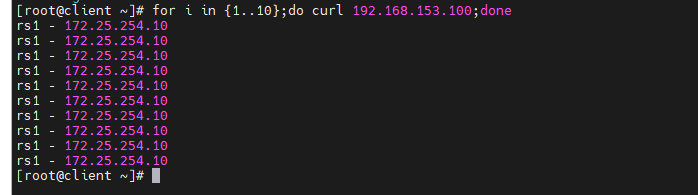
不支持动态调整权重值,只能动态上线(1)和下线(0)
[root@haproxy ~]# echo "get weight webcluster/rs1-haha" | socat stdio /var/lib/haproxy/stats
[root@haproxy ~]# echo "set weight webcluster/rs1-haha 1" | socat stdio /var/lib/haproxy/stats
[root@haproxy ~]# echo "set weight webcluster/rs1-haha 0" | socat stdio /var/lib/haproxy/stats
[root@haproxy ~]# echo "get weight webcluster/rs1-haha" | socat stdio /var/lib/haproxy/stats

[root@client ~]# for i in {1..10};do curl 192.168.153.100;done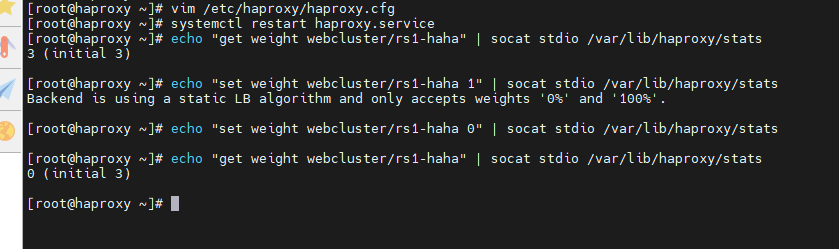
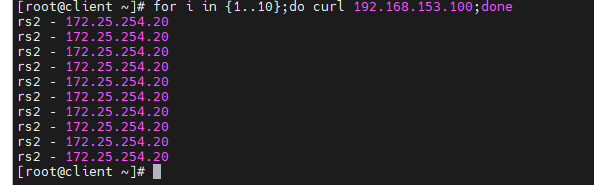
### 一致性hash
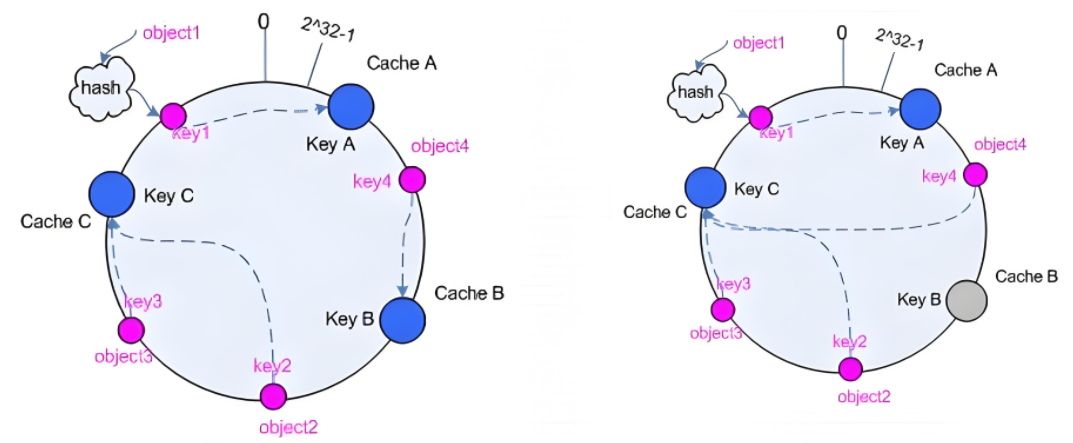
一致性hash,当服务器的总权重发生变化时,对调度结果影响是局部的,不会引起大的变动hash(o) mod n
该hash算法是动态的,支持使用 socat等工具进行在线权重调整,支持慢启动
- 后端服务器哈希环点keyA=hash(后端服务器虚拟ip)%(2^32)
- 客户机哈希环点key1=hash(client_ip)%(2^32) 得到的值在0---4294967295之间
- 将keyA和key1都放在hash环上,将用户请求调度到离key1最近的keyA对应的后端服务器

hash环偏斜问题:增加虚拟服务器IP数量,比如:一个后端服务器根据权重为1生成1000个虚拟IP,再hash。而后端服务器权 重为2则生成2000的虚拟IP,再bash,最终在hash环上生成3000个节点,从而解决hash环偏斜问题
hash对象到后端服务器的映射关系
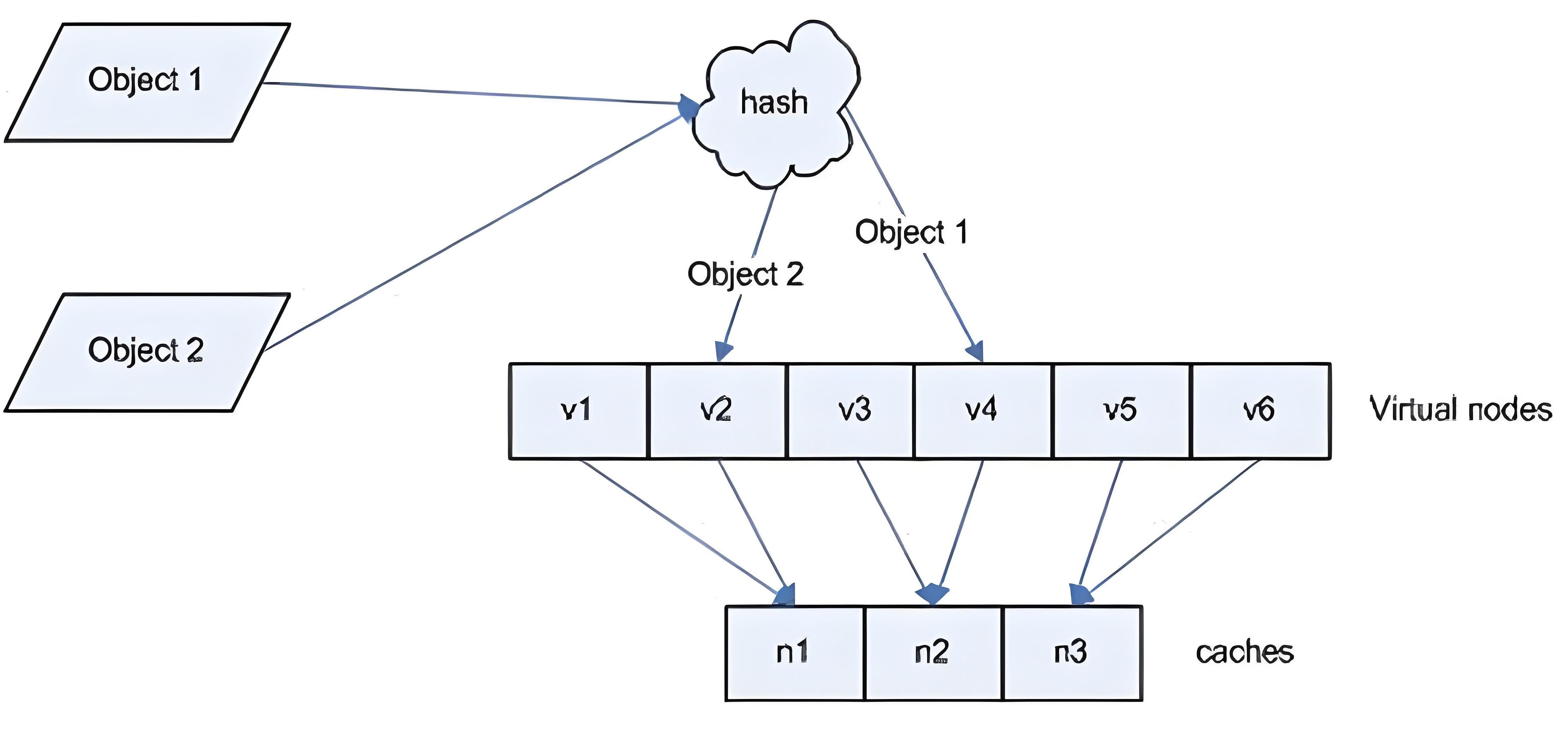
一致性hash示意图:后端服务器在线与离线的调度方式
设定hash-type为consistent,即设定为一致性hash
[root@haproxy ~]# vim /etc/haproxy/haproxy.cfg
 72 listen webcluster
 73     bind            *:80
 74     balance         source
 75     hash-type       consistent
 76     server rs2-hehe 172.25.254.20:80 check inter 3s fall 3 rise 5 weight 1
 77     server rs1-haha 172.25.254.10:80 check inter 3s fall 3 rise 5 weight 3
[root@haproxy ~]# systemctl restart haproxy.service
[root@haproxy ~]# echo "get weight webcluster/rs1-haha" | socat stdio /var/lib/haproxy/stats
[root@haproxy ~]# echo "get weight webcluster/rs2-hehe" | socat stdio /var/lib/haproxy/stats

[root@client ~]# for i in {1..10};do curl 192.168.153.100;done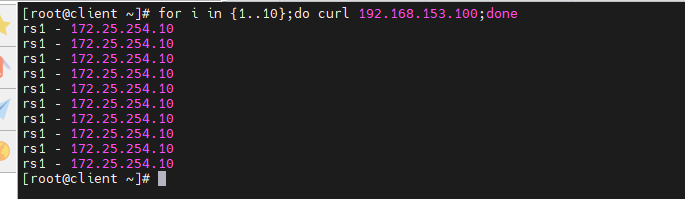
(2)uri
基于对用户请求的URI的左半部分或整个uri做hash,再将hash结果对总权重进行取模后
- 根据最终结果将请求转发到后端指定服务器
- 适用于后端是缓存服务器场景
- 默认是静态算法,也可以通过hash-type指定map-based和consistent,来定义使用取模法还是一致性hash
- 此算法基于应用层,所以只支持 mode http(七层) ,不支持 mode tcp(四层)

准备好测试环境
[root@rs1 ~]# echo RS1 - 172.25.254.10 >/var/www/html/index1.html
[root@rs1 ~]# echo RS1 - 172.25.254.10 >/var/www/html/index2.html

[root@rs2 ~]# echo RS2 - 172.25.254.20 >/var/www/html/index1.html
[root@rs2 ~]# echo RS2 - 172.25.254.20 >/var/www/html/index2.html
### 取模法
设定算法为uri,默认静态,也可以设置hash-type为map-based静态
[root@haproxy ~]# vim /etc/haproxy/haproxy.cfg
 72 listen webcluster
 73     bind            *:80
 74     balance         uri
 75     hash-type       map-based
 76     server rs2-hehe 172.25.254.20:80 check inter 3s fall 3 rise 5 weight 1
 77     server rs1-haha 172.25.254.10:80 check inter 3s fall 3 rise 5 weight 2
[root@haproxy ~]# systemctl restart haproxy.service

[root@client ~]# for i in {1..10};do curl 192.168.153.100/index.html;done
[root@client ~]# for i in {1..10};do curl 192.168.153.100/index1.html;done
[root@client ~]# for i in {1..10};do curl 192.168.153.100/index2.html;done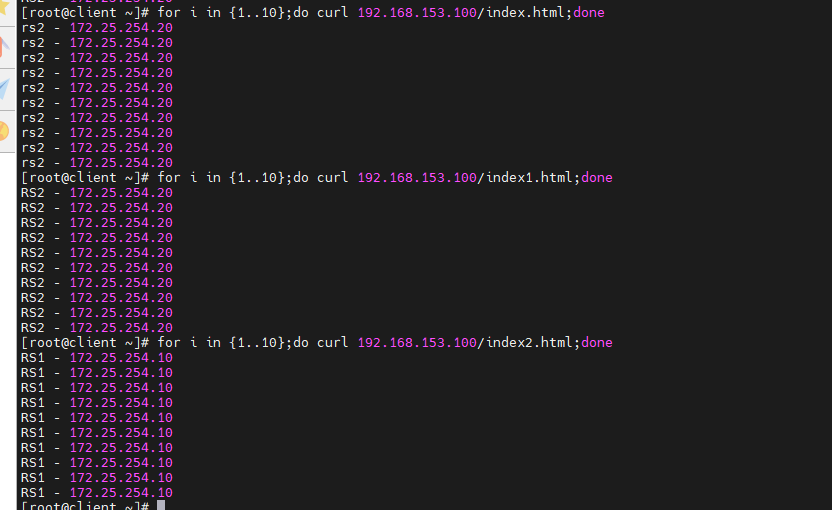
### 一致性hash
设置hash-type为consistent
[root@haproxy ~]# vim /etc/haproxy/haproxy.cfg
 72 listen webcluster
 73     bind            *:80
 74     balance         uri
 75     hash-type       consistent
 76     server rs2-hehe 172.25.254.20:80 check inter 3s fall 3 rise 5 weight 1
 77     server rs1-haha 172.25.254.10:80 check inter 3s fall 3 rise 5 weight 2
[root@haproxy ~]# systemctl restart haproxy.service

[root@client ~]# for i in {1..10};do curl 192.168.153.100/index.html;done
[root@client ~]# for i in {1..10};do curl 192.168.153.100/index1.html;done
[root@client ~]# for i in {1..10};do curl 192.168.153.100/index2.html;done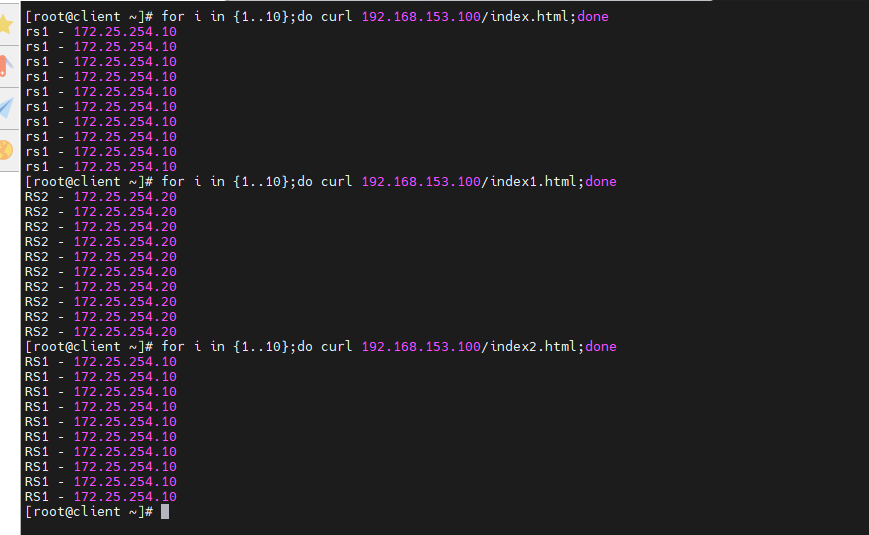
(3)url_param
- url_param对用户请求的url中的 params 部分中的一个参数key对应的value值作hash计算,并由服务器总权重相除以后派发至某挑出的服务器,后端搜索同一个数据会被调度到同一个服务器,多用与电商
- 通常用于追踪用户,以确保来自同一个用户的请求始终发往同一个real server
- 如果无没key,将按roundrobin算法
- 也有取模法和一致性hash
### 取模法
设定算法为url_param,支持多个url_param hash
[root@haproxy ~]# vim /etc/haproxy/haproxy.cfg
 72 listen webcluster
 73     bind            *:80
 74     balance         url_param name,userid
 76     server rs2-hehe 172.25.254.20:80 check inter 3s fall 3 rise 5 weight 1
 77     server rs1-haha 172.25.254.10:80 check inter 3s fall 3 rise 5 weight 2
[root@haproxy ~]# systemctl restart haproxy.service

[root@client ~]# for i in {1..10};do curl 192.168.153.100/index.html?name=timinglee;done
[root@client ~]# for i in {1..10};do curl 192.168.153.100/index.html?userid=lee;done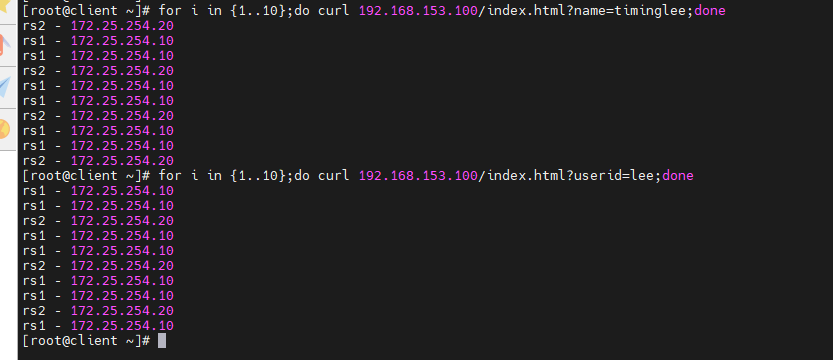
### 一致性hash
设定hash-type为consistent
[root@haproxy ~]# vim /etc/haproxy/haproxy.cfg
 72 listen webcluster
 73     bind            *:80
 74     balance         url_param name,userid
 75     hash-type       consistent
 76     server rs2-hehe 172.25.254.20:80 check inter 3s fall 3 rise 5 weight 1
 77     server rs1-haha 172.25.254.10:80 check inter 3s fall 3 rise 5 weight 2
[root@haproxy ~]# systemctl restart haproxy.service

[root@client ~]# for i in {1..10};do curl 192.168.153.100/index.html?name=timinglee;done
[root@client ~]# for i in {1..10};do curl 192.168.153.100/index.html?userid=lee;done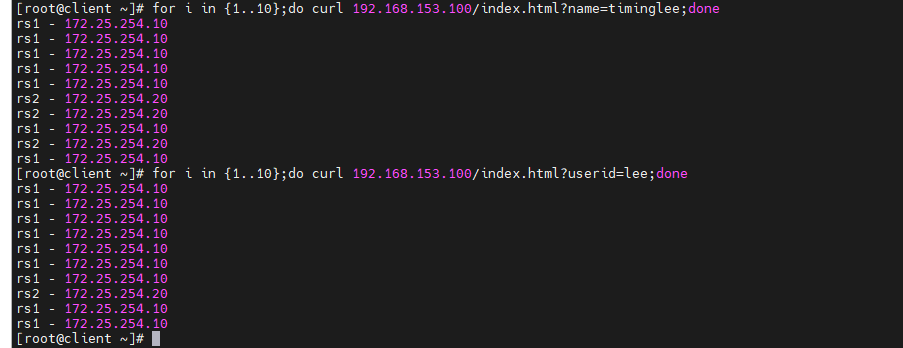
(4)hdr
- 针对用户每个http头部(header)请求中的指定信息做hash
- 此处由 name 指定的http首部将会被取出并做hash计算
- 再由服务器总权重取模以后派发至某挑出的服务器,如果无有效值,则会使用默认的轮询调度
### 取模法
设定算法为hdr
[root@haproxy ~]# vim /etc/haproxy/haproxy.cfg
 72 listen webcluster
 73     bind            *:80
 74     balance         hdr(User-Agent)
 76     server rs2-hehe 172.25.254.20:80 check inter 3s fall 3 rise 5 weight 1
 77     server rs1-haha 172.25.254.10:80 check inter 3s fall 3 rise 5 weight 2
[root@haproxy ~]# systemctl restart haproxy.service

[root@client ~]# for i in {1..10};do curl -A "lee" 192.168.153.100;done
[root@client ~]# for i in {1..10};do curl -A "timing" 192.168.153.100;done
[root@client ~]# for i in {1..10};do curl -A "timinglee" 192.168.153.100;done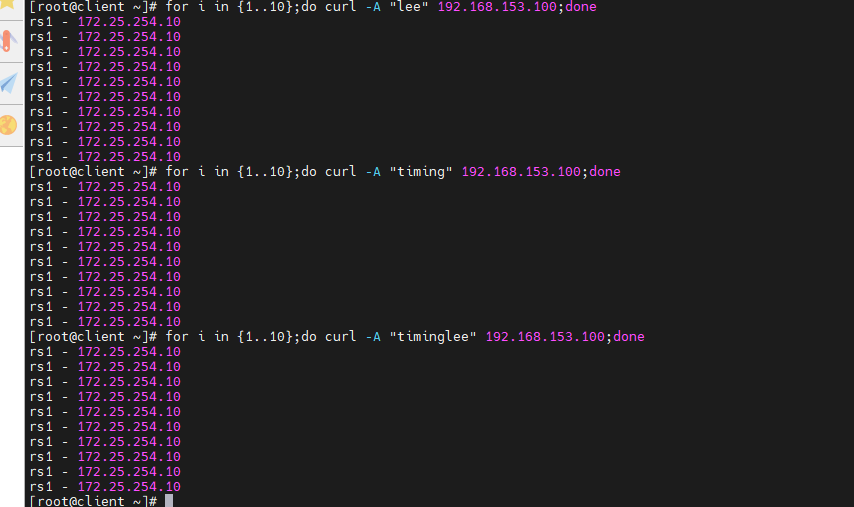
### 一致性hash
设定hash-type为consistent
[root@haproxy ~]# vim /etc/haproxy/haproxy.cfg
 72 listen webcluster
 73     bind            *:80
 74     balance         hdr(User-Agent)
 75     hash-type       consistent
 76     server rs2-hehe 172.25.254.20:80 check inter 3s fall 3 rise 5 weight 1
 77     server rs1-haha 172.25.254.10:80 check inter 3s fall 3 rise 5 weight 2
[root@haproxy ~]# systemctl restart haproxy.service

[root@client ~]# for i in {1..10};do curl -A "lee" 192.168.153.100;done
[root@client ~]# for i in {1..10};do curl -A "haha" 192.168.153.100;done
[root@client ~]# for i in {1..10};do curl -A "hehe" 192.168.153.100;done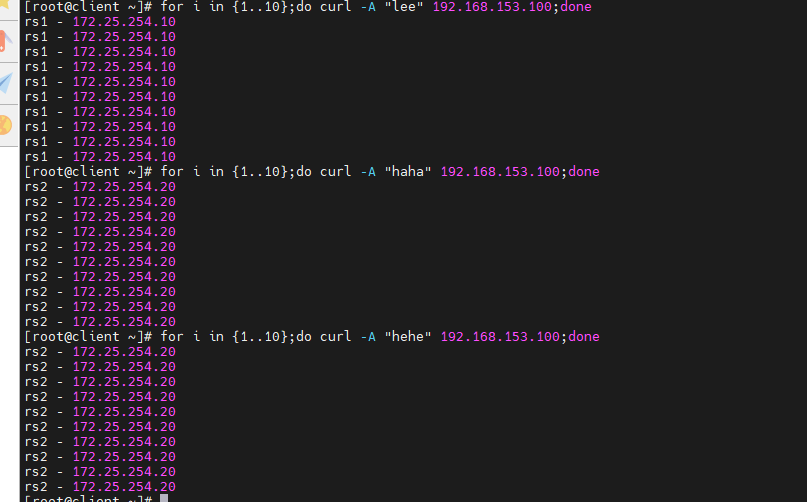
五、高级功能即配置
1. 基于cookie的会话保持
- 如果在haprorxy中设定算法为source,在同一台客户端主机中,无论使用什么浏览器访问的最终服务器是同一个
- 可以使用cookie值进行优化,让同一台客户端中同一个浏览器中访问的是同一个服务器
- 不同浏览器访问的是不同的服务器
- 不支持 tcp mode,使用 http mode
设置动态算法并添加cookie值
[root@haproxy ~]# vim /etc/haproxy/haproxy.cfg
 72 listen webcluster
 73     bind            *:80
 74     balance         roundrobin
 75     hash-type       consistent
 76     cookie WEBCOOKIE insert nocache indirect
 77     server rs2-hehe 172.25.254.20:80 cookie web2 check inter 3s fall 3 rise 5 weight 1
 78     server rs1-haha 172.25.254.10:80 cookie web1 check inter 3s fall 3 rise 5 weight 2
[root@haproxy ~]# systemctl restart haproxy.service
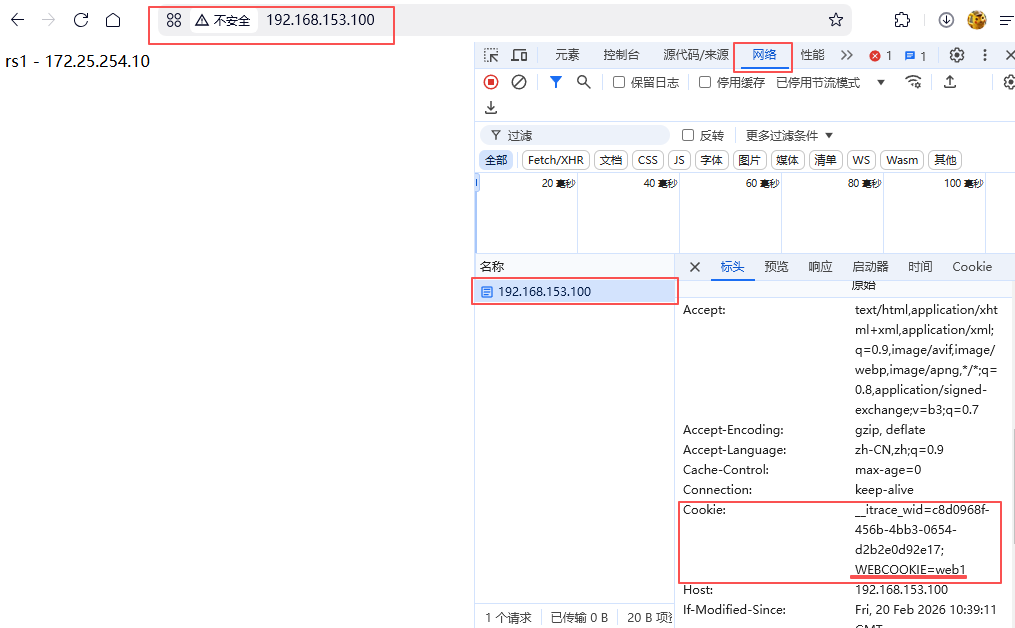
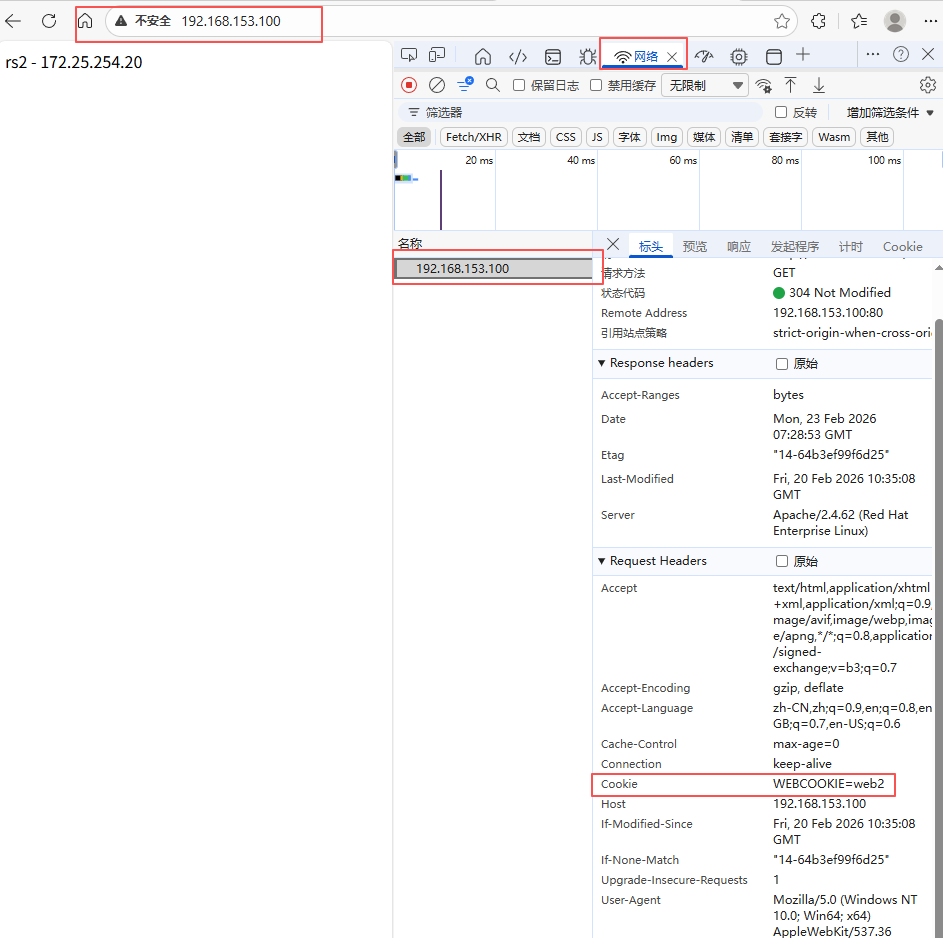
测试,在不同浏览器访问192.168.153.100,打开网页后右击检查------刷新网页------选择网络------选择ip地址------查找cookie值
千问访问
edge访问
2. HAProxy状态页
通过web界面,显示当前HAProxy的运行状态
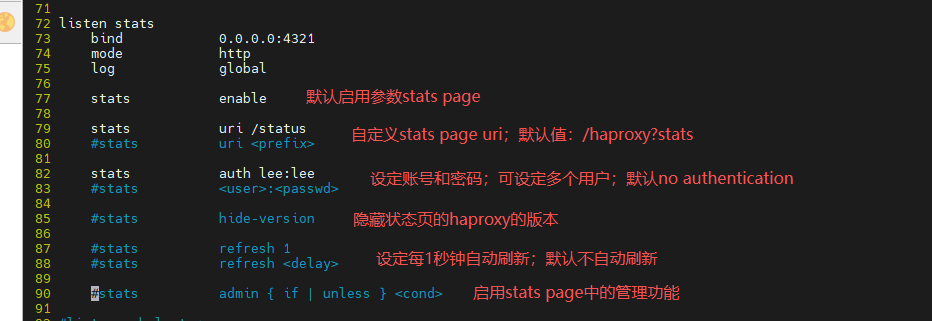
开启状态页;设定uri为"/status"即访问时访问192.168.153.100:4321/status;设定用户和密码为lee和lee;开启每秒自动刷新
[root@haproxy ~]# vim /etc/haproxy/haproxy.cfg
 72 listen stats
 73     bind            0.0.0.0:4321
 74     mode            http
 75     log             global
 76     stats           enable
 77     stats           uri /status
 78     #stats          uri <prefix>
 80     stats           auth lee:lee
 81     #stats          <user>:<passwd>
 83     #stats          hide-version
 85     stats          refresh 1
 87     #stats          refresh <delay>
 88     #stats          admin { if | unless } <cond>
[root@haproxy ~]# systemctl restart haproxy.service
实验环境

到浏览器下访问192.168.153.100:4321/status测试
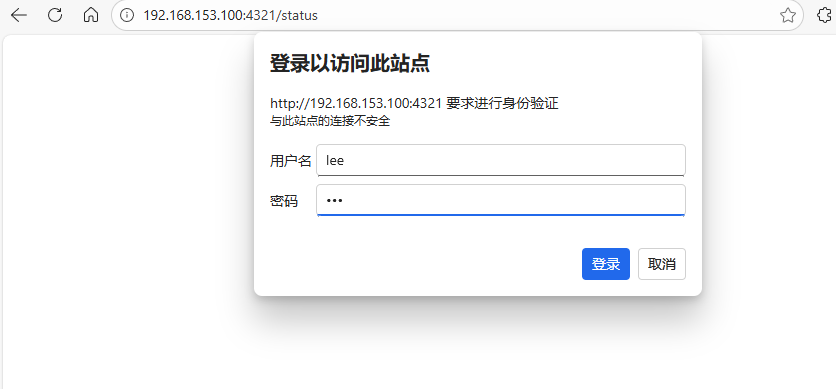
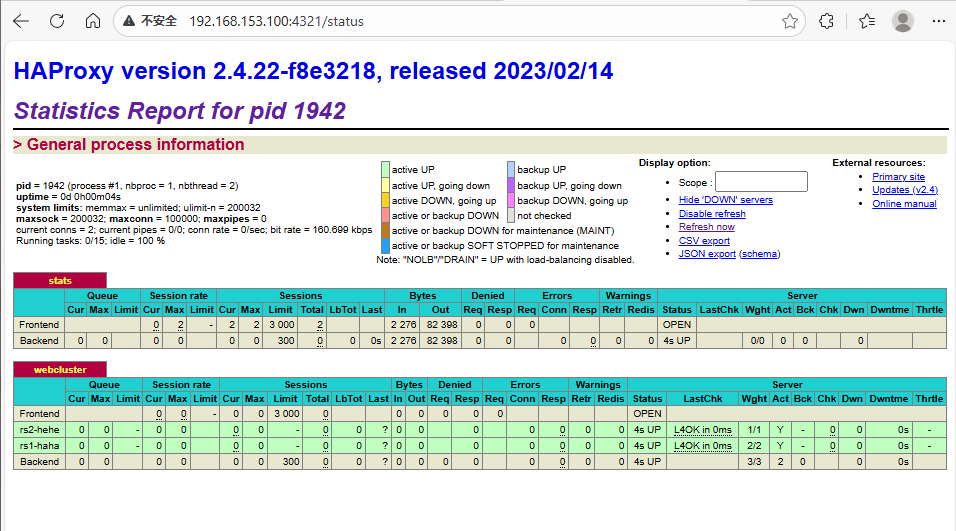
测试当rs2挂掉了,rs2的状态页会从绿--->黄--->红
激活rs2服务器后,状态页会从红--->黄--->绿
[root@rs2 ~]# systemctl stop httpd.service

[root@rs2 ~]# systemctl start httpd.service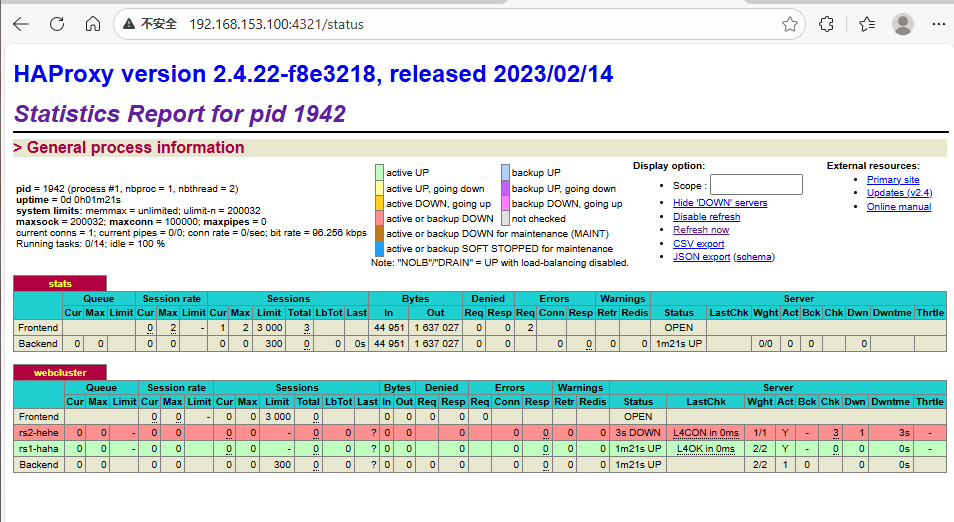
3. IP透传
web服务器中需要记录客户端的真实IP地址,用于做访问统计、安全防护、行为分析、区域排行等场景。
(1)七层透传
当haproxy工作在七层的时候,也可以透传客户端真实IP至后端服务器
在由haproxy发往后端主机的请求报文中添加"X-Forwarded-For"首部,其值为前端客户端的地址;用于向后端主发送真实的客户端IP
实验环境,查看rs2最新10行透传消息
[root@haproxy ~]# vim /etc/haproxy/haproxy.cfg
 90 listen webcluster
 91     bind            *:80
 92     balance         roundrobin
 93     server rs2-hehe 172.25.254.20:80 check inter 3s fall 3 rise 5 weight 1
 94     server rs1-haha 172.25.254.10:80 check inter 3s fall 3 rise 5 weight 2
[root@haproxy ~]# systemctl restart haproxy.service

[root@rs2 ~]# cat /etc/httpd/logs/access_log | tail -10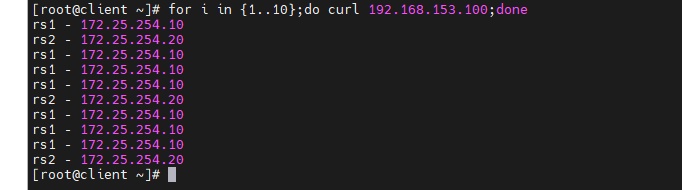
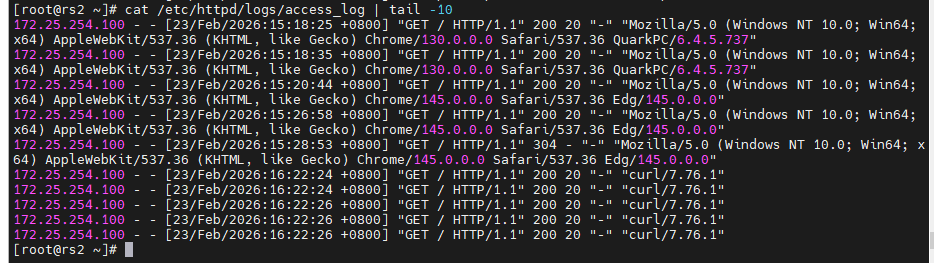
开启透传功能,再次进行测试
[root@haproxy ~]# vim /etc/haproxy/haproxy.cfg
 54 defaults
 60     option forwardfor       except 127.0.0.0/8
[root@haproxy ~]# systemctl restart haproxy.service

[root@rs2 ~]# vim /etc/httpd/conf/httpd.conf
201     LogFormat "%h %l %u %t \"%r\" %>s %b \"%{Referer}i\" \"%{User-Agent}i\" \"%{X-Forwarded-For}i\" " combined
[root@rs2 ~]# systemctl restart httpd.service

[root@client ~]# for i in {1..10};do curl 192.168.153.100;done

[root@rs2 ~]# cat /etc/httpd/logs/access_log | tail -10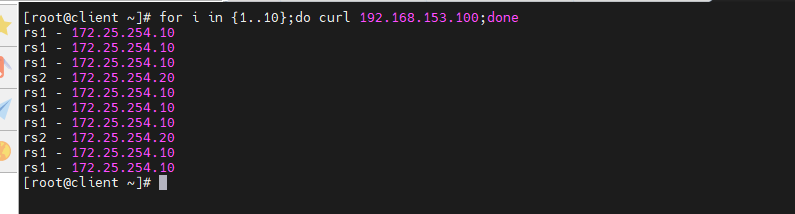
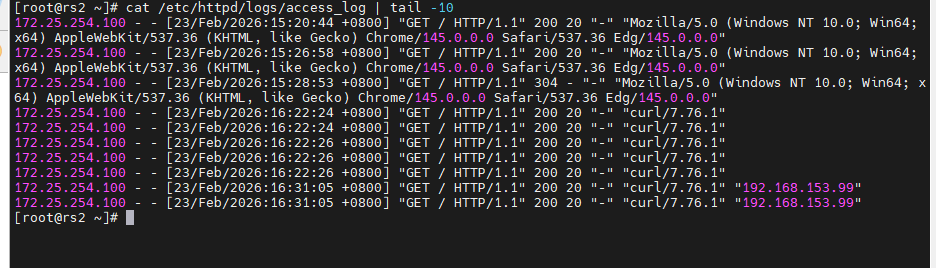
(2)四层透传
实验环境,关闭apache,部署nginx,并进行测试
[root@rs1 ~]# systemctl stop httpd.service
[root@rs1 ~]# dnf install nginx -y
[root@rs1 ~]# echo rs1 - nginx > /usr/share/nginx/html/index.html
[root@rs1 ~]# systemctl enable --now nginx.service

[root@rs2 ~]# systemctl stop httpd.service
[root@rs2 ~]# dnf install nginx -y
[root@rs2 ~]# echo rs2 - nginx > /usr/share/nginx/html/index.html
[root@rs2 ~]# systemctl enable --now nginx.service

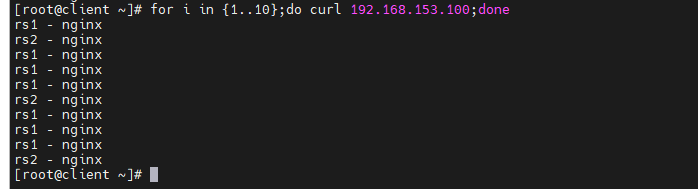
[root@client ~]# for i in {1..10};do curl 192.168.153.100;done
开启nginx的四层访问控制,并进行测试(haproxy为设定四层访问导致报错)
[root@rs1 ~]# vim /etc/nginx/nginx.conf
 38     server {
 39         listen       80 proxy_protocol;
 40         listen       [::]:80;
 41         server_name  _;
 42         root         /usr/share/nginx/html;
[root@rs1 ~]# systemctl restart nginx.service

[root@rs2 ~]# vim /etc/nginx/nginx.conf
 38     server {
 39         listen       80 proxy_protocol;
 40         listen       [::]:80;
 41         server_name  _;
 42         root         /usr/share/nginx/html;
[root@rs2 ~]# systemctl restart nginx.service

[root@client ~]# for i in {1..10};do curl 192.168.153.100;done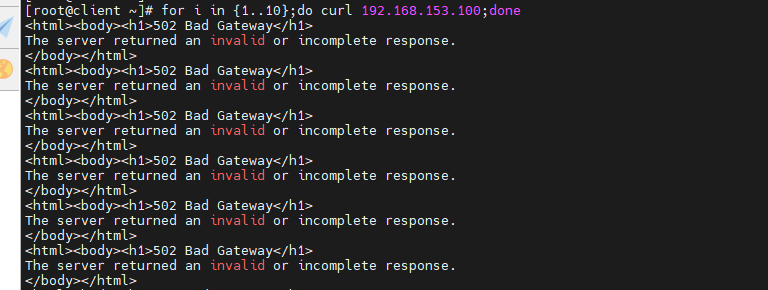
在haproxy开启四层访问
[root@haproxy ~]# vim /etc/haproxy/haproxy.cfg
 90 listen webcluster
 91     bind            *:80
 92     mode            tcp
 93     balance         roundrobin
 94     server rs2-hehe 172.25.254.20:80 send-proxy check inter 3s fall 3 rise 5 weight 1
 95     server rs1-haha 172.25.254.10:80 send-proxy check inter 3s fall 3 rise 5 weight 3
[root@haproxy ~]# systemctl restart haproxy.service

[root@client ~]# for i in {1..10};do curl 192.168.153.100;done
开启四层透传,再次进行测试
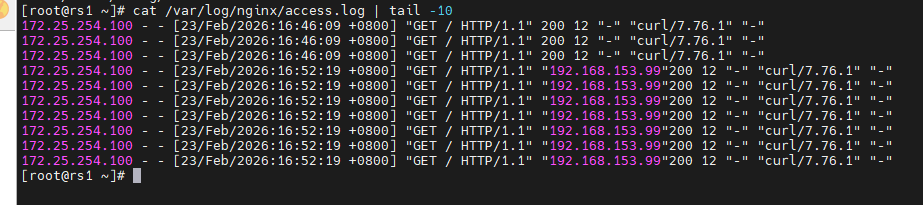
[root@rs1 ~]# vim /etc/nginx/nginx.conf
 17 http {
 18     log_format  main  '$remote_addr - $remote_user [$time_local] "$request" '
 19                       '"$proxy_protocol_addr"'
 20                       '$status $body_bytes_sent "$http_referer" '
 21                       '"$http_user_agent" "$http_x_forwarded_for"';
[root@rs1 ~]# systemctl restart nginx.service

[root@client ~]# for i in {1..10};do curl 192.168.153.100;done

[root@rs1 ~]# cat /var/log/nginx/access.log | tail -10
4. 自定义错误界面
- 对指定的报错进行重定向,进行优雅的显示错误页面
- 使用errorfile和errorloc指令的两种方法,可以实现自定义各种错误页面
(1)sorryserver设定
正常的所有服务器如果出现宕机,那么客户将被定向到指定的主机中,这个当业务主机出问题时被临时访问的主机叫做sorryserver
实验环境,在新主机中安装apache(可暂时用haproxy主机测试)
[root@haproxy ~]# dnf install httpd -y
[root@haproxy ~]# vim /etc/httpd/conf/httpd.conf
 47 Listen 8080
[root@haproxy ~]# systemctl enable --now httpd
Created symlink /etc/systemd/system/multi-user.target.wants/httpd.service → /usr/lib/systemd/system/httpd.service.
[root@haproxy ~]# echo "天塌了,有高的挺着" > /var/www/html/index.html

[root@rs1 ~]# systemctl stop nginx.service
[root@rs1 ~]# systemctl restart httpd.service

[root@rs2 ~]# systemctl stop nginx.service
[root@rs2 ~]# systemctl restart httpd.service
配置sorryserver上线
[root@haproxy ~]# vim /etc/haproxy/haproxy.cfg
 90 listen webcluster
 91     bind            *:80
 92     mode            http
 93     balance         roundrobin
 94     server rs2-hehe 172.25.254.20:80 check inter 3s fall 3 rise 5 weight 1
 95     server rs1-haha 172.25.254.10:80 check inter 3s fall 3 rise 5 weight 3
 96     server sorry-wuwu 172.25.254.100:80 backup
[root@haproxy ~]# systemctl restart haproxy.service

[root@client ~]# for i in {1..10};do curl 192.168.153.100;done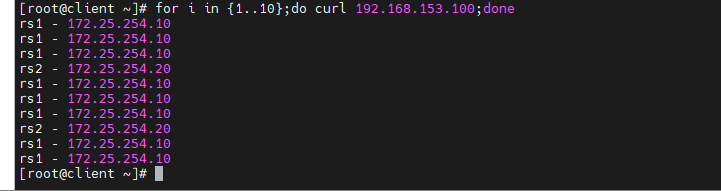
当两台后端服务器都挂了
[root@rs1 ~]# systemctl stop  httpd.service

[root@rs2 ~]# systemctl stop  httpd.service

</html>[root@client ~]# for i in {1..10};do curl 192.168.153.100;done
(2)自定义错误页面
当所有主机包括sorryserver都宕机了,那么haproxy会提供一个默认访问的错误页面,这个错误页面跟报错代码有关,这个页面可以通过定义来机型设置
关闭所有主机的apache服务,导致所有web服务都宕机,出现503页面报错
[root@haproxy ~]# systemctl stop httpd.service
[root@haproxy ~]# systemctl restart haproxy.service

[root@rs1 ~]# systemctl stop httpd.service

[root@rs2 ~]# systemctl stop httpd.service

[root@client ~]# curl 172.25.254.100
创建自定义错误目录,编写错误页面,应用错误页面
[root@haproxy ~]# mkdir /errorpage/html -p
[root@haproxy ~]# vim /errorpage/html/503.http
  1 HTTP/1.0 503 Service Unavailable
  2 Cache-Control: no-cache
  3 Connection: close
  4 Content-Type: text/html;charset=UTF-8
  5
  6 <html><body><h1>什么动物生气最安静</h1>
  7 大猩猩!!
  8 </body></html>
[root@haproxy ~]# vim /etc/haproxy/haproxy.cfg
 54 defaults
 71     errorfile 503           /errorpage/html/503.http
[root@haproxy ~]# systemctl restart haproxy.service

[root@client ~]# curl 172.25.254.100
(3)从定向错误到指定网站
访问IP到其他网站
[root@haproxy ~]# vim /etc/haproxy/haproxy.cfg
 54 defaults
 71     errorloc 503            http://www.baidu.com
[root@haproxy ~]# systemctl restart haproxy.service
在浏览器访问192.168.153.100

5. HAProxy的四层负载均衡
针对除HTTP以外的TCP协议应用服务访问的应用场景
如果使用frontend、backend和listen,一定在frontend、backend和listen段中都指定mode tcp
(1)环境设定
部署数据库,并建立授权远程登录用户
[root@rs1 ~]# dnf install mariadb-server mariadb -y
[root@rs1 ~]# vim /etc/my.cnf.d/mariadb-server.cnf
 16 [mysqld]
 17 server_id=10
 18 datadir=/var/lib/mysql
 19 socket=/var/lib/mysql/mysql.sock
 20 log-error=/var/log/mariadb/mariadb.log
 21 pid-file=/run/mariadb/mariadb.pid
[root@rs1 ~]# systemctl restart mariadb.service
[root@rs1 ~]# mysql
MariaDB [(none)]> CREATE USER 'lee'@'%' identified by 'lee';
MariaDB [(none)]> GRANT ALL ON *.* TO 'lee'@'%';
MariaDB [(none)]> quit

[root@rs2 ~]# dnf install mariadb-server mariadb -y
[root@rs2 ~]# vim /etc/my.cnf.d/mariadb-server.cnf
 16 [mysqld]
 17 server_id=20
 18 datadir=/var/lib/mysql
 19 socket=/var/lib/mysql/mysql.sock
 20 log-error=/var/log/mariadb/mariadb.log
 21 pid-file=/run/mariadb/mariadb.pid
[root@rs2 ~]# systemctl restart mariadb.service
[root@rs2 ~]# mysql
MariaDB [(none)]> CREATE USER 'lee'@'%' identified by 'lee';
MariaDB [(none)]> GRANT ALL ON *.* TO 'lee'@'%';
MariaDB [(none)]> quit
在rs2上远程登录rs1的数据库
[root@rs2 ~]# mysql -ulee -plee -h 172.25.254.10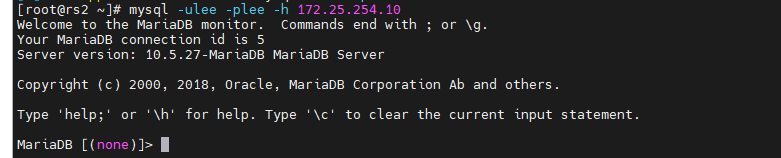
(2)四层负载操作
部署四层负载
[root@haproxy ~]# vim /etc/haproxy/haproxy.cfg
 99 listen mariadbcluster
100     bind            *:6663
101     mode            tcp
102     balance         roundrobin
103     server rs1 172.25.254.10:3306 check inter 3s fall 3 rise 5 weight 1
104     server rs2 172.25.254.20:3306 check inter 3s fall 3 rise 5 weight 1
[root@haproxy ~]# systemctl restart haproxy.service
[root@haproxy ~]# netstat -antlupe | grep haproxy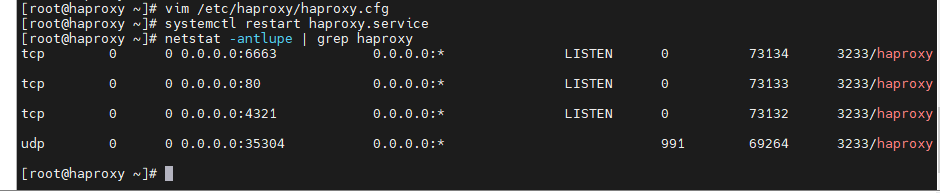
在测试机上安装mysql,并进行测试
[root@client ~]# dnf install mysql -y
[root@client ~]# mysql -ulee -plee -h 192.168.153.100 -P 6663
mysql> SELECT @@server_id;
mysql> quit

[root@client ~]# mysql -ulee -plee -h 192.168.153.100 -P 6663
mysql> SELECT @@server_id;
mysql> quit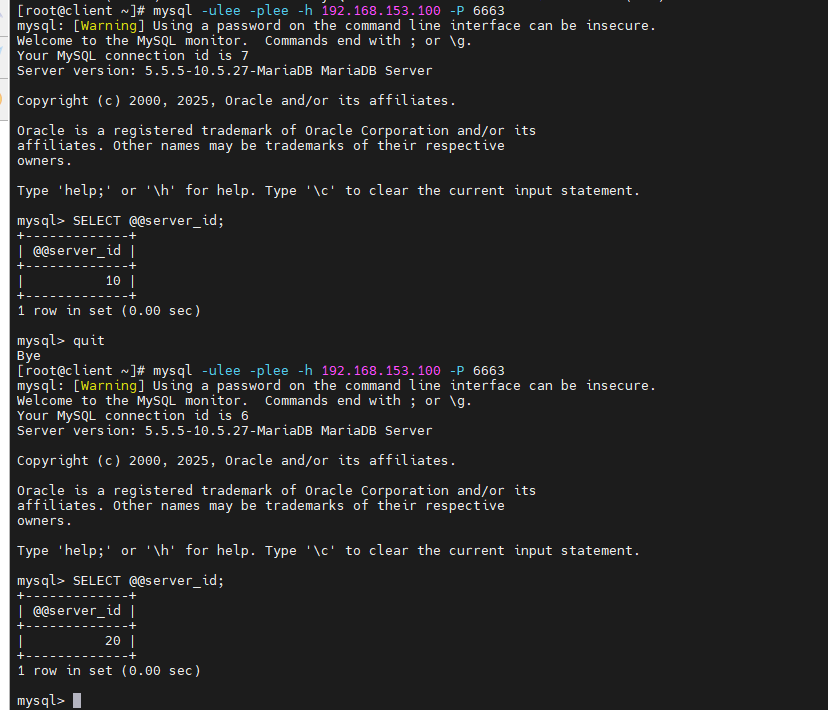
(3)backup参数
备用服务器
当主服务器挂掉时,转到被服务器工作
[root@haproxy ~]# vim /etc/haproxy/haproxy.cfg
 99 listen mariadbcluster
100     bind            *:6663
101     mode            tcp
102     balance         roundrobin
103     server rs1 172.25.254.10:3306 check inter 3s fall 3 rise 5 weight 1
104     server rs2 172.25.254.20:3306 check inter 3s fall 3 rise 5 weight 1 backup
[root@haproxy ~]# systemctl restart haproxy.service

[root@client ~]# mysql -ulee -plee -h 192.168.153.100 -P 6663
mysql> SELECT @@server_id;
mysql> quit

[root@client ~]# mysql -ulee -plee -h 192.168.153.100 -P 6663
mysql> SELECT @@server_id;
mysql> quit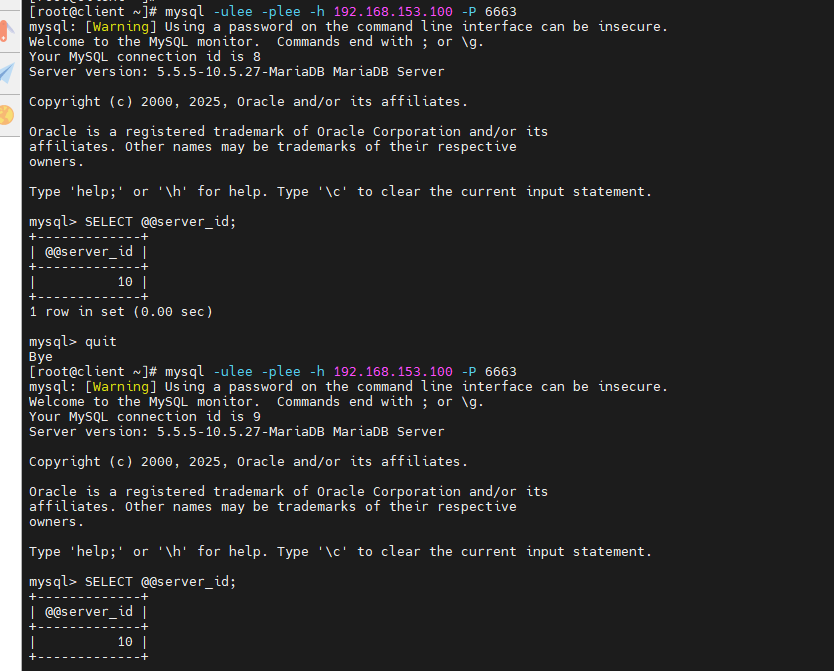
关闭rs1数据库服务等待一分钟再进行测试
[root@rs1 ~]# systemctl stop mariadb.service

[root@client ~]# mysql -ulee -plee -h 192.168.153.100 -P 6663
mysql> SELECT @@server_id;
mysql> quit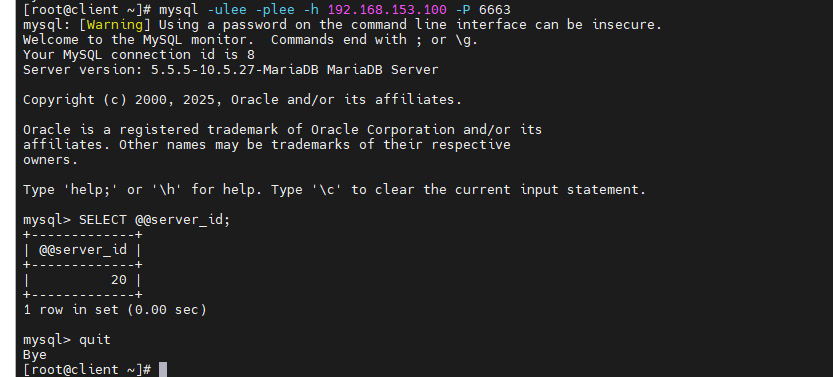
再次激活rs1数据库等待一分钟再进行测试
[root@rs1 ~]# systemctl start mariadb.service

[root@client ~]# mysql -ulee -plee -h 192.168.153.100 -P 6663
mysql> SELECT @@server_id;
mysql> quit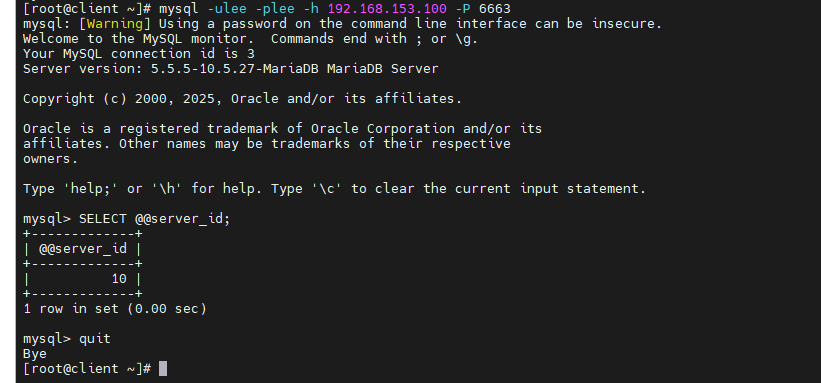
6. ACL访问控制
(1)域名解析环境
在Windows主机做域名解析:https://blog.csdn.net/Forget_8/article/details/157556220?spm=1001.2014.3001.5502#t62
需要Windows主机来做测试的则编写Windows主机的域名解析(主要是需要Windows浏览器访问)
2026-02-23 19:17.25 /tmp/home_Forget vim /etc/hosts
127.0.0.1 localhost
::1 localhost
192.168.153.100 www.timinglee.org lee.timinglee.org bbs.timinglee.org login.timinglee.org www.lee.org www.lee.com php.timinglee.org app.timinglee.org
2026-02-23 19:21.08 /tmp/home_Forget ping bbs.timinglee.org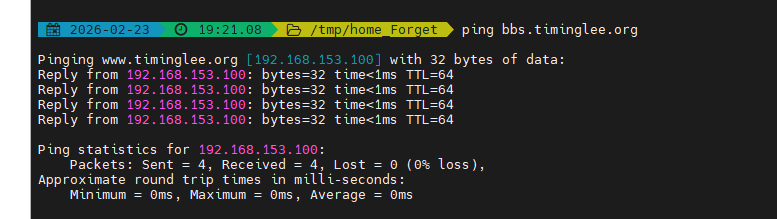
不需要图像化的浏览器访问则可以直接用测试机来做域名解析进行测试
[root@client ~]# vim /etc/hosts
  1 127.0.0.1   localhost localhost.localdomain localhost4 localhost4.localdomain4
  2 ::1         localhost localhost.localdomain localhost6 localhost6.localdomain6
  3 192.168.153.99     client
  4 192.168.153.100 www.timinglee.org lee.timinglee.org bbs.timinglee.org login.timinglee.org www.lee.org     www.lee.com php.timinglee.org app.timinglee.org
(2)设置haproxy配置
使用frontend和backend,因为frontend和listen使用的名称相同,所以把listen的配置注释或删掉
[root@haproxy ~]# vim /etc/haproxy/haproxy.cfg
106 frontend webcluster
107     bind            *:80
108     mode            http
109     use_backend     webserver-80-rs1
110
111 backend webserver-80-rs1
112     server web1 172.25.254.10:80 check inter 3s fall 3 rise 5
113
114 backend webserver-80-rs2
115     server web2 172.25.254.20:80 check inter 3s fall 3 rise 5
[root@haproxy ~]# systemctl restart haproxy.service
(3)acl基于访问尾部
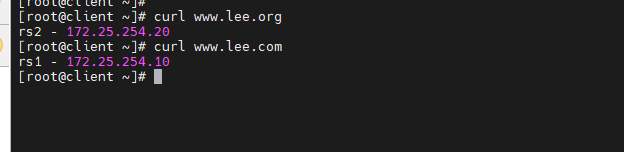
在访问的网址中,所有以.com结尾的访问10,其他访问20
[root@haproxy ~]# vim /etc/haproxy/haproxy.cfg
106 frontend webcluster
107     bind            *:80
108     mode            http
109
110     acl test hdr_end(host) -i .com
111
112     use_backend     webserver-80-rs1 if test
113     default_backend webserver-80-rs2
[root@haproxy ~]# systemctl restart haproxy.service

[root@client ~]# curl www.lee.org
[root@client ~]# curl www.lee.com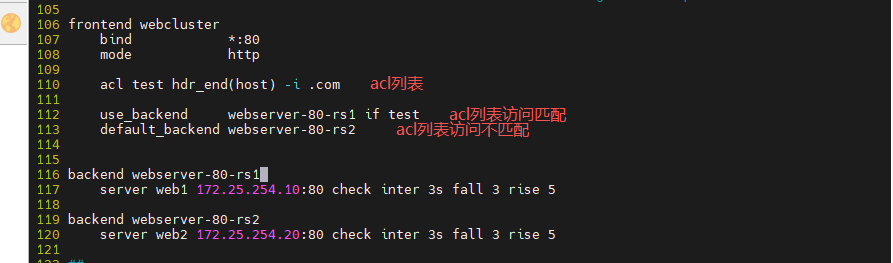
(4)acl基于访问头部
在访问的网址中,所有以bbs.开头的访问10,其他访问20
[root@haproxy ~]# vim /etc/haproxy/haproxy.cfg
106 frontend webcluster
107     bind            *:80
108     mode            http
109
110     acl test hdr_end(host) -i .com
111
112     acl test hdr_beg(host) -i bbs.
113
114     use_backend     webserver-80-rs1 if head
115     default_backend webserver-80-rs2
[root@haproxy ~]# systemctl restart haproxy.service

[root@client ~]# curl www.timinglee.org
[root@client ~]# curl bbs.timinglee.org
(5)acl的base参数
base_dir 匹配的是 URL 的路径部分(不带域名和参数)
实验环境,添加base_dir参数;创建rs1和rs2测试网页
[root@haproxy ~]# vim /etc/haproxy/haproxy.cfg
106 frontend webcluster
107     bind            *:80
108     mode            http
109
110     acl pathdir base_dir -i /lee
111     use_backend     webserver-80-rs1 if pathdir
112     default_backend webserver-80-rs2
[root@haproxy ~]# systemctl restart haproxy.service

[root@rs1 ~]# mkdir -p /var/www/html/lee/test/
[root@rs1 ~]# echo lee - 172.25.254.10 > /var/www/html/lee/index.html
[root@rs1 ~]# echo test - 172.25.254.10 > /var/www/html/lee/test/index.html

[root@rs2 ~]# mkdir -p /var/www/html/lee/test/
[root@rs2 ~]# echo lee - 172.25.254.20 > /var/www/html/lee/index.html
[root@rs2 ~]# echo test - 172.25.254.20 > /var/www/html/lee/test/index.html
测试
[root@client ~]# curl 172.25.254.100/lee/
[root@client ~]# curl 172.25.254.100/lee/test/
[root@client ~]# curl 172.25.254.100/index.html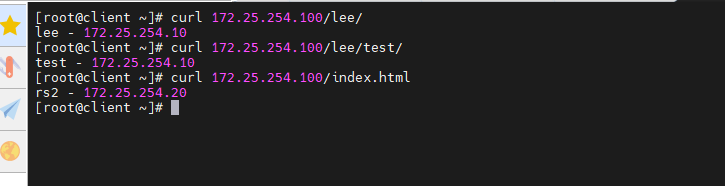
(6)acl禁止列表黑名单
禁止客户端进行访问
[root@haproxy ~]# vim /etc/haproxy/haproxy.cfg
106 frontend webcluster
107     bind            *:80
108     mode            http
109
110     acl pathdir base_dir -i /lee
111     use_backend     webserver-80-rs1 if pathdir
112     default_backend webserver-80-rs2
113
114     acl invalid_src src 192.168.153.99
115     http-request deny if invalid_src
[root@haproxy ~]# systemctl restart haproxy.service

[root@client ~]# curl 192.168.153.100
[root@client ~]# curl 172.25.254.100
(7)acl禁止列表白名单
除了192.168.153.99(客户端),其他用户均不能访问
[root@haproxy ~]# vim /etc/haproxy/haproxy.cfg
106 frontend webcluster
107     bind            *:80
108     mode            http
109
110     acl pathdir base_dir -i /lee
111     use_backend     webserver-80-rs1 if pathdir
112     default_backend webserver-80-rs2
113
114     acl invalid_src src 192.168.153.99
115     http-request deny if ! invalid_src
[root@haproxy ~]# systemctl restart haproxy.service

[root@client ~]# curl 172.25.254.100
[root@client ~]# curl 192.168.153.100

[root@rs2 ~]# curl 172.25.254.100

7. HAProxy全站加密
haproxy可以实现https的证书安全,从用户到haproxy为https,从haproxy到后端服务器用http通信 但基于性能考虑,生产中证书都是在后端服务器比如nginx上实现
(1)制作证书
创建存放证书目录,生成证书
[root@haproxy ~]# mkdir /etc/haproxy/certs
[root@haproxy ~]# openssl req -newkey rsa:2048 -nodes -sha256 -keyout /etc/haproxy/certs/timinglee.org.key -x509 -days 365 -out /etc/haproxy/certs/timinglee.org.crt
[root@haproxy ~]# ls /etc/haproxy/certs/
[root@haproxy ~]# cat /etc/haproxy/certs/* > /etc/haproxy/certs/timinglee.pem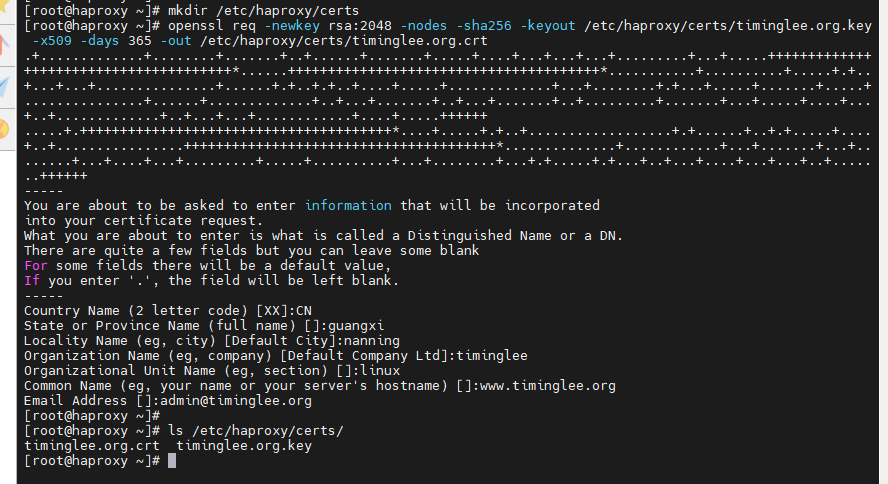
(2)全站加密
[root@haproxy ~]# vim /etc/haproxy/haproxy.cfg
 73 frontend webcluster-http
 74     bind            *:80
 75     redirect scheme https if ! { ssl_fc }
 76
 77 listen webcluster-https
 78     bind            *:443 ssl crt /etc/haproxy/certs/timinglee.pem
 79     mode            http
 80     balance         roundrobin
 81     server rs1 172.25.254.10:80 check inter 3s fall 3 rise 5 weight 1
 82     server rs2 172.25.254.20:80 check inter 3s fall 3 rise 5 weight 1
[root@haproxy ~]# systemctl restart haproxy.service

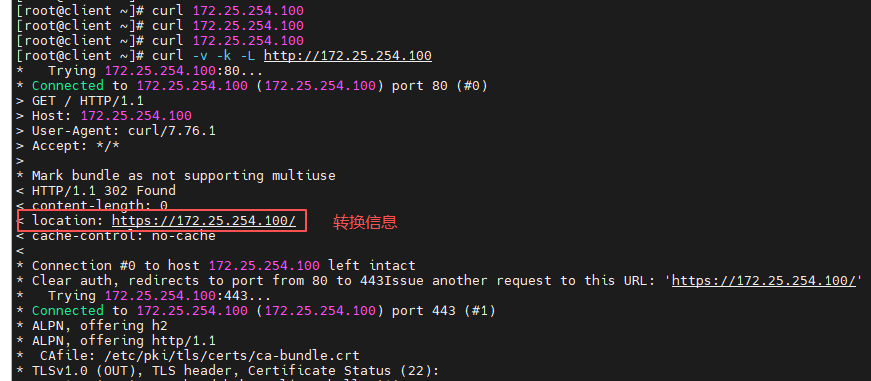
[root@client ~]# curl 172.25.254.100
[root@client ~]# curl -v -k -L http://172.25.254.100