欢迎加入开源鸿蒙跨平台社区:https://openharmonycrossplatform.csdn.net
一、状态机架构深度解析
在现代应用开发中,复杂的状态管理是核心挑战之一。状态机(State Machine)提供了一种结构化的方式来管理状态转换,使代码更加可预测和可维护。理解状态机的核心概念,是构建复杂业务逻辑的基础。
📱 1.1 状态机基本概念
状态机由状态(State)、事件(Event)、转换(Transition)和动作(Action)组成:
┌─────────────────────────────────────────────────────────────────┐
│                      状态机核心概念                              │
│  ┌─────────────────────────────────────────────────────────┐    │
│  │  状态 (State)                                            │    │
│  │  - 表示系统在某一时刻的条件或模式                          │    │
│  │  - 例如: Idle, Loading, Success, Error                   │    │
│  └─────────────────────────────────────────────────────────┘    │
│                              │                                   │
│                              ▼                                   │
│  ┌─────────────────────────────────────────────────────────┐    │
│  │  事件 (Event)                                            │    │
│  │  - 触发状态转换的外部或内部信号                            │    │
│  │  - 例如: onTap, onDataReceived, onError                  │    │
│  └─────────────────────────────────────────────────────────┘    │
│                              │                                   │
│                              ▼                                   │
│  ┌─────────────────────────────────────────────────────────┐    │
│  │  转换 (Transition)                                       │    │
│  │  - 定义从一个状态到另一个状态的规则                        │    │
│  │  - 可以包含条件判断和副作用                                │    │
│  └─────────────────────────────────────────────────────────┘    │
│                              │                                   │
│                              ▼                                   │
│  ┌─────────────────────────────────────────────────────────┐    │
│  │  动作 (Action)                                           │    │
│  │  - 状态转换时执行的副作用                                  │    │
│  │  - 例如: 更新 UI、发送网络请求、记录日志                   │    │
│  └─────────────────────────────────────────────────────────┘    │
└─────────────────────────────────────────────────────────────────┘
🔬 1.2 有限状态机(FSM)详解
有限状态机是最常用的状态机类型,具有有限个状态和明确定义的转换规则:
┌─────────────────────────────────────────────────────────────┐
│                    有限状态机示例                            │
│                      (加载状态机)                            │
├─────────────────────────────────────────────────────────────┤
│                                                              │
│                    ┌─────────┐                              │
│                    │  Idle   │                              │
│                    └────┬────┘                              │
│                         │                                    │
│                    load│Event                                │
│                         │                                    │
│                         ▼                                    │
│                    ┌─────────┐                              │
│         ┌──────────│ Loading │──────────┐                   │
│         │          └─────────┘          │                   │
│    error│                 │success       │error              │
│         │                 │              │                   │
│         ▼                 ▼              ▼                   │
│    ┌─────────┐      ┌─────────┐     ┌─────────┐             │
│    │  Error  │      │ Success │     │  Error  │             │
│    └────┬────┘      └────┬────┘     └────┬────┘             │
│         │                │               │                   │
│    retry│           reset│          retry│                   │
│         │                │               │                   │
│         └────────────────┼───────────────┘                   │
│                          │                                    │
│                          ▼                                    │
│                    ┌─────────┐                              │
│                    │  Idle   │                              │
│                    └─────────┘                              │
│                                                              │
└─────────────────────────────────────────────────────────────┘
🎯 1.3 状态机设计原则
设计良好的状态机需要遵循以下原则:
┌─────────────────────────────────────────────────────────────┐
│                    状态机设计原则                            │
├─────────────────────────────────────────────────────────────┤
│  ┌─────────────────────────────────────────────────────┐   │
│  │  1. 状态互斥 - 系统在任意时刻只能处于一个状态         │   │
│  └─────────────────────────────────────────────────────┘   │
│  ┌─────────────────────────────────────────────────────┐   │
│  │  2. 转换明确 - 每个转换都有明确的触发条件             │   │
│  └─────────────────────────────────────────────────────┘   │
│  ┌─────────────────────────────────────────────────────┐   │
│  │  3. 无歧义 - 相同事件在相同状态下产生相同结果         │   │
│  └─────────────────────────────────────────────────────┘   │
│  ┌─────────────────────────────────────────────────────┐   │
│  │  4. 完整性 - 覆盖所有可能的状态和转换场景             │   │
│  └─────────────────────────────────────────────────────┘   │
│  ┌─────────────────────────────────────────────────────┐   │
│  │  5. 可观测 - 状态变化可被监听和记录                   │   │
│  └─────────────────────────────────────────────────────┘   │
│  ┌─────────────────────────────────────────────────────┐   │
│  │  6. 可恢复 - 支持状态持久化和恢复                     │   │
│  └─────────────────────────────────────────────────────┘   │
└─────────────────────────────────────────────────────────────┘
状态机类型对比:
| 类型 | 特点 | 适用场景 |
|---|---|---|
| 有限状态机 (FSM) | 状态数量有限,转换明确 | 表单、加载状态 |
| 层次状态机 (HSM) | 支持状态嵌套 | 复杂业务流程 |
| 并发状态机 | 多个状态同时活动 | 多任务系统 |
| 状态图 | 可视化状态流转 | 系统设计文档 |
二、基础状态机实现
基础状态机实现包括状态定义、事件处理和状态转换。
👆 2.1 矩阵状态机实现
dart
import 'package:flutter/material.dart';

/// 状态基类
abstract class StateBase {
  String get name;
}

/// 事件基类
abstract class EventBase {
  String get name;
}

/// 状态转换结果
class TransitionResult<S extends StateBase> {
  final S toState;
  final List<SideEffect> sideEffects;

  TransitionResult({
    required this.toState,
    this.sideEffects = const [],
  });
}

/// 副作用
abstract class SideEffect {
  Future<void> execute();
}

/// 状态机配置
class StateMachineConfig<S extends StateBase, E extends EventBase> {
  final Map<S, Map<E, S>> _transitionTable = {};
  final Map<S, List<SideEffect>> _enterActions = {};
  final Map<S, List<SideEffect>> _exitActions = {};

  void addTransition(S from, E event, S to) {
    _transitionTable.putIfAbsent(from, () => {})[event] = to;
  }

  void addEnterAction(S state, SideEffect action) {
    _enterActions.putIfAbsent(state, () => []).add(action);
  }

  void addExitAction(S state, SideEffect action) {
    _exitActions.putIfAbsent(state, () => []).add(action);
  }

  S? getTransition(S from, E event) {
    return _transitionTable[from]?[event];
  }

  List<SideEffect> getEnterActions(S state) {
    return _enterActions[state] ?? [];
  }

  List<SideEffect> getExitActions(S state) {
    return _exitActions[state] ?? [];
  }
}

/// 状态机
class StateMachine<S extends StateBase, E extends EventBase>
    extends ChangeNotifier {
  final StateMachineConfig<S, E> _config;
  S _currentState;
  final List<S> _history = [];

  StateMachine({
    required S initialState,
    required StateMachineConfig<S, E> config,
  })  : _currentState = initialState,
        _config = config {
    _history.add(_currentState);
  }

  S get currentState => _currentState;
  List<S> get history => List.unmodifiable(_history);

  Future<void> send(E event) async {
    final toState = _config.getTransition(_currentState, event);

    if (toState == null) {
      debugPrint('No transition from $_currentState on event $event');
      return;
    }

    final exitActions = _config.getExitActions(_currentState);
    for (final action in exitActions) {
      await action.execute();
    }

    _currentState = toState;
    _history.add(_currentState);
    notifyListeners();

    final enterActions = _config.getEnterActions(_currentState);
    for (final action in enterActions) {
      await action.execute();
    }
  }

  bool canSend(E event) {
    return _config.getTransition(_currentState, event) != null;
  }
}

/// 加载状态
enum LoadState implements StateBase {
  idle,
  loading,
  success,
  error;

  @override
  String get name => toString();
}

/// 加载事件
enum LoadEvent implements EventBase {
  load,
  success,
  error,
  reset,
  retry;

  @override
  String get name => toString();
}

/// 加载状态机示例
class LoadStateMachineDemo extends StatefulWidget {
  const LoadStateMachineDemo({super.key});

  @override
  State<LoadStateMachineDemo> createState() => _LoadStateMachineDemoState();
}

class _LoadStateMachineDemoState extends State<LoadStateMachineDemo> {
  late final StateMachine<LoadState, LoadEvent> _stateMachine;

  @override
  void initState() {
    super.initState();
    _initStateMachine();
  }

  void _initStateMachine() {
    final config = StateMachineConfig<LoadState, LoadEvent>();

    config.addTransition(LoadState.idle, LoadEvent.load, LoadState.loading);
    config.addTransition(LoadState.loading, LoadEvent.success, LoadState.success);
    config.addTransition(LoadState.loading, LoadEvent.error, LoadState.error);
    config.addTransition(LoadState.success, LoadEvent.reset, LoadState.idle);
    config.addTransition(LoadState.error, LoadEvent.retry, LoadState.loading);
    config.addTransition(LoadState.error, LoadEvent.reset, LoadState.idle);

    _stateMachine = StateMachine(
      initialState: LoadState.idle,
      config: config,
    );

    _stateMachine.addListener(_onStateChanged);
  }

  void _onStateChanged() {
    setState(() {});
  }

  Future<void> _loadData() async {
    await _stateMachine.send(LoadEvent.load);

    await Future.delayed(const Duration(seconds: 2));

    final success = DateTime.now().second % 2 == 0;

    if (success) {
      await _stateMachine.send(LoadEvent.success);
    } else {
      await _stateMachine.send(LoadEvent.error);
    }
  }

  @override
  void dispose() {
    _stateMachine.removeListener(_onStateChanged);
    _stateMachine.dispose();
    super.dispose();
  }

  @override
  Widget build(BuildContext context) {
    return Scaffold(
      appBar: AppBar(title: const Text('加载状态机')),
      body: Center(
        child: _buildContent(),
      ),
    );
  }

  Widget _buildContent() {
    switch (_stateMachine.currentState) {
      case LoadState.idle:
        return ElevatedButton(
          onPressed: _loadData,
          child: const Text('加载数据'),
        );
      case LoadState.loading:
        return const Column(
          mainAxisAlignment: MainAxisAlignment.center,
          children: [
            CircularProgressIndicator(),
            SizedBox(height: 16),
            Text('加载中...'),
          ],
        );
      case LoadState.success:
        return Column(
          mainAxisAlignment: MainAxisAlignment.center,
          children: [
            const Icon(Icons.check_circle, color: Colors.green, size: 64),
            const SizedBox(height: 16),
            const Text('加载成功'),
            const SizedBox(height: 16),
            ElevatedButton(
              onPressed: () => _stateMachine.send(LoadEvent.reset),
              child: const Text('重置'),
            ),
          ],
        );
      case LoadState.error:
        return Column(
          mainAxisAlignment: MainAxisAlignment.center,
          children: [
            const Icon(Icons.error, color: Colors.red, size: 64),
            const SizedBox(height: 16),
            const Text('加载失败'),
            const SizedBox(height: 16),
            Row(
              mainAxisAlignment: MainAxisAlignment.center,
              children: [
                ElevatedButton(
                  onPressed: () => _stateMachine.send(LoadEvent.retry),
                  child: const Text('重试'),
                ),
                const SizedBox(width: 16),
                ElevatedButton(
                  onPressed: () => _stateMachine.send(LoadEvent.reset),
                  child: const Text('重置'),
                ),
              ],
            ),
          ],
        );
    }
  }
}
🔄 2.2 表单状态机实现
dart
/// 表单状态
enum FormState implements StateBase {
  pristine,
  dirty,
  valid,
  invalid,
  submitting,
  submitted,
  error;

  @override
  String get name => toString();
}

/// 表单事件
enum FormEvent implements EventBase {
  input,
  validate,
  valid,
  invalid,
  submit,
  success,
  failure,
  reset;

  @override
  String get name => toString();
}

/// 表单状态机示例
class FormStateMachineDemo extends StatefulWidget {
  const FormStateMachineDemo({super.key});

  @override
  State<FormStateMachineDemo> createState() => _FormStateMachineDemoState();
}

class _FormStateMachineDemoState extends State<FormStateMachineDemo> {
  late final StateMachine<FormState, FormEvent> _stateMachine;
  final TextEditingController _emailController = TextEditingController();
  final TextEditingController _passwordController = TextEditingController();
  String _errorMessage = '';

  @override
  void initState() {
    super.initState();
    _initStateMachine();
  }

  void _initStateMachine() {
    final config = StateMachineConfig<FormState, FormEvent>();

    config.addTransition(FormState.pristine, FormEvent.input, FormState.dirty);
    config.addTransition(FormState.dirty, FormEvent.validate, FormState.dirty);
    config.addTransition(FormState.dirty, FormEvent.valid, FormState.valid);
    config.addTransition(FormState.dirty, FormEvent.invalid, FormState.invalid);
    config.addTransition(FormState.valid, FormEvent.input, FormState.dirty);
    config.addTransition(FormState.valid, FormEvent.submit, FormState.submitting);
    config.addTransition(FormState.invalid, FormEvent.input, FormState.dirty);
    config.addTransition(FormState.invalid, FormEvent.valid, FormState.valid);
    config.addTransition(FormState.submitting, FormEvent.success, FormState.submitted);
    config.addTransition(FormState.submitting, FormEvent.failure, FormState.error);
    config.addTransition(FormState.submitted, FormEvent.reset, FormState.pristine);
    config.addTransition(FormState.error, FormEvent.reset, FormState.pristine);

    _stateMachine = StateMachine(
      initialState: FormState.pristine,
      config: config,
    );

    _stateMachine.addListener(_onStateChanged);
  }

  void _onStateChanged() {
    setState(() {});
  }

  void _onInputChanged() {
    if (_stateMachine.currentState == FormState.pristine) {
      _stateMachine.send(FormEvent.input);
    }
    _validateForm();
  }

  void _validateForm() {
    final email = _emailController.text;
    final password = _passwordController.text;

    if (email.isEmpty || password.isEmpty) {
      _errorMessage = '请填写所有字段';
      _stateMachine.send(FormEvent.invalid);
      return;
    }

    if (!_isValidEmail(email)) {
      _errorMessage = '邮箱格式不正确';
      _stateMachine.send(FormEvent.invalid);
      return;
    }

    if (password.length < 6) {
      _errorMessage = '密码至少6位';
      _stateMachine.send(FormEvent.invalid);
      return;
    }

    _errorMessage = '';
    _stateMachine.send(FormEvent.valid);
  }

  bool _isValidEmail(String email) {
    return RegExp(r'^[\w-\.]+@([\w-]+\.)+[\w-]{2,4}$').hasMatch(email);
  }

  Future<void> _submitForm() async {
    await _stateMachine.send(FormEvent.submit);

    await Future.delayed(const Duration(seconds: 1));

    final success = DateTime.now().second % 2 == 0;

    if (success) {
      await _stateMachine.send(FormEvent.success);
    } else {
      setState(() {
        _errorMessage = '提交失败,请重试';
      });
      await _stateMachine.send(FormEvent.failure);
    }
  }

  void _resetForm() {
    _emailController.clear();
    _passwordController.clear();
    _errorMessage = '';
    _stateMachine.send(FormEvent.reset);
  }

  @override
  void dispose() {
    _stateMachine.removeListener(_onStateChanged);
    _stateMachine.dispose();
    _emailController.dispose();
    _passwordController.dispose();
    super.dispose();
  }

  @override
  Widget build(BuildContext context) {
    return Scaffold(
      appBar: AppBar(title: const Text('表单状态机')),
      body: Padding(
        padding: const EdgeInsets.all(16),
        child: _buildForm(),
      ),
    );
  }

  Widget _buildForm() {
    final state = _stateMachine.currentState;

    return Column(
      children: [
        _buildStateIndicator(state),
        const SizedBox(height: 24),
        TextField(
          controller: _emailController,
          decoration: InputDecoration(
            labelText: '邮箱',
            border: const OutlineInputBorder(),
            errorText: state == FormState.invalid && !_isValidEmail(_emailController.text)
                ? '邮箱格式不正确'
                : null,
          ),
          enabled: state != FormState.submitting,
          onChanged: (_) => _onInputChanged(),
        ),
        const SizedBox(height: 16),
        TextField(
          controller: _passwordController,
          decoration: InputDecoration(
            labelText: '密码',
            border: const OutlineInputBorder(),
            errorText: state == FormState.invalid && _passwordController.text.length < 6
                ? '密码至少6位'
                : null,
          ),
          obscureText: true,
          enabled: state != FormState.submitting,
          onChanged: (_) => _onInputChanged(),
        ),
        const SizedBox(height: 16),
        if (_errorMessage.isNotEmpty)
          Text(
            _errorMessage,
            style: const TextStyle(color: Colors.red),
          ),
        const SizedBox(height: 24),
        _buildActionButtons(state),
      ],
    );
  }

  Widget _buildStateIndicator(FormState state) {
    Color color;
    String text;
    IconData icon;

    switch (state) {
      case FormState.pristine:
        color = Colors.grey;
        text = '未填写';
        icon = Icons.edit;
        break;
      case FormState.dirty:
        color = Colors.orange;
        text = '已修改';
        icon = Icons.edit;
        break;
      case FormState.valid:
        color = Colors.green;
        text = '验证通过';
        icon = Icons.check_circle;
        break;
      case FormState.invalid:
        color = Colors.red;
        text = '验证失败';
        icon = Icons.error;
        break;
      case FormState.submitting:
        color = Colors.blue;
        text = '提交中...';
        icon = Icons.hourglass_empty;
        break;
      case FormState.submitted:
        color = Colors.green;
        text = '提交成功';
        icon = Icons.check_circle;
        break;
      case FormState.error:
        color = Colors.red;
        text = '提交失败';
        icon = Icons.error;
        break;
    }

    return Container(
      padding: const EdgeInsets.symmetric(horizontal: 16, vertical: 8),
      decoration: BoxDecoration(
        color: color.withOpacity(0.1),
        borderRadius: BorderRadius.circular(20),
      ),
      child: Row(
        mainAxisSize: MainAxisSize.min,
        children: [
          Icon(icon, color: color, size: 20),
          const SizedBox(width: 8),
          Text(
            text,
            style: TextStyle(color: color, fontWeight: FontWeight.bold),
          ),
        ],
      ),
    );
  }

  Widget _buildActionButtons(FormState state) {
    if (state == FormState.submitting) {
      return const CircularProgressIndicator();
    }

    return Row(
      children: [
        Expanded(
          child: ElevatedButton(
            onPressed: state == FormState.valid ? _submitForm : null,
            child: const Text('提交'),
          ),
        ),
        const SizedBox(width: 16),
        Expanded(
          child: OutlinedButton(
            onPressed: state != FormState.pristine ? _resetForm : null,
            child: const Text('重置'),
          ),
        ),
      ],
    );
  }
}
三、层次状态机实现
层次状态机支持状态嵌套,可以更好地组织复杂的状态结构。
📊 3.1 层次状态定义
dart
/// 层次状态基类
abstract class HierarchicalState implements StateBase {
  HierarchicalState? get parent;
  List<HierarchicalState> get children;

  bool isSubstateOf(HierarchicalState other) {
    if (this == other) return true;
    if (parent == null) return false;
    return parent!.isSubstateOf(other);
  }
}

/// 应用状态
class AppState extends HierarchicalState {
  @override
  String get name => 'App';

  @override
  HierarchicalState? get parent => null;

  @override
  List<HierarchicalState> get children => [
    AuthState.unauthenticated,
    AuthState.authenticated,
  ];
}

/// 认证状态
class AuthState extends HierarchicalState {
  static const AuthState unauthenticated = AuthState._('Unauthenticated', null);
  static const AuthState authenticated = AuthState._('Authenticated', null);

  static const AuthState loggingIn = AuthState._('LoggingIn', authenticated);
  static const AuthState loggedIn = AuthState._('LoggedIn', authenticated);
  static const AuthState loggingOut = AuthState._('LoggingOut', authenticated);

  final String _name;
  @override
  final HierarchicalState? parent;

  const AuthState._(this._name, this.parent);

  @override
  String get name => _name;

  @override
  List<HierarchicalState> get children => [];
}

/// 层次状态机
class HierarchicalStateMachine<S extends HierarchicalState, E extends EventBase>
    extends ChangeNotifier {
  final Map<S, Map<E, S>> _transitionTable = {};
  S _currentState;
  final List<S> _stateHistory = [];

  HierarchicalStateMachine({
    required S initialState,
  }) : _currentState = initialState {
    _stateHistory.add(_currentState);
  }

  S get currentState => _currentState;
  List<S> get stateHistory => List.unmodifiable(_stateHistory);

  void addTransition(S from, E event, S to) {
    _transitionTable.putIfAbsent(from, () => {})[event] = to;
  }

  Future<void> send(E event) async {
    S? toState = _transitionTable[_currentState]?[event];

    if (toState == null && _currentState.parent != null) {
      toState = _transitionTable[_currentState.parent as S]?[event];
    }

    if (toState == null) {
      debugPrint('No transition from $_currentState on event $event');
      return;
    }

    _currentState = toState;
    _stateHistory.add(_currentState);
    notifyListeners();
  }

  bool isInState(S state) {
    return _currentState == state || _currentState.isSubstateOf(state);
  }
}

/// 认证状态机示例
class AuthStateMachineDemo extends StatefulWidget {
  const AuthStateMachineDemo({super.key});

  @override
  State<AuthStateMachineDemo> createState() => _AuthStateMachineDemoState();
}

class _AuthStateMachineDemoState extends State<AuthStateMachineDemo> {
  late final HierarchicalStateMachine<AuthState, AuthEvent> _stateMachine;

  @override
  void initState() {
    super.initState();
    _initStateMachine();
  }

  void _initStateMachine() {
    _stateMachine = HierarchicalStateMachine<AuthState, AuthEvent>(
      initialState: AuthState.unauthenticated,
    );

    _stateMachine.addTransition(
      AuthState.unauthenticated,
      AuthEvent.login,
      AuthState.loggingIn,
    );
    _stateMachine.addTransition(
      AuthState.loggingIn,
      AuthEvent.success,
      AuthState.loggedIn,
    );
    _stateMachine.addTransition(
      AuthState.loggingIn,
      AuthEvent.failure,
      AuthState.unauthenticated,
    );
    _stateMachine.addTransition(
      AuthState.loggedIn,
      AuthEvent.logout,
      AuthState.loggingOut,
    );
    _stateMachine.addTransition(
      AuthState.loggingOut,
      AuthEvent.success,
      AuthState.unauthenticated,
    );

    _stateMachine.addListener(_onStateChanged);
  }

  void _onStateChanged() {
    setState(() {});
  }

  Future<void> _login() async {
    await _stateMachine.send(AuthEvent.login);

    await Future.delayed(const Duration(seconds: 1));

    final success = DateTime.now().second % 2 == 0;

    if (success) {
      await _stateMachine.send(AuthEvent.success);
    } else {
      await _stateMachine.send(AuthEvent.failure);
    }
  }

  Future<void> _logout() async {
    await _stateMachine.send(AuthEvent.logout);

    await Future.delayed(const Duration(milliseconds: 500));

    await _stateMachine.send(AuthEvent.success);
  }

  @override
  void dispose() {
    _stateMachine.removeListener(_onStateChanged);
    _stateMachine.dispose();
    super.dispose();
  }

  @override
  Widget build(BuildContext context) {
    return Scaffold(
      appBar: AppBar(title: const Text('认证状态机')),
      body: Center(
        child: _buildContent(),
      ),
    );
  }

  Widget _buildContent() {
    final state = _stateMachine.currentState;

    if (state == AuthState.unauthenticated) {
      return Column(
        mainAxisAlignment: MainAxisAlignment.center,
        children: [
          const Icon(Icons.lock_outline, size: 64, color: Colors.grey),
          const SizedBox(height: 16),
          const Text('未登录'),
          const SizedBox(height: 24),
          ElevatedButton(
            onPressed: _login,
            child: const Text('登录'),
          ),
        ],
      );
    }

    if (state == AuthState.loggingIn) {
      return const Column(
        mainAxisAlignment: MainAxisAlignment.center,
        children: [
          CircularProgressIndicator(),
          SizedBox(height: 16),
          Text('登录中...'),
        ],
      );
    }

    if (state == AuthState.loggedIn) {
      return Column(
        mainAxisAlignment: MainAxisAlignment.center,
        children: [
          const Icon(Icons.check_circle, size: 64, color: Colors.green),
          const SizedBox(height: 16),
          const Text('已登录'),
          const SizedBox(height: 24),
          ElevatedButton(
            onPressed: _logout,
            style: ElevatedButton.styleFrom(backgroundColor: Colors.red),
            child: const Text('登出'),
          ),
        ],
      );
    }

    if (state == AuthState.loggingOut) {
      return const Column(
        mainAxisAlignment: MainAxisAlignment.center,
        children: [
          CircularProgressIndicator(),
          SizedBox(height: 16),
          Text('登出中...'),
        ],
      );
    }

    return const Text('未知状态');
  }
}

/// 认证事件
enum AuthEvent implements EventBase {
  login,
  logout,
  success,
  failure;

  @override
  String get name => toString();
}
四、事件驱动架构
事件驱动架构使状态机能够响应各种外部和内部事件。
🎨 4.1 事件总线实现
dart
import 'dart:async';

/// 事件总线
class EventBus {
  final _streamController = StreamController<dynamic>.broadcast();

  Stream<T> on<T>() {
    return _streamController.stream.where((event) => event is T).cast<T>();
  }

  void emit<T>(T event) {
    _streamController.add(event);
  }

  void dispose() {
    _streamController.close();
  }
}

/// 全局事件总线
final eventBus = EventBus();

/// 应用事件
class AppEvent {
  final String type;
  final dynamic data;
  final DateTime timestamp;

  AppEvent({
    required this.type,
    this.data,
    DateTime? timestamp,
  }) : timestamp = timestamp ?? DateTime.now();
}

/// 用户事件
class UserLoggedInEvent extends AppEvent {
  final String userId;
  final String userName;

  UserLoggedInEvent({
    required this.userId,
    required this.userName,
  }) : super(type: 'userLoggedIn');
}

class UserLoggedOutEvent extends AppEvent {
  UserLoggedOutEvent() : super(type: 'userLoggedOut');
}

/// 数据事件
class DataLoadedEvent<T> extends AppEvent {
  final T data;

  DataLoadedEvent(this.data) : super(type: 'dataLoaded');
}

class DataErrorEvent extends AppEvent {
  final String error;

  DataErrorEvent(this.error) : super(type: 'dataError');
}

/// 事件驱动状态机示例
class EventDrivenDemo extends StatefulWidget {
  const EventDrivenDemo({super.key});

  @override
  State<EventDrivenDemo> createState() => _EventDrivenDemoState();
}

class _EventDrivenDemoState extends State<EventDrivenDemo> {
  late final StateMachine<DataState, DataEvent> _stateMachine;
  StreamSubscription? _eventSubscription;
  List<String> _eventLog = [];

  @override
  void initState() {
    super.initState();
    _initStateMachine();
    _subscribeToEvents();
  }

  void _initStateMachine() {
    final config = StateMachineConfig<DataState, DataEvent>();

    config.addTransition(DataState.initial, DataEvent.load, DataState.loading);
    config.addTransition(DataState.loading, DataEvent.success, DataState.loaded);
    config.addTransition(DataState.loading, DataEvent.error, DataState.error);
    config.addTransition(DataState.loaded, DataEvent.refresh, DataState.loading);
    config.addTransition(DataState.error, DataEvent.retry, DataState.loading);

    _stateMachine = StateMachine(
      initialState: DataState.initial,
      config: config,
    );

    _stateMachine.addListener(_onStateChanged);
  }

  void _subscribeToEvents() {
    _eventSubscription = eventBus.on<AppEvent>().listen((event) {
      _addLog('收到事件: ${event.type}');

      if (event is DataLoadedEvent) {
        _stateMachine.send(DataEvent.success);
      } else if (event is DataErrorEvent) {
        _stateMachine.send(DataEvent.error);
      }
    });
  }

  void _addLog(String log) {
    setState(() {
      _eventLog.insert(0, '${DateTime.now().toString().substring(11, 19)} - $log');
      if (_eventLog.length > 20) _eventLog.removeLast();
    });
  }

  void _onStateChanged() {
    _addLog('状态变更: ${_stateMachine.currentState}');
    setState(() {});
  }

  Future<void> _loadData() async {
    _addLog('开始加载数据');
    await _stateMachine.send(DataEvent.load);

    await Future.delayed(const Duration(seconds: 2));

    final success = DateTime.now().second % 2 == 0;

    if (success) {
      eventBus.emit(DataLoadedEvent<String>('数据内容'));
    } else {
      eventBus.emit(DataErrorEvent('加载失败'));
    }
  }

  @override
  void dispose() {
    _eventSubscription?.cancel();
    _stateMachine.removeListener(_onStateChanged);
    _stateMachine.dispose();
    super.dispose();
  }

  @override
  Widget build(BuildContext context) {
    return Scaffold(
      appBar: AppBar(title: const Text('事件驱动状态机')),
      body: Column(
        children: [
          _buildStatePanel(),
          const Divider(),
          Expanded(
            child: ListView.builder(
              itemCount: _eventLog.length,
              itemBuilder: (context, index) {
                return ListTile(
                  dense: true,
                  title: Text(_eventLog[index]),
                );
              },
            ),
          ),
        ],
      ),
    );
  }

  Widget _buildStatePanel() {
    final state = _stateMachine.currentState;

    return Padding(
      padding: const EdgeInsets.all(16),
      child: Column(
        children: [
          Text(
            '当前状态: ${state.name}',
            style: const TextStyle(fontSize: 18, fontWeight: FontWeight.bold),
          ),
          const SizedBox(height: 16),
          ElevatedButton(
            onPressed: state == DataState.initial ||
                       state == DataState.loaded ||
                       state == DataState.error
                ? _loadData
                : null,
            child: Text(
              state == DataState.initial
                  ? '加载数据'
                  : state == DataState.loaded
                      ? '刷新数据'
                      : state == DataState.error
                          ? '重试'
                          : '加载中...',
            ),
          ),
        ],
      ),
    );
  }
}

/// 数据状态
enum DataState implements StateBase {
  initial,
  loading,
  loaded,
  error;

  @override
  String get name => toString();
}

/// 数据事件
enum DataEvent implements EventBase {
  load,
  success,
  error,
  refresh,
  retry;

  @override
  String get name => toString();
}
五、复杂状态流转实现
🔄 5.1 订单状态机
dart
/// 订单状态
enum OrderState implements StateBase {
  created,
  pending,
  confirmed,
  processing,
  shipped,
  delivered,
  cancelled,
  refunded;

  @override
  String get name => toString();
}

/// 订单事件
enum OrderEvent implements EventBase {
  confirm,
  process,
  ship,
  deliver,
  cancel,
  refund,
  reset;

  @override
  String get name => toString();
}

/// 订单状态机示例
class OrderStateMachineDemo extends StatefulWidget {
  const OrderStateMachineDemo({super.key});

  @override
  State<OrderStateMachineDemo> createState() => _OrderStateMachineDemoState();
}

class _OrderStateMachineDemoState extends State<OrderStateMachineDemo> {
  late final StateMachine<OrderState, OrderEvent> _stateMachine;
  final List<String> _history = [];

  @override
  void initState() {
    super.initState();
    _initStateMachine();
  }

  void _initStateMachine() {
    final config = StateMachineConfig<OrderState, OrderEvent>();

    config.addTransition(OrderState.created, OrderEvent.confirm, OrderState.confirmed);
    config.addTransition(OrderState.created, OrderEvent.cancel, OrderState.cancelled);
    config.addTransition(OrderState.confirmed, OrderEvent.process, OrderState.processing);
    config.addTransition(OrderState.confirmed, OrderEvent.cancel, OrderState.cancelled);
    config.addTransition(OrderState.processing, OrderEvent.ship, OrderState.shipped);
    config.addTransition(OrderState.processing, OrderEvent.cancel, OrderState.cancelled);
    config.addTransition(OrderState.shipped, OrderEvent.deliver, OrderState.delivered);
    config.addTransition(OrderState.delivered, OrderEvent.refund, OrderState.refunded);
    config.addTransition(OrderState.cancelled, OrderEvent.reset, OrderState.created);
    config.addTransition(OrderState.refunded, OrderEvent.reset, OrderState.created);

    _stateMachine = StateMachine(
      initialState: OrderState.created,
      config: config,
    );

    _stateMachine.addListener(_onStateChanged);
    _addHistory('订单已创建');
  }

  void _onStateChanged() {
    _addHistory('状态变更: ${_stateMachine.currentState.name}');
    setState(() {});
  }

  void _addHistory(String event) {
    setState(() {
      _history.insert(0, '${DateTime.now().toString().substring(11, 19)} - $event');
    });
  }

  Future<void> _sendEvent(OrderEvent event) async {
    if (_stateMachine.canSend(event)) {
      _addHistory('触发事件: ${event.name}');
      await _stateMachine.send(event);
    }
  }

  @override
  void dispose() {
    _stateMachine.removeListener(_onStateChanged);
    _stateMachine.dispose();
    super.dispose();
  }

  @override
  Widget build(BuildContext context) {
    return Scaffold(
      appBar: AppBar(title: const Text('订单状态机')),
      body: Column(
        children: [
          _buildStateCard(),
          _buildActionButtons(),
          const Divider(),
          Expanded(
            child: ListView.builder(
              itemCount: _history.length,
              itemBuilder: (context, index) {
                return ListTile(
                  dense: true,
                  title: Text(_history[index]),
                );
              },
            ),
          ),
        ],
      ),
    );
  }

  Widget _buildStateCard() {
    final state = _stateMachine.currentState;
    final (color, icon, description) = _getStateInfo(state);

    return Container(
      margin: const EdgeInsets.all(16),
      padding: const EdgeInsets.all(16),
      decoration: BoxDecoration(
        color: color.withOpacity(0.1),
        borderRadius: BorderRadius.circular(12),
        border: Border.all(color: color, width: 2),
      ),
      child: Row(
        children: [
          Icon(icon, color: color, size: 48),
          const SizedBox(width: 16),
          Expanded(
            child: Column(
              crossAxisAlignment: CrossAxisAlignment.start,
              children: [
                Text(
                  state.name.toUpperCase(),
                  style: TextStyle(
                    fontSize: 20,
                    fontWeight: FontWeight.bold,
                    color: color,
                  ),
                ),
                const SizedBox(height: 4),
                Text(
                  description,
                  style: TextStyle(color: Colors.grey[600]),
                ),
              ],
            ),
          ),
        ],
      ),
    );
  }

  (Color, IconData, String) _getStateInfo(OrderState state) {
    switch (state) {
      case OrderState.created:
        return (Colors.blue, Icons.add_shopping_cart, '订单已创建,等待确认');
      case OrderState.confirmed:
        return (Colors.green, Icons.check_circle, '订单已确认,等待处理');
      case OrderState.processing:
        return (Colors.orange, Icons.settings, '订单处理中');
      case OrderState.shipped:
        return (Colors.purple, Icons.local_shipping, '订单已发货');
      case OrderState.delivered:
        return (Colors.teal, Icons.done_all, '订单已送达');
      case OrderState.cancelled:
        return (Colors.red, Icons.cancel, '订单已取消');
      case OrderState.refunded:
        return (Colors.amber, Icons.money_off, '订单已退款');
    }
  }

  Widget _buildActionButtons() {
    final state = _stateMachine.currentState;

    return Padding(
      padding: const EdgeInsets.symmetric(horizontal: 16),
      child: Wrap(
        spacing: 8,
        runSpacing: 8,
        children: [
          _buildButton('确认订单', OrderEvent.confirm, Colors.green,
              state == OrderState.created),
          _buildButton('处理订单', OrderEvent.process, Colors.orange,
              state == OrderState.confirmed),
          _buildButton('发货', OrderEvent.ship, Colors.purple,
              state == OrderState.processing),
          _buildButton('送达', OrderEvent.deliver, Colors.teal,
              state == OrderState.shipped),
          _buildButton('退款', OrderEvent.refund, Colors.amber,
              state == OrderState.delivered),
          _buildButton('取消', OrderEvent.cancel, Colors.red,
              state == OrderState.created ||
              state == OrderState.confirmed ||
              state == OrderState.processing),
          _buildButton('重置', OrderEvent.reset, Colors.grey,
              state == OrderState.cancelled || state == OrderState.refunded),
        ],
      ),
    );
  }

  Widget _buildButton(
    String label,
    OrderEvent event,
    Color color,
    bool enabled,
  ) {
    return ElevatedButton(
      onPressed: enabled ? () => _sendEvent(event) : null,
      style: ElevatedButton.styleFrom(
        backgroundColor: color,
        foregroundColor: Colors.white,
      ),
      child: Text(label),
    );
  }
}
六、状态持久化
📱 6.1 状态持久化实现
dart
import 'dart:convert';

/// 可持久化状态
abstract class PersistableState implements StateBase {
  String toJson();
  static PersistableState fromJson(String json);
}

/// 状态持久化管理器
class StatePersistenceManager<S extends PersistableState> {
  final String key;
  final S Function(Map<String, dynamic>) fromJson;

  StatePersistenceManager({
    required this.key,
    required this.fromJson,
  });

  Future<void> save(S state) async {
    // 实际项目中使用 SharedPreferences 或其他存储
    debugPrint('保存状态: ${state.name}');
  }

  Future<S?> load() async {
    // 实际项目中从存储加载
    return null;
  }

  Future<void> clear() async {
    debugPrint('清除状态');
  }
}

/// 可持久化状态机
class PersistableStateMachine<S extends PersistableState, E extends EventBase>
    extends StateMachine<S, E> {
  final StatePersistenceManager<S> _persistenceManager;

  PersistableStateMachine({
    required super.initialState,
    required super.config,
    required StatePersistenceManager<S> persistenceManager,
  }) : _persistenceManager = persistenceManager {
    _loadState();
  }

  Future<void> _loadState() async {
    final savedState = await _persistenceManager.load();
    if (savedState != null) {
      // 恢复状态
    }
  }

  @override
  Future<void> send(E event) async {
    await super.send(event);
    await _persistenceManager.save(currentState);
  }
}

/// 持久化状态示例
class PersistentStateDemo extends StatefulWidget {
  const PersistentStateDemo({super.key});

  @override
  State<PersistentStateDemo> createState() => _PersistentStateDemoState();
}

class _PersistentStateDemoState extends State<PersistentStateDemo> {
  late final StateMachine<CounterState, CounterEvent> _stateMachine;
  int _counter = 0;

  @override
  void initState() {
    super.initState();
    _initStateMachine();
  }

  void _initStateMachine() {
    final config = StateMachineConfig<CounterState, CounterEvent>();

    config.addTransition(CounterState.initial, CounterEvent.increment, CounterState.incremented);
    config.addTransition(CounterState.incremented, CounterEvent.increment, CounterState.incremented);
    config.addTransition(CounterState.incremented, CounterEvent.decrement, CounterState.decremented);
    config.addTransition(CounterState.decremented, CounterEvent.increment, CounterState.incremented);
    config.addTransition(CounterState.decremented, CounterEvent.decrement, CounterState.decremented);
    config.addTransition(CounterState.incremented, CounterEvent.reset, CounterState.initial);
    config.addTransition(CounterState.decremented, CounterEvent.reset, CounterState.initial);

    _stateMachine = StateMachine(
      initialState: CounterState.initial,
      config: config,
    );

    _stateMachine.addListener(_onStateChanged);
  }

  void _onStateChanged() {
    setState(() {});
  }

  void _increment() {
    setState(() {
      _counter++;
    });
    _stateMachine.send(CounterEvent.increment);
  }

  void _decrement() {
    setState(() {
      _counter--;
    });
    _stateMachine.send(CounterEvent.decrement);
  }

  void _reset() {
    setState(() {
      _counter = 0;
    });
    _stateMachine.send(CounterEvent.reset);
  }

  @override
  void dispose() {
    _stateMachine.removeListener(_onStateChanged);
    _stateMachine.dispose();
    super.dispose();
  }

  @override
  Widget build(BuildContext context) {
    return Scaffold(
      appBar: AppBar(title: const Text('持久化状态')),
      body: Center(
        child: Column(
          mainAxisAlignment: MainAxisAlignment.center,
          children: [
            Text(
              '计数器: $_counter',
              style: const TextStyle(fontSize: 48, fontWeight: FontWeight.bold),
            ),
            const SizedBox(height: 8),
            Text(
              '状态: ${_stateMachine.currentState.name}',
              style: const TextStyle(fontSize: 16, color: Colors.grey),
            ),
            const SizedBox(height: 32),
            Row(
              mainAxisAlignment: MainAxisAlignment.center,
              children: [
                FloatingActionButton(
                  onPressed: _decrement,
                  child: const Icon(Icons.remove),
                ),
                const SizedBox(width: 32),
                FloatingActionButton(
                  onPressed: _increment,
                  child: const Icon(Icons.add),
                ),
              ],
            ),
            const SizedBox(height: 16),
            ElevatedButton(
              onPressed: _reset,
              child: const Text('重置'),
            ),
          ],
        ),
      ),
    );
  }
}

/// 计数器状态
enum CounterState implements StateBase {
  initial,
  incremented,
  decremented;

  @override
  String get name => toString();
}

/// 计数器事件
enum CounterEvent implements EventBase {
  increment,
  decrement,
  reset;

  @override
  String get name => toString();
}
七、OpenHarmony 平台适配
📱 7.1 OpenHarmony 状态管理适配
dart
import 'dart:io';

/// OpenHarmony 状态适配
class OpenHarmonyStateAdapter {
  static bool get isOpenHarmony {
    try {
      return Platform.operatingSystem == 'openharmony';
    } catch (_) {
      return false;
    }
  }

  static Duration get stateTransitionDuration {
    return isOpenHarmony
        ? const Duration(milliseconds: 200)
        : const Duration(milliseconds: 300);
  }
}

/// OpenHarmony 适配状态机
class OpenHarmonyStateMachine<S extends StateBase, E extends EventBase>
    extends StateMachine<S, E> {
  OpenHarmonyStateMachine({
    required super.initialState,
    required super.config,
  });

  @override
  Future<void> send(E event) async {
    final transitionDuration = OpenHarmonyStateAdapter.stateTransitionDuration;

    if (OpenHarmonyStateAdapter.isOpenHarmony) {
      await Future.delayed(transitionDuration);
    }

    await super.send(event);
  }
}

/// OpenHarmony 状态示例
class OpenHarmonyStateDemo extends StatefulWidget {
  const OpenHarmonyStateDemo({super.key});

  @override
  State<OpenHarmonyStateDemo> createState() => _OpenHarmonyStateDemoState();
}

class _OpenHarmonyStateDemoState extends State<OpenHarmonyStateDemo> {
  late final StateMachine<LoadState, LoadEvent> _stateMachine;

  @override
  void initState() {
    super.initState();
    _initStateMachine();
  }

  void _initStateMachine() {
    final config = StateMachineConfig<LoadState, LoadEvent>();

    config.addTransition(LoadState.idle, LoadEvent.load, LoadState.loading);
    config.addTransition(LoadState.loading, LoadEvent.success, LoadState.success);
    config.addTransition(LoadState.loading, LoadEvent.error, LoadState.error);
    config.addTransition(LoadState.success, LoadEvent.reset, LoadState.idle);
    config.addTransition(LoadState.error, LoadEvent.reset, LoadState.idle);

    _stateMachine = OpenHarmonyStateMachine(
      initialState: LoadState.idle,
      config: config,
    );

    _stateMachine.addListener(_onStateChanged);
  }

  void _onStateChanged() {
    setState(() {});
  }

  Future<void> _loadData() async {
    await _stateMachine.send(LoadEvent.load);

    await Future.delayed(const Duration(seconds: 1));

    await _stateMachine.send(LoadEvent.success);
  }

  @override
  void dispose() {
    _stateMachine.removeListener(_onStateChanged);
    _stateMachine.dispose();
    super.dispose();
  }

  @override
  Widget build(BuildContext context) {
    return Scaffold(
      appBar: AppBar(title: const Text('OpenHarmony 状态适配')),
      body: Center(
        child: Column(
          mainAxisAlignment: MainAxisAlignment.center,
          children: [
            Text(
              '平台: ${Platform.operatingSystem}',
              style: const TextStyle(fontSize: 16),
            ),
            Text(
              '是否 OpenHarmony: ${OpenHarmonyStateAdapter.isOpenHarmony}',
              style: const TextStyle(fontSize: 16),
            ),
            const SizedBox(height: 24),
            Text(
              '状态: ${_stateMachine.currentState.name}',
              style: const TextStyle(fontSize: 20, fontWeight: FontWeight.bold),
            ),
            const SizedBox(height: 24),
            ElevatedButton(
              onPressed: _stateMachine.currentState == LoadState.idle
                  ? _loadData
                  : null,
              child: const Text('加载数据'),
            ),
          ],
        ),
      ),
    );
  }
}
八、最佳实践与调试技巧
🎯 8.1 状态机最佳实践
┌─────────────────────────────────────────────────────────────┐
│                    状态机最佳实践                            │
├─────────────────────────────────────────────────────────────┤
│  ┌─────────────────────────────────────────────────────┐   │
│  │  1. 保持状态简单 - 每个状态只表示一种条件            │   │
│  └─────────────────────────────────────────────────────┘   │
│  ┌─────────────────────────────────────────────────────┐   │
│  │  2. 明确转换条件 - 每个转换都有清晰的触发条件        │   │
│  └─────────────────────────────────────────────────────┘   │
│  ┌─────────────────────────────────────────────────────┐   │
│  │  3. 避免状态爆炸 - 使用层次状态机组织复杂状态        │   │
│  └─────────────────────────────────────────────────────┘   │
│  ┌─────────────────────────────────────────────────────┐   │
│  │  4. 记录状态历史 - 便于调试和审计                    │   │
│  └─────────────────────────────────────────────────────┘   │
│  ┌─────────────────────────────────────────────────────┐   │
│  │  5. 处理无效转换 - 优雅处理非法状态转换请求          │   │
│  └─────────────────────────────────────────────────────┘   │
│  ┌─────────────────────────────────────────────────────┐   │
│  │  6. 状态可视化 - 使用图表展示状态流转                │   │
│  └─────────────────────────────────────────────────────┘   │
└─────────────────────────────────────────────────────────────┘
🔧 8.2 常见问题与解决方案
| 问题 | 解决方案 |
|---|---|
| 状态数量过多 | 使用层次状态机或并发状态机 |
| 转换条件复杂 | 使用守卫函数和条件判断 |
| 状态丢失 | 实现状态持久化 |
| 调试困难 | 记录状态历史和事件日志 |
| 性能问题 | 减少不必要的状态更新 |
| 内存泄漏 | 及时移除监听器和清理资源 |
📊 8.3 调试工具
dart
/// 状态机调试工具
class StateMachineDebugger {
  static void printStateHistory<S extends StateBase>(List<S> history) {
    print('=== 状态历史 ===');
    for (int i = 0; i < history.length; i++) {
      print('$i: ${history[i].name}');
    }
    print('================');
  }

  static void visualizeStateMachine<S extends StateBase, E extends EventBase>(
    Map<S, Map<E, S>> transitionTable,
  ) {
    print('=== 状态机图 ===');
    for (final entry in transitionTable.entries) {
      final from = entry.key;
      for (final transition in entry.value.entries) {
        final event = transition.key;
        final to = transition.value;
        print('${from.name} --[$event]--> ${to.name}');
      }
    }
    print('================');
  }
}
九、完整示例代码
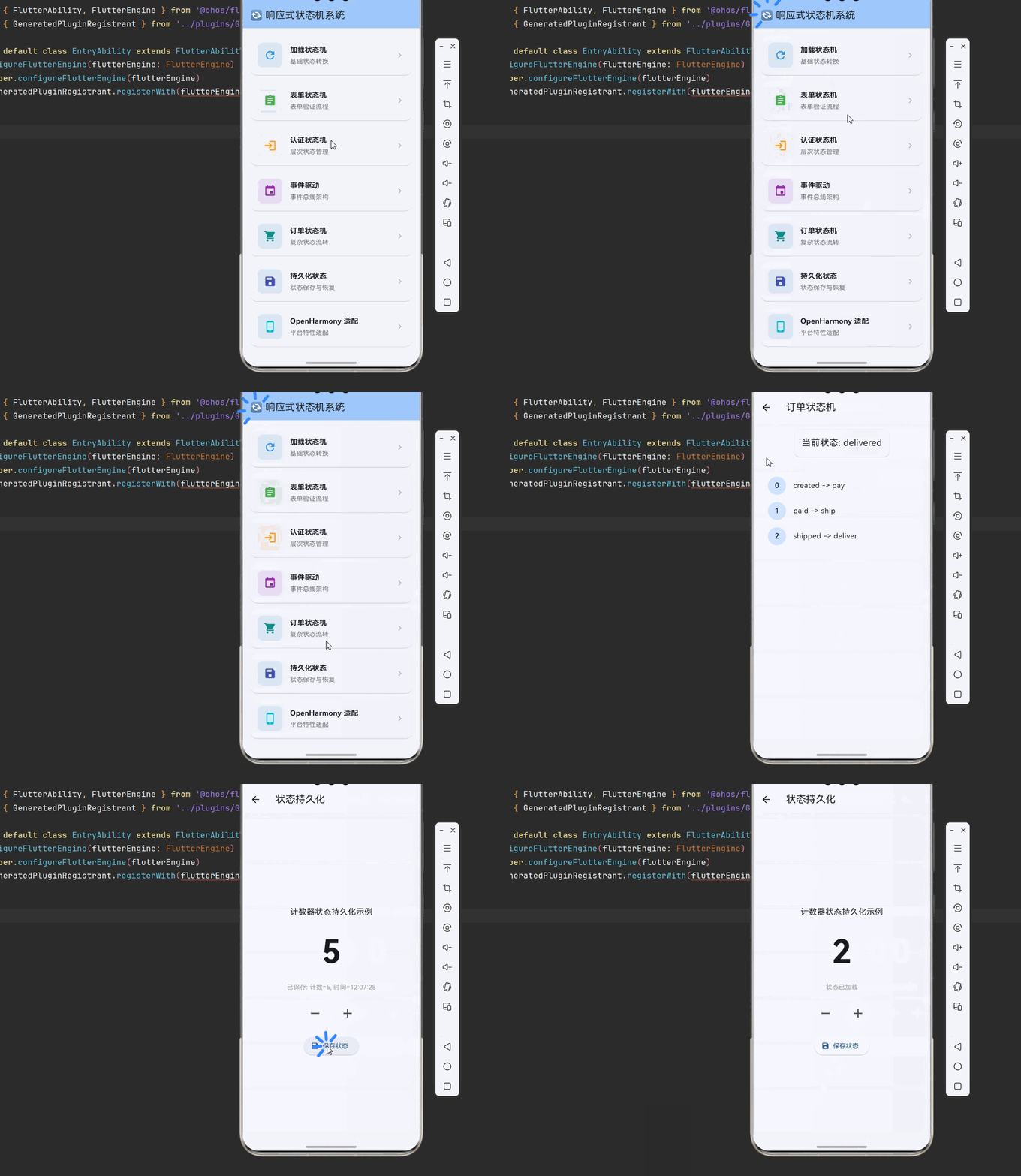
以下是完整的响应式状态机系统示例代码:
dart
import 'package:flutter/material.dart';
import 'package:flutter/foundation.dart';
import 'dart:async';
import 'dart:math';
import 'dart:io';
void main() {
runApp(const MyApp());
}
class MyApp extends StatelessWidget {
const MyApp({super.key});
@override
Widget build(BuildContext context) {
return MaterialApp(
title: '响应式状态机系统',
theme: ThemeData(
colorScheme: ColorScheme.fromSeed(seedColor: Colors.blue),
useMaterial3: true,
),
home: const StateMachineHomePage(),
debugShowCheckedModeBanner: false,
);
}
}
class StateMachineHomePage extends StatelessWidget {
const StateMachineHomePage({super.key});
@override
Widget build(BuildContext context) {
return Scaffold(
appBar: AppBar(
title: const Text('🔄 响应式状态机系统'),
backgroundColor: Theme.of(context).colorScheme.inversePrimary,
),
body: ListView(
padding: const EdgeInsets.all(16),
children: [
_buildSectionCard(
context,
title: '加载状态机',
description: '基础状态转换',
icon: Icons.refresh,
color: Colors.blue,
onTap: () => Navigator.push(
context,
MaterialPageRoute(builder: (_) => const LoadStateMachineDemo()),
),
),
_buildSectionCard(
context,
title: '表单状态机',
description: '表单验证流程',
icon: Icons.assignment,
color: Colors.green,
onTap: () => Navigator.push(
context,
MaterialPageRoute(builder: (_) => const FormStateMachineDemo()),
),
),
_buildSectionCard(
context,
title: '认证状态机',
description: '层次状态管理',
icon: Icons.login,
color: Colors.orange,
onTap: () => Navigator.push(
context,
MaterialPageRoute(builder: (_) => const AuthStateMachineDemo()),
),
),
_buildSectionCard(
context,
title: '事件驱动',
description: '事件总线架构',
icon: Icons.event,
color: Colors.purple,
onTap: () => Navigator.push(
context,
MaterialPageRoute(builder: (_) => const EventDrivenDemo()),
),
),
_buildSectionCard(
context,
title: '订单状态机',
description: '复杂状态流转',
icon: Icons.shopping_cart,
color: Colors.teal,
onTap: () => Navigator.push(
context,
MaterialPageRoute(builder: (_) => const OrderStateMachineDemo()),
),
),
_buildSectionCard(
context,
title: '持久化状态',
description: '状态保存与恢复',
icon: Icons.save,
color: Colors.indigo,
onTap: () => Navigator.push(
context,
MaterialPageRoute(builder: (_) => const PersistentStateDemo()),
),
),
_buildSectionCard(
context,
title: 'OpenHarmony 适配',
description: '平台特性适配',
icon: Icons.phone_android,
color: Colors.cyan,
onTap: () => Navigator.push(
context,
MaterialPageRoute(builder: (_) => const OpenHarmonyStateDemo()),
),
),
],
),
);
}
Widget _buildSectionCard(
BuildContext context, {
required String title,
required String description,
required IconData icon,
required Color color,
required VoidCallback onTap,
}) {
return Card(
margin: const EdgeInsets.only(bottom: 12),
shape: RoundedRectangleBorder(borderRadius: BorderRadius.circular(16)),
child: InkWell(
onTap: onTap,
borderRadius: BorderRadius.circular(16),
child: Padding(
padding: const EdgeInsets.all(16),
child: Row(
children: [
Container(
width: 56,
height: 56,
decoration: BoxDecoration(
color: color.withOpacity(0.1),
borderRadius: BorderRadius.circular(12),
),
child: Icon(icon, color: color, size: 28),
),
const SizedBox(width: 16),
Expanded(
child: Column(
crossAxisAlignment: CrossAxisAlignment.start,
children: [
Text(
title,
style: const TextStyle(
fontSize: 16,
fontWeight: FontWeight.bold,
),
),
const SizedBox(height: 4),
Text(
description,
style: TextStyle(color: Colors.grey[600], fontSize: 14),
),
],
),
),
Icon(Icons.chevron_right, color: Colors.grey[400]),
],
),
),
),
);
}
}
enum LoadState { idle, loading, success, error }
class LoadStateMachineDemo extends StatefulWidget {
const LoadStateMachineDemo({super.key});
@override
State<LoadStateMachineDemo> createState() => _LoadStateMachineDemoState();
}
class _LoadStateMachineDemoState extends State<LoadStateMachineDemo> {
LoadState _state = LoadState.idle;
String _data = '';
String _error = '';
Future<void> _loadData() async {
setState(() {
_state = LoadState.loading;
_error = '';
});
await Future.delayed(const Duration(seconds: 2));
if (Random().nextBool()) {
setState(() {
_state = LoadState.success;
_data = '数据加载成功: ${DateTime.now()}';
});
} else {
setState(() {
_state = LoadState.error;
_error = '加载失败,请重试';
});
}
}
void _reset() {
setState(() {
_state = LoadState.idle;
_data = '';
_error = '';
});
}
@override
Widget build(BuildContext context) {
return Scaffold(
appBar: AppBar(title: const Text('加载状态机')),
body: Center(
child: Column(
mainAxisAlignment: MainAxisAlignment.center,
children: [
if (_state == LoadState.idle)
const Text('点击按钮加载数据', style: TextStyle(fontSize: 18))
else if (_state == LoadState.loading)
const CircularProgressIndicator()
else if (_state == LoadState.success)
Text(_data, style: const TextStyle(fontSize: 16, color: Colors.green))
else
Text(_error, style: const TextStyle(fontSize: 16, color: Colors.red)),
const SizedBox(height: 24),
if (_state == LoadState.idle)
ElevatedButton(onPressed: _loadData, child: const Text('加载数据'))
else if (_state == LoadState.loading)
const Text('加载中...')
else
ElevatedButton(onPressed: _reset, child: const Text('重置')),
],
),
),
);
}
}
enum TrafficLight { red, yellow, green }
class TrafficLightDemo extends StatefulWidget {
const TrafficLightDemo({super.key});
@override
State<TrafficLightDemo> createState() => _TrafficLightDemoState();
}
class _TrafficLightDemoState extends State<TrafficLightDemo> {
TrafficLight _state = TrafficLight.red;
void _nextState() {
setState(() {
switch (_state) {
case TrafficLight.red:
_state = TrafficLight.green;
break;
case TrafficLight.green:
_state = TrafficLight.yellow;
break;
case TrafficLight.yellow:
_state = TrafficLight.red;
break;
}
});
}
Color _getColor() {
switch (_state) {
case TrafficLight.red:
return Colors.red;
case TrafficLight.yellow:
return Colors.yellow;
case TrafficLight.green:
return Colors.green;
}
}
@override
Widget build(BuildContext context) {
return Scaffold(
appBar: AppBar(title: const Text('交通灯状态机')),
body: Center(
child: Column(
mainAxisAlignment: MainAxisAlignment.center,
children: [
Container(
width: 100,
height: 100,
decoration: BoxDecoration(
color: _getColor(),
shape: BoxShape.circle,
border: Border.all(color: Colors.black, width: 2),
),
),
const SizedBox(height: 24),
Text('当前状态: ${_state.name}', style: const TextStyle(fontSize: 20)),
const SizedBox(height: 24),
ElevatedButton(onPressed: _nextState, child: const Text('切换状态')),
],
),
),
);
}
}
enum OrderState { created, paid, shipped, delivered, cancelled }
class OrderStateMachineDemo extends StatefulWidget {
const OrderStateMachineDemo({super.key});
@override
State<OrderStateMachineDemo> createState() => _OrderStateMachineDemoState();
}
class _OrderStateMachineDemoState extends State<OrderStateMachineDemo> {
OrderState _state = OrderState.created;
final List<String> _history = [];
void _transition(String action) {
setState(() {
_history.add('${_state.name} -> $action');
switch (_state) {
case OrderState.created:
if (action == 'pay') _state = OrderState.paid;
else if (action == 'cancel') _state = OrderState.cancelled;
break;
case OrderState.paid:
if (action == 'ship') _state = OrderState.shipped;
else if (action == 'cancel') _state = OrderState.cancelled;
break;
case OrderState.shipped:
if (action == 'deliver') _state = OrderState.delivered;
break;
default:
break;
}
});
}
List<Widget> _buildActions() {
switch (_state) {
case OrderState.created:
return [
ElevatedButton(onPressed: () => _transition('pay'), child: const Text('支付')),
ElevatedButton(onPressed: () => _transition('cancel'), child: const Text('取消')),
];
case OrderState.paid:
return [
ElevatedButton(onPressed: () => _transition('ship'), child: const Text('发货')),
ElevatedButton(onPressed: () => _transition('cancel'), child: const Text('取消')),
];
case OrderState.shipped:
return [
ElevatedButton(onPressed: () => _transition('deliver'), child: const Text('确认收货')),
];
default:
return [];
}
}
@override
Widget build(BuildContext context) {
return Scaffold(
appBar: AppBar(title: const Text('订单状态机')),
body: Padding(
padding: const EdgeInsets.all(16),
child: Column(
children: [
Card(
child: Padding(
padding: const EdgeInsets.all(16),
child: Text('当前状态: ${_state.name}', style: const TextStyle(fontSize: 20)),
),
),
const SizedBox(height: 16),
Wrap(spacing: 8, children: _buildActions()),
const SizedBox(height: 16),
Expanded(
child: ListView.builder(
itemCount: _history.length,
itemBuilder: (context, index) => ListTile(
title: Text(_history[index]),
leading: CircleAvatar(child: Text('$index')),
),
),
),
],
),
),
);
}
}
class FormStateMachineDemo extends StatefulWidget {
const FormStateMachineDemo({super.key});
@override
State<FormStateMachineDemo> createState() => _FormStateMachineDemoState();
}
class _FormStateMachineDemoState extends State<FormStateMachineDemo> {
final _formKey = GlobalKey<FormState>();
final _nameController = TextEditingController();
final _emailController = TextEditingController();
bool _isSubmitting = false;
bool _isSuccess = false;
Future<void> _submit() async {
if (!_formKey.currentState!.validate()) return;
setState(() => _isSubmitting = true);
await Future.delayed(const Duration(seconds: 1));
setState(() {
_isSubmitting = false;
_isSuccess = true;
});
}
void _reset() {
_formKey.currentState?.reset();
_nameController.clear();
_emailController.clear();
setState(() => _isSuccess = false);
}
@override
Widget build(BuildContext context) {
return Scaffold(
appBar: AppBar(title: const Text('表单状态机')),
body: Padding(
padding: const EdgeInsets.all(16),
child: _isSuccess
? Center(
child: Column(
mainAxisAlignment: MainAxisAlignment.center,
children: [
const Icon(Icons.check_circle, color: Colors.green, size: 64),
const SizedBox(height: 16),
const Text('提交成功!', style: TextStyle(fontSize: 20)),
const SizedBox(height: 24),
ElevatedButton(onPressed: _reset, child: const Text('重新填写')),
],
),
)
: Form(
key: _formKey,
child: Column(
children: [
TextFormField(
controller: _nameController,
decoration: const InputDecoration(labelText: '姓名'),
validator: (v) => v?.isEmpty ?? true ? '请输入姓名' : null,
),
const SizedBox(height: 16),
TextFormField(
controller: _emailController,
decoration: const InputDecoration(labelText: '邮箱'),
validator: (v) => v?.contains('@') ?? false ? null : '请输入有效邮箱',
),
const SizedBox(height: 24),
ElevatedButton(
onPressed: _isSubmitting ? null : _submit,
child: _isSubmitting
? const CircularProgressIndicator(color: Colors.white)
: const Text('提交'),
),
],
),
),
),
);
}
}
class EventDrivenStateMachineDemo extends StatefulWidget {
const EventDrivenStateMachineDemo({super.key});
@override
State<EventDrivenStateMachineDemo> createState() => _EventDrivenStateMachineDemoState();
}
class _EventDrivenStateMachineDemoState extends State<EventDrivenStateMachineDemo> {
final StreamController<String> _eventBus = StreamController.broadcast();
String _state = 'idle';
int _counter = 0;
StreamSubscription<String>? _subscription;
@override
void initState() {
super.initState();
_subscription = _eventBus.stream.listen((event) {
setState(() {
switch (event) {
case 'start':
_state = 'running';
break;
case 'pause':
_state = 'paused';
break;
case 'resume':
_state = 'running';
break;
case 'stop':
_state = 'stopped';
_counter = 0;
break;
case 'increment':
if (_state == 'running') _counter++;
break;
}
});
});
}
@override
void dispose() {
_subscription?.cancel();
_eventBus.close();
super.dispose();
}
@override
Widget build(BuildContext context) {
return Scaffold(
appBar: AppBar(title: const Text('事件驱动状态机')),
body: Center(
child: Column(
mainAxisAlignment: MainAxisAlignment.center,
children: [
Text('状态: $_state', style: const TextStyle(fontSize: 24)),
const SizedBox(height: 16),
Text('计数: $_counter', style: const TextStyle(fontSize: 48)),
const SizedBox(height: 24),
Wrap(
spacing: 8,
children: [
ElevatedButton(onPressed: () => _eventBus.add('start'), child: const Text('开始')),
ElevatedButton(onPressed: () => _eventBus.add('pause'), child: const Text('暂停')),
ElevatedButton(onPressed: () => _eventBus.add('resume'), child: const Text('恢复')),
ElevatedButton(onPressed: () => _eventBus.add('stop'), child: const Text('停止')),
ElevatedButton(onPressed: () => _eventBus.add('increment'), child: const Text('+1')),
],
),
],
),
),
);
}
}
enum AuthState { loggedOut, authenticating, authenticated, error }
class AuthStateMachineDemo extends StatefulWidget {
const AuthStateMachineDemo({super.key});
@override
State<AuthStateMachineDemo> createState() => _AuthStateMachineDemoState();
}
class _AuthStateMachineDemoState extends State<AuthStateMachineDemo> {
AuthState _state = AuthState.loggedOut;
String _message = '';
Future<void> _login() async {
setState(() {
_state = AuthState.authenticating;
_message = '登录中...';
});
await Future.delayed(const Duration(seconds: 2));
if (Random().nextBool()) {
setState(() {
_state = AuthState.authenticated;
_message = '登录成功!';
});
} else {
setState(() {
_state = AuthState.error;
_message = '登录失败,请重试';
});
}
}
void _logout() {
setState(() {
_state = AuthState.loggedOut;
_message = '';
});
}
void _reset() {
setState(() {
_state = AuthState.loggedOut;
_message = '';
});
}
@override
Widget build(BuildContext context) {
return Scaffold(
appBar: AppBar(title: const Text('认证状态机')),
body: Center(
child: Padding(
padding: const EdgeInsets.all(16),
child: Column(
mainAxisAlignment: MainAxisAlignment.center,
children: [
Icon(
_state == AuthState.authenticated ? Icons.verified_user : Icons.lock,
size: 64,
color: _state == AuthState.authenticated ? Colors.green : Colors.grey,
),
const SizedBox(height: 16),
Text(
_state.name.toUpperCase(),
style: const TextStyle(fontSize: 24, fontWeight: FontWeight.bold),
),
const SizedBox(height: 8),
Text(_message),
const SizedBox(height: 24),
if (_state == AuthState.loggedOut)
ElevatedButton(onPressed: _login, child: const Text('登录'))
else if (_state == AuthState.authenticating)
const CircularProgressIndicator()
else if (_state == AuthState.authenticated)
ElevatedButton(onPressed: _logout, child: const Text('登出'))
else
ElevatedButton(onPressed: _reset, child: const Text('重试')),
],
),
),
),
);
}
}
enum EventState { idle, processing, success, failed }
class EventDrivenDemo extends StatefulWidget {
const EventDrivenDemo({super.key});
@override
State<EventDrivenDemo> createState() => _EventDrivenDemoState();
}
class _EventDrivenDemoState extends State<EventDrivenDemo> {
final StreamController<String> _eventBus = StreamController.broadcast();
EventState _state = EventState.idle;
int _counter = 0;
StreamSubscription<String>? _subscription;
@override
void initState() {
super.initState();
_subscription = _eventBus.stream.listen((event) {
setState(() {
switch (event) {
case 'start':
_state = EventState.processing;
break;
case 'success':
_state = EventState.success;
break;
case 'fail':
_state = EventState.failed;
break;
case 'reset':
_state = EventState.idle;
_counter = 0;
break;
case 'increment':
_counter++;
break;
}
});
});
}
@override
void dispose() {
_subscription?.cancel();
_eventBus.close();
super.dispose();
}
@override
Widget build(BuildContext context) {
return Scaffold(
appBar: AppBar(title: const Text('事件驱动状态机')),
body: Center(
child: Column(
mainAxisAlignment: MainAxisAlignment.center,
children: [
Text('状态: ${_state.name}', style: const TextStyle(fontSize: 24)),
const SizedBox(height: 16),
Text('计数: $_counter', style: const TextStyle(fontSize: 48)),
const SizedBox(height: 24),
Wrap(
spacing: 8,
runSpacing: 8,
children: [
ElevatedButton(onPressed: () => _eventBus.add('start'), child: const Text('开始')),
ElevatedButton(onPressed: () => _eventBus.add('success'), child: const Text('成功')),
ElevatedButton(onPressed: () => _eventBus.add('fail'), child: const Text('失败')),
ElevatedButton(onPressed: () => _eventBus.add('reset'), child: const Text('重置')),
ElevatedButton(onPressed: () => _eventBus.add('increment'), child: const Text('+1')),
],
),
],
),
),
);
}
}
class PersistentStateDemo extends StatefulWidget {
const PersistentStateDemo({super.key});
@override
State<PersistentStateDemo> createState() => _PersistentStateDemoState();
}
class _PersistentStateDemoState extends State<PersistentStateDemo> {
int _counter = 0;
String _lastSaved = '';
@override
void initState() {
super.initState();
_loadState();
}
void _loadState() {
// 模拟从持久化存储加载状态
setState(() {
_counter = 0;
_lastSaved = '状态已加载';
});
}
void _saveState() {
// 模拟保存状态到持久化存储
setState(() {
_lastSaved = '已保存: 计数=$_counter, 时间=${DateTime.now().toString().substring(11, 19)}';
});
}
@override
Widget build(BuildContext context) {
return Scaffold(
appBar: AppBar(title: const Text('状态持久化')),
body: Center(
child: Column(
mainAxisAlignment: MainAxisAlignment.center,
children: [
const Text('计数器状态持久化示例', style: TextStyle(fontSize: 18)),
const SizedBox(height: 24),
Text('$_counter', style: const TextStyle(fontSize: 72, fontWeight: FontWeight.bold)),
const SizedBox(height: 16),
Text(_lastSaved, style: const TextStyle(color: Colors.grey)),
const SizedBox(height: 24),
Row(
mainAxisAlignment: MainAxisAlignment.center,
children: [
IconButton(
onPressed: () => setState(() => _counter--),
icon: const Icon(Icons.remove, size: 32),
),
const SizedBox(width: 24),
IconButton(
onPressed: () => setState(() => _counter++),
icon: const Icon(Icons.add, size: 32),
),
],
),
const SizedBox(height: 24),
ElevatedButton.icon(
onPressed: _saveState,
icon: const Icon(Icons.save),
label: const Text('保存状态'),
),
],
),
),
);
}
}
class OpenHarmonyStateDemo extends StatefulWidget {
const OpenHarmonyStateDemo({super.key});
@override
State<OpenHarmonyStateDemo> createState() => _OpenHarmonyStateDemoState();
}
class _OpenHarmonyStateDemoState extends State<OpenHarmonyStateDemo> {
String _platformInfo = '';
bool _isOhos = false;
@override
void initState() {
super.initState();
_checkPlatform();
}
void _checkPlatform() {
setState(() {
_isOhos = !kIsWeb && Platform.operatingSystem == 'ohos';
_platformInfo = '平台: ${Platform.operatingSystem}\n'
'状态持久化: ${_isOhos ? "OpenHarmony Preferences" : "SharedPreferences"}';
});
}
@override
Widget build(BuildContext context) {
return Scaffold(
appBar: AppBar(title: const Text('OpenHarmony 状态管理')),
body: Padding(
padding: const EdgeInsets.all(16),
child: Column(
crossAxisAlignment: CrossAxisAlignment.start,
children: [
Card(
color: _isOhos ? Colors.green.shade100 : Colors.blue.shade100,
child: Padding(
padding: const EdgeInsets.all(16),
child: Row(
children: [
Icon(_isOhos ? Icons.phone_android : Icons.computer,
color: _isOhos ? Colors.green : Colors.blue),
const SizedBox(width: 12),
Text(
_isOhos ? 'OpenHarmony 环境' : '其他平台环境',
style: const TextStyle(fontSize: 18, fontWeight: FontWeight.bold),
),
],
),
),
),
const SizedBox(height: 16),
const Text('平台信息:', style: TextStyle(fontSize: 16, fontWeight: FontWeight.bold)),
const SizedBox(height: 8),
Container(
padding: const EdgeInsets.all(12),
decoration: BoxDecoration(
color: Colors.grey.shade100,
borderRadius: BorderRadius.circular(8),
),
child: Text(_platformInfo, style: const TextStyle(fontFamily: 'monospace')),
),
],
),
),
);
}
}十、总结
本文深入探讨了 Flutter for OpenHarmony 的响应式状态机系统,从架构原理到具体实现,涵盖了以下核心内容:
📚 核心知识点回顾
- 状态机概念:理解状态、事件、转换、动作的核心概念
- 有限状态机:实现基础的矩阵状态机和状态转换表
- 层次状态机:支持状态嵌套的复杂状态管理
- 事件驱动:通过事件总线实现解耦的事件处理
- 复杂流转:订单、表单等复杂业务场景的状态管理
- 状态持久化:状态的保存、恢复和迁移
🎯 最佳实践要点
- 保持状态简单,每个状态只表示一种条件
- 使用层次状态机组织复杂状态
- 记录状态历史便于调试
- 实现状态持久化保证数据安全
- 使用事件总线解耦组件通信
🚀 进阶方向
- 深入研究 XState 等成熟的状态机库
- 实现可视化状态编辑器
- 探索状态机的测试策略
- 优化大规模状态机的性能
通过掌握这些技术,你可以构建出可预测、可维护的状态管理系统,有效应对复杂业务逻辑的挑战。
💡 提示:在实际项目中,建议使用 bloc、riverpod 等状态管理库结合状态机模式。