Flutter 三方库 devicelocale 鸿蒙适配
欢迎大家加入开源鸿蒙跨平台开发者社区
一、背景与库简介
devicelocale 是 Flutter 上用于获取设备当前语言与区域设置的插件,原版支持 Android、iOS、Web、Linux、macOS 等平台,通过 MethodChannel 与原生端通信,提供:
- 设备偏好语言列表(
preferredLanguages) - 当前区域字符串(
currentLocale,如zh-Hans-CN、en-US) - 按应用设置语言(Android 13+ 的
setLanguagePerApp等)
本文介绍如何为该库增加 OpenHarmony / 鸿蒙 平台支持,并给出 完整 ETS 实现代码,便于复用到其他类似插件。
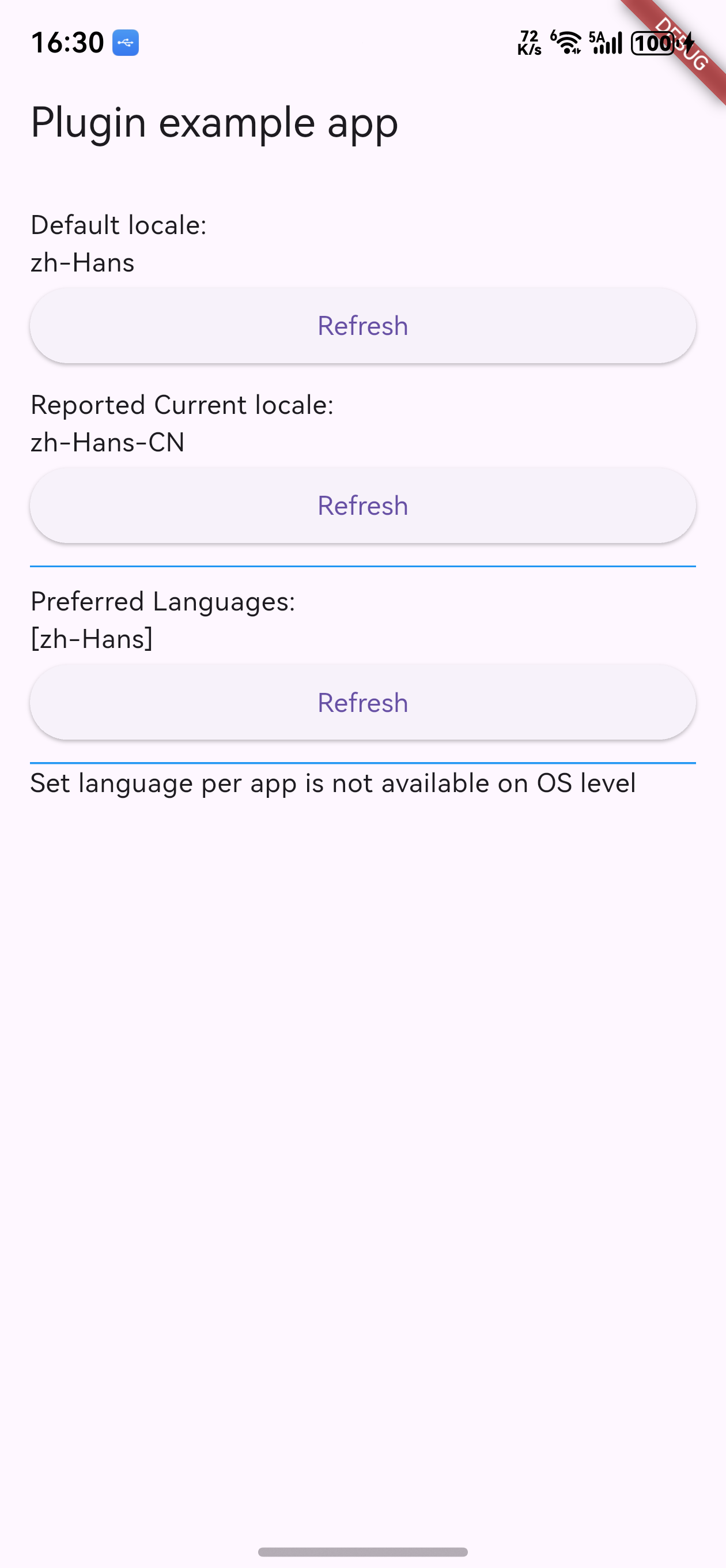
二、适配思路概览
- 对齐已有平台协议 :Dart 侧使用固定 MethodChannel 名称
uk.spiralarm.flutter/devicelocale,并约定方法名:preferredLanguages、currentLocale、setLanguagePerApp、isLanguagePerAppSettingSupported、getPlatformVersion。鸿蒙侧需实现同名 MethodChannel 与相同方法名。 - 参考 Android 实现 :Android 端使用
LocaleListCompat.getAdjustedDefault()、Locale.getDefault().toLanguageTag()等获取语言列表与当前区域;鸿蒙侧用 i18n.System 的getPreferredLanguageList()、getSystemLocale()等 API 做等价实现。 - 平台能力差异 :「按应用设置语言」在鸿蒙上暂不实现,对应方法返回
false,与 Android 13 以下行为一致。
三、鸿蒙侧实现要点
3.1 依赖与入口
- Flutter 鸿蒙插件 :使用
@ohos/flutter_ohos的FlutterPlugin、MethodChannel、MethodCallHandler、MethodResult等。 - 系统语言 API :使用
@kit.LocalizationKit的i18n.System(getSystemLocale、getPreferredLanguageList、getFirstPreferredLanguage、getSystemLanguage)。若为纯 OpenHarmony 环境,可改为@ohos.i18n并按实际 API 微调。
3.2 MethodChannel 名称
必须与 Dart 端一致,否则无法通信:
ts
this.channel = new MethodChannel(binding.getBinaryMessenger(), "uk.spiralarm.flutter/devicelocale");3.3 方法映射与返回值
| Dart 调用方法 | MethodChannel 方法名 | 鸿蒙返回值说明 |
|---|---|---|
preferredLanguages |
preferredLanguages |
字符串数组,首项为当前系统语言 |
currentLocale |
currentLocale |
当前区域字符串,如 zh-Hans-CN、en-US |
setLanguagePerApp |
setLanguagePerApp |
暂不支持,返回 false |
isLanguagePerAppSettingSupported |
同名 | 返回 false |
| (可选)平台版本 | getPlatformVersion |
如 "OpenHarmony" |
3.4 异常与兼容
getSystemLocale()在部分机型/版本可能不可用,建议用getFirstPreferredLanguage()、getSystemLanguage()做降级。getPreferredLanguageList()返回值可能非数组,需做Array.isArray(list)判断,否则回退为仅包含当前 locale 的列表。
四、完整实现代码(DevicelocalePlugin.ets)
以下为鸿蒙侧插件的 完整 ETS 实现 ,可直接用于 ohos/src/main/ets/components/plugin/DevicelocalePlugin.ets:
ets
import {
  FlutterPlugin,
  FlutterPluginBinding,
  MethodCall,
  MethodCallHandler,
  MethodChannel,
  MethodResult,
} from '@ohos/flutter_ohos';
import { i18n } from '@kit.LocalizationKit';

/** DevicelocalePlugin - 参考 Android 实现,提供设备语言与偏好语言列表 */
export default class DevicelocalePlugin implements FlutterPlugin, MethodCallHandler {
  private channel: MethodChannel | null = null;

  constructor() {
  }

  getUniqueClassName(): string {
    return "DevicelocalePlugin";
  }

  onAttachedToEngine(binding: FlutterPluginBinding): void {
    this.channel = new MethodChannel(binding.getBinaryMessenger(), "uk.spiralarm.flutter/devicelocale");
    this.channel.setMethodCallHandler(this);
  }

  onDetachedFromEngine(binding: FlutterPluginBinding): void {
    if (this.channel != null) {
      this.channel.setMethodCallHandler(null);
    }
  }

  onMethodCall(call: MethodCall, result: MethodResult): void {
    const method = call.method;
    switch (method) {
      case "preferredLanguages":
        result.success(this.getPreferredLanguages());
        break;
      case "currentLocale":
        result.success(this.getCurrentLocale());
        break;
      case "setLanguagePerApp":
        result.success(this.setLanguagePerAppSetting(call));
        break;
      case "isLanguagePerAppSettingSupported":
        result.success(this.isLanguagePerAppSettingSupported());
        break;
      case "getPlatformVersion":
        result.success("OpenHarmony");
        break;
      default:
        result.notImplemented();
    }
  }

  /** 当前系统区域标识,如 zh-Hans-CN、en-US */
  private getCurrentLocale(): string {
    try {
      return i18n.System.getSystemLocale();
    } catch (e) {
      try {
        return i18n.System.getFirstPreferredLanguage();
      } catch (_e) {
        return i18n.System.getSystemLanguage();
      }
    }
  }

  /** 系统偏好语言列表,与 Android LocaleListCompat.getAdjustedDefault() 对应 */
  private getPreferredLanguages(): Array<string> {
    try {
      const list = i18n.System.getPreferredLanguageList();
      return Array.isArray(list) ? list : [this.getCurrentLocale()];
    } catch (e) {
      return [this.getCurrentLocale()];
    }
  }

  /** OHOS 暂按不支持"按应用设置语言"处理,与 Android 13 以下行为一致 */
  private isLanguagePerAppSettingSupported(): boolean {
    return false;
  }

  /** 暂不支持,返回 false */
  private setLanguagePerAppSetting(call: MethodCall): boolean {
    return false;
  }
}说明:
- 若使用 OpenHarmony 且无
@kit.LocalizationKit,可改为:import { i18n } from '@ohos.i18n';,并确认i18n.System.getSystemLocale()/getPreferredLanguageList()等在该环境下存在且命名一致。 setLanguagePerAppSetting未使用call参数,保留参数是为与 Dart 侧setLanguagePerApp(Locale locale)的调用方式一致,便于日后扩展。
五、Dart 侧使用方式(无需改库核心代码)
插件在 pubspec.yaml 中声明 ohos 平台后,Dart 侧无需区分平台即可使用,例如:
dart
import 'package:devicelocale/devicelocale.dart';

// 偏好语言列表(字符串)
final List? list = await Devicelocale.preferredLanguages;

// 当前区域字符串
final String? locale = await Devicelocale.currentLocale;

// 当前区域转 Locale
final Locale? localeObj = await Devicelocale.currentAsLocale;
鸿蒙上 isLanguagePerAppSettingSupported 为 false,setLanguagePerApp 会直接返回 false,不会走原生逻辑。
六、小结
- 通过 对齐 MethodChannel 名称与方法名 、用鸿蒙 i18n.System API 实现与 Android 等价的"偏好语言列表 + 当前区域",即可在鸿蒙上完整支持 devicelocale 的读能力。
- 上述 DevicelocalePlugin.ets 为完整实现,可直接复制到工程中使用;按应用设置语言在鸿蒙上暂不实现,接口保持与 Dart 一致即可。
- 适配思路(参考 Android、统一 Channel、异常降级)也可复用到其他需要「设备语言/区域」的 Flutter 鸿蒙插件。
参考
- 原库:flutter-devicelocale
- 适配后的库地址:https://atomgit.com/oh-flutter/flutter-devicelocale
- 鸿蒙 i18n:
@kit.LocalizationKit/@ohos.i18n文档