欢迎加入开源鸿蒙跨平台社区:https://openharmonycrossplatform.csdn.net
🎯 欢迎来到 Flutter for OpenHarmony 社区!本文将深入讲解 Flutter 中 flutter_phone_direct_caller 电话拨号插件的使用方法,带你全面掌握在应用中直接拨打电话的功能。
一、flutter_phone_direct_caller 组件概述
在很多应用中,需要提供拨打电话的功能,例如联系客服、拨打紧急电话、一键呼叫等。flutter_phone_direct_caller 是一个简单易用的电话拨号插件,可以直接调用系统拨号功能,无需打开拨号界面。
📋 flutter_phone_direct_caller 组件特点
| 特点 | 说明 |
|---|---|
| 直接拨号 | 直接拨打电话,无需经过拨号界面 |
| 权限自动处理 | 插件自动处理权限请求 |
| 跨平台支持 | 支持 Android、iOS、OpenHarmony |
| 简单易用 | API 简洁,一行代码即可拨打电话 |
| 鸿蒙适配 | 专门为 OpenHarmony 平台进行了适配 |
二、OpenHarmony 平台适配说明
2.1 兼容性信息
本项目基于 flutter_phone_direct_caller@2.2.1 开发,适配 Flutter 3.7.12-ohos-1.0.6 和 Flutter 3.22.1-ohos-1.0.1。
2.2 工作原理
flutter_phone_direct_caller 在 OpenHarmony 平台上使用以下机制:
- Call 能力:使用 OpenHarmony 的 Call 能力进行电话拨号
- 权限管理:插件自动处理拨号权限请求
- MethodChannel 通信:通过 Flutter MethodChannel 调用原生拨号接口
详细工作流程
Call API OpenHarmony Native Layer MethodChannel Dart Layer Call API OpenHarmony Native Layer MethodChannel Dart Layer 1. 用户点击拨打电话按钮 2. 传递拨号请求 3. 检查权限 5. 等待用户授权 alt 用户授权 用户拒绝 alt 权限已授予 权限未授予 7. 处理拨号结果 callNumber(phoneNumber) 方法调用 4. 调用 Call API makeCall(phoneNumber) 拨号结果 4. 请求权限 6. 调用 Call API makeCall(phoneNumber) 拨号结果 6. 返回失败 返回结果(true/false) Future<bool>
OpenHarmony 平台实现
在 OpenHarmony 平台上,flutter_phone_direct_caller 通过以下方式实现:
dart
// OpenHarmony 原生代码(伪代码)
public class FlutterPhoneDirectCallerPlugin implements MethodCallHandler {
    private static final String CHANNEL = "flutter_phone_direct_caller/methods";

    @Override
    public void onMethodCall(MethodCall call, Result result) {
        if (call.method.equals("callNumber")) {
            String phoneNumber = call.argument("number");
            callNumber(phoneNumber, result);
        } else {
            result.notImplemented();
        }
    }

    private void callNumber(String phoneNumber, Result result) {
        try {
            // 1. 检查并请求权限
            if (!checkCallPermission()) {
                requestCallPermission((isGranted) -> {
                    if (isGranted) {
                        performCall(phoneNumber, result);
                    } else {
                        result.success(false);
                    }
                });
                return;
            }

            // 2. 执行拨号
            performCall(phoneNumber, result);

        } catch (Exception e) {
            result.error("CALL_ERROR", e.getMessage(), null);
        }
    }

    private void performCall(String phoneNumber, Result result) {
        // 使用 OpenHarmony 的 Call 能力
        CallAbility callAbility = new CallAbility(context);
        callAbility.makeCall(phoneNumber, new CallCallback() {
            @Override
            public void onSuccess() {
                result.success(true);
            }

            @Override
            public void onFailure(String error) {
                result.success(false);
            }
        });
    }

    private boolean checkCallPermission() {
        // 检查是否有拨号权限
        return verifySelfPermission("ohos.permission.CALL_PHONE") ==
            PackageManager.PERMISSION_GRANTED;
    }

    private void requestCallPermission(PermissionCallback callback) {
        // 请求拨号权限
        requestPermissionsFromUser(
            new String[]{"ohos.permission.CALL_PHONE"},
            REQUEST_CODE_CALL_PHONE,
            (code, data) -> {
                boolean isGranted = verifySelfPermission("ohos.permission.CALL_PHONE") ==
                    PackageManager.PERMISSION_GRANTED;
                callback.onResult(isGranted);
            }
        );
    }
}代码说明:这段伪代码展示了 OpenHarmony 原生层的实现逻辑。首先通过 MethodChannel 接收 Flutter 层的拨号请求,然后检查拨号权限。如果权限已授予,直接调用 Call API 拨打电话;如果权限未授予,则先请求用户授权,根据用户授权结果决定是否拨号。最后将拨号结果返回给 Flutter 层。
Dart 层实现
在 Dart 层,flutter_phone_direct_caller 的实现如下:
dart
import 'package:flutter/services.dart';

class FlutterPhoneDirectCaller {
  static const MethodChannel _channel = MethodChannel('flutter_phone_direct_caller/methods');

  /// 拨打电话
  ///
  /// [number] 要拨打的电话号码
  ///
  /// 返回 [Future<bool>],true 表示拨号成功,false 表示拨号失败
  static Future<bool> callNumber(String number) async {
    try {
      // 通过 MethodChannel 调用原生方法
      final result = await _channel.invokeMethod('callNumber', {'number': number});

      // 原生层返回 bool 类型结果
      return result as bool;
    } on PlatformException catch (e) {
      // 处理平台异常
      print('拨号失败: ${e.message}');
      return false;
    } catch (e) {
      // 处理其他异常
      print('拨号失败: $e');
      return false;
    }
  }
}代码说明:Dart 层使用 MethodChannel 与原生层通信。callNumber 方法接收电话号码参数,通过 invokeMethod 调用原生的 callNumber 方法,并将参数传递过去。使用 try-catch 捕获可能出现的异常,确保调用失败时返回 false 而不是抛出异常,方便调用者处理。
2.3 支持的功能
| 功能 | 说明 | OpenHarmony 支持 |
|---|---|---|
| 直接拨号 | 直接拨打指定号码 | ✅ yes |
| 返回结果 | 返回拨号结果 | ✅ yes |
三、项目配置与安装
3.1 添加依赖配置
在 pubspec.yaml 文件中添加以下依赖:
yaml
dependencies:
  flutter:
    sdk: flutter

  # 添加 flutter_phone_direct_caller 依赖(OpenHarmony 适配版本)
  flutter_phone_direct_caller:
    git:
      url: https://gitcode.com/openharmony-sig/fluttertpc_flutter_phone_direct_caller.git
配置说明:
- 使用 git 方式引用开源鸿蒙适配的 flutter_phone_direct_caller 仓库
url:指定 GitCode 托管的仓库地址- 无需指定
path,因为这是根目录包
3.2 下载依赖
配置完成后,执行以下命令下载依赖:
bash
flutter pub get3.3 权限配置
flutter_phone_direct_caller 会自动处理权限,无需手动配置。
四、flutter_phone_direct_caller 基础用法
4.1 导入库
在使用电话拨号之前,需要先导入库:
dart
import 'package:flutter_phone_direct_caller/flutter_phone_direct_caller.dart';4.2 拨打电话
使用 callNumber 方法拨打电话:
dart
// 拨打电话
bool result = await FlutterPhoneDirectCaller.callNumber('085921191121');

print('拨号结果: $result');
参数说明:
number:要拨打的电话号码(字符串)- 返回值:
booltrue:拨号成功false:拨号失败
4.3 格式化电话号码
在拨打电话之前,建议对电话号码进行格式化:
dart
String formatPhoneNumber(String phone) {
  // 移除所有非数字字符
  return phone.replaceAll(RegExp(r'[^\d]'), '');
}
五、实际应用场景
5.1 联系客服
dart
class CustomerServiceWidget extends StatelessWidget {
  final String servicePhone = '4008888888';
  final String serviceTime = '09:00-18:00';

  @override
  Widget build(BuildContext context) {
    return Card(
      elevation: 4,
      shape: RoundedRectangleBorder(borderRadius: BorderRadius.circular(12)),
      child: ListTile(
        leading: CircleAvatar(
          backgroundColor: Colors.blue.shade100,
          child: const Icon(Icons.headset_mic, color: Colors.blue),
        ),
        title: const Text('联系客服'),
        subtitle: Text('服务时间: $serviceTime'),
        trailing: const Icon(Icons.phone, color: Colors.blue),
        onTap: () async {
          // 弹出确认对话框
          final shouldCall = await showDialog<bool>(
            context: context,
            builder: (context) => AlertDialog(
              title: const Text('联系客服'),
              content: Text('确定要拨打客服电话 $servicePhone 吗?\n服务时间: $serviceTime'),
              actions: [
                TextButton(
                  onPressed: () => Navigator.pop(context, false),
                  child: const Text('取消'),
                ),
                TextButton(
                  onPressed: () => Navigator.pop(context, true),
                  child: const Text('拨打'),
                ),
              ],
            ),
          );

          if (shouldCall == true) {
            final result = await FlutterPhoneDirectCaller.callNumber(servicePhone);
            if (!result) {
              ScaffoldMessenger.of(context).showSnackBar(
                const SnackBar(content: Text('拨号失败,请检查设备是否支持通话功能')),
              );
            }
          }
        },
      ),
    );
  }
}代码说明:这个示例创建了一个客服联系卡片组件,包含客服图标、服务时间等信息。当用户点击时,首先显示确认对话框,确认后才发起拨号,避免误操作。如果拨号失败,会通过 SnackBar 提示用户。
5.2 紧急呼叫
dart
class EmergencyCallWidget extends StatelessWidget {
  final Map<String, String> emergencyNumbers = {
    '110': '报警电话',
    '120': '急救电话',
    '119': '火警电话',
    '122': '交通事故',
  };

  @override
  Widget build(BuildContext context) {
    return Card(
      color: Colors.red.shade50,
      elevation: 4,
      shape: RoundedRectangleBorder(
        borderRadius: BorderRadius.circular(12),
        side: BorderSide(color: Colors.red.shade300),
      ),
      child: Column(
        crossAxisAlignment: CrossAxisAlignment.start,
        children: [
          const Padding(
            padding: EdgeInsets.all(16),
            child: Row(
              children: [
                Icon(Icons.warning, color: Colors.red),
                SizedBox(width: 8),
                Text(
                  '紧急呼叫',
                  style: TextStyle(
                    fontSize: 18,
                    fontWeight: FontWeight.bold,
                    color: Colors.red,
                  ),
                ),
              ],
            ),
          ),
          ...emergencyNumbers.entries.map((entry) => ListTile(
            leading: CircleAvatar(
              backgroundColor: Colors.red.shade100,
              child: Text(entry.key, style: const TextStyle(color: Colors.red, fontWeight: FontWeight.bold)),
            ),
            title: Text(entry.value),
            trailing: const Icon(Icons.phone_in_talk, color: Colors.red),
            onTap: () async {
              final shouldCall = await showDialog<bool>(
                context: context,
                builder: (context) => AlertDialog(
                  title: const Text('紧急呼叫'),
                  content: Text('确定要拨打 ${entry.value} (${entry.key}) 吗?'),
                  actions: [
                    TextButton(
                      onPressed: () => Navigator.pop(context, false),
                      child: const Text('取消'),
                    ),
                    ElevatedButton(
                      onPressed: () => Navigator.pop(context, true),
                      style: ElevatedButton.styleFrom(backgroundColor: Colors.red),
                      child: const Text('紧急拨打'),
                    ),
                  ],
                ),
              );

              if (shouldCall == true) {
                final result = await FlutterPhoneDirectCaller.callNumber(entry.key);
                if (!result) {
                  ScaffoldMessenger.of(context).showSnackBar(
                    const SnackBar(content: Text('拨号失败,请检查设备是否支持通话功能')),
                  );
                }
              }
            },
          )),
        ],
      ),
    );
  }
}代码说明:这个示例创建了紧急呼叫组件,包含多个紧急电话号码(110、120、119、122)。使用红色主题突出紧急性,每个号码都有明确的标识和说明。点击时会弹出确认对话框,确认后立即拨打电话。
5.3 电话号码管理
dart
class PhoneNumberManagerWidget extends StatelessWidget {
  final List<PhoneNumberEntry> phoneNumbers;

  const PhoneNumberManagerWidget({Key? key, required this.phoneNumbers}) : super(key: key);

  @override
  Widget build(BuildContext context) {
    return Card(
      elevation: 2,
      child: Column(
        crossAxisAlignment: CrossAxisAlignment.start,
        children: [
          const Padding(
            padding: EdgeInsets.all(16),
            child: Text(
              '联系电话',
              style: TextStyle(fontSize: 16, fontWeight: FontWeight.bold),
            ),
          ),
          ...phoneNumbers.asMap().entries.map((entry) {
            final index = entry.key;
            final phone = entry.value;
            return ListTile(
              leading: CircleAvatar(
                backgroundColor: _getPhoneTypeColor(phone.type).shade100,
                child: Icon(_getPhoneTypeIcon(phone.type), color: _getPhoneTypeColor(phone.type)),
              ),
              title: Text(phone.number),
              subtitle: Text(phone.label),
              trailing: Row(
                mainAxisSize: MainAxisSize.min,
                children: [
                  IconButton(
                    icon: const Icon(Icons.copy, size: 20),
                    onPressed: () {
                      Clipboard.setData(ClipboardData(text: phone.number));
                      ScaffoldMessenger.of(context).showSnackBar(
                        const SnackBar(content: Text('号码已复制')),
                      );
                    },
                  ),
                  IconButton(
                    icon: const Icon(Icons.phone, color: Colors.green),
                    onPressed: () async {
                      final result = await FlutterPhoneDirectCaller.callNumber(phone.number);
                      if (result) {
                        ScaffoldMessenger.of(context).showSnackBar(
                          SnackBar(content: Text('正在拨打 ${phone.label}...')),
                        );
                      } else {
                        ScaffoldMessenger.of(context).showSnackBar(
                          const SnackBar(content: Text('拨号失败')),
                        );
                      }
                    },
                  ),
                ],
              ),
            );
          }),
        ],
      ),
    );
  }

  Color _getPhoneTypeColor(PhoneType type) {
    switch (type) {
      case PhoneType.mobile:
        return Colors.blue;
      case PhoneType.home:
        return Colors.green;
      case PhoneType.work:
        return Colors.orange;
      case PhoneType.other:
        return Colors.grey;
    }
  }

  IconData _getPhoneTypeIcon(PhoneType type) {
    switch (type) {
      case PhoneType.mobile:
        return Icons.smartphone;
      case PhoneType.home:
        return Icons.home;
      case PhoneType.work:
        return Icons.work;
      case PhoneType.other:
        return Icons.phone;
    }
  }
}

class PhoneNumberEntry {
  final String number;
  final String label;
  final PhoneType type;

  PhoneNumberEntry({
    required this.number,
    required this.label,
    required this.type,
  });
}

enum PhoneType { mobile, home, work, other }代码说明:这个示例创建了电话号码管理组件,可以管理多个不同类型的电话号码(手机、家庭、工作等)。每个号码都有对应的图标和颜色标识,方便区分。提供复制号码和拨打电话两个功能。
六、高级用法
6.1 电话号码验证与格式化
在实际应用中,用户输入的电话号码可能格式不正确,需要进行验证和格式化。
dart
class PhoneNumberValidator {
  /// 验证手机号码格式(中国大陆)
  static bool isValidMobilePhone(String phone) {
    // 移除所有非数字字符
    final cleanPhone = phone.replaceAll(RegExp(r'[^\d]'), '');

    // 验证11位数字,以1开头
    final regex = RegExp(r'^1[3-9]\d{9}$');
    return regex.hasMatch(cleanPhone);
  }

  /// 验证固定电话格式
  static bool isValidLandline(String phone) {
    final cleanPhone = phone.replaceAll(RegExp(r'[^\d]'), '');

    // 验证固定电话格式:区号(3-4位) + 号码(7-8位)
    final regex = RegExp(r'^0\d{2,3}\d{7,8}$');
    return regex.hasMatch(cleanPhone);
  }

  /// 验证国际电话格式
  static bool isValidInternational(String phone) {
    final cleanPhone = phone.replaceAll(RegExp(r'[^\d+]'), '');

    // 验证国际电话格式:国家代码(1-3位) + 号码
    final regex = RegExp(r'^\+[1-9]\d{0,2}\d{6,14}$');
    return regex.hasMatch(cleanPhone);
  }

  /// 格式化手机号码为 138 1234 5678 格式
  static String formatMobilePhone(String phone) {
    final cleanPhone = phone.replaceAll(RegExp(r'[^\d]'), '');
    if (cleanPhone.length == 11) {
      return '${cleanPhone.substring(0, 3)} ${cleanPhone.substring(3, 7)} ${cleanPhone.substring(7)}';
    }
    return phone;
  }

  /// 格式化固定电话
  static String formatLandline(String phone) {
    final cleanPhone = phone.replaceAll(RegExp(r'[^\d]'), '');
    if (cleanPhone.length >= 10 && cleanPhone.length <= 12) {
      // 区号 + 号码
      final areaCodeLength = cleanPhone.length == 10 ? 3 : 4;
      return '${cleanPhone.substring(0, areaCodeLength)}-${cleanPhone.substring(areaCodeLength)}';
    }
    return phone;
  }

  /// 格式化国际电话
  static String formatInternational(String phone) {
    final cleanPhone = phone.replaceAll(RegExp(r'[^\d+]'), '');
    if (cleanPhone.startsWith('+') && cleanPhone.length > 12) {
      return '${cleanPhone.substring(0, cleanPhone.length - 8)} ${cleanPhone.substring(cleanPhone.length - 8)}';
    }
    return phone;
  }
}代码说明:PhoneNumberValidator 类提供了电话号码验证和格式化的方法。包括手机号码验证(中国大陆)、固定电话验证、国际电话验证,以及对应的格式化方法。格式化方法可以增强用户体验,使电话号码更易读。
6.2 拨号历史记录
记录用户的拨号历史,方便快速回拨和查看通话记录。
dart
class CallHistoryManager {
  static final CallHistoryManager _instance = CallHistoryManager._internal();
  factory CallHistoryManager() => _instance;
  CallHistoryManager._internal();

  final List<CallRecord> _history = [];

  List<CallRecord> get history => List.unmodifiable(_history);

  /// 添加拨号记录
  void addRecord(String phoneNumber, {String? name}) {
    final record = CallRecord(
      phoneNumber: phoneNumber,
      name: name ?? phoneNumber,
      timestamp: DateTime.now(),
    );

    _history.insert(0, record);

    // 只保留最近100条记录
    if (_history.length > 100) {
      _history.removeLast();
    }
  }

  /// 获取指定电话的拨打次数
  int getCallCount(String phoneNumber) {
    return _history.where((r) => r.phoneNumber == phoneNumber).length;
  }

  /// 获取最后一次拨打时间
  DateTime? getLastCallTime(String phoneNumber) {
    final record = _history.firstWhere(
      (r) => r.phoneNumber == phoneNumber,
      orElse: () => CallRecord(phoneNumber: phoneNumber, name: phoneNumber, timestamp: DateTime(1970)),
    );

    if (record.timestamp.year > 2000) {
      return record.timestamp;
    }
    return null;
  }

  /// 清除所有记录
  void clearAll() {
    _history.clear();
  }

  /// 删除指定记录
  void deleteRecord(CallRecord record) {
    _history.remove(record);
  }
}

class CallRecord {
  final String phoneNumber;
  final String name;
  final DateTime timestamp;

  CallRecord({
    required this.phoneNumber,
    required this.name,
    required this.timestamp,
  });

  Map<String, dynamic> toJson() {
    return {
      'phoneNumber': phoneNumber,
      'name': name,
      'timestamp': timestamp.toIso8601String(),
    };
  }

  factory CallRecord.fromJson(Map<String, dynamic> json) {
    return CallRecord(
      phoneNumber: json['phoneNumber'],
      name: json['name'],
      timestamp: DateTime.parse(json['timestamp']),
    );
  }
}

// 使用示例
class CallHistoryWidget extends StatelessWidget {
  final CallHistoryManager _historyManager = CallHistoryManager();

  @override
  Widget build(BuildContext context) {
    return Scaffold(
      appBar: AppBar(
        title: const Text('拨号历史'),
        actions: [
          IconButton(
            icon: const Icon(Icons.delete),
            onPressed: () {
              _historyManager.clearAll();
            },
          ),
        ],
      ),
      body: Obx(() {
        final history = _historyManager.history;
        if (history.isEmpty) {
          return const Center(child: Text('暂无拨号记录'));
        }

        return ListView.builder(
          itemCount: history.length,
          itemBuilder: (context, index) {
            final record = history[index];
            return ListTile(
              leading: CircleAvatar(
                child: Text(record.name[0]),
              ),
              title: Text(record.name),
              subtitle: Column(
                crossAxisAlignment: CrossAxisAlignment.start,
                children: [
                  Text(record.phoneNumber),
                  Text(
                    _formatTime(record.timestamp),
                    style: const TextStyle(fontSize: 12, color: Colors.grey),
                  ),
                ],
              ),
              trailing: IconButton(
                icon: const Icon(Icons.phone, color: Colors.green),
                onPressed: () async {
                  final result = await FlutterPhoneDirectCaller.callNumber(record.phoneNumber);
                  if (result) {
                    _historyManager.addRecord(record.phoneNumber, name: record.name);
                  }
                },
              ),
            );
          },
        );
      }),
    );
  }

  String _formatTime(DateTime time) {
    final now = DateTime.now();
    final difference = now.difference(time);

    if (difference.inDays > 0) {
      return '${difference.inDays}天前';
    } else if (difference.inHours > 0) {
      return '${difference.inHours}小时前';
    } else if (difference.inMinutes > 0) {
      return '${difference.inMinutes}分钟前';
    } else {
      return '刚刚';
    }
  }
}代码说明:CallHistoryManager 类管理用户的拨号历史记录。支持添加记录、获取拨打次数、获取最后拨打时间、清除记录等功能。CallHistoryWidget 展示拨号历史列表,支持快速回拨。历史记录可以持久化存储到本地,以便应用重启后恢复。
6.3 拨号确认对话框
在拨打电话前显示详细信息,避免误拨,并提供更多信息展示。
dart
class CallConfirmationDialog {
  /// 显示拨号确认对话框
  static Future<bool> show(
    BuildContext context, {
    required String phoneNumber,
    String? name,
    String? description,
    bool isEmergency = false,
  }) async {
    return await showDialog<bool>(
      context: context,
      builder: (context) => _CallConfirmationDialog(
        phoneNumber: phoneNumber,
        name: name,
        description: description,
        isEmergency: isEmergency,
      ),
    ) ?? false;
  }
}

class _CallConfirmationDialog extends StatelessWidget {
  final String phoneNumber;
  final String? name;
  final String? description;
  final bool isEmergency;

  const _CallConfirmationDialog({
    required this.phoneNumber,
    this.name,
    this.description,
    required this.isEmergency,
  });

  @override
  Widget build(BuildContext context) {
    final theme = isEmergency ? Colors.red : Theme.of(context).primaryColor;

    return AlertDialog(
      shape: RoundedRectangleBorder(borderRadius: BorderRadius.circular(16)),
      title: Row(
        children: [
          Icon(
            isEmergency ? Icons.warning : Icons.phone,
            color: theme,
          ),
          const SizedBox(width: 8),
          Text(isEmergency ? '紧急呼叫' : '确认拨号'),
        ],
      ),
      content: Column(
        mainAxisSize: MainAxisSize.min,
        crossAxisAlignment: CrossAxisAlignment.start,
        children: [
          if (name != null) ...[
            Text(
              name!,
              style: const TextStyle(fontSize: 18, fontWeight: FontWeight.bold),
            ),
            const SizedBox(height: 8),
          ],
          Text(
            phoneNumber,
            style: TextStyle(
              fontSize: 24,
              fontWeight: FontWeight.bold,
              color: theme,
            ),
          ),
          if (description != null) ...[
            const SizedBox(height: 12),
            Text(
              description!,
              style: const TextStyle(color: Colors.grey),
            ),
          ],
        ],
      ),
      actions: [
        TextButton(
          onPressed: () => Navigator.pop(context, false),
          child: const Text('取消'),
        ),
        ElevatedButton(
          onPressed: () => Navigator.pop(context, true),
          style: ElevatedButton.styleFrom(
            backgroundColor: isEmergency ? Colors.red : null,
          ),
          child: const Text('拨打'),
        ),
      ],
    );
  }
}

// 使用示例
class SmartCallButton extends StatelessWidget {
  final String phoneNumber;
  final String? name;
  final String? description;
  final bool isEmergency;

  const SmartCallButton({
    Key? key,
    required this.phoneNumber,
    this.name,
    this.description,
    this.isEmergency = false,
  }) : super(key: key);

  @override
  Widget build(BuildContext context) {
    return ElevatedButton.icon(
      icon: Icon(
        isEmergency ? Icons.phone_in_talk : Icons.phone,
        color: isEmergency ? Colors.white : null,
      ),
      label: Text(isEmergency ? '紧急呼叫' : '拨打'),
      style: ElevatedButton.styleFrom(
        backgroundColor: isEmergency ? Colors.red : null,
      ),
      onPressed: () async {
        final shouldCall = await CallConfirmationDialog.show(
          context,
          phoneNumber: phoneNumber,
          name: name,
          description: description,
          isEmergency: isEmergency,
        );

        if (shouldCall) {
          final result = await FlutterPhoneDirectCaller.callNumber(phoneNumber);
          if (!result) {
            ScaffoldMessenger.of(context).showSnackBar(
              const SnackBar(content: Text('拨号失败')),
            );
          }
        }
      },
    );
  }
}代码说明:CallConfirmationDialog 类提供了功能丰富的拨号确认对话框,可以显示联系人名称、描述信息。支持紧急呼叫模式,使用红色主题突出紧急性。SmartCallButton 封装了拨号按钮和确认对话框,提供统一的拨号体验。
6.4 常用联系人管理
管理常用联系人,提供快速拨号功能。
dart
class FavoriteContactsManager {
  static final FavoriteContactsManager _instance = FavoriteContactsManager._internal();
  factory FavoriteContactsManager() => _instance;
  FavoriteContactsManager._internal();

  final List<Contact> _favorites = [];

  List<Contact> get favorites => List.unmodifiable(_favorites);

  /// 添加常用联系人
  void addContact(Contact contact) {
    if (!_favorites.any((c) => c.phone == contact.phone)) {
      _favorites.add(contact);
    }
  }

  /// 移除常用联系人
  void removeContact(Contact contact) {
    _favorites.remove(contact);
  }

  /// 更新联系人
  void updateContact(Contact oldContact, Contact newContact) {
    final index = _favorites.indexWhere((c) => c.phone == oldContact.phone);
    if (index != -1) {
      _favorites[index] = newContact;
    }
  }
}

class Contact {
  final String name;
  final String phone;
  final String? avatar;
  final ContactType type;

  Contact({
    required this.name,
    required this.phone,
    this.avatar,
    this.type = ContactType.other,
  });
}

enum ContactType { family, friend, work, other }

class FavoriteContactsWidget extends StatelessWidget {
  final FavoriteContactsManager _manager = FavoriteContactsManager();

  @override
  Widget build(BuildContext context) {
    return Card(
      elevation: 2,
      child: Padding(
        padding: const EdgeInsets.all(16),
        child: Column(
          crossAxisAlignment: CrossAxisAlignment.start,
          children: [
            Row(
              mainAxisAlignment: MainAxisAlignment.spaceBetween,
              children: [
                const Text(
                  '常用联系人',
                  style: TextStyle(fontSize: 16, fontWeight: FontWeight.bold),
                ),
                TextButton.icon(
                  icon: const Icon(Icons.add, size: 18),
                  label: const Text('添加'),
                  onPressed: () {
                    // 添加联系人
                  },
                ),
              ],
            ),
            const SizedBox(height: 12),
            if (_manager.favorites.isEmpty)
              const Padding(
                padding: EdgeInsets.all(24),
                child: Center(
                  child: Text(
                    '暂无常用联系人',
                    style: TextStyle(color: Colors.grey),
                  ),
                ),
              )
            else
              Wrap(
                spacing: 8,
                runSpacing: 8,
                children: _manager.favorites.map((contact) {
                  return InkWell(
                    onTap: () async {
                      final shouldCall = await CallConfirmationDialog.show(
                        context,
                        phoneNumber: contact.phone,
                        name: contact.name,
                      );

                      if (shouldCall) {
                        await FlutterPhoneDirectCaller.callNumber(contact.phone);
                      }
                    },
                    child: Container(
                      width: 80,
                      padding: const EdgeInsets.all(8),
                      decoration: BoxDecoration(
                        color: Colors.grey.shade100,
                        borderRadius: BorderRadius.circular(12),
                      ),
                      child: Column(
                        children: [
                          CircleAvatar(
                            backgroundImage: contact.avatar != null
                                ? NetworkImage(contact.avatar!)
                                : null,
                            child: contact.avatar == null
                                ? Text(contact.name[0])
                                : null,
                          ),
                          const SizedBox(height: 4),
                          Text(
                            contact.name,
                            style: const TextStyle(fontSize: 12),
                            maxLines: 1,
                            overflow: TextOverflow.ellipsis,
                          ),
                        ],
                      ),
                    ),
                  );
                }).toList(),
              ),
          ],
        ),
      ),
    );
  }
}代码说明:FavoriteContactsManager 类管理常用联系人列表。支持添加、删除、更新联系人。FavoriteContactsWidget 以网格布局展示常用联系人,点击联系人后显示确认对话框,确认后拨打电话。常用联系人可以持久化存储到本地。
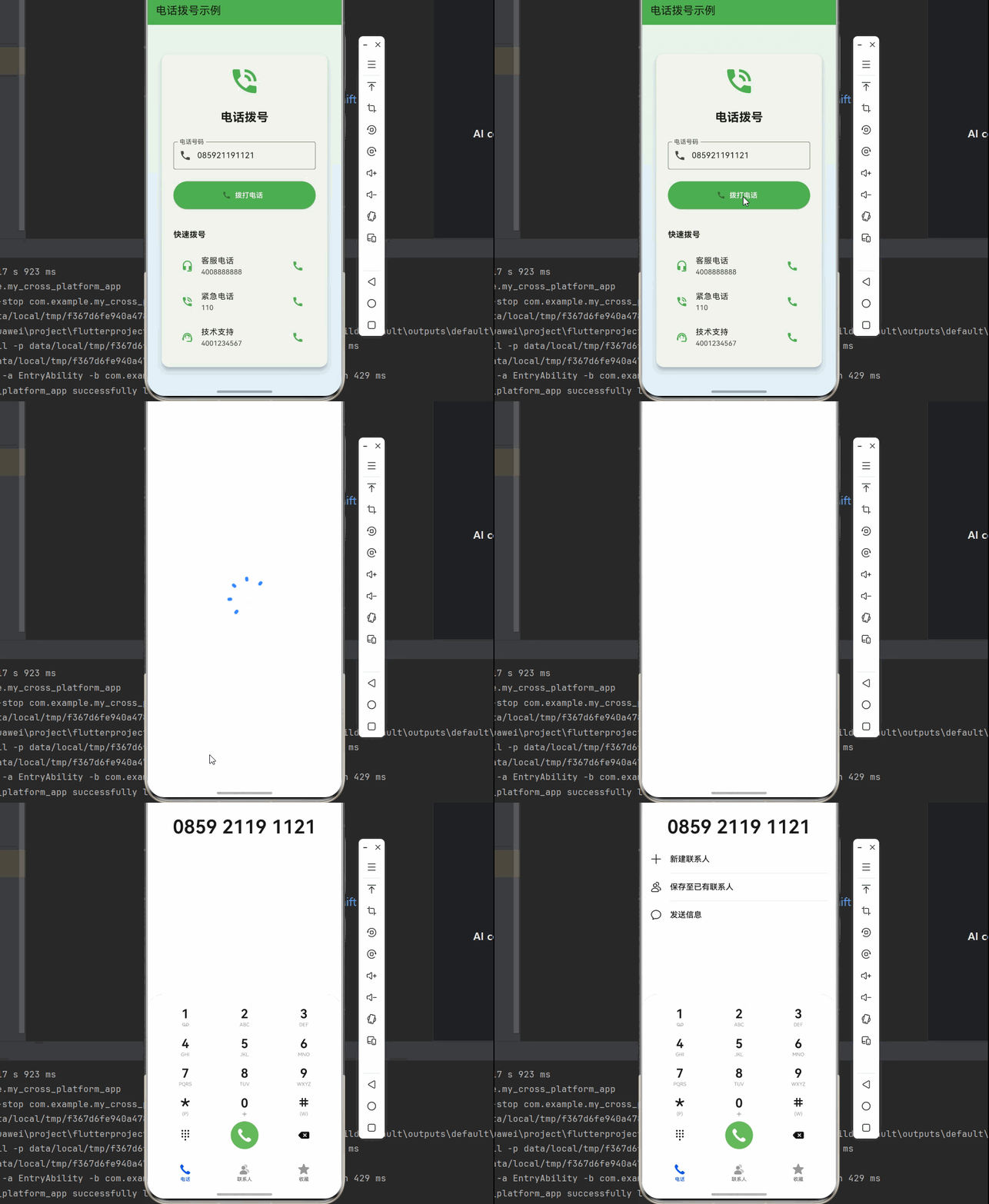
七、完整示例代码
下面是一个完整的电话拨号示例应用:
dart
import 'package:flutter/material.dart';
import 'package:flutter_phone_direct_caller/flutter_phone_direct_caller.dart';

void main() => runApp(const MyApp());

class MyApp extends StatelessWidget {
  const MyApp({Key? key}) : super(key: key);

  @override
  Widget build(BuildContext context) {
    return MaterialApp(
      title: '电话拨号示例',
      debugShowCheckedModeBanner: false,
      theme: ThemeData(
        colorScheme: ColorScheme.fromSeed(seedColor: Colors.green),
        useMaterial3: true,
      ),
      home: const PhoneCallerPage(),
    );
  }
}

class PhoneCallerPage extends StatefulWidget {
  const PhoneCallerPage({Key? key}) : super(key: key);

  @override
  State<PhoneCallerPage> createState() => _PhoneCallerPageState();
}

class _PhoneCallerPageState extends State<PhoneCallerPage> {
  final TextEditingController _numberController = TextEditingController();
  String? _result;
  bool _isCalling = false;

  @override
  void initState() {
    super.initState();
    _numberController.text = '085921191121';
  }

  @override
  void dispose() {
    _numberController.dispose();
    super.dispose();
  }

  @override
  Widget build(BuildContext context) {
    return Scaffold(
      appBar: AppBar(
        title: const Text('电话拨号示例'),
        backgroundColor: Colors.green,
      ),
      body: Container(
        decoration: BoxDecoration(
          gradient: LinearGradient(
            begin: Alignment.topCenter,
            end: Alignment.bottomCenter,
            colors: [
              Colors.green.shade50,
              Colors.blue.shade50,
            ],
          ),
        ),
        child: Center(
          child: SingleChildScrollView(
            padding: const EdgeInsets.all(24),
            child: Card(
              elevation: 8,
              shape: RoundedRectangleBorder(
                borderRadius: BorderRadius.circular(16),
              ),
              child: Padding(
                padding: const EdgeInsets.all(24),
                child: Column(
                  mainAxisSize: MainAxisSize.min,
                  children: [
                    const Icon(
                      Icons.phone_in_talk,
                      size: 64,
                      color: Colors.green,
                    ),
                    const SizedBox(height: 24),
                    const Text(
                      '电话拨号',
                      style: TextStyle(
                        fontSize: 24,
                        fontWeight: FontWeight.bold,
                      ),
                    ),
                    const SizedBox(height: 32),
                    TextField(
                      controller: _numberController,
                      keyboardType: TextInputType.phone,
                      decoration: const InputDecoration(
                        labelText: '电话号码',
                        hintText: '请输入要拨打的电话号码',
                        prefixIcon: Icon(Icons.phone),
                        border: OutlineInputBorder(),
                      ),
                    ),
                    const SizedBox(height: 24),
                    ElevatedButton.icon(
                      icon: _isCalling
                          ? const SizedBox(
                              width: 20,
                              height: 20,
                              child: CircularProgressIndicator(
                                strokeWidth: 2,
                                color: Colors.white,
                              ),
                            )
                          : const Icon(Icons.call),
                      label: Text(_isCalling ? '正在拨号...' : '拨打电话'),
                      onPressed: _isCalling ? null : _makeCall,
                      style: ElevatedButton.styleFrom(
                        backgroundColor: Colors.green,
                        foregroundColor: Colors.white,
                        minimumSize: const Size.fromHeight(56),
                      ),
                    ),
                    const SizedBox(height: 16),
                    if (_result != null)
                      Container(
                        padding: const EdgeInsets.all(12),
                        decoration: BoxDecoration(
                          color: _result == 'true'
                              ? Colors.green.shade100
                              : Colors.red.shade100,
                          borderRadius: BorderRadius.circular(8),
                        ),
                        child: Row(
                          children: [
                            Icon(
                              _result == 'true'
                                  ? Icons.check_circle
                                  : Icons.error,
                              color: _result == 'true'
                                  ? Colors.green
                                  : Colors.red,
                            ),
                            const SizedBox(width: 8),
                            Text(
                              _result == 'true' ? '拨号成功' : '拨号失败',
                              style: TextStyle(
                                color: _result == 'true'
                                    ? Colors.green
                                    : Colors.red,
                                fontWeight: FontWeight.bold,
                              ),
                            ),
                          ],
                        ),
                      ),
                    const SizedBox(height: 24),
                    _buildQuickCallButtons(),
                  ],
                ),
              ),
            ),
          ),
        ),
      ),
    );
  }

  Future<void> _makeCall() async {
    final phoneNumber = _numberController.text.trim();

    if (phoneNumber.isEmpty) {
      ScaffoldMessenger.of(context).showSnackBar(
        const SnackBar(content: Text('请输入电话号码')),
      );
      return;
    }

    setState(() {
      _isCalling = true;
      _result = null;
    });

    try {
      final result = await FlutterPhoneDirectCaller.callNumber(phoneNumber);
      setState(() {
        _result = result.toString();
      });

      ScaffoldMessenger.of(context).showSnackBar(
        SnackBar(
          content: Text(result == true ? '拨号成功' : '拨号失败'),
          backgroundColor: result == true ? Colors.green : Colors.red,
        ),
      );
    } catch (e) {
      setState(() {
        _result = 'error';
      });
      ScaffoldMessenger.of(context).showSnackBar(
        SnackBar(
          content: Text('拨号失败: $e'),
          backgroundColor: Colors.red,
        ),
      );
    } finally {
      setState(() {
        _isCalling = false;
      });
    }
  }

  Widget _buildQuickCallButtons() {
    final quickCalls = [
      {'name': '客服电话', 'number': '4008888888', 'icon': Icons.headset_mic},
      {'name': '紧急电话', 'number': '110', 'icon': Icons.phone_in_talk},
      {'name': '技术支持', 'number': '4001234567', 'icon': Icons.support_agent},
    ];

    return Column(
      crossAxisAlignment: CrossAxisAlignment.start,
      children: [
        const Text(
          '快速拨号',
          style: TextStyle(
            fontSize: 16,
            fontWeight: FontWeight.bold,
          ),
        ),
        const SizedBox(height: 16),
        ...quickCalls.map((call) => ListTile(
          leading: Icon(call['icon'] as IconData, color: Colors.green),
          title: Text(call['name'] as String),
          subtitle: Text(call['number'] as String),
          trailing: const Icon(Icons.call, color: Colors.green),
          onTap: () async {
            setState(() {
              _numberController.text = call['number'] as String;
            });
            await _makeCall();
          },
        )),
      ],
    );
  }
}
七、API 参考
7.1 FlutterPhoneDirectCaller API
| 方法 | 说明 | 参数 | 返回值 | OpenHarmony 支持 |
|---|---|---|---|---|
| callNumber | 发起电话呼叫 | String | Future <bool> |
✅ yes |
7.2 参数说明
callNumber
- 参数:
number(String)- 要拨打的电话号码 - 返回值:
Future<bool>true:拨号成功false:拨号失败
八、常见问题与解决方案
8.1 拨号失败
问题描述:调用 callNumber 返回 false。
可能原因:
- 设备不支持通话功能(如模拟器)
- 电话号码格式不正确
- 用户取消了拨号
解决方案:
dart
final result = await FlutterPhoneDirectCaller.callNumber(phoneNumber);
if (!result) {
  // 提示用户检查设备是否支持通话功能
  ScaffoldMessenger.of(context).showSnackBar(
    const SnackBar(content: Text('拨号失败,请检查设备是否支持通话功能')),
  );
}
九、总结
本文详细介绍了 Flutter for OpenHarmony 中 flutter_phone_direct_caller 电话拨号插件的使用方法,包括:
- 基础概念:flutter_phone_direct_caller 的特点、应用场景
- 平台适配:工作原理、支持的功能
- 项目配置:依赖添加
- 核心 API:拨打电话
- 实际应用:联系客服、紧急呼叫
- 完整示例:完整的电话拨号应用
- 最佳实践:号码验证、用户确认、错误处理
flutter_phone_direct_caller 是一个简单易用的电话拨号插件,非常适合需要拨打电话功能的应用。API 简洁,一行代码即可实现拨打电话功能。
十、参考资料
📌 提示:本文基于 flutter_phone_direct_caller@2.2.1 和 OpenHarmony 适配版本编写。