(done) 速通 rustlings(7) 全局变量/常量

RUST 中,let 不能用于声明全局变量

全局常量必须显示声明类型

rust 复制代码
// The type of constants must always be annotated.
const NUMBER: u64 = 3;

fn main() {
    println!("Number: {NUMBER}");
}

另一种全局 "常量" 声明方式是使用 static,默认只读。

若使用 static mut,则是可变全局变量,由于可变全局变量容易造成别名/并发问题,必须使用 unsafe 块访问。

rust 复制代码
static GREETING: &str = "hello";       // 只读全局
static mut COUNTER: i32 = 0;           // 可变全局,需要 unsafe

fn incr() {
    unsafe {
        COUNTER += 1;                  // 修改时要显式不安全
    }
}

fn main() {
    println!("{GREETING}");
    unsafe { println!("count = {COUNTER}"); }
    incr();
}

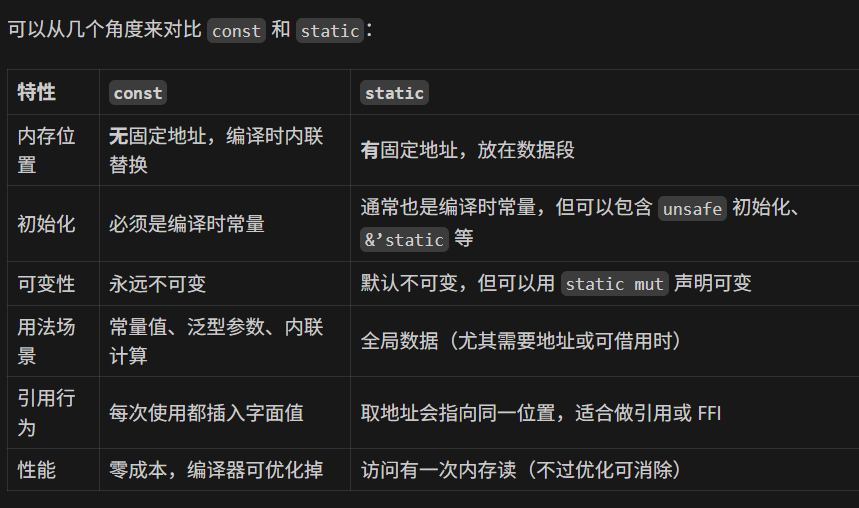
使用 static 声明的全局常量和使用 const 声明的全局常量区别如下:
相关推荐
阿正的梦工坊1 天前
【Rust】03-所有权、移动与复制
开发语言·算法·rust
小小龙学IT1 天前
Rust Web 框架 Axum:轻量级异步的下一代后端利器
前端·驱动开发·rust
星栈独行1 天前
用 Rust + Makepad 做一个 JSON 查看器:从零到能用的全过程
开发语言·程序人生·ui·rust·json
阿正的梦工坊1 天前
【Rust】01-认识 Rust:语言定位、工具链与第一个程序
开发语言·后端·rust
特立独行的猫a1 天前
Tauri 应用移植到 OpenHarmony/鸿蒙PC完整指南
华为·rust·harmonyos·tauri·移植·鸿蒙pc
搬砖魁首2 天前
基础能力系列 - 多线程2 - 条件变量
c++·rust·条件变量·原子类型·线程同步互斥
Yuyubow2 天前
gpui step by step 5. FocusHandle 焦点处理与键盘点击事件
rust
techdashen2 天前
在 Fly.io 上使用 Rust 构建远程开发环境:从 Tokio 到 eBPF
开发语言·后端·rust
星栈2 天前
用 Rust + Makepad 做一个 JSON 查看器:从零到能用的全过程
前端·rust